
 By saman zahra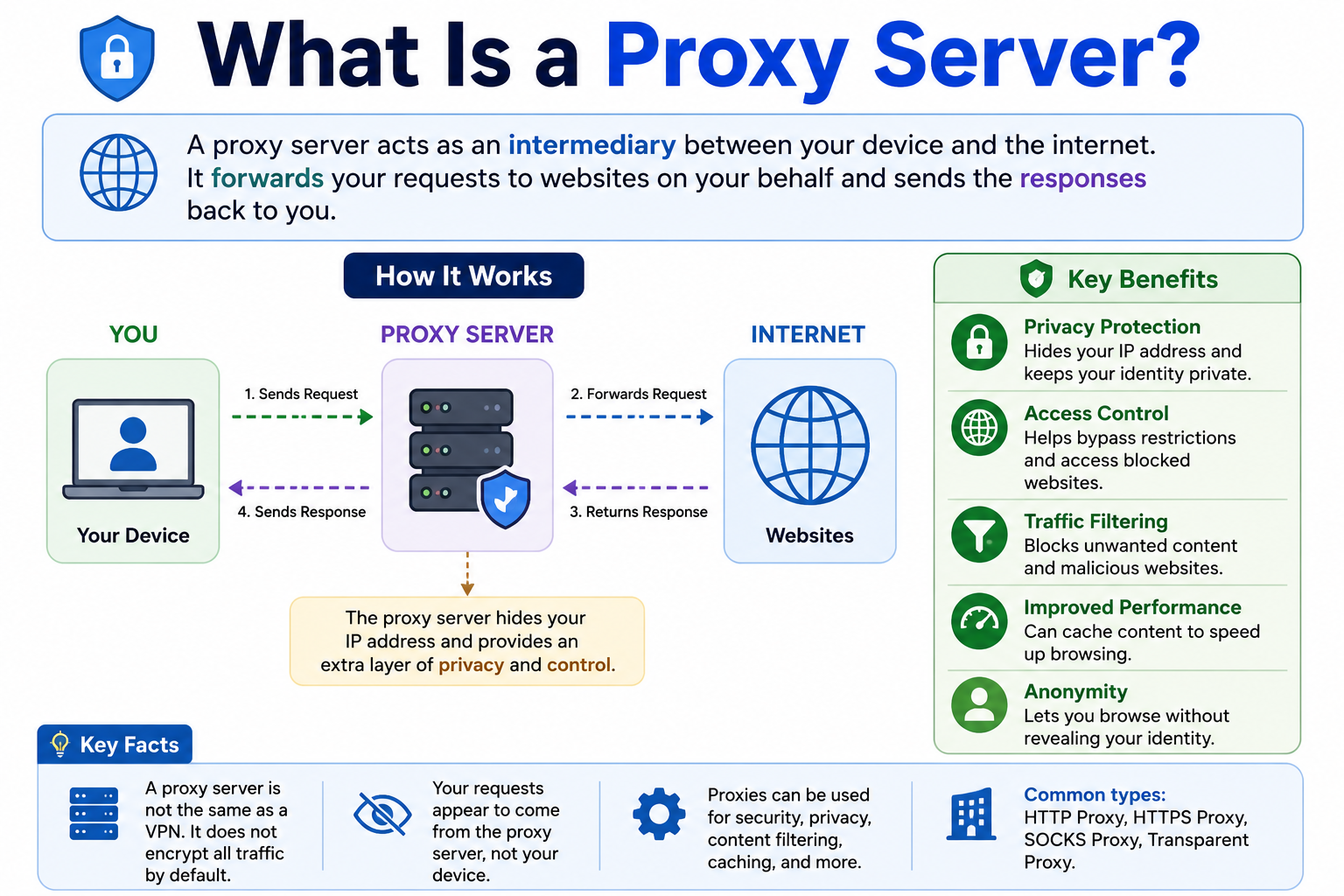
When you order something from a restaurant through a delivery service, the restaurant does not deliver to your door directly. The delivery service acts as a go-between, picking up the order and bringing it to you. Proxy servers work on a similar principle. They sit between a client, such as your device, and another server, acting as an intermediary that handles requests and responses.
Understanding what is a proxy server helps clarify how networks, websites, and internet communication can be structured and managed. When your device sends a request through a proxy, the proxy forwards that request to the destination. The destination server may see the proxy’s IP address rather than your device’s direct public IP, depending on how the proxy is configured.
Proxy servers are used by individuals, businesses, and cloud infrastructure for a wide range of purposes. To understand the broader network context in which proxies operate, What Is the Internet? How It Works, History, Types and Why It Matters provides essential background.
Quick Answer: What Is a Proxy Server?
A proxy server is an intermediary between a client and another server. When a client sends a request, the proxy receives it, processes it according to its configuration, and forwards it to the destination. The destination then sends a response back through the proxy to the client. Depending on its configuration, a proxy can provide traffic control, caching, filtering, access management, or a different apparent source IP address.
What Is a Proxy Server?
A proxy server is a system that acts as an intermediary between a client and a destination server. Instead of communicating directly with the destination, the client sends its request to the proxy. The proxy then processes that request and forwards it to the intended destination.
Think of it like a receptionist at a large office. Visitors do not walk directly into every room they need. They speak to the receptionist first, who routes them appropriately. This analogy is simplified, but it captures the basic role of a proxy. In networking, the proxy receives requests from clients and handles them on their behalf.
The basic flow looks like this:
Client → Proxy → Destination Server
When the destination server responds, the response travels back through the proxy to the client. Depending on its configuration, the proxy can inspect, filter, modify, cache, or simply forward the request. The destination server typically sees the proxy’s IP address rather than the client’s direct address, though this depends on the proxy type and configuration.
Proxy servers are not a single technology. They come in many forms, operate at different levels of the network stack, and serve very different purposes depending on their role.
How Does a Proxy Server Work?
The basic mechanics of proxy operation follow a consistent pattern, though the details differ by proxy type.
- A client, such as a browser or application, sends a request for a resource, such as a web page or file.
- The request is directed to the proxy server rather than going directly to the destination.
- The proxy processes the request based on its configuration. It may check access rules, inspect content, consult its cache, or apply filtering policies.
- The proxy forwards the request to the appropriate destination server.
- The destination server processes the request and sends a response back to the proxy.
- The proxy receives the response, may process or cache it, and returns it to the client.
Different proxy types operate at different protocol layers. An HTTP proxy handles web requests at the application layer. A SOCKS proxy operates at a lower level and can handle a wider variety of traffic types. A reverse proxy sits in front of servers rather than clients.
The important thing to understand is that proxies are not all identical. Different proxy types are designed for different purposes, and their behavior depends significantly on their configuration and the protocol they support.
What Is a Proxy Server Used For?
Proxy servers serve many legitimate purposes across different environments.
Access control allows organizations to determine which websites or services their users can reach. A proxy can enforce these rules centrally rather than configuring each device individually.
Web filtering blocks content that violates acceptable use policies, such as malicious websites or inappropriate content, before it reaches end users.
Caching stores copies of frequently requested content. When another user requests the same content, the proxy can serve it from cache rather than fetching it from the origin server again, reducing load and latency in some configurations.
Traffic management allows organizations to control and monitor internet usage, helping to understand bandwidth consumption and enforce policies.
Corporate internet policies are commonly enforced through forward proxies on organizational networks, ensuring all outbound traffic complies with the organization’s rules.
Reverse proxying places a proxy in front of backend servers to manage incoming requests, distribute traffic, and protect internal infrastructure from direct exposure.
Load balancing is a common use of reverse proxies, distributing client requests across multiple backend servers to improve reliability and scalability.
Security controls including traffic inspection, header manipulation, and connection filtering are functions that proxies can perform depending on their configuration.
Application connectivity is managed in some architectures by routing application-to-application communication through proxy infrastructure, particularly in cloud and microservices environments.
Testing and development workflows sometimes use proxies to simulate different network conditions, geographic locations, or to inspect traffic during application development.
What Are the Main Types of Proxy Servers?
Proxy servers are classified in several different ways, and many categories overlap. A proxy might be an HTTP proxy that is also anonymous, for example. The major classification dimensions include:
Direction of traffic handling, which distinguishes forward proxies from reverse proxies. Protocol support, which includes HTTP, HTTPS, and SOCKS proxies. Transparency to clients and servers, covering transparent, anonymous, and high-anonymity proxies. The source of the IP address used, distinguishing residential proxies from datacenter proxies. Availability, separating public proxies from private proxies.
Understanding these dimensions helps make sense of the different proxy types without treating the categories as entirely separate and mutually exclusive.
What Is a Forward Proxy?
A forward proxy acts on behalf of clients. Clients are configured to send their requests to the forward proxy, which then communicates with the internet on their behalf.
The general flow:
User or device → Forward proxy → Internet server
Forward proxies are commonly used in corporate and organizational environments to control internet access. All outbound traffic from users on the network passes through the forward proxy, which can apply filtering, logging, caching, and access policies centrally.
When a client uses a forward proxy, the destination server typically sees the proxy’s IP address in the connection rather than the client’s direct address. The level of information forwarded by the proxy about the original client depends on the proxy’s configuration.
Forward proxies are also used for caching web content to reduce repeated requests to the same resources and for monitoring how employees or users access the internet.
What Is a Reverse Proxy?
A reverse proxy sits in front of one or more backend servers and handles incoming requests from clients. Unlike a forward proxy, which acts on behalf of clients, a reverse proxy acts on behalf of servers.
The general flow:
User → Reverse proxy → Web server or application server
From the client’s perspective, they are communicating with the proxy. The actual backend servers are not directly exposed to clients.
Reverse proxies serve several important functions. Load balancing distributes incoming client requests across multiple backend servers, improving availability and performance. TLS termination handles the HTTPS connection at the proxy level, decrypting traffic before passing it to backend servers and encrypting responses before sending them to clients, which can simplify certificate management for backend infrastructure. Caching stores responses from backend servers so repeated requests can be served more quickly. Request routing directs different types of requests to the appropriate backend services.
Reverse proxies are also used to add a layer between the public internet and backend infrastructure, reducing the direct exposure of origin servers. However, a reverse proxy alone does not make a website or application fully secure. It is one component of a broader architecture.
What Is an HTTP Proxy?
An HTTP proxy is designed primarily to handle HTTP web traffic. Clients configure their HTTP requests to go through the proxy, which forwards them to the destination web server.
HTTP proxies understand the structure of HTTP requests and can inspect, modify, filter, and cache them. This makes them useful for web traffic management, content filtering, and web request logging.
An important limitation: HTTP proxies are designed around HTTP. They do not automatically handle all types of internet traffic. Non-HTTP protocols or applications not configured to use the proxy will not route their traffic through it.
When an HTTP proxy handles HTTPS traffic, it typically uses a mechanism called the HTTP CONNECT method to tunnel the connection. In this approach, the proxy establishes a tunnel between the client and the destination, and the actual HTTPS traffic passes through that tunnel. The proxy does not decrypt the HTTPS content in this tunneling arrangement unless specifically configured to do so as part of an SSL/TLS inspection setup.
What Is an HTTPS Proxy?
The term HTTPS proxy is used in different ways, which makes it worth explaining carefully rather than assuming one universal meaning.
In some contexts, an HTTPS proxy simply means a proxy that supports the handling of HTTPS connections, typically through tunneling as described above for HTTP proxies.
In other contexts, it may refer to a proxy service that is accessed through an HTTPS-secured connection, meaning the connection between the client and the proxy itself is secured by TLS.
An important distinction: the encryption provided by HTTPS between a browser and a destination website is separate from whether the proxy connection itself is encrypted. A website’s HTTPS connection encrypts the content between the browser and the web server. That encryption is separate from the connection between the client and the proxy. Whether the connection to the proxy is also encrypted depends on how the proxy service is set up and accessed.
Understanding how HTTPS works in browsers is covered in What Is a Web Browser? How It Works, Types, Features and Examples, including how browsers handle secure connections.
What Is a SOCKS Proxy?
SOCKS is a network protocol that allows a client to communicate with a server through a proxy server at a lower level than HTTP proxies. Unlike HTTP proxies, which understand and work with HTTP-specific content, SOCKS proxies operate at a more general level, handling TCP connections and, in the case of SOCKS5, UDP traffic as well.
SOCKS has gone through different versions. SOCKS4 supports basic TCP connections. SOCKS5, the current version, adds support for UDP, authentication methods, and IPv6 addressing.
Because SOCKS operates at a lower protocol level, it can proxy a wider variety of applications and traffic types compared to HTTP proxies. Applications that support SOCKS can route their traffic through a SOCKS proxy regardless of the application-level protocol being used.
A critical accuracy point: SOCKS5 does not inherently encrypt traffic. The SOCKS protocol itself is a proxying mechanism, not an encryption protocol. Traffic routed through a SOCKS5 proxy is not automatically encrypted by the proxy. Applications using end-to-end encryption such as HTTPS will still have that encryption, but the SOCKS proxy itself does not add an encryption layer.
What Is a Transparent Proxy?
A transparent proxy intercepts and forwards client requests without requiring explicit proxy configuration on client devices. From the client’s perspective, the connection appears to go directly to the destination, though traffic is actually passing through the proxy.
Transparent proxies are used in network environments where administrators want to apply filtering, caching, or monitoring to all traffic without configuring individual devices. Internet service providers and enterprise networks sometimes deploy transparent proxies for content caching or filtering at the network level.
The term transparent here refers to transparency in setup from the client’s perspective, not necessarily invisibility in all respects. Sophisticated analysis of network traffic can reveal that a transparent proxy is in use.
Transparent proxies raise privacy considerations, particularly when they are deployed without users’ knowledge, because they can inspect unencrypted traffic passing through them.
What Is an Anonymous Proxy?
Anonymous proxies are proxies that aim to conceal or limit the information passed to destination servers about the originating client. The general idea is that the destination server sees less information about the real client because the proxy does not include the client’s IP address in forwarded request headers.
It is important to understand that proxy anonymity labels are not standardized guarantees. Different providers use these terms differently, and the actual behavior depends on the proxy implementation and configuration. Claiming a proxy is anonymous does not mean it cannot be identified as a proxy by destination servers, or that it prevents all forms of client identification.
Application-level tracking through cookies, browser fingerprinting, account logins, and other mechanisms remains effective regardless of proxy use.
What Is a High-Anonymity Proxy?
High-anonymity proxies, sometimes called elite proxies, are designed to reveal less information to destination servers. They generally do not include the client’s original IP address in the headers sent to the destination and may not identify themselves as proxies in request headers.
The intent is to make the connection appear more like a direct connection from the proxy’s own address rather than a forwarded request from a client.
However, even high-anonymity proxies do not provide perfect anonymity. Websites can use many other tracking methods. Cookies set during a session, browser characteristics, account logins, behavioral patterns, and tracking scripts can all identify or track a user regardless of which IP address the connection appears to come from.
What Is a Residential Proxy?
A residential proxy uses IP addresses that are associated with real residential internet connections, the kind assigned by ISPs to home users. Because these addresses look like regular consumer connections rather than data center infrastructure, they may be treated differently by some websites and services.
There are significant concerns with some residential proxy services. The collection of residential IP addresses for use in proxy networks can involve serious ethical, legal, and privacy questions. Some services obtain residential IP addresses by incorporating software into apps or devices in ways that users may not fully understand, effectively using their internet connections as proxy exit points without adequate consent.
Anyone considering residential proxy services should investigate carefully how the service obtains and manages its IP address pool, what terms apply to the underlying IP address sources, and whether the intended use complies with applicable laws and service agreements.
What Is a Datacenter Proxy?
Datacenter proxies use IP addresses associated with hosting providers and data centers rather than residential ISP connections. These addresses are often recognizable as datacenter infrastructure by websites and services that maintain lists of data center IP ranges.
Datacenter proxies are commonly used in web development, testing, research, and network management workflows. They generally offer faster and more stable connections than many residential proxies.
When considering datacenter proxies, it is important to ensure the intended use complies with the terms of service of any websites or platforms accessed through them and with applicable laws and regulations.
Public Proxy vs Private Proxy
| Feature | Public Proxy | Private Proxy |
|---|---|---|
| Users | Many users share the same proxy | Usually limited to specific users |
| Availability | Often open to anyone | Restricted to authorized users |
| Performance | Can be inconsistent due to shared use | Usually more predictable |
| Security | Higher risk due to unknown operators | Depends on provider and configuration |
| Control | Limited | Greater control over configuration |
Public proxies are accessible to anyone and are often free to use. Because they are shared among many unknown users, they carry higher risks. The operator of a public proxy can potentially observe unencrypted traffic passing through it. Free public proxies should be approached with significant caution.
Private proxies restrict access to authorized users or organizations. They typically offer more predictable performance and allow administrators more control over configuration, logging, and security settings.
Proxy vs VPN
Proxies and VPNs are sometimes described as interchangeable, but they are different technologies that serve different purposes.
| Feature | Proxy | VPN |
|---|---|---|
| Main role | Intermediary for selected traffic or applications | Routes device traffic through an encrypted tunnel |
| Encryption | Depends on proxy type and protocol | VPN tunnels are designed to encrypt traffic between device and VPN server |
| Scope | Often application or protocol specific | Commonly covers all device traffic |
| IP visibility | May change apparent IP to destination server | Usually changes apparent public IP address |
| Privacy | Depends on proxy type, provider, and configuration | Depends on VPN provider, protocol, and configuration |
| Common use cases | Filtering, caching, routing, reverse proxying | Secure remote access, network-level privacy |
Proxies typically work at the application or protocol level. A browser configured to use a proxy will route its web traffic through it, but other applications may not. VPNs generally operate at the network level, routing all device traffic through the VPN tunnel by default depending on configuration.
Encryption is a significant distinction. VPN tunnels are designed to encrypt traffic between the device and the VPN server. HTTP and SOCKS proxies do not inherently add encryption. Whether traffic through a proxy is encrypted depends on the application protocol being used and the proxy implementation.
Neither proxies nor VPNs automatically make users anonymous. VPN providers can see connection metadata, and privacy depends on the provider’s logging policies, jurisdiction, and trustworthiness. The broader principles of protecting yourself online are covered in What Is Cybersecurity?.
Proxy vs DNS
Proxies and DNS serve entirely different roles in network communication.
| Feature | DNS | Proxy |
|---|---|---|
| Main role | Resolves domain names to IP addresses and other information | Forwards network or application requests |
| Example | example.com → IP address information | Client → Proxy → Server |
| Handles content requests | No | Yes, depending on proxy type |
| Caching | DNS response caching | Web or application content in some proxy configurations |
DNS translates human-readable domain names into the network information needed to reach services. It does not forward your web requests or act as an intermediary for application traffic. A proxy forwards actual requests and responses between clients and servers.
Some privacy-focused DNS services offer filtering as part of their function, which can superficially seem similar to what a proxy does. But changing your DNS resolver does not route your web traffic through an intermediary. It only changes how domain names are resolved.
What Is DNS? How the Domain Name System Works for Beginners explains how DNS works and what it is actually doing behind the scenes.
Proxy vs IP Address
An IP address and a proxy server are fundamentally different things, though they are related in the context of proxy use.
An IP address is a numerical address assigned to a network interface, used to identify endpoints in IP-based network communication. It is an addressing concept, not a device or service.
A proxy is a server, a piece of infrastructure, that receives requests and forwards them. When you use a proxy, the destination server may see the proxy’s IP address as the apparent source of the connection rather than your own. But the proxy itself is not an IP address. It is a server that has its own IP address.
Understanding how IP addresses work in networked communication is covered in What Is an IP Address? Types, How It Works and Why It Matters.
Proxy vs Firewall
| Feature | Proxy | Firewall |
|---|---|---|
| Main role | Intermediary for application requests | Controls and filters network traffic based on rules |
| Layer | Typically application layer | Can operate at multiple network layers |
| Traffic inspection | Depending on proxy type | Depending on firewall type |
| Main purpose | Routing, filtering, caching, access control | Security enforcement and traffic control |
A proxy and a firewall are different tools, though they can complement each other in a security architecture. A firewall controls which traffic is allowed to pass through a network boundary based on defined rules. A proxy acts as an intermediary for specific application-layer traffic.
Some security architectures use both together. For example, a firewall might enforce network-level access controls while a forward proxy handles web traffic filtering and logging. However, a proxy is not a replacement for a firewall, and a firewall is not a replacement for a proxy. They solve different problems.
What Are the Benefits of a Proxy Server?
Proxy servers offer meaningful benefits when they are appropriate for the use case and properly configured.
Access control gives organizations centralized control over which resources users can reach, enforced through the proxy rather than on individual devices.
Web filtering blocks access to known malicious sites, inappropriate content, or restricted categories of websites based on organizational policies.
Caching reduces repeated outbound requests for the same content, which can improve response times for frequently accessed resources in some network environments.
Centralized management means policies can be updated in one place rather than across many individual devices.
Logging and monitoring provides visibility into how the network is being used, supporting compliance, troubleshooting, and security analysis.
Traffic routing allows different types of requests to be directed to the appropriate destinations based on content, destination, or protocol.
Load balancing through reverse proxies distributes incoming traffic across multiple backend servers, improving reliability and scalability.
Backend protection through reverse proxying keeps internal server addresses from being directly exposed to public internet traffic.
Privacy improvements in certain configurations can reduce the information visible to destination servers, though this is not a guarantee of anonymity.
The actual benefits realized depend on the proxy type, how it is deployed, and how well it is configured and maintained.
What Are the Disadvantages of a Proxy Server?
Proxy servers also come with limitations and risks that are worth understanding before deploying or using them.
Slower connections can result from the additional hop traffic takes through a proxy, particularly when the proxy server is geographically distant or under heavy load.
Single point of failure means that if the proxy server becomes unavailable, all traffic depending on it may be disrupted.
Provider trust is a significant concern. When traffic passes through a proxy, the proxy operator can potentially observe unencrypted traffic. Choosing a trustworthy provider is essential.
Logging concerns arise when proxy operators retain logs of user activity. Users and organizations should understand the logging practices of any proxy they use.
Misconfiguration risks can create security gaps, expose traffic to unintended parties, or fail to enforce the intended policies.
Compatibility problems occur when applications are not designed to work with proxies or when certain types of traffic are not handled correctly by the proxy.
Free public proxy risks deserve special mention. Free public proxies are operated by unknown parties whose motivations and security practices are unclear. They may log and exploit traffic, inject unwanted content, or expose users to security risks. Relying on unknown free proxy lists is not a safe practice.
Incorrect assumptions about anonymity lead users to believe they have more privacy protection than they actually do, which can result in privacy-sensitive activity being exposed through application-level tracking or proxy operator logging.
Are Proxy Servers Safe?
Whether a proxy server is safe depends primarily on who operates it, how it is configured, and what you are using it for.
A proxy operated by a trusted organization on a well-managed internal network, with appropriate security controls and clearly defined policies, can be a safe and useful tool. Organizations use proxies effectively for access control, filtering, and network management every day.
A random free public proxy operated by an unknown party is a very different situation. When you route traffic through such a proxy, the proxy operator can potentially see any unencrypted traffic you send. Even with HTTPS, they can see connection metadata such as which domains you are visiting.
The following factors matter for proxy safety. Provider trust determines whether your traffic is handled responsibly. Encryption in transit matters for sensitive information. Logging practices affect your privacy. Whether the proxy could be intercepting or modifying traffic is relevant to security. Malware risks exist with software promoted as proxy clients from untrusted sources.
Proxies do not automatically protect you. They are tools whose safety profile depends entirely on their implementation and the trustworthiness of whoever operates them.
Can a Proxy Hide Your IP Address?
A proxy can change the IP address that a destination server sees in the connection, depending on how the proxy is configured. If you connect through a proxy that does not forward your original IP address in request headers, the destination server sees the proxy’s IP rather than yours.
However, there are several important caveats.
The proxy operator can see your real IP address, because your connection originates from your device and reaches the proxy before going anywhere else.
Some proxy configurations do include the client’s original IP address in forwarding headers such as the X-Forwarded-For header, which would make it visible to the destination server.
The destination server sees the proxy’s IP, but your online activity can still be tracked through cookies, browser fingerprinting, logged-in account sessions, behavioral patterns, and tracking technologies that do not depend on IP addresses.
Changing which IP address a destination server sees is not the same as becoming anonymous. Privacy online is a much broader topic that involves many factors beyond just the IP address involved in a connection.
Can a Proxy Encrypt Internet Traffic?
This is a common misconception that deserves a direct and accurate answer.
Not all proxies encrypt internet traffic, and the type of encryption that may exist depends on the specific proxy protocol and connection setup.
An HTTP proxy that handles traffic through tunneling does not encrypt the content itself. If the application is using HTTPS, that HTTPS encryption still applies end-to-end between the browser and the website, but this encryption comes from HTTPS, not from the proxy.
A SOCKS5 proxy does not inherently encrypt traffic. It is a proxying protocol, not an encryption protocol. Applications routing traffic through SOCKS5 are not automatically gaining an encryption layer from the proxy itself.
If the connection between a client and a proxy is itself secured by TLS, then that specific connection segment is encrypted. But this is the connection to the proxy, separate from encryption between the proxy and the destination.
Proxying and encryption are different concepts that should not be conflated. If traffic encryption is your primary goal, the appropriate tool is either end-to-end HTTPS for web traffic or a VPN that is specifically designed to encrypt traffic between the device and the VPN server.
How Does a Proxy Affect Website Privacy?
When you use a proxy to visit a website, the website’s server interacts with the proxy rather than directly with your device. This means the website sees the proxy’s IP address in the connection.
However, a proxy does not make your browsing invisible to websites in any comprehensive sense. If you are logged into an account on a website, that website knows who you are regardless of which IP address you appear to be coming from. Cookies stored by websites during previous sessions can identify returning visitors. Browser fingerprinting techniques can identify specific browser configurations based on characteristics that have nothing to do with IP addresses.
HTTPS protects the content of communications from many intermediaries, but it does not prevent websites from collecting information that is sent to them through normal browsing, such as your account credentials, behavior on the site, or preferences.
A proxy changes one piece of information visible to destination servers. It does not eliminate other forms of tracking and identification that websites routinely use.
Proxy Servers in Businesses
Organizations of all sizes use proxy servers as part of their network infrastructure and security architecture.
Forward proxies allow IT departments to enforce internet access policies for all users on the network. Web filtering blocks access to categories of sites that violate acceptable use policies or that pose security risks, such as known phishing sites or malware distribution hosts.
Monitoring through proxy logs helps organizations understand how the internet connection is being used, identify unusual or unauthorized activity, and produce records for compliance or security analysis purposes.
Bandwidth management can be supported through caching and traffic prioritization on some proxy configurations, helping large networks use their internet connection more efficiently.
Some organizations use proxies as part of their data loss prevention strategy, inspecting traffic for sensitive information that should not be transmitted outside the organization.
Security controls enforced through proxies complement other network security tools. Network Security covers the broader field of protecting organizational networks, What Is Cybersecurity? addresses the overall security landscape, and What Is a Firewall? explains how firewalls work alongside proxies in security architecture.
Reverse Proxies and Websites
Modern websites and web applications commonly use reverse proxies as part of their delivery infrastructure.
Load balancing is one of the most important functions. When a website receives more traffic than a single server can handle, a reverse proxy distributes incoming requests across multiple backend servers, keeping response times acceptable and reducing the risk of any single server being overwhelmed.
TLS termination at the reverse proxy level allows backend servers to receive unencrypted traffic from the proxy within the secure internal network, simplifying certificate management. The reverse proxy handles the HTTPS connection with the user.
Caching of responses from backend servers allows the reverse proxy to serve repeated requests for the same content without forwarding each request all the way to the backend.
Request routing directs different types of requests to different backend services, which is particularly useful in microservices architectures where different parts of an application are served by different backend components.
DDoS mitigation capabilities in some reverse proxy implementations can help absorb or filter malicious traffic before it reaches backend servers.
A reverse proxy is a useful component in a website’s architecture, but it is not a complete security solution. It is one layer in a broader security and delivery stack.
Cloud infrastructure commonly uses reverse proxy concepts as part of how web applications are delivered and scaled. What Is Edge Computing? explains how distributed infrastructure can bring content and processing closer to users, which often involves reverse proxy-like behavior at edge locations.
Proxy Servers and Cloud Computing
Proxy servers are woven throughout cloud infrastructure in various forms.
In cloud application architectures, API gateways act as reverse proxies that receive requests for APIs and route them to the appropriate backend services. Load balancers in cloud environments use reverse proxy concepts to distribute traffic across multiple instances of an application. Content delivery networks serve content from edge locations using reverse proxy behavior, caching and delivering content to users from geographically closer servers.
Within cloud private networks, forward proxies can control which external services cloud-hosted applications are allowed to communicate with, enforcing outbound traffic policies similar to how organizational network proxies work.
Service meshes in container and microservices environments often include proxy components that manage service-to-service communication, applying policies, collecting telemetry, and handling traffic routing between services.
The relationship between proxy technology and cloud infrastructure means that proxies are not just tools for managing individual user internet access. They are fundamental components of how large-scale cloud services are built and delivered. How Does Cloud Computing Work? explains the mechanics of cloud infrastructure, and What Is Cloud Hosting? covers how hosted web services operate within this context.
Proxy Servers and Cybersecurity
Proxies play both offensive and defensive roles in cybersecurity, and it is important to focus on their defensive value.
Web filtering through a forward proxy is a practical security control that blocks users from reaching known malicious websites, phishing pages, and sites distributing malware. By intercepting outbound web requests and checking destinations against threat intelligence, a proxy can prevent users from inadvertently connecting to dangerous sites.
Traffic inspection capabilities in some proxy implementations allow the inspection of application-layer content for security-relevant patterns, supporting data loss prevention and threat detection workflows.
Access control enforced through proxy infrastructure ensures that users and systems can only reach the destinations that organizational policy permits, reducing the attack surface available to threats that attempt to communicate with external command and control infrastructure.
Logging and monitoring at the proxy level provides a record of outbound network activity that security teams can analyze to detect anomalies or investigate incidents.
Reverse proxies can reduce the exposure of backend infrastructure to direct internet access, which limits the available attack surface for external threats.
These defensive functions work most effectively as part of a layered security approach. A proxy complements firewalls, endpoint security, and other controls rather than replacing any of them. What Is Antivirus Software? explains endpoint protection, and Network Security covers the broader field of network-level security controls.
How to Set Up a Proxy Server
Setting up or configuring a proxy involves different steps depending on whether you are deploying a proxy server for a network or configuring a client device to use an existing proxy.
For client configuration, the general process is:
- Obtain proxy details from a trusted administrator or authorized provider, including the proxy hostname or IP address and the port number.
- Determine the proxy protocol, such as HTTP, HTTPS tunneling, or SOCKS5.
- Check whether the proxy requires authentication credentials.
- Open the relevant application, browser, or operating system network settings.
- Enter the proxy address, port, and any required credentials in the appropriate fields.
- Save the configuration and test connectivity.
- Verify that the proxy is functioning as expected.
Always obtain proxy configuration details from your organization’s IT team or an authorized provider rather than from unknown public sources. Do not configure proxy settings to bypass organizational security policies or network restrictions.
How to Configure a Proxy in a Web Browser
Most browsers can use a proxy configured at the operating system level, and some browsers allow their own proxy settings to be configured independently.
On most desktop operating systems, proxy settings are accessible through the system network settings, and browsers follow these settings by default. Some browsers offer their own network or connection settings where proxy details can be entered directly.
Automatic proxy configuration scripts, sometimes called PAC files, allow more sophisticated proxy configuration that specifies different proxy behavior for different destinations.
The exact steps for configuring proxy settings vary by browser version and operating system, so checking current official documentation for your specific browser and operating system is the most reliable approach. What Is a Web Browser? How It Works, Types, Features and Examples provides context for how browsers manage network connections.
How to Check Whether a Proxy Is Working
After configuring a proxy, you can verify it is working through several straightforward checks.
Confirm that your proxy settings are correctly entered by reviewing them in the application or operating system settings where you configured them.
Check whether you can reach the internet through the proxy by opening a website in the application using the proxy. If the connection succeeds, the proxy is functioning at a basic level.
If you want to verify which IP address destination services see, use a trusted IP-checking service to see the apparent public IP address. If the proxy is working, you should see an IP address associated with the proxy server rather than your normal public IP.
If you administer the proxy, review server-side logs to confirm that requests are being received and processed as expected.
If the proxy filters content, attempt to access a site that should be blocked and verify that it is handled correctly according to the policy.
Common Proxy Server Problems
Several problems commonly affect proxy connections.
Proxy connection refused usually means the proxy server is not accepting connections, which can result from the server being offline, the port being incorrect, or firewall rules blocking the connection.
Incorrect proxy address means the hostname or IP address entered does not match the actual proxy server.
Incorrect port is a common configuration error where the port number does not match what the proxy server is listening on.
Authentication failure occurs when required credentials are missing, incorrect, or expired.
Slow connection can result from a proxy under heavy load, poor network path, or geographic distance between the client and proxy.
Proxy timeout happens when the proxy does not respond within the expected time, which can be caused by network issues or server problems.
DNS resolution issues occur when the client cannot resolve the proxy hostname to an IP address, preventing connection to the proxy.
HTTPS certificate problems may appear when a proxy is involved in inspecting HTTPS traffic and presents a certificate that the browser does not trust.
Proxy server unavailable simply means the server is offline or unreachable from the client’s location.
Application compatibility problems arise when an application does not support the proxy protocol being used or handles proxy connections in unexpected ways.
How to Troubleshoot Proxy Problems
When a proxy connection is not working, working through these steps methodically helps identify the source of the problem.
- Check that the proxy hostname or IP address entered in your settings is correct.
- Verify that the port number is correct.
- Confirm that any required credentials are entered correctly and have not expired.
- Test internet connectivity without the proxy if your situation allows it, to determine whether the problem is specific to the proxy connection.
- Confirm that the proxy server itself is online and reachable from your network.
- Check whether DNS resolution for the proxy hostname is working correctly.
- Review application-specific proxy settings separately from operating system settings, as some applications handle proxy configuration independently.
- Check whether firewall rules are blocking the connection to the proxy port.
- Review browser proxy settings to confirm they are correctly configured or correctly deferring to system settings.
- Contact the network administrator or proxy service provider if the issue cannot be resolved through the above steps.
Do not attempt to work around organizational proxy settings or security policies. If you believe there is a legitimate problem with a proxy configuration in a managed environment, report it to the IT team responsible for the network.
Frequently Asked Questions
What is a proxy server?
A proxy server is an intermediary that receives network requests from clients, forwards them to destination servers, and returns responses to the clients. It can provide filtering, caching, access control, routing, and other functions depending on its type and configuration.
What does a proxy server do?
A proxy server forwards requests from clients to destinations, processes traffic according to its configuration, and returns responses. Depending on its type, it can filter content, cache resources, control access, balance load, or change the apparent source IP of connections.
How does a proxy server work?
A client sends a request to the proxy instead of directly to the destination. The proxy processes the request, forwards it to the destination, receives the response, and returns it to the client.
Why use a proxy server?
Proxy servers are used for access control, web filtering, caching, load balancing, reverse proxying, security controls, network monitoring, and traffic management, among other purposes.
Does a proxy hide your IP address?
A proxy can change the IP address that destination servers see, but the proxy operator can still see the client’s real IP address, and other tracking methods can identify users regardless of which IP the connection appears to come from.
Does a proxy make you anonymous?
No. A proxy can change the apparent source IP address seen by destination servers, but it does not provide anonymity. Cookies, browser fingerprinting, account logins, and other tracking mechanisms remain effective.
Does a proxy encrypt internet traffic?
Not automatically. HTTP and SOCKS proxies do not inherently encrypt traffic. HTTPS traffic has its own end-to-end encryption between the browser and the website. The proxy itself does not add encryption unless specifically configured to do so.
Is a proxy the same as a VPN?
No. Proxies and VPNs are different technologies. Proxies typically act as application-level intermediaries, while VPNs create encrypted tunnels at the network level for all device traffic. Their scope, encryption behavior, and use cases differ significantly.
What is a forward proxy?
A forward proxy acts on behalf of clients, forwarding their outbound requests to the internet. It is commonly used for access control, web filtering, and caching in organizational networks.
What is a reverse proxy?
A reverse proxy sits in front of backend servers and handles incoming requests on their behalf. It is used for load balancing, TLS termination, caching, request routing, and protecting backend infrastructure.
What is an HTTP proxy?
An HTTP proxy handles HTTP web traffic, forwarding browser requests to web servers. It can inspect, filter, and cache web content.
What is an HTTPS proxy?
The term HTTPS proxy is used in different ways. It may refer to a proxy that supports HTTPS connections, typically through tunneling, or to a proxy accessed through a TLS-secured connection.
What is a SOCKS proxy?
A SOCKS proxy is a general-purpose proxy protocol that can handle different types of traffic. It operates at a lower level than HTTP proxies and can proxy applications that support the SOCKS protocol.
What is SOCKS5?
SOCKS5 is the current version of the SOCKS protocol. It adds support for UDP, IPv6, and authentication methods compared to earlier versions. It does not inherently encrypt traffic.
What is a transparent proxy?
A transparent proxy intercepts traffic without requiring client-side proxy configuration. It is used in network environments to apply filtering, caching, or monitoring without configuring individual devices.
What is an anonymous proxy?
An anonymous proxy aims to conceal the client’s IP address from destination servers. The level of anonymity provided varies and is not a standardized guarantee.
What is a residential proxy?
A residential proxy uses IP addresses associated with residential internet connections. The sourcing and use of residential IP addresses can involve significant ethical, legal, and privacy concerns depending on the service.
What is a datacenter proxy?
A datacenter proxy uses IP addresses associated with hosting or data center infrastructure. These are commonly recognized as non-residential connections by many websites.
What is a public proxy?
A public proxy is accessible to any user and is often free. It carries higher risks because the operator is unknown and performance can be unreliable.
What is a private proxy?
A private proxy restricts access to authorized users and generally offers more control, better performance, and more predictable security than a public proxy.
Are free proxy servers safe?
Free public proxies carry significant risks. Unknown operators may log traffic, inject content, or compromise security. Relying on unknown free proxy lists is not a recommended practice.
What is the difference between a proxy and DNS?
DNS resolves domain names to IP addresses. A proxy forwards actual network requests and responses between clients and servers. They serve different roles in network communication.
What is the difference between a proxy and an IP address?
An IP address is a numerical network address assigned to a network interface. A proxy is a server that acts as an intermediary. A proxy has its own IP address, and it may change which IP address destination servers see.
What is the difference between a proxy and a firewall?
A firewall controls and filters network traffic based on rules. A proxy acts as an intermediary for application requests. Both can be part of a security architecture, but they serve different functions and neither replaces the other.
Can a proxy slow down the internet?
Yes. Routing traffic through an additional hop can add latency, particularly if the proxy is under heavy load or geographically distant from the client or destination.
Can websites detect proxy servers?
Websites can use various methods to detect proxy connections, including checking the IP address against known proxy ranges, examining request headers, and other techniques.
Can a proxy change your IP address?
A proxy can change the IP address that destination servers see in the connection. It does not change your device’s actual IP address or the address visible to the proxy operator.
How do I set up a proxy?
Obtain proxy details from a trusted administrator or provider, then enter the address, port, and credentials in your operating system or application proxy settings.
How do I know if a proxy is working?
Check your connection to the internet, verify which IP address destination services see, and review proxy logs if you administer the server.
Why is my proxy server not connecting?
Common causes include incorrect address or port, authentication errors, the proxy server being offline, firewall rules blocking the connection, or DNS resolution failure for the proxy hostname.
Do browsers use proxy servers?
Browsers can use proxy servers. Most browsers follow operating system proxy settings, and some allow browser-specific proxy configuration.
Are proxy servers legal?
Using a proxy is not inherently illegal. However, using a proxy to commit fraud, access systems without authorization, violate laws, or breach service agreements can be illegal or prohibited. Legality depends on the country, network, service, and intended use.
Final Thoughts
Proxy servers are an important and versatile part of networking infrastructure. From the simple concept of an intermediary that sits between a client and a destination to the complex reverse proxy architectures that underlie modern cloud-delivered websites and applications, proxies serve many legitimate and valuable purposes.
This guide has covered what is a proxy server and how proxies work step by step, the key distinction between forward proxies that act on behalf of clients and reverse proxies that protect and load-balance backend servers, the different proxy protocols including HTTP, SOCKS5, and transparent proxies, the important differences between residential and datacenter proxies and the concerns associated with some residential proxy services, how proxies compare to VPNs, DNS, IP addresses, and firewalls as distinct technologies with different roles, the realistic privacy and security picture of proxy use without exaggerating what proxies can provide, how businesses use proxies for access control, filtering, and monitoring, how reverse proxies and cloud infrastructure work together, and practical guidance on setup, configuration, verification, and troubleshooting.
A proxy server is an intermediary that can forward network requests and provide useful functions such as filtering, caching, routing, access control, and reverse-proxy protection. The privacy and security benefits of using a proxy server depend entirely on the type of proxy, how it is configured, and the trustworthiness of whoever operates it. Understanding what proxies actually do, and what they cannot do, is the foundation for using them effectively and safely.
References
- Internet Engineering Task Force (IETF). RFC 9110: HTTP Semantics. ietf.org
- Internet Engineering Task Force (IETF). RFC 1928: SOCKS Protocol Version 5. ietf.org
- Internet Engineering Task Force (IETF). RFC 7235: Hypertext Transfer Protocol (HTTP/1.1): Authentication. ietf.org
- Mozilla Developer Network (MDN). Proxy Servers and Tunneling. developer.mozilla.org
- NIST. Guidelines on Firewalls and Firewall Policy (SP 800-41). csrc.nist.gov
- Cloudflare. What Is a Reverse Proxy? cloudflare.com/learning
Technology Disclaimer:
This article is for educational and informational purposes only. Proxy behavior, privacy features, security capabilities, and configuration options vary by protocol, provider, application, and network environment. Always follow applicable laws, organizational policies, and service terms.
Author:
TechOriginHub Editorial Team covers practical technology, software, cybersecurity, cloud computing, and internet topics with a focus on clear and useful guidance.