
 By saman zahra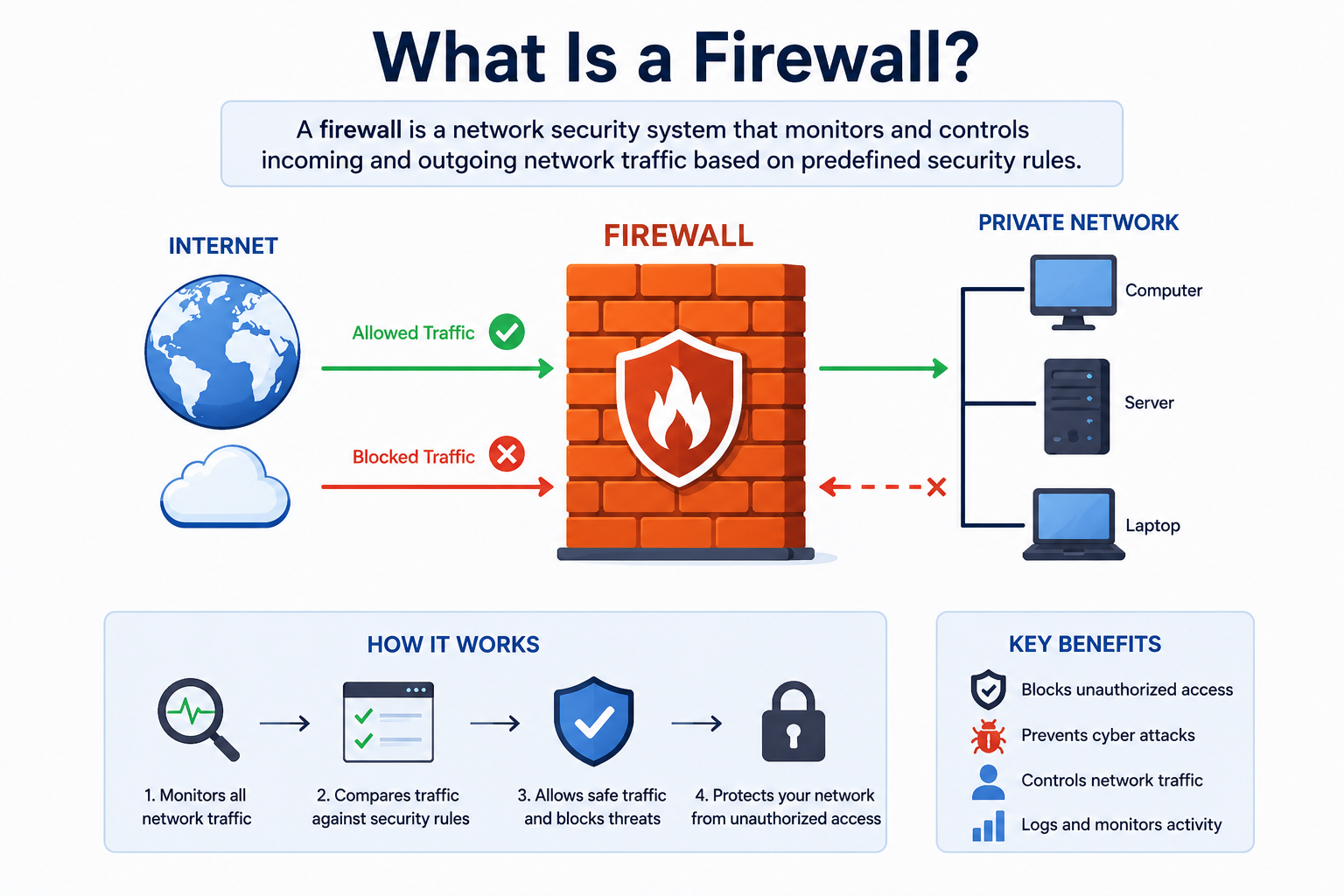
Every time you connect to the internet, your device faces thousands of potential threats. Cybercriminals constantly probe networks looking for open doors they can walk right through. A firewall acts as the first line of defense between your trusted network and the untrusted outside world. Understanding what is a firewall is one of the most fundamental steps anyone can take toward building stronger cybersecurity, whether you are protecting a home computer or an entire corporate network.
Quick Answer
What is a firewall? A firewall is a network security system that monitors and controls incoming and outgoing network traffic based on predefined security rules. It acts as a barrier between a trusted internal network and untrusted external networks like the internet. Firewalls block unauthorized access while allowing legitimate communications to pass through, protecting computers and networks from cyber threats.
What Is a Firewall?
A firewall is a security system, either hardware, software, or a combination of both, that monitors and filters network traffic flowing in and out of your computer or network. It uses a set of security rules to decide which traffic to allow and which traffic to block. Think of it as a security guard standing at the entrance of a building, checking every person who tries to enter and turning away anyone who does not belong.
The term “firewall” originally comes from construction, where a firewall is a physical barrier built to stop fire from spreading between rooms. In cybersecurity, the concept is nearly identical. A network firewall stops dangerous digital threats from spreading from an untrusted network, like the internet, into your private, trusted network.
Firewalls are critically important because not all network traffic is safe. Hackers, malware, and unauthorized users constantly attempt to gain access to private systems. Without a firewall, your computer or network sits completely exposed to every threat that passes through the internet. A properly configured firewall significantly reduces your attack surface by filtering out harmful traffic before it ever reaches your devices.
A practical example makes this clear. Imagine you run a small business with ten computers all connected to the internet. Without a firewall, a hacker could scan your network, find an open port, and connect directly to one of your computers. With a firewall in place, the firewall detects that the connection attempt is coming from an untrusted source, applies your security rules, and blocks the attempt entirely. The hacker never gets through.
How Does a Firewall Work?
A firewall works by continuously examining network traffic and making decisions about each packet of data that tries to enter or leave your network. A data packet is a small unit of information that travels across a network. Every time you load a website, send an email, or stream a video, your data moves as a collection of these packets.
Monitoring Network Traffic
The firewall sits at the boundary between your internal network and the external internet. It sees every packet of data that tries to cross that boundary in either direction. The firewall continuously examines key details about each packet, including its source IP address, destination IP address, port number, and the protocol it uses.
An IP address is like a home address for a device on a network. A port number identifies which application or service the data is intended for, much like an apartment number within a building. By examining these details, the firewall builds a complete picture of what kind of traffic is trying to pass through.
Applying Security Rules
Every firewall operates based on a set of rules, often called an access control list or rule set. These rules tell the firewall exactly what to do with specific types of traffic. For example, a rule might state that traffic coming from a specific trusted IP address on port 443 (the standard HTTPS port for secure web browsing) should be allowed. Another rule might state that all traffic arriving on port 23 (an outdated and insecure Telnet port) should be blocked.
Network administrators create and manage these rules based on the organization’s specific security requirements. The firewall evaluates each incoming or outgoing packet against these rules in sequence. When it finds a matching rule, it applies the specified action, either allowing or blocking the traffic.
Blocking Unauthorized Access
When the firewall identifies traffic that violates its security rules, it immediately blocks that packet from passing through. The blocked packet simply does not reach its destination. Depending on the firewall configuration, the system might also log the blocked attempt and send an alert to the network administrator, providing valuable information about potential attack patterns.
For instance, if a hacker attempts to connect to your database server on a port that your firewall rules say should never receive external connections, the firewall drops those packets immediately. The attacker receives no response, which effectively makes your database invisible from the outside world.
Allowing Trusted Connections
At the same time, the firewall allows legitimate, authorized traffic to pass through without interference. When you visit a trusted website, your browser sends a request that matches the firewall’s rules for permitted outgoing traffic. The website’s response comes back on an expected port from a known source, and the firewall allows it through. This process happens in milliseconds, so you experience no noticeable delay during normal internet use.
The balance between blocking threats and allowing normal traffic is what makes firewall configuration both critical and complex. Rules that are too strict might block legitimate business traffic. Rules that are too permissive might allow dangerous connections through. Getting this balance right requires careful planning and regular review.
Types of Firewalls
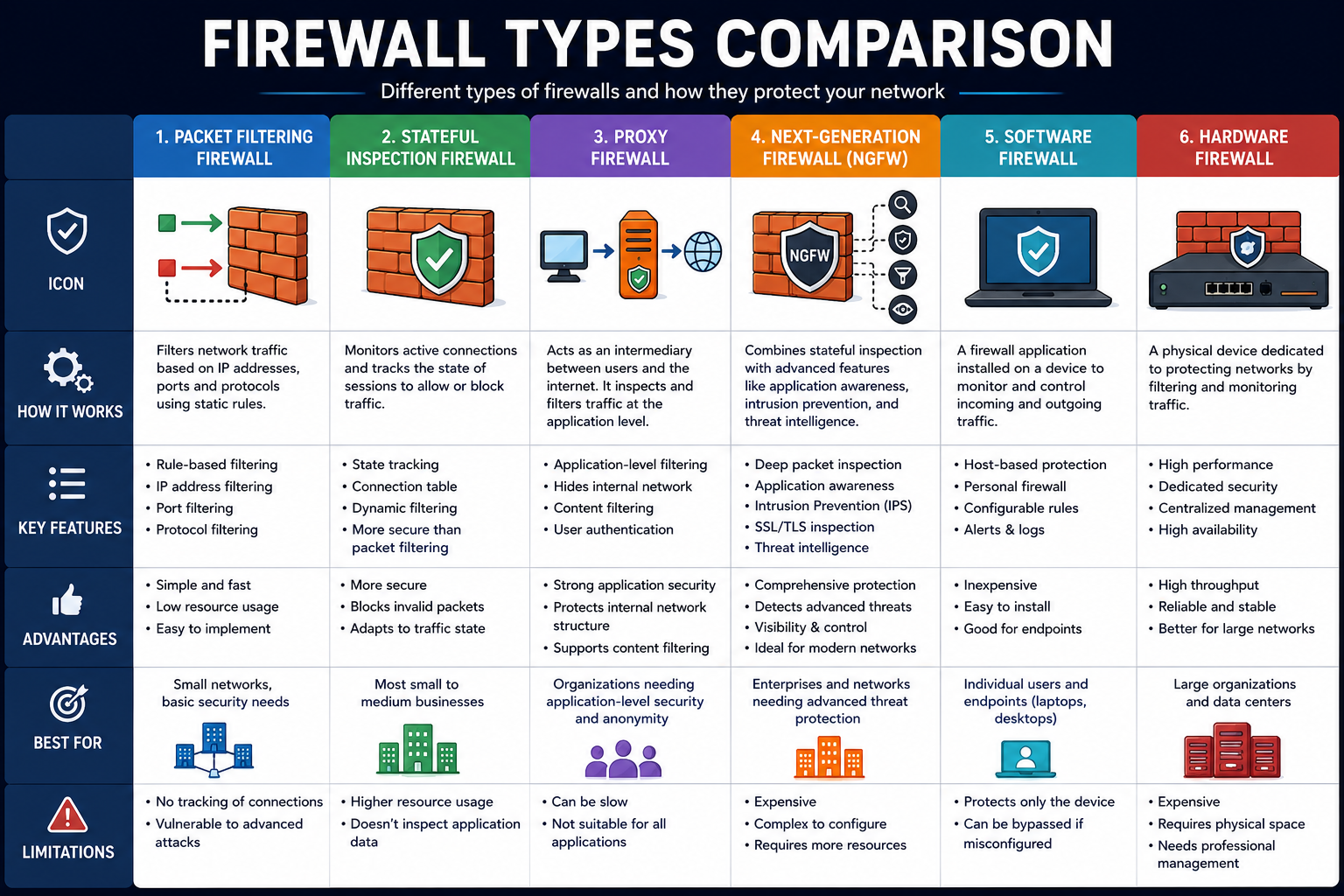
Firewalls come in several different types, each using a different approach to inspect and filter network traffic. Understanding these types helps you choose the right firewall solution for your specific needs.
Packet Filtering Firewall
A packet filtering firewall is the most basic type of firewall. It examines each data packet individually and checks its header information, including source address, destination address, port numbers, and protocol. Based on this information, it either allows or blocks the packet according to predefined rules.
How it works: The firewall examines each packet in isolation without considering whether it belongs to an established connection or what came before it.
Advantages: Packet filtering firewalls are fast, lightweight, and have minimal impact on network performance. They are relatively simple to set up and work well for basic traffic filtering.
Disadvantages: Because they examine packets individually without context, they cannot detect sophisticated attacks that spread across multiple packets. They also cannot inspect the actual content of the data, making them ineffective against application-layer attacks.
Best use cases: Small home networks or as an additional filtering layer within a larger, multi-layered security architecture.
Stateful Inspection Firewall
A stateful inspection firewall, also called a dynamic packet filtering firewall, goes beyond simple packet inspection. It tracks the state of active network connections and uses this context when making filtering decisions. This means it understands whether a packet is part of an established, legitimate connection or whether it is an unexpected, potentially malicious packet arriving out of context.
How it works: The firewall maintains a state table that records information about every active connection. When a new packet arrives, the firewall checks the state table to determine whether the packet belongs to a known, established connection before applying its rules.
Advantages: Stateful inspection provides much stronger security than basic packet filtering because it understands the context of network connections. It effectively blocks many types of attacks that packet filtering misses.
Disadvantages: Maintaining connection state tables uses more memory and processing power than packet filtering. Additionally, stateful inspection firewalls still cannot inspect the actual content of application-layer data.
Best use cases: Most business networks and enterprise environments use stateful inspection as a core component of their firewall strategy.
Proxy Firewall
A proxy firewall, sometimes called an application-level gateway, acts as an intermediary between your internal network and the internet. Instead of allowing direct connections between internal and external systems, the proxy firewall receives requests on behalf of internal users, examines the full content of those requests, and then forwards them to the destination if they meet the security requirements.
How it works: When an internal user wants to visit a website, the proxy firewall intercepts that request. It examines the full application-layer content of the request, applies security checks, and only then retrieves the content from the external server on the user’s behalf. The external server communicates with the proxy, not directly with the internal user.
Advantages: Proxy firewalls provide deep inspection of application-layer traffic and can detect sophisticated threats that other firewall types miss. They also hide the internal network’s IP addresses from external systems, providing an additional layer of privacy.
Disadvantages: Because they process the full content of every connection, proxy firewalls can introduce noticeable latency and become performance bottlenecks, especially in high-traffic environments.
Best use cases: Organizations that need deep inspection of web traffic or must enforce strict content filtering policies, such as schools, government agencies, and regulated industries.
Next-Generation Firewall (NGFW)
A next-generation firewall (NGFW) combines traditional firewall capabilities with advanced security features that address modern cybersecurity threats. NGFW platforms integrate deep packet inspection, intrusion prevention systems, application awareness, user identity tracking, and threat intelligence feeds into a single powerful security solution.
How it works: An NGFW examines not just packet headers but the full content of every packet, even within encrypted traffic in many implementations. It identifies which application generated the traffic, which user sent it, and whether the content matches known threat signatures or suspicious behavioral patterns.
Advantages: Next-generation firewalls provide comprehensive protection against sophisticated modern threats that traditional firewalls simply cannot detect. They offer granular control over specific applications and user groups rather than just ports and protocols.
Disadvantages: NGFW solutions are significantly more expensive and complex than traditional firewalls. They require skilled administrators to configure and manage effectively, and they demand more hardware resources to process deep packet inspection at scale.
Best use cases: Medium to large enterprises, data centers, and any organization that needs comprehensive protection against advanced persistent threats and modern cyberattacks.
Software Firewall
A software firewall is a program installed directly on an individual computer or server. It monitors and controls network traffic specifically for that device. Windows Defender Firewall, built into Microsoft Windows operating systems, is one of the most widely used examples of a software firewall.
How it works: The software firewall runs as a background service on the device it protects. It intercepts all incoming and outgoing network connections and applies its rules before allowing the traffic to reach other applications on the same device.
Advantages: Software firewalls are affordable, easy to deploy, and allow granular control over individual application permissions. They protect the specific device even when it connects to untrusted public networks, such as coffee shop Wi-Fi.
Disadvantages: Software firewalls only protect the device they are installed on. They consume the device’s own processing power and memory, and they can be disabled by malware that gains sufficient system privileges.
Best use cases: Individual computers, laptops, and servers as part of a multi-layered security approach. Software firewalls work best in combination with a hardware firewall or network-level firewall.
Hardware Firewall
A hardware firewall is a dedicated physical device that sits between your internet connection and your internal network. It filters all network traffic for every device connected behind it. Home routers typically include a basic hardware firewall. Enterprise-grade hardware firewalls from companies like Cisco, Palo Alto Networks, and Fortinet offer far more sophisticated protection.
How it works: The hardware firewall device connects directly to your internet router or modem and acts as the gateway for all traffic entering and leaving your network. Every device on your network sends its traffic through the hardware firewall before it reaches the internet, and all incoming traffic passes through it before reaching any internal device.
Advantages: Hardware firewalls protect every device on the network simultaneously without consuming any processing power on individual devices. They are more difficult for malware to disable because they operate independently of any single computer’s operating system.
Disadvantages: Hardware firewalls are more expensive than software solutions and require physical installation and configuration. They do not protect devices when those devices leave the network and connect elsewhere.
Best use cases: Business networks, home networks with multiple devices, and any environment where protecting an entire network perimeter is a priority.
Firewall Types Comparison Table
| Firewall Type | Inspection Level | Performance Impact | Best For | Cost |
|---|---|---|---|---|
| Packet Filtering | Headers only | Very low | Basic filtering | Low |
| Stateful Inspection | Connection state | Low-Medium | Business networks | Medium |
| Proxy Firewall | Full application content | High | Content filtering | Medium-High |
| Next-Generation (NGFW) | Full deep packet inspection | Medium-High | Enterprise security | High |
| Software Firewall | Individual device traffic | Low-Medium | Personal computers | Low-Free |
| Hardware Firewall | Full network perimeter | Minimal on devices | Network perimeters | Medium-High |
Benefits of Using a Firewall
A properly configured firewall delivers a wide range of security and operational benefits. Here are fifteen important reasons why using a firewall is essential.
Firewall Benefits Table
| Benefit | Description |
|---|---|
| Blocks unauthorized access | Prevents hackers from connecting to your network or devices |
| Filters malicious traffic | Stops known malicious IP addresses and traffic patterns |
| Protects sensitive data | Prevents data theft by blocking unauthorized outbound connections |
| Monitors network activity | Provides visibility into all network traffic for security analysis |
| Prevents malware communication | Blocks malware from connecting to command-and-control servers |
| Enforces security policies | Ensures all traffic complies with organizational security rules |
| Supports regulatory compliance | Helps meet requirements like PCI DSS, HIPAA, and GDPR |
| Prevents network intrusions | Stops attackers from exploiting vulnerable network services |
| Controls application access | Manages which applications can access the network |
| Protects against DoS attacks | Mitigates some forms of denial of service attacks |
| Hides internal network structure | Conceals internal IP addresses from external attackers |
| Logs security events | Maintains records of traffic and incidents for forensic analysis |
| Reduces attack surface | Closes unused ports and services that attackers could exploit |
| Provides segmentation | Separates different parts of a network to limit breach impact |
| Supports remote access security | Controls and secures VPN and remote desktop connections |
Beyond the table above, firewalls also provide peace of mind. Knowing that a dedicated security system constantly watches your network traffic allows IT teams to focus on other priorities without worrying that every connection attempt might compromise their systems.
Firewall vs Antivirus
Many people confuse firewalls and antivirus software or assume one makes the other unnecessary. In reality, these two security tools serve very different but complementary purposes. Using both together creates a significantly stronger security posture than relying on either one alone.
Firewall vs Antivirus Table
| Factor | Firewall | Antivirus |
|---|---|---|
| Primary Purpose | Controls network traffic and access | Detects and removes malicious software |
| Protection Focus | Network perimeter and connections | Files, programs, and malware on the device |
| Threats Blocked | Unauthorized connections, network attacks, port scans | Viruses, trojans, ransomware, spyware, worms |
| Where It Works | At the network boundary or on network interfaces | Inside the operating system on individual files |
| Installation Type | Hardware device or software application | Software application installed on each device |
| Real-time Protection | Monitors live network traffic continuously | Scans files and running processes in real time |
| Can It Stop Network Attacks? | Yes, very effectively | Limited capability |
| Can It Remove Malware? | No, not designed for this purpose | Yes, this is its primary function |
| Best Use Case | Preventing unauthorized network access | Detecting and eliminating malware infections |
| Works Together? | Yes, both together provide layered security | Yes, essential complement to firewall protection |
The key takeaway is straightforward. A firewall stops threats from entering your network through unauthorized connections, while antivirus software handles threats that have already reached your device, whether through an authorized channel like email or a downloaded file. You genuinely need both working together to maintain strong computer security.
Firewall vs VPN
Firewalls and virtual private networks (VPNs) are both important network security tools, but they serve fundamentally different purposes. Understanding the distinction helps you deploy them correctly and maximize the protection each one provides.
Firewall vs VPN Table
| Factor | Firewall | VPN |
|---|---|---|
| Primary Purpose | Filter and control network traffic | Encrypt and tunnel network traffic |
| What It Does | Blocks or allows traffic based on rules | Creates a secure, encrypted tunnel for data |
| Privacy Protection | Limited (does not encrypt traffic) | Strong (encrypts all traffic in the tunnel) |
| Identity Protection | Does not hide your IP address externally | Masks your real IP address from external sites |
| Threats Addressed | Unauthorized access, network intrusions | Eavesdropping, surveillance, insecure networks |
| Performance Impact | Minimal for most users | Can reduce connection speed depending on server |
| Best Used For | Protecting your network from external threats | Securing connections on public or untrusted networks |
| Work Together? | Yes, both provide different layers of protection | Yes, a VPN works best behind a good firewall |
These two tools work extremely well together. A firewall protects your network by controlling which connections are allowed to pass through. A VPN encrypts the traffic that does pass through, protecting it from interception by third parties. Together, they address different aspects of network security and provide much stronger combined protection than either delivers alone.
For more information on how VPNs enhance your privacy and security, see our guide on What Is a VPN?.
Where Are Firewalls Used?
Firewalls are deployed across virtually every type of network environment. Each deployment context has specific requirements and challenges.
Home Networks
Home routers almost always include a built-in basic hardware firewall. This firewall uses network address translation (NAT) to hide the IP addresses of home devices from the internet and blocks unsolicited incoming connections. Many home users also run software firewalls on individual computers for additional protection. As smart home devices multiply, home network security becomes increasingly important.
Businesses
Businesses of all sizes deploy firewalls to protect their corporate networks, servers, and sensitive data. Small businesses might use a single hardware firewall appliance, while large enterprises deploy multiple firewall layers, including perimeter firewalls, internal network segmentation firewalls, and application-layer firewalls protecting web servers and databases. Business firewall configurations typically include detailed logging, alert systems, and integration with broader security operations.
Data Centers
Data centers host thousands of servers and process enormous volumes of network traffic every second. Data center firewalls must handle extremely high throughput while maintaining strict security policies. Modern data centers use next-generation firewalls and microsegmentation strategies to isolate workloads from each other, limiting the potential impact of a security breach.
Schools and Universities
Educational institutions use firewalls to protect student and staff data, comply with regulations like FERPA in the United States, and enforce acceptable use policies. School firewalls often include content filtering capabilities that block access to inappropriate websites and restrict the types of applications students can use on the school network.
Government Organizations
Government agencies handle extremely sensitive data and face sophisticated threat actors, including state-sponsored hackers. Government networks deploy multiple layers of firewalls, strict access controls, and advanced monitoring systems. Many government networks are air-gapped, meaning they are completely disconnected from the public internet, with firewalls controlling any limited external connection points.
Cloud Environments
As organizations move infrastructure to cloud platforms like AWS, Microsoft Azure, and Google Cloud, traditional physical firewalls give way to cloud-based firewall solutions. Cloud firewalls, sometimes called security groups or cloud-native firewalls, protect virtual machines, containers, and cloud services using the same fundamental principles as traditional firewalls but adapted for dynamic, scalable cloud architectures. For more on securing cloud environments, see our guide on Cloud Security.
Common Firewall Mistakes
Even with a firewall in place, poor configuration and management practices can leave significant security gaps. Here are twelve common mistakes that users and businesses frequently make.
Mistake 1: Using Default Firewall Settings Without Review
Most firewalls come with default configurations that are designed for broad compatibility, not maximum security. Relying on default settings without reviewing and customizing them for your specific environment leaves many unnecessary ports open and important rules missing.
Mistake 2: Creating Overly Permissive Rules
Administrators sometimes create rules that are far too broad, such as allowing all traffic from a wide IP address range because a specific application needs access. Overly broad rules defeat the purpose of having a firewall and create large security gaps.
Mistake 3: Never Reviewing or Updating Firewall Rules
Business needs change over time. Employees leave, applications are decommissioned, and new services are added. Firewall rule sets that are never reviewed quickly become cluttered with outdated rules, some of which may create unintended security vulnerabilities.
Mistake 4: Ignoring Firewall Logs
Firewall logs contain invaluable information about attack attempts, unusual traffic patterns, and potential internal threats. Many organizations enable logging but never actually review the logs, missing critical warning signs of an impending breach.
Mistake 5: Treating a Firewall as the Only Security Layer
A firewall is an important security control, but it is not a complete security solution on its own. Relying solely on a firewall without antivirus software, intrusion detection systems, strong password policies, and user security training creates dangerous blind spots.
Mistake 6: Not Updating Firewall Firmware or Software
Like all software, firewall operating systems and firmware contain vulnerabilities that vendors patch through updates. Failing to apply these updates regularly leaves known vulnerabilities in place that attackers can exploit to bypass the firewall entirely.
Mistake 7: Disabling the Firewall for Troubleshooting and Forgetting to Re-enable It
IT staff sometimes temporarily disable a firewall to troubleshoot a network connectivity issue and then forget to re-enable it afterward. Even a brief period without an active firewall leaves the entire network exposed.
Mistake 8: Allowing All Outbound Traffic
Many organizations focus their firewall rules entirely on inbound traffic and allow all outbound traffic without restriction. This approach fails to detect malware communicating with external command-and-control servers or employees exfiltrating sensitive data.
Mistake 9: Not Testing Firewall Rules
After configuring firewall rules, many administrators never actually test whether those rules work as intended. Regular penetration testing and firewall rule validation are essential to confirm that the firewall is truly blocking what it should block.
Mistake 10: Failing to Implement Network Segmentation
A single flat network protected only by a perimeter firewall means that once an attacker gets past the firewall, they can reach every device on the network. Implementing internal firewall segmentation limits the damage an attacker can cause after breaching the perimeter.
Mistake 11: Using Weak Administrative Passwords on Firewall Devices
Firewall management interfaces with weak or default passwords are an obvious and frequently exploited target. Compromising the firewall’s administrative access gives attackers complete control over the organization’s network security.
Mistake 12: Not Having a Firewall Change Management Process
Making ad hoc changes to firewall rules without a formal review and approval process creates inconsistencies, conflicts between rules, and potential security gaps. A structured change management process ensures that every rule change is intentional, documented, and properly reviewed.
Firewall Best Practices
Following strong firewall management practices is essential for maintaining effective network protection over time. Here are twenty actionable tips that every organization should implement.
Firewall Best Practices Checklist
| Practice | Priority | Frequency |
|---|---|---|
| Keep firewall enabled at all times | Critical | Always |
| Review and update firewall rules | High | Quarterly minimum |
| Apply firmware and software updates | Critical | As released |
| Review firewall logs | High | Daily or weekly |
| Block all unused ports | High | Ongoing |
| Use strong administrative passwords | Critical | Always, rotate regularly |
| Enable multi-factor authentication for admin access | Critical | Always |
| Combine firewall with antivirus software | High | Always |
| Implement network segmentation | High | During initial setup and reviews |
| Test firewall rules regularly | High | Quarterly |
| Document all firewall rules and changes | Medium | With every change |
| Use a formal change management process | High | Always |
| Monitor outbound as well as inbound traffic | High | Always |
| Enable intrusion detection alongside firewall | High | Always |
| Implement Zero Trust network principles | High | Ongoing implementation |
| Restrict firewall management access by IP | High | Always |
| Conduct regular penetration testing | High | Annually or semi-annually |
| Back up firewall configurations regularly | Medium | Weekly minimum |
| Train staff on security policies | Medium | Annually and onboarding |
| Align firewall rules with compliance requirements | High | During audits and reviews |
- Always keep your firewall enabled. Never disable it unless absolutely necessary, and re-enable it immediately after any temporary changes.
- Review your firewall rule set at least quarterly to remove outdated rules and add necessary new ones.
- Apply firmware and software updates as soon as vendors release them to close known vulnerabilities.
- Review firewall logs regularly to identify unusual patterns, repeated blocked attempts, and potential internal threats.
- Block all ports and services that your organization does not actively use. Every open port is a potential entry point for attackers.
- Use strong, unique passwords for firewall administrative interfaces and change them regularly.
- Enable multi-factor authentication for all firewall management access to prevent unauthorized administrative access.
- Combine your firewall with antivirus software and an intrusion detection system for layered security protection.
- Implement network segmentation so that a breach in one part of the network cannot spread freely to other critical systems.
- Test your firewall rules regularly using authorized vulnerability scanning and penetration testing to confirm they work as intended.
- Document every firewall rule with a clear explanation of its purpose, the date it was created, and the name of the person who created it.
- Use a formal change management process for all firewall rule modifications to prevent accidental security gaps.
- Monitor outbound traffic as carefully as inbound traffic. Unusual outbound connections often indicate malware or data exfiltration.
- Enable intrusion detection or intrusion prevention systems alongside your firewall for additional threat detection capability.
- Begin implementing Zero Trust principles, which assume no user or device is trusted by default, even those already inside the network perimeter.
- Restrict access to the firewall management interface to specific, trusted IP addresses only.
- Conduct formal penetration testing at least annually to identify weaknesses in your firewall configuration from an attacker’s perspective.
- Back up firewall configurations regularly so you can quickly restore a known-good state after hardware failure or a misconfiguration incident.
- Provide regular security awareness training to all staff so they understand the importance of security policies that the firewall helps enforce.
- Align your firewall rules and policies with relevant regulatory compliance requirements such as PCI DSS, HIPAA, or GDPR to avoid costly violations.
Common Firewall Myths
Several persistent misconceptions lead users and organizations to misunderstand firewalls and make poor security decisions as a result.
Myth 1: A Firewall Makes Your Network Completely Secure
A firewall is a powerful security tool, but it is not an impenetrable shield. Sophisticated attackers can use techniques like social engineering, phishing, or exploiting authorized channels to bypass firewall protections. A firewall must be part of a layered security strategy, not treated as a standalone solution.
Myth 2: Home Users Do Not Need a Firewall
Some home users believe firewalls are only for large businesses. In reality, home networks face the same types of threats as corporate networks. Every device connected to the internet benefits from firewall protection, regardless of the network’s size.
Myth 3: Firewalls Only Block Incoming Traffic
Many people assume firewalls only filter traffic coming into the network. Well-configured firewalls monitor and control both inbound and outbound traffic. Monitoring outbound traffic is especially important for detecting malware that is trying to communicate with external servers.
Myth 4: Windows Firewall Is Not Worth Using
Windows Defender Firewall is a capable and legitimate security tool. While it may not offer all the advanced features of enterprise-grade firewall solutions, it provides meaningful protection for individual Windows computers when properly configured and combined with other security tools.
Myth 5: Once Configured, a Firewall Does Not Need Attention
Firewall configurations require ongoing maintenance. New vulnerabilities emerge, network infrastructure changes, and new applications require updated firewall rules. Treating a firewall as a set-and-forget device leads to outdated rules and growing security gaps.
Myth 6: A Firewall Can Stop All Viruses and Malware
Firewalls are primarily network security devices. They can block some malware from communicating externally, but they are not designed to detect or remove malware that has already infected a device. Antivirus software handles that function.
Myth 7: Expensive Firewalls Are Always Better
The most expensive firewall is not necessarily the best choice for every situation. A properly configured, moderately priced firewall often provides superior protection compared to a high-end firewall with poor rule management. Configuration and management quality matter far more than price alone.
Myth 8: Firewalls Slow Down Internet Speeds Significantly
Modern firewalls are designed to process traffic efficiently with minimal impact on connection speeds. While very basic or outdated hardware firewall devices might introduce some latency, a well-specified modern firewall typically has no noticeable effect on internet performance for most users.
Myth 9: A Firewall Protects Against All Cyber Threats
Firewalls are effective against many network-based threats, but they do not protect against every type of cyberattack. Phishing emails, insider threats, physical security breaches, and attacks that arrive through authorized channels can all bypass firewall defenses. Comprehensive cybersecurity requires multiple overlapping security controls.
Myth 10: Cloud Services Do Not Need Firewalls
Some organizations assume that moving to the cloud eliminates the need for firewall protection. In reality, cloud environments need robust firewall configurations just as much as traditional on-premises networks. Cloud providers offer firewall tools, but organizations are responsible for configuring them correctly under the shared responsibility model.
Future of Firewall Technology
Firewall technology continues to evolve rapidly in response to changing threats, new network architectures, and emerging technologies. Several major trends are shaping the future direction of firewall security.
AI-Powered Firewalls
Artificial intelligence and machine learning are transforming how firewalls detect and respond to threats. AI-powered firewalls can identify unusual traffic patterns that do not match known attack signatures, detect zero-day threats, and automatically adjust security rules in response to emerging dangers. As cyberattacks become more sophisticated, AI-driven security will become essential for keeping pace with evolving threats.
Cloud Firewalls
Cloud-native firewall solutions are replacing traditional hardware appliances in many environments. Cloud firewalls scale dynamically with cloud infrastructure, require no physical hardware, and integrate natively with cloud service providers’ security ecosystems. As hybrid and multi-cloud architectures become the standard, cloud firewall expertise becomes increasingly valuable for cybersecurity professionals.
Zero Trust Architecture
The Zero Trust security model fundamentally changes how firewalls and network security controls operate. Instead of assuming that everything inside the network perimeter is safe, Zero Trust requires continuous verification of every user, device, and connection before granting access to any resource. Firewalls in Zero Trust environments enforce granular, identity-based access controls rather than broad network-level policies.
SASE – Secure Access Service Edge
SASE (pronounced “sassy”) is an emerging network security framework that combines wide-area networking capabilities with comprehensive cloud-delivered security services, including firewall-as-a-service, in a single unified platform. SASE is designed for modern distributed workforces where employees connect from anywhere using any device. It delivers consistent security policy enforcement regardless of where users or resources are located.
Threat Intelligence Integration
Modern firewalls increasingly integrate with real-time threat intelligence feeds that provide continuously updated information about malicious IP addresses, domains, and attack patterns. By consuming this threat intelligence, firewalls can automatically block known malicious sources and adapt to new threats faster than any manual rule update process could achieve.
Frequently Asked Questions
What is a firewall?
A firewall is a network security system that monitors and controls incoming and outgoing network traffic based on predetermined security rules. It creates a protective barrier between your trusted internal network and untrusted external networks like the internet, blocking unauthorized access while allowing legitimate communications.
How does a firewall work?
A firewall examines every packet of data traveling into or out of your network. It checks each packet’s source, destination, port, and protocol against a set of security rules. If the packet matches an allow rule, the firewall permits it through. If it matches a block rule or no rule at all, the firewall drops the packet and optionally logs the event.
Do I need a firewall?
Yes, absolutely. Every internet-connected device and network needs firewall protection. Without a firewall, your computer or network is directly exposed to unauthorized connection attempts, port scans, and exploitation attempts from the internet. Firewalls are a fundamental, non-negotiable component of any cybersecurity strategy.
Is Windows Firewall enough?
Windows Defender Firewall provides solid basic protection for individual Windows computers. For most home users who also use antivirus software and practice safe browsing habits, it offers meaningful security. However, businesses and organizations with complex networks should deploy dedicated hardware or next-generation firewall solutions for more comprehensive protection.
What is a hardware firewall?
A hardware firewall is a dedicated physical device that protects an entire network by filtering all traffic between your internet connection and your internal devices. Hardware firewalls operate independently of individual computers, protect every device on the network simultaneously, and are generally more difficult for malware to bypass compared to software firewalls.
What is a software firewall?
A software firewall is a program installed on an individual computer or server that monitors and controls network traffic for that specific device. Software firewalls are affordable, flexible, and essential for protecting laptops and computers when they connect to public or untrusted networks away from home.
Can a firewall stop hackers?
A properly configured firewall significantly reduces the risk of unauthorized access by blocking connection attempts from hackers. However, no firewall stops every attack on its own. Sophisticated hackers use techniques like social engineering and application-layer attacks that firewalls may not detect. Combining a firewall with other security controls provides the strongest protection.
Can a firewall stop viruses?
A firewall can block some malware from communicating with external servers and can prevent certain types of network-based malware from spreading. However, firewalls are not designed to detect or remove viruses from infected devices. You need dedicated antivirus software to handle malware detection and removal effectively.
What is the difference between a firewall and antivirus?
A firewall controls network traffic and blocks unauthorized connections to your network. Antivirus software scans files, programs, and running processes on your device to detect and remove malicious software. Both address different threats and should be used together for comprehensive protection.
What is the difference between a firewall and a VPN?
A firewall filters and controls network traffic based on security rules. A VPN encrypts your network traffic and routes it through a secure server to protect privacy and secure connections on untrusted networks. Both serve different security purposes and work best when deployed together.
Should businesses use firewalls?
Yes, without exception. Every business that connects to the internet needs a properly configured firewall. Businesses face significant legal, financial, and reputational consequences from data breaches. A firewall is one of the most fundamental and cost-effective security controls any organization can implement.
What is a Next-Generation Firewall?
A next-generation firewall (NGFW) is an advanced firewall that combines traditional firewall features with deep packet inspection, intrusion prevention, application awareness, user identity tracking, and threat intelligence. NGFWs provide comprehensive protection against modern sophisticated threats that traditional firewalls cannot detect.
How often should firewall rules be updated?
Firewall rules should be reviewed at least quarterly. Additionally, rules should be updated whenever network infrastructure changes, new applications are deployed, old services are decommissioned, or new vulnerabilities are discovered that require rule adjustments. Establishing a formal change management process ensures rule updates are handled consistently and securely.
Is a firewall necessary for home users?
Yes. Home networks face real cybersecurity threats every day. Most home routers include a basic built-in firewall, and all computers connected to a home network should also run software firewalls. As smart home devices proliferate, home network firewall protection becomes increasingly critical.
What is the future of firewall technology?
The future of firewall technology includes AI-powered threat detection, cloud-native firewall solutions, Zero Trust architecture integration, SASE frameworks that combine networking and security services, and deep integration with real-time threat intelligence. Firewalls will continue to evolve from simple traffic filters into intelligent, adaptive security platforms.
People Also Ask
What is a firewall?
A firewall is a security system that monitors and controls network traffic based on security rules, creating a protective barrier between trusted and untrusted networks.
How does a firewall work?
A firewall inspects each data packet’s source, destination, port, and protocol, then either allows or blocks it based on configured security rules.
What are the types of firewalls?
The main types include packet filtering firewalls, stateful inspection firewalls, proxy firewalls, next-generation firewalls (NGFW), software firewalls, and hardware firewalls.
Do I need a firewall?
Yes. Every internet-connected device and network needs firewall protection to block unauthorized access and reduce exposure to cyber threats.
Can a firewall stop hackers?
A properly configured firewall blocks many hacking attempts but is not a complete solution alone. Combining it with antivirus software, strong passwords, and security awareness provides much stronger protection.
What is the difference between a firewall and antivirus?
A firewall controls network traffic and blocks unauthorized connections. Antivirus software detects and removes malware from devices. Both serve different purposes and should be used together.
What is a Next-Generation Firewall?
A Next-Generation Firewall (NGFW) combines traditional firewall capabilities with deep packet inspection, intrusion prevention, application control, and threat intelligence for comprehensive modern security.
Is Windows Firewall enough?
Windows Defender Firewall provides adequate basic protection for individual home computers when combined with antivirus software. Businesses and complex networks need dedicated enterprise-grade firewall solutions.
Are hardware firewalls better than software firewalls?
Hardware firewalls protect entire networks and operate independently of device resources, making them ideal for network perimeters. Software firewalls protect individual devices and offer flexibility for mobile users. Using both together provides layered protection.
Why is a firewall important?
A firewall is important because it actively blocks unauthorized network access, filters malicious traffic, monitors network activity, protects sensitive data, and forms the foundation of any effective cybersecurity strategy.
Final Thoughts
Understanding what is a firewall and how it protects your digital environment is no longer optional knowledge reserved for IT professionals. In 2026, cyber threats target every individual, small business, and large enterprise connected to the internet. A properly configured firewall remains one of the most fundamental and effective tools in any cybersecurity strategy.
However, a firewall is a starting point, not a finish line. The strongest security posture combines a well-managed firewall with antivirus protection, strong password practices, multi-factor authentication, regular software updates, employee security awareness training, and continuous monitoring. Each layer addresses threats that other layers might miss, creating a defense-in-depth approach that significantly raises the cost and difficulty for attackers.
Whether you are a home user who wants to protect your personal devices, a small business owner securing your customer data, or an IT professional managing a complex enterprise network, investing time and resources into proper firewall deployment and management pays dividends in security, compliance, and peace of mind. Start with your firewall, configure it correctly, keep it updated, and build your broader security strategy from there.
For more essential cybersecurity knowledge, explore our guides on What Is Cybersecurity?
References
- Cybersecurity and Infrastructure Security Agency (CISA). Firewalls and Network Security Resources. Available at: https://www.cisa.gov
- National Institute of Standards and Technology (NIST). Guidelines on Firewalls and Firewall Policy. Special Publication 800-41. Available at: https://www.nist.gov
- Cisco Systems. Network Security and Firewall Technology Resources. Available at: https://www.cisco.com/security
- Microsoft. Windows Defender Firewall Documentation and Security Guidance. Available at: https://www.microsoft.com/security
- Palo Alto Networks. Next-Generation Firewall Technology and Resources. Available at: https://www.paloaltonetworks.com
- Fortinet. Firewall and Network Security Solutions Documentation. Available at: https://www.fortinet.com
Disclaimer
This article is for educational and informational purposes only. It explains firewall concepts, network security principles, and cybersecurity best practices. It does not constitute professional security advice. Always consult a qualified cybersecurity professional for specific security implementations relevant to your organization or environment.
Author Bio
TechOriginHub Editorial Team is a team of technology writers and cybersecurity researchers dedicated to publishing accurate, beginner-friendly, and up-to-date tech guides, reviews, and online security resources.