
 By saman zahra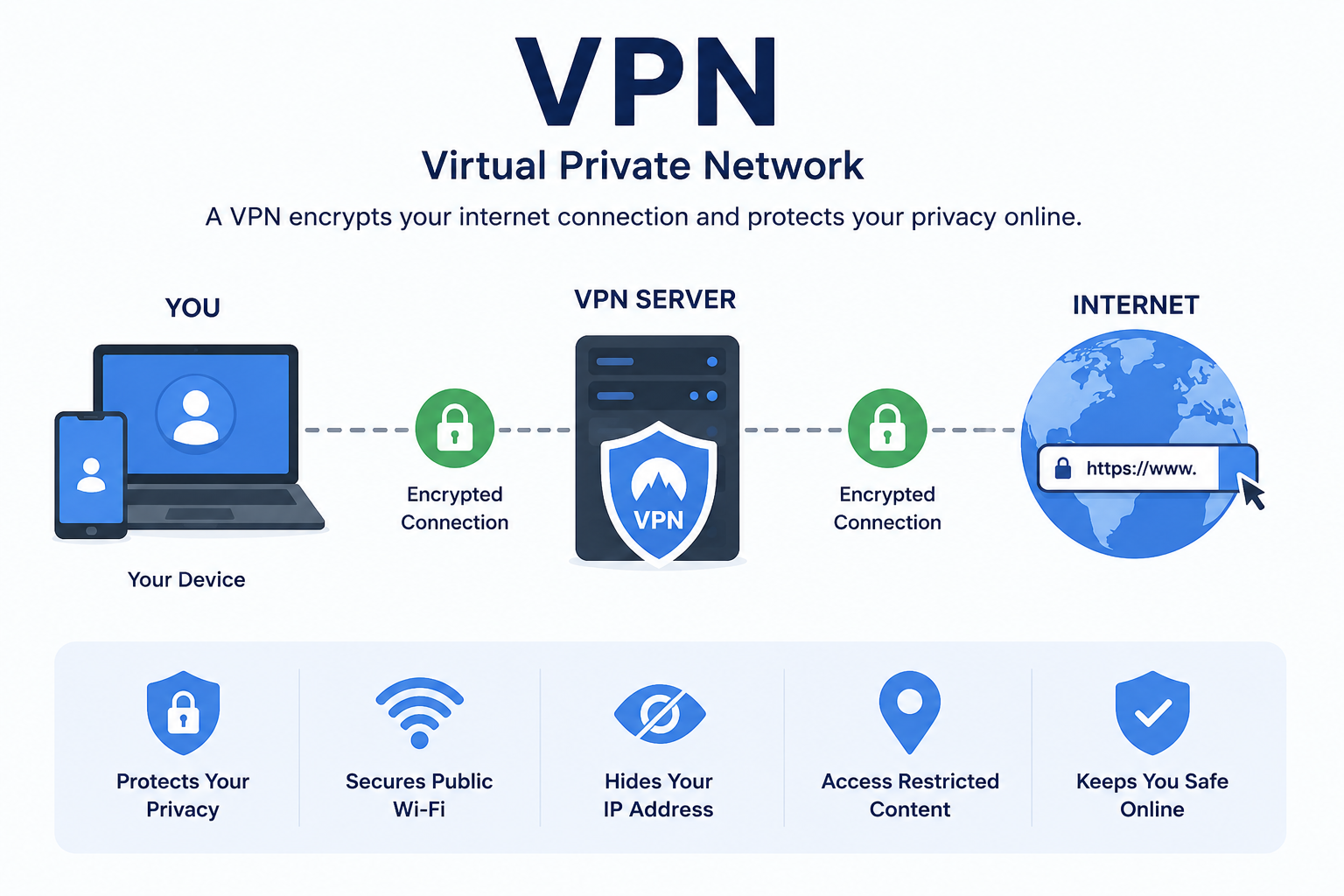
Introduction
Your online privacy is under constant pressure. Every time you connect to the internet, your internet service provider, advertisers, hackers, and even government agencies can monitor what you do online. Whether you check your bank account at a coffee shop, work remotely from a hotel, or simply browse the web at home, your data travels across networks that are not always safe.
Understanding what is a VPN has become an essential piece of digital literacy in 2026. Public Wi-Fi networks at airports, cafes, and libraries expose your personal information to anyone with the right tools. Data privacy laws vary wildly between countries, and corporations track your online behavior with remarkable precision. Remote work has pushed millions of people onto home networks and public connections that were never designed with enterprise security in mind.
A VPN offers a practical and accessible solution to many of these problems. It creates a private, encrypted connection between your device and the internet, shielding your data from prying eyes. This guide explains exactly what a VPN is, how it works, why you might need one, and how to use it effectively in 2026.
Quick Answer
A VPN, or Virtual Private Network, is a technology that creates an encrypted, secure connection between your device and the internet. It routes your internet traffic through a private server, hiding your IP address and protecting your data from hackers, surveillance, and tracking. VPNs are widely used for online privacy, secure public Wi-Fi use, remote work, and safer internet browsing.
What Is a VPN?
A VPN, which stands for Virtual Private Network, is a technology that creates a secure, encrypted connection between your device and the internet. Think of it as a private tunnel through which your internet traffic travels, hidden from anyone who might try to intercept or monitor it.
Originally, organizations created VPNs to allow employees to securely connect to company networks from remote locations. Before VPNs, remote workers had no reliable way to access sensitive corporate systems without exposing company data to significant risk. VPN technology solved that problem by creating encrypted pathways over public internet infrastructure.
Today, individuals use VPNs for a much wider range of purposes. Online privacy, public Wi-Fi security, bypassing geographic content restrictions, and protecting sensitive communications are all common reasons people rely on VPNs every day.
A simple real-world example: Imagine you are sitting in an airport and connecting to the free public Wi-Fi to check your online banking. Without a VPN, anyone else on that network with basic hacking knowledge could potentially intercept your login credentials. With a VPN active, your connection is encrypted. Even if someone intercepts your data, all they see is meaningless, scrambled information.
The core value of a VPN is straightforward. It protects your data in transit, hides your true IP address, and makes your online activity significantly harder to monitor or track.
How Does a VPN Work?
Understanding how a VPN works removes the mystery from the technology and helps you use it more effectively. The process involves four key stages that happen almost instantly every time you connect.
Encrypting Your Internet Traffic
When you activate a VPN, it immediately begins encrypting all the data leaving your device. Encryption transforms your readable data into an unreadable scramble of characters that only the intended recipient — the VPN server — can decode.
Most modern VPNs use AES-256 encryption, which stands for Advanced Encryption Standard with a 256-bit key. This is the same encryption standard used by governments and financial institutions worldwide. To put its strength in perspective, breaking AES-256 encryption through brute force would take current computers longer than the estimated age of the universe.
Even if a hacker managed to intercept your encrypted traffic, the data would appear as complete nonsense. Without the decryption key held by the VPN server, the intercepted data is completely useless to an attacker.
Creating a Secure Tunnel
After encrypting your data, the VPN establishes what professionals call a secure tunnel. This is not a physical tunnel, but rather a dedicated, protected pathway through which your encrypted data travels between your device and the VPN server.
The tunnel uses specific VPN protocols — sets of rules governing how data is packaged and transmitted — to maintain the integrity and security of the connection. Different protocols offer different balances of speed and security, which we cover in detail later in this guide.
This tunnel separates your traffic from everyone else on the same network. Other users on a public Wi-Fi network, for example, cannot see inside your tunnel even if they can see that you are connected to the network.
Connecting Through a VPN Server
Your encrypted data travels through the secure tunnel to a VPN server, which acts as your gateway to the broader internet. The VPN server decrypts your data, retrieves the information you requested from the internet, and sends the response back through the encrypted tunnel to your device.
Critically, the VPN server makes all requests to the internet on your behalf. From the perspective of websites, streaming services, and online platforms, the VPN server is the source of the traffic. Your actual device and its real IP address remain hidden behind the server.
This server-based architecture is why VPNs can also appear to place you in different geographic locations. Connecting to a VPN server located in the United Kingdom, for example, makes your traffic appear to originate from the UK, regardless of where you physically are.
Protecting Your IP Address
Your IP address is a unique numerical identifier assigned to your device by your internet service provider. It reveals your approximate geographic location and serves as the primary way websites and advertisers track your online behavior over time.
When you use a VPN, websites and online services see the IP address of the VPN server rather than your actual IP address. This IP masking makes it significantly harder for third parties to build a profile of your online activities, target you with location-based advertising, or track your browsing history.
However, it is important to understand that IP masking does not make you completely anonymous online. Browser cookies, account logins, and other tracking technologies can still identify you even when a VPN is active. A VPN is a powerful privacy tool, but not a total anonymity solution.
Types of VPNs
Several distinct types of VPNs exist, each designed for specific use cases and environments.
Remote Access VPN
A remote access VPN allows individual users to connect to a private network — typically a corporate network — from a remote location over the internet.
How it works: The user installs a VPN client on their device. When they connect, the client establishes an encrypted tunnel to the company’s VPN server, granting access to internal resources as if they were physically in the office.
Advantages: Enables secure remote work, protects data in transit, and gives remote employees full access to internal systems.
Disadvantages: Requires VPN client software on each device and may slow connection speeds depending on server load.
Best use cases: Remote employees accessing corporate systems, IT professionals managing company infrastructure from outside the office.
Site-to-Site VPN
A site-to-site VPN connects two or more entire networks together over the internet. Rather than connecting individual users, it links entire office networks as if they were one unified system.
How it works: Dedicated VPN hardware or software at each location creates a permanent encrypted tunnel between the two networks. All traffic between the sites flows through this tunnel automatically.
Advantages: Seamlessly connects geographically separated offices, requires no individual client setup for employees, and enables centralized resource sharing.
Disadvantages: More complex and expensive to set up than remote access VPNs. Requires dedicated hardware and network expertise.
Best use cases: Multinational companies connecting headquarters to branch offices, businesses linking data centers across different locations.
Personal VPN
A personal VPN is a consumer-grade VPN service that individuals subscribe to for privacy, security, and content access. These are the VPN services most people encounter through advertisements and app stores.
How it works: The user subscribes to a VPN service, downloads the provider’s app, and connects to one of the provider’s servers with a single tap or click.
Advantages: Easy to use, affordable, widely available across all devices, and provides immediate privacy benefits. Many providers offer servers in dozens of countries.
Disadvantages: Requires trusting the VPN provider with your data. Free options often come with serious privacy and security compromises.
Best use cases: Individual privacy protection, secure browsing on public Wi-Fi, accessing streaming content from different regions, safer online shopping.
Business VPN
A business VPN provides enterprise-grade security for organizations, typically offering centralized management, user access controls, and audit logging beyond what personal VPN services offer.
How it works: The organization deploys a VPN solution that IT administrators manage centrally. Administrators control who can connect, what resources they can access, and how the connection is configured.
Advantages: Granular access control, detailed activity logging, scalable for large workforces, and designed to meet regulatory compliance requirements.
Disadvantages: Higher cost, requires IT expertise to manage, and may require significant setup and maintenance time.
Best use cases: Organizations requiring secure remote access for employees, companies handling sensitive client data, regulated industries such as healthcare and finance.
Mobile VPN
A mobile VPN is specifically designed for devices that frequently switch between networks, such as smartphones and tablets moving between cellular data, home Wi-Fi, and public Wi-Fi networks.
How it works: Unlike traditional VPNs that disconnect when you switch networks, mobile VPNs maintain the secure tunnel even as your device changes connection points. They automatically reconnect when network conditions change.
Advantages: Seamless connectivity across multiple network types, ideal for users constantly on the move, and maintains security during network transitions.
Disadvantages: Can consume more battery power and may require specific configuration depending on the device and operating system.
Best use cases: Field workers, healthcare professionals using mobile devices, sales teams working across multiple locations throughout the day.
VPN Types Comparison Table
| VPN Type | Primary User | Key Benefit | Setup Complexity | Cost Level |
|---|---|---|---|---|
| Remote Access VPN | Individual employees | Secure corporate access | Moderate | Low to moderate |
| Site-to-Site VPN | Enterprises | Connect entire offices | High | High |
| Personal VPN | Individual consumers | Privacy and security | Very low | Low |
| Business VPN | Organizations | Enterprise security | High | Moderate to high |
| Mobile VPN | Mobile workers | Stable roaming connection | Low | Low to moderate |
Benefits of Using a VPN
VPNs deliver a wide range of security, privacy, and practical benefits for both individual users and organizations.
1. Protects Your Data on Public Wi-Fi
Public Wi-Fi networks at airports, cafes, and hotels are notorious for their poor security. A VPN encrypts your traffic on these networks, protecting your passwords, banking details, and personal communications.
2. Hides Your IP Address
By routing your traffic through a VPN server, you mask your real IP address from websites, advertisers, and potentially malicious actors monitoring your connection.
3. Encrypts All Internet Traffic
VPN encryption protects every byte of data you send and receive, not just the pages you visit. This includes email traffic, app data, and background system communications.
4. Improves Online Privacy
Without a VPN, your internet service provider can see and potentially sell your browsing history. A VPN prevents your ISP from monitoring your online activity.
5. Enables Secure Remote Work
Businesses rely on VPNs to let employees access internal systems safely from anywhere in the world. Remote work simply would not be viable at scale without VPN technology.
6. Protects Online Banking Transactions
Financial transactions transmitted over unsecured connections are vulnerable to interception. A VPN adds encryption that protects your banking sessions wherever you connect.
7. Reduces Advertising Tracking
Advertisers use your IP address alongside cookies to build detailed behavioral profiles. IP masking through a VPN disrupts part of this tracking infrastructure.
8. Allows Access to Geo-Restricted Content
Some streaming services, websites, and platforms restrict content based on geographic location. Connecting through a VPN server in a supported region allows access to otherwise unavailable content.
9. Helps Bypass Censorship
In countries where governments restrict access to certain websites and online services, VPNs can provide access to the open internet by routing traffic through servers in unrestricted regions.
10. Protects Sensitive Communications
Journalists, activists, legal professionals, and healthcare workers handle highly sensitive communications. VPN encryption provides an important layer of protection for these high-stakes interactions.
11. Reduces Risk of Bandwidth Throttling
Some ISPs deliberately slow down connections to certain services such as streaming platforms or gaming servers. A VPN can sometimes prevent this throttling because the ISP cannot see what specific service you are using.
12. Supports Compliance Requirements
Regulated industries such as healthcare, legal services, and finance often require encrypted data transmission. VPNs help organizations meet these compliance requirements efficiently.
13. Protects Multiple Devices
Most consumer VPN services support simultaneous connections across multiple devices. One subscription protects your laptop, smartphone, tablet, and smart TV concurrently.
14. Provides Peace of Mind While Traveling
International travelers encounter unfamiliar networks constantly. A VPN ensures that regardless of where you connect, your data remains encrypted and your privacy remains protected.
15. Defends Against Man-in-the-Middle Attacks
Man-in-the-middle attacks occur when a criminal intercepts the communication between two parties. VPN encryption makes this type of attack significantly more difficult to execute successfully.
VPN vs Proxy
Both VPNs and proxies act as intermediaries between your device and the internet, but they work very differently and offer vastly different levels of protection.
VPN vs Proxy Comparison Table
| Feature | VPN | Proxy |
|---|---|---|
| Encryption | Full end-to-end encryption | No encryption |
| Privacy Level | High | Low to moderate |
| IP Masking | Yes, all traffic | Yes, but typically only browser traffic |
| Speed | Moderate (slight reduction due to encryption) | Generally faster (no encryption overhead) |
| Security | High | Low |
| System-Wide Protection | Yes — covers all apps and traffic | No — typically only browser level |
| Authentication | Usually required | Often none required |
| Cost | Free to premium tiers available | Often free |
| Best Use Case | Full privacy and security protection | Basic geo-unblocking without security needs |
| Reliability | High with reputable providers | Variable |
The key distinction is encryption. A proxy simply routes your traffic through an intermediary server without encrypting it. Your ISP, network administrators, and anyone intercepting your traffic can still see exactly what you are doing. A VPN encrypts everything, making your traffic unreadable to outsiders.
For online banking, remote work, or any situation involving sensitive data, a VPN is the clear choice. A proxy is only appropriate for low-stakes tasks where privacy and security are not significant concerns.
VPN vs Incognito Mode
Many people mistakenly believe that using their browser’s incognito or private browsing mode provides similar protection to a VPN. This is one of the most common and potentially dangerous misunderstandings in online privacy.
VPN vs Incognito Mode Comparison Table
| Feature | VPN | Incognito Mode |
|---|---|---|
| Hides browsing from ISP | Yes | No |
| Hides IP address | Yes | No |
| Encrypts internet traffic | Yes | No |
| Prevents browser history saving | No | Yes |
| Prevents cookie tracking after session | No | Yes (session cookies cleared) |
| Protects from hackers on public Wi-Fi | Yes | No |
| Masks location | Yes | No |
| Protects login credentials in transit | Yes | No |
Incognito mode only prevents your browser from saving your browsing history, cookies, and form data on your local device. It does absolutely nothing to protect your traffic as it travels across the internet. Your ISP, the websites you visit, and anyone monitoring your network can still see your activity perfectly clearly.
A VPN and incognito mode serve different purposes. Incognito mode keeps your browsing history off your local device. A VPN protects your data from everyone outside your device. For genuine online privacy and security, a VPN is the appropriate tool.
Common VPN Protocols
A VPN protocol is the set of rules that governs how your data is packaged, transmitted, and encrypted through the VPN tunnel. Different protocols offer different balances of speed, security, and compatibility.
VPN Protocol Comparison Table
| Protocol | Speed | Security | Best Use Case | Open Source |
|---|---|---|---|---|
| OpenVPN | Moderate | Very high | Privacy, security-focused use | Yes |
| WireGuard | Very fast | Very high | Speed and modern security | Yes |
| IKEv2/IPSec | Fast | High | Mobile devices, frequent network switching | Partially |
| L2TP/IPSec | Moderate | Moderate | Basic compatibility needs | No |
| SSTP | Moderate | High | Windows environments | No |
OpenVPN
OpenVPN is one of the most widely trusted VPN protocols available. It is open source, meaning its code is publicly available for security researchers to audit and verify. It supports AES-256 encryption and works reliably across different network environments.
The main drawback of OpenVPN is that it can be slightly slower than newer protocols due to its older architecture. However, it remains an excellent choice for users prioritizing proven security over maximum speed.
WireGuard
WireGuard is the newest major VPN protocol and has quickly become the industry favorite. It uses modern cryptographic algorithms and contains far fewer lines of code than older protocols, making it easier to audit for vulnerabilities.
WireGuard offers significantly faster connection speeds than OpenVPN while maintaining excellent security. Most reputable VPN providers now support WireGuard, and it is the recommended choice for most users in 2026.
IKEv2/IPSec
IKEv2 (Internet Key Exchange version 2) paired with IPSec (Internet Protocol Security) is particularly well suited for mobile devices. It reconnects quickly when your network connection drops or changes, making it ideal for smartphones moving between Wi-Fi and mobile data.
IKEv2/IPSec offers strong security and fast speeds but is not open source in all implementations, which limits independent security verification in some cases.
L2TP/IPSec
Layer 2 Tunneling Protocol combined with IPSec was once widely used but has fallen out of favor among security professionals. It offers moderate security but is slower than newer protocols and there are some concerns about potential weaknesses in certain implementations.
L2TP/IPSec is best avoided for sensitive use cases, though it remains broadly compatible with older devices and systems.
SSTP
Secure Socket Tunneling Protocol is a Microsoft-developed protocol that works particularly well in Windows environments. It can pass through most firewalls effectively because it uses the same port as standard HTTPS web traffic.
SSTP is not open source and is not natively supported on non-Windows platforms, which limits its appeal for users with mixed device environments.
When Should You Use a VPN?
Knowing when to activate your VPN helps you build effective security habits without overthinking the technology.
On Public Wi-Fi Networks
Always activate your VPN when connecting to any public Wi-Fi network. Coffee shops, airports, hotels, libraries, and restaurants all offer convenient connectivity, but these networks are inherently untrusted. A VPN immediately addresses the security gap that public Wi-Fi creates.
During International Travel
When traveling abroad, you encounter unfamiliar networks and potentially restrictive internet environments. A VPN protects your data on foreign networks and ensures you can access services from your home country. Always research the legality of VPN use in your destination country before traveling.
For Remote Work
If you work remotely and need to access company systems, file servers, or internal applications, your organization’s VPN is essential. Even for general work tasks, using a personal VPN adds an important layer of protection when working from cafes, co-working spaces, or client offices.
For Online Banking and Shopping
Conducting financial transactions over any network other than your trusted home network warrants VPN protection. A VPN ensures your banking credentials and payment details are encrypted throughout the transaction.
On Home Networks
While home networks are generally safer than public Wi-Fi, your ISP can still monitor and log your browsing activity on a home connection. Using a VPN at home prevents ISP surveillance and reduces targeted advertising based on your browsing history.
When Accessing Sensitive Information
Healthcare workers accessing patient records, lawyers reviewing confidential client information, and journalists communicating with sources should always use a VPN. The encryption protects highly sensitive information that carries legal and ethical confidentiality obligations.
For Streaming and Entertainment
Many streaming platforms offer different content libraries in different countries. A VPN server located in a target country provides access to that region’s content catalog, expanding your entertainment options significantly.
Limitations of VPNs
VPNs are powerful tools, but they are not perfect. Understanding their limitations helps you build a more realistic and effective security strategy.
Reduced Internet Speed
VPN encryption and server routing add processing overhead that can reduce your connection speed. The degree of slowdown depends on the VPN protocol used, the distance to the VPN server, and the server load at the time of connection. Premium VPN services with modern protocols like WireGuard minimize this impact considerably.
Subscription Costs
Reliable VPN services require a subscription fee. Quality providers typically charge between $3 and $12 per month depending on the subscription length. While this is affordable for most users, it represents a recurring cost worth considering.
Trusting Your VPN Provider
A VPN shifts your trust from your ISP to your VPN provider. If your VPN provider logs your activity and shares that data with third parties or law enforcement, your privacy is still compromised. Always choose providers with independently audited no-log policies.
Not Complete Anonymity
A VPN protects your IP address and encrypts your traffic, but it does not make you fully anonymous online. Websites can still identify you through browser cookies, account logins, browser fingerprinting, and behavioral analysis. A VPN is one layer of a broader privacy strategy, not a complete solution on its own.
Website and Service Restrictions
Some websites, streaming services, and online platforms actively detect and block VPN traffic. This is particularly common with streaming services protecting their content licensing agreements. While many VPN providers work to stay ahead of these blocks, some restrictions will occasionally affect your experience.
Legal Considerations
VPN use is legal in most countries, but some nations heavily restrict or outright ban VPN usage. Countries including China, Russia, Iran, and North Korea impose significant restrictions on VPN services. Always verify the legal status of VPN use in any country you visit or operate in.
Common VPN Myths
Misconceptions about VPNs are widespread. Clearing up these myths helps you make better-informed security decisions.
Myth 1: A VPN Makes You Completely Anonymous
A VPN hides your IP address and encrypts your traffic, but it does not make you fully anonymous. Websites can still track you through cookies, account logins, and browser fingerprinting. Complete anonymity online requires a comprehensive suite of privacy measures beyond a VPN alone.
Myth 2: Free VPNs Are Just as Good as Paid Ones
Free VPN services frequently sustain themselves by collecting and selling user data to advertisers, which directly contradicts the purpose of using a VPN. Many free VPNs contain malware, limit bandwidth heavily, offer weak encryption, and provide far fewer server options. A reputable paid VPN is always the better choice for meaningful privacy and security.
Myth 3: VPNs Are Only for Tech Experts
Modern consumer VPN apps are designed for simplicity. Most require nothing more than downloading an app, creating an account, and tapping a connect button. Anyone comfortable using a smartphone can operate a VPN effectively.
Myth 4: VPNs Are Only Useful for Illegal Activity
This outdated stereotype ignores the enormous legitimate use cases for VPN technology. Remote workers, travelers, privacy-conscious consumers, and journalists all have entirely lawful and important reasons to use VPNs daily.
Myth 5: A VPN Protects You from All Cyber Threats
A VPN encrypts your traffic and hides your IP address, but it does not protect you from malware, phishing, ransomware, or social engineering attacks. You still need antivirus software, strong passwords, and other security measures alongside your VPN.
Myth 6: Incognito Mode and VPN Do the Same Thing
As explained earlier in this guide, incognito mode only prevents local browsing history storage. A VPN encrypts your internet traffic and hides your IP address. They serve completely different purposes and can be used together.
Myth 7: VPNs Always Slow Your Internet to a Crawl
Modern VPN protocols like WireGuard have dramatically reduced the speed impact of VPN use. Many users experience only a minimal speed reduction on premium services. Connection speed also depends on your proximity to the VPN server and the quality of your base internet connection.
Myth 8: All VPN Providers Are Equally Trustworthy
VPN providers vary enormously in their privacy practices, logging policies, security standards, and transparency. Some providers have been caught logging user data despite claiming otherwise. Always choose providers with independently verified no-log policies and a transparent track record.
Myth 9: You Only Need a VPN on Public Wi-Fi
While public Wi-Fi is a high-priority use case, using a VPN at home also provides meaningful protection against ISP surveillance, targeted advertising, and certain network-level attacks. A VPN is valuable across all connection types, not just public networks.
Myth 10: VPNs Are Illegal
VPNs are legal in the vast majority of countries worldwide. Governments, corporations, and individuals use VPN technology as a standard and accepted part of network security infrastructure. However, a small number of countries restrict VPN use, so travelers should always check local regulations.
Best Practices for Using a VPN
Following these best practices helps you get the most security and performance benefit from your VPN service.
- Always enable your VPN before connecting to any public Wi-Fi network.
- Choose a reputable VPN provider with an independently audited no-log policy.
- Use the WireGuard or OpenVPN protocol for the best balance of speed and security.
- Enable the kill switch feature, which blocks your internet connection if the VPN drops unexpectedly.
- Connect to the VPN server geographically closest to you for the best performance when privacy is the primary goal.
- Use a different server location only when you intentionally need to appear in a specific region.
- Enable VPN protection on all your devices, including smartphones and tablets, not just your laptop.
- Keep your VPN application updated to the latest version to ensure you have the newest security patches.
- Avoid free VPN services, particularly those with no clear business model or privacy policy.
- Read your VPN provider’s privacy policy before subscribing to understand what data they collect.
- Use split tunneling to route only sensitive traffic through the VPN, improving speed for general browsing where maximum security is not needed.
- Pair your VPN with other security tools including antivirus software, a password manager, and two-factor authentication.
- Enable the VPN automatically on startup so you never inadvertently connect without protection.
- Regularly test your VPN for IP leaks using reputable online tools to ensure your real IP address remains hidden.
- Check for DNS leak protection in your VPN settings, as DNS leaks can expose your browsing activity even when the VPN is connected.
- Use your VPN on all networks, not just public Wi-Fi, to protect against ISP monitoring at home.
- If you use a business VPN, follow your organization’s policies regarding which resources to access through the VPN.
- Log out of personal accounts like Google or Facebook while using a VPN if anonymity is your primary goal, as these platforms track you through account data regardless of IP address.
- Choose a VPN provider headquartered in a privacy-friendly jurisdiction when maximum privacy is a priority.
- Treat your VPN as one important layer in a broader cybersecurity strategy, not as a standalone complete solution.
VPN Best Practices Checklist
| Best Practice | Status |
|---|---|
| Reputable paid VPN service selected | |
| Kill switch feature enabled | |
| VPN activates automatically on startup | |
| All devices protected by VPN | |
| VPN app kept updated | |
| No-log policy independently verified | |
| IP leak test conducted | |
| DNS leak protection enabled | |
| VPN used on public Wi-Fi without exception | |
| Strong passwords and 2FA used alongside VPN |
Frequently Asked Questions
What is a VPN?
A VPN, or Virtual Private Network, is a technology that creates an encrypted, secure connection between your device and the internet. It routes your internet traffic through a private server, hiding your real IP address and protecting your data from hackers, surveillance, and unwanted tracking.
How does a VPN work?
A VPN works by encrypting your internet traffic and routing it through a secure tunnel to a VPN server. The server makes requests to the internet on your behalf, so websites and online services see the server’s IP address rather than yours. When the response comes back, the VPN server sends it through the encrypted tunnel to your device.
Is a VPN legal?
Yes, VPNs are legal in most countries. Businesses and individuals use them globally as a standard security tool. However, a small number of countries including China, Russia, and Iran restrict or ban VPN use. Always verify local laws before using a VPN while traveling internationally.
Is a VPN safe?
A reputable paid VPN with strong encryption and a verified no-log policy is very safe to use. The main safety consideration is choosing a trustworthy provider, as a VPN shifts your trust from your ISP to the VPN company. Avoid free VPNs, which often compromise user privacy to sustain their business model.
Does a VPN make you anonymous?
No. A VPN significantly improves your privacy and makes tracking harder, but it does not make you completely anonymous. Websites can still identify you through browser cookies, account logins, and browser fingerprinting. True anonymity online requires a much more comprehensive set of privacy tools and practices.
Can a VPN stop hackers?
A VPN protects your data in transit through encryption, which prevents most network-level attacks including man-in-the-middle attacks on public Wi-Fi. However, it does not protect against malware, phishing, ransomware, or attacks targeting your device directly. You still need antivirus software and other security measures alongside your VPN.
Is a free VPN safe?
Most free VPNs carry significant risks. Many collect and sell user data to advertisers, display intrusive advertising, offer weak encryption, and impose severe bandwidth limits. Some free VPN apps contain malware. For meaningful security and privacy, a reputable paid VPN service is always the better investment.
Should I always use a VPN?
Using a VPN is highly recommended on public Wi-Fi networks without exception. For home and work networks, using a VPN provides valuable protection against ISP monitoring and reduces advertising tracking. Whether you use it constantly or selectively depends on your privacy priorities and the sensitivity of your online activity.
Does a VPN slow down the internet?
All VPNs introduce some degree of speed reduction because encryption and server routing add processing steps. However, modern protocols like WireGuard minimize this impact significantly. With a quality VPN provider and a server geographically close to your location, most users notice only a minimal speed difference in everyday use.
Can a VPN protect public Wi-Fi?
Yes. This is one of the most important use cases for a VPN. On public Wi-Fi, your unencrypted traffic is potentially visible to others on the same network. A VPN encrypts your traffic immediately, making it unreadable to anyone who might attempt to intercept it. Always activate your VPN before connecting to any public network.
Can businesses use VPNs?
Absolutely. Businesses have used VPN technology for decades to secure remote employee access, connect multiple office locations, and protect sensitive company data in transit. Business-grade VPN solutions offer additional features including centralized management, access control, and audit logging that go beyond consumer-grade services.
What is the best VPN protocol?
WireGuard is currently the most recommended VPN protocol for most users in 2026. It offers excellent security using modern cryptography, very fast connection speeds, and a simple codebase that makes it easier to audit for vulnerabilities. OpenVPN remains an excellent alternative for users who prefer its longer track record of proven security.
What is the difference between VPN and Proxy?
A proxy routes your internet traffic through an intermediary server but does not encrypt it. A VPN both routes and encrypts your traffic. A proxy offers basic IP masking for low-stakes tasks, while a VPN provides full privacy and security protection. For any situation involving sensitive data, a VPN is the correct tool.
What is split tunneling?
Split tunneling is a VPN feature that allows you to choose which applications or websites route through the VPN and which connect directly to the internet. For example, you might route your banking app through the VPN while streaming video directly to avoid the speed overhead of encryption. Split tunneling gives you flexibility without sacrificing security where it matters most.
Is a VPN worth it?
For most internet users, a VPN is absolutely worth the modest subscription cost. The combination of encryption, IP masking, ISP privacy protection, and public Wi-Fi security provides meaningful and tangible security benefits that far outweigh the expense. For remote workers, frequent travelers, and anyone handling sensitive information, a VPN is essentially a necessity.
People Also Ask
What is a VPN?
A VPN, or Virtual Private Network, is a technology that encrypts your internet connection and routes your traffic through a private server. It hides your IP address and protects your data from hackers, ISPs, and third-party trackers, making your online activity significantly more private and secure.
How does a VPN work?
A VPN works in four stages. It encrypts your internet traffic, routes it through a secure tunnel, sends it through a VPN server that makes requests on your behalf, and returns the response through the same encrypted tunnel. Websites see the VPN server’s IP address rather than your real one.
Is using a VPN safe?
Using a reputable paid VPN with verified no-log policies and strong encryption is very safe. The key is choosing a trustworthy provider. Free VPNs frequently compromise user privacy and security. Always research a provider thoroughly before subscribing and look for independently audited privacy policies.
Do I need a VPN?
If you ever use public Wi-Fi, work remotely, conduct online banking, or care about your online privacy, a VPN provides meaningful and practical protection. While nobody is legally required to use a VPN, the security and privacy benefits make it a highly recommended tool for virtually all internet users.
What is the difference between VPN and Proxy?
The primary difference is encryption. A VPN encrypts all your internet traffic and routes it through a secure server, protecting your data from interception. A proxy merely routes traffic through an intermediary without any encryption, offering basic IP masking but no genuine security protection.
Is a VPN legal?
VPNs are legal in most countries and are widely used by businesses, government agencies, and individuals as a standard security tool. However, a small number of countries restrict or ban VPN use. Always check local laws and regulations, particularly when traveling internationally.
Can a VPN hide my IP address?
Yes. When you connect through a VPN, websites and online services see the IP address of the VPN server rather than your real device IP. This IP masking makes it harder for websites, advertisers, and potential attackers to identify your geographic location or track your activity across different sites.
Is a free VPN worth using?
Generally, no. Free VPNs typically sustain themselves by collecting and monetizing user data, which defeats the purpose of using a VPN for privacy. Many impose bandwidth caps that make them impractical for regular use. A reputable paid VPN service provides genuine security, better performance, and trustworthy privacy practices.
Does a VPN slow internet speed?
A VPN introduces some speed reduction due to encryption overhead and server routing. However, modern protocols like WireGuard minimize this impact significantly. With a quality provider and a nearby server, most users experience only a small speed difference. The security benefits easily justify this minor trade-off.
Which VPN protocol is best?
WireGuard is the current top recommendation for most users because it combines excellent security with fast speeds and modern cryptographic standards. OpenVPN is a solid alternative with a long history of proven reliability. For mobile users who frequently switch between networks, IKEv2/IPSec offers strong performance due to its quick reconnection capabilities.
Final Thoughts
Understanding what is a VPN and knowing how to use one effectively puts you in a meaningfully stronger position when it comes to online privacy and internet security. A VPN encrypts your traffic, hides your IP address, protects your data on public networks, and gives you greater control over your digital footprint.
However, it is equally important to understand what a VPN cannot do. It does not make you invisible online. It does not protect against malware, phishing, or weak passwords. It does not eliminate every privacy risk in your digital life. A VPN is a powerful and valuable tool, but it works best as part of a broader security strategy.
Combine your VPN with strong, unique passwords for every account, two-factor authentication on your most important services, reputable antivirus software, and consistent security awareness. These layers work together to create a genuinely robust defense against the most common online threats.
The cost of a quality VPN is modest. The time to set one up is minimal. The security and privacy benefits are real and immediate. Whether you are protecting your banking sessions on public Wi-Fi, securing your remote work connection, or simply reclaiming some privacy from your ISP and advertisers, a VPN is a smart and practical investment for virtually every internet user in 2026.
Take the time today to evaluate your current setup. If you do not yet use a VPN, consider starting with a reputable provider and activating it on your most important device first. Build from there until all your devices and connections benefit from the protection a VPN provides.
References
- Cybersecurity and Infrastructure Security Agency (CISA). “Securing Networks.” https://www.cisa.gov
- National Institute of Standards and Technology (NIST). “Guidelines on VPNs and Cryptographic Standards.” https://www.nist.gov
- Microsoft Security. “VPNs and Remote Work Security Best Practices.” https://www.microsoft.com/security
- Google Safety Center. “Staying Safe Online — Privacy and Security Tips.” https://safety.google
- Cisco Security. “What Is a VPN? Virtual Private Network Explained.” https://www.cisco.com/security
Technology Disclaimer
The information provided in this article is for educational and informational purposes only. TechOriginHub does not endorse any specific VPN provider, product, or service mentioned or implied in this guide. VPN effectiveness, legality, and performance vary depending on location, provider, configuration, and use case. Cybersecurity threats and best practices evolve continuously. Always consult official sources such as CISA, NIST, and your organization’s IT security team for the most current guidance. While VPNs significantly improve online privacy and security, they are not a complete cybersecurity solution and should be used as part of a broader, layered security strategy.