
 By saman zahra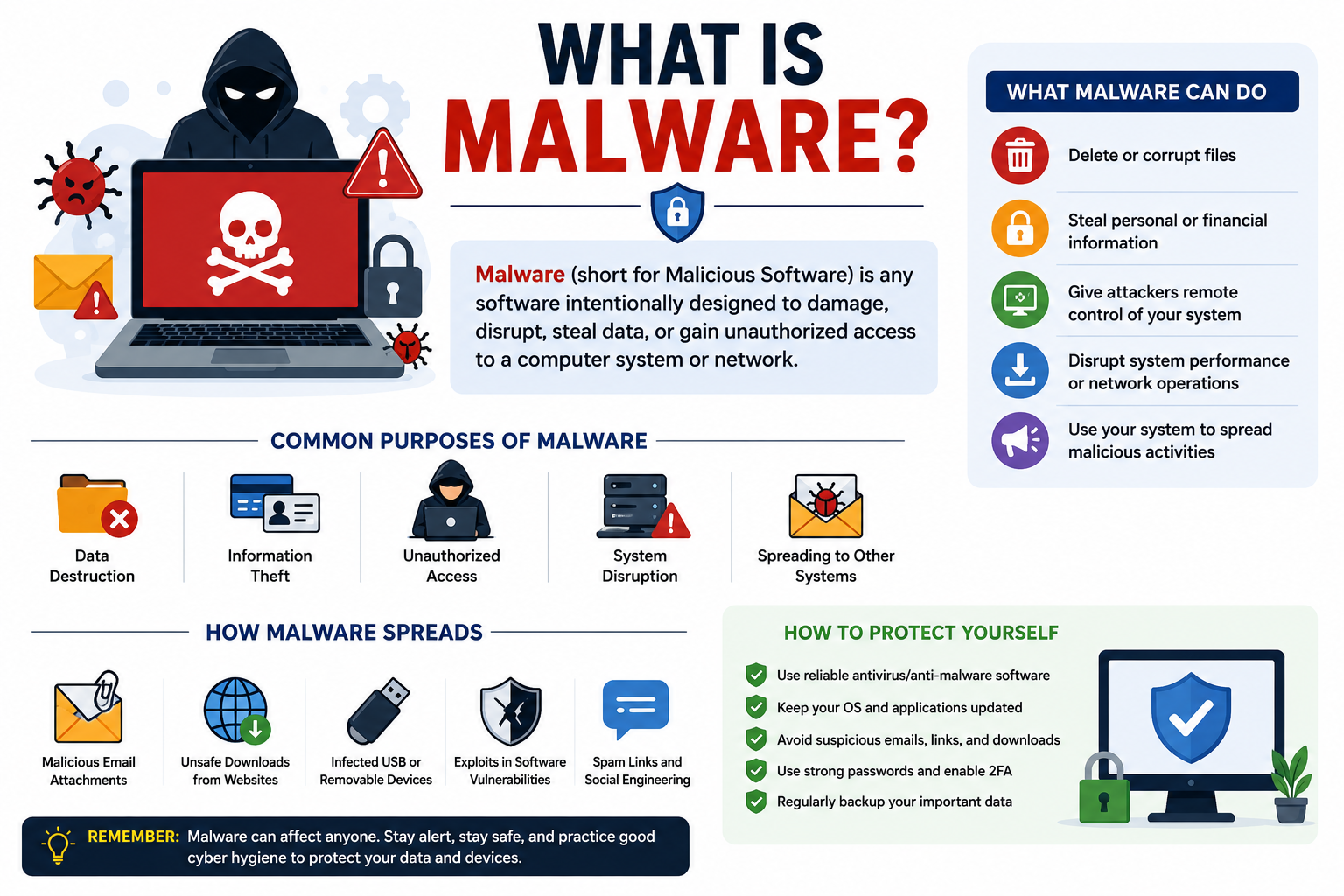
Malware attacks millions of devices every single day, targeting personal computers, smartphones, businesses, online banking platforms, and critical infrastructure around the world. Cybercriminals use malware to steal sensitive data, demand ransom payments, spy on individuals, and disrupt entire organizations. Understanding what is malware is no longer knowledge reserved for IT professionals. Every person who uses a smartphone, laptop, or internet banking account needs to understand this threat and know how to defend against it effectively.
Quick Answer
What is malware? Malware, short for malicious software, is any program or code deliberately designed to damage, disrupt, or gain unauthorized access to computer systems, networks, or devices. It includes viruses, ransomware, spyware, trojans, worms, and more. Cybercriminals use malware to steal data, demand ransom, spy on users, and cause serious harm to individuals and organizations.
What Is Malware?
Malware is a broad term that describes any software intentionally created to cause harm to a computer, network, server, or user. The word itself is a combination of “malicious” and “software.” Cybercriminals design malware to perform harmful actions without the victim’s knowledge or consent.
Think of malware as a digital weapon. Just as a physical weapon can take many forms, malware comes in dozens of different types, each built to cause a specific kind of damage. Some malware steals your passwords. Some locks your files and demands a ransom payment. Some spies on everything you type. Some quietly recruits your device into a massive network of compromised computers that attackers control remotely.
Malware is dangerous because it often operates invisibly. Most victims have no idea their device is infected until the damage is already done. A cybercriminal might steal your banking credentials weeks before you notice any suspicious activity in your account. A business might run ransomware-infected systems for days before the attackers decide to trigger the attack and encrypt all the company’s files.
Real-world examples illustrate just how devastating malware can be. The WannaCry ransomware attack in 2017 infected more than 230,000 computers across 150 countries in a single day, crippling hospitals, banks, and telecommunications companies. The Emotet malware, initially discovered as a banking trojan, evolved into one of the most dangerous and widespread malware delivery networks in history before law enforcement agencies took it down in 2021. These incidents demonstrate that malware is not an abstract threat. It causes real financial losses, disrupts real organizations, and harms real people.
How Does Malware Work?
Malware follows a predictable lifecycle from initial infection to causing damage. Understanding each stage helps you recognize threats earlier and respond more effectively.
Infection
The infection stage is where malware first enters a device or network. Cybercriminals use many methods to deliver malware to victims. They send phishing emails with malicious attachments, create convincing fake websites that trigger drive-by downloads, hide malware inside seemingly legitimate software downloads, and exploit vulnerabilities in outdated software or operating systems.
The infection often happens in seconds and requires very little action from the victim. In some cases, simply visiting a compromised website is enough to trigger an infection. In other cases, the attacker relies on tricking the user into clicking a link or opening a file that appears completely harmless.
Installation
Once malware reaches a device, it must install itself to begin operating. During this stage, the malware copies itself to specific locations on the system, sometimes in temporary folders, system directories, or startup locations where it will automatically run every time the device powers on.
Sophisticated malware actively works to hide during installation. It might disguise itself as a legitimate system file, inject its code into a running process, or modify system configurations to avoid detection by security software. Some malware installs additional components or downloads secondary payloads from remote servers controlled by the attacker.
Execution
After installing successfully, the malware begins executing its primary function. What happens during execution depends entirely on the type of malware involved. A keylogger starts recording every keystroke. Ransomware begins encrypting files. Spyware starts capturing screenshots and monitoring browser activity. A botnet agent opens a connection to the attacker’s command-and-control server and awaits instructions.
Execution often happens silently in the background. The malware typically consumes minimal system resources initially to avoid triggering performance alerts that might cause the user to investigate. Advanced malware may even schedule its most damaging actions for times when the device is less likely to be actively monitored.
Damage
The damage stage represents the malware achieving its intended harmful goal. This might mean stolen banking credentials sent to an attacker’s server, encrypted files with a ransom demand displayed on screen, sensitive personal data exfiltrated to a remote location, or the device conscripted into launching attacks against other targets.
The extent of the damage varies enormously depending on the malware type and the attacker’s objectives. Some malware causes immediate, visible damage like file encryption. Other malware operates quietly for months, silently collecting valuable data before the attacker decides to monetize it. In either case, the victim faces real consequences ranging from financial loss to identity theft to complete data destruction.
Spreading
Many malware types do not stay contained to a single device. After establishing itself, malware often attempts to spread to other connected systems. Worms scan networks for vulnerable devices and replicate themselves automatically. Trojans may download additional malware that spreads further. Botnets use compromised devices to distribute malware to new victims through spam campaigns and automated attacks.
Spreading dramatically amplifies the damage malware can cause. A single infected device in a corporate network can become the starting point for a full-scale breach that compromises hundreds of servers and thousands of client records within hours.
Common Types of Malware
Malware comes in many distinct forms, each designed with specific attack capabilities. Understanding the differences helps you recognize threats and respond appropriately.
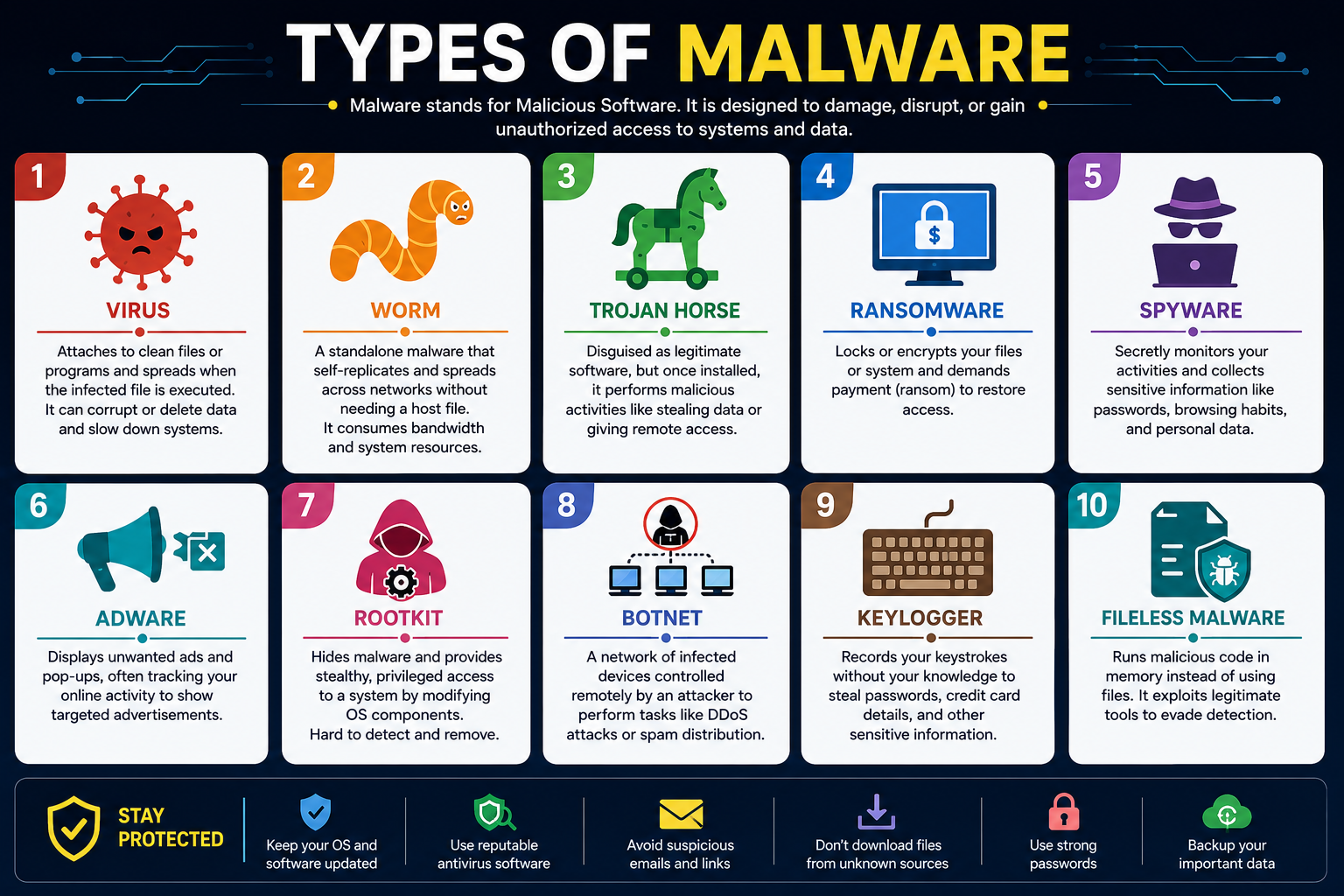
Types of Malware Comparison Table
| Malware Type | Primary Goal | Spreads Automatically | Visible to User | Most Common Target |
|---|---|---|---|---|
| Virus | Damage files and systems | Yes, through files | Sometimes | Personal computers |
| Worm | Self-replicate and spread | Yes, through networks | Rarely | Networks and servers |
| Trojan Horse | Disguise and enable access | No | Rarely | Individuals and businesses |
| Ransomware | Extort money | Sometimes | Yes (ransom note) | Businesses and individuals |
| Spyware | Steal information | No | Rarely | Individuals |
| Adware | Display unwanted ads | Sometimes | Yes (ads) | Home users |
| Rootkit | Maintain persistent access | No | Almost never | Business systems |
| Botnet | Remote control of devices | Yes | Rarely | All device types |
| Keylogger | Record keystrokes | No | Rarely | Banking and credential targets |
| Fileless Malware | Evade detection | No | Almost never | Enterprise environments |
Virus
A computer virus is malicious code that attaches itself to legitimate files or programs and replicates when those files are opened or executed. Just like a biological virus needs a host cell to reproduce, a computer virus needs a host file to spread. When an infected file is shared with another user and opened on their system, the virus spreads to that system as well.
Symptoms: Slow system performance, files becoming corrupted, programs crashing unexpectedly, and unusual error messages appearing during normal operations.
Risks: Viruses can corrupt or delete files, damage software installations, and create entry points for additional malware. Some viruses target operating system components and can render a device completely unusable.
Prevention: Keep antivirus software active and updated, avoid opening email attachments from unknown senders, and download software only from official and trusted sources.
Worm
A worm is self-replicating malware that spreads across networks without needing to attach to a host file or require any user action. Once a worm infects one device, it automatically scans the network for other vulnerable devices and copies itself to them. This self-propagating nature makes worms particularly dangerous in corporate environments where thousands of devices share the same network.
Symptoms: Unusual network activity, significantly slower network speeds, unexpected system slowdowns, and high bandwidth consumption without any obvious cause.
Risks: Worms can rapidly infect entire networks, consume enormous bandwidth, and deliver additional malicious payloads to every infected device. They can also create backdoors that attackers exploit for further access.
Prevention: Apply software patches promptly, maintain properly configured firewalls, and use network monitoring tools to detect unusual traffic patterns early.
For more on securing your network, see our guide on Network Security.
Trojan Horse
A trojan horse, commonly called a trojan, disguises itself as legitimate, useful software to trick users into installing it. Unlike viruses and worms, trojans do not self-replicate. Instead, they rely entirely on social engineering to deceive victims into running them willingly. Once installed, a trojan performs hidden malicious actions while appearing to function normally or doing nothing visible at all.
Symptoms: Unusual network connections, new programs appearing without installation, system settings changing unexpectedly, and antivirus alerts about suspicious processes.
Risks: Trojans commonly create backdoors that give attackers remote access to the infected device, download additional malware, steal credentials, and allow attackers to monitor user activity.
Prevention: Download software only from official websites and reputable app stores, verify software publishers before installation, and maintain active antivirus protection that scans downloads automatically.
Ransomware
Ransomware is malware that encrypts the victim’s files or locks their entire device and then demands a ransom payment, typically in cryptocurrency, in exchange for restoring access. Ransomware attacks have grown dramatically in scale and sophistication over recent years, targeting hospitals, schools, government agencies, and businesses of every size.
Symptoms: Files suddenly become inaccessible with unusual file extensions, a ransom demand message appears on screen, and the desktop background often changes to display the attacker’s instructions.
Risks: Ransomware can cause complete data loss, significant financial damages from ransom payments and recovery costs, operational downtime, and severe reputational damage for affected organizations.
Prevention: Maintain regular offline backups of all important data, apply security patches promptly, use endpoint protection software, and train staff to recognize phishing attacks that commonly deliver ransomware.
See our resource on Common Cyber Threats for more on defending against ransomware.
Spyware
Spyware secretly monitors user activity and collects sensitive information without the user’s knowledge or consent. It observes browsing habits, captures login credentials, records financial information, and sends all collected data back to the attacker. Some spyware also activates webcams or microphones to monitor victims in real time.
Symptoms: Slower device performance, increased data usage, browser settings changing without user action, new toolbars or extensions appearing in browsers, and unusual battery drain on mobile devices.
Risks: Spyware leads to identity theft, financial fraud, unauthorized account access, and serious privacy violations. Advanced commercial spyware has been used to target journalists, activists, and political figures globally.
Prevention: Install reputable anti-spyware and antivirus software, keep all software updated, avoid clicking suspicious links, and regularly review browser extensions and installed applications for anything unfamiliar.
Adware
Adware automatically displays unwanted advertisements on infected devices, often in the form of pop-up windows, browser redirects, or injected ads on websites. While some adware is simply annoying rather than immediately dangerous, many adware programs also collect user data without consent and can serve as delivery vehicles for more harmful malware.
Symptoms: Excessive pop-up advertisements appearing constantly, browser homepage changing without permission, new browser toolbars appearing, and websites displaying far more ads than usual.
Risks: Beyond the nuisance factor, adware slows down device performance, collects personal browsing data, and sometimes delivers malicious advertisements that lead to more serious malware infections.
Prevention: Download software only from trusted sources, carefully read installation dialogs to decline bundled software offers, use a reputable browser with ad-blocking capabilities, and scan devices regularly with anti-malware tools.
Rootkit
A rootkit is an especially dangerous type of malware designed to gain deep administrative access to a system while hiding its presence as thoroughly as possible. Rootkits modify core operating system components to conceal themselves and other malware from security software, system administrators, and standard detection tools. Because of this deep hiding capability, rootkits are among the most difficult malware infections to detect and remove.
Symptoms: Rootkits rarely produce obvious symptoms, which is precisely what makes them so dangerous. Subtle signs might include unexplained system instability, security software that stops functioning properly, or performance issues that appear without explanation.
Risks: Rootkits give attackers persistent, deeply embedded access to compromised systems. They can disable security tools, hide other malware, intercept communications, and maintain long-term access for extended espionage or data theft operations.
Prevention: Keep systems fully patched, use security software with rootkit detection capabilities, enable Secure Boot features on modern systems, and consider periodic complete system integrity checks using trusted offline scanning tools.
Botnet
A botnet is a network of malware-infected devices, often called “bots” or “zombies,” that attackers control remotely from a central command-and-control server. Individual device owners typically have no idea their device has been recruited into a botnet. Attackers use botnets to launch distributed denial-of-service (DDoS) attacks, send spam email campaigns, distribute additional malware, and conduct credential stuffing attacks against websites.
Symptoms: Unusual network activity during idle periods, increased bandwidth consumption, slower than usual internet speeds, and device running hot without any active user applications.
Risks: Botnet membership causes your device to participate in criminal activities without your knowledge, potentially implicating you in attacks against other targets. Botnets also leave devices exposed to further exploitation by their controllers.
Prevention: Keep all software updated and patched, use a properly configured firewall, install reputable security software, and monitor network traffic for unusual outbound connections.
Keylogger
A keylogger records every keystroke a user types on an infected device. This captured data typically includes usernames, passwords, credit card numbers, personal messages, search queries, and any other text the user enters. Attackers use keyloggers specifically to steal login credentials for banking, email, social media, and corporate accounts.
Symptoms: Keyloggers almost never produce visible symptoms. Victims typically discover an infection only after noticing unauthorized account access or fraudulent financial transactions.
Risks: Keyloggers directly enable identity theft, financial fraud, unauthorized account takeovers, and corporate data breaches. A single keylogger infection can expose credentials for dozens of different accounts.
Prevention: Use a password manager that auto-fills credentials without keyboard input, enable multi-factor authentication on all important accounts, keep antivirus software active and updated, and avoid using public computers for sensitive activities.
Fileless Malware
Fileless malware is a sophisticated type of attack that operates entirely in a device’s memory without writing any files to the hard drive. Because traditional security tools look for malicious files on disk, fileless malware is exceptionally difficult to detect. It typically hijacks legitimate system tools like PowerShell or Windows Management Instrumentation to execute its malicious code.
Symptoms: Fileless malware produces almost no obvious symptoms, making it one of the hardest infection types for victims to identify without specialized security monitoring tools.
Risks: Fileless malware is highly effective against organizations with strong traditional security controls because it bypasses file-based detection entirely. It is frequently used in targeted attacks against enterprises and government agencies.
Prevention: Use endpoint detection and response (EDR) solutions that monitor behavioral patterns rather than just files, restrict the use of powerful system administration tools to authorized personnel only, and implement application whitelisting policies.
How Malware Spreads
Understanding how malware reaches devices helps you avoid the most common infection pathways.
Phishing Emails
Phishing emails remain the single most common malware delivery method. Attackers craft convincing emails that appear to come from trusted sources like banks, government agencies, or colleagues. These emails contain malicious attachments or links that deliver malware when opened or clicked.
Fake Websites
Cybercriminals create convincing counterfeit versions of legitimate websites to trick visitors into downloading malware or entering credentials. They also compromise legitimate websites by injecting malicious code that automatically downloads malware to visitors’ devices without any user interaction.
Software Downloads
Malware frequently hides inside pirated software, free utility programs, game mods, and applications downloaded from unofficial sources. The malware installs alongside or instead of the promised software, infecting the device without the user realizing anything is wrong.
USB Drives
Infected USB drives spread malware when plugged into a computer. Some sophisticated malware can infect a USB drive automatically and then spread to any computer the drive connects to afterward. Never plug an unknown USB drive into your device, regardless of where you found it.
Malicious Advertisements
Malvertising involves attackers placing malicious code inside online advertisements that appear on legitimate websites. When users view or click these ads, the malware downloads automatically. This method is particularly dangerous because victims trust the legitimate websites hosting the ads.
Infected Mobile Apps
Malicious apps appear in both official and unofficial app stores. Even apps that pass initial review can contain hidden malware that activates after installation. Third-party app stores outside of official platforms carry significantly higher risk.
Public Wi-Fi Attacks
Attackers on public Wi-Fi networks can intercept unencrypted traffic, redirect users to fake websites, and deliver malware through man-in-the-middle attacks. Using a VPN on public Wi-Fi significantly reduces this risk.
Signs Your Device Has Malware
Recognizing a malware infection early significantly limits the potential damage. Watch for these fifteen warning signs on any of your devices.
- Your device runs noticeably slower than usual without any clear explanation.
- Programs crash frequently or behave in unexpected and unusual ways.
- Your browser homepage has changed to a site you did not set.
- Unknown browser extensions or toolbars have appeared without installation.
- Excessive pop-up advertisements appear even when you are not browsing the web.
- Your internet connection seems unusually slow or consumes more data than expected.
- Your device’s hard drive light blinks constantly even when you are not actively using it.
- New programs appear in your installed applications list that you do not remember installing.
- Your security software suddenly stops working or becomes impossible to open.
- Your email contacts report receiving strange messages from your account.
- Your device overheats regularly even during light tasks or when sitting idle.
- Files appear missing, corrupted, or have changed their file extensions unexpectedly.
- You notice unauthorized account access, transactions, or password change requests.
- Your device’s battery drains much faster than it normally does, particularly on mobile devices.
- Your cursor moves on screen by itself or applications open and close without your input.
Malware vs Virus
Many people use “malware” and “virus” interchangeably, but these terms have distinct meanings in cybersecurity. The comparison table below clarifies the key differences.
Malware vs Virus Table
| Factor | Malware | Virus |
|---|---|---|
| Definition | Broad term for all malicious software | A specific type of malware that attaches to files |
| Scope | Encompasses all types of malicious programs | One specific category within the malware family |
| Spread Method | Varies by type (network, email, downloads, etc.) | Spreads by attaching to and infecting other files |
| Requires Host File | Depends on the type | Yes, always needs a host file to spread |
| Examples | Viruses, worms, ransomware, spyware, trojans | ILOVEYOU, Melissa, CIH (Chernobyl) virus |
| Self-Replicating | Some types are, others are not | Yes, replication is a defining characteristic |
| Primary Damage | Varies widely by specific type | File corruption, system damage, spreading |
| Detection | Requires comprehensive security software | Detectable by standard antivirus tools |
The simplest way to remember the distinction is this: all viruses are malware, but not all malware is a virus. Malware is the overarching category that contains dozens of specific threat types, of which a virus is just one.
Malware vs Ransomware
Ransomware receives significant media attention and is often discussed separately from general malware. Understanding how ransomware fits within the broader malware landscape is important for a complete picture of cybersecurity threats.
Malware vs Ransomware Table
| Factor | Malware (General) | Ransomware (Specific Type) |
|---|---|---|
| Definition | Any malicious software | Malware that encrypts files and demands payment |
| Primary Goal | Varies by type | Financial extortion through data encryption |
| Victim Interaction | Often operates silently | Makes itself known immediately with a ransom note |
| Financial Impact | Varies widely | Direct ransom demands plus recovery costs |
| Recovery Difficulty | Varies by type | Extremely difficult without clean backups |
| Common Targets | Everyone | Businesses, hospitals, government agencies |
| Payment Method | Not always applicable | Usually cryptocurrency |
| Notable Examples | Emotet, Zeus, WannaCry | WannaCry, LockBit, REvil, Ryuk |
| Best Defense | Layered security approach | Regular offline backups plus strong endpoint security |
Ransomware is arguably the most financially damaging category within the broader malware family. Organizations paid ransoms totaling billions of dollars globally in recent years, and the total cost including downtime and recovery often far exceeds the ransom amount itself.
How to Prevent Malware
Prevention is always far more effective and less costly than dealing with an active infection. Here are twenty actionable steps everyone should take to protect against malware attacks.
Malware Prevention Checklist
| Prevention Action | Priority | Applicable To |
|---|---|---|
| Install reputable antivirus software | Critical | All devices |
| Keep operating system updated | Critical | All devices |
| Update all software and applications | Critical | All devices |
| Enable firewall protection | Critical | Computers and networks |
| Use strong, unique passwords | Critical | All accounts |
| Enable multi-factor authentication | Critical | All important accounts |
| Back up data regularly to offline storage | Critical | All devices |
| Avoid clicking suspicious links | High | All users |
| Download only from official sources | High | All users |
| Scan USB devices before use | High | Computer users |
| Use a VPN on public Wi-Fi | High | Mobile and laptop users |
| Review browser extensions regularly | High | All browser users |
| Enable browser security features | High | All users |
| Use a password manager | High | All users |
| Educate yourself on phishing tactics | High | All users |
| Avoid pirated software | High | All users |
| Enable automatic updates | Medium | All devices |
| Monitor bank statements regularly | High | All users |
| Restrict administrative privileges | High | Business environments |
| Implement email security filtering | High | Business environments |
- Install reputable antivirus and anti-malware software on every device and keep it updated with the latest threat definitions.
- Keep your operating system updated with all security patches applied promptly after they are released.
- Update every application and program on your devices regularly since outdated software contains vulnerabilities attackers actively exploit.
- Enable your firewall at all times and configure it to block unauthorized incoming connections.
- Use strong, unique passwords for every account, avoiding the same password across multiple services.
- Enable multi-factor authentication (MFA) on all important accounts including email, banking, and social media.
- Back up important files regularly to an external drive or secure cloud service that is not continuously connected to your main system.
- Think carefully before clicking any link in an email, text message, or social media post, even from people you know.
- Download software only from official websites, official app stores, and verified publishers.
- Scan every USB drive with security software before opening any files it contains.
- Use a reputable VPN when connecting to public Wi-Fi networks to protect your traffic from interception.
- Review your browser extensions and installed applications periodically and remove anything unfamiliar or unnecessary.
- Enable your browser’s built-in security features, including safe browsing warnings and pop-up blocking.
- Use a password manager to generate and store complex passwords without needing to type them manually.
- Learn to recognize phishing emails by checking sender addresses carefully and being skeptical of urgent requests.
- Never download pirated software, cracked programs, or modified applications from unofficial sources.
- Enable automatic updates on your devices so security patches install without requiring manual attention.
- Review your bank and credit card statements regularly to catch unauthorized transactions that might indicate credential theft.
- Limit administrative privileges on business devices so that malware cannot easily make system-wide changes if a standard user account is compromised.
- Deploy email security filtering in business environments to automatically identify and quarantine suspicious messages before they reach employees.
How to Remove Malware Safely
If you suspect your device is infected with malware, follow these steps carefully to minimize damage and remove the threat effectively.
Step 1: Disconnect from the Internet
Immediately disconnect your device from the internet and any local network connections. This prevents malware from sending stolen data to attackers, downloading additional malicious payloads, or spreading to other devices on your network.
Step 2: Enter Safe Mode
Restart your computer in Safe Mode, which loads only essential system processes and prevents most malware from launching automatically. On Windows, you can access Safe Mode by pressing F8 during startup or through the Advanced Startup Options menu. Safe Mode makes malware much easier to detect and remove.
Step 3: Run a Full Security Scan
Open your antivirus or anti-malware software and run a complete, full-system scan. If you suspect your existing security software might be compromised, download a second opinion scanner from a reputable vendor using an uninfected device and transfer it via a clean USB drive.
Step 4: Remove All Detected Threats
Follow your security software’s instructions to quarantine and remove all detected threats. Review the list of detected items carefully before taking action. After removal, restart your device and run a second scan to confirm that the infection has been fully cleared.
Step 5: Update All Software and Passwords
After confirming the device is clean, immediately update your operating system, all applications, and your security software. Change the passwords for all accounts you used on the infected device, starting with the most sensitive ones like email and banking. Enable multi-factor authentication if you have not done so already.
Step 6: Restore from Backup if Necessary
If the malware caused significant damage or the infection cannot be fully removed, restoring from a clean backup taken before the infection occurred is the safest option. For severe rootkit infections or cases where restoration is not possible, a complete operating system reinstallation may be necessary. This is why maintaining regular backups is so critically important.
Step 7: Report the Incident
If the infection involved data theft, financial fraud, or ransomware, report the incident to relevant authorities. In the United States, you can report cybercrime to CISA and the FBI’s Internet Crime Complaint Center. Reporting helps authorities track malware campaigns and potentially warn other potential victims.
Best Malware Protection Tools
Building a strong defense against malware requires using multiple complementary security tools. No single tool protects against every type of threat.
Malware Protection Tools Comparison Table
| Tool Type | Primary Protection | Examples | Cost |
|---|---|---|---|
| Antivirus Software | Detects and removes malware | Windows Defender, Malwarebytes, Bitdefender | Free to paid |
| Anti-Malware Software | Broader malware detection and removal | Malwarebytes, HitmanPro | Free to paid |
| Firewall | Blocks unauthorized network connections | Windows Firewall, hardware routers | Free to paid |
| Browser Protection | Blocks malicious websites and downloads | Built-in browser safe browsing, extensions | Free |
| Password Manager | Prevents credential theft via strong passwords | Bitwarden, 1Password, Dashlane | Free to paid |
| VPN | Encrypts traffic on untrusted networks | ProtonVPN, Mullvad, NordVPN | Paid |
Antivirus Software
Antivirus software is the cornerstone of malware defense for most users. Modern antivirus tools use signature-based detection, behavioral analysis, and cloud-based threat intelligence to identify and block both known and emerging threats. Choose a solution from a reputable vendor and ensure automatic updates remain enabled at all times.
Anti-Malware Software
Dedicated anti-malware tools like Malwarebytes complement antivirus software by specifically targeting adware, spyware, potentially unwanted programs, and other threats that traditional antivirus programs sometimes miss. Running both types of tools together provides broader coverage against the full spectrum of malware threats.
Firewalls
A properly configured firewall monitors network traffic and blocks unauthorized connections that might deliver malware or allow existing malware to communicate with attacker-controlled servers. Every device should run a software firewall, and every network should have a hardware firewall at its perimeter.
Visit our complete guide on What Is a Firewall?
Browser Protection
Modern browsers include built-in safe browsing features that warn you before visiting known malicious websites. Additionally, browser security extensions can provide extra layers of protection against malicious advertisements, tracking scripts, and phishing sites. Keep your browser fully updated to benefit from the latest security improvements.
Password Managers
Password managers generate and store strong, unique passwords for every account and auto-fill them without requiring you to type them, which directly defeats keyloggers. They also alert you when your credentials appear in known data breaches, allowing you to change passwords before attackers exploit them.
VPNs
A virtual private network encrypts all traffic leaving your device, protecting it from interception on public Wi-Fi networks where attackers might attempt to deliver malware through man-in-the-middle attacks.
For a complete explanation of VPN technology, see our guide on What Is a VPN?.
Common Malware Myths
Widespread misconceptions about malware lead many users to take unnecessary risks with their digital security.
Myth 1: Macs Cannot Get Malware
Apple devices are not immune to malware. While macOS faces fewer threats than Windows simply due to market share historically, malware specifically targeting macOS has grown significantly in recent years. Mac users absolutely need security software and safe browsing habits.
Myth 2: I Would Know If My Device Was Infected
Modern malware is specifically designed to be invisible. Sophisticated threats like keyloggers, spyware, rootkits, and fileless malware operate for months without producing any obvious symptoms. Regular security scans are essential regardless of how normally your device appears to be running.
Myth 3: Antivirus Software Alone Is Enough
Antivirus software is essential but not sufficient on its own. Sophisticated malware often evades traditional antivirus detection. A layered approach combining antivirus, anti-malware tools, firewalls, browser protection, and safe user behavior provides much more comprehensive protection.
Myth 4: Only Careless Users Get Infected
Sophisticated phishing attacks fool security professionals and executives regularly. Even careful, experienced users can encounter convincing fake websites or cleverly crafted phishing emails. Malware also spreads through compromised legitimate websites that users have no reason to distrust.
Myth 5: Malware Only Comes from Sketchy Websites
Malvertising delivers malware through advertisements on completely legitimate, high-traffic websites. Attackers have successfully placed malicious ads on major news sites, video platforms, and popular entertainment websites. You do not need to visit disreputable websites to encounter malware.
Myth 6: Free Antivirus Is Never Effective
Several reputable vendors offer free antivirus products that provide genuine protection. Windows Defender, built directly into Windows 10 and 11, consistently scores well in independent security testing and offers solid baseline protection for home users at no cost.
Myth 7: Smartphones Are Safe from Malware
Smartphones are frequent targets for malware. Malicious apps, phishing messages, and browser-based attacks successfully compromise mobile devices running both Android and iOS. Mobile malware can steal contacts, intercept SMS messages including two-factor authentication codes, and track your location.
Myth 8: Paying the Ransom Fixes Ransomware
Paying a ransomware demand does not guarantee data recovery. Many victims pay and never receive working decryption keys. Additionally, paying demonstrates to attackers that you are a viable target, potentially making you more likely to face future attacks. The only reliable ransomware defense is clean, offline backups.
Myth 9: Malware Is Only a Problem for Large Businesses
Small businesses and individuals are among the most frequently targeted malware victims because they typically have fewer security controls in place. Attackers specifically target smaller organizations knowing that defenses are likely weaker and the targets are less likely to detect or respond effectively to an attack.
Myth 10: Deleting a Suspicious File Removes Malware
By the time a suspicious file is visible to the user, malware has often already installed itself in multiple locations across the system. Simply deleting the obvious file rarely removes the complete infection. A thorough scan with reputable security software followed by professional removal is the appropriate response.
Future of Malware
The malware landscape continues to evolve in response to improving defenses, new technologies, and changing attacker motivations. Several major trends will define the threat environment in coming years.
AI-Powered Malware
Cybercriminals are beginning to use artificial intelligence to create more sophisticated malware that adapts its behavior to evade specific security tools, generates more convincing phishing content, and identifies the most valuable targets within compromised networks automatically. AI-powered malware represents a significant escalation in the sophistication of threats that defenders must prepare for.
Ransomware Evolution
Ransomware continues to grow more sophisticated and more destructive. Modern ransomware attacks involve double extortion tactics, where attackers both encrypt files and threaten to publicly release stolen data if the ransom is not paid. Ransomware-as-a-service platforms now allow technically unsophisticated criminals to launch professional-grade attacks using tools created by specialist criminal groups.
Cloud Malware
As organizations migrate more infrastructure to cloud environments, attackers follow. Cloud-specific malware targets misconfigured cloud storage buckets, compromises cloud service credentials, exploits container vulnerabilities, and moves laterally through cloud environments to maximize the damage from a single initial compromise. For more on securing cloud infrastructure, see our guide on Cloud Security.
Mobile Malware
Mobile malware is growing rapidly in both volume and sophistication. Attackers target smartphones to steal banking credentials, intercept two-factor authentication codes, track victim locations, and access corporate data through personal devices connected to business networks. Mobile device management and dedicated mobile security tools are becoming increasingly important components of a complete security strategy.
IoT Malware
The Internet of Things connects billions of devices with limited security capabilities, from smart home appliances to industrial control systems. Malware targeting IoT devices recruits them into massive botnets, uses them as entry points into home and corporate networks, and in critical infrastructure contexts, can cause physical damage through cyberattacks. As IoT adoption accelerates, IoT security will become one of the most critical challenges in cybersecurity.
Frequently Asked Questions
What is malware?
Malware is any software intentionally designed to cause harm to a computer, network, or user. It includes viruses, ransomware, spyware, trojans, worms, adware, rootkits, and many other threat types. Cybercriminals use malware to steal data, demand ransom payments, disrupt services, and conduct surveillance on victims.
How does malware spread?
Malware spreads through phishing emails with malicious attachments or links, fake or compromised websites, downloads from unofficial sources, infected USB drives, malicious advertisements, infected mobile apps, and attacks on public Wi-Fi networks. Understanding these pathways helps you avoid the most common infection routes.
Can malware steal passwords?
Yes. Several types of malware specifically target password theft. Keyloggers record every keystroke including passwords as you type them. Spyware captures login credentials from browsers and applications. Trojans may steal stored passwords directly from browsers and password databases on infected devices.
Is malware the same as a virus?
No. A virus is one specific type of malware. Malware is the broader category that encompasses all malicious software including viruses, worms, trojans, ransomware, spyware, adware, rootkits, and many others. All viruses are malware, but malware includes many threats beyond viruses.
Can phones get malware?
Yes. Both Android and iOS devices can be infected with malware. Android faces a higher volume of malware threats due to its open app ecosystem, but sophisticated attacks have also successfully compromised iOS devices. Malicious apps, phishing messages, and browser exploits all represent active mobile malware delivery methods.
How do I remove malware?
Disconnect your device from the internet, restart in Safe Mode, run a complete scan with reputable antivirus or anti-malware software, remove all detected threats, update all software and passwords, and restore from a clean backup if necessary. For severe infections like advanced rootkits, a complete operating system reinstallation may be the most reliable solution.
Can Windows Defender detect malware?
Yes. Windows Defender, officially called Microsoft Defender Antivirus, is a capable security tool built into Windows 10 and 11. It consistently performs well in independent security testing and provides solid protection against many common malware threats. For additional coverage against broader malware types, combining it with a dedicated anti-malware tool is a good practice.
What is ransomware?
Ransomware is malware that encrypts the victim’s files or locks their device and demands a cryptocurrency payment in exchange for restoring access. It is one of the most financially damaging forms of malware, costing organizations billions of dollars annually through ransom payments, recovery costs, and operational downtime.
What is spyware?
Spyware is malware that secretly monitors your activity, collects sensitive information like passwords and financial data, and sends it to attackers without your knowledge. Some spyware also activates cameras and microphones to conduct real-time surveillance. It operates silently and rarely produces obvious symptoms.
Can antivirus remove malware?
Reputable antivirus and anti-malware software can detect and remove many types of malware effectively. However, highly sophisticated threats like advanced rootkits or deeply embedded fileless malware may require specialized tools or a complete system reinstallation to remove fully. Regular scans and prompt response to alerts maximize the effectiveness of security software.
How do I know if my computer is infected?
Common signs include slower performance, frequent program crashes, browser settings changing unexpectedly, excessive pop-up advertisements, unusual network activity, security software that stops working, unfamiliar programs appearing, and contacts reporting strange messages from your accounts. However, many sophisticated malware types produce no obvious symptoms, making regular security scans essential.
Is malware illegal?
Creating, distributing, and deploying malware is illegal in virtually every jurisdiction around the world. Penalties for malware-related crimes range from significant fines to lengthy prison sentences. Even possessing certain types of malicious tools with intent to cause harm is illegal in many countries.
Can Macs get malware?
Yes. Despite the common misconception that Macs are immune, Apple devices face real and growing malware threats. macOS-specific malware including spyware, adware, trojans, and ransomware exists and continues to grow in volume as Mac market share increases and attackers see greater value in targeting Apple users.
How can businesses prevent malware?
Businesses should implement a multi-layered security approach including enterprise-grade endpoint security software, properly configured firewalls, email security filtering, regular security awareness training for all employees, formal patch management processes, network segmentation, strong access controls, and regular security assessments. For comprehensive guidance, see our guide on Cybersecurity Best Practices.
What is the future of malware?
The future of malware includes AI-powered threats that adapt to evade specific defenses, increasingly sophisticated ransomware with double and triple extortion tactics, growing cloud-targeted malware, rapidly expanding mobile malware, and attacks on IoT devices with limited security protections. Staying informed and maintaining strong, layered defenses is more important than ever.
People Also Ask
What is malware?
Malware is malicious software intentionally designed to damage, disrupt, or gain unauthorized access to computer systems, networks, and devices. It includes viruses, ransomware, spyware, trojans, worms, and many other threat categories.
What are the different types of malware?
The main types of malware include viruses, worms, trojan horses, ransomware, spyware, adware, rootkits, botnets, keyloggers, and fileless malware. Each type uses different methods to infect systems and cause different categories of damage.
How does malware infect a computer?
Malware infects computers through phishing emails, malicious website downloads, infected USB drives, compromised software installations, malicious advertisements, and exploitation of unpatched software vulnerabilities.
Can malware steal personal information?
Yes. Spyware, keyloggers, and trojans specifically target personal information including passwords, banking credentials, credit card numbers, and identity documents, sending this data to attackers without the victim’s knowledge.
How do I remove malware?
Disconnect from the internet, restart in Safe Mode, run a complete scan with reputable security software, remove detected threats, update all software and passwords, and restore from a clean backup if the infection caused significant damage.
Is malware the same as a virus?
No. A virus is one specific type of malware. Malware is the broader category that includes viruses, worms, ransomware, spyware, trojans, adware, rootkits, and many other threat types.
Can smartphones get malware?
Yes. Both Android and iOS devices can be infected with malware through malicious apps, phishing messages, browser exploits, and connections to compromised networks.
What is ransomware?
Ransomware is malware that encrypts the victim’s files and demands a cryptocurrency payment to restore access. It is among the most financially damaging forms of malware affecting individuals and organizations globally.
What is spyware?
Spyware is malware that secretly monitors user activity, collects sensitive information like passwords and financial data, and transmits that data to attackers without the victim’s awareness or consent.
What is the best way to prevent malware?
The best prevention combines reputable antivirus software, keeping all software updated, enabling a firewall, using strong passwords with multi-factor authentication, backing up data regularly, and practicing safe browsing habits consistently.
Final Thoughts
Understanding what is malware and how it operates is one of the most valuable steps you can take toward protecting your digital life in 2026. Malware threats are not slowing down. They are growing in sophistication, diversity, and impact every single year. Cybercriminals continuously develop new techniques to evade defenses, reach new victims, and maximize the damage they cause to individuals and organizations alike.
The good news is that effective protection does not require expert-level technical knowledge. Following the twenty prevention practices outlined in this guide, using reputable security tools, keeping your software updated, and staying alert to the warning signs of infection will protect you against the vast majority of malware threats you are likely to encounter. Combining these habits with a genuine understanding of how different malware types operate puts you significantly ahead of the average user when it comes to staying safe online.
Start with the fundamentals. Install reputable security software. Enable your firewall. Back up your important data today. Learn to recognize phishing attempts. These simple, consistent actions form the foundation of strong personal and organizational cybersecurity. For a broader view of staying safe online, explore our complete guides on What Is Cybersecurity?,
References
- Cybersecurity and Infrastructure Security Agency (CISA). Malware and Cybersecurity Resources. Available at: https://www.cisa.gov
- National Institute of Standards and Technology (NIST). Cybersecurity Framework and Malware Incident Prevention Guidelines. Available at: https://www.nist.gov
- Microsoft Security. Malware Protection, Windows Defender, and Threat Intelligence Resources. Available at: https://www.microsoft.com/security
- CISA Stop Ransomware. Ransomware Guidance and Resources for Organizations. Available at: https://www.cisa.gov/stopransomware
- OWASP Foundation. Web Application Security and Malware Defense Resources. Available at: https://owasp.org
Disclaimer
This article is for educational and informational purposes only. It explains malware, cybersecurity risks, and defensive security practices. It does not provide instructions for creating, distributing, or using malicious software. Always use trusted security tools and follow legal cybersecurity practices.
Author Bio
TechOriginHub Editorial Team is a team of technology writers and cybersecurity researchers dedicated to publishing accurate, beginner-friendly, and up-to-date tech guides, reviews, and online security resources.