
 By saman zahra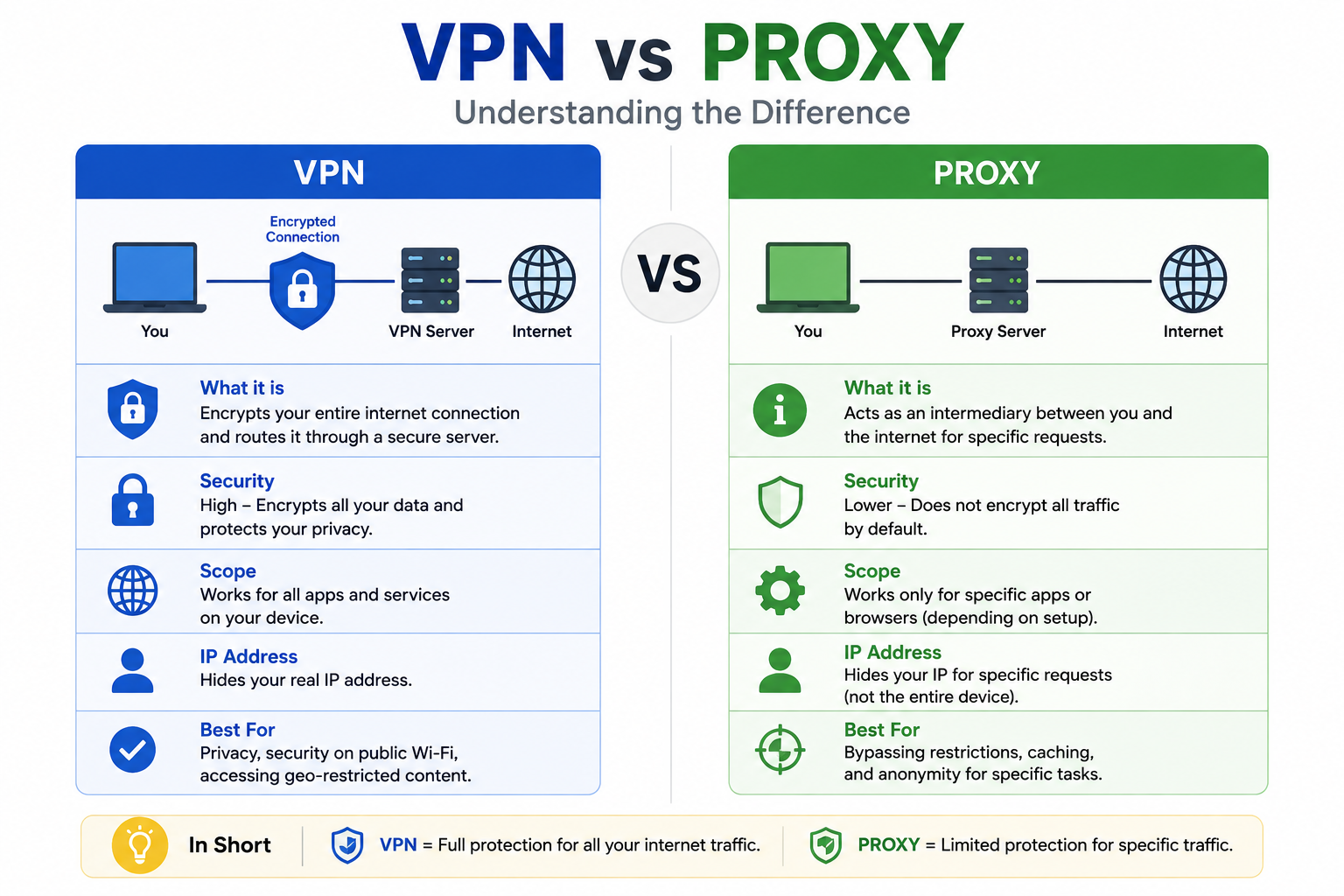
Every day, millions of people search for ways to browse the internet more privately, access content securely, or simply keep their personal data away from prying eyes. Two tools come up in nearly every conversation about online privacy: VPNs and proxy servers. Many people treat them as interchangeable, assuming they do essentially the same thing in slightly different ways. That assumption can leave you with far less protection than you think you have. Understanding the real differences in the VPN vs proxy debate, knowing how each tool actually works, and choosing the right one for your specific situation can make a significant difference to your online security and privacy in 2026.
Quick Answer
VPN vs Proxy: What is the difference? A VPN encrypts all your device’s internet traffic and routes it through a secure server, hiding your IP address and protecting your data. A proxy server only routes specific application traffic through an intermediary server to mask your IP but provides no encryption. VPNs offer stronger security and privacy. Proxies offer faster, simpler solutions for specific tasks like bypassing geo-restrictions.
What Is a VPN?
A VPN, which stands for Virtual Private Network, is a security technology that creates an encrypted connection between your device and a remote server operated by the VPN provider. All internet traffic from your device passes through this encrypted tunnel before reaching its destination on the internet. To any website, service, or observer monitoring network traffic, your traffic appears to come from the VPN server’s IP address rather than your real IP address and physical location.
Think of a VPN as a secure, private tunnel through a very public highway. Without a VPN, your data travels openly across the internet where internet service providers, network administrators, hackers on the same network, and other observers can potentially see where you are going and what data you are sending. With a VPN, all that traffic disappears into an encrypted tunnel that outside observers cannot read or trace back to you directly.
VPNs work at the operating system level, meaning they typically protect all internet traffic from your entire device rather than just traffic from a specific application or browser. This comprehensive coverage makes VPNs the preferred choice for users who need consistent, reliable privacy and security across everything they do online.
Common use cases for VPNs include securing internet connections on public Wi-Fi networks at airports, hotels, and coffee shops; enabling remote employees to access corporate networks securely; bypassing geographic content restrictions on streaming services; preventing internet service providers from monitoring browsing habits; and protecting sensitive communications from interception.
What Is a Proxy Server?
A proxy server is an intermediary computer that sits between your device and the internet. When you send a request to visit a website through a proxy, your request goes to the proxy server first. The proxy server then forwards your request to the destination website on your behalf. The website sees the proxy server’s IP address rather than your real IP address, giving you a basic level of anonymity.
Imagine a proxy server as a secretary who makes calls on your behalf. The person you are calling sees the secretary’s phone number on their caller ID, not yours. The secretary relays your request and delivers the response back to you. This process effectively hides your identity from the destination but does not provide any encryption or protection for the content of the communication itself.
Unlike VPNs, proxy servers typically operate at the application level. This means a proxy configured in your web browser only protects browser traffic. Other applications on your device, including email clients, file sharing applications, and other internet-connected software, continue to connect directly to the internet without any proxy protection.
Common use cases for proxy servers include bypassing website blocks in schools or workplaces, accessing geo-restricted content from specific regions, caching frequently accessed web content to improve loading speeds for multiple users on a network, filtering internet content in corporate or educational environments, and basic IP address hiding for general browsing without the need for encryption.
VPN vs Proxy: Key Differences
The table below provides a clear side-by-side comparison of the most important differences between VPNs and proxy servers to help you make an informed decision.
VPN vs Proxy Comparison Table
| Feature | VPN | Proxy Server |
|---|---|---|
| Encryption | Strong encryption of all traffic | No encryption in most cases |
| Privacy | High – hides traffic from ISPs and observers | Moderate – hides IP only |
| Security | Comprehensive device-wide protection | Limited, application-level only |
| Speed | Can reduce speed due to encryption overhead | Often faster due to no encryption |
| IP Address Masking | Yes, all device traffic | Yes, application-specific traffic only |
| Device Protection | Protects all applications on the device | Protects only configured applications |
| App Coverage | System-wide, all apps | Limited to configured applications |
| Ease of Setup | Simple app installation | Requires manual configuration per app |
| Cost | Free to premium paid options | Many free options available |
| Data Logging Risk | Varies by provider policy | Varies, many free proxies log data |
| Best For | Security, privacy, remote work | Speed, content bypassing, caching |
| Public Wi-Fi Safety | Excellent | Poor |
How Does a VPN Work?
Understanding exactly how a VPN provides its protection helps you appreciate why it offers significantly stronger security than a proxy server.
Encryption
When you connect to a VPN, the VPN client software on your device encrypts all outgoing data before it leaves your device. This encryption transforms your data into an unreadable format using strong cryptographic algorithms, typically AES-256, which is the same encryption standard used by governments and military organizations to protect classified information.
Because encryption happens before your data travels over any network, even your own internet service provider cannot read the content of your traffic. Network administrators at coffee shops, hotels, and other public locations cannot see what you are doing. An attacker who intercepts your encrypted data receives only meaningless ciphertext that is computationally infeasible to decode without the correct decryption key.
Secure Tunnel
After encrypting your data, the VPN establishes what is commonly called a secure tunnel between your device and the VPN server. This tunnel is a dedicated, protected pathway through the internet that keeps your encrypted data separate from all other network traffic. VPN protocols including OpenVPN, WireGuard, IKEv2, and L2TP/IPsec define the technical specifications for how this tunnel is created and maintained.
The tunnel concept means that every piece of data you send, whether you are loading a webpage, streaming video, sending email, or using any internet-connected application, travels through this single encrypted pathway to the VPN server before reaching its destination. The security benefits apply uniformly to everything your device sends and receives.
IP Address Masking
Once your encrypted data arrives at the VPN server, the server decrypts it and forwards your request to the intended destination on the internet. The destination website or service receives a connection that appears to originate from the VPN server’s IP address and geographic location, not from your actual device, real IP address, or physical location.
This IP masking serves multiple purposes. It prevents websites and online services from identifying your real location. It prevents your internet service provider from knowing which websites you visit. It also makes it significantly harder for advertisers, data brokers, and other online trackers to build profiles of your browsing behavior across different websites.
Secure Internet Traffic
The complete VPN protection cycle creates a situation where every aspect of your internet traffic benefits from security and privacy simultaneously. Your device encrypts data before sending it. Your ISP cannot read the encrypted traffic. The VPN server acts as your anonymous representative on the internet. The destination website cannot identify your real identity or location. The entire process happens transparently in the background, typically without any noticeable impact on your normal internet usage beyond a moderate reduction in connection speed.
How Does a Proxy Work?
Proxy servers achieve their functionality through a simpler and less secure process than VPNs.
Request Routing
When you configure an application or browser to use a proxy server, every internet request from that application is routed to the proxy server instead of going directly to the destination. The proxy server receives your request, examines it, and then forwards it to the destination website or server on your behalf. This redirection is the fundamental mechanism through which proxies provide their basic functionality.
The routing process itself does not add any encryption to your traffic. Your request travels from your device to the proxy server in the same format it would have traveled directly to the destination. Anyone monitoring the connection between your device and the proxy server can read the content of unencrypted requests, which is a significant security limitation compared to VPNs.
IP Address Masking
The destination website or server receives the forwarded request from the proxy server and therefore sees the proxy server’s IP address rather than your real IP address. This basic IP masking is the primary privacy benefit that proxy servers provide and the feature most commonly sought by people who use them.
However, this IP masking is limited and potentially unreliable. Many proxy servers, particularly free ones, include your real IP address in request headers that websites can read. Even proxy servers that properly hide your IP address may log your activity on the proxy server itself, creating a record of your browsing that could be accessed by the proxy operator or through legal processes.
Content Filtering
Proxy servers used in corporate, educational, and organizational environments frequently include content filtering capabilities that examine the websites and content users request and block access to sites that violate organizational policies. This filtering function works because all user requests pass through the proxy server, giving the proxy operator complete visibility into all web requests made through the proxy.
Content filtering is valuable for network administrators who need to enforce acceptable use policies, protect users from malicious websites, and ensure that organizational network resources are used appropriately. This same capability, however, means that whoever operates the proxy server has complete visibility into all the web traffic that passes through it.
Cached Data
One significant performance advantage that proxy servers provide over VPNs is content caching. When one user requests a webpage through a proxy, the proxy can store a local copy of that page. When subsequent users request the same page, the proxy delivers the cached copy rather than fetching fresh content from the origin server. This caching dramatically reduces bandwidth consumption and can significantly improve loading speeds for frequently accessed content in environments where many users share the same proxy.
Types of VPNs
VPN technology comes in several distinct configurations, each designed for specific use cases and user scenarios.
Types of VPN Comparison Table
| VPN Type | Primary Use | Who Uses It | Connection Method |
|---|---|---|---|
| Remote Access VPN | Individual users connecting to corporate networks | Remote employees, home users | Client software on device |
| Site-to-Site VPN | Connecting entire office networks together | Enterprises, multi-location organizations | Router-to-router or gateway |
| SSL VPN | Browser-based access to specific resources | Remote workers, contractors | Web browser, no client needed |
| Mobile VPN | Maintaining VPN connection on mobile devices | Mobile workers, field teams | Mobile VPN client app |
Remote Access VPN
Remote access VPNs allow individual users to connect securely to a private network from any internet-connected location. A user installs a VPN client application on their device, connects to the VPN server using their credentials, and then accesses the private network as if they were physically present in the office. Remote access VPNs are the type most home users and remote employees encounter in their daily lives.
Site-to-Site VPN
Site-to-site VPNs connect entire networks together across the internet, creating a unified, secure network that spans multiple physical locations. A company with offices in New York, London, and Tokyo might use site-to-site VPNs to connect all three office networks into a single, seamlessly integrated network. Individual users do not need to install any VPN software because the connection happens at the network gateway level.
SSL VPN
SSL VPNs use the same encryption technology that secures standard HTTPS web connections to provide VPN access through a web browser without requiring users to install dedicated client software. This approach simplifies deployment and access, particularly for contractors, visitors, or users on devices where installing additional software is not practical or permitted.
Mobile VPN
Mobile VPNs are specifically designed to maintain stable, persistent VPN connections on smartphones and tablets that frequently switch between different network connections including cellular data and various Wi-Fi networks. Mobile VPN clients seamlessly maintain the encrypted connection as the device moves between networks, preventing the security gaps that would occur if the VPN dropped and reconnected every time the device changed networks.
Types of Proxy Servers
Proxy servers also come in several distinct forms, each serving different purposes and operating through different technical mechanisms.
Types of Proxy Comparison Table
| Proxy Type | Direction | Primary Use | Encryption |
|---|---|---|---|
| Forward Proxy | Client to internet | Browse anonymously, bypass filters | No |
| Reverse Proxy | Internet to servers | Load balancing, protect servers | Optional |
| Transparent Proxy | Client to internet | Content filtering, caching | No |
| Anonymous Proxy | Client to internet | Basic IP hiding | No |
| SOCKS Proxy | Client to internet | General traffic routing | No (SOCKS5 supports auth) |
Forward Proxy
A forward proxy sits between client devices and the internet, acting as an intermediary for outgoing requests. When you use a forward proxy for browsing, your browser sends requests to the proxy rather than directly to websites. Forward proxies are the type most people encounter when they use a proxy for personal browsing privacy or to access content from different geographic regions.
Reverse Proxy
A reverse proxy works in the opposite direction from a forward proxy. Instead of representing client devices connecting to the internet, a reverse proxy sits in front of web servers and represents them to incoming clients. Reverse proxies are widely used by websites and web applications to distribute incoming traffic across multiple servers for load balancing, provide security screening of incoming requests, handle SSL encryption, and cache content to improve performance. Cloudflare’s content delivery network is a well-known example of reverse proxy technology at internet scale.
Transparent Proxy
A transparent proxy intercepts and routes client requests without the user being aware that their traffic is passing through a proxy at all. Users do not need to configure any settings because the proxy handles routing transparently at the network level. Transparent proxies are commonly deployed by internet service providers, corporations, and schools to filter content, enforce acceptable use policies, and cache web content to reduce bandwidth consumption.
Anonymous Proxy
An anonymous proxy explicitly hides the user’s real IP address from destination websites. These proxies identify themselves as proxy servers in their request headers but do not reveal the client’s actual IP address. Anonymous proxies provide a basic level of privacy for casual browsing but do not offer the encryption or comprehensive protection that VPNs provide.
SOCKS Proxy
SOCKS proxies operate at a lower level than HTTP proxies and can handle any type of internet traffic, not just web browsing. SOCKS5, the current version, supports authentication and can handle UDP traffic, making it useful for applications like email clients, file transfer programs, and torrent clients. SOCKS proxies provide more flexible traffic routing than HTTP proxies but still offer no encryption of transmitted data.
Advantages of Using a VPN
VPNs offer a comprehensive set of security and privacy benefits that make them the preferred choice for users who prioritize genuine online protection.
VPN Advantages Checklist
| Advantage | Description |
|---|---|
| Strong data encryption | AES-256 encryption protects all traffic from interception |
| Complete IP masking | Hides real IP address across all applications |
| Public Wi-Fi security | Protects against attacks on unsecured networks |
| ISP privacy | Prevents ISP from monitoring and selling browsing data |
| Geo-restriction bypassing | Access content from any geographic region |
| System-wide protection | Covers all applications, not just the browser |
| Remote work security | Secure access to corporate networks from anywhere |
| Reduces tracking | Limits advertiser and data broker surveillance |
| DNS leak protection | Prevents DNS queries from revealing browsing activity |
| Kill switch protection | Blocks internet if VPN drops to prevent unprotected exposure |
| Malware protection | Many VPNs include malicious website blocking |
| Multiple protocol options | Choose protocols optimized for speed or security |
| Legal and widely available | Supported on all major platforms and devices |
| Prevents bandwidth throttling | Stops ISPs from slowing specific types of traffic |
| Protects online banking | Secures financial transactions on any network |
- Strong military-grade encryption protects every piece of data your device sends or receives, making it completely unreadable to any third party who might intercept your traffic.
- Comprehensive IP address masking across all applications prevents websites, advertisers, and other online services from identifying your real location or building profiles of your activity.
- VPNs provide essential protection on public Wi-Fi networks at airports, hotels, and coffee shops where attackers frequently conduct man-in-the-middle attacks to intercept unprotected traffic.
- Your internet service provider cannot monitor your browsing habits, throttle specific types of traffic, or sell your browsing data to advertisers when your traffic passes through an encrypted VPN connection.
- VPNs enable access to streaming libraries, news sites, and online services that restrict access based on geographic location, making global content accessible from anywhere.
- Unlike proxies that only protect specific applications, VPNs protect all internet traffic from every application on your device simultaneously through a single connection.
- Remote employees can securely access corporate systems, shared drives, and internal applications through encrypted VPN connections as if they were physically present in the office.
- VPNs significantly reduce the effectiveness of online tracking and behavioral advertising by preventing the consistent IP-based identification that many tracking systems rely on.
- DNS leak protection in reputable VPN clients ensures that DNS queries, which reveal which websites you visit, travel through the VPN tunnel rather than exposing your browsing activity to your ISP.
- Kill switch features in quality VPN applications automatically block all internet access if the VPN connection drops unexpectedly, preventing any unprotected traffic from being exposed.
- Many VPN services include built-in protection against malicious websites, phishing pages, and known malware distribution sites, adding an additional security layer beyond simple traffic encryption.
- VPN protocols like WireGuard provide extremely fast connection speeds that minimize the performance impact of encryption, making modern VPNs suitable for streaming, gaming, and video calls.
- Using a VPN prevents internet service providers from throttling specific types of traffic like streaming or file downloads, since the ISP cannot identify the nature of encrypted VPN traffic.
- VPNs protect sensitive financial transactions including online banking and cryptocurrency activities on any network, ensuring that financial data cannot be intercepted by attackers or network observers.
- Reputable commercial VPN services operate strict no-logs policies that prevent them from retaining records of user activity, providing meaningful privacy protection even from the VPN provider itself.
Advantages of Using a Proxy
Proxy servers offer several practical advantages that make them the right choice for specific use cases where full encryption is unnecessary.
Proxy Advantages Checklist
| Advantage | Description |
|---|---|
| Higher speed | No encryption overhead means faster connections |
| Content caching | Cached content loads faster for repeat requests |
| Free options available | Many functional free proxy services exist |
| Simple configuration | Browser-level setup requires no software installation |
| Geo-restriction bypassing | Access region-locked content quickly |
| Content filtering | Organizations can control what users can access |
| Bandwidth savings | Caching reduces overall bandwidth consumption |
| Specific app routing | Route specific apps while leaving others direct |
| Server protection | Reverse proxies protect web servers from direct exposure |
| Low resource usage | Minimal system resource consumption |
| IP address hiding | Basic anonymity for casual browsing |
| Flexible deployment | Easy to deploy across organizational networks |
- Proxy servers operate without encryption overhead, which means they typically provide faster connection speeds than VPNs for simple tasks like accessing geo-restricted websites.
- Content caching significantly improves loading speeds for frequently requested web content and reduces bandwidth consumption, particularly valuable in educational and corporate environments.
- Many functional proxy services are available completely free of charge, making them accessible to users with minimal budgets who need basic IP masking capabilities.
- Configuring a browser-level proxy requires only a few settings changes and no software installation, making it extremely simple to set up for users with any level of technical experience.
- Proxies effectively enable access to geo-restricted content and region-locked websites quickly and without the additional complexity of a full VPN setup.
- Organizations use proxy servers to implement content filtering policies that control which websites employees or students can access on organizational networks without installing software on individual devices.
- Web content caching reduces the total bandwidth consumed by a network, which translates to cost savings and improved performance for organizations paying for bandwidth by consumption.
- Users can configure specific applications to use a proxy while allowing other applications to connect directly, providing flexible, targeted traffic routing for specific purposes.
- Reverse proxy servers protect origin web servers from direct internet exposure, providing security screening, load distribution, and additional attack surface reduction for web applications.
- Proxy servers consume minimal system resources on client devices since they perform simple request routing without the computational overhead of encryption and decryption.
- Basic IP masking from proxy servers provides sufficient anonymity for low-stakes casual browsing tasks where full VPN-level protection is unnecessary.
- Proxies deploy easily across organizational networks through group policy or network configuration, enabling consistent application of content filtering and access control policies for all users simultaneously.
VPN vs Proxy: Which Is More Secure?
When evaluating VPN vs proxy security, the answer is clear and consistent across every security consideration: VPNs provide substantially stronger security than proxy servers in virtually every scenario.
Encryption
The most fundamental security difference is encryption. VPNs encrypt all data traveling between your device and the VPN server using strong encryption algorithms that make intercepted data completely unreadable. Proxy servers, in most cases, provide no encryption whatsoever. Your data travels from your device to the proxy server in the same format as a direct connection, meaning anyone monitoring the connection between you and the proxy can read your traffic.
Data Privacy
VPNs prevent your internet service provider, network administrators, and network-level observers from seeing the content of your internet activity. Proxy servers hide your IP address from destination websites but provide no protection from ISP monitoring. Additionally, the proxy server operator has complete visibility into all unencrypted traffic passing through their system, creating a significant trust requirement around proxy server operators.
Public Wi-Fi Protection
On public Wi-Fi networks, VPNs provide essential protection against man-in-the-middle attacks where an attacker intercepts network traffic between your device and the network gateway. Encrypted VPN traffic is effectively useless to an attacker who intercepts it. Proxy servers provide no protection against this attack vector since the traffic between your device and the proxy is unencrypted and easily readable by an attacker monitoring the same network.
Online Banking
For sensitive activities like online banking, investment management, and any financial transactions, VPNs are the appropriate choice. The encryption VPNs provide ensures that financial data cannot be intercepted or read during transit. A proxy server provides no meaningful protection for financial transactions because an attacker monitoring the proxy connection can read all unencrypted traffic, including banking credentials and account information.
Streaming
Both VPNs and proxies can bypass geographic restrictions on streaming services. However, streaming services increasingly employ sophisticated VPN and proxy detection systems that block access from known VPN server and proxy IP addresses. Premium VPN services generally maintain a larger and more frequently refreshed pool of IP addresses that are less likely to be blocked. For reliable streaming access, quality VPN services typically outperform free proxy servers.
Business Use
For business applications involving access to sensitive corporate systems, confidential data, or financial information, VPNs are the only appropriate choice. No legitimate business should route sensitive commercial data through a proxy server without encryption, particularly a free or publicly operated proxy where the operator’s privacy practices and security posture are unknown.
When Should You Use a VPN?
VPNs are the right choice in several important and common scenarios.
Use a VPN whenever you connect to the internet through a public Wi-Fi network. Airports, hotels, coffee shops, and any other public network represent genuine security risks that only encryption can adequately address. A VPN ensures your data remains protected regardless of the security practices of the network you are connecting through.
Use a VPN for remote work situations where you need to access corporate systems, shared files, or internal applications. Organizations that handle sensitive data should require VPN connections for all remote employee access to ensure confidential information remains protected during transit.
See our guide on Network Security for more context on protecting organizational communications.
Use a VPN if you are concerned about your internet service provider monitoring and potentially selling your browsing data. ISPs in many countries have legal authority to collect and commercialize customer browsing data. A VPN encrypts your traffic so that your ISP cannot read or monetize your browsing habits.
Use a VPN for online banking, investment management, e-commerce transactions, and any other financial activity conducted on networks that you do not fully control. The encryption ensures that financial credentials and transaction data cannot be intercepted by network observers or attackers.
Use a VPN for streaming if you need reliable, consistent access to geo-restricted content. Premium VPN services maintain large server networks in multiple countries and regularly update their IP addresses to maintain access to streaming platforms that actively block proxy and VPN connections.
When Should You Use a Proxy?
Proxy servers serve specific purposes effectively where their limitations are acceptable for the task at hand.
Use a proxy server for simple web browsing tasks in environments where a website block needs to be bypassed quickly and temporarily. If you are trying to access a non-sensitive website that is blocked on your current network for administrative rather than security reasons, a basic proxy accomplishes this efficiently without the setup complexity of a full VPN.
Use a proxy in organizational and educational environments for content filtering and access control. Network administrators use transparent proxies to enforce acceptable use policies across all users without requiring software installation on individual devices. This is a highly practical application that aligns with proxies’ actual strengths.
Use a reverse proxy to protect web servers from direct internet exposure. Organizations deploying web applications use reverse proxies to screen incoming traffic, distribute load across multiple servers, handle SSL termination efficiently, and provide an additional security layer between public internet users and origin servers.
Use a proxy for web scraping, research, or data gathering tasks where the primary requirement is IP rotation rather than traffic encryption. In these automated, non-sensitive data collection scenarios, the lack of proxy encryption is not a meaningful concern and the speed advantage over VPNs may be beneficial for high-volume request processing.
Use a caching proxy in corporate or campus environments where improving loading speeds and reducing bandwidth consumption for frequently accessed web content provides measurable operational benefits for many simultaneous users.
Common Myths About VPNs and Proxy Servers
Several persistent misconceptions lead people to misunderstand these technologies and make poor decisions about their online privacy and security.
Myth 1: VPNs and Proxies Provide the Same Level of Protection
This is the most dangerous misconception. VPNs encrypt all your traffic. Proxies typically provide no encryption. The security difference is enormous and critically important for any activity involving sensitive data.
Myth 2: A VPN Makes You Completely Anonymous Online
A VPN significantly enhances your privacy but does not make you completely anonymous. Your VPN provider typically knows your real IP address. If you log into accounts while using a VPN, those services can still identify you. Accounts you log into, cookies already stored in your browser, and browser fingerprinting can still identify you regardless of VPN use.
Myth 3: Free VPNs Are Just As Good as Paid VPNs
Free VPN services frequently sustain themselves by logging user activity and selling that data to advertisers or data brokers, directly undermining the privacy you are trying to protect. Many free VPN services also lack the server infrastructure, encryption standards, and no-logs policies that make premium VPNs genuinely protective.
Myth 4: Proxy Servers Encrypt Your Data
Standard proxy servers, including most free web proxies, do not encrypt your data. HTTPS proxies provide encryption for the connection between your device and the proxy but not for what the proxy sends onward. SOCKS5 proxies support authentication but do not encrypt traffic content.
Myth 5: Using a VPN or Proxy Is Always Illegal
VPN and proxy use is legal in most countries. Some authoritarian governments restrict or ban VPN use, and using these tools to bypass legal restrictions in those jurisdictions carries legal risk. In democratic countries, VPN and proxy use for privacy and security is entirely legal and widely recommended by cybersecurity organizations.
Myth 6: VPNs Protect Against All Malware
VPNs encrypt your network traffic but do not protect against malware that is already installed on your device or that arrives through email attachments, malicious downloads, or physical media. VPN protection is network-level, not device-level. Endpoint security remains necessary alongside VPN protection.
Myth 7: A Proxy Is Sufficient for Secure Remote Work
Using a proxy server for remote access to corporate systems exposes all transmitted data to anyone monitoring the proxy connection. Organizations that rely on proxy servers rather than VPNs for remote access create serious data security risks for corporate information.
Myth 8: VPNs Dramatically Slow Down Internet Speeds
Modern VPN protocols, particularly WireGuard, have reduced the speed impact of VPN encryption to minimal levels on current hardware and fast internet connections. While some speed reduction exists due to encryption processing and routing, quality VPN services on modern devices typically produce only modest and often imperceptible performance differences for everyday tasks.
Myth 9: Your IP Is Always Fully Hidden When Using a Proxy
Many proxy servers, particularly free and poorly configured ones, include your real IP address in forwarded request headers that websites can read. Even properly configured proxies may leak your real IP address through WebRTC, DNS requests that bypass the proxy, or other technical mechanisms.
Myth 10: All VPN Providers Offer the Same Privacy
VPN providers vary enormously in their logging practices, privacy policies, jurisdiction, encryption standards, and commitment to user privacy. Some VPN providers maintain detailed logs of user activity that they share with authorities or third parties. Choosing a reputable provider with a verified no-logs policy and independent security audits is essential for genuine privacy protection.
Best Practices for Online Privacy
Whether you use a VPN, a proxy, or both, following comprehensive online privacy practices provides the strongest overall protection.
- Always use a reputable, paid VPN service from a provider with a verified no-logs policy and independent security audits for any activity involving sensitive data.
- Enable your VPN’s kill switch feature to automatically block internet access if the VPN connection drops unexpectedly, preventing unprotected traffic exposure.
- Use HTTPS websites exclusively and verify the padlock icon and correct URL in your browser for any website where you enter credentials or sensitive information.
- Enable multi-factor authentication on every account that supports it. MFA protects your accounts even if your credentials are compromised despite privacy tool protection.
- Use a reputable password manager to generate and store strong, unique passwords for every account, eliminating password reuse that amplifies the damage from any single credential compromise.
- Keep your operating system, browsers, and all applications updated with the latest security patches to close vulnerabilities that attackers exploit regardless of VPN or proxy use.
- Use private or incognito browsing mode when you want to prevent local session data including cookies, browsing history, and form entries from being stored on your device.
- Regularly clear browser cookies, cache, and browsing history to reduce the effectiveness of cookie-based tracking that persists regardless of IP masking.
- Consider using a privacy-focused browser or browser settings that disable third-party cookies and limit fingerprinting capabilities that track you across websites regardless of IP address.
- Be cautious about oversharing personal information on social media platforms, as this information enables social engineering attacks that technical privacy tools cannot prevent.
- Never use public Wi-Fi for sensitive activities without an active VPN connection, regardless of how legitimate or secure the network appears.
- Verify that your VPN provider does not leak DNS requests by testing for DNS leaks using reputable DNS leak testing tools after connecting to your VPN.
- Choose VPN providers based in jurisdictions with strong privacy laws that limit government data requests and do not participate in data-sharing arrangements between governments.
- Avoid using free proxy services for any activity involving sensitive data, accounts, or personal information, as these services frequently log and monetize user traffic data.
- Use end-to-end encrypted messaging applications for sensitive communications rather than relying on VPN encryption alone to protect the content of your messages.
- Regularly audit which applications have access to sensitive permissions on your devices, revoking access that is not clearly necessary for the application’s core function.
- Enable automatic security updates on all devices to ensure security patches install promptly without depending on manual update processes.
- Be suspicious of requests that arrive through email, text, or social media asking you to click links or provide credentials, as phishing attacks bypass all network-level privacy protections.
- Consider using privacy-focused search engines that do not store your search history or build behavioral profiles based on your queries.
- Periodically review the privacy policies of the VPN services and online tools you use, as policies change and what was a trustworthy service previously may have changed its practices.
Frequently Asked Questions
What is the difference between VPN and Proxy?
A VPN encrypts all traffic from your entire device and routes it through a secure server, providing strong privacy and security. A proxy server routes specific application traffic through an intermediary to mask your IP address but provides no encryption. VPNs offer comprehensive protection while proxies provide basic IP hiding for specific applications.
Is a VPN better than a Proxy?
For security and privacy purposes, yes. VPNs encrypt your data, protect all applications, and safeguard your information from interception. Proxy servers only hide your IP address without encryption and only for configured applications. For sensitive activities, VPNs are significantly better. For simple IP masking without security requirements, proxies can be sufficient.
Does a VPN hide my IP address?
Yes. When connected to a VPN, all your internet traffic appears to originate from the VPN server’s IP address rather than your real IP address. Websites, online services, and network observers see the VPN server’s address rather than your actual address and geographic location.
Does a Proxy encrypt data?
Standard proxy servers do not encrypt your data. Your traffic travels from your device to the proxy server without encryption in most proxy implementations. HTTPS proxies encrypt the connection to the proxy itself but do not provide comprehensive traffic encryption. Only VPNs encrypt the full content of your internet traffic throughout its journey.
Can I use both VPN and Proxy together?
Yes, you can use both simultaneously, though the practical benefit is limited for most users. Using a proxy server while connected to a VPN adds a proxy’s IP masking on top of the VPN’s existing encryption and IP masking. This combination is sometimes used for specific technical purposes but provides minimal additional security benefit for average users compared to VPN alone.
Which is faster, VPN or Proxy?
Proxy servers are generally faster than VPNs for simple browsing tasks because they do not perform the computational processing required for encryption and decryption. However, modern VPN protocols like WireGuard have significantly reduced this speed gap. On fast internet connections with capable hardware, the speed difference between quality VPN services and proxy servers is often minimal in practice.
Which is better for streaming?
Both VPNs and proxies can bypass geographic restrictions on streaming services. However, quality paid VPN services generally provide more reliable streaming access because they maintain larger, more frequently updated server IP pools that are harder for streaming platforms to detect and block. Free proxy services are frequently blocked by major streaming platforms.
Which is better for businesses?
VPNs are the appropriate choice for business use without exception. Business communications involving sensitive data, financial information, customer records, and proprietary systems must be encrypted to protect against interception and meet regulatory requirements. Proxy servers provide insufficient security for legitimate business applications involving sensitive data.
Is a free VPN safe?
Many free VPN services are not genuinely safe. Free VPN providers frequently sustain their services by logging user activity and selling that data to advertisers or third parties, directly undermining the privacy they claim to provide. Some free VPN applications contain malware. For genuine security and privacy, reputable paid VPN services with verified no-logs policies are strongly recommended.
Is a free Proxy safe?
Free proxy services carry significant risks. Many free proxy operators log all traffic passing through their servers and monetize this data. Some free proxies inject advertisements into web traffic or conduct man-in-the-middle attacks on the connections they handle. For any sensitive activity, free proxy services should be avoided entirely.
Can a VPN prevent hackers?
A VPN significantly reduces the risk of network-based attacks by encrypting your traffic and preventing man-in-the-middle attacks on public networks. However, a VPN cannot protect against malware already installed on your device, phishing attacks that steal credentials directly, or vulnerabilities in applications you use. VPN protection is one important layer within a comprehensive security approach.
Can a Proxy improve speed?
In specific scenarios, yes. Caching proxies that store local copies of frequently requested web content can deliver that content faster than fetching it fresh from origin servers. For organizations where many users access the same content repeatedly, caching proxies provide meaningful speed improvements and bandwidth savings.
Do VPNs slow down the internet?
VPNs introduce some speed reduction due to encryption processing and the additional routing through VPN servers. However, modern VPN protocols and fast server infrastructure have minimized this impact significantly. On fast internet connections, the speed reduction from quality VPN services is typically small enough to be imperceptible during normal browsing, streaming, and video calling.
Are VPNs legal?
VPN use is legal in most democratic countries and is actively recommended by cybersecurity organizations and government security agencies including CISA. Some countries with authoritarian governments restrict or ban VPN use. Always verify the legal status of VPN use in your specific jurisdiction before using one, particularly when traveling to countries with restrictive internet policies.
Which should beginners use?
For beginners who want genuine privacy and security protection, a reputable paid VPN service is the recommended starting point. VPN clients are simple to install and use, typically requiring only one tap or click to connect, and they provide comprehensive protection that proxy servers cannot match. For specific, non-sensitive tasks like bypassing simple content blocks, browser-configured proxy settings offer a quick and easy alternative.
People Also Ask
VPN vs Proxy: What’s the difference?
A VPN encrypts all device traffic and provides comprehensive security and privacy. A proxy masks your IP for specific applications without encryption. VPNs offer much stronger protection while proxies offer simpler, faster solutions for basic IP hiding.
Is a VPN better than a Proxy?
For security and privacy, yes. VPNs encrypt your data completely and protect all applications, while proxies only hide your IP without encryption. For sensitive activities, VPNs are significantly superior.
Does a Proxy hide your IP?
Yes, proxies hide your IP address from destination websites. However, many proxy servers include your real IP in forwarded headers or log your activity, and they provide no encryption of your actual data.
Does a VPN encrypt internet traffic?
Yes. VPNs encrypt all internet traffic using strong algorithms like AES-256, making your data completely unreadable to ISPs, network observers, and anyone who intercepts your traffic.
Can I use VPN and Proxy together?
Yes, though it provides minimal additional benefit for most users beyond what a VPN alone delivers. The VPN already encrypts traffic and masks your IP comprehensively, adding a proxy on top provides limited incremental value.
Which is faster?
Proxy servers are typically faster due to no encryption overhead. However, modern VPN protocols like WireGuard have significantly minimized this gap, making quality VPN services fast enough for streaming, gaming, and video calls.
Is VPN safer than Proxy?
Yes, significantly. VPNs encrypt all traffic, protect against network interception, and cover all applications. Proxy servers provide no encryption and only protect configured applications, leaving sensitive data exposed.
Which is better for streaming?
Quality paid VPN services generally provide more reliable streaming access than free proxies because they maintain larger, more frequently updated IP pools that streaming platforms find harder to detect and block.
Are free VPNs safe?
Many free VPNs are not safe. They frequently log user data and sell it to fund operations, directly defeating the purpose of using a VPN for privacy. Reputable paid VPN services with verified no-logs policies are strongly recommended for genuine protection.
Are Proxy servers legal?
Yes, in most countries. Using proxy servers for general web browsing and privacy is legal in democratic nations. Using them to bypass legally mandated content restrictions or engage in illegal activities carries legal risk regardless of jurisdiction.
Final Thoughts
The VPN vs proxy question does not have a single universal answer because the right tool genuinely depends on what you need to accomplish. If you need comprehensive privacy, strong data security, protection on public Wi-Fi, secure remote work access, or safety for any sensitive online activity, a reputable VPN is the clear and correct choice. VPNs provide encryption, system-wide coverage, and genuine privacy protection that proxy servers simply cannot match.
If you need quick, basic IP masking for non-sensitive browsing tasks, want to implement content filtering across an organizational network, or need caching capabilities to improve speed and reduce bandwidth consumption, proxy servers serve these specific purposes effectively and efficiently without unnecessary complexity.
What matters most is that you understand the actual capabilities and limitations of each technology and match your tool choice to your real security needs. Using a proxy for activities that require genuine security, because it is free or simpler to set up, creates a false sense of security that leaves sensitive data unprotected. Using a full VPN for tasks where a simple proxy would suffice is a perfectly acceptable choice but represents more complexity than the task strictly requires.
Online privacy and security are becoming more important every year as data collection, surveillance, and cybercrime all continue to grow. Both VPNs and proxy servers have legitimate and valuable roles to play in a thoughtful approach to protecting your digital life. Choose wisely, use these tools responsibly.
build your broader privacy and security strategy by exploring our guides on What Is a VPN?,
References
- Cybersecurity and Infrastructure Security Agency (CISA). Online Privacy and Network Security Resources. Available at: https://www.cisa.gov
- National Institute of Standards and Technology (NIST). Network Security and VPN Guidelines. Available at: https://www.nist.gov
- Cloudflare. Proxy Server and Network Security Documentation. Available at: https://www.cloudflare.com
- Cisco Systems. VPN Technology and Network Security Resources. Available at: https://www.cisco.com
- Microsoft Security. VPN and Network Privacy Security Resources. Available at: https://www.microsoft.com/security
- Mozilla Foundation. Internet Privacy and Security Resources. Available at: https://www.mozilla.org