
 By saman zahra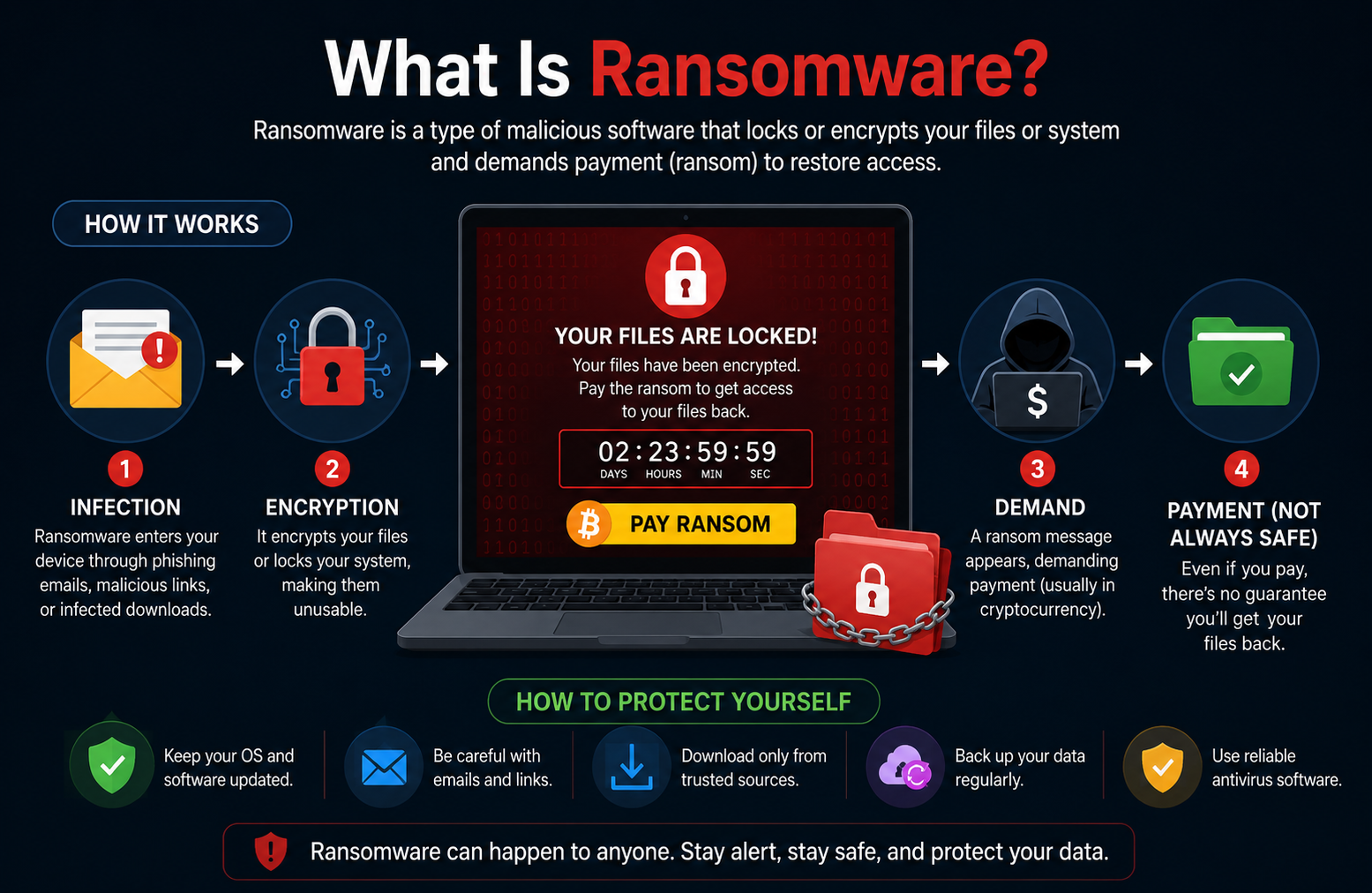
Ransomware has rapidly become one of the most destructive and financially devastating cyber threats in the world today. Every single day, cybercriminals launch ransomware attacks against hospitals that cannot access patient records, schools that lose years of academic data, businesses that face operational shutdowns, and individuals who suddenly find every personal file locked behind unbreakable encryption. Understanding what is ransomware, how it spreads, and how to defend against it is no longer optional knowledge. It is an essential skill for anyone who uses a computer, smartphone, or internet-connected device in 2026.
Quick Answer
What is ransomware? Ransomware is a type of malicious software that encrypts a victim’s files or locks their device, making data inaccessible until a ransom is paid, usually in cryptocurrency. Attackers display a ransom note with payment instructions. Even after paying, data recovery is not guaranteed. Ransomware targets individuals, businesses, hospitals, schools, and government organizations worldwide.
What Is Ransomware?
Ransomware is a category of malicious software that cybercriminals use to take control of a victim’s data or device and demand payment for restoring access. The name combines “ransom” and “software” because the attack functions exactly like a digital kidnapping. Attackers seize your files, lock you out completely, and then demand payment before they will consider returning access.
Most modern ransomware uses strong encryption algorithms to scramble the victim’s files. Encryption is a process that transforms readable data into an unreadable format that can only be decoded with a specific digital key. The attacker holds that key and refuses to hand it over until the ransom demand is met, typically requiring payment in Bitcoin or another cryptocurrency that is difficult to trace.
Ransomware is particularly dangerous for several reasons. First, the encryption used by serious ransomware groups is mathematically unbreakable without the attacker’s decryption key. Second, attackers increasingly combine file encryption with threats to publicly release stolen data if payment is not made. Third, even organizations with strong security controls can fall victim to a well-executed ransomware attack that exploits a single overlooked vulnerability or one employee who clicks a convincing phishing link.
Real-world examples underscore just how serious this threat has become. In 2021, the Colonial Pipeline attack shut down fuel distribution across the eastern United States for several days, causing widespread fuel shortages and panic buying. The attackers, a ransomware group called DarkSide, received approximately $4.4 million in ransom payment before law enforcement recovered a portion of the funds. In the same year, an attack on Ireland’s Health Service Executive crippled the country’s national healthcare system for weeks, delaying patient care across the entire country and costing over $100 million to remediate.
How Does Ransomware Work?
Ransomware follows a structured attack lifecycle that moves from initial infection through to the ransom demand. Understanding each stage helps organizations and individuals recognize attacks earlier and respond more effectively.
Initial Infection
Every ransomware attack begins with the malware reaching the victim’s device. Attackers deliver ransomware through phishing emails with malicious attachments, links to compromised websites, infected software downloads, exploited software vulnerabilities, and poorly secured remote access connections. The infection method varies depending on the target and the specific ransomware variant being deployed.
In many cases, the victim triggers the infection themselves without realizing it. They open an email attachment that appears to be an invoice or delivery notification. They click a link that looks like it leads to a legitimate software update. They download what seems to be a useful free application from an unofficial website. In each case, the seemingly harmless action delivers the ransomware payload to the device.
Installing the Malware
Once the ransomware reaches the device, it installs itself and establishes persistence. Persistence means the malware sets itself up to survive device restarts, ensuring it continues running until it completes its mission. Modern ransomware typically installs itself in system directories, creates registry entries on Windows systems to launch automatically, and often disables built-in security tools to prevent detection and removal.
During this phase, sophisticated ransomware also performs reconnaissance inside the infected system. It maps the network looking for connected drives, shared folders, and other devices it can also encrypt. It identifies backup locations that it can target and destroy before the encryption phase begins, removing the victim’s most reliable recovery option before they even know an attack is underway.
Encrypting Files
The encryption phase is where the ransomware causes its primary damage. The malware scans the device and connected network locations for valuable file types including documents, spreadsheets, images, videos, databases, and backups. It then encrypts each file using a strong algorithm, typically AES-256 for file encryption combined with RSA-2048 to protect the encryption keys.
As each file is encrypted, the ransomware typically renames it with a new extension that signals the infection. For example, a file called “quarterly-report.docx” might become “quarterly-report.docx.locked” or “quarterly-report.docx.encrypted” after the ransomware processes it. The original, readable version of the file is overwritten and becomes permanently inaccessible without the decryption key held by the attacker.
Displaying the Ransom Note
After completing encryption, the ransomware announces itself by displaying a ransom note. This note typically appears as a text file placed in every encrypted directory, a change to the desktop wallpaper, or a full-screen message that appears immediately when the user tries to access the system. The note explains what has happened, how much the ransom is, how to pay it, and often includes a deadline after which the ransom amount increases or the data is permanently deleted.
Professional ransomware groups often provide detailed payment instructions, customer support chat services, and even sample file decryption to prove they possess a working decryption key. This professionalism is deliberate. Attackers know that if victims do not trust that paying will actually restore their data, they are less likely to pay at all.
Recovery or Data Loss
The final stage of a ransomware attack leads in one of several directions. Organizations with clean, offline backups can restore their data without engaging with the attacker, though the restoration process still requires significant time and resources. Victims without adequate backups face an agonizing choice between paying the ransom and hoping for a key, attempting to use any publicly available decryption tools, or accepting permanent data loss.
Even victims who pay the ransom frequently encounter problems. Some attackers provide decryption tools that work poorly or incompletely. Others simply take the payment and disappear without providing anything useful in return. Law enforcement agencies and cybersecurity organizations strongly advise against paying ransoms, both because payment does not guarantee recovery and because it directly funds further criminal operations.
Types of Ransomware
Ransomware takes several distinct forms, each using different mechanisms and targeting different aspects of the victim’s system or data.
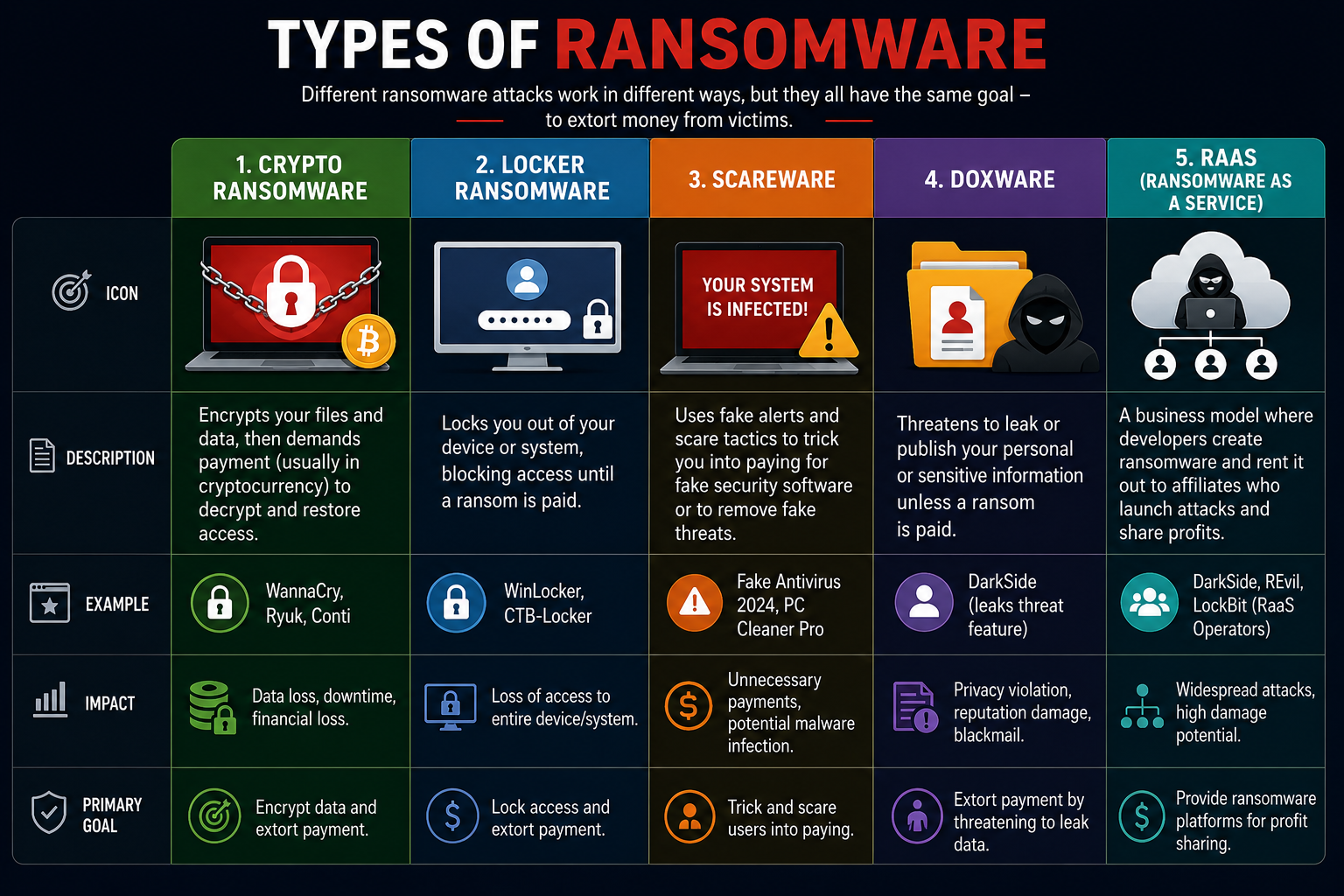
Types of Ransomware Comparison Table
| Type | What It Does | Primary Target | Visible to Victim | Main Risk |
|---|---|---|---|---|
| Crypto Ransomware | Encrypts files and demands payment for key | All users and businesses | Files inaccessible | Permanent data loss |
| Locker Ransomware | Locks entire device, blocks access | Individual users | Full screen lockout | Complete device loss |
| Scareware | Fakes threats to scare victims into paying | Home users | Fake warning messages | Financial fraud |
| Doxware (Leakware) | Threatens to publish stolen data | Businesses and executives | Ransom with data samples | Reputational damage |
| Ransomware-as-a-Service | Platform for criminals to deploy ransomware | Large organizations | Varies by deployment | Widespread attacks |
Crypto Ransomware
Crypto ransomware is the most prevalent and most damaging type. It uses strong encryption algorithms to lock the victim’s files while leaving the operating system functional, so the victim can still use their computer but cannot access any of their data. The attacker provides a decryption key only after receiving payment.
How it works: After infecting the device, crypto ransomware scans for target file types and encrypts them using asymmetric encryption, meaning the encryption key and the decryption key are mathematically related but different. The attacker holds the private decryption key on their own servers.
Common targets: Businesses of all sizes, healthcare organizations, educational institutions, and individuals with valuable personal or professional data.
Risks: Without a decryption key or clean backup, encrypted files are permanently unrecoverable. Crypto ransomware causes billions of dollars in damages annually worldwide.
Prevention: Maintain regular offline backups that ransomware cannot reach, keep all software updated, and deploy endpoint protection with behavioral detection capabilities.
Locker Ransomware
Locker ransomware does not encrypt individual files. Instead, it locks the victim out of their entire device by disabling the operating system interface or replacing it with a ransom demand screen. The victim cannot use the computer at all until they pay or successfully remove the ransomware.
How it works: Locker ransomware modifies boot records, disables login functionality, or displays a full-screen overlay that the victim cannot close or bypass through normal means. It often impersonates law enforcement agencies, falsely claiming the device was locked due to illegal activity.
Common targets: Individual home users, particularly those who are less technically experienced and more likely to believe false law enforcement claims.
Risks: Complete loss of device access, financial loss from ransom payment, and significant stress and disruption for non-technical victims.
Prevention: Keep operating systems updated, avoid downloading software from unofficial sources, and maintain a bootable recovery drive that can help restore system access if needed.
Scareware
Scareware is the least technically sophisticated ransomware variant. It does not actually encrypt files or lock devices. Instead, it displays alarming fake warning messages claiming the device is severely infected with viruses or that illegal activity has been detected. The goal is to panic the victim into paying for fake “security software” or a fake “fine” to resolve the nonexistent problem.
How it works: Scareware typically appears as aggressive pop-up messages, fake system scan animations, or full-screen alerts that make the computer appear unusable. In many cases, simply closing the browser or restarting the device resolves the situation.
Common targets: Less technically experienced users, particularly older adults who are unfamiliar with how legitimate security warnings appear.
Risks: While scareware often does not cause direct technical damage, victims who pay lose money to fraud. Some scareware also installs actual malware as a secondary payload.
Prevention: Use a reputable browser with pop-up blocking, install legitimate antivirus software, and learn to recognize the appearance of genuine security warnings from legitimate software.
Doxware (Leakware)
Doxware, also called leakware, adds a second layer of pressure to ransomware attacks by threatening to publicly release the victim’s sensitive data if the ransom is not paid. Rather than simply encrypting files, the attacker first exfiltrates copies of valuable data and then threatens both to maintain the encryption and to publish the stolen information.
How it works: Attackers first spend time inside the compromised network identifying and stealing the most sensitive and valuable data before triggering the ransomware. This data might include financial records, customer databases, personal communications, medical records, or intellectual property.
Common targets: Businesses handling sensitive customer data, executives with access to valuable confidential information, legal firms, healthcare organizations, and financial institutions.
Risks: Even organizations that restore data from backups still face the threat of public data exposure. This double extortion tactic dramatically increases the pressure on victims to pay, since declining to pay means sensitive data may appear online regardless.
Prevention: Implement strong data loss prevention controls, monitor network traffic for unusual large data transfers, and segment networks to limit the data attackers can access from a single compromised entry point.
Ransomware-as-a-Service (RaaS)
Ransomware-as-a-Service is a criminal business model that allows technically unsophisticated attackers to launch professional-grade ransomware attacks using platforms built by specialist cybercriminal developers. The ransomware developer creates and maintains the malware, infrastructure, payment processing, and victim support systems. Affiliates, who are essentially criminal customers, pay a subscription fee or share a percentage of ransom payments in exchange for access to the platform.
How it works: A criminal affiliate rents access to a RaaS platform, customizes the ransomware for their target, distributes it through their chosen delivery method, and collects payments through the platform’s infrastructure. The platform developers typically take 20 to 30 percent of all ransom payments as their share.
Common targets: RaaS dramatically lowers the technical barrier to launching ransomware attacks, meaning virtually any criminal with internet access and a willingness to pay the platform fee can target organizations of any size.
Risks: RaaS has exponentially increased the volume and frequency of ransomware attacks worldwide. Groups like LockBit, REvil, and Conti operated as highly organized RaaS enterprises before law enforcement actions disrupted their operations.
Prevention: Because RaaS attacks come from many different affiliates using varied delivery methods, defense requires a comprehensive layered security approach including employee training, strong endpoint protection, network segmentation, and robust backup procedures.
Common Ways Ransomware Spreads
Ransomware reaches victims through several well-established delivery pathways. Knowing these routes helps you avoid the most common infection sources.
Phishing Emails
Phishing emails remain the most common ransomware delivery method globally. Attackers send convincing emails that appear to come from trusted organizations like banks, shipping companies, government agencies, or internal colleagues. These emails contain malicious attachments in formats like Word documents, PDFs, or compressed archives, or they include links that direct victims to sites that automatically download ransomware.
Modern phishing emails are increasingly sophisticated. They personalize content using information gathered from social media and previous data breaches. They replicate the exact visual design of legitimate organizations’ communications. They create artificial urgency with messages about unpaid invoices, package delivery failures, or account security alerts that pressure victims into acting quickly without scrutinizing the message carefully.
Malicious Downloads
Ransomware frequently hides inside software downloaded from unofficial sources. Pirated software, cracked applications, free game downloads from unofficial sites, and counterfeit versions of popular tools all represent high-risk download categories. The ransomware installs silently alongside or instead of the promised software.
Fake Software Updates
Attackers create convincing fake update notifications for popular software including web browsers, media players, Adobe Flash, and operating system components. These fake updates appear as pop-up messages on compromised websites and prompt users to download and run what is actually ransomware disguised as a legitimate update package.
Remote Desktop Protocol (RDP)
Remote Desktop Protocol allows users to connect to and control computers remotely over a network. Poorly secured RDP connections with weak passwords or exposed to the internet without additional access controls represent a major ransomware entry point. Attackers scan the internet for exposed RDP ports, attempt to crack weak passwords, and use successfully compromised remote access to manually deploy ransomware across the network.
USB Devices
Infected USB drives spread ransomware when plugged into a computer. Attackers have deliberately left infected USB drives in parking lots, public spaces, and office buildings, counting on curious individuals to plug them in. Ransomware on a USB drive can begin executing automatically when the drive connects to an unprotected system.
Drive-by Downloads
Drive-by downloads occur when visiting a compromised or malicious website triggers an automatic malware download without any explicit user action. Attackers exploit vulnerabilities in browsers, browser plugins, or operating systems that have not been updated with the latest security patches. Simply loading a web page is sufficient to initiate the download and execution of ransomware.
Exploited Software Vulnerabilities
Many of the most damaging ransomware attacks in history exploited known vulnerabilities in widely used software. The WannaCry attack in 2017 exploited a Windows vulnerability called EternalBlue, for which Microsoft had already released a patch weeks before the attack. Organizations that had not applied the patch remained vulnerable and suffered catastrophic consequences. Keeping all software updated is therefore one of the single most effective defenses against ransomware.
Signs Your Computer Has Ransomware
Recognizing ransomware activity early gives you the best chance of limiting damage. Watch carefully for these fifteen warning signs.
- Files suddenly become inaccessible and display unfamiliar file extensions you do not recognize.
- A ransom demand message appears on your screen or replaces your desktop background.
- Your antivirus or security software stops working or becomes impossible to open.
- Your computer runs significantly slower than normal without any obvious explanation.
- You notice unusual and heavy hard drive activity when you are not actively using the computer.
- Files in shared network folders begin showing changed names or extensions.
- Your network activity spikes dramatically, suggesting data is being transferred externally.
- Folders contain new text files with names like “README.txt” or “DECRYPT_INSTRUCTIONS.txt.”
- Backup files or shadow copies are suddenly missing or have been deleted.
- Network drives and shared folders become inaccessible simultaneously.
- You cannot open any documents, images, or other files that previously worked normally.
- A countdown timer appears alongside a ransom demand, creating artificial urgency.
- Your browser searches redirect to unfamiliar websites you did not navigate to intentionally.
- Other devices on your network begin experiencing similar problems at the same time.
- System processes in your task manager show unfamiliar programs consuming high CPU or disk resources.
Ransomware vs Malware
Many people use these terms interchangeably, but ransomware is a specific category within the much broader malware family. The table below clarifies the important distinctions.
Ransomware vs Malware Table
| Factor | Malware (General) | Ransomware (Specific Type) |
|---|---|---|
| Definition | Any malicious software causing harm | Malware specifically designed to extort payment |
| Primary Goal | Varies by type | Financial extortion through access denial |
| Victim Awareness | Often operates silently for long periods | Makes itself immediately known with ransom demand |
| Data Impact | Varies by type | Files encrypted and made completely inaccessible |
| Financial Demand | Not always present | Always demands payment for restoration |
| Recovery Path | Varies by malware type | Clean backup or decryption key required |
| Detection Difficulty | Varies significantly by type | Initial infection is stealthy, then very obvious |
| Notable Examples | Emotet, Zeus, WannaCry, Mirai | LockBit, REvil, Conti, WannaCry, DarkSide |
Ransomware is essentially malware with a specific extortion goal. All ransomware is malware, but the vast majority of malware does not involve ransom demands. For a comprehensive understanding of the broader malware landscape,
see our complete guide on What Is Malware?.
Ransomware vs Virus
Ransomware and computer viruses are frequently confused, particularly by users who are new to cybersecurity concepts. They differ significantly in how they function and the damage they cause.
Ransomware vs Virus Table
| Factor | Computer Virus | Ransomware |
|---|---|---|
| Definition | Malware that attaches to files and self-replicates | Malware that encrypts files and demands ransom |
| Primary Goal | Spread and damage files or systems | Extort money from victims |
| Requires Host File | Yes, attaches to and spreads through files | No, operates independently as standalone malware |
| Self-Replicating | Yes, core characteristic | Sometimes, but not always a primary function |
| Financial Demand | Does not typically demand payment | Always demands payment |
| Victim Impact | File corruption, system damage | Data inaccessibility, financial loss |
| Recovery Method | Antivirus removal, file restoration | Clean backup restoration or decryption key |
| Notable Examples | ILOVEYOU, Melissa, CIH | WannaCry, LockBit, Colonial Pipeline attack |
How to Prevent Ransomware
Preventing ransomware requires a multi-layered approach combining technology, strong processes, and educated users. Here are twenty actionable steps that every individual and organization should implement immediately.
Ransomware Prevention Checklist
| Prevention Action | Priority | Who It Applies To |
|---|---|---|
| Maintain regular offline backups | Critical | Everyone |
| Keep all software and OS updated | Critical | Everyone |
| Install reputable antivirus and EDR | Critical | Everyone |
| Enable firewall protection | Critical | Everyone |
| Use multi-factor authentication | Critical | Everyone |
| Avoid suspicious email attachments | Critical | Everyone |
| Download from official sources only | High | Everyone |
| Secure and restrict RDP access | Critical | Businesses |
| Disable unnecessary macros | High | Business users |
| Train employees on phishing | Critical | Businesses |
| Segment network infrastructure | High | Businesses |
| Restrict administrative privileges | High | Businesses |
| Use email security filtering | High | Businesses |
| Monitor network for unusual activity | High | Businesses |
| Scan USB devices before use | High | Everyone |
| Keep browsers updated | High | Everyone |
| Use a VPN on public Wi-Fi | High | Mobile and remote workers |
| Implement application whitelisting | Medium | Business environments |
| Conduct regular penetration testing | High | Businesses |
| Develop an incident response plan | Critical | Businesses |
- Maintain regular backups of all important data and store at least one copy completely offline where ransomware cannot reach it. Test your backups regularly to confirm they actually restore correctly.
- Keep your operating system updated with all security patches applied immediately after release. Many ransomware attacks exploit vulnerabilities that already have available patches.
- Install reputable antivirus and anti-malware software with behavioral detection capabilities that can identify ransomware activity patterns rather than relying solely on known threat signatures.
- Enable your firewall at all times and configure it properly to block unauthorized incoming and outgoing connections. See our complete guide on What Is a Firewall? for detailed configuration guidance.
- Enable multi-factor authentication (MFA) on every important account including email, remote access systems, cloud services, and administrative consoles. MFA prevents attackers from using stolen credentials alone to gain access.
- Think very carefully before opening any email attachment or clicking any link, even from senders you recognize. Verify unexpected requests through a separate communication channel before acting on them.
- Download software only from official developer websites and authorized app stores. Never download software from third-party sites, torrent networks, or sources you cannot fully verify.
- Secure all Remote Desktop Protocol (RDP) connections by placing them behind a VPN, using strong complex passwords, enabling network-level authentication, and restricting RDP access to specific trusted IP addresses only.
- Disable macros in Microsoft Office applications by default and only allow macros from digitally signed, trusted sources. Malicious macros in Word and Excel documents are a major ransomware delivery vector.
- Train every employee to recognize phishing emails, suspicious download prompts, and fake software update requests. Human error remains the most common ransomware entry point in business environments.
- Segment your network so that a ransomware infection in one part of the organization cannot spread freely to other critical systems. Network segmentation dramatically limits the blast radius of a successful attack.
- Apply the principle of least privilege to all user accounts, giving each user only the permissions they genuinely need for their role. Ransomware can only encrypt what the compromised account has permission to access.
- Implement email security filtering that automatically scans incoming attachments and links, quarantines suspicious messages, and blocks known malicious senders before emails reach employees’ inboxes.
- Monitor your network continuously for unusual traffic patterns, large unexpected data transfers, and connections to unfamiliar external IP addresses. Early detection significantly limits ransomware damage.
- Always scan USB drives with security software before opening any files they contain. Never use a USB drive you found in a public location or received from an untrusted source.
- Keep your web browser and all browser extensions updated to the latest versions. Outdated browsers contain vulnerabilities that drive-by download attacks frequently exploit.
- Use a VPN when connecting to the internet through public Wi-Fi networks to protect your connection from man-in-the-middle attacks that might deliver ransomware. Learn more in our guide on What Is a VPN?.
- Consider implementing application whitelisting in business environments, which allows only specifically approved applications to run and prevents unauthorized ransomware executables from launching.
- Conduct regular penetration testing and security assessments to identify vulnerabilities in your environment before ransomware attackers discover and exploit them.
- Develop and regularly test a formal incident response plan specifically for ransomware scenarios so your team knows exactly what to do in the critical first minutes and hours after an attack is detected.
What Should You Do After a Ransomware Attack?
If ransomware strikes your device or network, your immediate response decisions significantly affect the ultimate outcome. Follow these steps carefully.
Step 1: Disconnect from the Internet Immediately
The moment you suspect a ransomware infection, disconnect the affected device from the internet and from your local network. Pull the network cable, disable Wi-Fi, and turn off any wireless connections. This critically important first step stops the ransomware from communicating with attacker servers, prevents additional encryption of network-connected files, and stops the malware from potentially spreading to other devices.
Step 2: Isolate Infected Devices
Physically isolate every device that shows signs of infection. Disconnect all network cables, disable wireless connections, and physically separate the infected machines from all other devices. If you are in a business environment, notify your IT team immediately so they can assess which systems are affected and prevent further spread across the network.
Step 3: Identify the Ransomware
Try to identify which specific ransomware variant you are dealing with. The ransom note often contains identifying information. You can also submit samples to free identification services like the No More Ransom Project at nomoreransom.org, which maintains a database of known ransomware variants. Identifying the specific variant helps determine whether free decryption tools are available for that particular ransomware family.
Step 4: Restore from Clean Backups
If you maintain clean, offline backups, this is your most reliable recovery path. Before restoring, ensure the infected systems have been fully cleaned or reinstalled to prevent reinfection. Restore data only to systems that have been verified as clean, and confirm that the backup was created before the infection occurred. This process takes time but avoids paying the attacker and provides the highest likelihood of full data recovery.
Step 5: Report the Attack
Report the ransomware attack to relevant authorities. In the United States, report to CISA and the FBI’s Internet Crime Complaint Center (IC3) at ic3.gov. In the United Kingdom, report to the National Cyber Security Centre. Reporting does not automatically resolve your situation, but it contributes to law enforcement efforts to identify, track, and prosecute ransomware groups. It also helps authorities warn other potential victims about active campaigns.
Step 6: Contact Cybersecurity Professionals
Engage a qualified cybersecurity incident response team as quickly as possible. Professional incident responders have tools and experience to assess the full scope of the attack, identify exactly how the attackers got in, determine what data was accessed or exfiltrated, guide the recovery process, and help prevent future attacks. Many cyber insurance policies include incident response services as part of their coverage.
Why Paying the Ransom Is Generally Discouraged
Law enforcement agencies including the FBI, CISA, and Europol all strongly advise against paying ransomware demands. The reasons are straightforward and practical. First, paying does not guarantee you will receive a working decryption key. Many victims pay in full and receive nothing, or receive tools that only partially decrypt their data. Second, paying directly funds the criminal organizations that launched the attack and enables them to develop more sophisticated tools and target more victims. Third, paying marks you as an organization that is willing to pay, potentially making you a target for future attacks by the same or different groups. Fourth, in some jurisdictions, paying ransoms to sanctioned cybercriminal groups may have legal implications. Recovery through backups, while difficult and time-consuming, is always the preferred path.
Best Tools for Ransomware Protection
Effective ransomware defense requires deploying multiple complementary security tools that address different aspects of the threat.
Best Ransomware Protection Tools Comparison
| Tool Category | Primary Function | Examples | Best For |
|---|---|---|---|
| Antivirus Software | Detect and block known ransomware | Windows Defender, Bitdefender, Malwarebytes | All users |
| Endpoint Detection and Response (EDR) | Behavioral threat detection and response | CrowdStrike, SentinelOne, Microsoft Defender for Endpoint | Businesses |
| Firewall | Block unauthorized network connections | Hardware firewalls, Windows Firewall | All users and networks |
| Backup Software | Create and manage offline data backups | Veeam, Acronis, Windows Backup | Everyone |
| Email Security | Filter malicious emails and attachments | Proofpoint, Mimecast, Microsoft Defender for Office 365 | Businesses |
| Network Monitoring | Detect unusual traffic patterns | Darktrace, Splunk, SolarWinds | Businesses |
Antivirus Software
Modern antivirus tools combine traditional signature-based detection with behavioral analysis to identify ransomware based on its actions rather than just its code. Choose a reputable solution from a well-established vendor and ensure automatic updates remain enabled so the software always has the latest threat definitions.
Endpoint Detection and Response (EDR)
EDR solutions go significantly beyond traditional antivirus capabilities. They continuously monitor endpoint behavior, detect suspicious activity patterns consistent with ransomware execution, and can automatically isolate an infected device from the network within seconds of detecting an attack. EDR is increasingly essential for businesses facing sophisticated ransomware threats.
Firewalls
A properly configured firewall prevents ransomware from communicating with attacker command-and-control servers and blocks the lateral movement that allows ransomware to spread from an initial infected device to the broader network. Both perimeter hardware firewalls and host-based software firewalls play important roles in a layered ransomware defense.
Backup Software
Reliable, regularly tested backups represent the single most important ransomware recovery resource. Use backup software that creates immutable backups, meaning backups that cannot be modified or deleted by ransomware even if it gains access to the backup system. Store at least one backup copy completely offline and physically disconnected from your network.
Email Security
Since phishing emails deliver the majority of ransomware infections, enterprise email security solutions that automatically scan attachments, analyze links, and use artificial intelligence to identify suspicious message patterns are a critical defensive layer for any business environment.
Network Monitoring
Network monitoring tools detect the unusual traffic patterns that accompany ransomware attacks, including large volumes of file encryption activity, unexpected connections to external servers, and unusual lateral movement between devices inside the network. Early detection through network monitoring can stop a ransomware attack before it causes maximum damage.
Common Myths About Ransomware
Dangerous misconceptions about ransomware lead individuals and organizations to underestimate the threat and take inadequate precautions.
Myth 1: Only Large Corporations Get Targeted
Ransomware attackers target organizations and individuals of every size. Small businesses are frequently attractive targets precisely because they typically have fewer security resources than large enterprises. Individual home users also face ransomware through automated campaigns that target anyone rather than specific high-value organizations.
Myth 2: Paying the Ransom Guarantees Recovery
Payment absolutely does not guarantee data recovery. Many victims pay the full ransom demand and receive nothing, receive non-functional decryption tools, or receive keys that only work on some of their encrypted files. Additionally, attackers who receive payment sometimes demand a second, larger payment before providing anything useful.
Myth 3: Antivirus Software Alone Provides Complete Protection
While antivirus software is essential, it cannot catch every ransomware variant, particularly newer and more sophisticated strains designed specifically to evade signature-based detection. A comprehensive defense requires antivirus, behavioral detection tools, proper backup strategies, user training, and strong access controls working together.
Myth 4: Ransomware Only Affects Windows Computers
Ransomware variants specifically targeting macOS, Linux systems, Android smartphones, and even network-attached storage devices all exist and have caused real damage. No operating system provides immunity from ransomware threats. Every platform requires appropriate security measures.
Myth 5: If I Have Cloud Storage, I Do Not Need Other Backups
Ransomware can and does encrypt files in cloud storage services that automatically synchronize with local devices. When ransomware encrypts local files, the sync service automatically uploads the encrypted versions to the cloud, overwriting the clean originals. Organizations need true offline backups that are not connected to systems that ransomware could reach.
Myth 6: Ransomware Is Easy to Spot Immediately
The most dangerous phase of a ransomware attack is often the initial period after infection and before encryption begins. During this time, attackers may spend days or weeks mapping the network, stealing data, and destroying backups completely silently. By the time the ransom note appears, the attack has been underway for potentially a very long time.
Myth 7: Law Enforcement Can Always Recover Your Data
While law enforcement agencies have successfully disrupted several major ransomware operations and occasionally recovered decryption keys, they cannot routinely decrypt victim data across the full range of active ransomware variants. Relying on law enforcement to recover your data is not a viable security strategy.
Myth 8: Once You Pay, Attackers Will Not Come Back
Paying a ransom identifies your organization as one that will pay under pressure. Some ransomware groups sell this information to other criminal organizations. Many victims who pay experience subsequent attacks, sometimes from the same group, sometimes from different attackers who purchased intelligence about willing payers.
Myth 9: Ransomware Is Only a Technical Problem
Ransomware attacks succeed primarily because of human factors. Employees clicking phishing emails, using weak passwords, failing to apply security updates, and ignoring security training are the most common enablers of successful ransomware infections. Addressing the human element is as important as technical controls.
Myth 10: A Cyber Insurance Policy Eliminates Ransomware Risk
Cyber insurance can help cover financial losses from a ransomware attack, but it does not prevent attacks from occurring. Insurance policies have coverage limits, exclusions, and requirements. Many insurers now require organizations to demonstrate specific security controls before providing coverage. Insurance should supplement strong security practices, never replace them.
Future of Ransomware
The ransomware threat continues to evolve rapidly, driven by criminal innovation, new technologies, and expanding attack surfaces.
AI-Powered Ransomware
Cybercriminal groups are beginning to integrate artificial intelligence into their ransomware operations. AI helps attackers craft more convincing and personalized phishing emails at scale, identify the most valuable data within a compromised network faster, adapt ransomware code to evade specific security tools, and automate the identification of vulnerable targets across the internet. AI-powered ransomware will be significantly harder to detect and defend against using traditional methods.
Double and Triple Extortion
Double extortion, where attackers both encrypt data and threaten to publish stolen information, has become standard practice among major ransomware groups. The emerging trend is triple extortion, which adds a third pressure by threatening to launch distributed denial-of-service attacks against the victim’s internet services or directly contacting the victim’s customers, partners, and stakeholders to increase pressure further.
Cloud Ransomware
As organizations move critical data and infrastructure to cloud environments, ransomware groups are developing cloud-specific attack capabilities. Cloud ransomware targets misconfigured storage buckets, compromised cloud service credentials, and cross-cloud access permissions to encrypt data stored in cloud environments.
See our guide on Cloud Security for more on protecting cloud infrastructure.
IoT Ransomware
The billions of IoT devices connecting to networks worldwide represent a rapidly growing attack surface for ransomware. Attacks against industrial control systems, medical devices, smart building systems, and critical infrastructure using ransomware-style extortion represent one of the most alarming emerging threats in cybersecurity. Physical consequences from IoT ransomware could extend far beyond the digital world.
Advanced Threat Detection
On the defensive side, artificial intelligence and machine learning are also transforming ransomware detection capabilities. Next-generation security platforms increasingly use behavioral analysis and anomaly detection to identify ransomware activity in its early stages, before encryption begins. The race between increasingly sophisticated attacks and increasingly capable defenses will continue to define the ransomware landscape throughout the coming years.
Frequently Asked Questions
What is ransomware?
Ransomware is malicious software that encrypts a victim’s files or locks their device and demands a ransom payment, typically in cryptocurrency, in exchange for restoring access. Even after paying, data recovery is never guaranteed. Ransomware targets individuals, businesses, hospitals, schools, and government organizations worldwide.
How does ransomware work?
Ransomware works by first infecting a device through a phishing email, malicious download, or software vulnerability. It then installs itself, encrypts the victim’s files using strong encryption algorithms, and displays a ransom note with payment instructions. Without a clean backup or decryption key, encrypted files remain permanently inaccessible.
Can ransomware be removed?
Ransomware code itself can often be removed using security software. However, removing the ransomware does not decrypt already-encrypted files. Full data recovery requires either a clean backup predating the infection or a working decryption key, which comes either from the attacker upon payment or from free decryption tools when security researchers have cracked specific ransomware variants.
Is ransomware a virus?
No. A virus is one specific type of malware that attaches to files and self-replicates. Ransomware is a different category of malware that focuses on encrypting data and demanding payment. Both are forms of malware, but they work differently and cause different types of damage.
Can phones get ransomware?
Yes. Both Android and iOS devices can be targeted by ransomware. Mobile ransomware typically arrives through malicious apps, phishing links in text messages or emails, or malicious websites. Android devices face a higher volume of mobile ransomware threats due to the openness of the Android ecosystem, but iOS devices are not immune.
Should I pay a ransom?
Law enforcement agencies including the FBI and CISA strongly advise against paying ransoms. Payment does not guarantee data recovery, directly funds criminal organizations, may expose you to legal risk if the attackers are sanctioned entities, and marks you as an organization willing to pay which can attract future attacks. Restore from clean backups whenever possible.
What is Ransomware-as-a-Service?
Ransomware-as-a-Service is a criminal business model where ransomware developers create and maintain attack platforms that they rent or license to criminal affiliates. Affiliates use these platforms to launch attacks and pay the developers a percentage of all ransom payments collected. RaaS has dramatically lowered the technical barrier for launching ransomware attacks.
Can antivirus stop ransomware?
Modern antivirus software with behavioral detection capabilities can stop many ransomware attacks, particularly known variants. However, new ransomware strains specifically designed to evade detection can sometimes bypass antivirus tools. Combining antivirus with EDR solutions, proper backup strategies, and user training provides much stronger protection than antivirus alone.
What are the signs of ransomware?
Key signs include files suddenly becoming inaccessible with changed extensions, a ransom note appearing on screen, security software stopping unexpectedly, unusual hard drive or network activity, shared network drives becoming inaccessible, and new text files appearing in folders with names like README or DECRYPT INSTRUCTIONS.
How do businesses prevent ransomware?
Businesses should implement offline backups tested regularly, comprehensive employee phishing training, endpoint detection and response software, email security filtering, network segmentation, restricted administrative privileges, multi-factor authentication across all systems, proper RDP security, and a formal incident response plan. See our guide on Cybersecurity Best Practices for comprehensive organizational security guidance.
How do backups help against ransomware?
Clean offline backups allow organizations to restore their data without paying the attacker or relying on a decryption key. They are the single most effective ransomware recovery tool available. Backups must be stored offline or in immutable storage to prevent ransomware from encrypting or deleting them along with primary data.
Is ransomware illegal?
Deploying ransomware is a serious criminal offense in virtually every country. Perpetrators face substantial prison sentences, massive financial penalties, and asset seizure. Law enforcement agencies worldwide actively investigate and prosecute ransomware attackers. Several high-profile ransomware operators have been arrested and convicted in recent years following international law enforcement cooperation.
Can Macs get ransomware?
Yes. While macOS faces fewer ransomware threats than Windows due to historically lower market share, specific Mac ransomware variants exist and have successfully infected Apple devices. As Mac market share grows, the incentive for attackers to develop macOS-targeted ransomware increases. Mac users need security software and safe computing habits just as much as Windows users.
Can cloud storage be affected?
Yes. Cloud storage services that automatically synchronize with local devices are vulnerable to ransomware. When ransomware encrypts local files, the sync process automatically uploads encrypted versions to the cloud, overwriting clean copies. Organizations need true offline backups that ransomware cannot reach through network or sync connections, separate from standard cloud synchronization services.
What is the future of ransomware?
The future of ransomware includes AI-powered attacks that adapt to evade specific defenses, increasingly sophisticated double and triple extortion campaigns, ransomware targeting cloud infrastructure, attacks against IoT devices including critical infrastructure systems, and growing RaaS operations making professional ransomware accessible to more criminal actors. Staying ahead of these threats requires continuous security improvement and active threat intelligence.
People Also Ask
What is ransomware?
Ransomware is malicious software that encrypts a victim’s files or locks their device and demands a ransom payment for restoring access, typically in cryptocurrency that is difficult to trace.
How does ransomware work?
Ransomware infects a device, installs itself, encrypts the victim’s files using strong encryption, and displays a ransom note demanding payment before the attacker will consider providing a decryption key.
Is ransomware a virus?
No. Ransomware is a distinct category of malware focused on extortion. A virus is a different type of malware that attaches to files and self-replicates. Both are malware but function very differently.
Can ransomware be removed?
The ransomware code can be removed, but this does not decrypt already-encrypted files. Full data recovery requires a clean backup or a working decryption key from either the attacker or publicly available research tools.
Should I pay a ransom?
Law enforcement strongly advises against paying. Payment does not guarantee recovery, funds criminal operations, and may attract future attacks by signaling your willingness to pay.
What are the different types of ransomware?
The main types are crypto ransomware (encrypts files), locker ransomware (locks devices), scareware (fake threats), doxware or leakware (threatens data publication), and Ransomware-as-a-Service (criminal rental platforms).
How can I prevent ransomware?
Maintain offline backups, keep all software updated, use multi-factor authentication, install reputable security software, train employees on phishing, and implement a comprehensive layered security strategy.
Can smartphones get ransomware?
Yes. Both Android and iOS devices can be infected with ransomware through malicious apps, phishing links, and malicious websites. Android devices face a higher volume of mobile ransomware threats.
What is Ransomware-as-a-Service?
RaaS is a criminal business model where ransomware developers provide attack platforms and infrastructure to criminal affiliates who pay a subscription or share ransom revenue in exchange for access.
What should I do after a ransomware attack?
Immediately disconnect from the internet, isolate infected devices, identify the ransomware variant, restore from clean backups, report to law enforcement and CISA, and engage professional cybersecurity incident responders.
Final Thoughts
Understanding what is ransomware and taking deliberate steps to protect against it has never been more important than it is today. Ransomware attacks continue to grow in frequency, sophistication, and the scale of damage they inflict on individuals, businesses, healthcare systems, educational institutions, and critical infrastructure around the world. No organization and no individual is too small or too obscure to become a target.
The encouraging reality is that effective ransomware prevention is genuinely achievable for everyone who is willing to adopt consistent security habits. Maintain regular offline backups and test them. Keep all software updated promptly. Use multi-factor authentication everywhere you can. Deploy reputable security software with behavioral detection. Train yourself and your team to recognize phishing attempts. Implement proper network segmentation and access controls in business environments. Each of these actions meaningfully reduces your risk.
No single security measure eliminates the threat entirely. However, layering multiple defenses, combining technical controls with educated and alert users, and maintaining a tested incident response plan ensures that if an attack does occur, you are in the strongest possible position to detect it early, contain the damage, and recover fully without enriching the criminals behind it.
For broader cybersecurity guidance, explore our complete guides on What Is Cybersecurity?,
References
- Cybersecurity and Infrastructure Security Agency (CISA). Ransomware Guidance and Resources. Available at: https://www.cisa.gov
- CISA Stop Ransomware. Official Ransomware Prevention and Response Resources. Available at: https://www.cisa.gov/stopransomware
- National Institute of Standards and Technology (NIST). Data Integrity and Ransomware Protection Guidelines. Available at: https://www.nist.gov
- Microsoft Security. Ransomware Detection, Protection, and Response Resources. Available at: https://www.microsoft.com/security
- FBI Internet Crime Complaint Center (IC3). Ransomware Reporting and Cybercrime Resources. Available at: https://www.ic3.gov
- OWASP Foundation. Security Resources and Web Application Protection Guidance. Available at: https://owasp.org
Disclaimer
This article is for educational and informational purposes only. It explains ransomware concepts, cybersecurity risks, and defensive security practices. It does not provide instructions for creating, deploying, or using ransomware or any other malicious software. Always follow legal cybersecurity practices and consult qualified security professionals for specific organizational security needs.
Author Bio
TechOriginHub Editorial Team is a team of cybersecurity researchers and technology writers dedicated to creating accurate, easy-to-understand, and up-to-date content on cybersecurity, online privacy, AI, and emerging technologies.