
 By saman zahra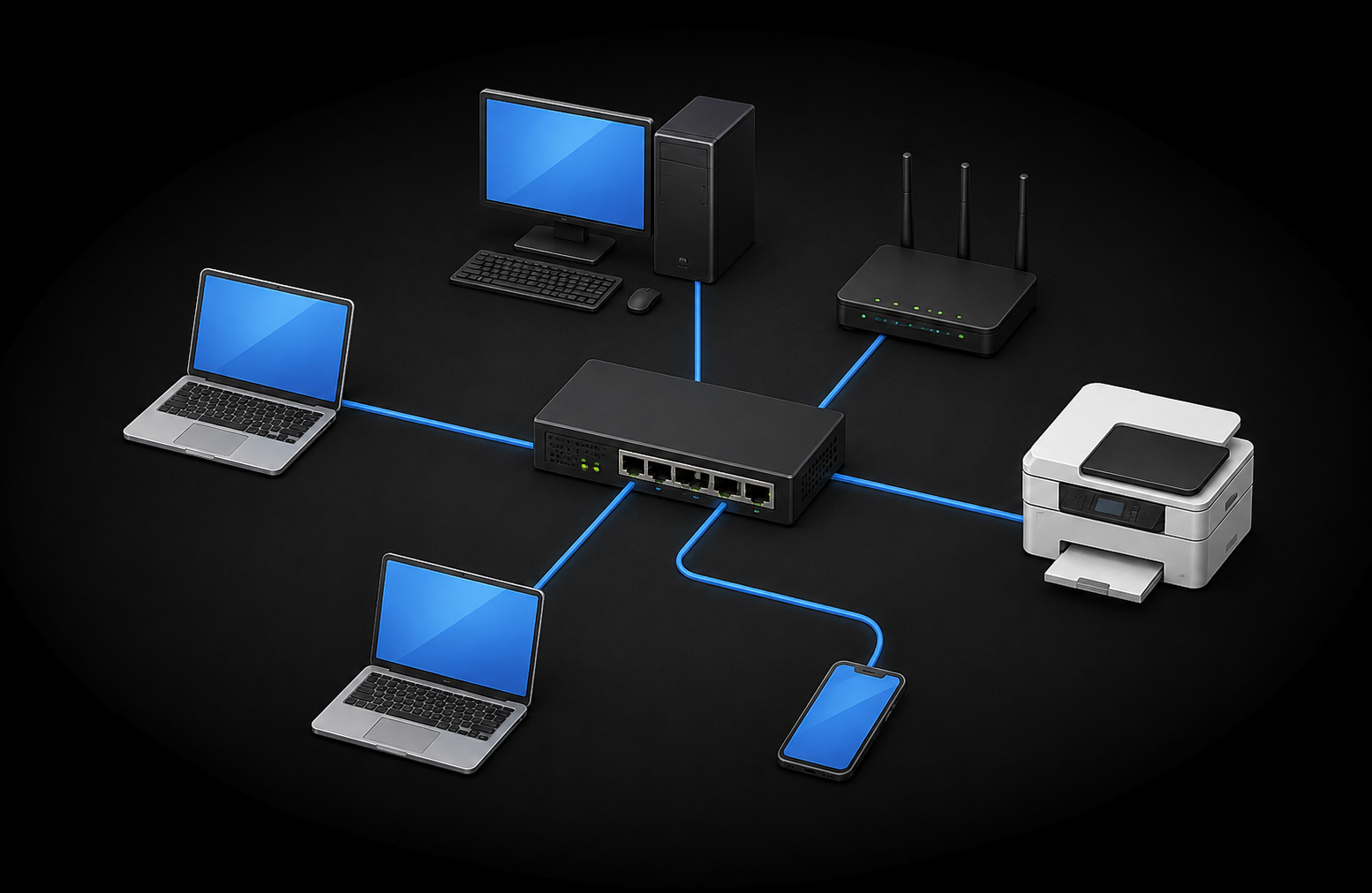
Introduction
Think about everything happening on a typical workday in an office. Computers share files with each other. A team printer handles requests from multiple workstations. Everyone accesses the internet through the same connection. All of this happens because the devices are connected through a Local Area Network.
Understanding what is LAN helps explain how devices in the same building or home communicate, share resources, and access broader networks. A LAN is not the same as the internet, and it is not the same as Wi-Fi. It is a specific type of network with its own purpose, components, and design principles.
This guide explains everything you need to know about LANs, from basic definitions to how they work, what components they use, and how they compare to other network types. For broader context on how networks function in general, our guide on what is a network and how it works provides a strong foundation. And for context on how the internet relates to a LAN, see our article on what is the internet and how it works.
Quick Answer: What Is LAN?
A LAN, or Local Area Network, is a computer network that connects devices within a limited geographic area such as a home, office, school, or building. Devices on a LAN can communicate with each other and share resources including files, printers, and internet connections. A LAN can use wired connections such as Ethernet, wireless connections such as Wi-Fi, or a combination of both, and it can function independently without internet access.
What Is LAN?
A Local Area Network, or LAN, is a computer network that connects devices within a geographically limited area. That area might be a single room, a floor of a building, an entire house, or a small office. The defining characteristic of a LAN is its limited scope, which is what separates it from larger network types that span cities or countries.
Devices on a LAN can communicate directly with each other and share resources such as printers, file storage, and internet connections. A LAN is typically owned and managed by a single household or organization, giving that entity control over how the network is configured and who can access it.
A simplified analogy helps here. Think of a LAN like the internal phone system within a single office building. People inside the building can call each other using extension numbers without involving the external telephone network. The LAN works similarly, allowing internal communication between devices without necessarily involving the broader internet. This analogy is simplified, but it captures the idea of a contained, locally managed communication system.
One important point to establish from the start: a LAN can exist and function perfectly well without internet access. A group of computers sharing files and a printer through a network switch are operating on a LAN regardless of whether they have any connection to the internet. For a broader overview of how different types of networks fit together, see our guide on what is a network and how it works.
What Does LAN Stand For?
LAN stands for Local Area Network. Each word in the name describes something meaningful about what the network is and does.
Local refers to the geographic scope. A LAN covers a limited, defined area rather than spanning cities, regions, or countries. Local in this context means nearby, typically within a single building or campus. It does not mean restricted to a single room, but it does mean the network is contained within a manageable, defined physical space.
Area describes the geographic dimension of the network. It reinforces that the network has a specific scope, distinguishing it from wider networks that might cover metropolitan areas or entire countries.
Network means a system of connected devices that can communicate and share data and resources with each other using defined communication standards and protocols.
Together, Local Area Network describes exactly what a LAN is: a network of connected devices operating within a defined local area, managed by a single entity, and designed to enable communication and resource sharing among the devices within that space.
How Does a LAN Work?
A LAN works by providing a shared communication infrastructure that allows devices within the same local area to exchange data, share resources, and access external networks when connected to an internet service provider.
Here is the basic sequence of how a LAN operates:
Step 1: Devices connect to the LAN. Computers, smartphones, tablets, printers, and smart devices join the network through either a wired Ethernet connection or a wireless Wi-Fi connection.
Step 2: Each device is identified at the local network level by a MAC address, which is a hardware identifier associated with the device’s network interface. MAC addresses are used to deliver data frames within the local network segment.
Step 3: A network switch manages wired connections. When a device sends data, the switch reads the destination MAC address and forwards the frame only to the port where the destination device is connected, rather than sending it to every device on the network.
Step 4: A wireless access point or wireless router provides Wi-Fi connectivity, allowing devices to connect to the LAN without physical cables.
Step 5: Devices communicate directly with each other across the LAN. File transfers, printer requests, and local application traffic all travel within the LAN without needing to leave the local network.
Step 6: A router connects the LAN to external networks. In a home or office, the router provides the gateway to the internet through an ISP connection.
Step 7: The router manages traffic between the local network and external networks, directing outbound requests to the appropriate internet destinations and returning responses to the correct local devices.
Step 8: In most setups, a DHCP server, often built into the router, automatically assigns IP addresses and network configuration to devices when they join the LAN.
For more on how wireless connectivity operates within this framework, see our guide on what is Wi-Fi and how it works.
What Are the Main Components of a LAN?
A LAN is built from several key components that each perform a specific role in enabling local network communication.
| Component | Main Purpose |
|---|---|
| Network switch | Connects wired LAN devices and forwards frames |
| Router | Connects LAN to external networks and internet |
| Wireless access point | Provides Wi-Fi connectivity to the LAN |
| Ethernet cable | Wired connection between devices and switch |
| NIC | Enables each device to connect to the network |
| Modem / ONT | Connects the LAN to the ISP for internet access |
Network Switch
A network switch is the central device in most wired LANs. It connects multiple devices through Ethernet cables and manages data delivery between them. When a device sends a data frame, the switch reads the destination MAC address and forwards the frame to the correct port. This selective forwarding keeps network traffic efficient and prevents unnecessary data from reaching every device on the network.
Router
The router connects the LAN to external networks, most commonly the internet. It manages traffic between the local network and outside destinations, provides the default gateway that local devices use to reach external addresses, and in most home and small office setups also includes DHCP functionality for automatic IP address assignment and NAT for sharing a single public IP address among multiple local devices.
Wireless Access Point
A wireless access point provides Wi-Fi connectivity, extending the LAN to devices that connect wirelessly. In home setups, the wireless access point function is typically built into the router. In larger environments such as offices and schools, standalone access points are deployed throughout the building to ensure coverage in every area.
Ethernet Cables and Ports
Ethernet cables are the physical wired connections that link devices to the switch or router. The LAN ports on a router or switch are the physical Ethernet interfaces where these cables connect. Ethernet cables come in various categories, and the category used affects the maximum speed and distance supported by the connection.
Network Interface Card (NIC)
Every device that connects to a network needs a network interface card, or NIC. This is the hardware component, either built into the device or added externally, that enables the device to communicate on the network. NICs can be wired, supporting Ethernet connections, or wireless, supporting Wi-Fi connections.
Modem or ONT
The modem or Optical Network Terminal provides the connection between the LAN and the ISP’s access network. It is the device through which the LAN’s router connects to the internet service. Importantly, the modem or ONT is not technically part of the LAN itself. It sits at the boundary between the local network and the ISP’s infrastructure.
Types of LAN
LANs can be implemented in different ways depending on the devices involved, the environment, and the connectivity requirements.
Wired LAN
A wired LAN uses Ethernet cables to connect devices to network switches and routers. Wired connections provide a dedicated physical path for data that is not shared with other wireless users and is not subject to radio interference. This makes wired LANs a common choice for desktop computers, servers, printers, and other stationary devices in offices and data centers. The actual performance of a wired LAN depends on the cable category used, the switch capabilities, and the network adapter in each device.
Wireless LAN (WLAN)
A wireless LAN, or WLAN, uses Wi-Fi to connect devices to the network without physical cables. Wireless access points or wireless routers broadcast a signal that devices connect to, joining the LAN wirelessly. WLANs are common in homes, modern offices, schools, and any environment where device mobility is important. Smartphones, tablets, and laptops benefit particularly from wireless connectivity because they move around throughout the day.
Combined Wired and Wireless LAN
Most modern LANs use both wired and wireless connections. Stationary devices that remain in fixed positions, such as desktop computers, servers, and network printers, typically use wired Ethernet connections. Mobile devices such as smartphones, tablets, and laptops connect over Wi-Fi. This combined approach provides the reliability of wired connections where it matters most while offering the flexibility of wireless access where mobility is needed.
Neither wired nor wireless is universally superior. The right choice depends on the specific device, its location, and the performance requirements of the application.
LAN vs WAN
The most important network type comparison for understanding a LAN is with a WAN, or Wide Area Network.
| Feature | LAN | WAN |
|---|---|---|
| Stands for | Local Area Network | Wide Area Network |
| Geographic scope | Limited area such as a building or campus | Large area such as a city, country, or global |
| Typical ownership | Single organization or household | Often multiple organizations or ISPs |
| Speed | Generally high within the local segment | Variable, depends on WAN technology |
| Example | Home or office network | Enterprise multi-site network |
| Internet access | Requires a router and ISP connection | Can include internet infrastructure |
A LAN covers a limited geographic area and is typically owned and managed by a single entity. A WAN connects networks across much larger geographic distances. An enterprise with offices in multiple cities uses a WAN to connect the LANs in each location into a single organizational network.
The internet itself is sometimes described in terms of WAN concepts, but it is more accurately understood as a global interconnected system of many separate networks. For a deeper understanding of how different network types relate to each other, see our guide on what is a network and how it works.
LAN vs WLAN
LAN and WLAN are related but distinct terms that are sometimes used interchangeably when they should not be.
| Feature | LAN | WLAN |
|---|---|---|
| Connection type | Wired, wireless, or both | Wireless only |
| Technology | Ethernet and/or Wi-Fi | Wi-Fi based on IEEE 802.11 standards |
| Mobility | Limited for wired devices | High mobility for wireless devices |
| Scope | Local area | Local area |
A LAN is the broader concept. It refers to any local area network regardless of whether it uses wired connections, wireless connections, or both. A WLAN is a specific type of LAN that uses wireless technology, typically Wi-Fi, as its connection method. Every WLAN is a type of LAN, but not every LAN is a WLAN. A LAN that uses only wired Ethernet connections has no wireless component and is therefore not a WLAN.
LAN vs Internet
Confusing a LAN with the internet is one of the most common misunderstandings in basic networking. They are fundamentally different things.
| Feature | LAN | Internet |
|---|---|---|
| Scope | Local, limited geographic area | Global |
| Ownership | Single organization or household | Distributed across many organizations globally |
| Access required | Local network connection | ISP connection and router required |
| Example | Home or office network | World Wide Web and global services |
| Privacy | Generally private | Public |
A LAN is a private local network within a defined area. The internet is a global public system of interconnected networks that spans every country in the world. A LAN can exist and function completely independently without any connection to the internet. Devices on a LAN can share files, use local applications, and access shared printers without internet access.
When a LAN is connected to the internet, it is through a router that connects the local network to an ISP’s access network. The internet access is a service layered on top of the local network infrastructure, not part of the LAN itself. For a full explanation of how the internet works, see our guide on what is the internet and how it works.
LAN vs Wi-Fi
Wi-Fi and LAN are frequently confused, particularly in everyday conversation where people often say “connect to the Wi-Fi” when they mean “connect to the local network.”
| Feature | LAN | Wi-Fi |
|---|---|---|
| What it is | A type of computer network | A wireless networking technology |
| Scope | Network concept covering devices and infrastructure | A method of connecting to a network |
| Wired or wireless | Can be wired, wireless, or both | Wireless only |
| Requires | Network hardware and design | Wireless access point or router |
A LAN is a network. Wi-Fi is a technology used to connect devices to a network wirelessly. A device that connects to a network over Wi-Fi is joining the LAN wirelessly. The LAN includes all the devices, switches, routers, and infrastructure. Wi-Fi is one of the ways those devices connect to that infrastructure.
For a detailed explanation of how Wi-Fi works as a technology, see our guide on what is Wi-Fi and how it works.
LAN vs Ethernet
Ethernet and LAN are also sometimes treated as synonyms when they describe different things.
| Feature | LAN | Ethernet |
|---|---|---|
| What it is | A type of computer network | A wired networking technology |
| Scope | Network concept | Connection technology standard |
| Wired or wireless | Can be wired, wireless, or both | Wired only |
| Standard | Network design concept | IEEE 802.3 |
A LAN is a network. Ethernet is the wired technology defined by the IEEE 802.3 standards that is commonly used to build wired LANs. Ethernet provides the cables, connectors, and communication protocols for wired local area networking. A LAN can use Ethernet, Wi-Fi, or both. Ethernet is one way to implement the wired connections within a LAN, not a synonym for the network itself.
What Is a LAN IP Address?
Every device on a LAN is assigned an IP address that identifies it at the network layer. Within a LAN, devices typically use private IP addresses, which are address ranges reserved for use within private networks and are not directly routable across the public internet.
In most LANs, a DHCP server, commonly built into the home or office router, automatically assigns these private IP addresses to devices when they connect. The DHCP assignment process also provides each device with additional network configuration including the subnet information, the default gateway address, and the DNS server addresses to use.
The default gateway is typically the router’s LAN IP address. When a device wants to reach a destination outside the local network, it sends the traffic to the default gateway, which then routes it toward the appropriate external destination.
Static IP addresses can also be assigned manually to specific devices. This is common for servers, printers, and other infrastructure devices that benefit from having a predictable, consistent address on the network.
It is important to understand that specific IP addresses vary by network configuration. No particular address is universal. The actual addresses used on any given LAN depend entirely on how the router and DHCP server are configured. For a full explanation of how IP addressing works, see our guide on what is an IP address and how it works.
What Is a LAN Port?
A LAN port is a physical Ethernet port on a router, network switch, or other networking device that provides a wired connection point for devices on the local network. When you plug an Ethernet cable from a computer into a router or switch, you are connecting to a LAN port.
LAN ports are distinct from the WAN port on a router. The WAN port faces outward toward the ISP connection or modem. LAN ports face inward toward the local network devices. Most home routers include between two and four LAN ports, while network switches can have many more.
Identifying a LAN port is straightforward in most cases. On a home router, LAN ports are often labeled and may be color-coded differently from the WAN port. On a network switch, all ports are typically LAN ports. For a detailed explanation of router ports and their functions, see our guide on what is a router and how it works.
What Is LAN Speed?
LAN speed refers to the data transfer rate achievable between devices on the local network. Common LAN speeds include 100 Mbps (Fast Ethernet), 1 Gbps (Gigabit Ethernet), and 10 Gbps (10 Gigabit Ethernet).
The actual speed achievable on any LAN depends on several factors working together:
Network switch capability: The switch must support the target speed on the relevant ports.
Ethernet cable category: The cable connecting devices to the switch must be rated for the target speed. Cat5e supports up to 1 Gbps at standard distances, Cat6A supports 10 Gbps at standard distances.
Device NIC capability: The network interface card in each device must support the target speed. A device with a 100 Mbps NIC cannot achieve Gigabit speeds regardless of the switch or cable.
Network congestion: Heavy traffic on the LAN can reduce effective throughput for individual devices.
Wi-Fi factors: Wireless LAN speeds are affected by signal strength, interference, distance from the access point, and the Wi-Fi standard supported by both the access point and the device.
It is important not to assume that all LANs operate at the same speed. The actual performance depends entirely on the hardware, configuration, and conditions of the specific network. Purchasing higher-rated equipment does not automatically guarantee that speed unless all components in the connection path support it.
LAN in Different Environments
LANs serve different purposes and take different forms depending on the environment they operate in.
Home LAN
A typical home LAN consists of a combined modem-router or separate modem and router, a Wi-Fi access point, and a small number of connected devices including smartphones, laptops, tablets, smart TVs, gaming consoles, and smart home devices. Most home LANs use a combination of wired Ethernet for stationary devices and Wi-Fi for mobile ones. Internet access is shared across all connected devices through the router’s NAT and DHCP functions.
Office LAN
An office LAN is more complex, typically involving network switches connecting workstations and servers, multiple wireless access points distributed throughout the workspace, shared printers and storage devices, and managed networking equipment that allows IT staff to monitor and control the network. Office LANs often include VLAN segmentation to separate different user groups and security policies, and dedicated servers providing shared services such as file storage, email, and applications.
School or University LAN
Educational institutions often operate campus-scale networks that technically extend beyond a single LAN to what is sometimes called a Campus Area Network. However, at the building level, each classroom block or department typically operates its own LAN, connected to the broader campus infrastructure. These networks support large numbers of simultaneous users and require robust managed infrastructure to maintain performance and security.
LAN Gaming
Before home internet connections became fast and widely available, LAN gaming was a popular way for groups of players to play multiplayer games together. Players would bring their computers to a single location, connect them through a local network, and play against each other over the LAN. The low latency of a local network compared to internet connections was a significant advantage for competitive gaming. LAN parties, as these gatherings came to be known, remain a part of gaming culture even as online multiplayer has become dominant. The low-latency characteristic of local area networks continues to be relevant in competitive gaming environments.
LAN and the Internet
A LAN and the internet are separate things, but they work together in most home and office environments to provide devices with both local communication and access to global resources.
Within the LAN, devices communicate with each other directly. A computer accessing a file on a local server, or a laptop sending a document to a local printer, does not need the internet for any of that communication.
When a device on the LAN needs to reach an internet destination, the traffic travels from the device to the router. The router applies Network Address Translation, mapping the device’s private LAN IP address to the public IP address assigned by the ISP, and forwards the request toward the internet. Responses from internet servers return to the router, which translates them back and delivers them to the correct local device.
This architecture means all devices on the LAN share a single public IP address as seen from the internet, while each maintains a unique private address within the local network. For more on the equipment that connects the LAN to the ISP, see our guide on what is a modem and how it works.
LAN and DNS
DNS, or Domain Name System, is the service that translates human-readable domain names into IP addresses. When a device on a LAN wants to connect to a website or online service, it first needs to resolve the domain name into an IP address through a DNS query.
In most home and small office LANs, the router provides DNS server information to devices via DHCP. When a device joins the network and receives its IP address from DHCP, it also receives the address of the DNS server to use. The device sends DNS queries to that server, which resolves domain names into IP addresses.
In larger enterprise LANs, organizations sometimes operate their own internal DNS servers that can resolve both public internet domain names and private internal hostnames for servers and services within the organization’s network. This allows devices on the LAN to reach internal resources by name without those names being publicly visible on the internet.
For a full explanation of how DNS works, see our guide on what is DNS and how the Domain Name System works.
LAN Security
A LAN is not automatically secure simply because it is local and private. Anyone who gains access to the network, physically or wirelessly, can potentially access the devices and data on it. LAN security requires deliberate attention to both physical and digital access controls.
Physical access security is the first line of defense. Network switches, routers, and patch panels should be located in secured areas. Unused Ethernet ports in accessible areas should be disabled or monitored.
Strong Wi-Fi security is essential for any LAN with a wireless component. WPA3 is the current recommended wireless security protocol. WPA2 with AES encryption is an acceptable alternative where WPA3 is not supported. Weak or easily guessed Wi-Fi passwords are a significant vulnerability.
Network segmentation divides the LAN into separate zones, limiting the potential impact if one device or user is compromised. Guest networks separate visitor and IoT device traffic from the main network.
Firewall settings on the router provide basic traffic filtering at the boundary between the local network and external networks. Enabling and maintaining firewall rules is an important part of LAN security.
Firmware updates for routers, switches, and access points address known security vulnerabilities. Keeping network equipment updated is one of the most effective security measures available.
Monitoring connected devices allows network administrators or home users to identify unauthorized devices that have joined the network.
VLAN segmentation in enterprise environments separates different user groups, departments, or device types into logically isolated network segments, preventing lateral movement between sensitive systems.
For comprehensive guidance on protecting networks and connected devices, see our articles on what is cybersecurity, what is a firewall, and network security.
LAN and Cloud Computing
Although cloud computing resources exist on remote servers rather than local hardware, accessing them always begins with the local network. When a device on a LAN connects to a cloud storage service, uses a cloud-hosted application, or accesses any internet-based service, the data path starts within the LAN.
The connection follows this sequence:
Device → LAN → Router → ISP Network → Internet → Cloud Service
The LAN is the first segment of this path. Its performance, reliability, and security affect the overall experience of accessing cloud resources. A poorly configured or congested LAN can create bottlenecks that limit the effective speed of cloud service access even when the internet connection itself is fast.
For more on how cloud services work beyond the local network, see our guides on what is cloud computing, what is cloud storage, and what is cloud hosting.
Common LAN Problems
Even well-configured LANs experience problems. Recognizing common issues helps with faster diagnosis and resolution.
No network connection means a device cannot communicate on the LAN at all. This often results from a disconnected cable, a disabled network interface, or a configuration problem on the device.
Cannot connect to internet means the device is connected to the LAN but cannot reach internet services. This is a different problem from having no LAN connection and typically points to a router, modem, or ISP issue rather than a LAN problem.
Slow LAN speed may result from network congestion, a cable or NIC that does not support the target speed, a switch port operating at a lower speed than expected, or wireless interference affecting Wi-Fi performance.
IP address conflicts occur when two devices on the same LAN are assigned the same IP address. Both devices typically experience connectivity problems as a result.
DNS resolution failures prevent domain names from being resolved into IP addresses. Websites appear unreachable even when the network connection itself is working.
Wi-Fi connectivity issues such as dropped connections or weak signals can result from distance from the access point, physical obstructions, interference from other wireless devices, or access point hardware problems.
Cable or port problems including damaged cables, loose connectors, or faulty switch ports can cause connection failures or intermittent drops for wired devices.
DHCP problems prevent devices from receiving automatic IP configuration, often resulting in addresses that cannot communicate properly with the rest of the network.
How to Troubleshoot LAN Problems
A structured approach to LAN troubleshooting identifies the source of the problem efficiently and avoids unnecessary changes.
- Check physical connections and cables. Confirm that all Ethernet cables are securely connected at both ends and that no cables are visibly damaged.
- Check device network settings. Verify that the network interface is enabled and that the device is configured to obtain an IP address automatically.
- Check router and switch status lights. Indicator lights provide immediate information about device status and connection health.
- Restart the router and switch. Power cycling networking equipment resolves many temporary software and connection issues.
- Check whether the problem affects all devices or just one. If only one device is affected, the problem is likely with that device or its connection. If all devices are affected, the router, switch, or ISP connection is more likely the cause.
- Check IP address assignment. Confirm the device has received a valid IP address from DHCP. A missing or invalid address points to a DHCP problem.
- Check DNS settings. If websites are unreachable but the network connection appears active, DNS may be the issue. Test by temporarily changing the DNS server on the affected device.
- Test with a wired Ethernet connection if available. If Wi-Fi is the suspected problem, a wired connection test can confirm whether the issue is wireless-specific.
- Check for IP address conflicts. Review the router’s connected device list for duplicate addresses.
- Update network adapter drivers and firmware. Outdated drivers or router firmware can cause performance problems and connection instability.
- Check ISP status if internet access is affected. Use a mobile data connection to check whether your ISP has reported an outage.
- Contact the network administrator or ISP if needed. If local troubleshooting does not resolve the problem, escalating to the ISP or network administrator is the appropriate next step.
LAN Best Practices
Following good practices when setting up and managing a LAN improves performance, reliability, and security over time.
- Use managed switches for better network visibility and control. Managed switches provide traffic monitoring, VLAN configuration, port security, and other management features that unmanaged switches do not.
- Use WPA3 or WPA2 with strong, unique Wi-Fi passwords. Weak wireless security is one of the most common vulnerabilities in home and small office LANs.
- Keep router and switch firmware updated. Regular firmware updates address security vulnerabilities and improve stability.
- Use a guest network for visitors and IoT devices. Isolating guest traffic and smart home devices from the main network limits the risk if any of those devices are compromised.
- Label cables and document the network layout. Clear labeling and documentation make troubleshooting and future changes significantly easier.
- Use appropriate cable categories for the required speeds. Matching cable category to the target speed ensures the physical layer supports the performance expected.
- Enable firewall features on the router. Basic firewall protection at the network boundary is an essential security measure for any LAN connected to the internet.
- Monitor connected devices regularly. Periodic review of the device list on the router identifies unauthorized connections and unexpected devices.
- Implement network segmentation for sensitive devices. VLANs or separate network zones protect sensitive systems by limiting which devices can communicate with them.
- Use static IP addresses for servers and key infrastructure devices. Consistent, predictable addresses for shared resources make access and management more reliable.
Frequently Asked Questions
What is LAN?
A LAN, or Local Area Network, is a computer network that connects devices within a limited geographic area such as a home, office, school, or building, enabling communication and resource sharing among connected devices.
What does LAN stand for?
LAN stands for Local Area Network. Local refers to the limited geographic scope, Area describes the physical coverage, and Network refers to the system of connected communicating devices.
How does a LAN work?
Devices connect to the LAN through wired Ethernet or wireless Wi-Fi connections. Switches manage wired device communication using MAC addresses. A router connects the LAN to external networks. DHCP assigns IP addresses automatically in most setups.
What is the difference between LAN and WAN?
A LAN covers a limited local area such as a building and is typically owned by one organization. A WAN covers large geographic distances, potentially spanning cities or countries, and often involves multiple organizations.
What is the difference between LAN and WLAN?
A LAN is the broader concept covering both wired and wireless local networks. A WLAN is a specific type of LAN that uses only wireless technology such as Wi-Fi.
What is the difference between LAN and internet?
A LAN is a private local network within a defined area. The internet is a global public system of interconnected networks. A LAN can exist without internet access.
What is the difference between LAN and Wi-Fi?
A LAN is a network. Wi-Fi is a wireless technology used to connect devices to a network. Wi-Fi is one method of joining a LAN, not a synonym for it.
What is the difference between LAN and Ethernet?
A LAN is a network. Ethernet is the wired networking technology, defined by IEEE 802.3, commonly used to build the wired connections within a LAN.
What devices are on a LAN?
Common LAN devices include computers, laptops, smartphones, tablets, printers, servers, smart TVs, gaming consoles, smart home devices, network switches, routers, and wireless access points.
What is a LAN port?
A LAN port is a physical Ethernet port on a router, switch, or device used to connect local devices via Ethernet cable. It is distinct from the WAN port, which faces the ISP connection.
What is a LAN IP address?
A LAN IP address is the private IP address assigned to a device on a local network. It is used for communication within the LAN and is not directly reachable from the public internet.
Does a LAN need internet?
No. A LAN can function independently for local communication and resource sharing without any internet connection. Internet access requires a router connected to an ISP.
Can a LAN work without a router?
Devices can communicate on a LAN through a switch without a router for local network traffic. A router is required to connect the LAN to external networks or the internet.
What is a wired LAN?
A wired LAN uses physical Ethernet cables to connect devices to network switches and routers. It does not rely on wireless signals for its connections.
What is a wireless LAN?
A wireless LAN, or WLAN, uses Wi-Fi technology to connect devices to the local network without physical cables.
How fast is a LAN?
LAN speed depends on the hardware used. Common speeds include 100 Mbps, 1 Gbps, and 10 Gbps. Actual speed depends on the switch, cable category, device NIC, and network conditions.
Is a LAN secure?
A LAN is not automatically secure. Security depends on the configuration, including Wi-Fi security protocols, firewall settings, access controls, and firmware update practices.
What is a LAN switch?
A LAN switch is a network device that connects multiple wired devices on the same local network and forwards data frames to the correct destination based on MAC addresses.
What is LAN gaming?
LAN gaming refers to multiplayer gaming where players connect their computers through a local area network rather than the internet, taking advantage of the low latency of local network connections.
What is a home LAN?
A home LAN is a local area network in a residential setting, typically consisting of a router, Wi-Fi, and connected household devices sharing an internet connection and local resources.
What is an office LAN?
An office LAN connects workstations, servers, printers, and other devices within a business environment using managed switches, access points, and routers with more advanced configuration than a typical home network.
How do I set up a LAN?
Connect a router to your ISP connection, connect devices via Ethernet cables to the router’s LAN ports or connect wirelessly via Wi-Fi, and configure network settings through the router’s administration interface.
How do I connect to a LAN?
Connect an Ethernet cable from your device to a LAN port on the switch or router, or connect wirelessly by selecting the Wi-Fi network and entering the password.
Why is my LAN slow?
Slow LAN performance can result from network congestion, a mismatch between cable category and target speed, a switch or NIC that does not support the required speed, or wireless interference affecting Wi-Fi connections.
Why can I connect to the LAN but not the internet?
Being connected to the LAN and having internet access are separate things. If you have a LAN connection but no internet, the issue is likely with the router, modem, or ISP connection rather than the local network.
What is a LAN cable?
A LAN cable is an Ethernet cable used to make wired connections between devices and network switches or routers on a local area network.
What is the default gateway on a LAN?
The default gateway is the device, usually the router, that local devices send traffic to when the destination is outside the local network. Its IP address is provided to devices via DHCP.
Can multiple devices share one internet connection on a LAN?
Yes. A router uses NAT to allow multiple devices on the LAN to share a single public IP address and internet connection.
What is DHCP on a LAN?
DHCP (Dynamic Host Configuration Protocol) is a service that automatically assigns IP addresses and network configuration to devices when they join the LAN.
What is a private IP address on a LAN?
A private IP address is an address from a reserved range used within local networks. It is not directly routable across the public internet and is translated to the public IP address by the router through NAT.
Final Thoughts
A Local Area Network is one of the most fundamental building blocks of modern connectivity. Every home with connected devices, every office with shared resources, and every school with networked computers relies on a LAN to make local communication and resource sharing possible.
Understanding what is LAN means understanding that it is a network concept, not a specific technology. A LAN can be wired, wireless, or both. It can use Ethernet cables, Wi-Fi, or a combination. It can exist independently without internet access, or it can be connected to the internet through a router and ISP service. The internet, Wi-Fi, and Ethernet are all related to LANs but are not synonyms for them.
The components of a LAN, including switches, routers, access points, cables, and network interfaces, each play a specific role in enabling local communication. IP addresses on a LAN are private addresses assigned automatically by DHCP in most setups. LAN speed depends on the entire hardware chain, not just one component. LAN security requires deliberate configuration and ongoing attention rather than being automatic.
When a LAN is connected to the internet, it becomes the first segment of the path to cloud services, websites, and online applications. Every data request that leaves a device begins its journey on the local network before reaching the broader internet.
A LAN connects devices within a limited geographic area, enabling communication, resource sharing, and internet access through a structured local network that forms the foundation of connectivity in homes, offices, schools, and businesses.
References
- IEEE Standards Association. IEEE 802.3-2022 — IEEE Standard for Ethernet. https://standards.ieee.org/ieee/802.3/10422/
- IEEE Standards Association. IEEE 802.11-2020 — IEEE Standard for Information Technology — Telecommunications and Information Exchange Between Systems — Local and Metropolitan Area Networks — Specific Requirements — Part 11: Wireless LAN Medium Access Control (MAC) and Physical Layer (PHY) Specifications. https://standards.ieee.org/ieee/802.11/7028/
- Internet Engineering Task Force (IETF). RFC 2131 — Dynamic Host Configuration Protocol. https://www.rfc-editor.org/rfc/rfc2131
- Internet Engineering Task Force (IETF). RFC 791 — Internet Protocol. https://www.rfc-editor.org/rfc/rfc791
- National Institute of Standards and Technology (NIST). NIST Special Publication 800-41 Revision 1 — Guidelines on Firewalls and Firewall Policy. https://csrc.nist.gov/publications/detail/sp/800-41/rev-1/final
- Cybersecurity and Infrastructure Security Agency (CISA). Home Network Security. https://www.cisa.gov/
- Wi-Fi Alliance. Wi-Fi Security. https://www.wi-fi.org/discover-wi-fi/security
- Internet Engineering Task Force (IETF). RFC 826 — An Ethernet Address Resolution Protocol. https://www.rfc-editor.org/rfc/rfc826
- Cisco Systems. LAN Design Fundamentals. Cisco Networking Academy. https://www.cisco.com/
- TIA/EIA-568 — Commercial Building Telecommunications Cabling Standard. Telecommunications Industry Association. https://www.tiaonline.org/
Disclaimer
This article is for educational and informational purposes only. LAN configurations, hardware capabilities, speed, security features, and network designs vary by equipment manufacturer, installation environment, and network requirements. Always follow manufacturer documentation and applicable networking best practices.