
 By saman zahra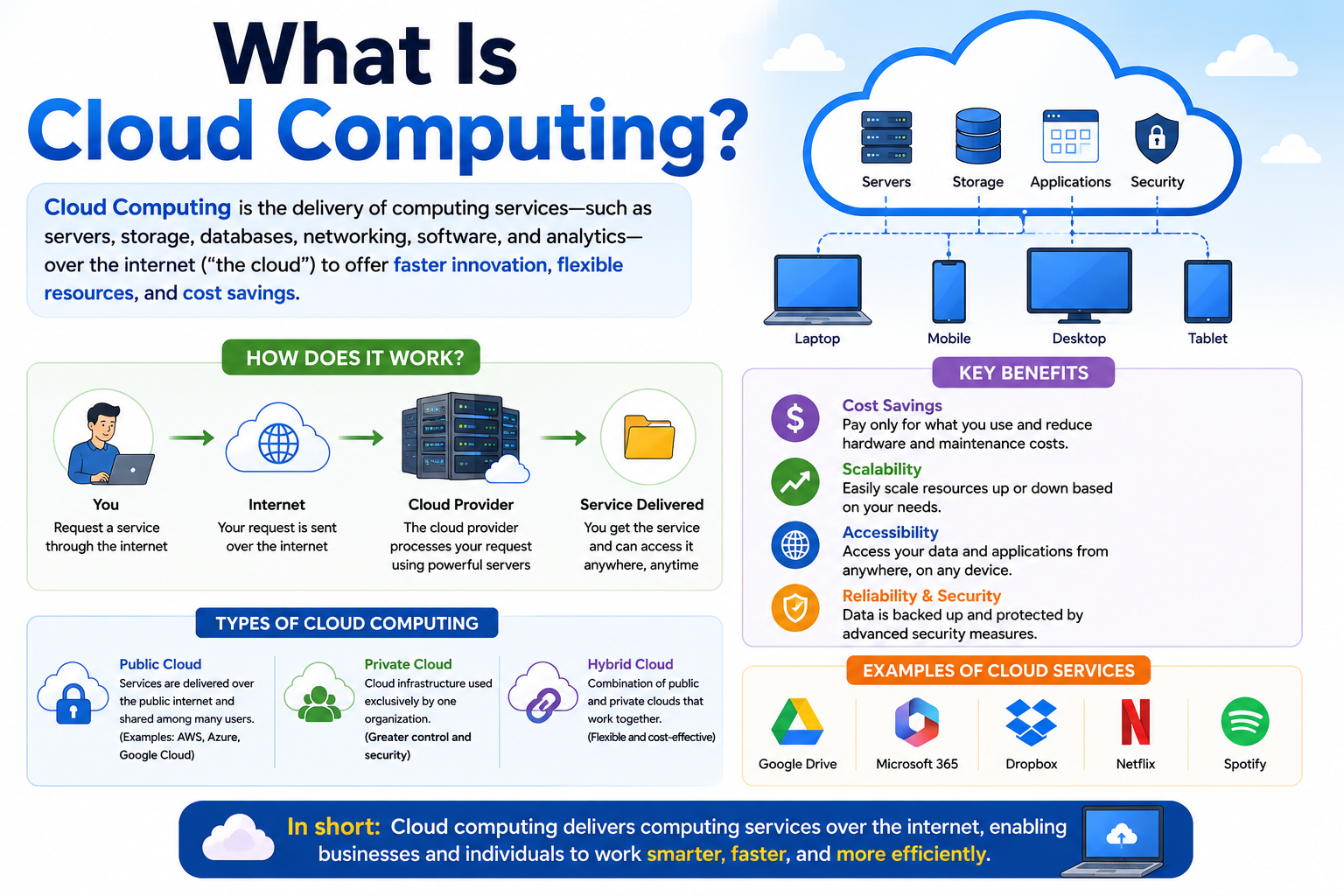
You already use cloud computing every single day, even if you have never thought about it by name. When you check your Gmail inbox, save a photo to Google Drive, or watch a show on Netflix, you are using cloud computing. When a coworker shares a document through Microsoft 365, or a student submits a project through an online platform, that is also cloud computing at work.
So what is cloud computing, exactly? In simple terms, it means accessing computing resources over the internet instead of using only the hardware sitting in front of you. Those resources include servers, storage, databases, networking, and software. They live in large facilities called data centers and are delivered to you through the internet whenever you need them.
This guide explains everything a beginner needs to know about cloud computing, including how it works, what it is used for, and what its benefits and limitations are.
Quick Answer: What Is Cloud Computing?
Cloud computing is the delivery of computing services, including servers, storage, databases, networking, software, and analytics, over the internet. Instead of owning and managing physical hardware, users access these resources from cloud providers on demand. Services like Gmail, Google Drive, Netflix, and Microsoft 365 are all everyday examples of cloud computing in action.
What Is Cloud Computing?
Cloud computing is the practice of using computing power, storage, and services hosted on remote servers and delivered over the internet. The word “cloud” is simply a way of describing the internet or a network of remote servers. You do not store your files locally on your own device or run software entirely from your own machine. Instead, those tasks happen on powerful computers in data centers around the world.
Think of it this way. When you save a file on your laptop, it lives on your laptop’s hard drive. When you save a file to Google Drive, it travels over the internet and lives on Google’s servers. You can then access that file from any device with an internet connection. That is the fundamental idea behind cloud computing.
Cloud computing allows individuals, students, businesses, and developers to access powerful computing resources without buying expensive hardware. A small business, for example, does not need to build its own server room. It can simply rent the computing power it needs from a cloud provider and pay for what it uses.
The National Institute of Standards and Technology (NIST) defines cloud computing as “a model for enabling ubiquitous, convenient, on-demand network access to a shared pool of configurable computing resources.” That definition covers the core ideas well, but in plain terms, it simply means accessing computing tools whenever you need them, from wherever you are, through the internet.
How Does Cloud Computing Work?
Understanding how cloud computing works does not require a technical background. The process follows a straightforward pattern every time you use a cloud-based service.
Here is what happens step by step:
Step 1: You connect to the internet.
Your device, whether a phone, laptop, or tablet, connects to the internet through Wi-Fi or a mobile network.
Step 2: You access a cloud service.
You open an application or website that is powered by cloud infrastructure. This could be your email, a streaming platform, or a file storage service.
Step 3: Your request travels to a data center.
The cloud provider operates large data centers filled with powerful servers. Your request, such as loading an email or playing a video, travels to one of these data centers.
Step 4: Servers process your request.
The servers in the data center process your request. If you are watching a video, the servers send that video data to your device. If you are saving a file, the servers store it securely.
Step 5: Results are delivered back to you.
The result of your request comes back to your device almost instantly. From your perspective, the process feels immediate.
Several important technologies make this possible:
Servers are powerful computers that store data and run applications. Cloud providers operate thousands of them across multiple data centers worldwide.
Data centers are large facilities designed to house and maintain these servers. They have redundant power supplies, cooling systems, and security measures to keep operations running at all times.
Networking connects your device to the cloud provider’s infrastructure. Fast and reliable internet connections make cloud services feel responsive.
Storage refers to the systems that hold your files, databases, and application data within the cloud environment.
Virtualization is a key technology that allows one physical server to act as many smaller, separate virtual machines. This makes cloud computing more efficient and flexible. You can learn more about virtualization concepts when exploring tools like [What Is VMware?] or [What Is Oracle VirtualBox?], which demonstrate how virtualization works at a desktop level.
Applications delivered through the cloud allow you to run software without installing it on your device. Your browser or a thin client application handles the interface, while the heavy processing happens in the data center.
What Is Cloud Computing Used For?
Cloud computing has become essential across nearly every part of modern life. Here are the most common uses, with practical examples for each.
File storage. Services like Google Drive, Dropbox, and OneDrive let you store documents, images, and videos in the cloud. You can access them from any device.
Data backup. Cloud backup services automatically copy your important files to remote servers. If your laptop breaks, your data is still safe.
Email. Gmail, Outlook, and Yahoo Mail all run on cloud infrastructure. Your messages live on remote servers, not just on your device.
Website hosting. Most websites run on cloud servers. Businesses use cloud platforms to keep their websites fast and available to visitors worldwide.
Streaming. Netflix, YouTube, Spotify, and similar services deliver video and audio from cloud servers to your screen or speakers on demand.
Online collaboration. Tools like Google Docs and Microsoft 365 let multiple people edit the same document at the same time, with changes saved in real time.
Software applications. Many popular programs now run entirely in a web browser, powered by the cloud. You do not need to install anything on your device.
Business applications. Customer relationship management tools, accounting software, and project management platforms run in the cloud. Salesforce is a widely used example.
Database hosting. Businesses store their customer data, product information, and transaction records in cloud-hosted databases.
Application development. Developers build, test, and deploy software using cloud platforms. This removes the need for expensive local development hardware.
Data analytics. Companies analyze large amounts of data using cloud-based analytics tools to understand customer behavior and business performance.
Disaster recovery. Organizations use cloud services to create copies of their systems and data so they can recover quickly after a technical failure or cyberattack.
Remote work. Cloud tools make it possible to work from anywhere with an internet connection. Video calls, shared files, and cloud applications all support remote teams.
Online education. Learning platforms, digital libraries, and student collaboration tools rely on cloud infrastructure to serve students around the world.
Gaming. Cloud gaming services stream games directly to your device. You play in real time without needing a high-powered gaming console or PC.
Types of Cloud Computing
Cloud computing services are organized into three main categories based on what they provide. These are called service models.
Infrastructure as a Service (IaaS)
Infrastructure as a Service, or IaaS, gives you access to the fundamental building blocks of computing. This includes virtual machines, storage, and networking. You rent the infrastructure from a cloud provider and manage what runs on it.
A virtual machine is a software-based version of a computer. It behaves like a real machine but runs on a shared physical server in a data center. You can install your own operating system, set up your own applications, and configure everything the way you need it.
IaaS is typically used by IT teams and developers who need control over their computing environment. Common IaaS examples include Amazon EC2 from Amazon Web Services, Microsoft Azure Virtual Machines, and Google Compute Engine from Google Cloud.
Platform as a Service (PaaS)
Platform as a Service, or PaaS, gives developers a ready-made environment to build, test, and deploy applications. The cloud provider manages the underlying infrastructure, including servers, storage, and networking. The developer focuses entirely on writing code and building the application.
Imagine building a house. With IaaS, you are given the land and the raw materials. With PaaS, the foundation and walls are already built. You just design and furnish the interior.
Common PaaS examples include Google App Engine, Microsoft Azure App Service, and Heroku. PaaS is popular with development teams that want to build and launch applications quickly without managing server configurations.
Software as a Service (SaaS)
Software as a Service, or SaaS, is the most familiar type of cloud computing for everyday users. With SaaS, you access a fully built application through a web browser or app. The cloud provider manages everything, including the software, servers, storage, and updates.
You simply sign in and use the software. You do not manage anything behind the scenes.
Well-known SaaS examples include [Google Workspace], which covers Gmail, Google Docs, Google Drive, and other productivity tools. [What Is Microsoft Office?] describes another leading productivity suite, with tools like Word, Excel, and Teams available through a subscription. Other SaaS examples include Salesforce, Dropbox, Zoom, and Slack.
Most people use SaaS services every day without realizing they are interacting with cloud computing.
Cloud Deployment Models
Beyond service types, cloud computing is also organized by how the cloud environment is set up and who has access to it. These are called deployment models.
Public Cloud
A public cloud is owned and operated by a third-party provider. The provider offers computing resources over the internet to many different customers at the same time. Each customer uses their own portion of the shared infrastructure, and their data remains separate.
Amazon Web Services, Microsoft Azure, and Google Cloud are the largest public cloud providers. Public clouds are generally cost-effective because customers share the cost of the underlying infrastructure. They are a strong choice for startups, developers, and businesses that do not require dedicated hardware.
Private Cloud
A private cloud is dedicated to a single organization. It can be hosted in the organization’s own data center or managed by a third-party provider, but the infrastructure is not shared with anyone else.
Private clouds offer more control and can be configured to meet specific security or compliance requirements. Government agencies, financial institutions, and large healthcare organizations often prefer private clouds because of strict data protection requirements.
Hybrid Cloud
A hybrid cloud combines a public cloud and a private cloud. Data and applications can move between the two environments depending on need.
A company might store sensitive customer data in a private cloud for security reasons, while running its public-facing website on a public cloud for scalability. The two environments work together, connected through a secure network.
Multi-Cloud
A multi-cloud approach means using services from more than one cloud provider. An organization might use Amazon Web Services for computing, Microsoft Azure for analytics, and Google Cloud for storage, each for their specific strengths or pricing.
Multi-cloud strategies can reduce dependency on any single provider. They can also allow organizations to choose the best tool for each task.
| Model | Main Idea | Best For | Example Use |
|---|---|---|---|
| Public Cloud | Shared infrastructure from a provider | Startups, developers, general business | Website hosting, SaaS apps |
| Private Cloud | Dedicated infrastructure for one organization | Large enterprises, government, healthcare | Sensitive data, compliance requirements |
| Hybrid Cloud | Public and private environments connected | Organizations needing flexibility and control | Mix of sensitive and public workloads |
| Multi-Cloud | Services from multiple providers | Organizations wanting flexibility and resilience | Using AWS, Azure, and Google Cloud together |
Examples of Cloud Computing
Cloud computing shows up in many tools and services you likely already use. Here is a list of common examples and why each one qualifies as cloud-based.
Google Drive stores your files on Google’s servers and lets you access them from any device. Your files are not tied to one machine.
Gmail processes and stores your email on Google’s cloud infrastructure. You can read the same inbox from your phone, tablet, or laptop.
Google Photos backs up your photos to Google’s cloud servers automatically. Your photos remain available even if you lose your phone.
Microsoft 365 delivers Word, Excel, PowerPoint, Teams, and other applications through a subscription. Documents can be saved and shared using OneDrive cloud storage.
OneDrive is Microsoft’s cloud storage service. It syncs files across your devices and makes sharing easy.
Dropbox is a cloud storage and collaboration platform. Teams use it to store and share files securely.
iCloud from Apple backs up your iPhone data, photos, contacts, and app data to Apple’s cloud servers.
Netflix streams movies and TV shows from cloud-based servers. No download is required because the content is delivered in real time.
Spotify streams music from the cloud. Your playlists and listening history are stored on Spotify’s servers, not just on your device.
Zoom hosts video calls using cloud infrastructure. Calls are processed through Zoom’s servers, which handle routing and quality management.
Slack is a cloud-based communication platform. Messages, files, and integrations all live in the cloud and are accessible from any device.
Salesforce is a cloud-based customer relationship management tool. Sales teams use it to manage contacts, track deals, and analyze performance.
Cloud gaming services like Xbox Cloud Gaming stream game data from cloud servers directly to your device. You play without needing powerful local hardware.
Online backup services like Backblaze or IDrive automatically copy your files to remote cloud servers, protecting you from data loss.
Cloud-based databases such as Amazon RDS or Google Cloud SQL store and manage data for websites and applications in the cloud.
Major Cloud Computing Providers
Several large companies provide cloud computing services to businesses, developers, and governments worldwide. Each provider has areas of strength and a broad range of services.
Amazon Web Services (AWS) is one of the largest and most widely used cloud platforms. It offers hundreds of services, including computing, storage, machine learning, and security tools.
Microsoft Azure is Microsoft’s cloud platform. It is widely used by businesses that already work with Microsoft products and is strong in enterprise software integration.
Google Cloud is Google’s cloud platform. It is recognized for its data analytics, machine learning tools, and global network infrastructure.
Oracle Cloud focuses heavily on enterprise database services and business applications. Many large organizations use Oracle Cloud for workloads that require Oracle database technology.
IBM Cloud serves enterprise clients and is known for hybrid cloud solutions and its focus on industries such as finance and healthcare.
| Provider | General Focus | Common Users |
|---|---|---|
| Amazon Web Services | Broad cloud services, computing, storage | Startups, developers, enterprises |
| Microsoft Azure | Enterprise software, hybrid cloud | Businesses using Microsoft products |
| Google Cloud | Data analytics, machine learning, networking | Developers, data teams, enterprises |
| Oracle Cloud | Enterprise databases, business applications | Large enterprises, finance, retail |
| IBM Cloud | Hybrid cloud, enterprise services | Finance, healthcare, government |
Cloud Computing vs Traditional Computing
Traditional computing means running software and storing data entirely on hardware you own and manage yourself. Cloud computing moves those tasks to remote servers managed by a provider. Both approaches have valid uses, and many organizations use a combination of both.
| Feature | Traditional Computing | Cloud Computing |
|---|---|---|
| Infrastructure | Owned and maintained by the user | Provided and maintained by the cloud provider |
| Storage | Local hard drives and servers | Remote servers in data centers |
| Cost model | High upfront hardware costs | Pay-as-you-go or subscription |
| Scalability | Limited by hardware capacity | Scale up or down quickly as needed |
| Maintenance | User is responsible for hardware and updates | Provider handles hardware maintenance |
| Accessibility | Typically limited to on-site devices | Accessible from anywhere with internet |
| Updates | Manual updates required | Automatic updates from provider |
| Hardware requirements | Significant local hardware investment | Minimal local hardware required |
| Backup | User manages their own backup systems | Provider often includes backup options |
| Management | Requires dedicated IT staff | Reduced IT management burden |
Traditional computing can still make sense when internet access is unreliable, when specific hardware control is required, or when data must not leave a particular location for legal or security reasons.
Benefits of Cloud Computing
Cloud computing offers a wide range of advantages for individuals, students, and businesses.
Lower upfront hardware costs. You do not need to buy servers or storage equipment to get started. Cloud services reduce the cost of setting up computing resources.
Scalability. You can increase or reduce your computing resources quickly based on demand. A retail business, for example, can scale up during busy seasons and scale down afterward.
Remote access. Cloud services are available anywhere with an internet connection. This makes working from different locations practical and simple.
Flexibility. Cloud platforms offer a wide range of services. You can choose exactly what you need and change your setup as your needs evolve.
Collaboration. Teams can work on the same files and applications at the same time, from different locations. Tools like [Google Workspace] and Microsoft 365 make real-time collaboration simple.
Automatic updates. Cloud providers handle software updates and security patches. You always use a current version without manually installing anything.
Backup options. Many cloud services include built-in backup capabilities. Your data is protected even if your local device fails.
Disaster recovery. Organizations can recover from technical failures more quickly when their data and systems are in the cloud.
Faster deployment. Businesses can launch new applications and services in hours or days rather than weeks, because cloud infrastructure is ready to use.
Resource efficiency. Cloud providers spread computing resources across many customers, which reduces waste compared to each organization running its own underused hardware.
Global accessibility. Cloud providers operate data centers around the world, allowing services to reach users wherever they are with low delay.
Easier software delivery. Developers can deploy software updates to all users at once through the cloud, without requiring users to install anything manually.
Centralized management. IT teams can manage cloud resources, user access, and security settings from a single console rather than visiting individual machines.
Support for remote work. Cloud tools give remote workers access to the same files and applications they would use in an office.
Access to advanced computing resources. Small businesses and individual developers can access powerful computing capabilities, such as large-scale data analysis or advanced databases, that would otherwise require significant investment.
It is important to note that cloud computing is not always cheaper than traditional computing. Costs depend on how heavily you use cloud services, how your applications are designed, and which pricing model you choose. Poorly managed cloud usage can lead to higher bills than expected.
Disadvantages of Cloud Computing
Cloud computing has real limitations alongside its benefits. A balanced view matters, especially when making decisions for a business or organization.
Internet dependency. Most cloud services require a reliable internet connection. If your connection is slow or unavailable, you may not be able to access your data or applications.
Recurring costs. Cloud services typically involve ongoing subscription or usage fees. Over time, these costs can add up, especially for large organizations.
Vendor lock-in. Moving from one cloud provider to another can be difficult and expensive. Applications built for one platform may not transfer easily to another.
Privacy concerns. Storing data on third-party servers raises questions about who can access that data and how it is protected. Organizations should review the privacy policies of cloud providers carefully.
Security responsibilities. While cloud providers protect their infrastructure, users and organizations are responsible for how they configure their cloud environments. Misconfigured settings are a common cause of data breaches.
Service outages. Cloud providers can experience technical failures. When a major provider has an outage, it can affect thousands of organizations simultaneously.
Compliance requirements. Certain industries, such as healthcare and finance, must follow strict rules about where data can be stored and how it is managed. Meeting these requirements in the cloud can be complex.
Data transfer costs. Moving large amounts of data out of a cloud provider’s environment can cost more than expected. These fees are sometimes called egress costs.
Limited control over infrastructure. With public cloud services, you cannot control the underlying hardware. This can be a concern for organizations with very specific technical requirements.
Cloud computing does not eliminate all IT risks. It shifts some responsibilities to the provider and keeps others with the organization. Understanding that boundary is essential.
Is Cloud Computing Safe?
Cloud computing can be very secure, but security is never automatic. Both cloud providers and their customers share responsibility for keeping data and applications safe.
This arrangement is known as the shared responsibility model. The cloud provider is responsible for the security of the physical infrastructure, the hardware, and the core services. The customer is responsible for how they configure those services, who has access, and how their data is managed.
Here are the key security areas to understand:
Authentication. Strong passwords and multi-factor authentication help prevent unauthorized access to cloud accounts. Multi-factor authentication means requiring more than just a password to sign in, such as a code sent to your phone.
Access control. Organizations should carefully control who can access which cloud resources. Not every employee needs access to everything.
Encryption. Reputable cloud providers encrypt data both while it is stored and while it is being transferred. Encryption converts data into a format that is unreadable without the correct key.
Backups. Even in the cloud, maintaining backups of important data adds an extra layer of protection.
Monitoring. Cloud providers offer tools to monitor for unusual activity. Organizations should use these tools and review alerts regularly.
Software updates. For cloud resources that the customer manages, keeping software and configurations up to date reduces security vulnerabilities.
Secure configurations. Many security incidents in the cloud happen because a setting was accidentally left open or misconfigured. Following security best practices during setup is important.
For a deeper look at protecting cloud environments, the [What Is Cloud Security?] guide covers key concepts and strategies in detail.
Cloud Computing and Cybersecurity
Cloud computing and cybersecurity are closely connected. As more data and applications move to the cloud, protecting them from cyber threats becomes increasingly important.
Identity security means protecting the accounts that have access to cloud resources. Stolen login credentials are one of the most common ways attackers gain access to cloud environments.
Access control limits what each user or system can do within a cloud environment. Applying the principle of least privilege, giving users only the access they actually need, reduces the impact if an account is compromised.
Data protection involves encrypting sensitive information and controlling who can read or change it.
Network security involves protecting the connections between cloud services and the users or systems that access them. Understanding the basics of [Network Security] is helpful for anyone managing cloud resources.
Malware can affect cloud environments just as it affects local systems. [What Is Malware?] explains the types of malicious software that can threaten your data.
Phishing is a common attack where someone is tricked into giving away login credentials through a fake website or email. These attacks target cloud account access directly.
Misconfigured cloud resources are among the most common causes of cloud data breaches. A storage bucket set to public by mistake, for example, can expose sensitive files to anyone on the internet.
For anyone building a broader understanding of digital safety, [What Is Cybersecurity?] provides a strong foundation. Protecting cloud environments often requires the same security mindset as protecting any other digital asset. Tools like firewalls and endpoint protection also play a role. [What Is a Firewall?] explains one of the core network protection tools, and [What Is Antivirus Software?] describes software that helps protect devices that connect to cloud services.
Cloud Storage vs Cloud Computing
Many people use the terms cloud storage and cloud computing interchangeably, but they describe different things.
Cloud storage refers specifically to storing files and data on remote servers. Services like Google Drive, Dropbox, and iCloud are primarily cloud storage services. Their main function is to hold your files and make them accessible from different devices.
Cloud computing is a much broader term. It includes cloud storage, but it also covers computing power, networking, databases, application hosting, software delivery, and much more.
| Cloud Storage | Cloud Computing |
|---|---|
| Primarily stores files and data | Provides a full range of computing resources and services |
| Example: Google Drive, Dropbox | Example: Amazon Web Services, Microsoft Azure |
| Focused on keeping and accessing files | Can include servers, databases, applications, networking, and storage |
| Simple to use for individuals | Used by individuals, developers, and large organizations |
Think of cloud storage as one room inside a large cloud computing building. The building contains many other rooms, each providing a different service.
What Is Virtualization in Cloud Computing?
Virtualization is one of the core technologies that makes cloud computing possible. Without it, cloud providers could not deliver computing resources efficiently to thousands of customers at the same time.
In simple terms, virtualization means creating a software-based version of something physical. In cloud computing, this usually means creating virtual machines from physical servers.
Imagine a physical server as a large apartment building. Instead of the whole building being one unit, virtualization divides it into many separate apartments. Each apartment, or virtual machine, behaves like its own independent computer. Customers rent an apartment without knowing or caring how many other apartments are in the building.
Virtual machines share the physical server’s resources, including its processor, memory, and storage. The cloud provider manages the division of resources so that each virtual machine performs reliably and does not interfere with others.
Resource allocation is the process of assigning the right amount of processor power, memory, and storage to each virtual machine based on what the customer needs.
Scalability is greatly improved by virtualization. A cloud provider can create new virtual machines quickly, giving customers more computing power within minutes.
If you want to explore how virtualization works in a hands-on way, tools like [What Is Oracle VirtualBox?] and [What Is VMware?] let you run virtual machines on your own computer. There are also [Free Virtualization Software] options if you want to experiment without spending money. Keep in mind that desktop virtualization tools and enterprise cloud infrastructure are different in scale, but the underlying concept of creating virtual machines is the same.
Cloud Computing for Students
Cloud computing offers students powerful tools for learning, organizing their work, and collaborating with others.
Online learning. Learning management systems, digital libraries, and educational video platforms all run on cloud infrastructure. Students access course materials, assignments, and grades through cloud-based portals.
File storage. Saving assignments and research documents to cloud storage services means students can access their work from any device, whether at school, home, or the library.
Collaboration. Cloud tools allow students to work on group projects together in real time. Multiple students can edit the same document simultaneously, with changes visible to everyone instantly.
Research. Online databases, academic journals, and research tools are accessible through cloud platforms. Students no longer need to visit a physical library for many resources.
Coding and development. Students learning programming can use cloud-based development environments. These platforms provide the tools needed to write and test code without complex local setup.
Backup. Storing work in the cloud protects against losing important files due to a computer crash or hardware failure.
Cloud-based applications. Many student tools, from note-taking apps to writing assistants, run entirely in the cloud through a web browser.
If you are looking for software tools that work well for learning and productivity, the [Best Software for Students] guide covers a range of helpful options. For cloud-based productivity specifically, [What Is Google Workspace?] explains the tools most students already use daily.
Cloud Computing for Businesses
Businesses of all sizes rely on cloud computing to operate more efficiently and reach their goals.
Websites. Most business websites run on cloud hosting platforms. Cloud hosting provides the performance and reliability businesses need to stay online consistently.
Databases. Customer records, product catalogs, and transaction data are stored in cloud-hosted databases. These databases are accessible to authorized staff from any location.
Email. Business email services run in the cloud. Employees access their accounts through webmail or email clients connected to cloud servers.
Collaboration. Cloud platforms let employees in different locations share files, join video meetings, and manage projects together.
Customer management. Cloud-based CRM tools like Salesforce help sales and support teams track customer interactions, manage deals, and analyze performance data.
Data analytics. Businesses use cloud analytics tools to process large amounts of data and identify trends, helping them make better decisions.
Backup and disaster recovery. Cloud backups protect business data from loss due to hardware failure, natural disasters, or cyberattacks. Recovery can be faster when systems are in the cloud.
Software development. Development teams build and deploy applications using cloud platforms. This reduces setup time and allows faster releases.
Remote work. Cloud tools allow employees to work productively from home or while traveling, using the same applications they would use in the office.
Protecting business data in the cloud also requires attention to security. Understanding [What Is Endpoint Security?] is relevant for businesses that use cloud services on many different employee devices.
Cloud Computing for Developers
Developers use cloud platforms as the foundation for building, testing, and deploying modern applications.
Cloud development environments allow developers to write and test code in a browser or connected tool without setting up a local environment. This makes getting started faster and reduces compatibility issues.
Application hosting in the cloud means developers can deploy their apps to servers that are already running and maintained by the provider. Apps can reach users anywhere in the world.
APIs are sets of instructions that allow different software systems to communicate. Cloud providers offer APIs for a wide range of services, including storage, databases, and security, that developers can use in their applications.
Databases hosted in the cloud store the data that applications use. Cloud databases can scale to handle large numbers of users.
Containers are lightweight packages that include an application and everything it needs to run. Cloud platforms like Amazon Elastic Kubernetes Service and Google Kubernetes Engine make managing containers easier.
Virtual machines give developers isolated environments to test code or run software with specific configurations.
Testing in the cloud allows developers to create temporary environments, run tests, and shut them down when finished. This is more cost-effective than maintaining dedicated test hardware.
Deployment using cloud platforms can be automated, so new versions of an application roll out to users quickly and reliably.
Developers often use tools like [What Is Visual Studio Code?] for writing code, and [What Is GitHub Desktop?] for managing version control and collaborative development workflows. Both integrate well with cloud-based development and deployment processes.
How Much Does Cloud Computing Cost?
Cloud computing costs vary widely depending on the provider, the services you use, and how much you use them. There is no single price that applies to everyone.
Pay-as-you-go pricing is one of the most common models. You pay only for the computing power, storage, or other resources you actually use. This is similar to a utility bill. If you use more, you pay more. If you use less, you pay less.
Subscription pricing is common for SaaS products like Microsoft 365 or Google Workspace. You pay a fixed monthly or annual fee for access to the service, regardless of how much you use it.
Free tiers are offered by most major cloud providers. Amazon Web Services, Google Cloud, and Microsoft Azure all have free plans that give new users access to limited amounts of certain services at no cost.
Reserved resources allow businesses to commit to using a specific amount of cloud resources for a set period, usually one or three years. In return, providers often offer a lower price than the standard pay-as-you-go rate.
Usage-based pricing applies to specific services where you pay based on measured activity, such as the number of database queries run or the amount of data transferred.
Cloud costs can become unexpectedly high if services are not monitored carefully. Running virtual machines or storing large amounts of data without reviewing your usage regularly can lead to higher bills than anticipated. Most major providers offer cost management tools to help track and control spending.
Always check the current pricing pages on official provider websites, as prices and available tiers change regularly.
How to Choose a Cloud Service
Choosing the right cloud service requires thinking through several important factors. Here is a practical checklist to guide your decision.
Purpose. Be clear about what you need the cloud service to do. File storage, application hosting, and database management all have different requirements.
Reliability. Look for providers with strong uptime guarantees. A service level agreement (SLA) describes the provider’s commitment to keeping their service available.
Security. Review the security features the provider offers, including encryption, access controls, and compliance certifications.
Privacy. Understand how the provider handles your data. Review their privacy policy to know where data is stored and who can access it.
Pricing. Compare pricing models carefully. Consider your expected usage and whether a pay-as-you-go or subscription model works better for your situation.
Scalability. Make sure the service can grow with your needs. You should be able to add storage or computing power without switching providers.
Performance. Consider whether the provider has data centers close to your users. Distance affects how quickly a service responds.
Location of data centers. Some regulations require data to be stored in specific countries or regions. Confirm where your data will be stored.
Compliance. If you work in healthcare, finance, or education, check whether the provider meets relevant compliance standards such as HIPAA, GDPR, or SOC 2.
Support. Evaluate the level of customer support available. Some providers offer 24-hour support, while others limit support to business hours or charge extra for it.
Integrations. Check whether the cloud service integrates with the tools you already use, such as your existing software, databases, or development workflows.
Ease of migration. Consider how difficult it would be to move your data and applications to a different provider if needed in the future.
Vendor lock-in. Some cloud services use proprietary formats or tools that make migration difficult. Prefer open standards where possible to maintain flexibility.
Backup and recovery. Confirm what backup and recovery options are available and how quickly you could restore your data if something went wrong.
Common Cloud Computing Problems
Cloud computing is reliable for most users, but problems do occur. Here are common issues and practical suggestions for handling them.
Slow cloud applications. A slow internet connection is often the cause. Try switching to a faster network. If the application itself is slow, the provider may be experiencing high traffic or a technical issue. Check the provider’s status page.
Internet connection problems. Cloud services require internet access. If your connection drops, you lose access to cloud tools temporarily. Using offline modes where available, such as Google Docs offline, can help in these situations.
Service outages. Even major cloud providers experience occasional outages. Follow the provider’s official status page for updates and estimated resolution times. Having a backup plan for critical services is a good practice.
Storage limits. Free storage tiers have limits. If you are running out of space, review what you have stored and delete unnecessary files, or upgrade to a paid plan.
Unexpected bills. Review your cloud usage regularly. Set up billing alerts if the provider offers them. Unexpected costs often come from forgotten resources left running, such as virtual machines or data transfers.
Account access problems. If you cannot sign in, start with the provider’s account recovery process. Use multi-factor authentication to protect your account from unauthorized access.
Sync issues. If files are not syncing correctly between your devices and the cloud, try signing out and back in, or check whether the sync application is up to date.
Configuration mistakes. Misconfigured settings are a common cause of both security problems and unexpected costs. Follow the provider’s documentation carefully, and use the security review tools that most cloud platforms provide.
Future of Cloud Computing
Cloud computing continues to develop rapidly. Several important trends are shaping its direction, though it is worth distinguishing between changes already underway and those that remain possibilities.
Computing at the edge. Edge computing moves some data processing closer to where data is generated, such as on devices or in local networks, rather than sending everything to a central data center. This reduces delay for time-sensitive applications like industrial sensors and connected vehicles.
Serverless computing. Serverless platforms allow developers to run code without managing servers at all. The cloud provider handles all the infrastructure automatically. Developers simply write their functions and pay only for the time their code runs.
Cloud-native applications. More organizations are building applications specifically designed for the cloud from the start. These applications use cloud features like scalability and distributed architecture as core parts of their design.
Multi-cloud strategies. Organizations increasingly use services from multiple providers to avoid dependency on a single vendor and choose the best tools for each task.
Automation. Cloud providers are expanding tools that automate repetitive tasks, such as scaling resources, applying security patches, and managing backups.
Cloud security. As cloud adoption grows, so does attention to cloud security. Providers continue to develop more sophisticated security tools, and organizations are placing greater emphasis on cloud security training and governance.
Sustainable computing. Major cloud providers have made public commitments to reducing the environmental impact of their data centers through renewable energy and improved energy efficiency. This trend is likely to continue growing in importance.
These directions reflect current industry movement. The rate and form of future changes will depend on technology development, business adoption, and regulatory requirements.
Frequently Asked Questions
What is cloud computing?
Cloud computing is the delivery of computing services over the internet, including servers, storage, databases, networking, software, and analytics. Users access these resources on demand from cloud providers instead of managing local hardware.
How does cloud computing work?
A user connects to the internet and accesses a cloud service. The request travels to a cloud provider’s data center, where servers process it. Results are delivered back to the user almost instantly. The provider manages all the underlying infrastructure.
What is cloud computing used for?
Cloud computing is used for file storage, email, streaming, website hosting, collaboration, software delivery, data backup, disaster recovery, database management, application development, and many other purposes.
What are the three main types of cloud computing?
The three main service models are Infrastructure as a Service (IaaS), Platform as a Service (PaaS), and Software as a Service (SaaS). Each provides a different level of control and responsibility for the user.
What are examples of cloud computing?
Common examples include Google Drive, Gmail, Microsoft 365, Netflix, Spotify, Zoom, Slack, Dropbox, iCloud, Salesforce, and Amazon Web Services.
Is Google Drive cloud computing?
Yes. Google Drive is a cloud storage service, which is part of the broader cloud computing ecosystem. Your files are stored on Google’s servers and accessed over the internet.
Is Gmail cloud computing?
Yes. Gmail is a Software as a Service application. Your emails are stored and processed on Google’s cloud infrastructure, and you access them through a browser or app.
What is the difference between cloud storage and cloud computing?
Cloud storage refers specifically to storing data on remote servers. Cloud computing is a broader term that includes storage along with computing power, networking, databases, software delivery, and more. Cloud storage is one component of cloud computing.
Is cloud computing safe?
Cloud computing can be very secure, but security depends on both the cloud provider and how the customer configures their environment. The shared responsibility model means providers secure the infrastructure, while customers are responsible for their own settings, access controls, and data management.
What are the advantages of cloud computing?
Key advantages include lower upfront costs, scalability, remote access, automatic updates, collaboration tools, faster deployment, built-in backup options, and access to advanced computing resources.
What are the disadvantages of cloud computing?
Limitations include internet dependency, recurring costs, vendor lock-in, potential privacy concerns, security configuration responsibilities, the risk of service outages, and data transfer fees.
What is SaaS?
Software as a Service (SaaS) is a cloud service model where users access fully built software through the internet. The provider manages everything. Examples include Gmail, Zoom, Salesforce, and Dropbox.
What is PaaS?
Platform as a Service (PaaS) provides developers with a managed environment for building and deploying applications. The provider handles infrastructure, and developers focus on writing code.
What is IaaS?
Infrastructure as a Service (IaaS) provides users with access to virtual machines, storage, and networking. Users manage what runs on the infrastructure. Examples include Amazon EC2 and Microsoft Azure Virtual Machines.
What is a public cloud?
A public cloud is owned by a third-party provider and offers computing resources over the internet to many customers simultaneously. Amazon Web Services, Microsoft Azure, and Google Cloud are leading public cloud providers.
What is a private cloud?
A private cloud is dedicated infrastructure used by a single organization. It offers more control and can be configured to meet specific security or compliance requirements.
What is a hybrid cloud?
A hybrid cloud combines public and private cloud environments. Organizations use both together, allowing data and workloads to move between them as needed.
What is virtualization in cloud computing?
Virtualization is the technology that allows one physical server to run many virtual machines. Each virtual machine behaves like an independent computer. This makes cloud computing more efficient and scalable.
Is cloud computing expensive?
The cost of cloud computing depends on the provider, service type, and how much you use. Free tiers are available for many services. Pay-as-you-go pricing keeps costs flexible, but usage should be monitored to avoid unexpected bills.
Do I need the internet to use cloud computing?
Most cloud computing services require an active internet connection. Some services offer limited offline modes, but full functionality generally depends on internet access.
Final Thoughts
Cloud computing has transformed the way people work, learn, and access technology. It removes the need to own expensive hardware and gives individuals and organizations the ability to access powerful resources on demand over the internet.
In this guide, you have learned what cloud computing means at its core. It is the delivery of computing services, including storage, servers, databases, networking, and software, over the internet. You have seen how it works step by step, from connecting to the internet to receiving results processed by servers in a data center thousands of miles away.
The three main service models, Infrastructure as a Service, Platform as a Service, and Software as a Service, each serve different needs. IaaS gives technical teams infrastructure to manage. PaaS gives developers a platform to build applications. SaaS gives everyday users ready-to-use software delivered through a browser.
Deployment models, including public, private, hybrid, and multi-cloud, offer organizations choices about how their cloud environments are set up and who controls them.
From Google Drive and Gmail to Netflix and Salesforce, cloud computing examples are everywhere. The benefits are real, including lower costs, flexibility, and remote access, but so are the limitations, including internet dependency, ongoing costs, and shared security responsibilities.
Security in the cloud is a shared effort. Providers protect their infrastructure, while users and organizations must configure their environments carefully and follow sound security practices.
The question of what is cloud computing is best answered not just with a definition, but with an understanding of how deeply it already shapes everyday digital life. Whether you are a student, a professional, a developer, or a business owner, cloud computing is a technology that affects how you work and what is possible for you.
As cloud technology continues to evolve, staying informed will help you make better decisions about how to use it effectively and safely.
References
- National Institute of Standards and Technology. The NIST Definition of Cloud Computing (Special Publication 800-145). U.S. Department of Commerce. https://nvlpubs.nist.gov/nistpubs/Legacy/SP/nistspecialpublication800-145.pdf
- Amazon Web Services. What Is Cloud Computing? AWS Documentation. https://aws.amazon.com/what-is-cloud-computing/
- Microsoft Azure. What Is Cloud Computing? Microsoft Learn. https://azure.microsoft.com/en-us/resources/cloud-computing-dictionary/what-is-cloud-computing/
- Google Cloud. What Is Cloud Computing? Google Cloud Documentation. https://cloud.google.com/learn/what-is-cloud-computing
- IBM. What Is Cloud Computing? IBM Think Topics. https://www.ibm.com/topics/cloud-computing
- Cloud Security Alliance. Cloud Controls Matrix and Security Guidance. https://cloudsecurityalliance.org/
- Microsoft Azure. Shared Responsibility in the Cloud. Microsoft Learn. https://learn.microsoft.com/en-us/azure/security/fundamentals/shared-responsibility
- Google Cloud. Infrastructure as a Service, Platform as a Service, and Software as a Service Overview. Google Cloud Documentation. https://cloud.google.com/learn/paas-vs-iaas-vs-saas
Technology Disclaimer
This article is for educational and informational purposes only. Cloud services, features, pricing, security controls, and availability can change over time. Always check the official documentation and current service terms before making technical or business decisions.