
 By saman zahra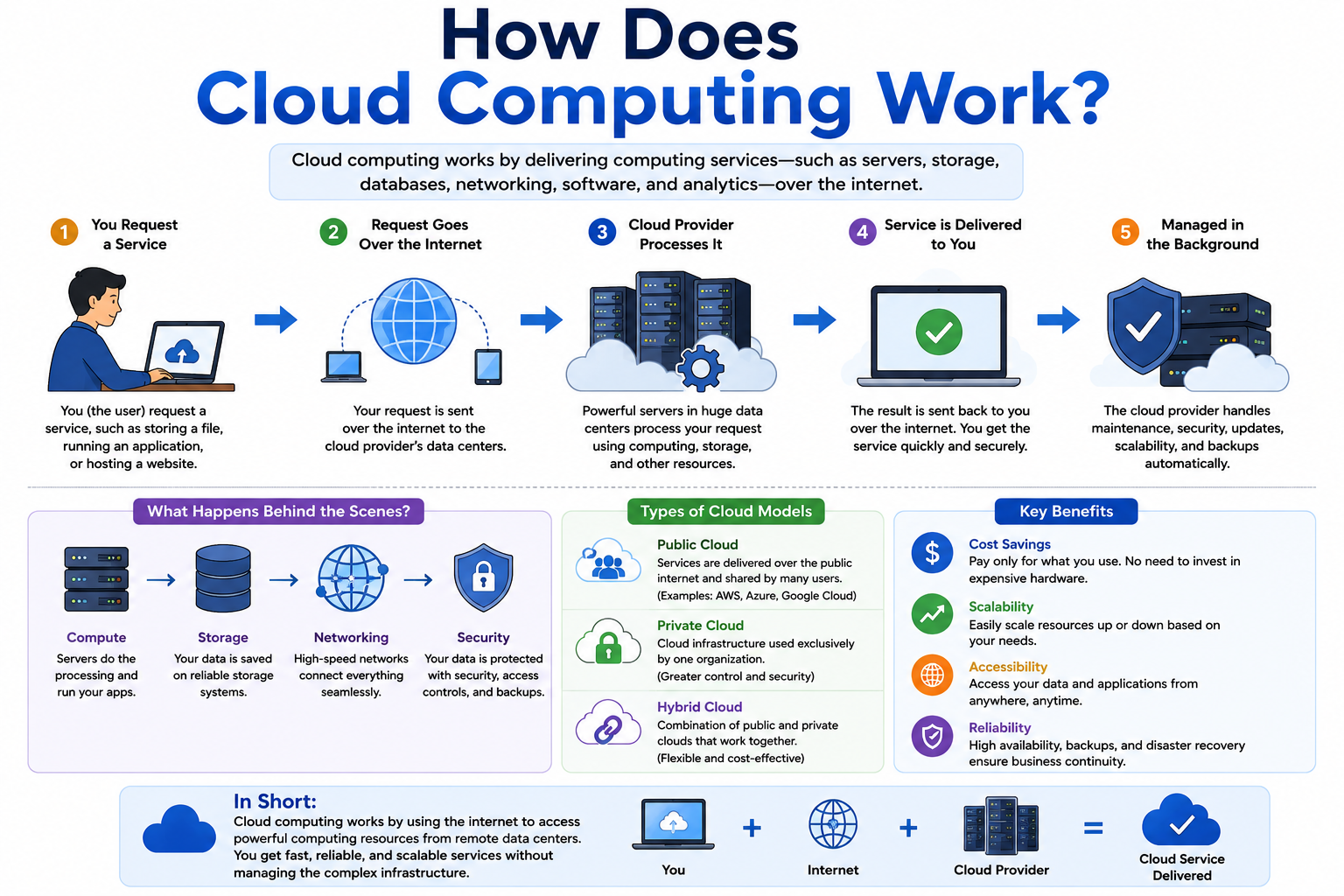
Every time you open an email, stream a video, or save a file online, computers in large facilities far from your location are doing the heavy lifting on your behalf. You might not think about any of that. From your perspective, you just clicked a button and something happened. But behind that simple action is a layered process involving networks, servers, storage systems, and security controls working together in milliseconds.
So how does cloud computing work, exactly? The short answer is that your device sends a request over the internet, cloud infrastructure receives and processes that request, and the result comes back to you almost instantly. The “cloud” is not a mysterious floating entity. It is a collection of real, physical computing resources housed in data centers around the world and made accessible through networks.
If you are new to this topic, the [What Is Cloud Computing? A Beginner’s Guide] article is a helpful starting point before diving into the deeper mechanics covered here.
Quick Answer: How Does Cloud Computing Work?
Cloud computing works by connecting users to remote computing resources through the internet. When you use a cloud service, your device sends a request to servers in a data center. Those servers process your request, retrieve or store data as needed, and send the result back to your device. The cloud provider manages all the underlying infrastructure.
How Does Cloud Computing Work?
At its most basic level, cloud computing works like this: you send a request, a remote system handles it, and you receive a result. Your device does not do all the work. Instead, powerful computers in data centers do most of the processing and storage on your behalf.
Here is the process broken down into clear steps:
Step 1: A user sends a request.
You click a button, open a file, submit a form, or start a video. That action becomes a request that leaves your device.
Step 2: The request travels through a network.
Your request moves through your internet connection, through routers and network equipment, toward the cloud provider’s infrastructure.
Step 3: Cloud infrastructure receives the request.
A cloud server or system of servers receives your request. Before anything happens, the service typically confirms your identity.
Step 4: Servers process the request.
The servers perform the required task. This might mean retrieving a file, running a calculation, loading a web page, or saving data.
Step 5: Data may be retrieved from storage or databases.
If your request involves data, the system retrieves it from storage systems or databases connected to the cloud infrastructure.
Step 6: The result is processed.
The servers assemble the response, whether that is a document, a video stream, a web page, or a simple confirmation message.
Step 7: The result is sent back to the user.
The response travels back through the network to your device. From your perspective, this entire process often takes less than a second.
Consider a practical example. You open Google Drive on your laptop and click on a document you saved last week. Your laptop sends a request to Google’s servers. Google authenticates your account, retrieves the document from its storage systems, and sends the document data back to your browser. The document appears on your screen. All of that happened between your click and the moment the document opened.
What Happens When You Use a Cloud Service?
To understand the process more concretely, consider what happens when you upload a photo to a cloud storage service.
Step 1: Your device connects to the internet.
Your phone or computer establishes an internet connection. Without this connection, no data can travel to the cloud.
Step 2: The cloud service authenticates you.
Before accepting your upload, the service checks your identity. It confirms that you have an account and that your login is valid. This process typically uses your username, password, and sometimes a second factor such as a code sent to your phone.
Step 3: The file is transmitted securely.
Your photo is broken into small packets of data and transmitted over the internet using secure protocols. HTTPS encryption protects the data during transit so that it cannot easily be intercepted.
Step 4: Cloud servers receive the file.
The cloud provider’s servers receive the incoming data packets and reassemble them into your photo file.
Step 5: Storage systems save the data.
The file is written to cloud storage. Depending on the provider, this might involve object storage systems designed to handle large numbers of files efficiently.
Step 6: Metadata is recorded.
The system saves information about your file, such as the file name, size, date uploaded, and your account details. This metadata allows the system to find and retrieve the file later.
Step 7: Backup or redundancy may be applied.
Many cloud services automatically copy your file to multiple locations. If one server or data center experiences a problem, your file is still safe in another location.
Step 8: You can access the file later.
The next time you need that photo, you sign in, and the system uses your stored metadata to find and deliver the file. You can access it from any device connected to the internet.
What Are Cloud Servers?
A server is a computer designed to process requests and deliver responses to other computers. Unlike a personal laptop, servers are built to handle many requests at the same time and run continuously without interruption.
A cloud server is a server whose resources are made available to users over the internet through a cloud platform. Cloud servers can be physical machines, but they are more commonly virtual. Virtual servers are software-based versions of servers that run on physical hardware. One physical server can host many virtual servers simultaneously.
Every server has key resources that determine what it can do:
CPU (Central Processing Unit) handles the calculations and logic that power applications and services. More CPU capacity means more processing power.
RAM (Random Access Memory) holds information that the server is actively working with. More RAM allows a server to handle more tasks at the same time.
Storage is where data is kept long term. Servers use various types of storage, including solid-state drives and larger storage arrays, depending on performance requirements.
Cloud providers operate large pools of physical servers in their data centers. Rather than assigning one physical server to one customer, they use virtualization to divide physical resources among many customers efficiently. This makes cloud services more flexible and cost-effective than traditional dedicated hardware.
What Are Cloud Data Centers?
A data center is a large, specialized facility designed to house and operate computing equipment. When you use a cloud service, your data and the software running it live in one of these facilities.
Data centers contain several key components:
Servers are the computing machines that process and serve data. A large data center can contain tens of thousands of servers.
Storage systems hold the enormous amounts of data that cloud services manage. These systems are designed for reliability and speed.
Networking equipment connects servers to each other and to the internet. High-speed switches, routers, and cables form the internal network of a data center.
Power systems keep everything running. Data centers use redundant power supplies and backup generators so that equipment stays on even during a power outage.
Cooling systems manage heat. Servers generate significant heat, and keeping them at safe temperatures is essential for their reliable operation.
Physical security protects the facility from unauthorized access. Data centers use access control systems, surveillance, and security personnel to keep physical equipment safe.
Redundancy is built into every layer of a data center. If one component fails, backup systems take over automatically.
Cloud providers like Amazon Web Services, Microsoft Azure, and Google Cloud operate dozens of data center facilities in multiple countries. They organize these facilities into geographic regions and smaller groupings called availability zones. Spreading infrastructure across multiple locations helps ensure that a problem in one place does not bring down an entire service. This geographic distribution also allows providers to serve users around the world with lower delay.
How Does the Internet Connect Users to the Cloud?
The internet is the pathway between your device and cloud infrastructure. Understanding the basic steps of that connection helps explain how a request reaches a cloud server so quickly.
Your internet connection is the starting point. Whether you use a home broadband connection, a mobile network, or a workplace network, your device connects to the broader internet through your internet service provider.
DNS (Domain Name System) translates the human-readable address you type, such as drive.google.com, into an IP address that computers use to find each other on the internet. Think of DNS as a phone book for the internet.
IP addresses are numerical identifiers assigned to every device and server connected to the internet. When your device needs to reach a cloud service, it uses the IP address resolved by DNS to send data to the right destination.
Routers direct data packets along the most efficient path from your device to the destination server. Data does not travel in a straight line. It moves through multiple routers across different networks until it reaches the cloud provider’s infrastructure.
Network infrastructure at the cloud provider includes high-speed connections, load balancers, and edge servers that receive incoming requests and route them to the appropriate internal systems.
HTTPS (Hypertext Transfer Protocol Secure) is the protocol used by most cloud services to transmit data securely. It encrypts the connection between your browser or app and the cloud server, protecting data in transit from being intercepted.
Protecting the connections between users and cloud services is an important part of [Network Security]. Tools like [What Is a Firewall?] play a role in controlling what traffic is allowed to pass between networks, both at the user end and within cloud infrastructure itself.
How Does Cloud Storage Work?
Cloud storage allows you to save files on remote servers and access them from any device with an internet connection. It works differently from saving a file to your laptop’s hard drive.
When you upload a file to a cloud storage service like Google Drive or OneDrive, the following happens:
Data transmission carries your file from your device to the cloud provider’s servers. The file is broken into packets, encrypted, and sent over the internet.
Object storage is one of the most common formats for cloud file storage. In object storage, each file is stored as an independent object with a unique identifier and associated metadata. This approach handles large numbers of files efficiently.
File storage organizes data in a traditional folder and file hierarchy, similar to what you see on your computer. Some cloud services use this model.
Block storage divides data into fixed-size blocks, which is common for databases and applications that require fast, consistent access to data.
Metadata is stored alongside your file. It includes information such as the file name, size, type, creation date, and access permissions. Metadata is what allows the system to find and retrieve your file when you need it.
Replication is the process of automatically copying your file to multiple storage locations. If one storage system fails, your data is preserved in another location.
Access permissions determine who can view, edit, or share your files. You control these settings through the cloud service’s interface.
Cloud storage is one component of the broader cloud computing ecosystem. It handles data at rest, meaning data that is stored rather than being actively processed.
How Do Cloud Databases Work?
A cloud database stores structured information in an organized way and allows applications to retrieve or update that information on demand. Cloud databases work similarly to traditional databases, but they run on cloud infrastructure rather than on local servers.
Consider an everyday example. When you create an account on an online shopping website, your name, email address, and order history are stored in a database. When you log in and check your recent orders, your browser sends a query to a server. The server communicates with the database, retrieves your order records, and sends them back to your screen.
Here is how that process works in a cloud environment:
Storing structured information. Data is organized into tables with rows and columns, similar to a spreadsheet, or in other formats depending on the database type. Each piece of information, such as a customer record or a product listing, sits in a defined structure.
Sending queries. When an application needs information, it sends a query, which is a structured request for specific data. For example, a query might ask for all orders placed by a particular customer in the past month.Processing requests. The cloud database system processes the query, searches through its stored data, and assembles the matching results.
Returning results. The results travel back to the application, which uses them to display information to the user.
Scaling resources. Cloud databases can increase their capacity when demand is high and reduce it when demand drops. This flexibility is one of the main advantages of running databases in the cloud.
What Is Virtualization in Cloud Computing?
Virtualization is the technology that makes cloud computing practical and efficient. Without it, cloud providers would need a separate physical machine for each customer, which would be enormously expensive and wasteful.
Here is how virtualization works in simple terms:
A physical server is a real machine with a CPU, RAM, and storage. By itself, one physical server can be very powerful, but assigning it entirely to one customer would waste most of its capacity.
A hypervisor is software that runs on the physical server and manages the creation and operation of virtual machines. The hypervisor divides the physical server’s resources and allocates portions to each virtual machine.
Virtual machines are software-based computers that run on top of the physical hardware. Each virtual machine has its own operating system and behaves like an independent computer. Multiple virtual machines can run on one physical server simultaneously.
Resource allocation means the hypervisor assigns specific amounts of CPU, RAM, and storage to each virtual machine based on what the customer needs. If a customer needs more resources, the hypervisor can allocate more, sometimes without interrupting the running system.
Isolation keeps each virtual machine separate from the others running on the same physical hardware. One customer’s data and applications do not mix with another customer’s environment.
This model allows cloud providers to serve many customers efficiently using a shared pool of physical hardware. It also makes it easy to create, resize, or remove computing resources quickly.
If you want to explore how virtualization works on a smaller scale, tools like [What Is Oracle VirtualBox?] and [What Is VMware?] let you run virtual machines on your own desktop or laptop. There are also [Free Virtualization Software] options available for personal use and learning. It is worth noting that these desktop virtualization tools share the same fundamental concept as cloud virtualization, but they operate at a very different scale. Cloud providers manage thousands of physical servers across multiple data centers, which is far beyond what desktop virtualization tools are designed to handle.
How Do Cloud Applications Work?
A cloud application is software that runs on cloud servers rather than on your local device. When you use a cloud application, your device handles the interface you see and interact with, while the cloud handles most of the processing.
Here is what happens when you open a cloud-based application such as an online email service:
Your browser or app connects to the internet and sends a request to the application’s servers.
The application server receives your request and begins processing it. The server runs the core logic of the application, such as retrieving your inbox or saving a draft email.
APIs allow different parts of the system to communicate. The email application might call one API to retrieve your messages, another to check for new mail, and another to handle attachments.
Databases store your emails, contacts, settings, and preferences. The application server queries these databases to find the information relevant to your request.
Authentication confirms that you are who you claim to be before giving you access to your data.
The response is assembled and sent back to your browser or app. Your inbox appears on your screen.
The key point is that the application logic, the data, and much of the processing all happen in the cloud. Your device mostly receives and displays the results. This is why cloud applications can run on low-powered devices. The device itself does not need to do the heavy lifting.
Understanding how applications are designed helps clarify why this model works the way it does. [What Is Application Software Used For?] covers the broader concept of application software in more detail.
What Are APIs and Why Are They Important in Cloud Computing?
API stands for Application Programming Interface. An API is a defined way for one piece of software to communicate with another. In cloud computing, APIs are essential because they allow applications, services, and systems to exchange data and trigger actions.
A helpful analogy is a restaurant. You sit at a table and look at a menu. You tell the waiter what you want. The waiter takes your order to the kitchen, where the food is prepared. The waiter then brings your meal back to your table. You never go into the kitchen yourself. The waiter is the API. The kitchen is the cloud service. You are the application or user making the request.
In cloud computing, APIs allow:
Applications to communicate. A mobile app can send a request to a cloud service through its API and receive a structured response without needing to understand the internal workings of that service.
Services to exchange data. When you book a flight on a travel website, that website might use APIs to check availability from multiple airlines, get pricing information, and confirm your booking, all through separate API calls happening in the background.
Mobile apps to communicate with servers. The app on your phone sends API requests to cloud servers. The servers process the requests and return responses that the app displays to you.
Cloud services to connect. Different cloud services within the same application can communicate with each other through APIs, allowing complex systems to be built from separate, specialized components.
APIs are what make modern cloud applications modular and scalable. Rather than building one enormous system that does everything, developers can build separate services that communicate through APIs and work together.
How Does Cloud Computing Handle Many Users?
One of the most impressive things about cloud computing is its ability to serve millions of users at the same time. This is not magic. It is the result of careful infrastructure design.
Resource allocation ensures that each user or application gets the computing resources it needs. Cloud systems monitor resource usage continuously and adjust allocations as demand changes.
Load balancing distributes incoming requests across multiple servers so that no single server becomes overwhelmed. Think of a highway with many lanes. If all vehicles tried to use only one lane, traffic would slow to a crawl. Load balancing opens more lanes when traffic increases.
Scaling allows cloud systems to add more servers or computing capacity when demand rises. When demand drops, they can reduce capacity to save resources. This happens automatically in well-designed cloud environments.
Distributed systems spread workloads across many servers and sometimes many data centers. Rather than relying on one powerful machine, cloud providers distribute tasks among many machines working in parallel.
Caching stores frequently requested data closer to users so it can be delivered faster. If many users are accessing the same popular video, a cached copy can be delivered quickly without the system fetching it fresh from the main storage every single time.
Multiple servers working together handle far more requests than any single machine could manage. Modern cloud platforms are built from the ground up to operate this way.
What Is Cloud Scaling?
Scaling in cloud computing means adjusting computing resources to match demand. This is one of the most practical advantages of cloud infrastructure.
Vertical Scaling
Vertical scaling means adding more power to an existing server. This could involve increasing the amount of RAM, upgrading to a faster CPU, or adding more storage. Vertical scaling is like upgrading your car’s engine to make it go faster. There is a limit to how much you can add to one machine, but for many workloads, vertical scaling is a straightforward solution.
Horizontal Scaling
Horizontal scaling means adding more servers to share the workload rather than making one server more powerful. Instead of upgrading one car, you add more cars to the fleet. This approach can scale almost indefinitely and is commonly used for web applications, streaming services, and other systems that need to handle large numbers of concurrent users.
Automatic Scaling
Automatic scaling, sometimes called autoscaling, allows cloud systems to add or remove resources automatically based on real-time demand. Cloud platforms monitor metrics like CPU usage, incoming requests, and response time. When usage rises above a set threshold, the system automatically adds more capacity. When demand drops, it removes the extra capacity to avoid unnecessary cost.
A practical example: an online retailer’s website might receive ten times its usual traffic during a major sale. Without automatic scaling, the website might slow down or crash. With automatic scaling, the cloud platform detects the surge in traffic, adds more server instances, and distributes the load. After the sale, traffic returns to normal, and the extra instances are removed.
Virtualization vs Cloud Computing
Virtualization and cloud computing are closely related, but they are not the same thing. This is a common source of confusion for beginners.
| Virtualization | Cloud Computing |
|---|---|
| A technology for creating virtual resources | A delivery model for computing services |
| Can run on local infrastructure | Typically accessed remotely over the internet |
| Creates virtual machines or similar resources | Can include compute, storage, databases, networking, and applications |
| Can exist independently of public cloud services | Often uses virtualization as a foundational technology |
Virtualization is a tool. Cloud computing is a service model. Cloud providers use virtualization as one of several technologies to build their infrastructure, but virtualization alone does not make something a cloud service. A company running virtual machines on its own servers in its own office is using virtualization but may not be using cloud computing in the traditional sense.
How Does Cloud Computing Store Data Safely?
Keeping data safe in the cloud involves multiple layers of protection. No system is completely secure, but reputable cloud providers implement extensive controls to reduce risk.
Authentication verifies that users are who they claim to be before granting access. Strong passwords and multi-factor authentication are foundational to account security.
Authorization determines what an authenticated user is permitted to do. A customer service employee might be authorized to view customer records but not to delete them.
Encryption converts data into an unreadable format. Reputable cloud providers encrypt data both when it is stored and when it is being transmitted. Even if someone intercepts encrypted data, they cannot read it without the correct decryption key.
Access controls limit who can reach specific data or systems. Following the principle of least privilege means giving users only the access they genuinely need.
Backups create copies of data that can be restored if the original is lost or corrupted.
Replication automatically copies data to multiple locations so that it remains available even if one storage system fails.
Monitoring involves continuous observation of cloud systems for unusual activity. Security teams and automated tools watch for signs of unauthorized access or abnormal behavior.
Security updates keep cloud infrastructure protected against known vulnerabilities. Cloud providers apply patches to their infrastructure regularly.
For a thorough understanding of how cloud environments are secured, [What Is Cloud Security?] covers the key concepts and practices in detail. The broader field of [What Is Cybersecurity?] is also important context for anyone responsible for managing cloud resources.
What Is the Shared Responsibility Model?
The shared responsibility model is an important concept for anyone using cloud services. It describes which security responsibilities belong to the cloud provider and which belong to the customer.
The cloud provider is responsible for securing the underlying infrastructure. This includes the physical data centers, the hardware, the networking equipment, and the foundational software layers that make cloud services operate.
The customer is responsible for how they use the cloud service. This includes configuring settings correctly, managing user accounts, setting access permissions, and protecting their own data.
Responsibilities shift depending on the service model:
With IaaS, the customer manages more of the stack, including the operating system, applications, and security configurations.
With PaaS, the provider manages more infrastructure, but the customer is still responsible for application security and data.
With SaaS, the provider manages nearly everything, but the customer remains responsible for user account management, access controls, and how they handle data within the application.
This model matters in practice. A misconfigured cloud storage bucket, for example, could accidentally expose sensitive files to the public. That would be the customer’s configuration error, not the provider’s infrastructure failure. Strong passwords, multi-factor authentication, correct permissions, and proper security configurations remain the customer’s responsibility regardless of which cloud service is used.
How Does Cloud Backup Work?
Cloud backup is the process of copying data to a remote cloud location so it can be restored if the original data is lost or damaged. It is important to understand that cloud storage and cloud backup are not the same thing.
Cloud storage, like Google Drive, is primarily designed for accessing and sharing files. Cloud backup is specifically designed to create recoverable copies of data in case of failure.
Here is how cloud backup typically works:
Backup schedules determine when data is copied. Some services back up data continuously, while others run daily or weekly backups at a set time.
Multiple copies are created and stored in different locations. This redundancy protects against losing data due to a hardware failure, natural disaster, or cyberattack.
Recovery allows you to restore a previous version of your data if something goes wrong. Most backup services let you choose which version to restore, which is useful if data was accidentally deleted or corrupted.
Disaster recovery is a broader plan for restoring entire systems, not just files, after a major failure. Cloud platforms offer disaster recovery services that can bring business systems back online relatively quickly after a serious incident.
Redundancy is built into both backup systems and the storage they use. Copies of your backup data are themselves stored redundantly.
Having a cloud backup is valuable, but it is worth verifying what your cloud service actually backs up and how frequently. Not every cloud service includes comprehensive backup by default.
How Does Cloud Computing Stay Available?
Cloud providers go to significant lengths to keep their services running continuously. However, no system guarantees perfect uptime in every situation. Here is how they work to maintain availability.
Redundant systems mean that critical components have backups ready to take over if the primary component fails. Power supplies, network connections, and storage systems all typically have redundancy built in.
Multiple servers handle the same workload. If one server fails, others continue serving requests without interruption.
Data replication ensures that copies of data exist in more than one location. If one storage system develops a problem, the data is still accessible from another copy.
Failover is the automatic process of switching to a backup system when a primary system fails. Failover can happen in seconds, often without users noticing any disruption.
Availability zones are separate physical locations within a cloud provider’s region. They have independent power, networking, and cooling. By spreading resources across multiple availability zones, providers can keep services running even if one zone experiences a problem.
Regions are distinct geographic areas where cloud providers operate groups of data centers. Deploying applications across multiple regions provides protection against regional disasters or widespread outages.
Despite all these measures, cloud services do occasionally experience outages. Major providers publish their availability records and post incident reports when outages occur. For critical workloads, organizations often design their cloud architecture to span multiple availability zones or regions.
How Does Cloud Computing Handle Security Threats?
Cloud environments face many of the same security threats as any other computing environment. Providers and customers both take steps to manage these risks.
Malware is software designed to damage, disrupt, or gain unauthorized access to systems. Cloud environments can be affected by malware just as local systems can. [What Is Malware?] explains the different types and how they work.
Unauthorized access is one of the most common cloud security risks. Attackers who obtain valid login credentials can access cloud resources as if they were the legitimate user. Strong authentication and access controls are the primary defenses.
Credential theft often results from phishing attacks, where users are tricked into entering their login details on a fake website or in response to a deceptive email. Understanding [What Is Phishing Attacks?] helps users recognize and avoid these attempts.
Data breaches can occur when unauthorized parties gain access to stored data. Encryption, access controls, and monitoring all reduce the risk and potential impact of a breach.
Misconfiguration is one of the most prevalent causes of cloud security incidents. A storage container accidentally set to public, an overly permissive access policy, or an unpatched server can create significant vulnerabilities. Regular security reviews and automated configuration checks help catch these issues.
Protecting devices that connect to cloud services is also important. [What Is Antivirus Software?] covers software that protects against malicious programs, and [What Is Endpoint Security?] explains the broader approach to securing the devices people use to access cloud resources.
How Do Businesses Use Cloud Computing?
Businesses across every industry rely on cloud computing to operate, grow, and serve their customers. Here are practical examples of how organizations use cloud services.
Website hosting. Most business websites run on cloud infrastructure. Cloud hosting can scale to handle traffic spikes without the business managing physical servers.
Email. Business email services run in the cloud. Employees access their accounts from any device, and the provider manages server maintenance.
File storage. Teams store documents, presentations, and spreadsheets in cloud storage services. Files are accessible from any location and can be shared easily.
Customer databases. Organizations store customer records, purchase history, and account information in cloud-hosted databases. This information is accessible to authorized staff wherever they work.
CRM (Customer Relationship Management). Cloud-based CRM platforms help sales and support teams manage customer interactions, track leads, and analyze performance data.
Accounting. Cloud-based accounting tools allow finance teams to access financial records, generate reports, and process transactions from anywhere.
Data analytics. Businesses use cloud analytics platforms to process large data sets and extract insights about customer behavior, market trends, and operational performance.
Software development. Development teams build, test, and deploy applications using cloud platforms. This removes the need for expensive dedicated development hardware and speeds up release cycles.
Backup. Organizations back up their critical data to the cloud, protecting against hardware failure, ransomware, and other threats.
Disaster recovery. Cloud platforms allow businesses to maintain copies of their systems and restore operations relatively quickly after a major failure.
Remote work. Cloud tools give employees the ability to work productively from home or while traveling, using the same applications they would access in an office.
AI and advanced workloads. Organizations run computationally intensive workloads, including data modeling and advanced analytics, on cloud infrastructure that would be impractical to build and maintain locally.
How Do Students Use Cloud Computing?
Students benefit from cloud computing in many practical ways, from organizing their studies to collaborating on group projects.
Cloud storage allows students to save assignments, notes, and research documents online. Files are accessible from a school computer, home laptop, or smartphone without needing to carry a physical drive.
Online documents. Services like Google Docs let students write papers and take notes directly in a browser. Work saves automatically to the cloud, reducing the risk of losing progress.
Collaboration. Multiple students can edit the same document simultaneously. Group assignments become easier when everyone can contribute and see changes in real time.
Online classes. Learning management systems, video lectures, and educational platforms all run on cloud infrastructure. Students access course materials through a browser or app.
Research. Academic databases and digital library resources are accessible through cloud platforms, allowing students to access journals and references from anywhere.
Coding. Cloud-based development environments allow students learning programming to write and test code without complex local installations.
Backup. Storing work in the cloud protects against losing important files if a device is lost, stolen, or damaged.
For discovering additional tools useful in academic settings, [Best Software for Students] covers a range of practical options. Students using cloud-based productivity tools will likely find [What Is Google Workspace?] helpful, as it explains the suite of tools most commonly used in educational environments.
How Do Cloud Services Make Money?
Cloud providers generate revenue through several pricing models. Understanding these models helps users choose services wisely and manage their spending.
Subscription pricing charges a fixed fee for a set period, usually monthly or annually. The customer gets access to a defined set of features regardless of how much they use. Google Workspace and Microsoft 365 use this model.
Pay-as-you-go pricing charges based on actual usage. If you run a virtual machine for ten hours, you pay for ten hours. If you use more storage one month, you pay for that extra storage. Amazon Web Services, Google Cloud, and Microsoft Azure all offer pay-as-you-go options.
Usage-based pricing is similar but tied to specific metrics such as the number of database queries processed, the amount of data transferred, or the number of API calls made.
Free tiers allow new users to explore cloud services without immediate cost. Most major providers offer a free tier with limited resources, which is useful for learning or small-scale projects. These free tiers have limits, and exceeding them typically triggers charges.
Reserved capacity allows customers to commit to using a certain amount of cloud resources for a period such as one or three years. In return, providers typically offer lower prices than the standard pay-as-you-go rate.
Cloud costs can grow unexpectedly if usage is not monitored carefully. Most providers offer cost management tools and the ability to set spending alerts. Always consult the official pricing documentation of any provider before committing to a service, as pricing structures and rates change over time.
IaaS, PaaS, and SaaS: How Do They Work?
Cloud computing services are organized into three main delivery models. Each provides a different level of abstraction and assigns different responsibilities to the provider and the customer.
IaaS
Infrastructure as a Service provides the raw building blocks of computing. The provider supplies virtual machines, storage, and networking. The customer installs and manages the operating system, applications, and everything above the infrastructure layer. IaaS is commonly used by IT teams that need fine-grained control over their computing environment. Amazon EC2 and Microsoft Azure Virtual Machines are well-known IaaS examples.
PaaS
Platform as a Service goes one step further. The provider manages the infrastructure and provides a pre-configured environment for building and deploying applications. The customer focuses on writing code and managing their application, without worrying about operating systems or server configurations. Google App Engine and Microsoft Azure App Service are examples of PaaS platforms. Developers often use tools like [What Is Visual Studio Code?] for writing code and [What Is GitHub Desktop?] for version control as part of a cloud-connected development workflow.
SaaS
Software as a Service delivers a fully built application over the internet. The provider manages everything, including infrastructure, software, updates, and security. The customer simply signs in and uses the application. [What Is Google Workspace?] describes one of the most widely used SaaS platforms, covering tools like Gmail, Google Docs, and Google Drive. [What Is Microsoft Office?] covers another leading suite with cloud-connected features through Microsoft 365.
| Model | What You Get | Who Manages Most Infrastructure | Example |
|---|---|---|---|
| IaaS | Virtual machines, storage, networking | Cloud provider manages hardware; customer manages OS and apps | Amazon EC2, Azure VMs |
| PaaS | Development platform and tools | Cloud provider manages infrastructure and runtime | Google App Engine, Azure App Service |
| SaaS | Ready-to-use software applications | Cloud provider manages everything | Gmail, Microsoft 365, Salesforce |
Public, Private, and Hybrid Cloud: How Do They Work?
Cloud environments can be set up in different ways depending on who uses them and how they are managed.
Public Cloud
A public cloud is owned and operated by a third-party provider and made available to many customers over the internet. Customers share the underlying physical infrastructure, but their data and applications remain logically separate. Public clouds are commonly used by startups, developers, and organizations that want scalable resources without managing hardware.
Private Cloud
A private cloud is computing infrastructure dedicated to a single organization. It can be located in the organization’s own data center or hosted by a provider, but the resources are not shared with other customers. Private clouds offer greater control and can be configured to meet specific security or compliance requirements. Healthcare providers, financial institutions, and government agencies often use private cloud environments.
Hybrid Cloud
A hybrid cloud connects a private cloud environment with a public cloud. Organizations can keep sensitive data or critical applications in their private environment while using the public cloud for less sensitive workloads or to handle demand spikes. The two environments communicate securely and can share workloads as needed.
Multi-Cloud
A multi-cloud approach means using services from more than one cloud provider. An organization might use one provider for computing, another for analytics, and a third for storage. This approach reduces dependency on a single vendor and allows organizations to choose the best tool for each task.
| Model | Who Owns the Infrastructure | Access | Best For |
|---|---|---|---|
| Public Cloud | Third-party provider | Many customers | General workloads, scalability |
| Private Cloud | Single organization | One organization | Sensitive data, compliance |
| Hybrid Cloud | Mix of owned and rented | One organization across environments | Flexibility and control |
| Multi-Cloud | Multiple third-party providers | One organization | Avoiding lock-in, best-of-breed services |
Cloud Computing vs Local Computing
Local computing, sometimes called on-premises computing, means running software and storing data on hardware you own and manage at your location. Cloud computing moves those capabilities to remote infrastructure managed by a provider.
| Feature | Local Computing | Cloud Computing |
|---|---|---|
| Hardware | Owned and managed by the user | Provided and maintained by the cloud provider |
| Storage | On-site hard drives and servers | Remote servers in data centers |
| Accessibility | Usually limited to on-site devices | Accessible from anywhere with internet |
| Scalability | Limited by owned hardware capacity | Scale up or down quickly on demand |
| Maintenance | User is responsible for all hardware | Provider handles hardware maintenance |
| Cost | High upfront investment | Pay-as-you-go or subscription; ongoing costs |
| Security responsibilities | User manages all security | Shared between provider and customer |
| Internet dependency | Can work without internet | Most services require internet access |
| Performance | Depends on local hardware quality | Depends on connection speed and provider capacity |
| Backup | User manages backup systems | Provider often includes backup options |
Local computing still makes sense in specific situations. Organizations with strict data sovereignty requirements, environments where internet access is unreliable, or operations requiring specialized hardware may benefit from keeping some or all of their infrastructure on-premises. Many organizations use a combination of local and cloud computing depending on their needs.
Advantages of Cloud Computing
Cloud computing offers substantial benefits for individuals, students, and organizations.
Scalability allows resources to grow or shrink based on actual demand, without requiring new hardware purchases.
Remote access means you can work from anywhere with an internet connection, using any compatible device.
Flexibility lets organizations choose exactly the services they need and adjust their setup as requirements change.
Collaboration is easier when teams share files and applications through cloud platforms, regardless of their physical location.
Reduced hardware management frees organizations from the burden of purchasing, maintaining, and eventually replacing physical servers.
Faster deployment means new applications and services can be launched in hours or days rather than weeks, because cloud infrastructure is ready to use.
Backup options are often built into cloud services, reducing the risk of permanent data loss.
Global access allows cloud providers to serve users in many countries through data centers distributed around the world.
Access to advanced computing resources gives small businesses and individual developers the ability to use powerful computing tools that would otherwise require significant investment.
Business continuity is supported by cloud platforms that offer redundancy, replication, and disaster recovery capabilities.
It is worth noting that cloud computing is not universally cheaper than local computing. The total cost depends on usage patterns, service selection, and how cloud resources are managed. Poorly configured or monitored cloud environments can result in higher costs than expected.
Disadvantages of Cloud Computing
A balanced view of cloud computing includes understanding its limitations.
Internet dependency is a fundamental constraint. Without a reliable internet connection, most cloud services become inaccessible.
Recurring costs can accumulate over time. While cloud services reduce upfront hardware costs, monthly or usage-based fees become a long-term expense that must be budgeted for carefully.
Vendor lock-in can make it difficult to switch providers later. Applications built using provider-specific tools or formats may require significant rework to migrate.
Privacy concerns arise from storing data on third-party servers. Organizations should review cloud providers’ privacy policies and understand where their data is stored and who can access it.
Configuration mistakes can create serious security vulnerabilities. Misconfigured access controls or storage settings are a common cause of cloud data incidents.
Outages do occur even with major providers. When a provider experiences a significant outage, it can affect many organizations simultaneously.
Data transfer costs can be higher than expected, particularly when moving large amounts of data out of a cloud environment.
Compliance challenges exist for regulated industries. Meeting requirements related to data residency, privacy, and security can add complexity to cloud adoption.
Security responsibilities remain partly with the customer. Moving to the cloud does not transfer all security obligations to the provider.
Is Cloud Computing Safe?
Cloud computing can be very secure, but security is never guaranteed automatically. The level of security in a cloud environment depends on multiple factors working together.
Provider security covers the physical infrastructure, hardware, and foundational software layers. Reputable providers invest heavily in protecting these components.
Customer configuration is equally important. A well-secured cloud platform can still be compromised if the customer configures it incorrectly or leaves accounts unprotected.
Identity management includes using strong passwords, enabling multi-factor authentication, and removing access promptly when employees leave or change roles.
Access controls should follow the principle of least privilege, ensuring that users and systems can only access what they genuinely need.
Encryption protects data both in transit and at rest, reducing the impact of a potential breach.
Monitoring helps detect unusual activity early, allowing faster response to potential incidents.
Software updates keep customer-managed components, such as applications running on cloud virtual machines, protected against known vulnerabilities.
User behavior matters significantly. Social engineering attacks, weak passwords, and careless handling of access credentials remain common causes of cloud security incidents.
No technology eliminates every security risk. Cloud computing introduces specific risks alongside its benefits, and both providers and customers share responsibility for managing those risks effectively.
Common Cloud Computing Problems
Even reliable cloud services encounter occasional issues. Here are common problems and practical approaches to addressing them.
Slow connection. If a cloud application is running slowly, start by checking your internet connection. A slow or congested network is often the cause. Try switching to a different network or restarting your router. If your connection is fine, the provider may be experiencing high load. Check the provider’s status page for updates.
Service outage. If a cloud service is completely unavailable, check the provider’s official status page or social media channels for outage information. During an outage, there is often little the user can do except wait for the provider to resolve the issue.
Sync problems. If files are not syncing correctly between your devices and the cloud, sign out and back in to the application. Check whether the app is up to date. Ensure your device has sufficient storage space for sync operations to complete.
Login issues. If you cannot sign in, use the account recovery options provided by the service. Enable multi-factor authentication once you regain access to improve future security.
Storage limits. If you are approaching or have reached your storage limit, review what you have stored and delete items you no longer need. Consider upgrading to a paid plan if additional storage is necessary.
Unexpected costs. Review your cloud usage dashboard regularly. Set up billing alerts where available. Forgotten resources, such as virtual machines left running or large data transfers, are common sources of unexpected charges.
Permission errors. If you cannot access a file or resource you expect to reach, check your account’s access permissions. Contact the account administrator if the settings need adjustment.
Application downtime. If a cloud-based application is unresponsive, check whether the issue is with the application itself or with the network. Try accessing the application from a different device or network to help narrow down the cause.
Frequently Asked Questions
How does cloud computing work?
Cloud computing works by connecting users to remote servers over the internet. Your device sends a request, cloud infrastructure processes it, and the result is delivered back to your device. The cloud provider manages the underlying hardware and software.
What is cloud computing in simple words?
Cloud computing means using computing resources, such as storage, software, and processing power, that are hosted on remote servers and accessed over the internet instead of running entirely on your own device.
Does cloud computing require the internet?
Most cloud services require an active internet connection to function. Some applications offer limited offline modes, but full cloud functionality generally depends on internet access.
Where is cloud data stored?
Cloud data is stored on servers in data centers operated by cloud providers. These facilities are located around the world. Providers often replicate data across multiple locations for reliability.
How does cloud storage work?
When you upload a file to cloud storage, it travels over the internet to the provider’s servers, where it is saved and indexed. You can retrieve it later from any device by authenticating with your account.
How do cloud servers work?
Cloud servers are physical or virtual machines in data centers that process requests from users. They receive incoming requests, perform the required tasks, and send responses back over the internet.
How does cloud computing handle multiple users?
Cloud infrastructure uses load balancing to distribute requests across multiple servers, automatic scaling to add capacity when demand rises, and distributed systems to handle large numbers of users simultaneously.
How does cloud computing scale?
Cloud systems can scale vertically by adding more resources to existing servers, horizontally by adding more servers, and automatically by adjusting resources in real time based on measured demand.
Is cloud computing safe?
Cloud computing can be very secure, but security depends on both the provider’s infrastructure and the customer’s configuration choices. No system eliminates every risk. Strong passwords, multi-factor authentication, and proper configuration are essential.
What is virtualization in cloud computing?
Virtualization is the technology that allows one physical server to run multiple virtual machines. It makes cloud infrastructure efficient by enabling many customers to share physical hardware while remaining logically isolated from each other.
What is the difference between cloud computing and virtualization?
Virtualization is a technology for creating virtual resources. Cloud computing is a service delivery model that uses virtualization along with many other technologies to provide computing services over the internet.
How do cloud applications work?
Cloud applications run on remote servers. Your device handles the interface, while the cloud servers handle processing, data storage, and business logic. Results are delivered to your device over the internet.
What are IaaS, PaaS, and SaaS?
IaaS provides virtual infrastructure. PaaS provides a platform for building applications. SaaS provides ready-to-use software accessed through a browser or app. Each model assigns different responsibilities to the provider and the customer.
How do businesses use cloud computing?
Businesses use cloud computing for website hosting, email, file storage, customer databases, data analytics, software development, remote work, backup, and disaster recovery, among many other purposes.
How do students use cloud computing?
Students use cloud computing for file storage, online documents, group collaboration, accessing learning platforms, research, coding environments, and backing up their work.
Is cloud computing expensive?
Costs vary widely by provider, service type, and usage. Free tiers are available for many services. Pay-as-you-go pricing can be flexible, but costs should be monitored carefully to avoid unexpected charges.
What happens if a cloud service goes down?
If a cloud service experiences an outage, users temporarily lose access to that service. Reputable providers publish status pages with outage information and estimated resolution times. Organizations with critical workloads often design for redundancy across multiple regions to reduce the impact of outages.
Final Thoughts
Understanding how cloud computing works helps you use it more effectively and make better decisions about the tools you rely on every day.
At its core, cloud computing connects your device to powerful computing resources hosted in data centers around the world. When you send a request, whether you are uploading a file, opening an application, or streaming a video, that request travels through the internet to a cloud provider’s infrastructure. Servers process the request, storage and database systems retrieve or save data, and the result comes back to your device within moments.
The internet carries your requests and delivers your results. Servers and data centers do the processing and storage. Virtualization makes it efficient to share physical hardware among many users. Storage systems organize and protect your files. Databases hold the structured information that applications rely on. Networking connects all of these components. Security controls protect data and access at every layer.
The service model you use, whether IaaS, PaaS, or SaaS, determines how much of the infrastructure you manage yourself and how much the provider handles. Deployment models, including public, private, hybrid, and multi-cloud, shape how your cloud environment is structured and who has access to it.
Understanding how does cloud computing work is not just a technical question. It is a practical one for anyone who uses digital tools in their daily life, studies, or work. The more clearly you understand what happens behind the scenes, the better positioned you are to use cloud services safely, efficiently, and with confidence.
References
- National Institute of Standards and Technology. The NIST Definition of Cloud Computing (Special Publication 800-145). U.S. Department of Commerce. https://nvlpubs.nist.gov/nistpubs/Legacy/SP/nistspecialpublication800-145.pdf
- Amazon Web Services. How Cloud Computing Works. AWS Documentation. https://aws.amazon.com/what-is-cloud-computing/
- Microsoft Azure. What Is Cloud Computing? A Beginner’s Guide. Microsoft Learn. https://azure.microsoft.com/en-us/resources/cloud-computing-dictionary/what-is-cloud-computing/
- Google Cloud. Cloud Infrastructure Overview. Google Cloud Documentation. https://cloud.google.com/docs/overview
- IBM. What Is Virtualization? IBM Think Topics. https://www.ibm.com/topics/virtualization
- Cloud Security Alliance. Security Guidance for Critical Areas of Focus in Cloud Computing. https://cloudsecurityalliance.org/research/guidance/
- Microsoft Azure. Shared Responsibility in the Cloud. Microsoft Learn. https://learn.microsoft.com/en-us/azure/security/fundamentals/shared-responsibility
- Google Cloud. Load Balancing Overview. Google Cloud Documentation. https://cloud.google.com/load-balancing/docs/load-balancing-overview
Technology Disclaimer
This article is for educational and informational purposes only. Cloud services, features, security controls, pricing, and availability can change over time. Always consult official documentation and current service terms before making technical or business decisions.