
 By saman zahra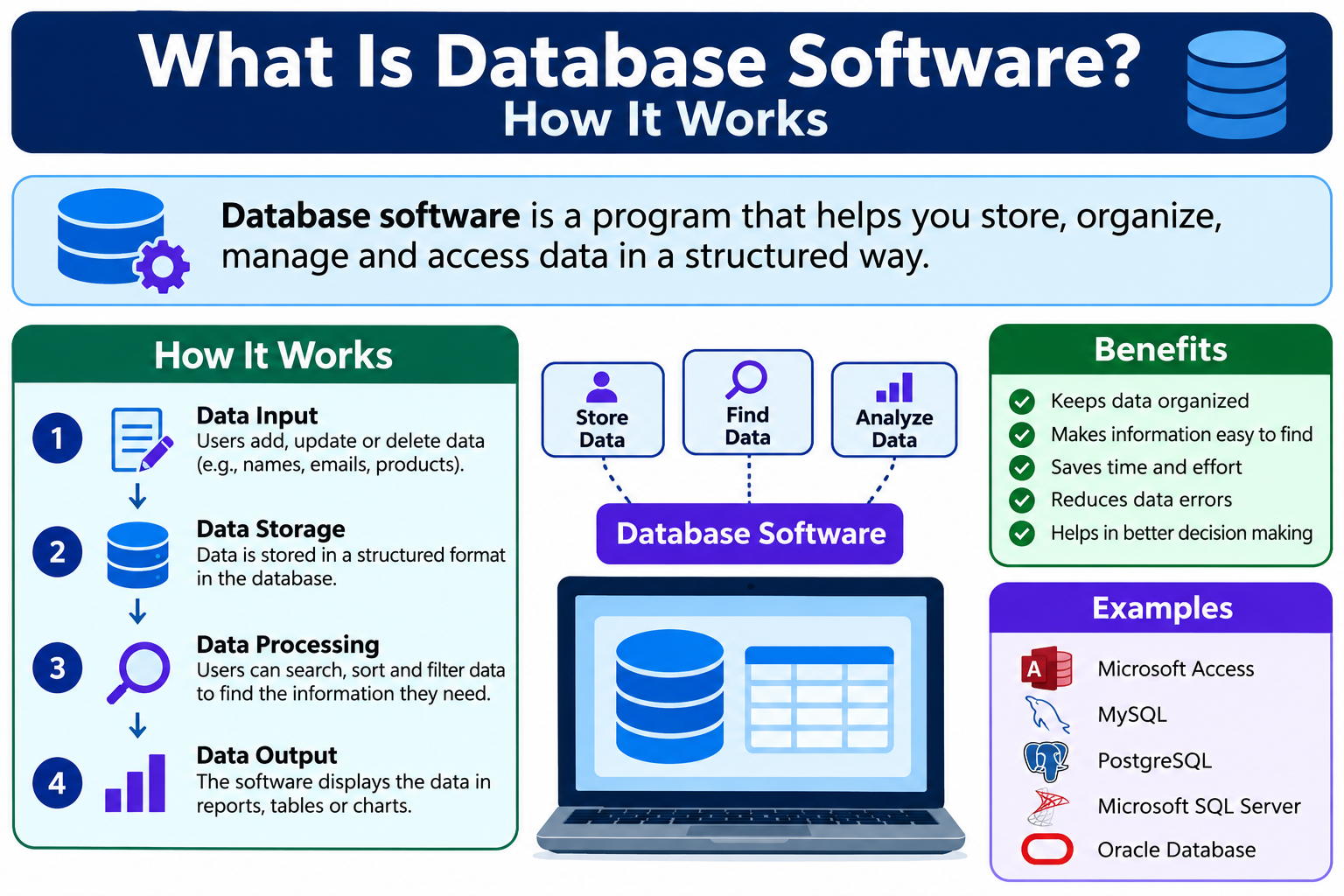
Introduction
Every day, millions of organizations store and manage enormous amounts of information. Hospitals track patient records. Schools manage student grades. Online stores handle thousands of product listings and orders. Banks process millions of transactions. Behind all of this structured information sits database software, the technology that makes storing, organizing, and retrieving data fast, reliable, and manageable.
Understanding what is database software is valuable whether you are a student learning about technology, a developer building an application, or a business owner trying to make smarter decisions with your data. To understand database software properly, it helps to know what a database is, how different types of software manage data, and why the right database tool matters for different situations.
This article explains everything clearly, from the basic definition to practical examples, major types, and how to choose the right database software for your needs.
Quick Answer: What Is Database Software?
Database software is a program that allows users to create, store, organize, search, update, and manage structured data. It acts as the system that controls how information is saved and retrieved. Database software is commonly used by businesses, developers, students, and organizations to handle everything from customer records and product inventories to financial transactions and website data.
What Is Database Software?
Database software is an application that helps users and organizations manage large amounts of structured information efficiently. Rather than storing data in scattered files or spreadsheets, database software organizes information into a structured system where it can be accessed, updated, and analyzed quickly.
Think of database software as a highly organized filing system. Instead of digging through folders manually, you can search for specific records instantly, update multiple entries at once, and control who has access to which information. The software handles all of this automatically, working in the background to keep data consistent and accessible.
Without database software, managing thousands or millions of records would be chaotic. Imagine a hospital trying to track patient histories using paper files, or an online store managing product stock through hand-written lists. Database software removes that complexity by providing structure, speed, and security.
It is worth noting that the term “database software” is broad. It can refer to the database engine itself, the management tools built around it, or the full system used to interact with stored data.
What Is a Database?
A database is an organized collection of related information stored in a way that makes it easy to access, manage, and update. The database itself is the structured storage system where the actual data lives.
Database software, on the other hand, is the program used to create, manage, and interact with that database. A database management system, or DBMS, is the software layer that sits between the user and the database, handling all requests to read, write, update, or delete data.
Consider a school that stores student information. The student records, including names, grades, and enrollment details, form the database. The software the school uses to add new students, search for records, or update grades is the database management software. The DBMS coordinates everything, ensuring data is stored correctly and retrieved accurately.
These three terms are closely related and often used interchangeably in everyday conversation, but understanding their distinct roles helps when learning how data management systems actually function.
How Does Database Software Work?
Database software follows a consistent process to store, manage, and retrieve information. Here is a step-by-step look at how that process typically works.
Step 1: Data is collected.
Information arrives from various sources, such as a form on a website, a point-of-sale system, or a manual entry by a staff member.
Step 2: Data is stored.
The database software saves the information in an organized structure, such as a table with rows and columns.
Step 3: Data is organized.
The software indexes the data and establishes relationships between different pieces of information, making future searches faster and more accurate.
Step 4: Users or applications send requests.
A user types a search query, or an application sends an automated request asking for specific data.
Step 5: Database software processes those requests.
The DBMS interprets the request, searches through the stored data, and identifies the relevant records.
Step 6: The database returns the required information.
The results are sent back to the user or application in a readable format.
Step 7: Authorized users can update the data.
Users with appropriate permissions can add new records, edit existing ones, or delete outdated information. The DBMS ensures these changes are applied consistently across the database.
This process happens in fractions of a second in modern database systems, even when handling millions of records simultaneously.
What Is a Database Management System (DBMS)?
A database management system, commonly abbreviated as DBMS, is the software responsible for creating, maintaining, and controlling access to a database. It acts as the intermediary between the database and the people or applications that need to use the data.
A DBMS performs several essential functions.
Data storage: It organizes and stores data in a structured, consistent format on disk or in memory.
Data retrieval: It processes queries from users or applications and returns the correct records efficiently.
Data modification: It allows authorized users to insert, update, or delete records while maintaining data integrity.
User access control: It manages who can view, edit, or administer the database, restricting access based on user roles and permissions.
Security: It applies security measures to protect stored data from unauthorized access or tampering.
Backup and recovery: It supports creating copies of the database and restoring data in the event of hardware failure, accidental deletion, or other data loss events.
Without a DBMS, managing large datasets would require developers to handle all of this complexity manually in their application code. The DBMS handles it at the system level, making development faster and data more reliable. For a broader look at (What Is Application Software Used For?), the linked article provides useful additional context.
Types of Database Software
Database software comes in several major categories, each designed for different types of data and different use cases.
Relational Database Software
Relational databases organize data into tables. Each table consists of rows and columns, similar to a spreadsheet. Each row represents a single record, and each column represents a specific attribute of that record.
The power of relational databases lies in relationships. Tables can be linked together using shared fields called keys. For example, a customer table and an orders table can be connected through a customer ID, allowing the system to pull complete customer order histories efficiently.
Relational databases use a language called SQL, which stands for Structured Query Language, to query and manage data. SQL allows users to write precise instructions to search, filter, sort, and update records.
Common relational database software includes MySQL, PostgreSQL, Microsoft SQL Server, Oracle Database, and SQLite. These are among the most widely used database systems in the world, powering everything from small websites to enterprise-scale applications.
NoSQL Database Software
NoSQL databases are designed to handle data that does not fit neatly into rows and columns. The term “NoSQL” stands for “not only SQL,” reflecting the fact that these systems use different data models and query methods.
NoSQL databases are commonly used when data structures vary significantly between records, when very large volumes of data need to be handled at high speed, or when data needs to be distributed across many servers.
There are several types of NoSQL databases.
Document databases store data as flexible documents, typically in a format similar to JSON. MongoDB is a widely known example.
Key-value databases store data as simple pairs of keys and values, making them extremely fast for certain types of lookups. Redis is a well-known key-value database.
Wide-column databases organize data in columns rather than rows, which works well for large-scale analytical workloads. Apache Cassandra is a commonly cited example.
Graph databases store data as nodes and relationships, making them suited for data that involves complex networks or connections, such as social networks or recommendation systems. Neo4j is a notable example in this category.
NoSQL databases are not inherently better than relational databases. Each type of database is better suited to specific workloads and data structures. Choosing between them depends on the nature of the application and the data involved.
Cloud Database Software
Cloud databases are hosted and managed on cloud computing platforms rather than on local servers. Users access them over the internet, and the cloud provider handles much of the infrastructure management, including hardware, scaling, and availability.
Cloud database services offer scalability, meaning you can increase or decrease storage and processing capacity based on demand without purchasing additional physical hardware. They also support remote access, allowing teams spread across different locations to work with the same data. Examples include Amazon Aurora, Google Cloud SQL, and Firebase. Cloud database security is an important consideration for any organization storing sensitive data in the cloud, which is covered in depth in the article (What Is Cloud Security?)
Desktop Database Software
Desktop database software is designed for individual users or small teams managing relatively modest amounts of data. These tools typically provide a graphical interface that does not require knowledge of SQL to use effectively.
Microsoft Access is one of the most familiar examples of desktop database software. It allows users to create databases, build forms for data entry, run queries, and generate reports without extensive technical knowledge. Microsoft Access is part of the Microsoft Office suite, and the article (What Is Microsoft Office?) provides more context about the broader Office application family.
Desktop database tools are practical for smaller projects but are not designed for the scale or concurrency requirements of enterprise systems.
Embedded Database Software
Embedded databases are designed to run inside applications rather than as standalone servers. They operate silently in the background, storing and retrieving data for the application without requiring a separate database server.
SQLite is the most widely used embedded database in the world. It is found in mobile applications, web browsers, operating systems, and many other software products. SQLite stores data in a single file on the device, making it portable, lightweight, and easy to deploy.
Database Software Examples
The following table provides an overview of widely used database software options across different categories.
| Database Software | Type | Best For | Main Feature | Beginner Friendly |
|---|---|---|---|---|
| MySQL | Relational | Web applications, general use | Fast, widely supported | Yes |
| PostgreSQL | Relational | Complex queries, data integrity | Advanced SQL support | Moderate |
| Microsoft SQL Server | Relational | Enterprise and business systems | Integrated with Microsoft tools | Moderate |
| Oracle Database | Relational | Large enterprise environments | High performance and reliability | No |
| SQLite | Relational / Embedded | Mobile apps, small projects | Serverless, single-file storage | Yes |
| Microsoft Access | Relational / Desktop | Small business, personal projects | Visual interface, forms and reports | Yes |
| MongoDB | NoSQL / Document | Flexible data, modern web apps | Document-based, schema-flexible | Moderate |
| Redis | NoSQL / Key-Value | Caching, real-time data | Extremely fast in-memory storage | Moderate |
| Apache Cassandra | NoSQL / Wide-Column | High-volume distributed data | High availability, linear scalability | No |
| Neo4j | NoSQL / Graph | Relationship-heavy data | Graph model, relationship queries | No |
| MariaDB | Relational | Web applications, MySQL alternative | Open-source MySQL fork | Yes |
| Amazon Aurora | Relational / Cloud | Cloud-native enterprise apps | High performance managed cloud DB | Moderate |
| Google Cloud SQL | Relational / Cloud | Cloud-hosted MySQL or PostgreSQL | Fully managed, scalable | Moderate |
| Firebase Realtime Database | NoSQL / Cloud | Mobile and web apps | Real-time sync, easy integration | Yes |
| Supabase | Relational / Cloud | Developers, open-source projects | PostgreSQL-based, developer-friendly | Yes |
Product features, editions, and licensing can change. Always check official documentation for the most current information before making a selection.
What Is Database Software Used For?
Database software has applications across nearly every industry and field. Here are fifteen practical examples of how it is used.
1. Customer relationship management: Businesses store customer contact details, purchase history, preferences, and support tickets in databases to manage and improve customer relationships.
2. E-commerce: Online stores use databases to manage product listings, stock levels, pricing, customer accounts, and order records.
3. Banking and finance: Banks rely on databases to process transactions, manage account balances, record loan information, and detect unusual activity.
4. Healthcare: Hospitals and clinics store patient records, medical histories, prescriptions, and appointment schedules in secure databases.
5. Education: Schools and universities use databases to manage student enrollment, grades, course schedules, and library resources.
6. Inventory management: Warehouses and retailers track stock levels, suppliers, purchase orders, and product locations using database systems.
7. Employee records: Human resources departments store employee profiles, payroll data, performance records, and employment history.
8. Accounting: Financial software uses databases to record income, expenses, invoices, tax information, and financial reports.
9. Websites and web applications: Nearly every dynamic website stores content, user accounts, settings, and activity logs in a database.
10. Mobile applications: Apps on phones and tablets use embedded or cloud databases to store user data, preferences, and application content.
11. Social media platforms: Social networks store user profiles, posts, messages, connections, and activity data in large-scale database systems.
12. Online services: Streaming platforms, email services, and subscription tools use databases to manage accounts, content libraries, and usage data.
13. Business analytics: Organizations analyze sales trends, customer behavior, and operational performance by querying database records.
14. Government records: Government agencies manage citizen records, tax filings, licensing, public services, and regulatory information through database systems.
15. Research: Academic and scientific researchers store and analyze experimental results, survey responses, and datasets using database tools.
Database Software for Businesses
Businesses of all sizes depend on database software to keep their operations running smoothly. Without organized data, making informed decisions about sales, stock, customers, or finances becomes significantly harder.
Customer information is one of the most critical assets a business manages. A well-maintained customer database allows a sales team to track interactions, identify opportunities, and provide consistent service. Sales data stored in a database helps managers understand which products perform well and where improvements are needed.
Inventory management is another area where databases deliver clear value. Real-time stock tracking, reorder alerts, and supplier records are all managed more effectively through database systems than through spreadsheets or manual records.
Employee management also relies on database software. HR departments use it to store contracts, track absences, manage payroll, and record performance reviews. Accounting teams use databases to record financial transactions, generate reports, and prepare for audits.
Perhaps most importantly, databases support business analytics. When data is well-organized and consistently recorded, businesses can query it to identify patterns, measure performance, and make decisions backed by evidence rather than guesswork.
Database Software for Students
Students studying computer science, information technology, software development, data science, business, or engineering will encounter database concepts throughout their education. Understanding databases early provides a strong foundation for many technology careers.
For beginners, SQLite is an excellent starting point. It requires no server setup, runs on most operating systems, and is widely used in real-world applications, making it practical to learn rather than simply academic.
MySQL is another beginner-friendly option. It is free to download, well-documented, and supported by a large community. Many web development courses and university programs use MySQL to teach relational database concepts and SQL queries.
PostgreSQL is worth learning for students who want to work with more advanced SQL features, including complex queries, custom data types, and data integrity rules. It is widely respected in professional environments.
For students interested in NoSQL, MongoDB offers a generous free tier and good learning resources. It introduces document-based data modeling, which is a useful skill for modern web and mobile application development.
Learning database concepts alongside a general understanding of (What Is Computer Software for Beginners?) and (What Is Software and How Does It Work?) gives students a more complete picture of how technology systems are built.
Database Software for Developers
Developers use databases as the foundation for almost every application they build. Whether creating a web application, a mobile app, an API, or a desktop tool, the database stores the persistent data the application depends on.
In backend development, the database typically stores user accounts, authentication credentials, content, configuration settings, transaction records, and application logs. The application communicates with the database by sending queries, retrieving results, and updating records based on user actions.
Web applications commonly connect to relational databases like MySQL, PostgreSQL, or Microsoft SQL Server. APIs often retrieve data from the database and return it to a frontend application in a structured format. Mobile applications may use Firebase or an embedded database like SQLite for local storage and cloud synchronization.
Security is a critical concern when developers interact with databases. Poorly written database queries can introduce vulnerabilities such as SQL injection, which allows attackers to manipulate database queries through user inputs. Developers must follow secure coding practices and validate all inputs before passing them to the database.
Tools like (What Is Visual Studio Code?) are commonly used by developers to write database queries, build application code, and manage project files. Version control tools such as (What Is GitHub Desktop?) help developers track changes to database schemas and application code over time, making collaboration and rollback significantly easier.
SQL vs NoSQL Databases
Choosing between SQL and NoSQL is one of the most common decisions developers and architects face when starting a new project.
| Feature | SQL Databases | NoSQL Databases |
|---|---|---|
| Data structure | Tables with rows and columns | Documents, key-value pairs, graphs, or wide columns |
| Query language | SQL (Structured Query Language) | Varies by system; some use their own query methods |
| Schema | Fixed, predefined schema | Flexible, schema can vary between records |
| Scalability | Typically scales vertically | Often designed for horizontal scaling |
| Relationships | Strong support for relational data | Relationship handling varies by type |
| Data consistency | Strong consistency by default | Consistency models vary |
| Best use cases | Structured data, financial systems, reporting | Flexible data, large-scale web apps, real-time data |
| Examples | MySQL, PostgreSQL, SQL Server | MongoDB, Redis, Cassandra, Neo4j |
Neither approach is universally better. SQL databases excel when data has a clear, consistent structure and strong relationships between entities. NoSQL databases are often preferred when data structures vary widely, when very high write or read speeds are needed, or when horizontal scaling across many servers is a priority.
The best choice depends entirely on the specific requirements of the application.
Database Software vs Spreadsheet Software
Many beginners use spreadsheet applications like Microsoft Excel to store and manage data before encountering dedicated database software. While spreadsheets are useful tools, they are not designed to replace database software for complex or large-scale data management.
| Feature | Database Software | Spreadsheet Software (e.g., Excel) |
|---|---|---|
| Data size | Handles millions of records | Best for smaller datasets |
| Multiple users | Designed for concurrent access | Limited multi-user support |
| Relationships | Built-in relational modeling | Limited, manual relationships |
| Querying | Powerful query languages (SQL) | Basic filters and formulas |
| Automation | Supports triggers and procedures | Limited automation |
| Security | Role-based access controls | Basic password protection |
| Scalability | Scales with demand | Not designed for large-scale growth |
| Best use cases | Applications, business systems, large datasets | Analysis, reporting, small data tasks |
Spreadsheets are practical for data analysis, simple record-keeping, and reporting. However, once data volumes grow, multiple users need to access data simultaneously, or relationships between data sets become important, database software is the appropriate tool. Microsoft Excel and other spreadsheet tools are part of the broader office software ecosystem described in [What Is Microsoft Office?]
Database Software vs Database Management System
These two terms are closely related and often used interchangeably in everyday conversation. In practice, the distinction is straightforward.
A database management system (DBMS) is the software that manages the database. MySQL, PostgreSQL, and MongoDB are all database management systems. They handle data storage, retrieval, security, and administration.
Database software is a broader term that can refer to the DBMS itself, the graphical tools used to interact with the database, or the entire data management solution as a package.
In most practical conversations, saying “database software” and “DBMS” conveys a similar meaning. The technical distinction matters more in academic or enterprise contexts where precision is important.
Benefits of Database Software
Database software provides substantial advantages over unstructured or manual data management approaches.
1. Organized data: Information is stored in a structured, consistent format that is easy to navigate and maintain.
2. Faster searching: Databases can locate specific records in milliseconds, even across millions of entries.
3. Easy updates: Records can be modified, added, or deleted efficiently without disrupting other stored data.
4. Data consistency: The DBMS enforces rules that prevent duplicate, incomplete, or contradictory records.
5. Multi-user access: Multiple people or applications can access the same database simultaneously without conflicts.
6. Security: Role-based permissions control who can view, edit, or administer data.
7. Backup and recovery: Most database systems support automated backups and recovery procedures to protect against data loss.
8. Scalability: Databases can grow to accommodate increasing amounts of data and user traffic.
9. Reporting: Data stored in a database can be queried and summarized to generate reports and dashboards.
10. Automation: Databases support stored procedures, triggers, and scheduled tasks that automate repetitive data operations.
11. Better decision-making: Well-organized data makes it easier to analyze trends and make informed business decisions.
12. Integration: Database software integrates with many applications, APIs, and third-party tools.
13. Data integrity: Constraints and validation rules prevent invalid data from being stored.
14. Centralized management: A single database can serve as the central data store for an entire organization or application.
15. Reduced redundancy: Relational databases minimize duplicated data by linking related records through references rather than repetition.
Limitations of Database Software
No tool is without trade-offs. Database software has genuine limitations worth understanding before committing to a solution.
Cost: Enterprise database software such as Oracle Database and Microsoft SQL Server can involve significant licensing costs. Even with open-source alternatives, infrastructure, hosting, and administration carry their own expenses.
Complexity: Setting up and configuring a database correctly requires technical knowledge. Poorly designed databases can be slow, inconsistent, or difficult to maintain.
Maintenance: Databases require ongoing attention, including performance tuning, index management, software updates, and security patching.
Security risks: A database containing sensitive information is a valuable target for attackers. Misconfigured permissions, unpatched vulnerabilities, and weak credentials can expose critical data.
Hardware requirements: Large databases require significant storage, memory, and processing power, which adds infrastructure costs.
Learning curve: SQL and database design concepts take time to learn, particularly for users new to structured data management.
Backup requirements: Without a reliable backup strategy, data loss from hardware failure or human error can be catastrophic.
Administration needs: Large production databases typically require a dedicated database administrator to manage performance, access, and reliability.
Database Security
Database security is a critical concern for any organization storing sensitive or valuable information. A data breach can expose customer information, financial records, trade secrets, or personal data, with serious consequences.
Several practices contribute to strong database security.
Authentication: Requiring verified credentials before granting database access prevents unauthorized users from connecting.
Authorization: Role-based access controls ensure that users can only view or modify data relevant to their role. A customer service representative, for example, does not need access to financial administration tables.
Encryption: Encrypting data at rest and in transit protects it from interception or unauthorized access even if the underlying storage is compromised.
Backups: Regular backups ensure that data can be recovered following hardware failure, accidental deletion, or a security incident.
Software updates: Keeping database software patched and updated closes known vulnerabilities that attackers might otherwise exploit.
Monitoring: Logging and monitoring database activity helps detect unusual behavior, such as large data exports or login attempts from unexpected locations.
Database security is one component of a broader cybersecurity strategy. The article [What Is Cybersecurity?] provides a useful overview of the wider principles involved. For organizations with networked database infrastructure, [Network Security] practices are equally important for protecting data in transit and limiting unauthorized access to database servers.
Database Backup and Recovery
Data loss is one of the most serious risks any organization faces. Hardware failures, accidental deletions, software errors, and security incidents can all result in lost or corrupted database records. A reliable backup and recovery strategy is essential.
Full backups create a complete copy of the entire database at a specific point in time. Full backups provide the most complete recovery option but require significant storage space and time to complete.
Incremental backups capture only the data that has changed since the last backup. They are faster and use less storage than full backups but require the most recent full backup plus all incremental backups to perform a complete recovery.
Recovery is the process of restoring a database from a backup after data loss or corruption. The speed and completeness of recovery depend on the backup strategy in place and how recently the last backup was taken.
Disaster recovery planning goes a step further, ensuring that a database can be restored even in the event of a major failure such as a server room fire, flood, or large-scale cyber attack. This often involves storing backups in geographically separate locations.
Backups should be tested regularly. A backup that cannot be successfully restored provides no real protection. Organizations should schedule test restorations periodically to confirm that recovery procedures work as expected.
How to Choose Database Software
Selecting the right database software requires careful consideration of your specific needs. Here are practical factors to evaluate.
1. Project size: A small personal project has different requirements than a large enterprise system. Match the database to the scale of the project.
2. Data type: Consider whether your data fits naturally into tables, or whether it is more flexible and document-like. This influences the choice between SQL and NoSQL.
3. Scalability: If you expect rapid data growth or high user traffic, choose a database that can scale without major architectural changes.
4. Performance: Consider how quickly the database needs to respond to queries and how many concurrent users or applications will be connecting.
5. Security: Evaluate what security features the database provides, including encryption, access controls, and audit logging.
6. Cost: Compare licensing fees, cloud hosting costs, and support costs. Open-source options reduce software costs but still require infrastructure and administration.
7. Hosting: Decide whether you will host the database on your own servers, a cloud platform, or a managed service.
8. Developer skills: Choose a database that your team already knows, or one with strong learning resources if training is needed.
9. Community support: Widely used databases have large communities, extensive documentation, and many third-party integrations. Smaller or newer databases may offer fewer resources.
10. Documentation: Official documentation quality varies. Good documentation reduces the time needed to troubleshoot problems and learn features.
11. Integrations: Confirm that the database works well with the programming languages, frameworks, and tools your team uses.
12. Backup options: Evaluate what backup and recovery features the database provides natively, and what additional tools may be needed.
13. Cloud compatibility: If cloud deployment is planned, check whether the database is well-supported on your chosen cloud platform.
14. Vendor stability: For long-term projects, the ongoing development and community health of the database project matter. Established projects with active development are lower risk choices.
Best Free Database Software
Several high-quality database tools are available at no direct software licensing cost. The following options are widely used in both learning and production environments.
MySQL is one of the most widely deployed relational databases in the world. It is available as an open-source Community Edition under the GPL license. MySQL powers a large proportion of the world’s websites and web applications. Consult the official MySQL documentation for current licensing details.
PostgreSQL is a powerful, open-source relational database known for its standards compliance, advanced SQL support, and data integrity features. It is released under the PostgreSQL License, which is considered very permissive. PostgreSQL is a strong choice for applications that require complex queries and robust data modeling.
SQLite is a self-contained, serverless, embedded database that requires no configuration or administration. It is widely used in mobile applications, browsers, and development environments. SQLite is in the public domain. It is one of the most deployed database engines in the world by volume of installations.
MariaDB is a community-developed fork of MySQL created by some of MySQL’s original developers. It is released under the GPL license and is designed to be compatible with MySQL while adding additional features. MariaDB is a popular alternative for those seeking an open-source MySQL-compatible option.
MongoDB Community Edition is the free, open-source version of MongoDB, available under the Server Side Public License (SSPL). It provides the core document database functionality and is suitable for development and smaller production environments. Licensing terms for MongoDB have evolved over time, so checking the current MongoDB documentation is recommended.
All of the above options have active communities, extensive documentation, and are used in professional development environments. However, free tiers or open-source editions may not include all features available in commercial editions.
Common Database Problems
Even well-maintained databases encounter issues. Here are common problems beginners may encounter, along with general guidance.
Slow Queries
Slow database queries are often caused by missing indexes, poorly written SQL, or insufficient server resources. Adding appropriate indexes to frequently queried columns typically improves performance significantly. Reviewing query structure and avoiding unnecessarily complex joins also helps.
Connection Errors
Connection errors occur when an application cannot reach the database server. Common causes include incorrect credentials, network issues, firewall rules blocking the database port, or the database service not running. Verify the connection string, check that the database service is active, and confirm that any firewalls allow the connection.
Missing Data
Missing data can result from failed transactions, accidental deletion, or incomplete data imports. Check transaction logs if available, and verify backup integrity. Implementing data validation rules and transaction management prevents many data loss scenarios.
Permission Errors
Permission errors appear when a user or application attempts to perform an action they are not authorized for. Review the user’s role and permissions within the database management system. Grant only the minimum permissions necessary for the task.
Storage Issues
As databases grow, storage space can become limited. Monitor disk usage regularly and archive or delete records that are no longer needed. Consider database partitioning or moving older data to separate storage for large production systems.
Backup Failures
Backup jobs can fail due to insufficient storage space, permission issues, or scheduling conflicts. Review backup logs regularly and set up alerts for failed backup jobs. Test restoration procedures periodically to confirm that backups are valid.
Compatibility Problems
Upgrading database software versions can sometimes introduce compatibility issues with applications or queries. Test upgrades in a staging environment before applying them to production systems, and review release notes for breaking changes.
Frequently Asked Questions
What is database software?
Database software is a program used to create, store, organize, search, update, and manage structured data. It allows users and applications to work with large amounts of information efficiently and securely.
What is database software used for?
It is used for customer management, e-commerce, banking, healthcare records, education, inventory tracking, employee records, website data, mobile applications, analytics, and many other purposes.
What are examples of database software?
Common examples include MySQL, PostgreSQL, Microsoft SQL Server, Oracle Database, SQLite, Microsoft Access, MongoDB, Redis, Apache Cassandra, and Firebase.
What is a DBMS?
A DBMS, or database management system, is the software that manages a database. It handles data storage, retrieval, security, user access, and backup. MySQL and PostgreSQL are both examples of DBMS software.
What is the difference between a database and a DBMS?
A database is the organized collection of stored data. A DBMS is the software system used to create, manage, and interact with that database.
What are the main types of databases?
The major types include relational databases, NoSQL databases, cloud databases, desktop databases, and embedded databases.
What is relational database software?
Relational database software organizes data into tables with rows and columns. Tables are linked through shared keys. SQL is used to query and manage relational data. Examples include MySQL, PostgreSQL, and Microsoft SQL Server.
What is NoSQL database software?
NoSQL database software handles data that does not fit into traditional tables. It includes document databases, key-value stores, wide-column databases, and graph databases. MongoDB and Redis are common examples.
Is MySQL database software?
Yes. MySQL is a widely used relational database management system. It is open-source, fast, and well-supported, making it one of the most popular choices for web applications.
Is Microsoft Access a database?
Yes. Microsoft Access is a desktop database management system that provides a visual interface for creating and managing databases. It is designed for smaller-scale projects and individual users.
Is Excel a database?
Excel is a spreadsheet application, not a database management system. While it can store data in rows and columns, it lacks the query capabilities, data integrity features, multi-user support, and scalability of dedicated database software.
What database software is best for beginners?
SQLite and MySQL are commonly recommended starting points. Both are well-documented, widely used in real projects, and have large learning communities. Microsoft Access is also accessible for beginners who prefer a visual interface.
What is the best free database software?
MySQL, PostgreSQL, SQLite, and MariaDB are widely used open-source options. Each has an active community and extensive documentation. Licensing terms vary, so checking official sources is advisable.
What database software is used by businesses?
Businesses use a wide range of options depending on their size and needs. Small businesses may use MySQL or Microsoft Access. Larger organizations commonly use Microsoft SQL Server, Oracle Database, or PostgreSQL. Cloud-managed services like Amazon Aurora and Google Cloud SQL are also widely adopted.
What is SQL?
SQL stands for Structured Query Language. It is the standard language used to create, query, update, and manage data in relational databases. Most relational database systems support SQL with some product-specific variations.
What is the difference between SQL and NoSQL?
SQL databases use structured tables and a fixed schema with SQL as the query language. NoSQL databases use flexible data models such as documents or key-value pairs. SQL is often preferred for structured, relational data. NoSQL suits flexible, high-volume, or distributed data scenarios.
Why is database security important?
Databases often contain sensitive personal, financial, or business information. A security breach can expose private data, disrupt operations, and create legal and reputational consequences. Proper security practices protect both the organization and the people whose data is stored.
Final Thoughts
Database software is one of the most fundamental technologies in modern computing. From the websites you visit every day to the banking systems that process your transactions and the hospital records that support your healthcare, databases quietly power the information-driven world around us.
Understanding what database software is, how different types work, and what each one is suited for gives you a significant advantage, whether you are a student, a developer, or a business professional. Relational databases built on SQL remain the dominant choice for structured, consistent data. NoSQL databases fill important roles where flexibility and scale take priority. Cloud-managed database services have made it easier than ever to deploy and scale database systems without deep infrastructure expertise.
Choosing the right database software requires careful thinking about your data type, scale, budget, team skills, and security requirements. No single database is the perfect choice for every situation. The best approach is to understand your specific needs and match them to the tool most capable of meeting them.
As with all technology decisions, staying current matters. Database capabilities, licensing terms, and best practices evolve. Consulting official documentation and reputable sources ensures your decisions are based on accurate, up-to-date information.
What is database software, at its core? It is the technology that makes organized, reliable, and accessible data possible at any scale. Learning how it works is a genuinely useful investment for anyone involved in technology today.
References
- IBM — What Is a Database?
IBM Technology documentation on databases and database management systems.
https://www.ibm.com/topics/databases - Oracle — What Is a Database?
Oracle official documentation and educational resources on relational databases.
https://www.oracle.com/database/what-is-database/ - Microsoft Learn — SQL Server Documentation
Official Microsoft documentation covering SQL Server concepts, features, and administration.
https://learn.microsoft.com/en-us/sql/sql-server/ - PostgreSQL Global Development Group — PostgreSQL Documentation
Official PostgreSQL documentation covering installation, administration, and SQL features.
https://www.postgresql.org/docs/ - MySQL — Official Documentation
Official MySQL reference manual covering installation, configuration, and SQL reference.
https://dev.mysql.com/doc/ - MongoDB — Official Documentation
Official MongoDB documentation covering document database concepts, drivers, and administration.
https://www.mongodb.com/docs/ - SQLite — Official Documentation
Official SQLite project documentation covering the embedded database engine, SQL support, and usage.
https://www.sqlite.org/docs.html - NIST — National Institute of Standards and Technology
NIST guidelines on database security and data management best practices.
https://www.nist.gov/
Technology Disclaimer
This article is for educational and informational purposes only. Database features, pricing, licensing, compatibility, and availability may change over time. Always consult official documentation and qualified technical advisors before making database technology or business decisions.