
 By saman zahra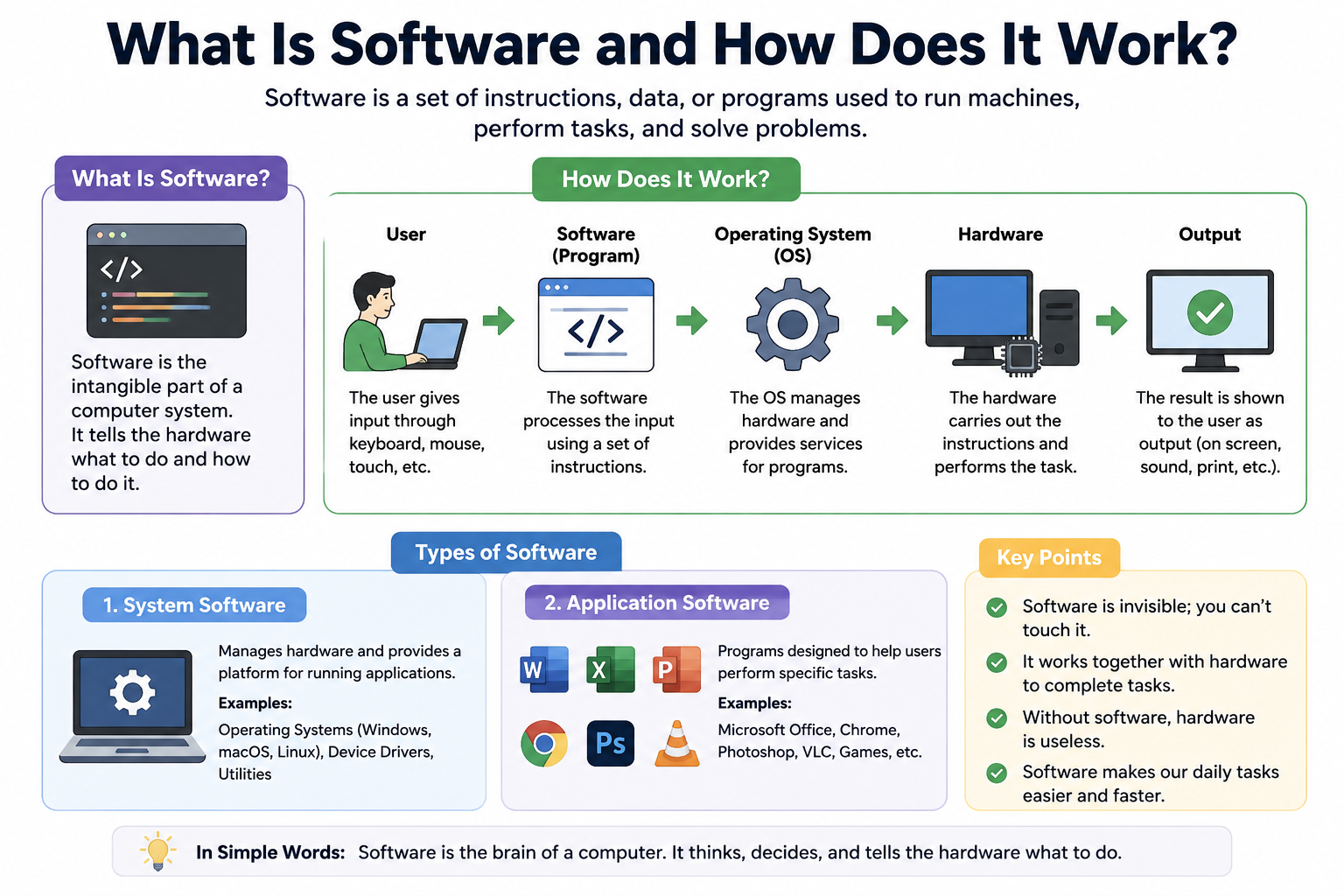
Every time you tap an app on your phone or click a program on your computer, you are using software. Most people use it every day without thinking twice about what it actually is. Understanding what is software and how does it work can help you make better choices about the technology you use.
Software is the invisible layer that makes computers useful. Without it, a computer would just be a collection of metal, plastic, and circuits doing nothing. Software tells the hardware what to do, when to do it, and how to display the results back to you.
Quick Answer
Software is a set of instructions written by programmers that tells a computer how to perform tasks. It works by receiving input from the user, processing that input using code, communicating with the operating system, and then using the computer’s hardware to produce a result. Common examples include web browsers, word processors, and mobile apps.
What Is Software?
Software is a program, or a collection of programs, that gives a computer its ability to function. Think of it as a recipe. The hardware is the kitchen and the ingredients, but the software is the recipe that tells everything what to do.
Every instruction a computer follows comes from software. Without it, no task could be completed. You could not browse the internet, write a document, or even turn on your phone properly.
Software exists in many forms. Some software manages the entire computer, while other software handles specific tasks like editing photos or sending emails. Together, these programs form the digital environment you interact with every day.
Software interacts with hardware constantly. When you click save on a document, software sends a signal through the operating system to the storage drive. The hardware writes the data, and the software confirms the task is done.
How Does Software Work?
Software works by following a set of coded instructions, step by step. Here is a simple breakdown of the process.
Step 1: You give an instruction.
You click a button, press a key, or tap the screen. This is your input.
Step 2: The software receives your instruction.
The application you are using captures that input and prepares to act on it.
Step 3: The software processes the instruction.
The program runs through its code to figure out what needs to happen. This happens very fast, usually in milliseconds.
Step 4: The operating system steps in.
The software communicates with the operating system, which acts as a bridge between programs and hardware.
Step 5: The hardware performs the task.
The processor, memory, or storage drive completes the physical part of the task.
Step 6: The result is displayed.
The software shows you the outcome, such as a web page loading or a video playing.
A real-world example: When you open Google Chrome and visit a website, Chrome sends a request through the operating system to your network card. The network card fetches the page data, the operating system returns it to Chrome, and Chrome displays the website on your screen. All of this happens in seconds.
Software vs Hardware
Software and hardware are two completely different things, but they need each other to work. Neither is useful without the other.
| Feature | Software | Hardware |
|---|---|---|
| Definition | A set of coded instructions | Physical parts of a computer |
| Physical or digital | Digital only | Physical and touchable |
| Examples | Windows, Chrome, Word | CPU, RAM, keyboard, monitor |
| How users interact | Through a screen or interface | By touching or connecting |
| Role in a computer | Gives instructions | Carries out instructions |
| Can it be touched? | No | Yes |
Software depends on hardware to run. Hardware depends on software to know what to do. A powerful computer with no software installed cannot perform any useful task. A well-designed software program cannot run without compatible hardware.
Types of Software
Software falls into four main categories. Each type serves a different purpose.
System Software
System software manages and controls the hardware of a computer. It runs in the background and creates the environment where other programs can operate. The most important type of system software is the operating system.
Examples of system software include:
- Windows — the most widely used desktop operating system
- macOS — Apple’s operating system for Mac computers
- Linux — a free and open-source operating system used by developers and servers
- Android — Google’s operating system for smartphones and tablets
- iOS — Apple’s operating system for iPhones and iPads
Without system software, your computer cannot start up or run any applications.
Application Software
Application software is designed to help users complete specific tasks. This is the type of software most people think of when they hear the word “software.” It runs on top of system software.
Examples include:
- Microsoft Office — for creating documents, spreadsheets, and presentations. If you want to learn more, read our guide on [What Is Microsoft Office?]
- Google Chrome — for browsing the internet
- Adobe Acrobat — for creating, editing, and reading PDF files. Our article on [What Is Adobe Acrobat?] explains it in detail
- Notion — for notes, planning, and organization. Learn more in [What Is Notion?]
- Trello — for managing projects and tasks. See our guide on [What Is Trello?]
- VLC Media Player — for playing videos and audio files
Application software is what most people install, use daily, and update regularly.
Utility Software
Utility software helps maintain, optimize, and protect your computer. It works quietly in the background or on demand. Most people do not think of utility software as often, but it keeps computers running smoothly.
Examples include:
- Antivirus software — protects your computer from malware and viruses
- Backup software — automatically saves copies of your important files
- File compression tools — reduce the size of files for easier storage or sharing
- Disk management tools — help you manage storage drives and free up space
Utility software is essential for keeping your system healthy over time.
Programming Software
Programming software is used by developers to create other software. These tools let programmers write, test, and organize their code efficiently.
Examples include:
- Visual Studio Code — one of the most popular code editors in the world. Read our detailed article on [What Is Visual Studio Code?]
- GitHub Desktop — a tool for managing code versions and collaborating with other developers. Learn more in [What Is GitHub Desktop?]
- Compilers — tools that translate code written by humans into instructions a computer can understand
- Debuggers — tools that help developers find and fix errors in their code
- Integrated development environments (IDEs) — all-in-one tools that combine code editing, testing, and debugging in one place
Programming software is the foundation of all software development.
How Software Is Created
Software does not appear by magic. It goes through a structured process called the software development lifecycle. Here is a beginner-friendly look at each stage.
Planning
First, developers and teams decide what the software needs to do. They identify the problem they are solving, who will use the software, and what features it needs. Good planning prevents costly mistakes later.
Designing
Next, designers plan the layout, structure, and flow of the software. They create wireframes, which are simple sketches showing how the software will look and behave. This stage ensures the final product is easy to use.
Programming
This is where developers write the actual code. They use programming languages like Python, JavaScript, or Java to give the software its instructions. This is often the longest stage of the process.
Testing
Before release, testers try to break the software on purpose. They use the program in many different ways to find problems. Good testing catches bugs before real users encounter them.
Debugging
When testers find errors, developers fix them. This process is called debugging. A bug is any mistake in the code that causes the software to behave incorrectly.
Deployment
Once the software passes testing, it is released to the public. This could mean uploading it to an app store, publishing it on a website, or shipping it on a device.
Updates and Maintenance
Software rarely stays the same after release. Developers release updates to fix bugs, improve performance, and add new features. Maintenance ensures the software stays useful and secure over time.
Common Examples of Software
Here are 15 common software programs you may already use or recognize.
| Software Name | Type | Main Purpose | Example Use |
|---|---|---|---|
| Windows 11 | System | Operating system | Running a PC |
| macOS Sequoia | System | Operating system | Running a Mac |
| Android | System | Mobile operating system | Running a smartphone |
| Microsoft Word | Application | Word processing | Writing documents |
| Google Chrome | Application | Web browsing | Visiting websites |
| Adobe Acrobat | Application | PDF management | Editing PDF files |
| Notion | Application | Notes and organization | Planning projects |
| Trello | Application | Project management | Tracking tasks |
| VLC Media Player | Application | Media playback | Playing videos |
| Norton Antivirus | Utility | Security protection | Blocking malware |
| WinRAR | Utility | File compression | Zipping large files |
| Visual Studio Code | Programming | Code editing | Writing code |
| GitHub Desktop | Programming | Version control | Managing code changes |
| Google Workspace | Application | Productivity suite | Team collaboration |
| OBS Studio | Application | Screen recording and streaming | Recording tutorials |
What Is an Operating System?
An operating system, often called an OS, is the most important type of system software. It manages everything on your computer. Without it, no other program could run.
The operating system handles memory, storage, processing, and connected devices. It acts as a manager that organizes all tasks and resources. When you open multiple apps at once, the operating system decides how to share the computer’s processing power between them.
Applications depend entirely on the operating system to function. A program built for Windows will not run on macOS without special tools. This is because each operating system speaks its own language with the hardware.
Common operating systems include Windows, macOS, Linux, Android, and iOS. Each serves a slightly different purpose and audience, but all do the same core job of managing hardware and supporting applications.
How Software Communicates With Hardware
The connection between software and hardware involves several layers. Here is a simple step-by-step example using printing a document.
- You click print in Microsoft Word. This is your instruction to the application software.
- Word processes your request and prepares the document data for printing.
- Word tells the operating system that you want to print.
- The operating system finds the printer driver. A driver is a small program that lets the operating system talk to a specific hardware device.
- The driver sends data to the printer, which is the hardware device.
- The printer prints your document, and the operating system confirms the task is complete.
- Word shows you a confirmation message on your screen.
Every interaction between software and hardware follows a similar chain. The driver is the translator that makes communication between software and hardware possible.
What Is Software Programming?
Programming is the process of writing instructions that tell a computer what to do. These instructions are written in a programming language, such as Python, JavaScript, C++, or Java.
The text a programmer writes is called source code. Computers cannot read source code directly. A tool called a compiler or interpreter translates that code into a language the computer understands, called machine code.
An algorithm is a set of logical steps that solves a problem. Every program is built around algorithms. For example, a search function in an app is an algorithm that finds matching results from a list.
Sometimes code has mistakes in it. These mistakes are called bugs. When a program crashes or behaves unexpectedly, a bug is often the cause. The process of finding and fixing bugs is called debugging.
Programming tools like [Visual Studio Code] make writing and organizing code much easier. Platforms like [GitHub Desktop] help developers track changes and work with teammates on the same project.
What Are Software Updates?
Software updates are improvements or fixes that developers release after the original software is published. They are one of the most important parts of keeping software useful and safe.
There are several types of updates:
- Bug fixes — correct errors that cause crashes or incorrect behavior
- Security patches — close gaps that hackers or malware could exploit
- New features — add fresh tools or capabilities to the software
- Performance improvements — make the software faster or use fewer resources
- Compatibility updates — ensure the software works with newer operating systems or hardware
Keeping your software updated matters more than most people realize. Outdated software is one of the most common ways cybercriminals gain access to personal data. Regular updates are a simple and effective security habit.
Why Is Software Important?
Software touches almost every part of modern life. Here are 15 practical reasons why it matters.
- Education — learning apps and online courses make education accessible from anywhere.
- Business — companies use software to manage sales, communicate with clients, and track finances.
- Communication — email, messaging apps, and video calls all run on software.
- Entertainment — music streaming, video streaming, and gaming rely entirely on software.
- Banking — online banking apps let you transfer money, pay bills, and check balances safely.
- Healthcare — hospitals use software to manage patient records and schedule appointments.
- Cybersecurity — tools like antivirus programs and firewalls protect devices and data. Our guides on [What Is Cybersecurity?] and [Network Security] cover this in detail.
- Productivity — software like [Google Workspace] helps teams collaborate in real time.
- Design — graphic designers use software to create logos, websites, and marketing materials.
- Navigation — mapping apps help people find directions and avoid traffic.
- Science — researchers use software to analyze data and simulate experiments.
- Government — public services, tax systems, and records depend on software.
- Cloud computing — cloud platforms use software to store and access data from any device.
- Automation — software automates repetitive tasks, saving time and reducing errors.
- Programming — developers use software tools to build new software for every industry.
Common Uses of Software
Software is used in almost every field imaginable. Here is a look at some of the most common areas.
Education: Students use software for research, writing assignments, and attending online classes. Teachers use it to grade work and communicate with students.
Business: Companies rely on software for accounting, project management, customer support, and internal communication.
Personal productivity: Tools for notes, scheduling, and task management help individuals stay organized. Apps like [Notion] make it easy to manage personal projects in one place.
Communication: Email clients, messaging platforms, and video conferencing software connect people across the world.
Graphic design: Designers use specialized software to create visual content for print and digital media.
Video editing: Content creators use video editing software to cut, color, and export professional-quality videos. Software like [OBS Studio] is popular for screen recording and live streaming.
Gaming: Video games are software products that combine graphics, sound, and user input into interactive experiences.
Programming: Developers use code editors, compilers, and version control tools to build software applications.
Cybersecurity: Security software monitors networks, detects threats, and protects sensitive data. Understanding [Cloud Security] is increasingly important as more data moves online.
Cloud computing: Cloud platforms use software to host services, store files, and run applications remotely.
Software Examples for Beginners
If you are just getting started, here are some beginner-friendly software categories and tools worth knowing about.
Office software: [Microsoft Office] includes Word, Excel, and PowerPoint for everyday writing, spreadsheets, and presentations.
PDF software: [Adobe Acrobat] lets you open, read, edit, and sign PDF documents with ease.
Note-taking software: [Notion] is a flexible tool for capturing ideas, organizing notes, and planning projects.
Project management software: [Trello] uses cards and boards to help you organize tasks and track progress.
Code editors: [Visual Studio Code] is one of the best free tools for beginners who want to learn programming.
Screen recording software: [OBS Studio] is a free and powerful tool for recording your screen or streaming video.
Cloud storage software: Services like Google Drive let you save files online and access them from any device.
Free Software vs Paid Software
Choosing between free and paid software depends on your needs, budget, and how often you will use it.
| Feature | Free Software | Paid Software |
|---|---|---|
| Cost | No upfront cost | Monthly or one-time fee |
| Features | Basic to moderate | Full feature set |
| Support | Community forums | Dedicated customer support |
| Updates | Irregular | Regular and guaranteed |
| Security | Varies by product | Usually stronger |
| Best for | Casual or beginner users | Professional or business users |
Free software can be perfectly fine for everyday tasks. Many powerful free tools exist, including LibreOffice, VLC, and OBS Studio. However, paid software often includes better support, more frequent updates, and advanced features that professionals need.
Open-Source vs Proprietary Software
These two terms describe how software is built and who can access its code.
| Feature | Open-Source Software | Proprietary Software |
|---|---|---|
| Source code access | Publicly available | Closed and restricted |
| Cost | Usually free | Often paid |
| Customization | High | Limited |
| Development | Community-driven | Company-controlled |
| Examples | Linux, VLC, Firefox | Windows, Adobe Acrobat, Microsoft Office |
| Advantages | Transparent, flexible, community-supported | Polished, supported, regularly updated |
| Limitations | Less consistent support | Can be expensive, no code access |
Open-source software is built and maintained by communities of developers around the world. Anyone can view, modify, and share the code. Proprietary software is owned by a company, and only that company can view or modify its code.
Both types have their place. Open-source software is often preferred by developers and businesses that need flexibility. Proprietary software is common in corporate environments where consistent support matters.
Virtualization tools like [Oracle VirtualBox] are open-source, while [VMware] offers both free and paid proprietary versions.
Common Software Problems
Even good software has problems sometimes. Here are some common issues and simple steps to fix them.
Software not opening: Restart your computer and try again. If the problem continues, reinstall the software from the official website.
Software crashing: Check if the software needs an update. Outdated versions often crash. Also make sure your device meets the minimum system requirements.
Slow software: Close other programs running in the background. Slow performance can also result from low memory or a full storage drive.
Compatibility problems: Some software only works on certain operating systems or versions. Always check compatibility before installing.
Installation errors: Make sure you have enough storage space. Also verify that you downloaded the file from the official source, as corrupted files cause installation failures.
Update problems: If an update fails, restart your device and try again. If the problem persists, visit the software’s official support page.
Missing permissions: Some software requires administrator access to install or run. Right-click the program and select “Run as Administrator” on Windows, or approve permissions on macOS and mobile devices.
How to Choose the Right Software
With so many options available, choosing the right software can feel overwhelming. Here are 15 practical tips to help.
- Define your purpose. Know exactly what task you need the software to perform before searching.
- List the features you need. Separate must-have features from nice-to-have ones.
- Check your budget. Decide if you want free software or if you are willing to pay.
- Verify compatibility. Make sure the software works on your operating system and device.
- Read user reviews. Check trusted review sites to see what real users say about the software.
- Check for a free trial. Many paid programs offer a free trial period before you commit.
- Evaluate ease of use. If you are a beginner, look for software with a clean and simple interface.
- Check security practices. Find out how the software protects your data and privacy.
- Review the privacy policy. Know what data the software collects and how it is used.
- Look at update frequency. Software that is updated regularly is more trustworthy and secure.
- Check customer support options. Good software should offer help through documentation, chat, or email.
- Consider system requirements. Check that your hardware can run the software without performance issues.
- Look for community support. Active user communities can help you solve problems quickly.
- Check the developer’s reputation. Use software from well-known and trustworthy companies whenever possible.
- Start simple. Begin with the most basic version of the software before upgrading to advanced plans.
Frequently Asked Questions
What is software?
Software is a set of coded instructions that tells a computer how to perform tasks. It exists in digital form and cannot be physically touched.
How does software work?
Software works by receiving input from a user, processing that input through code, communicating with the operating system, and using hardware to produce a result.
What are the main types of software?
The four main types are system software, application software, utility software, and programming software.
What is application software?
Application software is designed to help users complete specific tasks. Examples include word processors, web browsers, and photo editors.
What is system software?
System software manages the hardware and creates the environment for other programs to run. Operating systems like Windows and macOS are system software.
What is utility software?
Utility software maintains, optimizes, or protects a computer. Examples include antivirus programs, backup tools, and disk management utilities.
What is programming software?
Programming software provides tools that developers use to write, test, and organize code. Examples include Visual Studio Code and compilers.
What is the difference between software and hardware?
Hardware refers to the physical parts of a computer that you can touch. Software refers to the digital programs that run on that hardware.
Is an operating system software?
Yes. An operating system is the most important type of system software. It manages hardware and allows other applications to run.
How is software created?
Software is created through a development process that includes planning, designing, programming, testing, debugging, and deployment.
What is open-source software?
Open-source software is software whose source code is publicly available for anyone to view, modify, and distribute.
What is proprietary software?
Proprietary software is owned by a company or developer. Its source code is not publicly available, and use is typically restricted by a license.
Why does software need updates?
Software needs updates to fix bugs, close security vulnerabilities, add new features, and maintain compatibility with new hardware and operating systems.
Can software work without hardware?
No. Software requires hardware to run. Software provides the instructions, but hardware carries out those instructions.
What are some examples of computer software?
Common examples include Windows, Google Chrome, Microsoft Word, Adobe Acrobat, VLC Media Player, and antivirus programs.
Final Thoughts
Software is one of the most important inventions in modern history. It transforms physical hardware into powerful tools that help people learn, communicate, work, and create.
Understanding what is software and how does it work does not require a technical background. At its core, software is simply a set of instructions that tells machines what to do. From the operating system that boots your computer to the apps you use every day, software is working constantly behind the scenes.
Whether you are a complete beginner or someone looking to expand your tech knowledge, understanding the basics of software gives you more confidence in choosing, using, and troubleshooting the tools in your life.
The more you learn about software, the better equipped you are to make smart decisions in an increasingly digital world.
-
References
- IBM — What Is Software?
IBM: What Is Software? - Encyclopaedia Britannica — Software
Britannica: Software - NIST — Software
NIST Computer Security Resource Center: Software - Red Hat — What Is Application Software?
Red Hat: What Is Application Software? - Computer History Museum — Software
Computer History Museum: Software
- IBM — What Is Software?
By TechOriginHub Editorial Team
Disclaimer
This article is for educational and informational purposes only. Software features, compatibility, pricing, and availability may change over time. Always download software from trusted official sources.