
 By saman zahra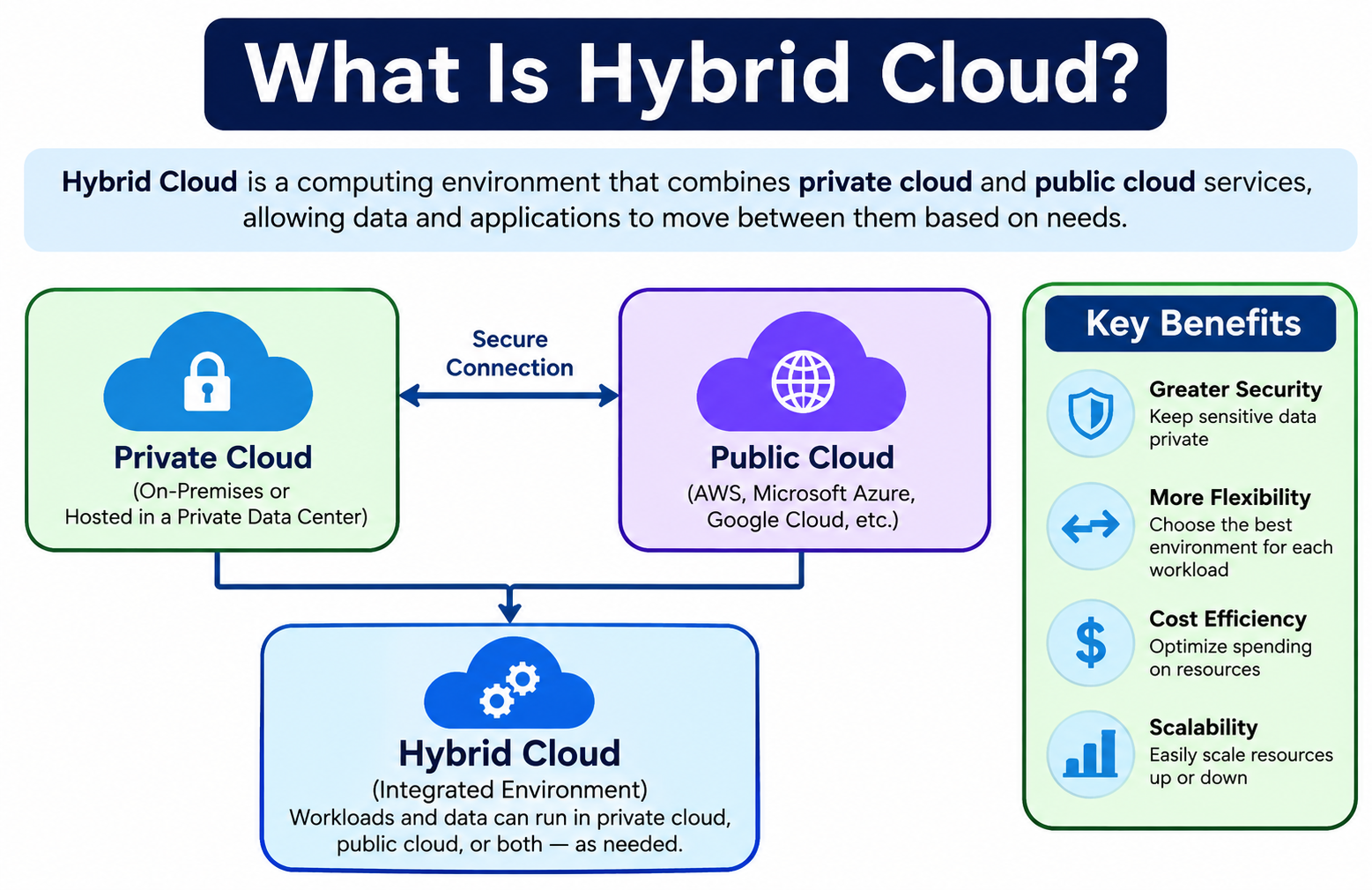
Most organizations do not start from scratch when they adopt cloud computing. They already have servers, applications, and data in existing infrastructure. Moving everything to a public cloud at once is rarely practical, and for some workloads, it may not be desirable at all. Hybrid cloud offers a different path. It combines private or on-premises infrastructure with public cloud services, connecting them so workloads, data, and applications can operate across both environments. Understanding what is hybrid cloud helps organizations evaluate whether this approach fits their specific requirements. For foundational context, begin with [What Is Cloud Computing? A Beginner’s Guide].
Quick Answer: What Is a Hybrid Cloud?
A hybrid cloud is a computing environment that integrates private or on-premises infrastructure with public cloud services and connects them through networking so that data, applications, or workloads can function across both environments. It is not simply using two separate cloud services. A meaningful hybrid cloud requires integration between environments, allowing workloads to be placed where they best fit organizational requirements.
What Is Hybrid Cloud?
Hybrid cloud is a computing model that combines two or more distinct environments, typically a private cloud or on-premises infrastructure and a public cloud, and integrates them so they can share workloads, data, and services. The defining characteristic of hybrid cloud is not simply having both a private environment and public cloud access. It is the meaningful connection and integration between those environments that enables workloads to move or communicate across them.
An organization might run its core business applications on a private environment for control and consistency while using public cloud services for backup, analytics, or handling demand spikes. The integration between these environments, through network connections, shared identity management, and coordinated security policies, is what makes the architecture genuinely hybrid.
Public cloud provides scalable, provider-managed infrastructure and services accessible over a network. Private cloud provides a dedicated environment with greater organizational control. Hybrid cloud brings both together and creates an architecture where each workload can be placed in the environment that best suits its requirements.
How Does Hybrid Cloud Work?
Hybrid cloud operates through several interconnected elements that allow a private environment and public cloud to function as a coordinated architecture.
- An organization maintains private or on-premises infrastructure for workloads that require dedicated resources, specific configurations, or greater direct control.
- The organization uses public cloud services for workloads that benefit from scalability, managed services, geographic distribution, or specialized capabilities.
- Networking infrastructure connects the private and public environments securely, using technologies such as VPNs, dedicated network connections, or software-defined networking.
- Identity and access management systems control which users, applications, and services can access resources across both environments, often through a centralized directory or identity provider.
- Applications and data communicate across environments where the architecture requires it, with workloads able to interact with resources in either the private or public side.
- Workloads are placed in the environment that best fits their performance, security, compliance, or cost requirements, rather than defaulting to one location for everything.
- Monitoring and security controls are applied across the entire architecture, providing visibility into what is happening in both the private infrastructure and the public cloud environment.
The quality of the integration determines how effectively the hybrid architecture functions. Poorly connected environments with weak identity management or inconsistent security policies create operational and security problems rather than the intended flexibility. For a broader explanation of how cloud infrastructure delivers services, visit [How Does Cloud Computing Work?].
What Are the Main Components of Hybrid Cloud?
A hybrid cloud environment consists of several distinct components that work together to create an integrated architecture.
Public Cloud
The public cloud component provides infrastructure and services from a provider such as Amazon Web Services, Microsoft Azure, or Google Cloud. These services offer scalable compute resources, managed databases, storage services, analytics platforms, and many other capabilities without the organization needing to manage the underlying hardware. Public cloud resources can be provisioned and released relatively quickly, which supports workloads with variable or unpredictable demand. For a detailed explanation of how public cloud works, visit [What Is Public Cloud?].
Private Cloud
The private cloud component provides a dedicated environment for the organization, either hosted on its own premises or in a third-party facility. Private cloud delivers cloud-style capabilities such as virtualization, resource pooling, and automation within an environment controlled by the organization. It is suited to workloads that require specific configurations, consistent performance, or greater organizational control over infrastructure. [What Is Private Cloud?] explains private cloud concepts and architecture in detail.
On-Premises Infrastructure
Not every hybrid architecture includes a fully realized private cloud. Some organizations participate in hybrid cloud with conventional on-premises infrastructure that has been connected to public cloud services. Traditional servers, storage systems, and networks can participate in a hybrid architecture when they are integrated with public cloud environments through appropriate networking and management tools. Understanding the differences between cloud and conventional infrastructure is covered in [Cloud Computing vs Traditional Computing].
Networking
Networking is what makes hybrid cloud a connected architecture rather than two separate environments. Organizations typically use virtual private networks to create encrypted tunnels between their private environment and public cloud. Some providers offer dedicated network connection services that provide more consistent and higher-throughput connectivity than VPN over the public internet. Within each environment, firewalls, network routing, and segmentation control how traffic flows and which systems can communicate with each other. [Network Security] explains how network protection works in connected environments. [What Is a Firewall?] covers how firewalls control traffic across network boundaries.
Identity and Access Management
When users and systems span multiple environments, centralized identity and access management is essential. A user working from a desktop connected to on-premises infrastructure may also need access to public cloud services. An application running in public cloud may need to authenticate against systems in the private environment. Identity management systems provide a consistent way to verify identities and enforce access policies across both sides of the hybrid architecture, reducing the risk of unauthorized access and simplifying administration.
Hybrid Cloud Architecture
Hybrid cloud architecture varies considerably between organizations depending on their workloads, requirements, and technical decisions. A simplified view of how the components relate looks like this:
Users connect to applications that may run in either the private environment or the public cloud. The private infrastructure and the public cloud environment are connected through a secure network link. Data and services can flow across that connection as the application requires.
| Component | Possible Location | Purpose |
|---|---|---|
| Application | Public or private | Runs business software |
| Database | Private or public | Stores structured data |
| Backup | Public cloud | Disaster recovery |
| Sensitive workload | Private | Greater infrastructure control |
| Scalable workload | Public cloud | Flexible capacity |
This table represents one possible arrangement. Real hybrid architectures differ significantly. Some organizations keep all databases on-premises and use public cloud only for application hosting and backup. Others run most workloads in public cloud while keeping specific sensitive data in private infrastructure. The architecture should reflect the specific requirements of the workloads involved, not a generic template.
What makes an architecture genuinely hybrid is not where each piece sits but how they are connected and integrated. Applications that never communicate across environments or share identity management are not truly hybrid. They are simply separate environments that happen to coexist.
Why Do Organizations Use Hybrid Cloud?
Organizations adopt hybrid cloud for a range of practical reasons, most of which relate to the reality of existing technology investments and the varying requirements of different workloads.
Existing infrastructure investment means many organizations have already spent significantly on on-premises servers, storage, and applications. Discarding that investment to move entirely to public cloud is neither practical nor cost-effective in many cases. Hybrid cloud allows that existing infrastructure to continue contributing value while public cloud services are adopted where they provide the most benefit.
Scalability is a common driver. Private infrastructure has fixed capacity. When demand exceeds what the private environment can handle, public cloud resources can absorb the additional load without requiring new hardware purchases.
Data control matters to organizations that need to know exactly where specific data is stored and processed. Keeping sensitive data in a private environment while using public cloud for other workloads allows organizations to maintain that control where it matters most.
Gradual cloud migration allows organizations to move workloads to public cloud at a manageable pace rather than attempting a complete migration at once. A hybrid architecture supports this incremental approach.
Application modernization uses public cloud services to update how applications work without replacing them entirely. An existing application in the private environment might consume a managed database or analytics service from a public cloud provider.
Disaster recovery and business continuity benefit from public cloud’s geographic distribution, using public cloud storage or compute resources as a recovery target for critical systems.
Specialized cloud services from public providers, such as managed analytics platforms or content delivery networks, may complement what the private environment offers without requiring the organization to build those capabilities internally.
Benefits of Hybrid Cloud
Hybrid cloud offers genuine advantages for organizations whose requirements align with what the model provides.
Flexibility allows organizations to assign workloads to the environment that best suits their technical and operational requirements rather than forcing all workloads into a single infrastructure model.
Scalability beyond private infrastructure capacity becomes possible when public cloud resources can absorb demand that exceeds the private environment’s limits.
Workload placement decisions can be made based on performance, cost, compliance, and control requirements for each workload individually rather than as a blanket policy.
Gradual migration enables organizations to move applications to public cloud progressively, learning from each migration and reducing the risk of disrupting business operations.
Existing infrastructure utilization means that hardware already owned and operational can continue providing value as part of the broader hybrid architecture rather than being replaced prematurely.
Access to public cloud services opens capabilities such as managed databases, analytics tools, content delivery, and specialized compute options that would be expensive or complex to build and maintain privately.
Data control is preserved for workloads and data that require it, while public cloud flexibility is available for workloads where the organization is comfortable with provider-managed infrastructure.
Disaster recovery options improve when public cloud resources can serve as a recovery target for private infrastructure, providing geographic separation without requiring a second physical data center.
Business continuity planning becomes more flexible with multiple environments available to take on workloads if one environment experiences a disruption.
Application modernization allows organizations to incrementally adopt cloud services and architectures without replacing entire systems at once.
Resource optimization is achievable when workloads run in the environment where they perform best and cost least relative to their requirements.
Greater architectural choice means organizations are not locked into a single infrastructure model and can adapt their environment as technology and requirements evolve.
Disadvantages of Hybrid Cloud
Hybrid cloud also carries meaningful challenges that organizations must plan for and manage actively.
Architectural complexity is the most significant challenge. Designing, building, and operating an environment that spans private infrastructure and public cloud requires more expertise and planning than either approach alone.
Network dependency means that integration between environments relies on reliable, appropriately sized network connectivity. Network performance problems can affect applications that communicate across environments.
Security management becomes more complex when policies, access controls, monitoring, and incident response must cover multiple environments and their connections rather than a single unified environment.
Integration challenges arise when applications or data systems in different environments were not designed to communicate with each other. Making them work together reliably requires careful planning and sometimes significant development effort.
Monitoring complexity increases because visibility must extend across the private environment and the public cloud. Tools that work well in one environment may not cover the other without additional configuration or separate tooling.
Skills requirements are demanding. Operating a hybrid cloud effectively requires expertise in private infrastructure, public cloud services, networking, security, and the management tools that span environments. Finding and retaining staff with this combination of skills is a genuine operational challenge.
Data movement costs can be significant. Moving large volumes of data between private infrastructure and public cloud environments may incur both network bandwidth costs and cloud provider data transfer charges.
Vendor management becomes more complex when the organization relies on both its own infrastructure vendors and one or more public cloud providers, each with their own support processes, pricing models, and service terms.
Troubleshooting is harder when problems can originate in either environment or in the network connection between them. Identifying the source of an issue requires comprehensive visibility across the entire architecture.
Compliance considerations multiply when data and workloads span environments with different control mechanisms, potentially requiring separate compliance assessments for each environment.
Organizations can reduce these challenges by investing in centralized management tools, thorough documentation, staff training, and careful architecture design that minimizes unnecessary complexity.
Hybrid Cloud vs Public Cloud
| Feature | Hybrid Cloud | Public Cloud |
|---|---|---|
| Infrastructure | Private or on-premises and public cloud | Public cloud |
| Control | Greater control over private side | Depends on service model |
| Scalability | Flexible across environments | Usually highly scalable |
| Complexity | Higher | Often simpler |
| Management | Multiple environments | Mostly provider-managed infrastructure |
| Workload placement | Flexible | Primarily public environment |
| Migration flexibility | High | Depends on architecture |
Public cloud is often simpler to adopt because it requires no private infrastructure management. Organizations with straightforward workloads, no existing infrastructure investment, and comfort with provider-managed environments may find that public cloud alone meets their needs effectively.
Hybrid cloud provides more flexibility for organizations that need to combine environments for workload, compliance, or operational reasons. However, that flexibility comes with greater architectural and management complexity. Choosing between them depends on the organization’s specific workloads, existing investments, and technical capabilities.
Hybrid Cloud vs Private Cloud
| Feature | Hybrid Cloud | Private Cloud |
|---|---|---|
| Environment | Private plus public | Dedicated private environment |
| Flexibility | High | High within private infrastructure |
| Public cloud access | Yes | Not required |
| Architecture | More complex | Usually simpler |
| Scalability | Can use public cloud capacity | Depends on private capacity |
| Management | Multiple environments | Dedicated environment |
Private cloud provides a dedicated environment with strong organizational control but is bounded by the capacity of the infrastructure available. When demand exceeds private capacity or when workloads would benefit from public cloud services, hybrid cloud provides a path to use both without abandoning the private environment.
Organizations that choose private cloud alone accept the scalability limitations that come with fixed infrastructure. Those that add public cloud integration to create a hybrid architecture gain flexibility but take on the additional management complexity that integration requires. [What Is Private Cloud?] provides full coverage of private cloud architecture and operation.
Hybrid Cloud vs Traditional Computing
| Feature | Hybrid Cloud | Traditional Computing |
|---|---|---|
| Cloud resources | Yes | Not necessarily |
| Public cloud integration | Yes | No |
| Scalability | Flexible | Often hardware-dependent |
| Automation | High potential | Varies |
| Infrastructure | Mixed | Mostly local |
| Workload placement | Flexible | Mostly local |
Traditional computing environments use locally managed hardware and software without cloud integration. They can be capable and reliable but lack the elasticity, self-service, and access to managed cloud services that hybrid architectures provide.
Adding cloud characteristics and public cloud integration to existing infrastructure transforms a conventional on-premises environment into a hybrid cloud architecture. This transformation requires investment in virtualization, management platforms, networking, and security tools rather than simply connecting a server to the internet. For a detailed comparison of cloud and traditional computing, read [Cloud Computing vs Traditional Computing].
Hybrid Cloud vs Multi-Cloud
These two terms are related but describe different architectural concepts, and the distinction matters.
Hybrid cloud combines private or on-premises infrastructure with public cloud services, with integration between those environments.
Multi-cloud refers to using services from multiple public cloud providers. An organization might use Amazon Web Services for compute, Google Cloud for analytics, and Microsoft Azure for certain platform services. Multi-cloud does not necessarily involve any private infrastructure.
| Feature | Hybrid Cloud | Multi-Cloud |
|---|---|---|
| Private infrastructure | Often included | Not required |
| Public cloud providers | One or more | Two or more |
| Main concept | Integration between environments | Multiple cloud providers |
| Complexity | Can be high | Can be high |
An organization can operate a hybrid cloud and a multi-cloud strategy simultaneously. For example, it might have private on-premises infrastructure integrated with two public cloud providers. In that case, the architecture is both hybrid and multi-cloud. Understanding the distinction prevents confusion when planning infrastructure strategy.
Hybrid Cloud Security
Security in a hybrid cloud environment is more complex than in a single-environment architecture because the organization must protect the private infrastructure, the public cloud environment, and the network connections between them, all under a coherent security policy.
Identity management is particularly critical in hybrid environments. Users and systems must be authenticated and authorized consistently across both sides of the architecture. Weak or inconsistent identity controls create opportunities for unauthorized access to resources in either environment.
Authentication and authorization policies should apply uniformly regardless of where a user or system is connecting from. A user with access to a private environment should have their permissions validated just as carefully when accessing public cloud resources.
Encryption protects data both in transit between environments and at rest in each environment. Data moving across a network connection between private infrastructure and public cloud should be encrypted to protect it against interception.
Network segmentation limits the potential spread of a security incident. If an attacker gains access to one segment of the network, proper segmentation prevents them from moving freely to other systems and environments.
Firewalls control traffic between environments and between internal network segments, enforcing which systems are permitted to communicate with which other systems. Monitoring and logging should cover both environments, generating alerts when unusual activity is detected in either the private infrastructure or the public cloud.
Endpoint security on devices connecting to the hybrid environment protects against attacks that target user devices as an entry point into the broader architecture. [What Is Endpoint Security?] explains device-level protection relevant to hybrid cloud environments.
Hybrid environments do not automatically improve security. Adding public cloud integration to a private environment introduces new potential attack surfaces and management complexity. Security must be designed into the hybrid architecture deliberately rather than assumed to exist.
For comprehensive cloud security guidance, read [What Is Cloud Security?]. [What Is Cybersecurity?] covers foundational security principles. [Network Security] explains network-level controls relevant to hybrid environments. [What Is a Firewall?] covers how firewalls function at network boundaries.
Hybrid Cloud and the Shared Responsibility Model
Responsibility for security and operations in a hybrid cloud depends on which components are involved and how they are managed.
| Area | Typical Responsibility |
|---|---|
| Public cloud infrastructure | Provider |
| Public cloud configuration | Often customer |
| Private infrastructure | Organization or provider depending on setup |
| Identity management | Organization |
| Application security | Shared depending on service model |
| Data security | Organization has major responsibilities |
In the public cloud component, the provider secures the underlying infrastructure while the customer is responsible for configuring services correctly, managing access controls, and protecting the data they place in the cloud environment. In the private infrastructure component, the organization takes on more or all of the infrastructure responsibility depending on whether it is self-managed or operated by a managed service provider.
Identity management across both environments is typically the organization’s responsibility, regardless of how each environment’s underlying infrastructure is managed. Application security depends on the service model used in each environment. Data security, including encryption, classification, and access controls, remains a significant organizational responsibility across the entire hybrid architecture.
Exact responsibilities depend on specific contracts, service arrangements, and the technical architecture in use. Organizations should clarify these responsibilities clearly before adopting any hybrid cloud configuration.
Hybrid Cloud Data Storage
Data storage in a hybrid cloud environment spans multiple locations and requires careful planning for performance, cost, and compliance.
Private storage within the on-premises or private cloud environment holds data that the organization wants to keep under direct control, such as sensitive business records, customer data, or regulated information.
Public cloud storage provides scalable capacity for workloads that benefit from cloud-based storage, including archives, backups, and large media files. [What Is Cloud Storage?] explains how cloud storage works, and [Best Cloud Storage Services Comparison] covers specific service options.
Backup and replication across environments allows organizations to maintain copies of critical data in a geographically separate location. Replicating data from private infrastructure to public cloud storage can support disaster recovery objectives.
Data synchronization keeps copies of data consistent across environments when applications in both environments need access to the same information. Synchronization introduces latency and network traffic considerations that must be accounted for in the architecture.
Data transfer between environments generates network traffic and potentially incurs cloud provider data egress charges. Moving large volumes of data frequently between private infrastructure and public cloud can significantly affect both performance and cost.
Data residency requirements may influence where specific data can be stored. Organizations with regulatory obligations regarding data location must confirm that their hybrid storage architecture places data in compliant locations.
Hybrid Cloud Scalability
Scalability in hybrid cloud can draw on resources from both environments depending on where workloads are placed and how the architecture is designed.
Vertical Scaling
Vertical scaling means increasing the resources available to an existing system, such as adding more processing power or memory to a virtual machine. In a hybrid environment, vertical scaling within the private infrastructure is bounded by available hardware capacity. In the public cloud component, vertical scaling options are generally broader.
Horizontal Scaling
Horizontal scaling means adding more instances of a system to distribute workload across additional resources. Within private infrastructure, horizontal scaling is limited by available capacity in the resource pool. In public cloud, additional instances can typically be provisioned more quickly from the provider’s larger resource pool.
Cloud Bursting
Cloud bursting is a hybrid cloud concept where an application running primarily in a private environment temporarily expands into public cloud resources when private infrastructure reaches capacity. When demand spikes beyond what the private environment can support, additional compute resources are provisioned in the public cloud to absorb the excess load. When demand returns to normal levels, the public cloud resources are released. Cloud bursting requires the application to be designed to work across both environments and depends on reliable, low-latency network connectivity between them. It is a useful concept for workloads with predictable capacity in normal conditions but occasional demand peaks that exceed private infrastructure limits.
Hybrid Cloud Disaster Recovery
Public cloud resources can complement private infrastructure in disaster recovery planning by providing a recovery target that is geographically separate and scalable.
Backup using public cloud storage gives organizations a cost-effective way to maintain copies of important data outside their primary facility. [What Is Cloud Storage?] explains how cloud storage supports backup scenarios.
Replication of virtual machines or application data to public cloud environments creates a secondary copy that can be activated if the primary private infrastructure becomes unavailable.
Failover configurations can direct users to public cloud hosted copies of applications when private infrastructure fails, supporting business continuity during incidents.
However, storing a backup in public cloud storage does not by itself constitute a complete disaster recovery strategy. Recovery requires more than data. Applications must be able to run in the recovery environment. Network connectivity must redirect users appropriately. Data must be current enough to support business operations after recovery. Recovery procedures must be documented, tested, and executable under the stress of an actual incident.
Organizations that want meaningful disaster recovery through hybrid cloud must design, test, and practice their recovery processes regularly, not simply copy data to a cloud bucket and assume recovery will work when needed.
Hybrid Cloud Use Cases
Hybrid cloud serves a wide range of organizational scenarios where workloads benefit from different infrastructure environments.
Gradual cloud migration allows organizations to move applications to public cloud one at a time while maintaining remaining workloads in existing private infrastructure during the transition.
Enterprise applications such as ERP systems, which may be expensive and complex to migrate, can continue running in private infrastructure while the organization uses public cloud for newer applications and services.
Disaster recovery configurations use public cloud as a recovery target for private infrastructure, providing geographic separation and scalable recovery capacity.
Backup workloads leverage public cloud storage for cost-effective, scalable data protection without requiring dedicated secondary hardware.
E-commerce platforms may keep customer database systems in private infrastructure for control while using public cloud for web hosting, content delivery, and handling traffic spikes during peak periods.
Data analytics workloads can process data from private systems using public cloud analytics services that provide managed processing capacity without requiring dedicated analytics infrastructure.
Development and testing environments in public cloud allow developers to provision and test new application versions without consuming private infrastructure resources or interfering with production systems.
Seasonal workloads that experience predictable demand cycles, such as retail during peak shopping periods, can use public cloud resources during high-demand periods without provisioning permanent private infrastructure for that peak capacity.
Legacy application modernization connects existing applications in private infrastructure to modern cloud services, adding capabilities without replacing the core application.
Remote work infrastructure uses public cloud applications and virtual desktops that connect securely to private systems through hybrid networking.
Organizations in financial services, healthcare, and government may use hybrid cloud when their specific technical, operational, or control requirements make it a suitable approach. This does not mean these industries must use hybrid cloud. The right architecture depends on specific organizational requirements rather than industry category alone.
Hybrid Cloud for Small Businesses
Hybrid cloud can make sense for small businesses in specific situations, but it may be unnecessarily complex for many small organizations.
A small business that already owns servers and wants to add cloud-based backup, email, or collaboration tools is creating a simple hybrid architecture by connecting existing infrastructure with cloud services. This is a practical and common approach that provides genuine value without the full complexity of an enterprise hybrid cloud deployment.
Cloud backups of data from on-premises servers, using a cloud storage service, provide protection against hardware failure without requiring a second physical location.
Remote applications accessed through public cloud services, such as productivity suites, complement on-premises systems for small businesses with limited IT staff. [What Is Google Workspace?] and [What Is Microsoft Office?] explain cloud-based productivity tools commonly used in these scenarios.
Gradual migration allows a small business to move applications to public cloud one at a time as budget and capacity allow, rather than committing to a complete replacement of existing infrastructure.
However, a small business with straightforward technology needs and no existing infrastructure investment may find that public cloud alone or fully managed SaaS services are simpler, cheaper, and sufficient. Hybrid cloud’s complexity is most justified when there is existing infrastructure worth integrating, workloads with specific requirements, or compelling reasons to span environments. If those conditions do not exist, the additional complexity of hybrid cloud may provide little benefit.
Hybrid Cloud for Enterprises
Large organizations are among the most common users of hybrid cloud architectures because their scale, existing infrastructure investments, and diverse workload requirements naturally align with what hybrid cloud provides.
Legacy systems that have been in production for years or decades often cannot be easily migrated to public cloud without significant redevelopment. Hybrid cloud allows these systems to continue operating in private infrastructure while newer applications and services are built on public cloud.
Large databases supporting core business operations may remain in private infrastructure for performance and control reasons while applications built to process and analyze that data use public cloud analytics services.
Enterprise applications including supply chain systems, financial platforms, and human resources systems often require specific configurations and integrations that benefit from dedicated private infrastructure.
Global operations may use public cloud services in geographic regions where the organization has no physical presence, while central data systems remain in corporate data centers.
Compliance requirements vary by business unit, geography, and data type within large organizations. Hybrid cloud allows each workload to be placed in the environment that best supports its specific compliance posture.
Data analytics at enterprise scale often involves moving data from production systems in private infrastructure to public cloud analytics platforms, a workflow that requires reliable hybrid connectivity and careful data management.
Hybrid Cloud for Students
Students and technology learners can develop practical understanding of hybrid cloud concepts through hands-on experimentation with available tools.
Virtual machines are the foundation of private cloud components in hybrid architectures. [What Is VMware?] explains enterprise virtualization. [What Is Oracle VirtualBox?] covers a widely accessible virtualization platform for learning. [Free Virtualization Software] lists options for building practice environments.
Networking concepts including VPNs, routing, firewalls, and network segmentation are central to hybrid cloud connectivity. Practicing these concepts in virtualized networks builds the skills needed to design and operate hybrid architectures.
Linux is the operating system underlying many cloud and private infrastructure components. Developing Linux administration skills provides practical capability for working with both public and private cloud environments.
Public cloud providers offer free tier accounts that allow students to experiment with cloud services without cost, providing hands-on experience with the public cloud component of a hybrid architecture.
Containers and Kubernetes are increasingly important in hybrid cloud deployments, enabling applications to run consistently across private and public environments. Learning container basics introduces a technology central to modern hybrid cloud practice.
Cloud storage exploration through services covered in [Best Cloud Storage Services Comparison] helps students understand the storage side of hybrid cloud. For broader tool recommendations for learning, visit [Best Software for Students].
How Much Does Hybrid Cloud Cost?
Hybrid cloud costs span multiple categories across both the private infrastructure and public cloud components.
Private infrastructure costs include server hardware, storage systems, networking equipment, virtualization software licenses, cloud management platform licenses, and physical facility costs including power and cooling.
Public cloud costs include compute usage, storage capacity, database services, data transfer, and any additional managed services used from the provider. Data transfer charges, sometimes called egress fees, apply when moving data from public cloud environments back to private infrastructure.
Software licensing for management tools that span environments, identity management systems, monitoring platforms, and security software adds to the total cost picture.
IT staff with the skills to design, operate, and troubleshoot hybrid environments represent a significant and ongoing cost. The expertise required spans private infrastructure, public cloud, networking, and security.
Maintenance costs for private infrastructure hardware, including warranty support and component replacement, continue alongside public cloud subscription and usage fees.
Disaster recovery configurations add cost for replication, backup storage, and the testing needed to confirm recovery procedures work correctly.
Hybrid cloud is not automatically cheaper than either public cloud alone or private cloud alone. In some cases, organizations find that a hybrid approach allows them to optimize costs by placing workloads in the most economical environment for each. In other cases, the additional management overhead and integration complexity increase total costs compared to a simpler single-environment approach. Total cost depends on workload placement decisions, utilization of both environments, data movement volumes, hardware lifecycle assumptions, staffing requirements, and management overhead.
Hybrid Cloud Management and Monitoring
Managing a hybrid cloud environment effectively requires visibility across both the private infrastructure and the public cloud components simultaneously.
Performance monitoring should track response times, resource utilization, and application health in both environments. Problems that appear to originate in one environment may actually stem from connectivity issues between environments or from interactions between components in different locations.
Security monitoring needs to cover access logs, security events, and threat alerts from both the private infrastructure and the public cloud account. Gaps in monitoring coverage leave organizations unable to detect incidents that affect one side of the architecture.
Resource utilization tracking helps identify underused resources in either environment, supporting cost optimization decisions about where workloads should be placed.
Cost monitoring is particularly important in hybrid environments because costs accumulate in multiple places simultaneously. Public cloud usage charges, private infrastructure maintenance costs, and data transfer fees must all be tracked to understand total expenditure accurately.
Centralized monitoring tools that aggregate data from both environments into a single dashboard simplify management and reduce the risk of missing important events. However, configuring centralized monitoring across different environments requires additional setup and often additional tools beyond what either environment provides natively.
Log management across environments supports both operational troubleshooting and security incident investigation. Logs from private infrastructure and public cloud services should be collected, retained, and searchable through a system that spans both environments.
Common Hybrid Cloud Challenges
Organizations operating hybrid cloud environments regularly encounter a set of predictable challenges.
Integration between environments requires careful design and ongoing maintenance. Applications that were not built to operate across environments may require significant modification to function reliably in a hybrid architecture.
Network latency between private infrastructure and public cloud can affect applications that depend on low-latency communication between components. Applications designed assuming all components are on the same local network may perform poorly when components are distributed across environments.
Security policy consistency across environments is difficult to maintain without deliberate tools and processes. Security controls that work well within a single environment may not extend naturally to the other side of the hybrid architecture.
Identity management spanning environments requires careful configuration. Users, services, and applications must be authenticated and authorized consistently regardless of which environment they are connecting to or from.
Data synchronization between environments introduces complexity, potential consistency issues, and performance overhead when the same data must be current in multiple locations simultaneously.
Cost visibility is harder to maintain when costs accumulate in multiple places across private infrastructure and public cloud accounts. Without dedicated cost monitoring, organizations can lose track of total spending.
Skills shortages affect organizations that need staff with expertise spanning private infrastructure, public cloud services, networking, and security. This combination of skills is in high demand and may be expensive to recruit and retain.
Vendor lock-in risks multiply when applications use proprietary services from a public cloud provider that are difficult to migrate away from, particularly if the private infrastructure side of the architecture also involves vendor-specific technologies.
Practical responses include investing in monitoring tools with cross-environment visibility, standardizing security policies and enforcing them consistently, designing applications with portability in mind, and building staff skills across relevant technology areas.
How to Build a Hybrid Cloud Strategy
Organizations planning a hybrid cloud adoption benefit from following a structured approach rather than connecting environments without clear objectives.
- Assess existing infrastructure to understand what servers, storage, applications, and network connectivity are already in place and what condition they are in.
- Identify workloads and document what applications the organization runs, what resources they need, and what dependencies exist between them.
- Classify data by sensitivity, regulatory requirements, and performance requirements to determine which data should remain in private infrastructure and which can move to or interact with public cloud.
- Determine security requirements for each workload and the connections between environments, ensuring that the hybrid architecture will meet those requirements before deployment.
- Choose public cloud services that match the requirements of workloads intended for the public cloud component and that provide the integration capabilities needed for the hybrid architecture.
- Design network connectivity between environments, selecting appropriate technologies such as VPN or dedicated connections and specifying bandwidth, latency, and redundancy requirements.
- Establish identity and access management that works consistently across both environments, covering users, services, and administrative accounts.
- Plan data movement policies, including what data moves between environments, how frequently, how it is protected in transit, and what data transfer costs result.
- Test applications in the hybrid configuration using realistic workloads before depending on the architecture for production operations.
- Monitor performance and costs from the beginning so that the organization has baseline data to compare against as the environment evolves.
- Migrate workloads gradually rather than all at once, learning from each migration and addressing issues before proceeding to subsequent workloads.
- Review and optimize the architecture regularly as workloads, requirements, and cloud service options evolve over time.
When Should You Choose Hybrid Cloud?
Hybrid cloud may be the appropriate approach when several conditions are present.
Organizations that already have significant on-premises infrastructure find hybrid cloud a practical way to extend their existing investment with public cloud capabilities rather than discarding working systems.
Organizations pursuing gradual cloud migration benefit from hybrid cloud’s ability to support partial migration, with some workloads moved to public cloud while others remain in private infrastructure during the transition period.
Workloads with genuinely different requirements, where some need dedicated infrastructure for control or compliance reasons and others benefit from public cloud scalability or managed services, are well-suited to hybrid placement.
Organizations that need cloud-based disaster recovery for private infrastructure can implement this effectively through a hybrid architecture without requiring a second physical facility.
Businesses that need flexibility in workload placement as requirements change over time value the hybrid approach’s ability to accommodate different decisions without committing entirely to one infrastructure model.
When Is Hybrid Cloud Not the Best Choice?
Hybrid cloud is not appropriate for every organization or situation.
Organizations with simple workloads that do not have varying requirements across applications may find that public cloud alone provides everything they need more simply and economically.
Organizations with little or no existing infrastructure have no compelling reason to build a private component simply to achieve a hybrid architecture. Starting with public cloud is often more practical.
Organizations that lack the IT expertise to design, build, and operate a hybrid environment should consider whether they can realistically manage the complexity before committing. Operating a hybrid architecture poorly creates security and reliability risks that outweigh the benefits.
When a fully managed public cloud service or SaaS application covers the organization’s needs effectively, adding a private component to create a hybrid architecture introduces complexity without meaningful benefit.
When integration between environments would provide little operational value and most workloads would run in one environment anyway, the overhead of maintaining a hybrid architecture is hard to justify.
Frequently Asked Questions
What is hybrid cloud?
Hybrid cloud is a computing environment that combines private or on-premises infrastructure with public cloud services, integrating them through networking so data, applications, and workloads can operate across both environments.
What is hybrid cloud in simple words?
Hybrid cloud means using your own private servers or infrastructure together with public cloud services, connecting them so they work as a coordinated system. You keep some workloads in your private environment and use the cloud for others, with both sides able to communicate.
How does hybrid cloud work?
Private infrastructure and public cloud are connected through secure network links. Identity management controls access across both environments. Workloads are placed where they best fit requirements. Monitoring and security policies span the entire architecture.
What are examples of hybrid cloud?
An organization running core databases on private infrastructure while using public cloud for backup and analytics is one example. A business that keeps sensitive customer data on-premises while hosting its public-facing website in public cloud is another. Each involves integration between environments rather than simply using two separate services.
What is the difference between hybrid and public cloud?
Public cloud uses only provider-managed infrastructure. Hybrid cloud combines private or on-premises infrastructure with public cloud, integrating them so workloads can span both environments. Hybrid cloud is more complex but provides greater architectural flexibility.
What is the difference between hybrid and private cloud?
Private cloud provides a dedicated environment for one organization. Hybrid cloud adds public cloud integration to a private or on-premises environment, allowing workloads and data to use both. Hybrid offers access to public cloud scalability and services that a standalone private cloud does not provide.
Is hybrid cloud more secure?
Not automatically. Hybrid cloud gives organizations control over their private environment and flexibility in how they design security across both sides. However, adding connectivity between environments increases complexity. Security depends on how well both environments and their connections are designed, configured, and monitored.
Is hybrid cloud cheaper?
Not always. Costs depend on workload placement, utilization, data movement volumes, private infrastructure maintenance, public cloud usage, and management overhead. Some organizations achieve cost optimization through hybrid architectures. Others find the additional complexity increases total costs compared to simpler alternatives.
What are the benefits of hybrid cloud?
Key benefits include workload placement flexibility, access to public cloud scalability, utilization of existing infrastructure, support for gradual cloud migration, cloud-based disaster recovery options, and the ability to apply different infrastructure approaches to workloads with different requirements.
What are the disadvantages of hybrid cloud?
Key disadvantages include architectural complexity, network dependency, security management across multiple environments, integration challenges, skills requirements, data transfer costs, and higher management overhead compared to single-environment approaches.
What is hybrid cloud architecture?
Hybrid cloud architecture connects private or on-premises infrastructure with public cloud services through networking, identity management, and shared security policies. The architecture defines how workloads, data, and services are distributed and how they communicate across environments.
What is hybrid cloud computing?
Hybrid cloud computing is the practice of running workloads across a combination of private or on-premises infrastructure and public cloud services, with integration between those environments enabling coordinated operation.
What is cloud bursting?
Cloud bursting is a hybrid cloud technique where an application running primarily in private infrastructure temporarily uses public cloud resources when private capacity is exceeded. Additional public cloud instances absorb demand spikes. When demand returns to normal, the public cloud resources are released.
What is the difference between hybrid cloud and multi-cloud?
Hybrid cloud combines private or on-premises infrastructure with public cloud and integrates them. Multi-cloud uses services from multiple public cloud providers. An organization can use both strategies simultaneously, but they describe different architectural concepts.
Can small businesses use hybrid cloud?
Small businesses with existing on-premises infrastructure and specific workload requirements can benefit from hybrid cloud. However, small businesses with simple needs and no existing infrastructure may find that public cloud alone is simpler and sufficient.
Why do companies use hybrid cloud?
Companies use hybrid cloud to utilize existing infrastructure investments, support gradual cloud migration, place workloads in the environment that best fits their requirements, access public cloud scalability and services, and maintain control over specific data and applications in private environments.
Is hybrid cloud scalable?
Yes, hybrid cloud can be scalable. The public cloud component offers flexible scalability. The private component scales within its available capacity, and cloud bursting can extend capacity using public cloud resources when needed.
How does hybrid cloud improve disaster recovery?
Public cloud resources provide geographically separate storage and compute capacity that can serve as a recovery target for private infrastructure. Replication, backup, and failover configurations can direct workloads to the public cloud environment when the private infrastructure is unavailable.
What are hybrid cloud security challenges?
Key challenges include maintaining consistent security policies across environments, securing network connections between private and public infrastructure, managing identity and access controls spanning both sides, monitoring security events across all components, and ensuring data is protected in transit between environments.
What is an example of a hybrid cloud?
An organization that runs its financial transaction processing system on dedicated private infrastructure while using a public cloud provider for backup storage, analytics workloads, and disaster recovery has a hybrid cloud architecture, assuming those environments are connected and integrated rather than operating completely independently.
Final Thoughts
Hybrid cloud represents a thoughtful approach to computing infrastructure for organizations that need to combine the control and dedication of private or on-premises environments with the scalability and services of public cloud. It is not a simple concept, and it is not the right choice for every organization. But for those whose workloads, existing investments, and operational requirements align with what hybrid cloud offers, it provides genuine architectural advantages.
The definition of hybrid cloud rests on integration. Using separate private and public environments without connecting them meaningfully does not constitute a hybrid architecture. The connections, identity management systems, shared security policies, and coordinated management that tie both environments together are what make hybrid cloud a coherent and useful model rather than simply two separate technology decisions.
Understanding what is hybrid cloud requires grasping its key elements: the private component, the public component, the networking that connects them, the identity management that spans them, and the security controls that protect both sides and their connections. Each element contributes to the overall architecture’s effectiveness, and weakness in any area undermines the whole.
The benefits of workload flexibility, gradual migration support, infrastructure utilization, and disaster recovery options are real and meaningful. So are the challenges of architectural complexity, security management, integration difficulty, and skills requirements. Organizations that approach hybrid cloud with clear requirements, honest assessment of their capabilities, and appropriate investment in design and management are best positioned to realize its benefits.
Hybrid cloud works best when an organization genuinely needs to combine environments rather than adopting it as a trend. When the requirements justify it, what is hybrid cloud at its core is a practical and powerful way to get the best of both dedicated infrastructure and public cloud flexibility working together in service of real business needs.
References
National Institute of Standards and Technology. “The NIST Definition of Cloud Computing.” NIST Special Publication 800-145. https://nvlpubs.nist.gov/nistpubs/Legacy/SP/nistspecialpublication800-145.pdf
Amazon Web Services. “What Is Hybrid Cloud?” AWS Documentation. https://aws.amazon.com/what-is/hybrid-cloud/
Microsoft Azure. “What Is Hybrid Cloud?” Microsoft Azure Documentation. https://azure.microsoft.com/en-us/resources/cloud-computing-dictionary/what-is-hybrid-cloud-computing/
Google Cloud. “Hybrid and Multi-Cloud.” Google Cloud Documentation. https://cloud.google.com/learn/what-is-hybrid-cloud
IBM. “Hybrid Cloud.” IBM Think Topics. https://www.ibm.com/topics/hybrid-cloud
Cloud Security Alliance. “Security Guidance for Critical Areas of Focus in Cloud Computing.” https://cloudsecurityalliance.org/research/guidance/
Microsoft Azure. “Shared Responsibility in the Cloud.” Microsoft Azure Security Documentation. https://learn.microsoft.com/en-us/azure/security/fundamentals/shared-responsibility
Amazon Web Services. “AWS Shared Responsibility Model.” AWS Documentation. https://aws.amazon.com/compliance/shared-responsibility-model/
Technology Disclaimer
This article is for educational and informational purposes only. Cloud technologies, architectures, pricing, security controls, and provider offerings can change over time. Always verify current information through official documentation and consult qualified technology professionals for major infrastructure decisions.
Published by the TechOriginHub Editorial Team, covering practical technology, software, cybersecurity, and cloud computing topics with a focus on clear and useful guidance.