
 By saman zahra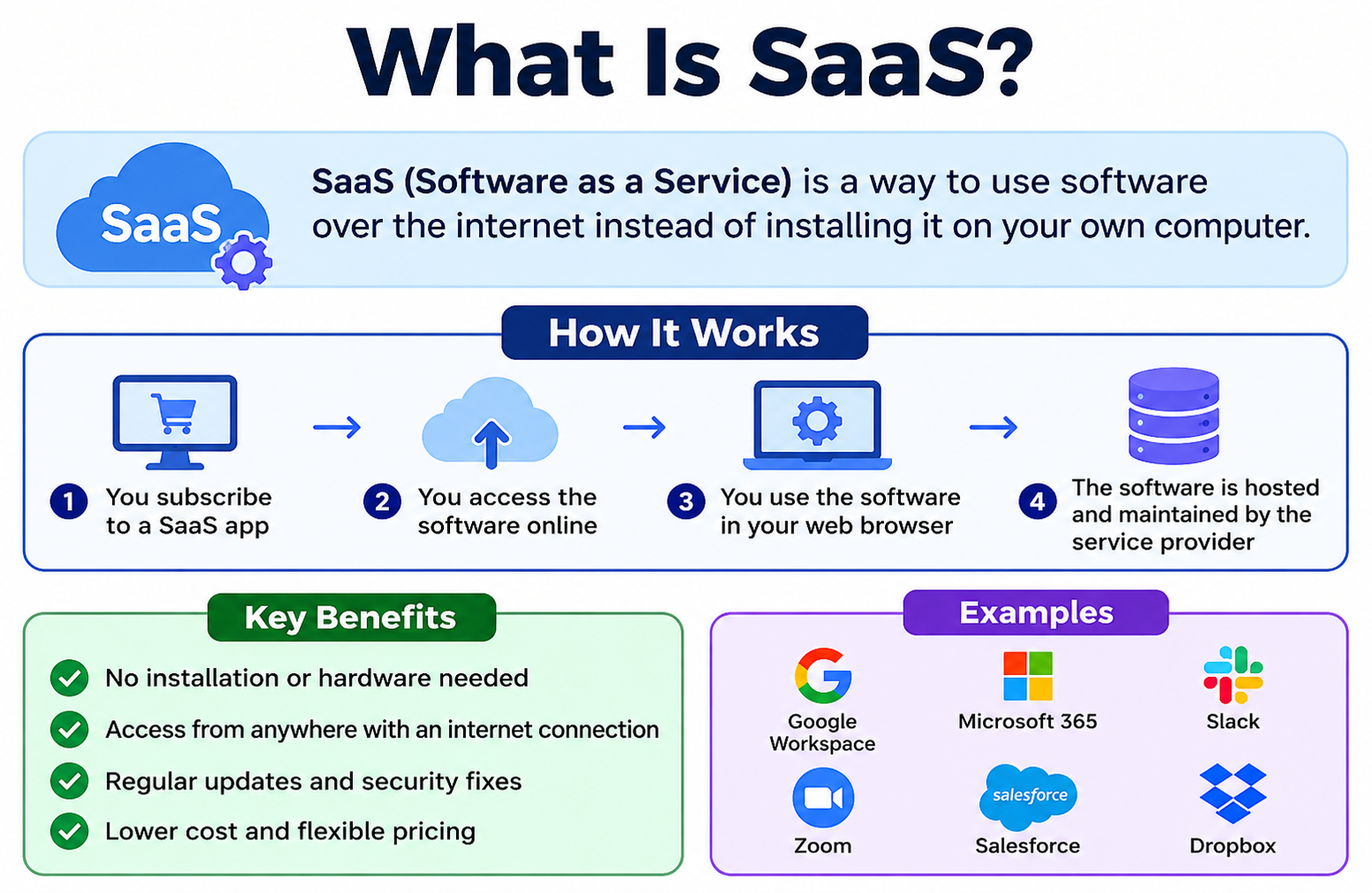
Think about the last time you checked your email in a browser, joined a video call, or edited a document online. You were using SaaS without necessarily knowing it. SaaS, or Software as a Service, is a cloud service model where a provider hosts software applications and delivers them to users over the internet. You do not download or install anything. You simply open a browser or app and start working. Familiar examples include Gmail, Microsoft 365, Zoom, Salesforce, Dropbox, Slack, and Netflix. To understand the broader technology behind SaaS, start with [What Is Cloud Computing? A Beginner’s Guide].
Quick Answer: What Is SaaS?
SaaS, or Software as a Service, is a cloud delivery model where a provider hosts and manages a software application on remote infrastructure and makes it available to users over the internet. Users access the software through a web browser or dedicated app without installing or managing it locally. The provider handles servers, updates, security patches, and maintenance. Users typically pay through a subscription.
What Is SaaS?
SaaS stands for Software as a Service. It is a way of delivering software applications over the internet rather than installing them on individual devices. The provider builds, hosts, and maintains the software. Users access it through a browser or a dedicated application without managing any of the underlying technology.
Think about the difference between buying a DVD and streaming a film online. With a DVD, you own a physical copy that you install and manage yourself. With streaming, the content lives on the provider’s servers and you access it when you need it. SaaS works the same way for software. You use the application without ever owning or managing the underlying system.
This model removes the need for users or IT teams to install software on every device, manage version updates, or maintain server infrastructure. The provider takes care of those responsibilities so users can focus on their work.
Understanding [What Is Software and How Does It Work?] provides useful background for appreciating how SaaS differs from traditional software delivery.
How Does SaaS Work?
SaaS involves several layers working together to deliver software reliably over the internet. Here is a step-by-step breakdown of the process.
- A provider builds a software application and hosts it on cloud infrastructure, which includes servers, databases, and networking systems.
- The provider manages all technical operations, including servers, databases, software updates, and security patches.
- Users access the application through a web browser or a dedicated desktop or mobile app, using a login and password.
- User data is stored on the provider’s cloud infrastructure, often in databases replicated across multiple locations.
- The provider charges users through a subscription fee, a per-user fee, or another pricing model.
- Users can access the application from any authorized device with an internet connection.
Several important concepts make this possible. Cloud infrastructure provides the computing power and storage the application needs. The internet carries requests and responses between the user’s device and the provider’s servers. Web browsers and apps provide the interface users interact with. Authentication systems verify that only authorized users gain access. Software update systems allow the provider to improve the application without requiring users to install anything new.
Multi-tenancy is a key characteristic of most SaaS applications. It means that multiple customers share the same underlying application and infrastructure, but their data is kept logically separate. Think of it like an apartment building where many residents share the same structure but each has a private, locked unit. Multi-tenancy allows providers to serve many customers efficiently while keeping each customer’s data isolated.
For a deeper explanation of how cloud infrastructure supports these services, visit [How Does Cloud Computing Work?].
Where Does SaaS Run?
SaaS applications run on cloud infrastructure managed entirely by the provider. This infrastructure is physically located in data centers, which are large facilities housing servers, storage systems, networking equipment, and power and cooling systems.
Major SaaS providers operate infrastructure across multiple geographic regions. This global distribution helps reduce latency, meaning the application responds faster to users in different parts of the world. It also supports redundancy, meaning if one location experiences a problem, another can continue serving users.
The databases that store user data, the application servers that process requests, and the content delivery networks that speed up file delivery are all managed by the provider. Users interact only with the finished application through their browser or app. The complexity of the underlying infrastructure is entirely invisible to them.
This separation between the user experience and the underlying infrastructure is one of the defining features of SaaS. It is also one of its most practical advantages for individuals and organizations that prefer to focus on using software rather than managing it.
SaaS vs Traditional Software
Traditional software is installed directly on a user’s device or on organization-managed servers. SaaS eliminates local installation and moves the software to provider-managed infrastructure. The differences affect cost, maintenance, access, and how updates are delivered.
| Feature | SaaS | Traditional Software |
|---|---|---|
| Installation | No local installation needed | Must be installed on each device |
| Updates | Managed by provider | Managed by user or IT team |
| Access | Usually browser or app | Usually device-specific |
| Cost model | Usually subscription-based | Often one-time purchase or license |
| Infrastructure | Provider-managed | User or organization-managed |
| Maintenance | Provider handles most maintenance | User or IT team handles maintenance |
| Scalability | Often easy to scale | May require additional licenses or hardware |
In a traditional software environment, an IT team might spend significant time rolling out updates across hundreds of devices. With SaaS, the provider pushes updates to the application centrally, and all users receive the new version automatically. This reduces the burden on IT staff considerably.
However, traditional software can offer greater control and customization. Organizations with specific technical requirements or compliance needs may find that on-premise software gives them more authority over how the application behaves and where data is stored.
SaaS vs PaaS vs IaaS
Cloud computing is commonly divided into three primary service models. SaaS is one of them, alongside Platform as a Service and Infrastructure as a Service. Each model provides a different level of control and management responsibility.
| Model | What It Provides | Who Manages Infrastructure | Example |
|---|---|---|---|
| SaaS | Ready-to-use software applications | Provider manages almost everything | Gmail, Zoom |
| PaaS | Development platform and tools | Provider manages infrastructure, customer manages apps | Google App Engine |
| IaaS | Virtual computing infrastructure | Provider manages hardware, customer manages OS and above | Amazon EC2 |
SaaS is the most abstracted of the three models. Users interact with a finished, fully functional application. They do not manage servers, operating systems, databases, or development environments. The provider handles all of that.
PaaS sits in the middle. Developers use the provider’s platform to build, test, and deploy their own applications. The provider manages the underlying infrastructure, but the customer takes responsibility for the application they build on top of it.
IaaS provides the most control. Customers rent virtual computing resources such as servers and storage, then install and manage their own operating systems, software, and applications on top of that infrastructure.
For a complete explanation of these models and how they relate to each other, read [What Are the Types of Cloud Computing?]. If you are new to the concept of cloud computing broadly, [What Is Cloud Computing? A Beginner’s Guide] is a helpful starting point.
What Are Common Examples of SaaS?
SaaS applications exist in almost every software category. Here are well-known examples organized by purpose.
Productivity and collaboration tools help individuals and teams create documents, communicate, and manage their work. Microsoft 365 delivers Word, Excel, PowerPoint, and Teams through a subscription. Google Workspace provides Docs, Sheets, Slides, and Gmail through the browser. Slack and Zoom support team communication and video conferencing.
Customer relationship management tools help businesses track customer interactions and manage sales pipelines. Salesforce and HubSpot are widely used SaaS platforms in this category.
Storage and file management services let users store and share files through the cloud. Dropbox and Google Drive are common examples. For a detailed look at these services, visit [Best Cloud Storage Services Comparison].
Accounting and finance tools support bookkeeping, invoicing, and financial reporting. QuickBooks Online and FreshBooks are SaaS products in this space.
Project management platforms help teams organize tasks, timelines, and deliverables. Asana and Trello are popular SaaS options used by teams of all sizes.
Entertainment services deliver music, video, and content through subscription models. Netflix and Spotify are consumer SaaS products that most people interact with regularly.
What Are the Types of SaaS Applications?
SaaS applications span a wide range of business and personal use cases. Here is an overview of the major categories.
Productivity and Collaboration SaaS
These tools help users create, edit, and share documents, spreadsheets, and presentations. They often include real-time collaboration features so multiple users can work on the same file simultaneously. Google Workspace and Microsoft 365 are leading examples.
Customer Relationship Management SaaS
CRM SaaS platforms help businesses manage customer data, track sales activities, and automate marketing tasks. Salesforce is one of the most widely recognized names in this category. These platforms typically rely on structured databases to organize large volumes of customer information. [What Is Database Software? Types, Uses and Examples] provides useful context for how data is managed behind the scenes.
Human Resources SaaS
HR SaaS platforms support employee onboarding, payroll processing, benefits administration, and performance management. Workday and BambooHR are examples used by businesses to manage their workforce-related processes.
Accounting and Finance SaaS
These platforms handle invoicing, expense tracking, payroll, and financial reporting. They are particularly popular with small businesses because they remove the need to install and maintain accounting software locally.
Project Management SaaS
Project management tools help teams plan tasks, set deadlines, assign responsibilities, and track progress. They are especially useful for remote teams who need a shared view of project status.
E-Commerce SaaS
E-commerce platforms let businesses build and operate online stores without managing the underlying server infrastructure. Shopify is a widely recognized example that powers online retail operations for businesses of many sizes.
Communication SaaS
Communication tools provide email, video conferencing, instant messaging, and voice calling through the cloud. Zoom and Slack are prominent examples that became central to remote work workflows.
Security SaaS
Security SaaS products deliver threat monitoring, endpoint protection, identity management, and network security controls through the cloud. These services allow organizations to access enterprise-grade security tools without building and maintaining the infrastructure themselves.
SaaS Pricing Models
SaaS providers use a range of pricing structures to accommodate different customer types and usage patterns. Understanding these models helps you evaluate and compare products effectively.
Per-User Subscription
This is one of the most common SaaS pricing approaches. The customer pays a fixed fee for each user who accesses the application per month or per year. It scales predictably as the number of users grows, which makes budgeting straightforward for businesses.
Flat-Rate Subscription
Some providers charge a single fixed price for access to the application regardless of the number of users or usage volume. This can be cost-effective for larger teams but may represent poor value for very small organizations with few users.
Usage-Based Pricing
Also called pay-as-you-go pricing, this model charges customers based on how much they use the service. For example, a customer might pay based on the number of transactions processed, the volume of data stored, or the number of messages sent. This approach aligns cost directly with usage but can make budgeting less predictable.
Freemium Model
Many SaaS providers offer a free tier with limited features or usage caps. Users who need more functionality, storage, or users can upgrade to a paid plan. This model allows potential customers to try the product before committing financially, which lowers the barrier to adoption.
Tiered Pricing
Tiered pricing offers multiple plan levels, each with a different set of features and a corresponding price. A basic plan might include core features at a lower cost, while premium tiers add advanced functionality, greater storage, or priority support. This structure allows providers to serve both individual users and large enterprises with the same product.
Pricing models and specific costs vary significantly between providers and change over time. Always check the provider’s current official pricing page before making purchasing decisions.
Benefits of SaaS
SaaS offers genuine advantages that have made it one of the most widely adopted software delivery models today.
No installation required means users can start working almost immediately without waiting for software to be downloaded, configured, or deployed across devices.
Accessible from any device allows users to open the same application on a work computer, a personal laptop, or a mobile phone, as long as they have internet access and their login credentials.
Automatic updates ensure that users always work with the most current version of the software. The provider handles updates centrally without requiring users to download or install anything.
Scalability allows organizations to add or remove user seats as their needs change, often without significant technical effort or procurement delays.
Reduced IT management burden frees internal technology teams from the tasks of installing, patching, and maintaining software on individual devices or servers.
Lower upfront costs are a potential advantage in many cases. SaaS removes the need for significant initial software licensing fees, though ongoing subscription costs must be factored into the total investment.
Easy collaboration is supported by the fact that multiple users can access the same application and often the same documents simultaneously, from different locations.
Cross-platform compatibility means SaaS applications typically work across Windows, Mac, iOS, Android, and other operating systems without separate versions.
Flexible pricing lets organizations choose a plan that fits their current budget and scale up when needed.
Faster deployment means new users or teams can often be set up and working within hours rather than days or weeks.
Disaster recovery support is built into many SaaS platforms because data is stored on provider infrastructure that includes redundancy and backup systems.
Global accessibility allows organizations with teams in different countries to use the same software without geographic restrictions, provided the service is available in those regions.
Not every SaaS product delivers every one of these benefits equally. Reviewing specific service documentation before committing to a platform is always a sensible step.
Disadvantages of SaaS
A balanced view of SaaS requires acknowledging its real limitations alongside its benefits.
Internet dependency is the most immediate limitation. If your internet connection is slow or unavailable, accessing a SaaS application may be difficult or impossible. This can be a significant concern for users in areas with unreliable connectivity.
Ongoing subscription costs accumulate over time. While upfront costs may be lower than traditional software, monthly or annual fees continue indefinitely. For some workloads and organization sizes, the total cost over several years may exceed what traditional software would have cost.
Data privacy concerns arise because your data is stored on infrastructure managed by a third party. The provider’s policies on data access, data sharing, and data retention matter significantly.
Vendor lock-in can occur when your workflows, data formats, and integrations become deeply tied to one provider’s platform. Migrating to a different service later can be technically complex and time-consuming.
Limited customization is a genuine constraint with many SaaS products. The provider controls the application’s features and configuration options. Organizations with highly specific requirements may find SaaS offerings less flexible than on-premise alternatives.
Service outages at the provider level can prevent all users from accessing the application simultaneously. Even well-resourced providers experience occasional downtime.
Data portability challenges arise when organizations need to export their data from one SaaS platform to move to another. Not all providers make this straightforward.
Security configuration responsibilities remain with the customer even in a SaaS model. Misconfigured access controls or poor password practices can expose data regardless of the provider’s security investment.
Compliance considerations require careful evaluation. Some industries and regions have specific regulations about where data can be stored and how it must be protected. Organizations should verify that a SaaS provider’s infrastructure and certifications align with their compliance requirements before adopting the service.
Reducing these risks starts with careful provider evaluation, strong internal security practices, and maintaining backup copies of important data.
Is SaaS Secure?
SaaS security depends on both the provider and the customer. Neither party can guarantee complete protection on their own, and no SaaS product should be treated as inherently secure without careful evaluation and proper configuration.
Cloud providers publish shared responsibility models that define who is responsible for which aspects of security. The provider typically takes responsibility for securing the physical data center, the underlying infrastructure, the application itself, and some platform-level security controls. The customer remains responsible for managing user accounts, configuring access permissions correctly, protecting login credentials, and controlling who has access to what data.
Reputable SaaS providers implement encryption to protect data during transmission and while it is stored. They invest in authentication systems, monitoring tools, and security certifications. However, these protections only go so far if customers use weak passwords, share accounts, or fail to configure access controls appropriately.
Multi-factor authentication is one of the most effective controls a customer can enable. It requires users to verify their identity with a second factor beyond their password, significantly reducing the risk of unauthorized access even if a password is stolen.
For a thorough understanding of how security works in cloud environments, read [What Is Cloud Security?]. For foundational digital security knowledge, [What Is Cybersecurity?] provides important context.
How to Use SaaS Safely
Taking practical security steps significantly reduces the risk of unauthorized access and data exposure in any SaaS environment.
- Use a strong, unique password for each SaaS account that you do not reuse across other services.
- Enable multi-factor authentication on every SaaS account that supports it.
- Review your account recovery options and ensure your backup email address and phone number are current and secure.
- Understand how the provider handles your data by reading their privacy policy and terms of service.
- Control user access within your organization by granting permissions based on what each user actually needs.
- Remove access for users who leave your organization or no longer require the application.
- Review third-party app integrations and revoke access for any connected applications you no longer use or recognize.
- Keep the devices you use to access SaaS applications updated with current operating system and security patches.
- Avoid accessing sensitive SaaS applications on public networks without a VPN to protect your connection.
- Monitor account activity logs for unusual logins, unfamiliar locations, or suspicious behavior.
- Understand the provider’s data export options before committing, so you know how to retrieve your data if needed.
- Review the provider’s security documentation, certifications, and compliance reports to understand the protections in place.
Threats like phishing attacks, where attackers impersonate trusted services to steal credentials, are a significant risk for SaaS users. [What Is Phishing Attacks?] explains how to recognize and avoid them. Understanding [What Is Malware?] also helps users protect the devices they use to access cloud applications. [What Is Antivirus Software?] and [What Is Endpoint Security?] provide further guidance on device-level protection.
SaaS and Data Privacy
When you store data in a SaaS application, a third party manages the infrastructure where that data lives. This raises important questions about ownership, access, and how the provider uses your information.
Most reputable SaaS providers state in their terms of service that customers retain ownership of their data. However, the provider has technical access to the infrastructure where data resides and may access it for operational purposes or when required by law. Reading the provider’s privacy policy carefully before storing sensitive information is essential.
Compliance frameworks such as GDPR in Europe and HIPAA in the United States impose specific requirements on how certain types of data must be handled. Organizations operating in regulated industries should verify that their SaaS providers hold relevant certifications and can support their compliance obligations.
Data residency matters in some cases. Certain regulations require that data about residents of a particular country be stored within that country’s borders. Some SaaS providers allow customers to choose a storage region, while others manage this automatically. Confirming the provider’s data location policies before adopting a service is a prudent step.
Privacy settings within your SaaS account control who can see and access your data. Reviewing and configuring these settings carefully protects against unintended sharing.
This article does not provide legal or compliance advice. Organizations with specific regulatory obligations should consult qualified professionals and review the provider’s current documentation before making decisions about data handling.
SaaS vs On-Premise Software
The decision between SaaS and on-premise software depends on organizational priorities, budget, technical resources, control requirements, and compliance obligations.
| Feature | SaaS | On-Premise Software |
|---|---|---|
| Deployment | Provider-hosted | Locally installed |
| Maintenance | Provider handles most maintenance | IT team manages maintenance |
| Updates | Automatic in most cases | Manual or IT-managed |
| Upfront cost | Usually lower | Often higher |
| Ongoing cost | Subscription-based | Maintenance and license costs |
| Customization | Often limited | Often greater |
| Control | Provider-managed infrastructure | Organization-controlled |
| Internet required | Usually yes | Not always |
| Scalability | Usually easier | May require additional infrastructure |
SaaS reduces the burden of managing infrastructure and software maintenance. On-premise software gives organizations greater authority over how the application behaves and where data is stored. For organizations in regulated industries with strict data requirements, on-premise deployment may offer compliance advantages that SaaS cannot easily replicate.
For context on how SaaS compares within the broader landscape of computing approaches, [Cloud Computing vs Traditional Computing] provides a detailed comparison.
SaaS for Small Businesses
SaaS has made professional-grade software accessible to small businesses that previously could not afford the infrastructure required to run enterprise applications. A small accounting firm can use cloud-based accounting software without purchasing servers. A retail business can manage customer relationships through a SaaS CRM without an IT department.
Common small business SaaS use cases include cloud-based email and productivity tools, online accounting platforms, customer management systems, video conferencing tools, file sharing services, project management applications, and digital marketing platforms.
SaaS often lowers the barrier to entry because upfront costs are reduced and most of the technical management falls to the provider. However, small businesses should still evaluate their specific needs carefully before committing to any platform. Ongoing subscription costs, data portability, and the provider’s reliability all deserve consideration.
Some small businesses may find that certain on-premise solutions serve them better, particularly if internet connectivity is unreliable or if their work involves applications with specific local processing requirements.
SaaS for Students
Students interact with SaaS applications throughout their academic life, often without thinking about the technology behind them.
Google Docs, Google Slides, and similar tools let students create and share assignments from any device. Collaboration features allow group members to work on presentations simultaneously without emailing files back and forth. Cloud storage services keep documents accessible from home, campus, and everywhere in between.
Learning management systems used by schools and universities are SaaS platforms that deliver course content, assignments, and grades through the browser. Video conferencing tools support remote learning and virtual office hours with instructors.
Research workflows benefit from cloud-based reference management and note-taking tools that synchronize across devices. Communication platforms help student groups coordinate schedules and share updates efficiently.
For practical tool recommendations tailored to academic use, visit [Best Software for Students]. If you use Google’s productivity suite for your studies, [What Is Google Workspace?] explains the full range of tools available to you.
SaaS for Enterprises
Large organizations use SaaS applications at significant scale and face additional considerations that smaller users may not encounter.
Security and compliance are the most critical evaluation criteria for enterprise SaaS adoption. Organizations in healthcare, finance, and other regulated industries must verify that providers hold appropriate certifications and can support audit requirements. [What Is Cloud Security?] covers the key security principles relevant to enterprise cloud environments.
Integration with existing systems is a practical concern. Enterprise environments often run multiple applications that need to exchange data. A SaaS product that does not integrate cleanly with existing tools can create data silos and workflow inefficiencies.
Access controls are more complex at enterprise scale. Administrators need granular control over who can access which features and data, particularly in large teams where different roles carry different responsibilities.
Data governance requires clear policies about how data is classified, who can access it, how long it is retained, and how it can be exported or deleted. Enterprises should understand a provider’s data governance capabilities before committing.
Service level agreements define the provider’s commitments regarding uptime, support response times, and performance. Enterprises should review SLAs carefully and understand what compensation is offered if those commitments are not met.
Vendor evaluation for enterprise SaaS should involve input from security, legal, compliance, and IT teams before a final decision is made.
How to Choose a SaaS Product
Selecting the right SaaS product requires evaluating more than just features and price. Here are fourteen factors worth examining.
Core features should align closely with your actual workflow requirements. Avoid paying for capabilities you will not use.
Pricing model should match your usage patterns and budget. Consider total cost over twelve and thirty-six months, not just the monthly fee.
Security and compliance documentation should confirm that the provider meets the standards relevant to your industry and location.
Data privacy policies should clearly explain how the provider handles your data, who can access it, and under what circumstances.
Multi-factor authentication support is a baseline security requirement. Providers that do not offer MFA present unnecessary risk.
Integration with other tools you already use reduces friction and data transfer complexity.
Uptime and reliability records help you assess whether the provider’s service availability meets your operational requirements.
Customer support quality and availability matter when problems occur. Understand what support channels are available and at what times.
Data export options should be clearly documented before you commit. Knowing how to retrieve your data protects you against vendor lock-in.
Scalability should allow you to grow your usage without hitting platform limitations or encountering sharp price increases.
User experience affects adoption. A tool that employees find difficult to use will deliver less value regardless of its technical capabilities.
Trial or free tier availability lets you test the product with real workflows before making a financial commitment.
Provider reputation and track record reflect the likelihood that the service will remain available and supported over time.
Contractual terms including auto-renewal clauses, cancellation policies, and data deletion procedures deserve careful review before signing.
Data portability and the ability to migrate away from a provider if needed should factor into your decision from the beginning, not just at the point of exit.
Common SaaS Problems
Even well-designed SaaS applications encounter occasional issues. Knowing how to respond saves time and reduces frustration.
Login problems are among the most common issues. Check that your password and any MFA codes are entered correctly. If you still cannot access your account, use the provider’s account recovery process.
Slow performance may reflect a problem with your internet connection rather than the application itself. Testing your connection speed and switching to a faster or more stable network often resolves performance issues.
Sync issues, where changes made on one device do not appear on another, usually resolve after a short delay. If the problem persists, signing out and back into the application often helps.
Feature limitations become apparent when a provider’s standard offering does not meet a specific requirement. Review whether a higher-tier plan addresses the gap or whether an alternative product is needed.
Integration problems between a SaaS application and other tools can arise from authentication errors or configuration issues. Checking the integration documentation and revoking and reconnecting the integration often resolves the problem.
Unexpected cost increases can occur when usage exceeds plan limits or when pricing changes. Regularly reviewing your subscription and usage helps you anticipate and manage costs.
Service outages are outside the customer’s control. Checking the provider’s status page confirms whether a known issue exists and provides estimated resolution times.
Data export challenges can arise when the export format is not compatible with another system. Contacting the provider’s support team and asking for guidance on export options is the most direct path to resolution.
SaaS and Cloud Computing
SaaS is one of three primary cloud service models that together define how cloud computing services are delivered. The other two are Platform as a Service and Infrastructure as a Service. Together, they represent a spectrum of control and management responsibility between the provider and the customer.
Cloud computing is the broader category. It encompasses the delivery of computing resources, storage, databases, networking, software, and many other services over a network. SaaS sits within that broader ecosystem as the model focused specifically on delivering finished software applications.
Frequently Asked Questions
What is SaaS?
SaaS, or Software as a Service, is a cloud delivery model where a provider hosts and manages a software application and makes it available to users over the internet through a browser or app, on a subscription basis.
How does SaaS work?
The provider builds and hosts the application on cloud infrastructure, manages all maintenance and updates, and delivers access to users through a browser or app. Users log in with their credentials and use the software without managing any underlying technology.
What are examples of SaaS?
Common examples include Gmail, Microsoft 365, Google Workspace, Zoom, Slack, Salesforce, Dropbox, QuickBooks Online, Asana, Netflix, and Spotify.
What is the difference between SaaS, PaaS, and IaaS?
SaaS delivers ready-to-use software. PaaS provides a development platform for building applications. IaaS provides virtual computing infrastructure that customers manage themselves. SaaS involves the least customer management of the three.
Is SaaS the same as cloud computing?
No. SaaS is one of three primary cloud service models within the broader concept of cloud computing. Cloud computing also includes PaaS, IaaS, and many other services.
Is Gmail a SaaS?
Yes. Gmail is a SaaS application. Google hosts and manages the email service, and users access it through a browser or mobile app without managing any infrastructure.
Is Netflix a SaaS?
Netflix is commonly described as a SaaS product in the consumer entertainment category. Users access content through a subscription without managing any of the underlying streaming infrastructure.
Is Microsoft 365 a SaaS?
Yes. Microsoft 365 delivers Word, Excel, PowerPoint, Teams, and other applications through a subscription. Microsoft manages the underlying infrastructure and delivers updates automatically.
Is Zoom a SaaS?
Yes. Zoom is a SaaS application. Users access video conferencing through a browser or the Zoom application without managing the servers that host the service.
Is SaaS secure?
SaaS can be very secure, but security is not automatic. It depends on both the provider’s controls and the customer’s configuration and behavior. Enabling MFA, managing access permissions carefully, and understanding the provider’s security documentation are essential steps.
Is SaaS cheaper than traditional software?
Not always. SaaS typically reduces upfront costs but involves ongoing subscription fees. Total cost depends on usage volume, the number of users, and how long the service is used. Comparing total cost of ownership over a realistic time period is the most informative approach.
Do I need the internet to use SaaS?
In most cases, yes. SaaS applications are accessed over the internet and require a connection to function fully. Some applications offer limited offline functionality, but full features typically require connectivity.
Can SaaS be used offline?
Some SaaS applications offer partial offline access, allowing users to work on documents or view data without a connection. Changes sync when connectivity is restored. The extent of offline functionality varies by application and should be confirmed with the provider.
What is multi-tenancy in SaaS?
Multi-tenancy means that multiple customers share the same underlying application and infrastructure. Each customer’s data is kept logically separate from others. It allows providers to serve many users efficiently while maintaining data privacy between accounts.
What is a SaaS subscription?
A SaaS subscription is a recurring payment, usually monthly or annual, that grants access to a software application hosted by the provider. Subscriptions can often be adjusted as the number of users or required features change.
Who owns the data in a SaaS application?
In most cases, the customer retains ownership of their data. However, the provider manages the infrastructure where data is stored. Reviewing the provider’s terms of service confirms the specific ownership and access policies for a given platform.
What happens to my data if a SaaS provider shuts down?
Providers typically notify customers and provide a period during which data can be exported before the service closes. Maintaining regular exports of important data and understanding the provider’s data retention policies reduces the risk of data loss in this scenario.
What is vendor lock-in in SaaS?
Vendor lock-in occurs when your data, workflows, and integrations become so dependent on one provider’s platform that switching to another becomes difficult. Choosing providers with clear data export options and open formats reduces this risk.
How do I choose a SaaS product?
Evaluate core features, pricing, security, compliance, MFA support, integration options, uptime track record, customer support, data export capabilities, and contractual terms. Testing the product through a free trial before committing is always advisable.
Is SaaS good for small businesses?
SaaS can work very well for small businesses because it reduces upfront costs and infrastructure management burden. However, small businesses should still evaluate their specific needs, budget for ongoing subscription costs, and confirm that the provider’s security and reliability meet their requirements.
Final Thoughts
SaaS has transformed how software is delivered, adopted, and used by individuals, businesses, and organizations of every size. Instead of purchasing and installing software on individual machines, users access fully managed applications through a browser or app, with the provider handling infrastructure, updates, and maintenance behind the scenes.
Common examples like Gmail, Microsoft 365, Zoom, Salesforce, and Dropbox demonstrate how broadly SaaS has been adopted across productivity, communication, finance, customer management, and entertainment. The range of SaaS categories continues to expand as more organizations find value in cloud-delivered software.
The benefits of SaaS, including accessibility, automatic updates, scalability, and reduced IT burden, are genuine and meaningful. So are the limitations, particularly around internet dependency, subscription costs, data privacy, and vendor lock-in. Evaluating both sides honestly leads to better decisions.
Security in a SaaS environment is a shared responsibility. Providers invest in infrastructure protection, but customers must configure accounts correctly, manage access carefully, and stay alert to threats. Understanding what the provider protects and what the customer must protect is the foundation of a secure SaaS deployment.
SaaS is not a replacement for all traditional or on-premise software. The right choice depends on workload, control requirements, compliance obligations, budget, and the specific capabilities of available products.
What is SaaS at its core? It is a practical and increasingly central way of delivering software that reduces complexity for users while enabling providers to maintain and improve applications at scale. Understanding how it works, what it costs, and how to use it safely gives you the foundation to evaluate and adopt SaaS tools with confidence.
References
National Institute of Standards and Technology. “The NIST Definition of Cloud Computing.” NIST Special Publication 800-145. https://nvlpubs.nist.gov/nistpubs/Legacy/SP/nistspecialpublication800-145.pdf
Microsoft. “What Is SaaS?” Microsoft Azure Documentation. https://azure.microsoft.com/en-us/resources/cloud-computing-dictionary/what-is-saas/
Amazon Web Services. “What Is SaaS?” AWS Documentation. https://aws.amazon.com/what-is/saas/
Google Cloud. “Software as a Service.” Google Cloud Documentation. https://cloud.google.com/learn/what-is-saas
Cloud Security Alliance. “Security Guidance for Critical Areas of Focus in Cloud Computing.” https://cloudsecurityalliance.org/research/guidance/
Salesforce. “What Is SaaS?” Salesforce Resources. https://www.salesforce.com/saas/
Microsoft. “Shared Responsibility in the Cloud.” Microsoft Azure Security Documentation. https://learn.microsoft.com/en-us/azure/security/fundamentals/shared-responsibility
Dropbox. “What Is SaaS Software?” Dropbox Business Resources. https://www.dropbox.com/business/resources/what-is-saas
Technology Disclaimer
This article is for educational and informational purposes only. SaaS products, features, pricing, security controls, privacy policies, and availability can change over time. Always check the provider’s current official documentation and terms before making decisions about adopting any software service.
Published by the TechOriginHub Editorial Team, covering practical technology, software, cybersecurity, and cloud computing topics with a focus on clear and useful guidance.