
 By saman zahra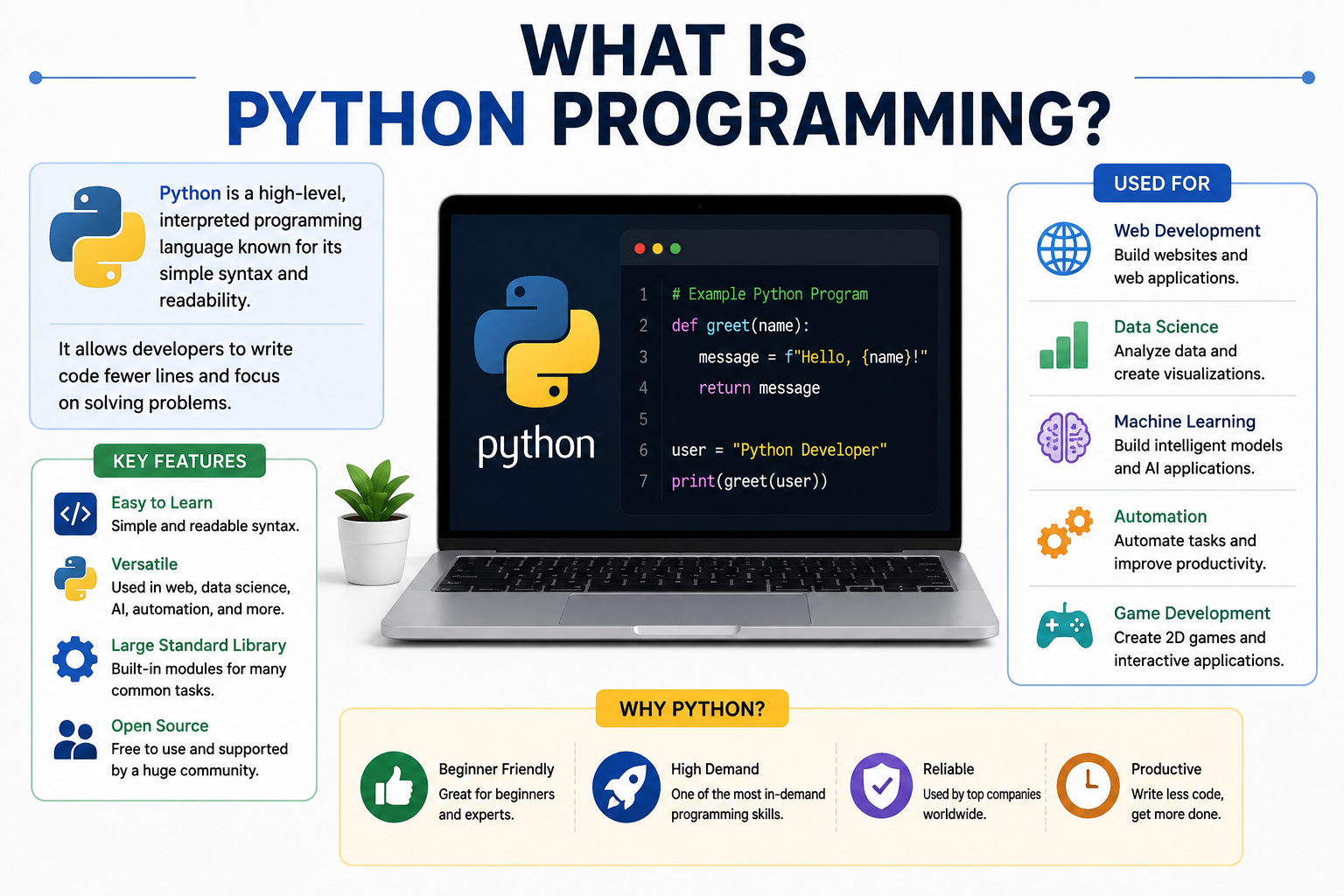
Introduction
Imagine you work in an office where you spend an hour every morning copying data from dozens of spreadsheets into a single report. You do the same thing every day, five days a week, and it never changes. A few lines of Python code could handle that entire task automatically in seconds, freeing you to focus on work that actually requires your attention.
That kind of practical, everyday usefulness is part of why so many people ask what is Python programming and whether it is worth learning. Python is one of the most widely used general-purpose programming languages in the world today, and it is found in everything from web applications and automation scripts to data analysis workflows and research environments.
Beginners are often drawn to Python because its syntax is designed to be readable and relatively approachable. At the same time, Python is also used in professional software development, scientific computing, and complex data-related work. If you are new to programming altogether, the TechOriginHub guide to computer programming for beginners provides a useful foundation before diving into a specific language.
This guide explains what Python is, how it works, what you can build with it, and how to get started.
Quick Answer: What Is Python Programming?
Python programming means using the Python language to write instructions that a computer can execute. Python is a high-level, general-purpose programming language with readable syntax and a large ecosystem of libraries, frameworks, and tools. It is used across many fields including web development, automation, data analysis, scientific computing, and software testing. Python code is processed by a Python implementation such as CPython before being executed.
What Is Python Programming?
Python programming is the practice of writing instructions in the Python language that a computer can process and execute to perform specific tasks. Those instructions, written as source code, can tell a program to calculate values, process data, respond to user input, communicate with other systems, or carry out automated workflows.
Python is described as a high-level language because it abstracts away many of the low-level details of how computers work. Programmers can express what they want the program to do without needing to manage hardware directly. This makes Python code generally more readable and closer to natural language than lower-level languages like C or assembly.
Python is also general-purpose, meaning it is not designed for a single narrow domain. The same language is used to build web applications, write automation scripts, process large datasets, run scientific simulations, and develop testing tools. This breadth is one of the reasons Python has found a home in so many different fields.
Understanding what Python programming involves also means understanding that programming itself is more than writing code. As explained to what programming means and how it works, programming includes problem-solving, algorithm design, testing, debugging, and maintaining software over time. Python is a tool for that broader process.
What Is Python?
Python is the programming language itself. It defines the syntax rules, the built-in data types, the control structures, and the semantics that govern how Python programs behave. Python was created by Guido van Rossum and first released in 1991. The language has evolved through major versions, with Python 3 being the current and actively maintained version as of the time of writing.
It is worth distinguishing several related terms that beginners sometimes confuse.
Python the language is the specification and syntax you write when creating a program. The Python interpreter, or more precisely a Python implementation, is the software that processes and runs that code. CPython is the most widely used Python implementation and serves as the reference implementation for the language. Other implementations exist, including PyPy, which is designed for improved performance in certain workloads.
Python libraries are collections of pre-written code that extend what you can do with Python. They are not part of the language itself but are built using it. Python frameworks are broader structures that provide conventions, tools, and patterns for building specific types of applications, such as web applications.
Understanding this distinction prevents a common beginner confusion. When someone says Python is used for data analysis, they typically mean Python together with data-related libraries like pandas and NumPy. Python the language provides the foundation, and the ecosystem around it provides the specialized tools.
How Does Python Work?
When you write a Python program and run it, the process involves several steps that happen largely behind the scenes.
First, you write source code in a text editor or development environment. This code follows Python’s syntax rules and expresses what you want the program to do in human-readable form.
Second, the Python implementation processes that source code. In CPython, the most common Python implementation, the source code is compiled into an intermediate form called bytecode. This bytecode is not machine code that runs directly on the processor, but rather a lower-level representation of the program’s instructions. These compiled bytecode files are typically stored with a .pyc extension.
Third, the Python virtual machine executes that bytecode. The virtual machine reads the bytecode instructions and carries out the corresponding operations on the computer.
Fourth, the program produces output or performs actions based on what the instructions specify.
This process differs from languages like C, where source code is compiled directly into machine code ahead of time and run without an additional runtime layer. It also differs from a purely interpreted model where source code is evaluated directly without any intermediate compilation step. Python’s typical approach sits between those two extremes.
It is worth noting that implementation details vary. PyPy, for example, uses just-in-time compilation to improve performance for certain workloads. The behavior and performance characteristics of a Python program can differ depending on which implementation is used.
What Are the Main Features of Python?
Readable syntax is one of Python’s defining characteristics. Python uses indentation to define code blocks rather than curly braces, and its keywords and structure are designed to read more like written instructions than dense technical code. This makes Python programs easier to read and review.
High-level language means Python handles many low-level concerns automatically, allowing programmers to focus on solving problems rather than managing memory addresses or hardware details.
General-purpose language means Python is applicable across a wide range of programming tasks rather than being designed for one specific domain.
Dynamically typed means that variable types are determined at runtime rather than requiring the programmer to declare them explicitly in advance. A variable can hold a string in one moment and an integer in another within the same program.
Automatic memory management means Python handles the allocation and deallocation of memory through a built-in garbage collection system, reducing the burden on the programmer compared to languages like C where manual memory management is required.
Large standard library means Python comes with a broad collection of modules covering tasks from file input and output to networking, text processing, mathematics, and more, reducing the need to find external packages for common requirements.
Large third-party ecosystem means thousands of additional packages are available through the Python Package Index, covering specialized domains like data analysis, web development, scientific computing, and more.
Cross-platform availability means Python programs can generally run on different major operating systems, including Windows, macOS, and Linux, when the appropriate Python implementation and required dependencies are available. This is not an absolute guarantee for every program and every dependency.
Support for multiple programming paradigms means Python can be used in a procedural style, an object-oriented style, or a functional style, giving programmers flexibility in how they organize their code.
Interactive development through the Python interpreter allows programmers to test small pieces of code immediately without writing a complete program, which supports an exploratory and iterative way of working.
Extensive community and documentation mean that finding answers to Python questions, tutorials for specific tasks, and help with problems is generally straightforward through official documentation and community forums.
Why Is Python Popular?
Python’s popularity across different fields comes from a combination of practical factors rather than any single defining feature.
Its readable and relatively approachable syntax means that new programmers can begin writing functional code without navigating as steep a learning curve as some other languages present. At the same time, Python scales well to complex professional use, which means beginners are learning a language that has genuine professional relevance.
The breadth of Python’s applications is significant. A language useful for web development, automation, data work, scientific computing, security, and testing is more versatile than a language optimized for only one domain. This versatility reduces the pressure on beginners to commit to a single specialization before they know what interests them most.
Python’s third-party ecosystem is extensive. The Python Package Index hosts a large number of community-maintained packages covering specialized needs across many fields. This means that for most common programming tasks, a well-maintained package likely exists to help.
Official documentation at Python.org is thorough and well-organized, and the Python community produces a large volume of tutorials, courses, books, and learning resources in multiple formats. This abundance of material makes self-directed learning more practical than it is for languages with smaller communities.
What Is Python Used For?
Python is used across a remarkable range of domains. The table below summarizes common use cases.
| Use Case | How Python Is Used |
|---|---|
| Web development | Building backend applications, APIs, and web services |
| Automation | Automating repetitive tasks, file management, and workflows |
| Data analysis | Processing, cleaning, and analyzing datasets |
| Machine learning | Building, training, and experimenting with models |
| Scientific computing | Numerical simulations and scientific workflows |
| Cybersecurity | Security automation, log analysis, and authorized testing |
| Software testing | Automated test scripts and testing frameworks |
| Education | Teaching programming concepts to students |
| Desktop applications | Building certain desktop utilities and tools |
| DevOps | Infrastructure automation and tooling |
Python’s suitability for a given task depends on the project requirements, performance needs, and the ecosystem available. It is one option among many rather than the automatic right choice for every situation. For projects that involve cloud infrastructure, Python is often used in automation and scripting roles.
The TechOriginHub guide to what is cloud computing provides context for how cloud environments connect to software development work.
What Can You Build With Python?
Python’s versatility means the list of things you can build with it is genuinely broad.
Automation scripts that handle repetitive file management, data processing, or report generation tasks are among the most immediately practical applications for beginners. Web applications built with frameworks like Django or Flask power a wide range of websites and services. APIs that allow software systems to communicate are another common Python output.
Data analysis tools that process and summarize large datasets, command-line utilities that automate system tasks, and testing tools that verify software behavior are all practical Python applications. Educational programs built with Python can teach programming concepts interactively.
Data processing pipelines that clean, transform, and load data from one system to another are common in business and research contexts. Security tools used in authorized testing and analysis environments are another application. Desktop utilities for specific tasks can also be built with Python, though it is not typically the first choice for highly graphical or performance-intensive desktop software.
The right tool for any given project depends on factors like performance requirements, team expertise, available libraries, and the deployment environment. Python is a strong option for many of these tasks, but the specific suitability should always be evaluated in context.
Python Syntax Explained for Beginners
One of the most frequently cited qualities of Python is that its syntax is relatively readable compared to many other programming languages. A simple example illustrates this immediately.
print("Hello, world!")This single line tells Python to display the text “Hello, world!” on the screen. The print() function is a built-in Python function that outputs whatever is placed inside the parentheses. The text “Hello, world!” is a string, which is the Python data type for sequences of characters. Strings must be enclosed in quotation marks.
Even without knowing Python, most people can read this line and understand roughly what it does. That readability is intentional.
Here is a slightly more involved example showing variables:
name = "Alex"
age = 20
The first line creates a variable called name and assigns it the string value “Alex”. The second line creates a variable called age and assigns it the integer value 20. Notice that there are no declarations of type required. Python determines the type of the value automatically at runtime.
Python uses indentation to define the structure of code blocks, such as the body of a function or a loop. Consistent indentation is not optional in Python. It is part of the language’s syntax, and inconsistent indentation causes errors. This is one of the first syntax habits beginners need to develop.
What Are Variables in Python?
A variable in Python is a name that refers to a value stored in memory. Variables allow programs to work with data that can change, be calculated, or be provided by the user.
name = "Alex"
age = 20
price = 19.99
is_student = True
In these examples, name refers to a string, age to an integer, price to a floating-point number, and is_student to a boolean value. Python determines the type of the object each variable refers to at runtime, which is what “dynamically typed” means in practice.
Variable names in Python must follow certain rules. They can contain letters, numbers, and underscores, but cannot start with a number. Python is case-sensitive, so name and Name are treated as different variables. Choosing clear and descriptive variable names is a habit that makes code significantly easier to read and maintain.
Because Python is dynamically typed, the same variable name can refer to values of different types at different points in a program, though this flexibility should be used thoughtfully to keep code understandable.
What Are Python Data Types?
Python includes a set of built-in data types that cover the most common kinds of data programs work with. Understanding these types is fundamental to writing functional Python code.
| Data Type | Example | Common Use |
|---|---|---|
| int | 10 | Whole numbers |
| float | 10.5 | Numbers with decimal points |
| str | “Hello” | Text and character sequences |
| bool | True | True or false values |
| list | [1, 2, 3] | Ordered, mutable collection of items |
| tuple | (1, 2, 3) | Ordered, immutable sequence |
| set | {1, 2, 3} | Collection of unique values |
| dict | {“name”: “Alex”} | Key-value pairs |
| NoneType | None | Represents the absence of a value |
Each type has specific behaviors and operations associated with it. A list, for example, supports adding and removing items, while a tuple does not allow modification after creation. Dictionaries are particularly useful for storing structured data where each value is associated with a descriptive key.
Python also allows developers to create their own custom data types through classes, which is part of Python’s object-oriented programming capabilities.
What Are Conditional Statements in Python?
Conditional statements allow a Python program to make decisions. Different code runs depending on whether a condition is true or false.
temperature = 8

if temperature < 10:
    print("Wrap up warm today.")
elif temperature < 20:
    print("A light jacket might be useful.")
else:
    print("It is warm outside.")
In this example, the program checks the value of temperature and prints a different message depending on which condition is met. The if statement begins the decision chain. The elif (short for “else if”) handles an additional condition. The else block handles all cases that do not match any preceding condition.
Indentation is essential here. The code inside each block must be consistently indented to show that it belongs to that particular branch of the conditional structure. Python will raise an error if the indentation is incorrect.
Conditional statements are one of the most fundamental tools in any programming language because they allow programs to respond differently to different inputs and situations.
What Are Loops in Python?
Loops allow a Python program to repeat a set of instructions multiple times without rewriting the same code repeatedly.
A for loop iterates over a sequence of values:
for number in range(1, 6):
    print(number)
This loop prints the numbers 1 through 5. The range(1, 6) function generates a sequence of integers starting at 1 and stopping before 6.
A while loop repeats as long as a condition remains true:
count = 1
while count <= 5:
    print(count)
    count += 1
This produces the same output. The loop continues while count is less than or equal to 5, and count is incremented by 1 on each pass.
Loops are useful any time a program needs to process multiple items in a collection, repeat a calculation, or perform the same action a defined number of times. They are a foundational concept in Python and in programming generally.
What Are Functions in Python?
A function in Python is a defined block of code that performs a specific task and can be called by name from other parts of a program. Functions promote code reuse and make programs easier to organize and maintain.
def greet(name):
    return "Hello, " + name + "!"

message = greet("Alex")
print(message)
In this example, greet is a function defined using the def keyword. It accepts one parameter called name and returns a greeting string. When called with the argument “Alex”, it returns “Hello, Alex!” which is then printed.
Functions can accept multiple parameters, can return values or perform actions without returning a value, and can be called as many times as needed throughout a program. Organizing code into well-named functions with clear responsibilities is one of the habits that separates readable, maintainable code from difficult-to-follow code.
What Are Python Modules, Packages and Libraries?
These three terms are related but describe different things, and understanding the distinction helps beginners navigate the Python ecosystem.
A module is a Python file containing definitions, functions, classes, and code. When you import a module, you gain access to the code it contains. Python’s math module, for example, provides mathematical functions and constants.
A package is a way of organizing related modules. In practical terms, a package is typically a directory containing multiple module files. Modern Python packaging has evolved over time, and the Python Packaging Authority (PyPA) maintains current guidance on how packages are structured and distributed.
A library is a broader and less formally defined term. It generally refers to a collection of reusable code, which might be a single module, a package, or a larger collection of packages. The term is often used casually to refer to any substantial collection of pre-written Python code.
Some commonly encountered examples include the math module for mathematical operations, the datetime module for working with dates and times, the requests library for making HTTP requests, NumPy for numerical computing, and pandas for data analysis and manipulation. Not all of these are part of Python’s standard library. NumPy and pandas, for example, are third-party packages that must be installed separately.
What Is the Python Standard Library?
Python includes a large collection of modules available with the standard distribution, known as the Python Standard Library. These modules cover a wide range of common programming tasks and are available without requiring any additional installation.
Some frequently used modules from the standard library include:
osandpathlibfor interacting with the file system and operating systemmathfor mathematical functionsdatetimefor working with dates and timesjsonfor reading and writing JSON datarandomfor generating random numbers and selectionsrefor working with regular expressionscsvfor reading and writing CSV filesurllibfor working with URLs and making basic HTTP requests
The standard library reduces the need to seek external packages for common requirements and means that programs using only standard library modules can generally run on any system with a standard Python installation. The full standard library documentation is available at Python.org and is an essential reference for any Python developer.
What Are Python Frameworks?
A framework provides a structure, set of conventions, and collection of tools that shapes how an application is built. Rather than starting from nothing, developers build within the framework’s architecture, which handles many common concerns automatically.
Django is a comprehensive web framework designed to support full-featured web application development. It includes tools for URL routing, database interaction through its ORM (Object-Relational Mapper), user authentication, form handling, and an administrative interface. Django follows a “batteries included” philosophy, providing many features out of the box.
Flask is a lightweight web framework that provides the essentials for building web applications without the larger footprint of Django. It gives developers more flexibility in how they structure their applications and which additional components they choose. Flask is often used for smaller applications or when developers want more control over their architecture.
FastAPI is a modern framework designed for building APIs. It is known for its speed in handling requests and for its support for automatic generation of documentation. FastAPI uses Python type annotations to define API structures, which makes code clearer and enables automatic validation.
These frameworks serve different purposes and are suited to different projects. Choosing between them depends on the scale of the application, the specific features needed, and the developer’s familiarity with each approach.
Python Libraries for Beginners
As beginners progress in Python, they will encounter a number of third-party libraries that are widely used across common Python workflows.
NumPy is a foundational library for numerical computing in Python. It provides efficient multi-dimensional array objects and a collection of mathematical functions for working with them. NumPy is the basis for many other scientific and data-related libraries.
pandas is a library for data manipulation and analysis. It introduces data structures like the DataFrame, which is similar to a spreadsheet table, and provides powerful tools for filtering, grouping, cleaning, and transforming data.
Matplotlib is a library for creating visualizations such as line charts, bar charts, scatter plots, and histograms. It is widely used in data analysis and scientific computing workflows.
Requests is a library that simplifies making HTTP requests from Python. It is commonly used for interacting with web APIs and retrieving data from web services.
Beautiful Soup is a library for parsing HTML and XML documents, commonly used in web scraping workflows where data is extracted from web pages.
These are all third-party packages and are not part of the Python standard library. They must be installed separately, typically using Python’s package installer, pip. Each has its own documentation, version history, and licensing terms, and it is worth consulting their official documentation for current information.
Is Python a Programming Language?
Yes. Python is a high-level, general-purpose programming language. It has defined syntax rules, semantics, control structures, data types, and an ecosystem of tools for building software.
This is worth stating clearly because beginners sometimes encounter confusion about where Python fits relative to other technologies they hear about together.
HTML is a markup language used to define the structure and content of web pages. It is not a programming language.
CSS is a style sheet language used to define the visual presentation of web documents. It is not a programming language.
SQL is a domain-specific language designed for querying and managing relational databases. Standard SQL is not a general-purpose programming language, though some database systems offer procedural extensions that add programming constructs.
The TechOriginHub article on database software and how it works provides useful context for understanding where SQL fits in the software landscape.
Python, by contrast, is a full general-purpose programming language capable of expressing the full range of programming logic including variables, conditions, loops, functions, classes, and complex data structures.
Python vs Coding
Beginners sometimes use the terms Python, coding, and programming interchangeably. They are related but describe different things.
| Term | What It Means |
|---|---|
| Python | A specific programming language with defined syntax and semantics |
| Coding | The act of writing code in any programming language |
| Programming | The broader process of designing, implementing, testing, debugging, and maintaining software |
Learning Python means learning a specific language. Coding in Python means writing Python source code. Programming with Python encompasses the full process from understanding a problem through to delivering and maintaining a working solution.
The distinction matters because it sets realistic expectations. Learning Python’s syntax is only one part of becoming an effective programmer. Problem-solving, algorithm design, debugging, and software organization are all part of what programming involves that go beyond any particular language.
Python vs Other Programming Languages
Every programming language has strengths and weaknesses, and no language is universally superior for every use case.
| Language | Common Uses | Beginner Considerations |
|---|---|---|
| Python | Automation, data, web, scientific computing | Readable syntax, broad ecosystem |
| JavaScript | Web development, front-end and back-end | Essential for browser-based development |
| Java | Enterprise software, JVM applications | More explicit type declarations |
| C++ | Systems programming, games, performance software | More complex memory and language concepts |
| C# | .NET applications, games with Unity | Strong ecosystem, similar structure to Java |
| Go | Backend systems, infrastructure | Simple syntax, compiled toolchain |
| Rust | Systems and performance-focused software | Steeper initial learning curve |
Python’s relative readability and broad applicability make it a common starting point. However, JavaScript is the natural choice for anyone focused on web front-end development. C++ and Rust are more appropriate for performance-critical systems work. Java and C# are common in enterprise environments with established codebases in those languages.
The right language for any project depends on the specific requirements, the existing technology stack, team expertise, and performance needs.
Advantages of Python
Python’s practical advantages for a wide range of users and use cases include the following.
Its easy-to-read syntax reduces the cognitive load of reviewing and writing code. This makes collaboration and maintenance easier. Python’s beginner-friendly learning curve means that people new to programming can begin writing functional programs without encountering as many language-specific barriers.
The large standard library means common programming tasks are supported without additional dependencies. The extensive third-party ecosystem means specialized tools are available for most domains. Cross-platform availability means Python programs can generally be developed and run across major operating systems.
The large and active developer community means that finding answers, learning resources, and help with problems is generally straightforward. Python is particularly well suited for automation work and data-related tasks, which are increasingly relevant in professional and business contexts.
A wide range of development tools, including the widely used Visual Studio Code editor with its Python extension, support Python development and make the working environment more productive.
Limitations of Python
A balanced view of Python includes understanding where it may not be the best choice.
Performance is the most commonly cited limitation. Python is generally slower than compiled languages like C, C++, Go, or Rust for computationally intensive workloads. For programs where raw execution speed is critical, other languages may be more appropriate. Libraries like NumPy partially address this by performing computationally intensive operations in optimized lower-level code.
Memory usage in Python programs can be higher than in equivalent programs written in lower-level languages, which matters in resource-constrained environments.
Mobile development is not a primary strength of Python. Most mobile application development for iOS and Android uses Swift, Kotlin, Java, or cross-platform frameworks that are not Python-based.
Dynamic typing, while offering flexibility, allows certain type-related errors to reach runtime that a statically typed language would catch before execution. In large codebases, this can make some categories of bugs harder to detect early.
Dependency management in larger Python projects can become complex, particularly when different projects require different versions of the same package. Tools like virtual environments and dependency management systems help address this, but the complexity is real.
These limitations do not make Python a poor choice for the many tasks it handles well. They simply mean that choosing Python for a specific project should involve an honest assessment of whether its characteristics match the project’s requirements.
Is Python Good for Beginners?
Python is often recommended as a first programming language, and there are genuine practical reasons for this. Its syntax is designed to be readable, which means beginners spend less time deciphering complex notation and more time learning programming concepts. The immediate feedback available through the interactive Python interpreter supports an exploratory way of learning.
The range of beginner-friendly projects available in Python, from simple scripts to basic web applications, gives new learners achievable goals that build confidence and reinforce concepts. The abundance of learning resources in multiple formats means self-directed learning is practical.
That said, beginners should not expect Python’s readability to eliminate the learning curve of programming itself. Becoming an effective programmer still requires developing problem-solving skills, learning how variables and data types work, understanding conditions, loops, and functions, building familiarity with data structures, and developing debugging habits. Python makes the language aspects of this easier, but it does not eliminate the intellectual work.
For someone new to programming, Python is a reasonable and practical starting choice, particularly if the goal involves web development, data work, automation, or general software development.
How to Start Learning Python
The following roadmap provides a practical sequence for learning Python from scratch.
- Install Python or use an online environment. The official Python installer is available at Python.org. Online environments like Replit allow you to run Python in a browser without installation.
- Learn basic syntax. Start with how to write and run a simple Python program. Understand indentation, comments, and the basic structure of Python code.
- Learn variables and data types. Understand how to store and work with different kinds of data.
- Learn conditions. Practice writing
if,elif, andelsestatements. - Learn loops. Write
forandwhileloops to repeat operations. - Learn functions. Define reusable blocks of code with
def. - Learn lists and dictionaries. These are the most commonly used data structures in Python.
- Learn modules and packages. Start using the standard library and then explore simple third-party packages.
- Practice small coding problems. Solve simple exercises to reinforce each concept.
- Build small projects. Apply what you have learned to build something functional.
- Learn debugging. Get comfortable reading error messages and finding mistakes in your code.
- Learn Git and version control. Tracking changes in your code is an important professional habit.
- Read official documentation. Python.org provides thorough documentation for the language and standard library.
- Move into a specialization. Once you have a solid foundation, explore web development, data analysis, automation, or another area that interests you.
Version control is an important part of any programming workflow. Understanding how tools like Git work is worth learning early in your Python journey.
Best Python Projects for Beginners
Building real projects is one of the most effective ways to reinforce programming concepts. The following projects are well-suited to beginners.
A calculator that handles basic arithmetic operations teaches variables, user input, conditions, and functions. A number guessing game introduces random number generation, loops, and conditional logic in an engaging format.
A to-do list that stores tasks and allows the user to add and remove items introduces list manipulation and basic user interaction. A simple expense tracker that records amounts and calculates totals builds on lists and dictionaries.
A unit converter that converts between measurements like kilometers and miles reinforces functions and basic mathematics. A password generator that creates random character strings introduces string manipulation and the random module from the standard library.
A file organizer that sorts files in a folder by type or name teaches file system interaction using the os or pathlib modules. A simple quiz program that asks questions and tracks scores reinforces conditions, loops, and basic data structures.
A basic weather application that retrieves data from a public weather API introduces the requests library and the concept of consuming external data services, which connects directly to how software components communicate through defined interfaces.
Python and Web Development
Python plays a significant role in backend web development. When a user submits a form, logs into an account, or requests data from a web service, the backend code that handles those requests might well be written in Python.
Django provides a comprehensive framework for building full-featured web applications. It includes tools for managing user accounts, interacting with databases, handling URL routing, and rendering templates. Flask offers a lighter alternative for smaller applications or projects where developers prefer to choose their own components. FastAPI has become a popular choice for building APIs due to its performance characteristics and the clarity that Python type annotations bring to API definitions.
Python-based web applications typically interact with databases to store and retrieve data. Understanding how data is stored and managed is relevant here, and the TechOriginHub guide to database software and its uses provides useful context for how databases connect to application development.
Web applications also rely on network infrastructure to deliver their services. Understanding the fundamentals of how the internet works, including how web browsers communicate with servers, provides useful context for web development.
The TechOriginHub guides to what is the internet and how web browsers work cover this background.
Python and Artificial Intelligence
Python has become the dominant language in the machine learning and research ecosystem, though it is important to be clear about what that means. Python itself is a programming language. It is not an AI system. The connection is that the libraries and frameworks most widely used for machine learning and related work are built for Python.
NumPy provides the numerical computing foundation that most other scientific libraries build on. pandas supports the data preparation and cleaning work that precedes most model training. scikit-learn provides implementations of classical machine learning algorithms with a consistent and accessible interface.
PyTorch and TensorFlow are two widely used frameworks for building and training deep learning models. Both have large communities, extensive documentation, and are used in both research and production environments.
Python’s readable syntax and the availability of these libraries mean that researchers and practitioners can express complex ideas in code without being slowed down by language-level friction. This practical alignment between Python’s qualities and the needs of data and research workflows is why the ecosystem has developed so strongly in this direction.
Python and Data Science
Data science workflows typically involve collecting data, cleaning and preparing it, analyzing it, and communicating results through visualizations or reports. Python supports each of these stages through its standard capabilities and its third-party ecosystem.
Image suggestion: Python for data science | ALT: “Python for data science”
pandas is the central tool for data manipulation in Python data science work. It provides the DataFrame structure for working with tabular data and a comprehensive set of operations for filtering, grouping, merging, and transforming datasets.
NumPy supports the numerical operations that underlie much of the mathematical work in data analysis. Matplotlib and related libraries like Seaborn allow analysts to create charts and visualizations that communicate findings clearly.
Python’s role in scientific computing extends to fields like physics, biology, economics, and engineering, where researchers use Python to run simulations, process experimental data, and explore mathematical models. The connection between Python-based data work and cloud infrastructure is increasingly relevant, as many data processing workflows run on cloud platforms.
The TechOriginHub guide to how cloud computing works provides useful background on the infrastructure that supports these workflows.
Python and Automation
One of Python’s most immediately practical applications for beginners and professionals alike is automation. Repetitive tasks that would otherwise require manual effort can often be automated with relatively straightforward Python code.
File management tasks such as renaming files in bulk, moving files between folders based on their type or date, and generating organized directory structures are common starting points for Python automation.
Data processing automation includes reading data from one format, transforming it, and writing it to another. For example, reading rows from a CSV file, performing calculations, and writing results to a new file is a task that Python handles cleanly.
Report generation can be automated by pulling data from a database or API, processing it, and formatting the output into a document or email. Web requests can be automated using the requests library to retrieve data from web services or interact with APIs on a schedule.
System administration tasks such as monitoring disk usage, checking network connectivity, or automating backups are areas where Python scripts are commonly used in professional environments. Testing tasks, including running automated test suites against software, are another significant automation application.
Python and Cybersecurity
Python is used in cybersecurity contexts for a range of defensive and analytical purposes. Security professionals use Python to write automation scripts that process large volumes of log data, to develop tools for analyzing network traffic, and to build utilities for security monitoring and reporting.
Authorized penetration testing, where security professionals test systems they have been given permission to test, often involves Python tools and scripts. Python’s network libraries and its ability to interact with system interfaces make it practical for building tools that probe for vulnerabilities in controlled and authorized environments.
Log analysis and security data processing are areas where Python’s data handling strengths apply directly. Processing, filtering, and correlating security event data from multiple sources is a common security operations task where Python automation provides genuine value.
It is important to emphasize that these applications involve authorized, defensive, and ethical use. Python should never be used to access systems without permission, to develop malware, or for any unauthorized activity.
The TechOriginHub guide to what is cybersecurity provides broader context for how security practices and tools fit within the larger technology landscape.
Common Python Mistakes Beginners Make
Every beginner makes mistakes, and many of them are predictable and avoidable.
Forgetting indentation is one of the most common Python-specific errors. Python uses indentation to define code structure, and inconsistent indentation causes immediate errors. The solution is to be consistent from the start, using either spaces or tabs throughout a project but never mixing them.
Misspelling variable names leads to NameError exceptions. Python is case-sensitive, so name and Name are different. Consistent, clear naming reduces this risk.
Mixing data types incorrectly causes TypeError exceptions. Trying to add a string and an integer without converting one to match the other is a typical example. Reading error messages carefully reveals what type mismatch occurred.
Forgetting parentheses in function calls is an easy mistake. Writing print "Hello" instead of print("Hello") is a Python 2 habit that does not work in Python 3.
Misunderstanding loops leads to programs that run forever or skip iterations. Checking loop conditions carefully and testing with simple examples helps build accurate mental models.
Copying code without understanding it creates knowledge gaps that become harder to fill later. If code is copied from a tutorial or resource, taking the time to understand each line before moving on is essential.
Ignoring error messages leaves useful diagnostic information unused. Python’s error messages typically identify the location and nature of the problem. Learning to read them is one of the most valuable habits a beginner can develop.
Writing overly complicated solutions is a common trap. Simple, readable code that works correctly is better than clever code that is difficult to follow. The simplest solution that meets the requirements is almost always preferable.
Trying to learn too many libraries at once scatters attention and slows genuine progress. Starting with one area and building depth before expanding is a more effective approach.
Not practicing is the most fundamental mistake. Reading about Python without writing Python code does not build programming skill. Regular, consistent practice on real problems and projects is what develops genuine competence.
Frequently Asked Questions About Python
Is Python easy to learn?
Python’s syntax is designed to be readable and is generally considered more approachable than many other programming languages for beginners. However, learning Python still requires time, consistent practice, and genuine effort to develop problem-solving skills. The language reduces some barriers but does not eliminate the work of learning to program effectively.
Is Python a programming language?
Yes. Python is a high-level, general-purpose programming language with defined syntax, semantics, control structures, data types, and a large ecosystem of libraries and tools.
What is Python mainly used for?
Python is used for web development, automation, data analysis, machine learning, scientific computing, software testing, cybersecurity tooling, education, DevOps automation, and building desktop utilities. Its exact suitability depends on the specific project and requirements.
Is Python good for beginners?
Python is a practical starting point for many beginners due to its readable syntax, large learning ecosystem, and broad range of applicable projects. Beginners still need to learn fundamental programming concepts, but Python’s design reduces some of the language-specific friction compared to more complex languages.
Is Python free to use?
Yes. Python is freely available and distributed under the Python Software Foundation License, which is a permissive open-source license. Third-party libraries and frameworks have their own licenses, which vary. Always check the license of any package you use in a project.
What can I build with Python?
You can build web applications, APIs, automation scripts, data analysis tools, command-line utilities, testing tools, educational programs, data processing pipelines, security tools, and desktop utilities with Python. Suitability depends on the specific project requirements.
Is Python used for AI?
Python is widely used in machine learning and related research and development work, primarily because the most established libraries and frameworks in this space, including NumPy, pandas, scikit-learn, PyTorch, and TensorFlow, are built for Python. Python itself is a programming language, not an AI system.
Is Python better than Java?
Neither Python nor Java is universally better. Python’s readable syntax and broad ecosystem make it practical for many tasks including automation, data work, and web development. Java’s explicit typing, mature enterprise ecosystem, and JVM-based model make it a strong choice for enterprise applications and environments where Java is already established. The right choice depends on the project, the team, and the requirements.
Can Python be used for web development?
Yes. Python is used in backend web development through frameworks such as Django, Flask, and FastAPI. It is not typically used for front-end browser-based development, where JavaScript is the standard language.
How long does it take to learn Python?
Basic Python syntax can be learned in a few weeks of consistent practice. Developing genuine proficiency, meaning the ability to build real, functional programs, takes longer and depends heavily on how much time is invested, how regularly practice occurs, and the complexity of the projects being attempted. There is no realistic fixed timeline that applies to everyone.
Conclusion
Python is a high-level, general-purpose programming language with a readable syntax and a broad ecosystem of libraries, frameworks, and tools that make it applicable across many different fields. Understanding what is Python programming means recognizing that Python is both a language beginners can approach with manageable effort and a tool that professionals use in web development, data analysis, automation, scientific computing, and security work.
Python is not the right choice for every project or every programmer. Its performance characteristics make other languages more appropriate for computationally intensive systems work. Its role in mobile development is limited. Dependency management in large projects requires care. These are real considerations that belong in any honest assessment of the language.
For beginners, Python offers a combination of readable syntax, a large learning ecosystem, and a wide range of applicable projects that make it a reasonable starting point. The work of learning to program, including developing problem-solving skills, understanding data structures, and building debugging habits, still requires consistent effort regardless of which language you start with.
The best practical advice is to start with a clear goal, install Python or use an online environment, work through the foundational concepts in sequence, and build real projects as early as possible. Consult the official Python documentation at Python.org regularly, as it is the most reliable source for current and accurate information about the language and its standard library.
References
- Python Software Foundation. Python Documentation. Retrieved from https://docs.python.org/3/
- Python Software Foundation. The Python Language Reference. Retrieved from https://docs.python.org/3/reference/
- Python Packaging Authority (PyPA). Python Packaging User Guide. Retrieved from https://packaging.python.org/
- Django Software Foundation. Django Documentation. Retrieved from https://docs.djangoproject.com/
- Flask Project. Flask Documentation. Retrieved from https://flask.palletsprojects.com/
- FastAPI. FastAPI Documentation. Retrieved from https://fastapi.tiangolo.com/
- NumPy Developers. NumPy Documentation. Retrieved from https://numpy.org/doc/
- pandas Development Team. pandas Documentation. Retrieved from https://pandas.pydata.org/docs/
- Matplotlib Development Team. Matplotlib Documentation. Retrieved from https://matplotlib.org/stable/contents.html
- Microsoft. Python in Visual Studio Code Documentation. Retrieved from https://code.visualstudio.com/docs/languages/python
Disclaimer
This article is for educational and informational purposes. Python, its implementations, libraries, frameworks, and development tools change over time. Always consult current official documentation before using Python or third-party packages in production projects.