
 By saman zahra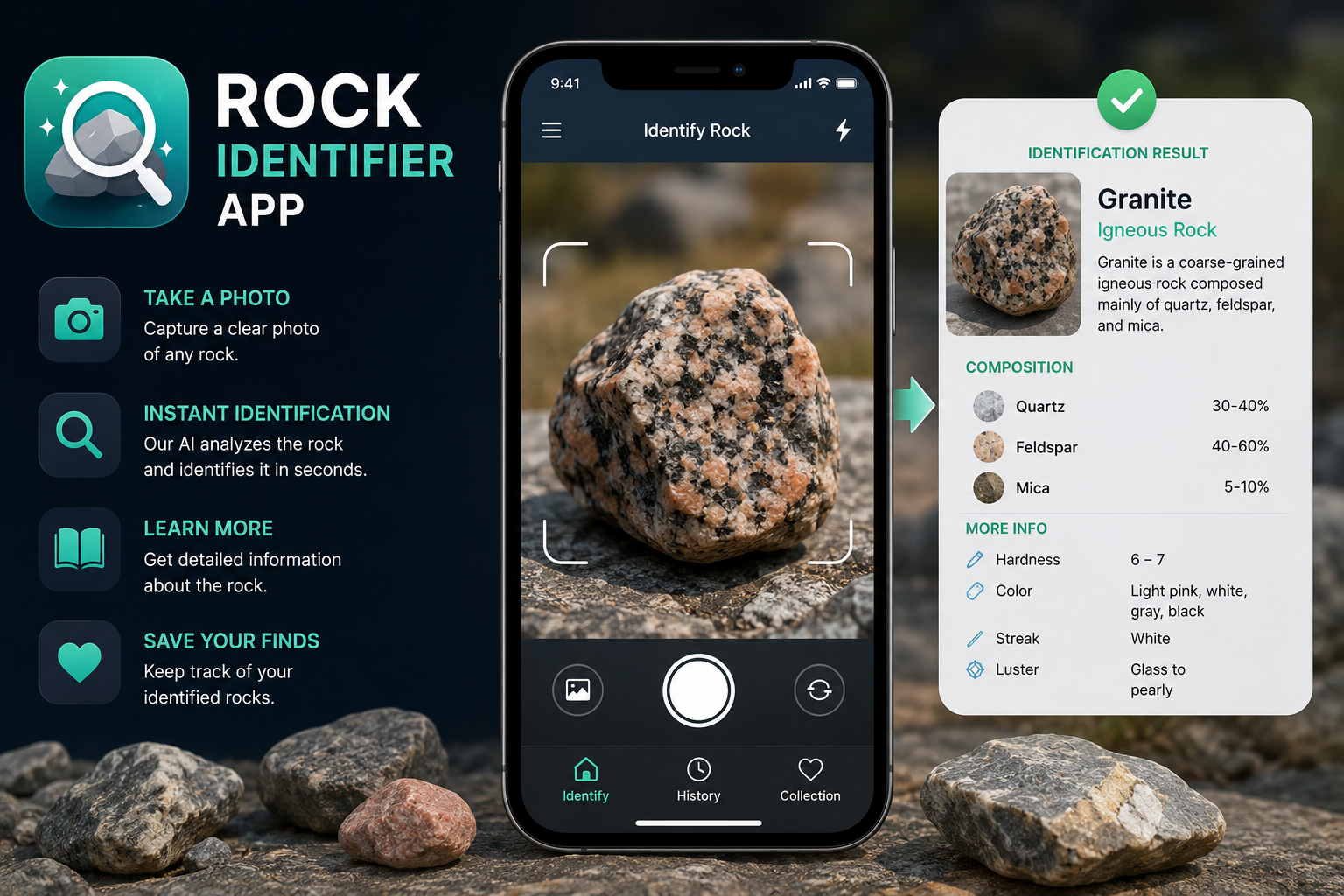
Introduction
Picture this: you are hiking through a nature trail and you notice an unusual stone half-buried in the path. It has a striking pattern, an unexpected color, or a surface that catches the light in a way that makes you stop and pick it up. You turn it over in your hand, genuinely curious about what it might be, but with no geology background to draw from. This is exactly the situation where a rock identifier app can be genuinely useful.
A rock identifier app is a mobile application that allows users to photograph a rock or mineral specimen and receive a possible identification along with supporting information. These apps have made basic rock and mineral identification more accessible to students, hikers, collectors, and curious beginners who might otherwise have no easy way to learn what they are looking at.
That said, these apps work from photographs, and photographs have real limitations when it comes to geological identification. This guide explains how rock identification apps work, what they can and cannot do, how to get the best results from them, and how to choose one that fits your needs.
Quick Answer: What Is a Rock Identifier App?
A rock identifier app is a mobile application that analyzes a photograph and, depending on the app, additional user-provided information to suggest what type of rock or mineral a specimen might be. The app compares visual characteristics against a database of rock and mineral information and returns one or more possible matches. Results should be treated as helpful starting points for learning rather than guaranteed scientific identifications.
What Is a Rock Identifier App?
A rock identifier app is a mobile application designed to help users determine what type of rock, mineral, crystal, or geological specimen they may have found. Unlike a general image search, which returns broad results from across the web, a rock identification app is focused specifically on geological specimens and typically provides structured information drawn from geology and mineralogy databases.
When a user submits a photograph, the app analyzes visible characteristics such as color, texture, grain structure, and surface patterns, then returns one or more possible identifications along with supporting information about that specimen type. Some apps also allow users to input additional details such as where the specimen was found, which can help narrow down the results.
These apps are particularly useful for beginners who want a starting point for understanding what they have found. A student, hiker, or casual collector who picks up an interesting stone now has a tool that can offer a reasonable first identification without needing a field guide or a geology degree.
It is worth understanding one important distinction before going further. Rocks and minerals are not the same thing, and a good rock identification app should help users understand the difference. A mineral is a naturally occurring, inorganic solid with a defined chemical composition and crystal structure. A rock is typically an aggregate of one or more minerals. Granite, for example, is a rock made up of minerals including quartz, feldspar, and mica. Some apps identify both rocks and minerals. Others focus on one or the other.
How Does a Rock Identifier App Work?
The general process of using a rock identifier app follows a recognizable sequence, though the technology and depth of analysis vary considerably between different applications.
First, the user opens the app on their smartphone or tablet. Most rock identification apps are available for both major mobile platforms, though availability varies by application.
Second, the user takes a new photograph directly within the app or uploads an existing photo from their device. The quality of this photograph has a significant effect on the usefulness of the result, which is why taking photos carefully matters.
Third, the app analyzes the visual characteristics visible in the photograph. This can include color, surface texture, visible grain size, crystal patterns, luster, and other features that can be observed from an image.
Fourth, the system compares those observed characteristics against the information available in its geological database or identification system. Different apps use different approaches to this comparison, and the depth and quality of their databases vary.
Fifth, the app returns one or more possible matches, often ranked by likelihood or presented with confidence indicators. Many apps present multiple possibilities rather than a single definitive answer, which reflects the genuine difficulty of identifying rocks from photographs alone.
Sixth, the user reviews the result and any supporting information the app provides, such as descriptions of the rock’s or mineral’s properties, formation, and common uses. The user can then decide whether the result seems plausible and whether further verification is needed.
It is important to understand that the exact technology behind these apps varies. Not every rock identification app uses the same methods, and the quality of results depends heavily on the sophistication of the underlying system and database. Apps built on well-curated geological databases with broad specimen coverage will generally return more useful results than those with limited reference material.
What Can a Rock Identifier App Identify?
The range of specimens that a rock identifier app can recognize depends on the specific application and the breadth of its database. Most rock identification apps focus on one or more of the following categories.
Common rocks such as granite, basalt, sandstone, limestone, slate, obsidian, and marble are among the most frequently covered specimen types. These are the rocks most people are likely to encounter in everyday environments.
Minerals including quartz, feldspar, calcite, mica, pyrite, hematite, and many others may be identifiable depending on the app. Mineral identification from photographs can be particularly challenging because many minerals share similar visual appearances.
Crystals such as amethyst, rose quartz, selenite, and fluorite are commonly sought by collectors and are included in many app databases.
Ores containing economically significant minerals may also appear in some databases, particularly apps aimed at more advanced users or collectors.
Gemstones in rough or polished form may be identifiable through some apps, though gemstone identification from photographs is subject to the same limitations as other visual identification.
Fossil-like specimens may be covered by some apps, though fossil identification is a distinct area of expertise and may fall outside the scope of apps focused purely on rock and mineral identification.
Geological formations and features visible in field photographs may be addressed by some apps, particularly those designed with outdoor exploration in mind.
It is important to note that not every app covers all of these categories. Before downloading a specific application, check its stated capabilities and focus areas. An app designed for mineral collectors may not be well suited for someone primarily interested in common field rocks, and vice versa.
Common Features of Rock Identifier Apps
While rock identification apps differ in design and depth, most share a recognizable set of features. Understanding what to look for helps users choose an app that matches their needs.
Photo-Based Identification
The central feature of virtually every rock identifier app is the ability to submit a photograph for analysis. Most apps allow users to take a new photo directly through the app’s camera interface or to upload a photo from their device’s existing gallery. Some apps ask users to select a relevant crop area or to photograph specific features of the specimen for a more targeted analysis.
Rock and Mineral Information
Beyond a name, most apps provide supporting information about the identified specimen. This can include descriptions of key characteristics, information about how the rock or mineral forms, where it is commonly found, and what it is used for. This educational content is often one of the most valuable parts of the app experience, particularly for beginners who want to learn rather than simply get an answer.
Identification History
Many apps include a feature that saves previous identification results so users can review what they have identified in the past. This is useful for building a personal record of specimens encountered over time, particularly for collectors or students working on a project.
Educational Information
Some apps go beyond identification results and include broader educational content about geology, mineralogy, and rock classification. This might include visual guides to common rock types, explanations of geological processes, or glossaries of technical terms explained in accessible language.
Search and Browse Features
A search or browse function allows users to explore the app’s database without submitting a photograph. This is useful for comparing a result with similar specimens, learning about rocks and minerals before going into the field, or simply satisfying curiosity about a particular rock type.
Location or Collection Features
Some apps allow users to tag identifications with location data, creating a geographic record of where specimens were found. Others include tools for organizing a personal collection digitally. These features vary widely between apps and are not universally available.
How Accurate Are Rock Identifier Apps?
Accuracy is one of the most important and most nuanced aspects of using a rock identifier app. Understanding the factors that affect accuracy helps set appropriate expectations and encourages users to approach results critically rather than accepting them uncritically.
Photo quality has a significant influence on results. A sharp, well-lit photograph of a clean specimen taken from an appropriate angle will generally produce more useful results than a blurry, shadowy image captured at an awkward distance. The app can only analyze what is visible in the photograph, so the quality of the image directly limits the quality of the analysis.
Lighting conditions affect how colors and surface textures appear in photographs. Poor or uneven lighting can make minerals appear duller or change the apparent color of a specimen, which may lead to less accurate matching.
Camera angle and field of view matter because some identifying features are only visible from specific perspectives. A rock that looks distinctive from one angle may look very different from another, and a single photograph rarely captures all the relevant visual information.
Surface visibility is another factor. A specimen covered in dirt, moss, or weathering may not reveal its true characteristics. Cleaning a specimen appropriately before photographing it can improve results, though care should be taken with fragile or valuable specimens.
Similar-looking specimens present one of the most fundamental challenges in visual rock identification. Many rocks and minerals share color ranges, surface textures, and general appearances that make them genuinely difficult to distinguish from a photograph alone. Pyrite and gold, for example, are visually similar enough to have famously fooled prospectors. Many light-colored minerals can be difficult to distinguish from each other visually.
A photograph also cannot reveal properties that are essential to reliable geological identification. Hardness, which is measured by testing whether one material scratches another, is one of the most useful identifying properties in mineralogy but is entirely invisible in a photograph. The same applies to streak, which is the color of a mineral’s powder, cleavage, which is how a mineral breaks, density, magnetic properties, and chemical composition. Laboratory methods such as X-ray diffraction can confirm mineral identity definitively, but these are entirely beyond what a smartphone photograph can provide.
The quality of the app’s identification system and database also matters considerably. An app backed by a well-curated and broad geological database will generally return more useful and better-calibrated results than one with limited reference material.
App results should always be treated as preliminary suggestions rather than confirmed identifications. They are a useful starting point for learning and further investigation, not a scientific conclusion.
How to Take a Better Photo for Rock Identification
The single most effective thing a user can do to improve rock identification results is to take a better photograph. The following practical steps can make a meaningful difference.
Clean the specimen first when appropriate. Loose dirt, dust, or mud on the surface can obscure important visual characteristics. A gentle rinse or soft brush can reveal texture and color more clearly. Avoid scrubbing fragile or delicate specimens, and take care not to damage anything potentially valuable.
Use good lighting. Natural daylight without direct harsh sunlight is often the most effective option. Diffuse light from an overcast sky or from an open doorway reveals surface texture and color without the harsh shadows that direct sunlight can create.
Avoid heavy shadows. Shadows falling across the specimen make portions of it invisible to analysis and can distort the apparent color and texture of other areas.
Capture multiple angles. Taking photographs from more than one angle gives a more complete visual picture of the specimen. A top view, a side view, and a close-up of any distinctive features together provide more information than a single shot.
Include a close-up shot. A close photograph that fills the frame with the specimen allows surface texture, crystal structure, grain size, and other fine details to be seen clearly. These details are often essential to identification.
Keep the specimen in focus. An out-of-focus photograph reveals very little useful information. If your device struggles to focus at close range, try increasing the distance slightly or tapping the specimen on your screen to direct the camera’s focus.
Use a simple, plain background. Photographing the specimen against a neutral background such as a white piece of paper or a plain surface prevents background patterns or colors from interfering with the image analysis.
Avoid excessive photo editing or filters. Image filters change color and contrast in ways that can affect how a rock’s appearance is interpreted. Submit photographs that are as close to the actual appearance of the specimen as possible.
Include relevant location information if the app allows it. Geology is highly regional. Knowing where a specimen was found can help narrow down possible identifications considerably, because certain rock and mineral types are associated with specific geological environments or regions. The U.S. Geological Survey provides detailed geological maps that can help contextualize where certain rock types are likely to be found.
Rock Identifier Apps for Students
Students at a wide range of levels, from primary school through to university, can find rock identification apps genuinely useful as learning tools when used thoughtfully.
In classroom settings, these apps can make geology lessons more interactive and hands-on. Rather than studying rock samples purely from textbook photographs, students can bring in specimens from their own environment and use an app to begin their investigation. This kind of active learning can make abstract geological concepts feel more concrete and relevant.
For field observations, a rock identification app gives students a portable reference tool that can support note-taking and observation recording during outdoor fieldwork. Students can photograph specimens where they find them, record location information, and review the app’s information alongside their own observations.
For geology assignments, apps can serve as a useful starting point for research. A student who receives an initial identification suggestion from an app then has a specific rock or mineral type to investigate further using textbooks, library resources, or geology databases.
For nature studies and broader earth science learning, these apps help students develop an eye for geological features in their everyday environment. Noticing the different types of stone used in buildings, walls, and pavements, or recognizing the rock types exposed in road cuttings, becomes more meaningful when students have a tool to help them investigate.
One important note for students and educators: app results should be treated as a starting point for investigation, not an answer to copy. Part of the educational value is in comparing the app’s suggestion with other sources, testing the identification against known properties, and developing critical thinking about how we know what rocks and minerals are.
Rock Identifier Apps for Rock Collectors
Rock and mineral collecting is a long-established hobby enjoyed by people of all ages. For collectors, a rock identifier app can serve several practical purposes.
When a collector acquires an unfamiliar specimen, whether found in the field, purchased at a mineral fair, or received as part of a trade, an identification app offers a quick first assessment to guide further research. Even if the result is only a probable match, it gives the collector a starting point for more detailed investigation.
Apps that include collection features allow users to build a digital catalog of their specimens, recording photographs, identification results, and location information in one place. This can make organizing a growing collection significantly easier than relying on handwritten labels and physical record-keeping alone.
For collectors who enjoy comparing similar specimens, the browse and search features in many apps can help identify the visual characteristics that distinguish one specimen type from another. This kind of active comparison builds genuine knowledge over time.
Serious collectors who encounter a specimen that may be significant, rare, or valuable should not rely on an app result alone. Additional identification methods, including physical tests of hardness and streak, examination under magnification, and in some cases consultation with a knowledgeable geologist or mineralogist, are appropriate for important specimens. Reputable mineralogical societies and geology clubs can often provide access to expert knowledge and identification resources.
Rock Identifier Apps for Hiking and Outdoor Exploration
Geology is visible everywhere in the natural landscape, from the bedrock exposed by rivers and road cuts to the boulders deposited by glaciers and the sand on beaches. A rock identification app can transform a hike from a purely recreational activity into an opportunity to learn about the geological history of the landscape around you.
When a hiker encounters an interesting specimen on a trail, an identification app can provide immediate context about what type of rock it is, how it may have formed, and what it tells us about the local geological environment. This kind of connection between observation and understanding is one of the most rewarding aspects of developing geological awareness.
Apps designed with outdoor exploration in mind may include features for recording observations with location data, creating a geographic log of interesting geological finds across multiple outings.
One important consideration for outdoor enthusiasts: many natural areas, national parks, and protected lands prohibit the collection of rocks, minerals, fossils, and other natural materials. Regulations vary by location and land management agency. The National Park Service, for example, has specific rules about collecting natural objects. Using a rock identifier app to photograph and learn about specimens you encounter, rather than removing them, is both legally and ethically appropriate in protected areas. Always check the regulations for any specific location before collecting.
Rock Identifier App vs Professional Identification
Understanding when an app result is sufficient and when professional identification is more appropriate is an important part of using these tools responsibly.
| Factor | Rock Identifier App | Professional Identification |
|---|---|---|
| Main input | Photographs and user-provided information | Physical specimen and detailed testing |
| Speed | Usually quick | Can take longer depending on method |
| Convenience | High, available anywhere with a smartphone | Depends on access to expertise or facilities |
| Cost | Varies, many offer free basic features | Varies by service or institution |
| Accuracy | Can vary based on photo quality and specimen | Generally more reliable when appropriate methods are used |
| Physical testing | Not possible from a photograph | May include hardness, streak, density, chemical testing |
| Laboratory methods | Not available | May include X-ray diffraction and other analytical methods |
| Best use case | Preliminary identification and educational learning | Confirming difficult, uncertain, or important specimens |
An app result is appropriate as a starting point for casual learning, field observation, educational projects, and initial investigation of common specimens. Professional identification becomes more appropriate when an accurate identification genuinely matters, such as when a specimen may have significant monetary value, when the identification has scientific relevance, or when an app result conflicts with other observations and cannot be resolved through further self-guided investigation.
Geology departments at universities, natural history museums, geological surveys, and professional mineralogical societies are potential resources for expert identification assistance.
Limitations of Rock Identifier Apps
A balanced understanding of these apps includes being clear about what they cannot do.
Visually similar specimens present a persistent challenge. Many rocks and minerals share color ranges and surface textures that are genuinely difficult to distinguish from a photograph, regardless of how sophisticated the identification system is.
Poor-quality photographs limit what any identification system can do with the image. Blurry, dark, or poorly framed photographs provide insufficient visual information for reliable analysis.
Limited visual information is inherent to photograph-based identification. A two-dimensional image of a specimen’s surface cannot convey hardness, streak, cleavage angle, density, magnetism, or chemical composition, all of which are properties routinely used in systematic geological identification.
Incorrect suggestions are possible with any automated identification system. An app may suggest a plausible-looking match that is in fact incorrect. Users should treat results critically rather than accepting them without question.
Incomplete databases mean that unusual, rare, or regionally specific specimens may not be present in an app’s reference material, leading to incorrect matches with the nearest visual approximation in the database.
App-specific limitations vary between applications. Some apps have stronger databases for common minerals than for rocks. Others may work better for crystalline specimens than for sedimentary rocks with subtler visual features.
Dependence on available geological information means that the usefulness of a result is partly determined by how well a specimen type is represented in published geological literature and in the app’s knowledge base.
Privacy and Safety Considerations
Before downloading and using any mobile application, including rock identification apps, it is worth understanding what data the app requests access to and how that information is handled.
Camera permissions are necessary for any app that uses photo-based identification. Granting camera access is standard for this type of application, but it is worth understanding that camera permission only grants access when the app is actively in use, not continuously.
Location permissions may be requested by apps that include features for tagging where specimens were found. Consider whether you are comfortable sharing location data and whether the app clearly explains how that data is stored and used. Location data can be sensitive, particularly if it reveals specific sites where you regularly collect specimens.
Account requirements vary by app. Some require users to create an account to access features or save identification history. Consider what personal information is required during account creation and how it is protected.
Data collection and photo storage policies differ between apps. Some apps may retain submitted photographs to improve their identification systems. Others process images without retaining them. These practices should be described in the app’s privacy policy.
Third-party sharing of data collected by the app may occur in some cases. Privacy policies should disclose whether data is shared with third parties and under what circumstances.
The practical advice is straightforward: read the privacy policy of any app before using it, particularly before submitting location-sensitive information or photographs. Privacy policies are typically accessible from the app’s listing in the relevant app store or from the developer’s website. Understanding what you are agreeing to before you begin is a sensible habit for any mobile application, not just rock identification tools.
Understanding broader concepts around mobile app data practices is useful context here. The TechOriginHub guide to what is cybersecurity covers important principles around digital privacy and data security that apply to mobile app use generally.
How to Choose the Best Rock Identifier App
There is no single rock identifier app that is the right choice for every user. The best option depends on what you want to identify, how you plan to use the app, and what features matter most to you. The following factors provide a practical framework for comparison.
Identification Features
Start by confirming that the app covers the type of specimens you are most interested in. Some apps focus primarily on minerals, others on rocks and minerals together, and others may include crystals, gemstones, or fossils. Checking the app’s stated scope before downloading saves time.
Database and Educational Content
An identification result is more useful when it is accompanied by informative supporting content. Look for apps that provide clear descriptions of specimen characteristics, formation information, and relevant geological context rather than simply returning a name.
Ease of Use
An app that is difficult to navigate reduces the value of its identification capabilities. Consider whether the interface is intuitive enough for the way you plan to use it, particularly if you are a beginner or will be using the app in the field rather than at a desk.
Photo Recognition
Consider how the app handles uncertain results. Apps that return multiple possible matches with supporting reasoning are often more honest and useful than those that always return a single confident answer, because genuine uncertainty is a normal part of visual rock identification.
History and Collections
If you want to build a record of your identifications over time, check whether the app stores previous results and whether that history is accessible without an internet connection.
Offline Functionality
Some rock identification apps require an active internet connection to process photographs and return results. If you plan to use the app in areas with limited connectivity, such as remote hiking trails, check whether any core features work offline. Cloud-based apps that require a connection to function will be unavailable without one. Understanding how cloud-based software depends on connectivity is covered in the TechOriginHub guide to what is cloud computing.
Privacy
Review what permissions the app requests and how it handles the data it collects. Check the privacy policy before creating an account or submitting photographs.
Cost
Many rock identification apps offer a free tier with basic features and optional paid upgrades for more advanced capabilities, expanded databases, or an advertisement-free experience. Compare what is available at no cost against what requires a subscription or one-time purchase, and consider whether the paid features justify the expense for your intended use.
Platform Support
Confirm that the app is available for your device’s operating system. Apps may be available for Android, iPhone, or both, but availability and feature parity between platforms can vary.
Tips for Verifying a Rock Identifier App’s Result
When an app returns an identification result, there are practical steps you can take to assess whether that result is plausible before accepting it.
Check the color. Does the color of your specimen match the typical color range described for that rock or mineral type? Be aware that color alone is rarely a definitive identifier, as many minerals occur in multiple color varieties.
Examine the texture. Is the surface texture consistent with the identification? A result that describes a glassy volcanic rock should match a specimen with a smooth, non-crystalline surface.
Assess the grain size. Coarse-grained rocks with visible individual crystals are formed differently from fine-grained rocks where individual grains are too small to see with the naked eye. This distinction can quickly rule out certain identification suggestions.
Test the hardness if appropriate. The Mohs hardness scale is a standard reference used in mineralogy. Testing whether your specimen scratches glass, or whether a copper coin scratches the specimen, can confirm or rule out suggestions quickly. The U.S. Geological Survey provides accessible explanations of common mineral properties including hardness.
Observe the luster. Is the surface metallic, glassy, waxy, dull, or pearly? Luster is a useful distinguishing property that is partly visible in photographs but easier to assess from the physical specimen.
Look for cleavage or fracture. Minerals that cleave break along flat planes, while those that fracture break in irregular patterns. This property is visible on broken surfaces of a specimen.
Check the streak if possible. Rubbing a specimen across unglazed porcelain or a streak plate leaves a powder trail whose color can differ significantly from the specimen’s surface color and is useful for distinguishing similar-looking minerals.
Consider the geological location. Different rock and mineral types are associated with different geological environments and regions. A result that describes a mineral typically found in hydrothermal veins may be less plausible for a specimen collected from a beach than for one found near a volcanic area.
Compare with reliable references. Cross-referencing an app result with a reputable field guide, a university geology resource, or a geological survey publication provides an additional layer of verification. The U.S. Geological Survey’s educational resources are freely accessible online and cover a wide range of common rocks and minerals.
Not every test is appropriate for every specimen. Avoid damaging potentially valuable specimens through unnecessary testing, and exercise caution when handling any specimen that may be fragile, potentially hazardous (some minerals contain toxic elements), or of unknown origin.
Frequently Asked Questions
What is a rock identifier app?
A rock identifier app is a mobile application that analyzes a photograph and, depending on the app, additional user-provided information to suggest what type of rock or mineral a specimen may be. Results are identification suggestions based on visual characteristics and should be treated as a starting point rather than a definitive geological identification.
Can my phone identify a rock?
A smartphone itself cannot identify rocks. However, a rock identifier app installed on a smartphone can analyze a photograph of a specimen and return possible identification suggestions based on visible characteristics. The accuracy of those suggestions depends on photo quality, the similarity between the specimen and reference material in the app’s database, and the properties that can be determined from a photograph.
Are rock identifier apps accurate?
Accuracy varies depending on the specific app, the quality of the submitted photograph, the distinctiveness of the specimen, and whether the specimen is visually similar to other rock or mineral types. Some common and visually distinctive specimens may be identified reliably, while others that share characteristics with multiple rock types may produce uncertain or incorrect results. App results should always be treated as preliminary.
What is the best rock identifier app?
There is no universally best rock identifier app. The right choice depends on what types of specimens you want to identify, how you plan to use the app, whether you need offline functionality, your privacy preferences, and your budget. Comparing apps based on these factors is more useful than relying on a single ranked recommendation.
Can a rock identifier app identify minerals?
Many rock identification apps also cover mineral identification, but the extent of mineral coverage varies by application. Mineral identification from photographs is subject to the same limitations as rock identification, and visually similar minerals can be particularly difficult to distinguish from images alone.
Can I identify a rock from a photo?
A photograph can reveal some useful visual characteristics, including color, texture, grain size, luster, and surface features. These characteristics can support a probable identification for many common specimens. However, a photograph cannot reveal hardness, streak, cleavage, density, or chemical composition, which means that visual identification from a photograph is inherently limited, particularly for specimens that look similar to multiple rock or mineral types.
How do I take a good photo for rock identification?
Use good natural lighting without harsh shadows. Clean loose dirt from the specimen first. Photograph against a plain, neutral background. Take multiple shots from different angles and include a close-up of distinctive features. Keep the specimen in sharp focus and avoid editing the photograph with filters or heavy adjustments before submitting it.
Can rock identifier apps identify gemstones?
Some apps include gemstones in their databases, though gemstone identification from photographs is subject to the same limitations as other visual identification. Color, transparency, and luster can suggest possibilities, but precise gemstone identification, particularly when the value of a stone matters, generally requires physical examination and potentially laboratory testing.
Can a rock identifier app replace a geologist?
No. A geologist brings training, experience, and the ability to conduct physical tests and observations that go far beyond what a photograph can reveal. A rock identifier app is a useful educational and preliminary tool but is not a substitute for professional geological expertise when accurate identification genuinely matters.
Are rock identifier apps free?
Many rock identification apps offer a free version with basic features. Some include optional paid upgrades for expanded databases, advanced features, or an advertisement-free experience. Pricing structures vary between apps and can change over time. Check the current listing in your device’s app store for up-to-date pricing information.
Conclusion
A rock identifier app is a genuinely useful tool for students, collectors, hikers, and anyone who wants to learn more about the geological world around them. By analyzing photographs of specimens and returning identification suggestions alongside supporting educational information, these apps bring basic rock and mineral identification within reach of people who have no formal geology background.
Understanding how image-based identification works, and where its limits lie, is important for getting the most from these tools. A photograph can reveal color, texture, grain structure, and surface features, but it cannot convey hardness, streak, cleavage, density, or chemical composition. These invisible properties often separate visually similar specimens, which is why app results are best treated as informed suggestions rather than confirmed identifications.
Photo quality has a direct and significant effect on the usefulness of any result. Taking clean, well-lit, sharply focused photographs from multiple angles, against a plain background, gives the app the best possible visual information to work from.
For students, these apps provide an accessible entry point into geology and earth science. For collectors, they support initial investigation of unfamiliar specimens and help build digital records of a collection. For hikers and outdoor enthusiasts, they add an educational dimension to time spent in natural environments.
When an important identification is needed, whether for a potentially valuable specimen, a scientific purpose, or a result that conflicts with other observations, additional verification through physical testing, reliable reference materials, or professional consultation is the appropriate next step.
The right rock identifier app depends on your specific needs, the types of specimens you encounter, the devices you use, and the features that matter most to your workflow. Use these apps as the educational tools they are designed to be, verify uncertain results through reliable geological resources, and let curiosity about the rocks around you lead you toward a broader understanding of the Earth’s geological story.
References
- U.S. Geological Survey (USGS). Minerals, Rocks, and Gemstones. Retrieved from https://www.usgs.gov/
- U.S. Geological Survey (USGS). Mohs Hardness Scale and Mineral Properties. Retrieved from https://www.usgs.gov/
- National Park Service. Collecting Rocks, Minerals, and Fossils on Public Lands. Retrieved from https://www.nps.gov/
- Mineralogical Society of America. Mineral and Rock Identification Resources. Retrieved from https://www.minsocam.org/
- Smithsonian National Museum of Natural History. Rock and Mineral Collections and Educational Resources. Retrieved from https://naturalhistory.si.edu/
- University of California Museum of Paleontology. Understanding Rocks and Minerals. Retrieved from https://ucmp.berkeley.edu/
- British Geological Survey. Rocks and Minerals. Retrieved from https://www.bgs.ac.uk/
- Google. Google Play App Store Policy and App Permissions Documentation. Retrieved from https://play.google.com/
- Apple. App Store Privacy and Permissions Guidelines. Retrieved from https://www.apple.com/app-store/
- NIST. Digital Security and Privacy Resources. Retrieved from https://www.nist.gov/
Technology and Geology Disclaimer
This article is for educational and informational purposes. Rock and mineral identification can be difficult from photographs alone. App-generated identifications should be treated as preliminary suggestions and may require additional observation, testing, or expert confirmation. App features, pricing, and availability can change. Always check current official app information before downloading or purchasing.
 Saad Qureshi