
 By Saad Qureshi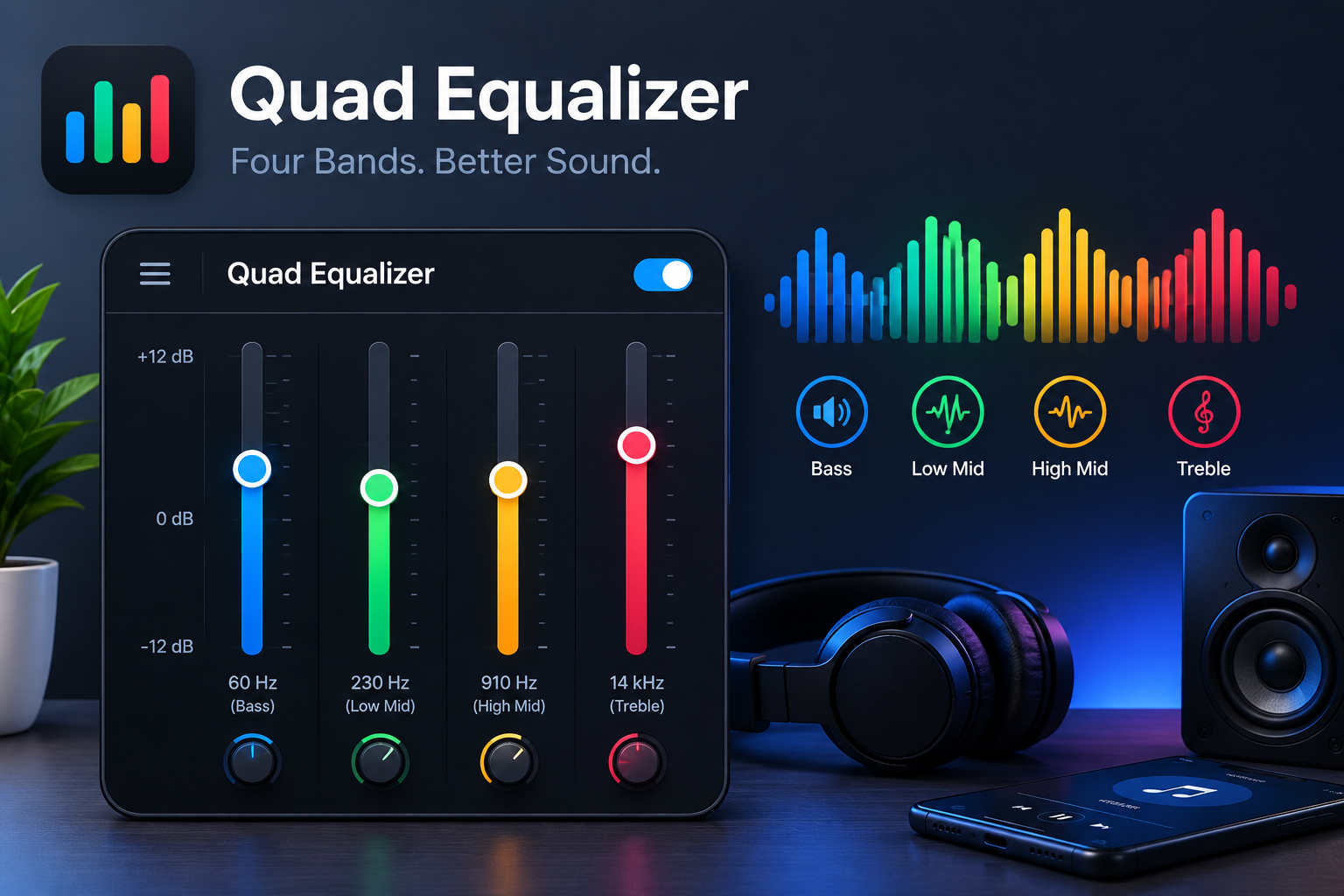
A quad equalizer is a sound control with four adjustable bands. Each band raises or lowers one part of the sound, from deep bass to crisp treble. It gives you more control than simple bass and treble knobs, but it stays much easier to use than a 10-band or 31-band equalizer.
You have probably used one without knowing its name. Many music apps, car stereos, soundbars and mixers offer a four-band setup. This guide explains what a quad equalizer is, how it works, what each band does, and how to set it up so your music, calls and videos sound clearer.
Quick Answer
A quad equalizer (also called a 4-band EQ) splits audio into four frequency zones: low, low-mid, high-mid and high. You move a slider or knob for each zone to boost it (make it louder) or cut it (make it quieter). In professional audio gear, “quad” can also mean a unit that equalizes four separate audio channels at once.
Key Takeaways
- A quad equalizer controls four frequency bands, usually bass, low-mids, high-mids and treble.
- It works like four separate volume knobs, each tied to one part of the sound.
- Small changes of 2 to 4 dB usually sound better than big boosts.
- Cutting a problem band often works better than boosting everything else.
- An equalizer shapes sound, but it cannot fix a broken speaker or a low-quality file.
Quick Info
| Item | Details |
|---|---|
| Other names | 4-band EQ, four-band equalizer |
| Number of bands | 4 (low, low-mid, high-mid, high) |
| Range it covers | Roughly 20 Hz to 20,000 Hz, the range of human hearing |
| Common types | Graphic (fixed bands) and parametric (adjustable bands) |
| Where you find it | Music apps, car stereos, mixers, soundbars, audio software |
| Best for | Beginners who want quick, clear sound control |
What Is a Quad Equalizer?
A quad equalizer is an audio tool that divides sound into four frequency bands and lets you adjust each one on its own. “Quad” simply means four. “Equalizer” comes from the word equalization, often shortened to EQ.
Equalization means adjusting the volume of different frequency ranges inside an audio signal. Audio engineers often describe equalizers as frequency-specific volume knobs. Instead of making the whole song louder, you make only the bass louder, or only the vocals clearer.
The idea is older than most people think. Equalization was first used to correct sound loss on telephone lines, before electronic amplifiers existed. Engineers added filters that balanced the signal so every frequency came through at an equal level. That is where the name “equalizer” comes from. Today the word covers any tool that reshapes sound, whether to fix a problem or simply to match your taste.
Two meanings of “quad equalizer”
The term can point to two different things, so it helps to know which one you are dealing with.
| Meaning | What it does | Where you see it |
|---|---|---|
| Four-band equalizer | Splits one audio signal into four adjustable frequency zones | Music apps, phones, car stereos, soundbars, plugins |
| Four-channel equalizer | Applies separate EQ to four different audio signals at once | Live sound mixers, PA systems, studio rack gear |
Most everyday users mean the first one. If you see “quad EQ” in an Android music app or a car head unit, it is almost always a four-band equalizer. In electronics design, chip makers also use the term for parts that correct signal loss on four high-speed data lanes, but that has nothing to do with music listening.
Where a quad equalizer sits among other EQs
A basic stereo often has only two controls: bass and treble. A professional live-sound equalizer can have 25 to 31 bands. Car audio equalizers usually fall in between, with about five to ten bands. A quad equalizer sits in the friendly middle. It gives you a real midrange control, which bass and treble knobs lack, without turning sound tuning into a technical job.
If you use equalizer apps on your phone, it also helps to understand what an Android app is and how apps work with your system’s audio.
How Does a Quad Equalizer Work?
A quad equalizer works by sending your audio through four filters, each tuned to one part of the sound spectrum. You set how much each filter boosts or cuts its range. The four results blend back together into the sound you hear.
The sound spectrum in simple words
Humans can hear sounds from about 20 Hz (very deep rumble) up to about 20,000 Hz, or 20 kHz (very high sparkle). Hz, or hertz, measures how many times a sound wave vibrates each second. Low numbers are deep sounds. High numbers are sharp, bright sounds.
A quad equalizer cuts this wide range into four easy zones. The exact frequencies change from one device to another, but most follow a pattern close to this:
| Band | Typical range | What you hear | Too much sounds | Too little sounds |
|---|---|---|---|---|
| Low (bass) | About 20 to 250 Hz | Kick drums, bass guitar, movie explosions | Boomy, muddy | Thin, weak |
| Low-mid | About 250 Hz to 2 kHz | Body of voices, guitars, pianos | Boxy, hollow | Cold, empty |
| High-mid | About 2 kHz to 6 kHz | Vocal clarity, speech, attack of instruments | Harsh, tiring | Dull, distant |
| High (treble) | About 6 kHz to 20 kHz | Cymbals, air, detail, sparkle | Sharp, hissy | Muffled, dark |
These ranges are typical guides, not fixed rules. Always check the numbers printed under each slider in your app or device.
Boost and cut
Each band has a control measured in decibels (dB). Moving it up boosts that range. Moving it down cuts it. The middle point, 0 dB, means no change. Many apps allow about plus or minus 12 dB per band, though the limit depends on the product.
A small change goes a long way. A boost of 3 dB is already easy to hear. That is why sound engineers usually suggest gentle moves instead of pushing every slider to the top.
Graphic vs parametric quad EQ
Quad equalizers come in two main styles:
- Graphic quad EQ: Each band has a fixed center frequency and a fixed width. You only move the level up or down. The slider positions look like a little graph of your sound, which is where the name comes from. Most phone and car equalizers work this way.
- Parametric quad EQ: You control three things per band: the level, the center frequency, and the width (called Q). A higher Q affects a narrow slice of sound. A lower Q affects a wide area. This style is common on mixers and in music production software.
Some designs also use shelving filters on the lowest and highest bands. A low shelf raises or lowers everything below a set point, like a bass knob. A high shelf does the same for everything above a set point, like a treble knob.
A short history
The first true graphic equalizer, the Cinema Engineering type 7080, appeared in the 1950s with six bands. Daniel Flickinger introduced the first parametric equalizer in early 1971, and George Massenburg used the term “parametric equalization” in a paper at an Audio Engineering Society convention in 1972. In the late 1990s and 2000s, equalizers moved into software through digital signal processing (DSP). That shift is why your phone can run an equalizer today.
Key Features of a Quad Equalizer
The main feature of a quad equalizer is balance: enough control to fix real sound problems, without so many sliders that you get lost. Here are the features you will see most often.
1. Four independent bands. Each band works on its own. You can cut harsh high-mids without touching the bass. This is the core of every quad EQ.
2. A real midrange control. Simple tone controls only have bass and treble. A quad equalizer splits the middle into low-mid and high-mid. The midrange is where voices live, so this split makes a big difference for podcasts, calls and movies.
3. Boost and cut in decibels. Each slider shows its change in dB. This makes your settings easy to repeat later or share with someone else.
4. Presets. Most apps and devices include ready-made settings such as Rock, Pop, Bass Booster, Vocal or Classical. Presets are a fast starting point. Apple’s Music app, for example, lets you choose an EQ setting from a list of presets.
5. Custom profiles. Many equalizers let you save your own settings. You might keep one profile for headphones and another for your car.
6. Adjustable frequency and Q (parametric models). On parametric quad EQs, you can move each band’s center point and decide how wide or narrow it is. This helps you remove one specific annoying sound.
7. Bypass or on/off switch. A bypass button turns the EQ off so you can compare. This is one of the most useful features, because it shows whether your changes really help.
8. Extra effects. Phone and app equalizers often add bass boost, virtualizer (3D sound), volume leveling or a preamp control. These are not part of the four bands, but they usually sit on the same screen.
9. Low resource use. A software equalizer uses very little processing power. Still, if you run an EQ app all day, it stays active in the background. Knowing what RAM in a smartphone does helps you understand why background apps can affect speed on older phones.
Uses of a Quad Equalizer
A quad equalizer is used to fix uneven sound and to shape audio to your taste. Below are the most common real-world uses, with simple starting settings.
Common uses
- Music listening: Add a little warmth to thin earbuds, or calm down harsh treble on cheap speakers.
- Podcasts and audiobooks: Lift the high-mids so voices are easier to understand.
- Movies and TV: Boost dialogue so you do not need to raise and lower the volume all the time.
- Gaming: Lift high-mids and treble to hear footsteps and small sound cues more clearly.
- Car audio: Correct the boomy bass that small car cabins often create.
- Live sound: Engineers cut a narrow band to stop feedback, the loud howl you hear when a microphone picks up its own speaker.
- Recording and mixing: Producers cut low rumble from vocals or reduce clashing frequencies so instruments fit together.
- Room correction: Every room changes how a speaker sounds. An equalizer can tame a bass peak caused by your walls.
Starting settings by situation
Use these as gentle starting points. Then adjust by ear.
| Situation | Low | Low-mid | High-mid | High |
|---|---|---|---|---|
| Flat (no change) | 0 dB | 0 dB | 0 dB | 0 dB |
| More bass for music | +3 dB | 0 dB | 0 dB | +1 dB |
| Clear voices (podcasts, calls) | -2 dB | 0 dB | +3 dB | +1 dB |
| Movie dialogue | -1 dB | +1 dB | +3 dB | 0 dB |
| Gaming footsteps | -2 dB | 0 dB | +3 dB | +2 dB |
| Harsh, tiring speakers | 0 dB | 0 dB | -3 dB | -2 dB |
| Muddy, boomy sound | -3 dB | -2 dB | 0 dB | +1 dB |
These values are suggestions based on how each band affects sound, not fixed standards. Your headphones, speakers and ears will decide the final setting.
What a quad equalizer cannot do
An equalizer only reshapes frequencies that are already in the audio. It cannot add detail that a low-quality file never had. It cannot repair a torn speaker or remove background noise completely. It also cannot separate a singer’s voice from the music. If your phone speaker sounds crackly or broken, the problem is likely hardware, and EQ will not fix it.
How to Set Up a Quad Equalizer
The best way to set up a quad equalizer is to start flat, change one band at a time, and compare with the EQ turned off. Here is a simple method that works on any device.
Step-by-step method
- Reset to flat. Set all four bands to 0 dB so you start from the original sound.
- Play a song you know well. Familiar music makes it easier to hear what changed.
- Listen for one problem. Ask yourself: is it too boomy, too thin, too harsh or too dull?
- Adjust one band. Move only the band linked to that problem, 2 to 3 dB at a time.
- Try cutting first. If vocals feel buried, try lowering the bass before raising the high-mids.
- Compare with bypass. Turn the EQ off and on. Keep the change only if it truly sounds better.
- Lower overall volume if needed. Big boosts can cause distortion, so turn the volume down a little after boosting.
- Save your profile. Give it a clear name, like “Earbuds” or “Car.”
On iPhone
The built-in Music app on iPhone has an EQ menu with presets. According to Apple Support, you open the Settings app, tap Apps, then tap Music, and choose EQ. The same screen has Sound Check, which evens out volume between songs. This EQ uses presets rather than four free sliders, and it applies to the Music app.
On Android
Many Android phones include a sound or equalizer screen under Settings, often named Sound quality and effects, Audio effects or Sound settings. The exact path depends on your phone brand. Some music players, such as Spotify, also have their own equalizer inside the app settings. If your phone has no built-in option, you can install an equalizer app from the Google Play Store.
Before you install one, check what it asks for. Some equalizer apps request access to audio, notifications or overlay features. Read up on what an app permission is so you only grant what the app truly needs.
Common mistakes to avoid
- Boosting every band. This just makes everything louder and can cause distortion.
- Maxing out the bass. Extra bass can drown out vocals and strain small speakers.
- Judging by loudness. Louder often sounds “better” at first. Match volume when you compare.
- Using one setting for everything. Headphones, speakers and cars all need different settings.
- Listening too loud for too long. Boosted treble at high volume can tire your ears and may harm hearing over time.
Quad Equalizer vs Other Equalizers
A quad equalizer is the best fit for most everyday listeners, while larger equalizers suit studios and live venues. This table shows how it compares.
| Type | Bands | Control level | Ease of use | Best for |
|---|---|---|---|---|
| Bass and treble tone control | 2 | Very basic | Very easy | Simple stereos, quick tweaks |
| 3-band EQ | 3 | Basic | Easy | Small mixers, guitar amps |
| Quad (4-band) EQ | 4 | Moderate | Easy | Phones, cars, beginners, podcasts |
| 5 to 10-band graphic EQ | 5 to 10 | Detailed | Medium | Car audio, music apps, home audio |
| 31-band graphic EQ | 31 | Very detailed | Hard | Live sound, room tuning |
| Parametric EQ | Varies | Most precise | Hard | Recording studios, mixing |
If you just want better sound from your phone or car, four bands are usually enough. If you are mixing music or tuning a concert hall, you will want a parametric or 31-band equalizer.
Frequently Asked Questions
What is a quad equalizer in simple words?
It is a sound control with four sliders or knobs. Each one makes a different part of the sound louder or quieter, from bass to treble.
Is a quad equalizer the same as a 4-band EQ?
In most cases, yes. In professional gear, “quad EQ” can also mean one unit that equalizes four separate audio channels.
What are the four bands on a quad equalizer?
Usually low (bass), low-mid, high-mid and high (treble). The exact frequency of each band depends on the device.
Does a quad equalizer improve sound quality?
It can make sound clearer and more balanced on your speakers or headphones. It does not add new detail to a low-quality audio file.
What is the best quad equalizer setting?
There is no single best setting. Start flat, make small changes of 2 to 3 dB, and compare with the EQ turned off.
Can a quad equalizer damage my speakers?
Heavy bass boosts at high volume can push small speakers too hard and cause distortion. Keep boosts small and lower the volume if you hear crackling.
Does the iPhone have an equalizer?
Yes. The Music app has EQ presets under Settings, then Apps, then Music, then EQ.
Conclusion
A quad equalizer gives you four simple controls over bass, low-mids, high-mids and treble. That is enough to fix most everyday sound problems, from muddy bass to unclear voices. Start flat, change one band at a time, prefer small cuts over big boosts, and always compare your result with the EQ off. Used this way, a quad equalizer can make your music, calls and videos sound noticeably better without buying new gear.
References
- Equalization (audio) — Wikipedia
- Adjust the sound quality in Music on iPhone — Apple Support
Disclaimer
This article is for general information only. Equalizer names, band frequencies and menu paths differ between devices, apps and software versions, so check your own device’s settings or manual. The suggested EQ values are starting points, not official standards. Listening at high volume for long periods can damage your hearing. TechOriginHub is not responsible for any damage caused by changes to your device or audio settings.