
 By saman zahra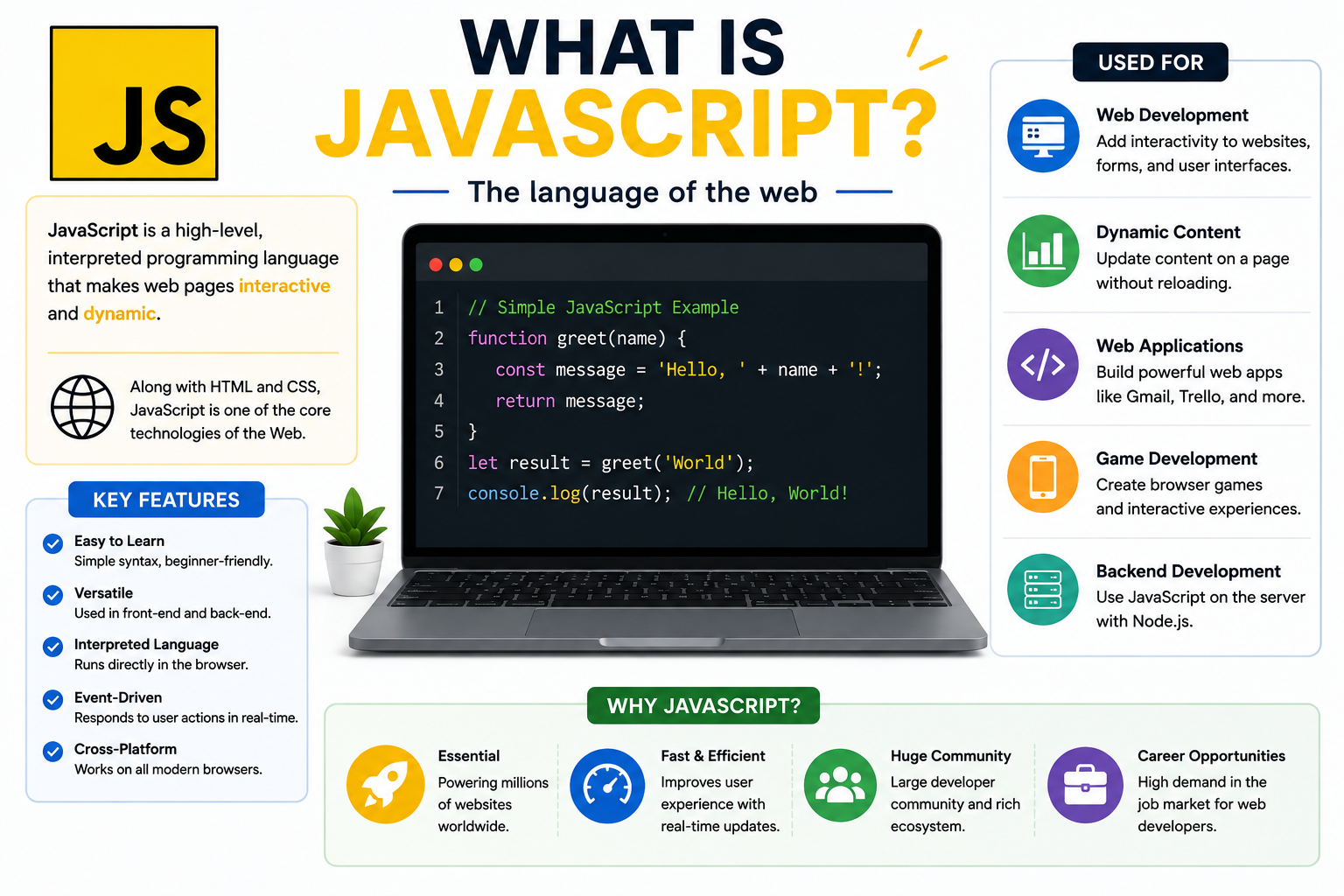
Introduction
If you have ever clicked a button on a website and watched something change instantly, filled out a form that told you an error before you submitted it, or used a live search bar that updated results as you typed, you have already seen JavaScript in action. JavaScript is the programming language that makes web pages interactive, responsive, and dynamic.
So what is JavaScript, exactly? JavaScript is a high-level programming language widely used to add interactivity, dynamic behavior, and application logic to websites and web applications. It runs in web browsers, on servers, and across a growing range of platforms and tools. Understanding what JavaScript is and how it works is one of the most useful things anyone interested in web development can do.
This guide explains JavaScript from the ground up, covering how it works, what it is used for, how it compares to other technologies, and how beginners can start learning it.
What Is JavaScript?
JavaScript is a high-level, interpreted programming language originally designed to run in web browsers and add interactive behavior to web pages. Today it is also widely used outside browsers through environments like Node.js, which allow JavaScript to run on servers, in command-line tools, and in many other contexts.
JavaScript is one of the three core technologies of the web, alongside HTML and CSS. While HTML defines the structure of a web page and CSS controls its visual appearance, JavaScript controls behavior, interactivity, and dynamic changes to content. A modern web application without JavaScript would be static and unresponsive.
JavaScript is standardized through a specification called ECMAScript, maintained by Ecma International. Modern JavaScript follows the ECMAScript standard and has evolved significantly since its early days. It now supports object-oriented programming, functional programming, asynchronous workflows, and module-based code organization, making it a genuinely general-purpose language rather than simply a tool for small browser scripts.
It is important to understand that JavaScript and Java are entirely different languages. They share part of a name for historical marketing reasons, but they have different syntax, different design goals, different runtime environments, and different communities. Confusing the two is one of the most common misconceptions among beginners.
How Does JavaScript Work?
Understanding how JavaScript works helps clarify why it behaves the way it does and why certain concepts in the language exist.
JavaScript Source Code and the JavaScript Engine
When you write JavaScript, you write source code in plain text files with a .js extension. That source code is processed by a JavaScript engine, which is a program that reads, compiles, optimizes, and executes JavaScript instructions.
Every major web browser includes a built-in JavaScript engine. Google Chrome and other Chromium-based browsers use the V8 engine. Firefox uses SpiderMonkey. Safari uses JavaScriptCore. These engines do not simply read JavaScript line by line and execute it one statement at a time. Modern engines use sophisticated compilation techniques, including just-in-time (JIT) compilation, to optimize code execution and improve performance significantly.
The Browser Environment and Client-Side JavaScript
When JavaScript runs inside a browser, it has access to a runtime environment that goes beyond the language itself. The browser provides Web APIs, which are interfaces that allow JavaScript to interact with the browser, the webpage, the network, and the user’s device.
Some of the most important browser-provided capabilities include the Document Object Model (DOM), which represents the structure of the HTML page as a tree of objects that JavaScript can read and modify. When JavaScript changes the DOM, the browser updates what the user sees on the screen. This is how interactive features like dropdown menus, live search results, and modal dialogs work.
The browser also provides APIs for making network requests, handling timers, working with local storage, accessing the user’s location (with permission), and many other features. JavaScript the language does not define these APIs. The browser provides them as part of the runtime environment.
JavaScript that runs in the browser and interacts with web pages is called client-side JavaScript, because it runs on the client’s device rather than on a server.
Events and Event Handling
JavaScript in the browser is largely event-driven. Events are things that happen in the browser, such as a user clicking a button, moving the mouse, pressing a key, submitting a form, or a page finishing loading. JavaScript programs can listen for these events and respond to them by running specific functions called event handlers.
This event-driven model is what makes web pages feel responsive. Instead of running a fixed sequence of instructions from top to bottom, a JavaScript program in the browser waits for events and reacts to them as they occur.
Server-Side JavaScript and Node.js
JavaScript is not limited to browsers. Node.js is a JavaScript runtime built on V8 that allows JavaScript to run on servers and other environments outside the browser. Node.js provides its own set of APIs for working with the file system, network connections, and operating system features, replacing the browser’s Web APIs with tools appropriate for server environments.
This means JavaScript can be used to write the backend code that powers web applications, handles database interactions, and responds to requests from browsers. JavaScript developers can use the same language for both the front end and the back end of an application, which has made Node.js widely adopted in professional web development.
How JavaScript Interacts With HTML and CSS
JavaScript interacts with HTML through the DOM. When a browser loads an HTML page, it parses the markup and constructs a DOM tree representing the page’s structure. JavaScript can navigate this tree, read element attributes and content, change text, add or remove elements, and modify styles.
JavaScript can also interact with CSS by changing an element’s style property directly or by adding and removing CSS class names, which changes how the browser applies style rules to elements. This allows JavaScript to create animations, transitions, and dynamic visual changes without reloading the page.
What Is JavaScript Used For?
JavaScript is used across an enormous range of applications. The following are some of its most common and important uses.
Interactive websites are the original use case. JavaScript makes buttons respond to clicks, menus open and close, content appear and disappear, and forms validate user input before submission.
Web applications rely heavily on JavaScript to provide application-like experiences in the browser. Services like email clients, project management tools, and document editors run largely through JavaScript.
Single-page applications (SPAs) load once and then update the content dynamically through JavaScript rather than reloading the page for every user action. This creates a faster, smoother user experience.
Form validation allows JavaScript to check whether a user has filled in a form correctly before the data is sent to a server, providing immediate feedback rather than waiting for a server response.
Real-time updates such as live notifications, chat messages, and live sports scores use JavaScript to receive and display new data without requiring the user to refresh the page.
Front-end development for websites and web applications is built almost entirely with JavaScript. Every modern web framework for building user interfaces is based on JavaScript.
Back-end development through Node.js allows JavaScript to power APIs, web servers, and server-side application logic. Many production web services use JavaScript on the server.
APIs use JavaScript both to build the server-side endpoints that provide data and to consume those endpoints from front-end applications.
Mobile app development using frameworks built on JavaScript, such as React Native, allows developers to build applications for iOS and Android using JavaScript.
Desktop applications can be built with tools like Electron, which uses JavaScript, HTML, and CSS to create cross-platform desktop software. Visual Studio Code, for example, is built with Electron.
Browser-based games use JavaScript together with the HTML Canvas API and WebGL to create interactive game experiences that run in the browser.
Data visualization libraries built in JavaScript allow developers to create charts, graphs, maps, and other visual representations of data directly in the browser.
Automation and scripting with Node.js allows JavaScript to automate file system tasks, build tooling, and perform operations that would traditionally require other scripting languages.
JavaScript vs HTML vs CSS
The three core technologies of the web serve distinct and complementary roles. Understanding the difference between them is essential for anyone learning web development.
| Technology | Role | Example |
|---|---|---|
| HTML | Defines the structure and content of a web page | Headings, paragraphs, images, links |
| CSS | Controls the visual appearance and layout | Colors, fonts, spacing, responsive design |
| JavaScript | Controls behavior, interactivity, and dynamic changes | Button clicks, form validation, live updates |
HTML provides the skeleton. CSS provides the appearance. JavaScript provides the behavior. A web page can exist with only HTML, but it will be static and plain. CSS makes it visually styled. JavaScript makes it respond to the user and change dynamically.
JavaScript is a full programming language with variables, functions, loops, conditions, and complex data structures. HTML is a markup language that describes document structure. CSS is a style sheet language that describes visual presentation. Referring to HTML or CSS as programming languages is a common misconception. They are important and powerful in their own right, but they are fundamentally different from programming languages like JavaScript.
Key Features of JavaScript
Dynamic behavior allows JavaScript to change a web page’s content, structure, and style after it has loaded, without requiring a page refresh.
Event-driven programming allows JavaScript programs to respond to user actions and browser events rather than following a fixed execution sequence.
Functions are reusable blocks of code that perform specific tasks. JavaScript supports first-class functions, meaning functions can be assigned to variables, passed as arguments, and returned from other functions.
Variables store data values. Modern JavaScript uses let for variables that can change, const for values that should not be reassigned, and var for older-style variable declarations.
Objects allow JavaScript to represent complex data as collections of key-value pairs. Almost everything in JavaScript is an object or can be treated like one.
Arrays are ordered lists of values that can hold any type of data, including other arrays and objects.
Asynchronous programming allows JavaScript to perform time-consuming operations, such as fetching data from a server, without blocking the rest of the program from running. Promises and the async/await syntax make asynchronous code easier to write and understand.
DOM manipulation allows JavaScript to read, modify, add, and remove elements in an HTML page, changing what users see in real time.
Modules allow large JavaScript programs to be organized into separate files that can import and export code from one another, making codebases easier to manage.
Support for multiple programming paradigms means JavaScript can be written in an object-oriented style using classes, in a functional style using higher-order functions and pure functions, or in a procedural style using straightforward sequences of instructions.
Basic JavaScript Concepts
Variables
let name = "Alex";
const age = 25;
var city = "London";
let declares a variable that can be reassigned. const declares a value that cannot be reassigned after its initial assignment. var is an older form of variable declaration with different scoping rules that can cause confusing behavior. Modern JavaScript generally favors let and const.
Data Types
JavaScript has several basic data types including strings (text), numbers, booleans (true or false), null, undefined, objects, and arrays. JavaScript is dynamically typed, meaning a variable does not have a fixed type and can hold different types of values at different points in a program.
Conditional Statements
let temperature = 15;

if (temperature < 10) {
    console.log("Wear a coat.");
} else if (temperature < 20) {
    console.log("A jacket might help.");
} else {
    console.log("Enjoy the warmth.");
}
Loops
for (let i = 1; i <= 5; i++) {
    console.log(i);
}
Functions
function greet(name) {
    return "Hello, " + name + "!";
}

console.log(greet("Alex"));
DOM Manipulation
document.getElementById("myButton").addEventListener("click", function() {
    document.getElementById("myText").textContent = "Button clicked!";
});
A Simple Real-World Example
Imagine a button on a webpage with the label “Click me.” When the user clicks the button, the text on the page changes to “You clicked the button.”
Here is how this works step by step. The HTML file contains a button element and a paragraph element. The JavaScript file uses document.getElementById to find those elements in the DOM. It adds an event listener to the button that listens for a click event. When the user clicks the button, the browser fires the click event and JavaScript runs the event handler function. The function updates the paragraph’s text content. The browser immediately reflects this change on the screen. The entire process happens in milliseconds without the page reloading.
This simple interaction demonstrates the core of how JavaScript works in the browser: listening for events, responding with code, and modifying the DOM to update what the user sees.
JavaScript Libraries and Frameworks
As JavaScript applications grow more complex, developers rely on libraries and frameworks to avoid building common functionality from scratch. Understanding the difference between these two types of tools is useful.
A library is a collection of pre-written code that a developer can call within their own program to perform specific tasks. The developer controls the overall structure of the application and uses the library where it is helpful. jQuery is a long-established JavaScript library that simplified DOM manipulation and browser compatibility in the early web.
A framework provides a more comprehensive structure that shapes how an entire application is built. Rather than calling the framework’s code when needed, developers build within the framework’s conventions and architecture. The framework calls the developer’s code at appropriate points.
React is a JavaScript library developed by Meta for building user interfaces. It introduces a component-based approach where UIs are built as reusable pieces that manage their own state. React is widely used in front-end development and has a large ecosystem of supporting tools.
Angular is a comprehensive framework developed and maintained by Google for building complex web applications. It provides a full set of tools and conventions for structure, routing, forms, and more.
Vue.js is a progressive framework for building user interfaces. It can be adopted incrementally, starting as a simple addition to an existing page and scaling to power full single-page applications.
Express.js is a minimal and flexible Node.js framework for building server-side web applications and APIs. It provides a layer of fundamental features without imposing a rigid structure, making it widely used for building back-end services with JavaScript.
Choosing between libraries and frameworks depends on the scale and requirements of the project, the team’s familiarity with the tools, and the architecture being built.
What Is Node.js?
Node.js is a JavaScript runtime environment that allows JavaScript to run outside of a web browser. It is built on Chrome’s V8 JavaScript engine and provides a set of APIs for interacting with the file system, network, and operating system, replacing the browser APIs that client-side JavaScript relies on.
Before Node.js, JavaScript could only run in browsers. Node.js, first released in 2009, changed this by making JavaScript a viable option for server-side development. A developer using Node.js can write the code that runs on a web server, handles incoming requests, reads and writes files, and communicates with databases, all using JavaScript.
This has several practical implications. Development teams can use one language across both front-end and back-end code, reducing the context-switching between different language ecosystems. The npm package registry, which is part of the Node.js ecosystem, is one of the largest repositories of open-source software packages in the world.
Node.js uses an event-driven, non-blocking input/output model, which makes it well suited for applications that handle many simultaneous connections or perform frequent network operations, such as real-time applications, APIs, and streaming services.
Understanding Node.js and its relationship with JavaScript is important because the two terms are sometimes confused. JavaScript is the programming language. Node.js is a runtime environment that allows JavaScript to run outside the browser. JavaScript also has its own connection to the wider software landscape, and guide to what is software and how it works provides useful background on how software environments like Node.js fit into the broader picture.
Advantages of JavaScript
Universal browser support means JavaScript runs in every modern web browser without requiring any installation from the user. This makes it the only programming language that runs natively in browsers and can reach virtually any web user.
Large ecosystem through npm and the broader JavaScript community means that libraries, frameworks, and tools exist for nearly every development need. Developers rarely need to build common functionality from scratch.
Front-end and back-end development with one language through Node.js reduces the number of different technologies a development team needs to maintain.
Large developer community means that documentation, tutorials, courses, forums, and community support are widely available. Finding answers to JavaScript questions is generally straightforward.
Beginner-friendly fundamentals mean that basic JavaScript concepts can be explored quickly with minimal setup. A browser’s developer console provides an immediate interactive environment for testing code.
Cross-platform capabilities through frameworks like React Native and Electron extend JavaScript to mobile and desktop application development.
Continuous evolution through the ECMAScript standardization process means JavaScript receives regular improvements and new features that address developer needs and improve the language’s capabilities.
Limitations of JavaScript
Browser compatibility considerations still exist despite significant improvement. Different browsers may implement newer JavaScript features at different times, requiring developers to consider which features their target audience’s browsers support.
Security concerns arise when JavaScript is written or used carelessly. Cross-site scripting (XSS) is a type of attack where malicious JavaScript is injected into a webpage and executed in another user’s browser. Understanding secure coding practices is important for JavaScript developers.
The TechOriginHub guide to what is cybersecurity provides broader context for web security considerations.
Increasing application complexity in large JavaScript codebases can become difficult to manage, particularly without strong architectural patterns and tooling.
Dependency management through npm can become complex. Projects can accumulate large numbers of dependencies, and managing versions and potential conflicts requires care.
Asynchronous programming can be challenging for beginners. The event loop, callbacks, promises, and async/await syntax represent a conceptual model that takes time to understand well. Poorly written asynchronous code can lead to difficult-to-debug behavior.
Performance in JavaScript is generally strong for web applications but may not match the performance of compiled languages for computationally intensive tasks. Poorly written JavaScript can cause performance issues, particularly in animations and complex DOM operations.
JavaScript is not the right tool for every task, and claiming otherwise would be inaccurate. Its strengths are significant, particularly for web development, but understanding its limitations helps developers make better architectural decisions.
JavaScript vs Java, Python and TypeScript
JavaScript vs Java
JavaScript and Java are completely different programming languages. They share part of a name for historical marketing reasons from the mid-1990s, but they have different syntax, different runtime environments, different design philosophies, and different primary use cases. Java is a statically typed, compiled language commonly used in enterprise software and Android development. JavaScript is dynamically typed and originally designed for browser-based interactivity. Confusing the two is one of the most common beginner misconceptions about JavaScript.
JavaScript vs Python
Both JavaScript and Python are high-level, dynamically typed languages with large ecosystems and broad applicability. Python is widely used in data analysis, scientific computing, automation, and back-end development. JavaScript is the dominant language for web front-end development and is also used for back-end through Node.js.
For someone interested in web development, JavaScript is typically the more direct starting point because it runs natively in browsers. For data science, automation, or scientific computing, Python is more commonly used. Neither is universally superior; the right choice depends on the use case.
The TechOriginHub guide to what is Python programming covers Python’s features and uses in detail.
JavaScript vs TypeScript
TypeScript is a superset of JavaScript developed by Microsoft. It adds optional static typing to JavaScript, which allows type errors to be caught before code runs rather than at runtime. TypeScript code is compiled to JavaScript before it is executed, meaning it runs in the same environments as JavaScript.
TypeScript is widely used in larger codebases where type safety reduces bugs and improves developer tooling like autocomplete and error detection. Beginners typically learn JavaScript first and adopt TypeScript later. JavaScript knowledge transfers directly to TypeScript because TypeScript code is valid JavaScript extended with type annotations.
| Language | Relation to JavaScript | Primary Strengths |
|---|---|---|
| Java | Unrelated language, different ecosystem | Enterprise software, Android development |
| Python | Separate language | Data science, automation, scientific computing |
| TypeScript | Superset of JavaScript | Static typing, large-scale application development |
Is JavaScript Easy to Learn?
JavaScript has a relatively low barrier to entry for the basics. A beginner can write their first interactive webpage with a small amount of code and see results immediately in a browser. No installation is strictly required to get started, as most browsers include developer tools with a console where JavaScript can be typed and run interactively.
That said, JavaScript has depth. Its asynchronous programming model, its prototype-based inheritance system, its module ecosystem, and the variety of frameworks built on top of it all take significant time to understand well. Knowing the fundamentals of JavaScript is achievable in weeks of consistent practice. Becoming proficient enough to build real applications takes considerably longer and requires working through meaningful projects.
The honest answer is that JavaScript’s fundamentals are accessible, its depth is significant, and real proficiency requires sustained practice. Like any programming language, what you get from learning JavaScript depends largely on how much time and effort you invest in building real things.
JavaScript Learning Roadmap for Beginners
Image suggestion: JavaScript beginner learning roadmap | ALT: “JavaScript learning roadmap for beginners”
The following roadmap provides a practical sequence for building JavaScript knowledge from scratch.
Step 1: HTML basics. Before writing JavaScript, understand how HTML documents are structured. JavaScript interacts with HTML elements, so basic HTML knowledge is necessary.
Step 2: CSS basics. Learn how CSS styles HTML elements. JavaScript often manipulates CSS classes and styles, so understanding how CSS works helps.
Step 3: JavaScript syntax. Learn how to write JavaScript statements, how to use the browser console, and how to connect a JavaScript file to an HTML page using the <script> tag.
Step 4: Variables and data types. Understand let, const, and var. Learn strings, numbers, booleans, null, undefined, and how JavaScript handles types dynamically.
Step 5: Functions and control flow. Write functions that accept parameters and return values. Practice if, else if, and else statements. Write for and while loops.
Step 6: Arrays and objects. Learn how to create and work with arrays of data and how to create objects with properties and methods.
Step 7: DOM manipulation. Use JavaScript to find HTML elements, read their content, change their text, modify their styles, and add or remove elements dynamically.
Step 8: Events. Add event listeners to elements. Handle click events, keyboard events, form submission events, and other user interactions.
Step 9: Asynchronous JavaScript. Learn about the event loop, callbacks, Promises, and async/await. Understand why asynchronous programming exists and how it works in JavaScript.
Step 10: APIs. Use the fetch function to request data from web APIs. Learn how to process JSON responses and display data on a page.
Step 11: Git and GitHub. Learn version control to track changes in your code and collaborate with others. Version control is an essential professional skill for any developer.
Step 12: Learn a JavaScript framework. Once comfortable with JavaScript fundamentals, explore React, Vue.js, or another framework relevant to your goals.
Beginner JavaScript Projects
Building real projects is the most effective way to solidify JavaScript knowledge.
A to-do list teaches DOM manipulation, event handling, and basic data management. Users can add tasks, mark them complete, and remove them. A calculator reinforces functions, arithmetic operators, and event handling through a practical and immediately useful tool.
A digital clock that updates every second introduces the concept of timers and the setInterval function in a visual and satisfying way. A quiz app that presents questions, checks answers, and tracks the score combines arrays, objects, conditions, and DOM manipulation into a complete small project.
A weather app that fetches current weather data from a public API introduces asynchronous JavaScript, the fetch API, and working with JSON data returned from a real external service. A form validator that checks whether a user’s input meets requirements before submission teaches event handling and string validation logic.
A notes app that saves notes to the browser’s local storage introduces client-side data persistence without a server. A simple interactive webpage with animated elements and user-controlled features demonstrates the creative possibilities of combining JavaScript with CSS transitions and DOM manipulation.
Each of these projects builds on the concepts covered in the learning roadmap and produces something tangible that demonstrates real skills.
Is JavaScript Still Used Today?
JavaScript is not a technology from the past that newer tools have replaced. It remains the foundation of web development in 2024 and is actively evolving through regular ECMAScript updates.
Every modern browser runs JavaScript. Every interactive feature on the web relies on it. The frameworks built on JavaScript, including React, Angular, and Vue.js, are among the most actively developed and widely adopted tools in software development. Node.js continues to power large-scale server applications and development tooling.
The JavaScript ecosystem through npm is among the largest collections of open-source software packages available in any language. JavaScript tooling, including bundlers, test runners, formatters, and linters, is mature and actively maintained.
Understanding how JavaScript connects to the broader infrastructure of the web, including how browsers interpret and run code, is useful context.
The TechOriginHub guide to what is a web browser explains how browsers work and why they are the primary environment for JavaScript. Similarly, understanding the internet infrastructure that delivers web applications to users is covered in what is the internet.
JavaScript’s importance in modern development is not in question. Learning JavaScript means learning the language that powers the web.
Common JavaScript Mistakes Beginners Make
Confusing JavaScript with Java is the most frequently encountered misconception. They are entirely different languages with different syntax, different ecosystems, and different purposes. The name similarity is a historical accident.
Using var unnecessarily leads to confusing scoping behavior. Modern JavaScript uses let and const, which have clearer and more predictable scoping rules. Beginners who learn from older tutorials may pick up var habits that can cause subtle bugs.
Forgetting about scope leads to situations where a variable is defined inside a function but then expected to be available outside it. Understanding how variable scope works in JavaScript prevents this category of confusion.
Not understanding asynchronous code is a common source of bugs. Beginners often write code that assumes a result is available immediately when it actually arrives after a delay, leading to programs that use undefined values unexpectedly.
Writing overly complex functions that try to do too many things at once makes code hard to understand and debug. Functions that do one thing clearly are easier to test and maintain.
Ignoring browser console errors leaves useful diagnostic information unused. The browser’s developer console shows JavaScript errors with line numbers and descriptions. Learning to read and act on these messages is an essential debugging skill.
Not testing code regularly means errors accumulate and become harder to trace back to their source. Testing small pieces of code as they are written catches mistakes when they are easiest to fix.
Copying code without understanding it creates gaps in knowledge that become increasingly problematic as projects grow. Taking the time to understand every line of code you include in a project is always worth the investment.
Frequently Asked Questions About JavaScript
What is JavaScript in simple words?
JavaScript is a programming language that makes web pages interactive. It allows buttons to respond to clicks, forms to validate input, content to update without reloading, and applications to run in a browser. It is also used on servers and in other environments through Node.js.
What is JavaScript used for?
JavaScript is used for building interactive websites, web applications, single-page applications, APIs, server-side applications with Node.js, mobile apps with frameworks like React Native, desktop apps with Electron, browser-based games, data visualization, and automation tooling.
Is JavaScript a programming language?
Yes. JavaScript is a high-level, dynamically typed programming language. It supports variables, functions, conditions, loops, objects, classes, modules, and other features that define a full programming language. It is standardized through the ECMAScript specification.
Is JavaScript the same as Java?
No. JavaScript and Java are completely different languages. They share part of a name for historical reasons but have different syntax, different design philosophies, different runtime environments, and different primary use cases. They are not related.
Is JavaScript easy to learn?
Basic JavaScript concepts are accessible to beginners with relatively little prior experience. A working interactive webpage can be built quickly. However, JavaScript has significant depth in areas like asynchronous programming, the module system, and framework ecosystems. Real proficiency requires sustained practice and project work.
Can JavaScript be used for backend development?
Yes. Node.js allows JavaScript to run on servers, enabling developers to write server-side application logic, APIs, and database interactions using JavaScript. Many production web services use Node.js on the back end.
Can JavaScript be used to build apps?
Yes. React Native uses JavaScript to build mobile applications for iOS and Android. Electron uses JavaScript to build desktop applications. Progressive Web Apps built with JavaScript can also provide app-like experiences on mobile devices.
What is the difference between JavaScript and HTML?
HTML is a markup language that defines the structure and content of a web page. JavaScript is a programming language that controls the behavior and interactivity of a web page. HTML is not a programming language.
What is the difference between JavaScript and CSS?
CSS is a style sheet language that controls the visual appearance and layout of a web page. JavaScript is a programming language that controls dynamic behavior and interactivity. CSS is not a programming language.
What is Node.js?
Node.js is a JavaScript runtime environment that allows JavaScript to run outside the browser. It is built on the V8 engine and provides APIs for file system access, networking, and other server-side operations. It is widely used for building server-side web applications and APIs.
What are JavaScript frameworks?
JavaScript frameworks are comprehensive structures that provide tools, conventions, and architecture for building JavaScript applications. Examples include React for building user interfaces, Angular for full-featured web applications, Vue.js as a progressive framework, and Express.js for server-side applications with Node.js.
Can I learn JavaScript without knowing HTML and CSS?
You can begin learning JavaScript syntax in isolation, but meaningful web development with JavaScript requires HTML and CSS knowledge. JavaScript in the browser manipulates HTML elements and CSS styles. Learning the three together in sequence, starting with HTML, then CSS, then JavaScript, provides the most practical foundation.
Final Thoughts
JavaScript is the programming language of the web. It is what turns static HTML pages into dynamic, responsive applications that users can interact with. It runs in every modern browser, powers servers through Node.js, and reaches mobile and desktop platforms through frameworks built on its foundation.
For beginners, JavaScript offers an accessible entry point with immediate visual feedback. Writing a few lines of JavaScript and watching a button respond on a real webpage is a satisfying and motivating way to start learning to program. For experienced developers, JavaScript’s depth, its ecosystem, and its continued evolution through ECMAScript updates provide ongoing challenges and opportunities.
Understanding what is JavaScript, how it works in the browser and on the server, and what it enables developers to build is foundational knowledge for anyone working in web development or software more broadly. The broader context of programming languages, how they work, and how they fit together is explored in the TechOriginHub guide to what is programming and how computer programming works.
If you are starting out, begin with HTML, move to CSS, and then approach JavaScript with a clear goal and a project to work toward. The combination of good resources, consistent practice, and real projects built from scratch is the most reliable path to genuine JavaScript proficiency.