
 By saman zahra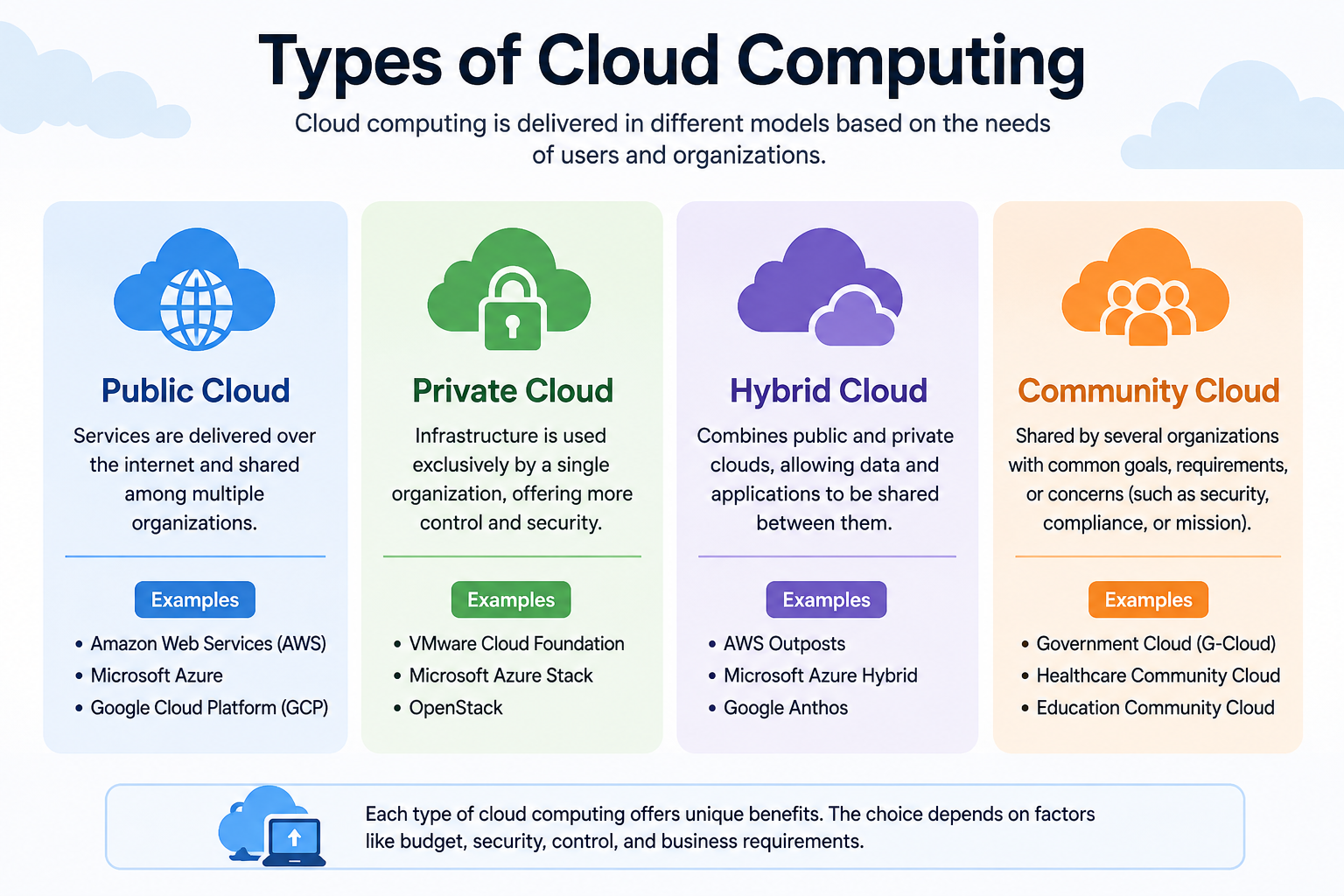
Cloud computing is not a single, one-size-fits-all technology. It comes in different forms, and understanding those forms is key to using cloud services wisely. Whether you are a student looking for storage tools, a developer building applications, or a business owner comparing technology options, knowing the types of cloud computing helps you make better decisions.
The types of cloud computing are typically discussed in two ways. The first is by service model, which describes what the cloud provides to you. The second is by deployment model, which describes how the cloud environment is set up and who has access to it. These two classification systems are often confused, but they answer different questions.
This guide explains both clearly. If you are completely new to this topic, [What Is Cloud Computing? A Beginner’s Guide] is a helpful place to start before working through the models covered here.
Quick Answer: What Are the Types of Cloud Computing?
Cloud computing is commonly classified in two ways. The first is by service model: Infrastructure as a Service (IaaS), Platform as a Service (PaaS), and Software as a Service (SaaS). The second is by deployment model: public cloud, private cloud, hybrid cloud, and multi-cloud. Service models describe what the cloud provides. Deployment models describe how the cloud environment is organized and accessed.
What Are the Main Types of Cloud Computing?
When people ask about the types of cloud computing, they are usually asking one of two distinct questions. They might want to know what kind of service the cloud delivers, or they might want to know how the cloud environment is structured. Both questions have separate answers.
Cloud Service Models
Cloud service models describe what the cloud provider delivers to the user. There are three main service models:
IaaS (Infrastructure as a Service) provides fundamental computing resources such as virtual machines, storage, and networking. The customer manages the operating system and applications that run on top of that infrastructure.
PaaS (Platform as a Service) provides a managed environment for building and deploying applications. The provider handles infrastructure and runtime management, and the customer focuses on development.
SaaS (Software as a Service) delivers complete, ready-to-use software applications over the internet. The provider manages everything, and the user simply accesses the application.
Cloud Deployment Models
Cloud deployment models describe how the cloud environment is set up and who can use it. The four main deployment models are:
Public cloud is infrastructure owned by a third-party provider and shared across many customers.
Private cloud is infrastructure dedicated to a single organization.
Hybrid cloud combines public and private environments working together.
Multi-cloud involves using services from more than one cloud provider.
Here is a simple overview of both classification systems:
| Cloud Model | Category | What It Means | Example |
|---|---|---|---|
| IaaS | Service Model | Rent virtual infrastructure | Amazon EC2 |
| PaaS | Service Model | Rent a development platform | Google App Engine |
| SaaS | Service Model | Use ready-to-use software | Google Workspace |
| Public Cloud | Deployment Model | Shared provider infrastructure | Microsoft Azure |
| Private Cloud | Deployment Model | Dedicated infrastructure | On-premises cloud |
| Hybrid Cloud | Deployment Model | Mixed public and private | Combined AWS and private data center |
| Multi-Cloud | Deployment Model | Multiple cloud providers | Using AWS and Google Cloud together |
Understanding this distinction from the beginning will help you follow cloud computing discussions much more easily.
What Are Cloud Service Models?
A cloud service model describes the type of resource or service the provider delivers and how responsibility is divided between the provider and the customer.
Think of it as a spectrum. On one end, the customer manages almost everything. On the other end, the provider manages almost everything. The three service models sit at different points along this spectrum.
With IaaS, the customer takes on more management responsibility. With PaaS, the provider takes on more. With SaaS, the provider handles the vast majority of everything, and the customer simply uses the finished product.
This division of responsibility is sometimes called the shared responsibility model. The cloud provider always manages its physical hardware and the core infrastructure that keeps the data center running. The customer’s responsibilities change depending on the service model they use. For a detailed look at how this works in practice, [How Does Cloud Computing Work?] explains the mechanics behind these service layers.
What Is Infrastructure as a Service (IaaS)?
Infrastructure as a Service, commonly shortened to IaaS, gives you access to the raw building blocks of computing through the internet. Instead of purchasing physical servers, storage drives, or networking equipment, you rent access to virtual versions of these resources from a cloud provider.
With IaaS, the provider manages the physical hardware, the data center facilities, and the networking infrastructure. The customer is responsible for the operating system, the software installed on top, and the security configuration of those resources.
Key resources provided through IaaS include:
Virtual machines, which are software-based computers that run on the provider’s physical servers. You choose the size and configuration based on your needs.
Storage, which allows you to store large amounts of data without owning physical drives.
Networking, which includes virtual networks, firewalls, load balancers, and IP addresses that connect your cloud resources.
Computing resources such as processor capacity and memory, which you can adjust as demand changes.
Common IaaS examples include Amazon Elastic Compute Cloud (EC2), Microsoft Azure Virtual Machines, and Google Compute Engine. These services allow users to create and manage virtual machines in the cloud through a web console or programming interface.
Advantages of IaaS
Flexibility is one of the strongest benefits of IaaS. You choose the operating system, software, and configuration that fits your workload without being constrained by a pre-built environment.
Scalability allows you to increase or decrease your virtual resources as demand changes, often within minutes.
Control gives technical teams the ability to manage their environment in detail, similar to managing physical hardware but without owning it.
Customization means you can build environments tailored to specific technical requirements.
Reduced hardware management removes the need to purchase, maintain, and replace physical servers, which can lower capital costs.
Disadvantages of IaaS
Greater technical responsibility means you are responsible for managing and securing the operating system and applications. This requires skilled staff.
Configuration complexity can be a challenge. Setting up virtual networks, access controls, and storage correctly requires technical knowledge.
Security configuration requirements sit largely with the customer. Misconfigured resources are a common cause of cloud security incidents.
Cost management challenges can arise if resources are left running unnecessarily or usage is not monitored carefully.
Who Should Use IaaS?
IaaS is well suited to developers, IT operations teams, and businesses that need fine-grained control over their computing environment. It works well for organizations running specialized software, managing large-scale workloads, or building custom infrastructure that does not fit into a pre-configured platform.
What Is Platform as a Service (PaaS)?
Platform as a Service, or PaaS, provides a managed environment where developers can build, test, and deploy applications without managing the underlying infrastructure. The cloud provider handles servers, operating systems, runtime environments, storage, and networking, so the development team can focus on writing code.
Think of IaaS as being given an empty plot of land with utilities connected. PaaS is like being given a fully equipped workshop. The tools are already set up, and you simply bring your project.
With PaaS, the provider manages:
Development environment, which includes the tools, frameworks, and libraries needed to build applications.
Runtime, which is the software environment that runs your application code.
Databases, which provide managed data storage that the application can use without the developer setting up a database server manually.
Deployment tools, which allow developers to publish updated versions of their applications with streamlined processes.
Common PaaS examples include Google App Engine, Microsoft Azure App Service, and Heroku. These platforms are designed to reduce setup time and allow development teams to focus on building rather than maintaining infrastructure.
Developers working with cloud-based development workflows often use tools like [What Is Visual Studio Code?] for writing code and [What Is GitHub Desktop?] for version control, both of which integrate naturally with PaaS deployment processes.
Advantages of PaaS
Faster development is possible because the infrastructure is pre-configured and ready to use. Development teams spend less time on setup and more time building.
Reduced operational burden means the provider handles patching, updates, and infrastructure management.
Built-in services such as databases, messaging, and authentication tools are often available as part of the platform.
Simplified scaling allows applications to handle more users without the developer manually configuring additional servers.
Lower infrastructure expertise requirements mean smaller development teams can build and deploy applications without dedicated operations staff.
Disadvantages of PaaS
Vendor lock-in is a real concern. Applications built using platform-specific tools or features can be difficult to migrate to a different provider.
Limited control over the underlying infrastructure can be a constraint if an application requires specific configurations that the platform does not support.
Compatibility constraints may arise when the platform’s supported languages, frameworks, or databases do not match what a team prefers.
Potential cost growth can occur as application usage grows and more platform resources are consumed.
Who Should Use PaaS?
PaaS is a strong choice for software development teams that want to build and deploy applications quickly. It works particularly well for web applications, mobile back-end services, and projects where the team wants to focus on application logic rather than infrastructure management.
What Is Software as a Service (SaaS)?
Software as a Service, or SaaS, is the most familiar type of cloud computing for everyday users. With SaaS, you access a fully built application through a web browser or dedicated app. The provider manages the infrastructure, the software, the updates, and the security of the application. You simply sign in and use it.
SaaS removes the need to install, maintain, or update software on your own device. The application is always available and always current, as long as you have an internet connection.
Well-known SaaS examples include:
[What Is Google Workspace?], which includes Gmail, Google Docs, Google Drive, Google Meet, and other productivity tools used by individuals, students, and businesses worldwide.
[What Is Microsoft Office?], available through Microsoft 365, which delivers Word, Excel, PowerPoint, Teams, and OneDrive through a cloud-connected subscription.
Salesforce, a widely used platform for managing customer relationships.
Dropbox, for cloud file storage and sharing.
Slack, for team communication and collaboration.
Advantages of SaaS
Easy access from any device with an internet connection and a browser means users are not tied to a single machine.
No local installation required in most cases, which simplifies deployment for large teams.
Automatic updates keep the software current without users needing to download patches or new versions.
Subscription flexibility allows individuals and organizations to pay monthly or annually and adjust their plans as needs change.
Collaboration features are built into many SaaS applications, allowing teams to share data and work simultaneously.
Disadvantages of SaaS
Internet dependency means that without a reliable connection, access to the application is limited or unavailable.
Subscription costs accumulate over time. While there are no large upfront costs, ongoing fees can become significant.
Limited customization is a common constraint. SaaS applications are designed for broad use and may not accommodate highly specific workflows.
Vendor lock-in can make it difficult to move to a different application without significant data migration effort.
Data and privacy considerations arise from storing organizational data on a third-party provider’s servers. Reviewing the provider’s data handling policies is important.
Who Should Use SaaS?
SaaS is suitable for individuals, students, small businesses, and large organizations that need reliable, easy-to-use applications without the overhead of managing software infrastructure. It is the most accessible entry point into cloud computing for most people.
IaaS vs PaaS vs SaaS
These three models represent different levels of abstraction and responsibility. Here is a clear comparison:
| Feature | IaaS | PaaS | SaaS |
|---|---|---|---|
| Infrastructure management | Customer | Provider | Provider |
| Operating system management | Customer | Provider | Provider |
| Application management | Customer | Customer | Provider |
| User control | High | Medium | Low |
| Technical knowledge required | High | Medium | Low |
| Typical users | IT teams, developers | Developers | End users, businesses |
| Example | Amazon EC2 | Google App Engine | Gmail, Salesforce |
A simple analogy can help clarify the difference. Imagine renting office space:
With IaaS, you rent an empty space with electricity and plumbing connected. You bring your own furniture, equipment, and staff.
With PaaS, you rent a fully equipped workspace. The desks, tools, and utilities are already in place. You bring your work and your team.
With SaaS, you walk into a business that is already running and simply use the service it provides. You do not manage any of the space or equipment.
These are analogies to aid understanding, not precise technical descriptions. The actual division of responsibilities in cloud environments is defined by the provider’s service documentation and the shared responsibility model.
What Are Cloud Deployment Models?
While service models describe what the cloud delivers, deployment models describe how the cloud environment is organized and who can access it. The deployment model determines the ownership structure, the level of control available, and how the infrastructure is shared or dedicated.
Understanding deployment models helps organizations make decisions about data sovereignty, cost, control, and scalability. The four main deployment models are public cloud, private cloud, hybrid cloud, and multi-cloud.
What Is a Public Cloud?
A public cloud is a cloud environment owned and operated by a third-party provider. The provider makes computing resources available to many different customers over the internet. Customers share the underlying physical infrastructure, but their data, accounts, and applications remain logically separate and isolated from other customers.
It is important to clarify one common misunderstanding: “public” does not mean that everyone can see your data. It means that the underlying infrastructure is shared among many customers. Your data remains private within your own account, protected by access controls and encryption.
Major public cloud providers include Amazon Web Services (AWS), Microsoft Azure, and Google Cloud. These providers operate data centers around the world and offer a broad range of services to their customers.
Advantages of Public Cloud
Cost efficiency comes from sharing infrastructure costs across many customers. You do not need to invest in building your own data center.
Scalability is a key strength. Public clouds can provide virtually unlimited resources on demand, allowing workloads to grow quickly.
Global reach allows organizations to deploy services close to their users in multiple geographic regions.
Reduced management burden means the provider handles hardware maintenance, physical security, and core infrastructure updates.
Broad service availability gives customers access to a wide range of services, from basic computing to advanced analytics.
Disadvantages of Public Cloud
Limited control over the underlying hardware can be a constraint for organizations with very specific technical requirements.
Compliance complexity can arise for regulated industries that must carefully manage where data is stored and who can access it.
Recurring costs accumulate over time and require careful management to avoid unexpected spending.
Shared infrastructure concerns can make some organizations uncomfortable, even though logical isolation is standard practice.
Who Uses Public Cloud?
Startups, developers, small and medium businesses, and large enterprises all use public cloud resources. It is the most widely adopted deployment model and is suitable for a broad range of workloads.
What Is a Private Cloud?
A private cloud is a cloud environment dedicated to a single organization. The infrastructure is not shared with any other customers. It can be hosted in the organization’s own data center, co-located in a third-party facility, or managed by a cloud provider as a dedicated environment.
Private clouds give organizations greater control over their infrastructure, configuration, and data management. They can be customized to meet specific security, compliance, or performance requirements.
It is important to note that a private cloud is not automatically more secure than a public cloud. Security depends on how the environment is designed, configured, and maintained. A poorly managed private cloud can be less secure than a well-managed public cloud environment.
Advantages of Private Cloud
Dedicated resources mean the organization does not share computing capacity with other customers.
Greater control over hardware, configuration, and security policies allows customization that may not be possible in a public environment.
Compliance support can be easier to achieve when the organization has direct control over where data is stored and how it is handled.
Predictable performance can be easier to guarantee in a dedicated environment.
Disadvantages of Private Cloud
Higher costs are a significant factor. Building and maintaining private cloud infrastructure requires substantial investment in hardware, software, and skilled staff.
Scalability limitations mean that growing a private cloud requires purchasing and installing additional hardware, which takes time and money.
Increased management responsibility means the organization handles hardware maintenance, software updates, and physical security.
Complexity requires a skilled technical team to design and operate the environment effectively.
Who Uses Private Cloud?
Large enterprises, government agencies, healthcare organizations, and financial institutions often use private cloud environments, particularly for workloads that must meet strict compliance requirements or where data sovereignty is a priority.
What Is a Hybrid Cloud?
A hybrid cloud connects a private cloud environment and a public cloud environment so they work together. Workloads, data, and applications can move between the two environments depending on need.
This model allows organizations to take advantage of the scalability and cost benefits of public cloud while keeping sensitive workloads or data in a more controlled private environment.
Practical examples of hybrid cloud use:
An organization might store confidential financial records in a private cloud but use a public cloud to host its customer-facing website.
A business might run its core applications in a private environment but use a public cloud to handle demand spikes during busy periods, a strategy sometimes called cloud bursting.
During disaster recovery planning, an organization might replicate critical systems to a public cloud so they can be restored quickly if the private environment fails.
Organizations migrating from traditional data centers to the cloud often use a hybrid model as a transitional approach.
Advantages of Hybrid Cloud
Flexibility allows organizations to place each workload in the most appropriate environment.
Cost optimization is possible by keeping some workloads on dedicated hardware and using pay-as-you-go public cloud resources for variable demand.
Improved continuity comes from having multiple environments that can support each other in the event of a failure.
Gradual migration allows organizations to move workloads to the cloud incrementally rather than all at once.
Disadvantages of Hybrid Cloud
Complexity is the primary challenge. Managing and connecting two different environments requires careful architectural planning and skilled staff.
Security management across two environments is more demanding than managing a single environment.
Integration challenges can arise when connecting private and public cloud systems, particularly if they use different technologies.
Cost management requires visibility across both environments to avoid inefficiencies.
What Is Multi-Cloud Computing?
Multi-cloud means using services from more than one cloud provider. An organization might use Amazon Web Services for one type of workload, Microsoft Azure for another, and Google Cloud for a third.
Multi-cloud is different from hybrid cloud. Hybrid cloud specifically describes connecting public and private environments. Multi-cloud refers to using multiple public cloud providers together, though in practice, some organizations use both approaches simultaneously.
Organizations choose multi-cloud strategies for several reasons:
Avoiding dependence on one provider reduces the risk that a single vendor’s outage affects all operations.
Using specialized services allows organizations to select the best tool from each provider for each specific task.
Geographic requirements can make it necessary to use a provider with data centers in specific regions.
Business continuity is supported when workloads can be distributed or shifted between providers if needed.
Workload optimization allows each application or service to run on the platform best suited to its technical requirements.
Multi-cloud can also increase management complexity. Running workloads across multiple providers requires skills across different platforms and toolsets. Governance, security monitoring, and cost management all become more demanding as the number of providers grows.
Public Cloud vs Private Cloud vs Hybrid Cloud vs Multi-Cloud
| Feature | Public Cloud | Private Cloud | Hybrid Cloud | Multi-Cloud |
|---|---|---|---|---|
| Infrastructure | Provider-owned, shared | Dedicated to one organization | Mix of public and private | Multiple public providers |
| Control | Lower | Higher | Variable | Variable |
| Scalability | Very high | Limited by owned hardware | Moderate to high | High |
| Complexity | Lower | Moderate to high | High | High |
| Typical use | General workloads, web apps | Sensitive data, compliance | Mixed workloads | Best-of-breed services |
| Example | AWS, Azure, Google Cloud | Organization’s own data center | AWS plus private data center | AWS and Azure together |
No single deployment model is best in every situation. The right choice depends on factors including the nature of the workload, budget, compliance requirements, existing infrastructure, and the technical capabilities of the team managing the environment.
What Is Community Cloud?
A community cloud is a cloud environment shared by a group of organizations that have common requirements, such as similar security standards, compliance obligations, or operational goals. Rather than one organization building a private cloud alone, several organizations with shared needs contribute to or share the same cloud environment.
Community clouds are less commonly discussed than public, private, and hybrid models. They are used in specific sectors where multiple organizations face similar regulatory requirements, such as government agencies, healthcare networks, or financial institutions.
It is worth noting that not all cloud providers offer formal community cloud services. The term is a conceptual classification from the NIST cloud computing definition rather than a widely marketed product category. If community cloud resources are relevant to your organization, consulting the specific provider’s documentation and service offerings will clarify what is actually available.
Cloud Deployment Models vs Cloud Service Models
This distinction is one of the most important things to understand about cloud computing classifications. These two concepts answer completely different questions.
| Concept | What It Answers | Examples |
|---|---|---|
| Service Model | What type of service does the cloud provide? | IaaS, PaaS, SaaS |
| Deployment Model | How is the cloud environment organized and who accesses it? | Public, Private, Hybrid, Multi-Cloud |
A business might use SaaS applications (service model) delivered through a public cloud (deployment model). A development team might use PaaS (service model) on a private cloud (deployment model). An enterprise might combine IaaS and PaaS (service models) across a hybrid cloud environment (deployment model).
The two classification systems are independent but related. Understanding both gives you a more complete picture of how cloud computing is structured and used.
Which Type of Cloud Computing Is Best?
There is no universal answer to this question. The best model for any person or organization depends on several factors working together. Making cloud decisions based on what works for someone else, without considering your own requirements, is one of the most common mistakes in cloud adoption.
Here are the key factors to consider:
Budget affects whether a pay-as-you-go public cloud service is more appropriate than an investment in private infrastructure.
Technical skills determine whether your team can manage the complexity of IaaS or whether a managed SaaS or PaaS solution would serve you better.
Security requirements vary by industry, regulation, and the nature of the data being handled.
Compliance obligations may restrict where data can be stored and which service providers can be used.
Scalability needs matter when workloads are variable or expected to grow significantly.
Customization requirements influence whether a managed SaaS solution or a more configurable IaaS environment is appropriate.
Workload characteristics determine which environment provides the best performance and cost efficiency.
Existing infrastructure shapes migration complexity and timeline.
Vendor strategy considerations include avoiding excessive dependency on a single provider.
A practical decision guide for beginners:
If you need ready-to-use software, SaaS is likely the right starting point.
If you are developing applications and want to focus on code rather than infrastructure, PaaS is worth exploring.
If you need maximum control over your computing environment, IaaS gives you that flexibility.
If you want broadly accessible infrastructure from a provider, a public cloud deployment model works for most general workloads.
If your organization needs dedicated resources or strict control, a private cloud environment may be appropriate.
If you need the benefits of both, a hybrid cloud approach offers that combination.
If you want to use the best tools from multiple providers or reduce single-vendor risk, a multi-cloud strategy is worth considering.
Examples of Cloud Computing Models
Seeing real-world examples makes these models much easier to understand.
Example 1: A student using Google Workspace.
A student uses Gmail, Google Docs, and Google Drive for their coursework. All of these are delivered through SaaS on a public cloud platform. The student does not manage any infrastructure.
Example 2: A developer deploying through PaaS.
A software developer builds a web application and deploys it using Google App Engine. The developer writes the code and configures the application while the platform manages the servers, runtime, and scaling.
Example 3: A company renting virtual machines through IaaS.
An IT team at a mid-sized company uses Amazon EC2 to run virtual machines. They install their own operating system, configure their own security settings, and manage everything above the infrastructure layer.
Example 4: A business using public cloud resources.
An online retailer hosts its website and database on Microsoft Azure. The retailer uses public cloud services that scale automatically during busy periods, such as holiday sales seasons.
Example 5: A hybrid cloud environment.
A healthcare organization stores patient records in a private cloud environment to meet compliance requirements. It uses a public cloud platform for its patient-facing scheduling portal, connecting both environments through a secure network.
Example 6: A multi-cloud strategy.
A large enterprise uses Amazon Web Services for computing workloads, Google Cloud for data analytics, and Microsoft Azure for collaboration and enterprise applications. Each provider is chosen for its strength in a specific area.
Benefits of Different Cloud Computing Models
Each cloud model offers distinct advantages that serve different needs.
IaaS benefits organizations that need fine-grained infrastructure control, custom configurations, and the ability to run specialized workloads without investing in physical hardware.
PaaS benefits development teams by eliminating infrastructure management and providing ready-to-use development tools, enabling faster application delivery.
SaaS benefits end users and organizations that need reliable, accessible software without managing any underlying technology.
Public cloud benefits organizations that need scalability, global reach, and broad service availability with minimal capital investment.
Private cloud benefits organizations that need dedicated resources, detailed control, and the ability to meet specific compliance or security requirements.
Hybrid cloud benefits organizations that want the control of a private environment combined with the scalability and flexibility of public cloud resources.
Multi-cloud benefits organizations that want to reduce vendor dependency, access specialized services, or distribute workloads for resilience and optimization.
Limitations of Different Cloud Computing Models
Every model also carries trade-offs that should be understood before making a decision.
IaaS requires significant technical expertise. Managing operating systems, security configurations, and application stacks in a cloud environment is demanding and requires skilled staff.
PaaS can introduce vendor lock-in through the use of platform-specific tools and services. Migrating applications built on one PaaS platform to another can require substantial rework.
SaaS offers limited customization. Organizations with complex or highly specific workflows may find that SaaS applications do not fully meet their needs.
Public cloud reduces control over infrastructure and can create compliance complexity for regulated industries. Cost management requires ongoing attention.
Private cloud involves significant upfront investment in hardware and skilled staff. Scalability is constrained by physical capacity.
Hybrid cloud introduces architectural complexity. Connecting and managing two environments, keeping them secure, and ensuring consistent governance across both is a demanding undertaking.
Multi-cloud multiplies the management challenges of individual providers. Operating across multiple platforms requires skills, tools, and governance processes specific to each environment.
Cloud Computing and Security
Security is a consideration across every cloud model, and the responsibilities involved differ depending on the service and deployment model in use.
Identity and access management controls who can access cloud resources and what they are permitted to do. Every cloud environment should enforce strong authentication and role-based access controls.
Authentication verifies user identity before granting access. Multi-factor authentication is a standard recommendation for all cloud environments.
Authorization determines what authenticated users can do once they have access. Applying the principle of least privilege reduces risk.
Encryption protects data both in transit and at rest. Most reputable cloud providers encrypt customer data by default at certain levels, but customers often have additional encryption responsibilities depending on the service model.
Network security protects the connections between cloud services and the users or systems that access them. Understanding [Network Security] fundamentals is valuable for anyone managing cloud infrastructure. Properly configured [What Is a Firewall?] controls are an important layer of defense in cloud environments.
Data protection requires knowing where data is stored, who can access it, and how it is handled in the event of a breach or system failure.
Monitoring helps detect unusual activity before it becomes a serious incident.
Backup strategies ensure data can be recovered in the event of loss, corruption, or a cyberattack.
Secure configuration is essential. Misconfigured cloud resources are among the most common causes of cloud security incidents.
No cloud model is automatically secure. Security requires deliberate design, correct configuration, and ongoing management. For a comprehensive look at protecting cloud environments, [What Is Cloud Security?] covers the key areas in detail. The broader principles of [What Is Cybersecurity?] also apply to every cloud environment and the people who use it.
Cloud Computing and Virtualization
Virtualization is a foundational technology behind most cloud computing environments. Understanding the relationship between the two helps clarify how cloud resources are delivered efficiently.
Virtual machines are software-based computers that run on physical hardware. They allow one physical server to function as many separate computing environments simultaneously.
Hypervisors are the software layer that creates and manages virtual machines. They allocate physical resources such as CPU, memory, and storage among the virtual machines running on a physical server.
Resource allocation through virtualization allows cloud providers to use their physical hardware efficiently. Rather than dedicating one physical machine to each customer, providers divide resources among many virtual machines, each serving a different customer or workload.
Infrastructure efficiency improves significantly with virtualization. Physical servers are used more fully, which helps cloud providers deliver resources at scale.
Tools like [What Is VMware?] and [What Is Oracle VirtualBox?] demonstrate how virtualization works in a desktop context. If you want to explore virtualization without spending money, [Free Virtualization Software] options are available for learning and experimentation.
It is important to understand that virtualization and cloud computing are not the same thing. Virtualization is a technology used to build and deliver cloud resources. A company running virtual machines on its own servers is using virtualization, but it may not be using a cloud service in the traditional sense. Cloud computing involves on-demand access, self-service provisioning, broad network access, and resource pooling, qualities defined in the NIST cloud computing model that go beyond virtualization alone.
Cloud Computing for Students
Students encounter cloud computing primarily through SaaS tools, cloud storage, and online learning platforms. Most students use cloud services daily without thinking of them in those terms.
SaaS productivity tools like Google Workspace and Microsoft 365 are used for writing documents, managing email, storing files, and collaborating on group assignments.
Cloud storage services such as Google Drive and OneDrive allow students to save and access their work from any device.
Online learning platforms deliver course content, assignments, video lectures, and assessments through cloud-based systems.
Development platforms are increasingly used by students learning software development. Cloud-based coding environments remove the need for complex local setup.
Cloud databases are used in computer science and data courses, allowing students to practice database design and querying in managed environments.
For a broader look at tools useful in academic life, [Best Software for Students] covers a wide range of practical options. Students interested in cloud-based productivity specifically will find [What Is Google Workspace?] a useful introduction to one of the most commonly used platforms in educational settings.
Cloud Computing for Businesses
Businesses use different cloud models strategically, often combining service and deployment models to match different workloads.
SaaS for productivity is the most common starting point. Email, document editing, video conferencing, and customer relationship management tools are widely used through SaaS.
IaaS for infrastructure gives IT teams the ability to run virtual servers, manage custom software, and control their computing environment without owning physical hardware.
PaaS for development allows development teams to build and deploy applications faster by eliminating infrastructure management from their workflow.
Public cloud for scalable workloads supports websites, applications, and data pipelines that need to grow and shrink dynamically.
Private cloud for specific requirements serves regulated workloads, sensitive data storage, or applications that require dedicated resources and detailed control.
Hybrid cloud for mixed environments allows businesses to combine the benefits of private control with public cloud scalability.
Multi-cloud for strategic diversification helps large organizations avoid single-vendor dependency and use the best available tools for each workload.
Understanding [What Is Database Software? Types, Uses and Examples] is relevant for businesses evaluating cloud database services, as the type of database technology often influences which cloud services and models are most appropriate.
Frequently Asked Questions
What are the types of cloud computing?
Cloud computing is classified in two ways: by service model (IaaS, PaaS, SaaS) and by deployment model (public, private, hybrid, multi-cloud). Service models describe what is provided. Deployment models describe how the environment is organized.
What are the three main cloud service models?
The three main cloud service models are Infrastructure as a Service (IaaS), Platform as a Service (PaaS), and Software as a Service (SaaS).
What are IaaS, PaaS, and SaaS?
IaaS provides virtual infrastructure such as servers and storage. PaaS provides a managed platform for building applications. SaaS delivers ready-to-use software over the internet.
What are the four cloud deployment models?
The four main cloud deployment models are public cloud, private cloud, hybrid cloud, and multi-cloud.
What is a public cloud?
A public cloud is infrastructure owned by a third-party provider and shared among many customers. Examples include Amazon Web Services, Microsoft Azure, and Google Cloud.
What is a private cloud?
A private cloud is computing infrastructure dedicated to a single organization. It offers more control and can be customized for specific security or compliance needs.
What is a hybrid cloud?
A hybrid cloud connects public and private cloud environments so workloads can move between them as needed.
What is multi-cloud?
Multi-cloud means using services from more than one cloud provider to avoid vendor lock-in, access specialized services, or distribute workloads.
What is community cloud?
A community cloud is shared by a group of organizations with common requirements, such as shared compliance standards. It is less common than public, private, and hybrid models.
What is the difference between IaaS and PaaS?
IaaS gives you virtual infrastructure that you manage yourself, including the operating system and applications. PaaS gives you a managed environment where the provider handles the infrastructure so you can focus on building applications.
What is the difference between PaaS and SaaS?
PaaS provides a development platform where you build your own applications. SaaS delivers finished, ready-to-use applications that you access without managing any underlying technology.
Is Google Workspace SaaS?
Yes. Google Workspace is a Software as a Service product. Google manages the infrastructure, software, and updates. Users simply sign in and use the applications.
Is AWS a public cloud?
Yes. Amazon Web Services is a major public cloud provider. It delivers computing resources over the internet to many customers who share underlying physical infrastructure.
Which cloud model is best for beginners?
SaaS is the most accessible starting point for most beginners. It requires no technical management and can be used immediately through a browser.
Which cloud model is best for businesses?
It depends on the business’s needs. Many businesses use a combination of models, such as SaaS for productivity, IaaS for infrastructure control, and public or hybrid cloud for different workloads.
Which cloud model gives the most control?
IaaS in a private cloud environment gives the most control, as the organization manages the operating system, applications, and configuration on dedicated infrastructure.
Is private cloud more secure than public cloud?
Not automatically. Security depends on how the environment is designed, configured, and maintained. A well-secured public cloud environment can be more secure than a poorly managed private cloud.
What is the difference between hybrid cloud and multi-cloud?
Hybrid cloud specifically connects public and private cloud environments. Multi-cloud uses services from multiple public cloud providers. An organization can use both strategies simultaneously.
What is the difference between cloud service models and deployment models?
Service models describe what type of computing service is provided, such as infrastructure, a development platform, or software. Deployment models describe how the cloud environment is structured and who accesses it, such as a shared public environment or a dedicated private environment.
Final Thoughts
Cloud computing is not a single technology. It is a collection of service models and deployment models that together give individuals, developers, and organizations a wide range of options for accessing and using computing resources.
The three main cloud service models are IaaS, PaaS, and SaaS. Each offers a different level of control and responsibility. IaaS gives maximum flexibility with the highest management burden. PaaS balances development speed with some constraints. SaaS delivers the simplest experience with the least control.
The four main cloud deployment models are public cloud, private cloud, hybrid cloud, and multi-cloud. Each reflects a different approach to owning, sharing, and connecting cloud infrastructure. Public cloud offers scalability and accessibility. Private cloud offers control and dedication. Hybrid cloud offers flexibility through combination. Multi-cloud offers resilience and choice across providers.
The right combination of types of cloud computing depends on your goals, technical capabilities, budget, compliance requirements, and the nature of the workloads you need to support. No model is universally better than another. The best approach is the one that meets your specific needs safely, efficiently, and sustainably.