
 By saman zahra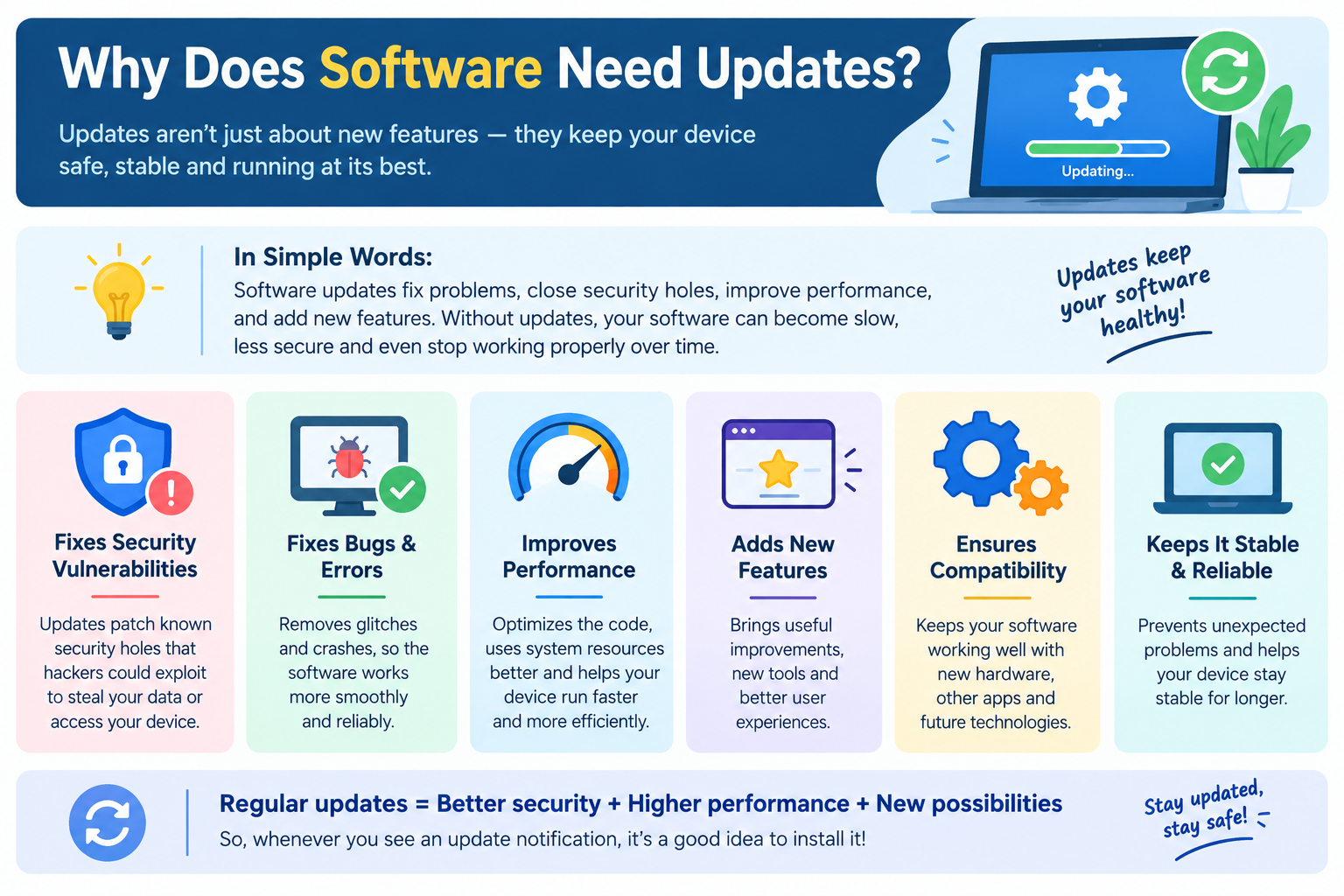
Introduction
Every device you use asks you to install updates. Your phone, your computer, your apps, and sometimes even your router or smart television prompt you regularly to apply the latest version of something. Most people tap the remind me later button without giving it much thought.
But software updates are not just routine housekeeping. They exist for specific and important reasons, and skipping them consistently has real consequences. Understanding why software needs updates helps you make better decisions about when to apply them, why security updates deserve prompt attention, and what you are actually getting when you let a program update itself.
This guide explains the genuine reasons software requires updates, the benefits those updates provide, and what happens when they are ignored.
What Is a Software Update?
A software update is a new version of an existing program that replaces or modifies the currently installed version to deliver fixes, improvements, or new capabilities.
Updates are different from upgrades. An update is a relatively contained change to an existing version, while an upgrade is a more significant transition to a substantially new version. A security patch that closes a vulnerability is an update. Moving from Windows 10 to Windows 11 is an upgrade.
Updates happen across every type of software:
- Operating systems such as Windows, macOS, iOS, and Android
- Applications installed on computers and smartphones
- Web browsers
- Drivers that allow hardware to communicate with the operating system
- Firmware embedded in hardware devices such as routers and printers
Understanding the full picture of software updates is covered in What Does Software Update Mean? This article focuses specifically on why those updates are necessary in the first place.
The Core Reason: Software Is Never Truly Finished
The most fundamental reason software needs updates is that no software is ever truly finished or perfect at the moment it is released.
Software is extraordinarily complex. A modern operating system contains hundreds of millions of lines of code. A popular web browser or productivity application contains tens of millions. Even a relatively simple smartphone app involves thousands of decisions made during development, each of which is a potential source of error.
No development team, regardless of size or experience, can anticipate every combination of hardware, settings, user behavior, and external environment that its software will encounter in the real world. Testing during development helps, but real-world use reveals problems and opportunities that controlled testing cannot fully replicate.
Software also exists within a constantly changing environment. The operating systems it runs on are updated. The hardware it runs on evolves. The web standards it must support change. The security threat landscape shifts continuously. A program that worked perfectly in one environment may need updating when that environment changes around it.
This is why software is not a finished product at release. It is a living product that requires ongoing maintenance to remain functional, secure, and useful.
Reason 1: Security Vulnerabilities Are Discovered After Release
Security updates are the most time-sensitive and important category of software update. Understanding why they are necessary requires understanding how security vulnerabilities work.
A security vulnerability is a weakness in software that could be exploited by a malicious actor to gain unauthorized access, steal data, disrupt service, or cause other harm. These weaknesses exist in the code, and they are often not known to the developer at the time of release.
Security vulnerabilities are discovered in several ways:
- Security researchers who examine software for weaknesses as part of their professional work.
- Bug bounty programs where developers invite the security community to find and report vulnerabilities in exchange for recognition or payment.
- Malicious actors who look for exploitable weaknesses to use for harmful purposes.
- Accidental discovery by users who encounter unexpected behavior.
When a vulnerability is found responsibly, the researcher typically follows a process called responsible disclosure, informing the developer privately before making any details public. This gives the developer time to create and release a patch before the vulnerability becomes widely known.
Once a patch is released, details of the vulnerability often become more public. Users who have not yet applied the update are then exposed to a weakness that is now more widely understood and potentially more easily exploited.
This is why security updates deserve prompt attention. The window between a patch being released and the vulnerability being widely understood is when unpatched devices are most at risk.
The Cybersecurity and Infrastructure Security Agency (CISA) identifies applying security patches promptly as one of the most fundamental and impactful security practices available to individuals and organizations. Their guidance at cisa.gov consistently emphasizes this point.
For a broader understanding of software security, see What Is Cybersecurity? and What Is Antivirus Software?
Reason 2: Bugs Found in Real-World Use
Testing software before release is thorough, but it cannot replicate every situation that real users encounter. Bugs, which are defects that cause software to behave differently from how it was designed, are discovered regularly after software reaches users.
Some bugs are minor, affecting a small cosmetic element or a rarely used feature. Others are more serious, causing crashes, data loss, or incorrect output. Either way, the fix is a software update.
Real-world conditions that reveal bugs include:
- Specific hardware combinations that developers did not test during development.
- Unusual user workflows that interact with the software in ways the developers did not anticipate.
- Interactions with other software installed on the same device that create unexpected conflicts.
- Edge cases in data input or usage patterns that trigger errors not caught in testing.
- Scale effects where behavior that works correctly for one user causes problems when millions of users perform the same action simultaneously.
Bug fix updates correct these errors without adding new features or making significant changes to how the software works. They make the existing software work as it was designed to, addressing the gap between how it behaves and how it should behave.
Reason 3: The Technology Environment Changes
Software does not run in isolation. It runs within an environment made up of an operating system, hardware, other software, and in many cases network services and web standards. All of these change over time, and software must be updated to remain compatible with the changing environment around it.
Operating system updates can affect how applications function. When Windows, macOS, iOS, or Android release major updates, they may change APIs that applications use to interact with the system, modify security policies, or introduce new capabilities that applications need to be updated to support.
New hardware introduces new capabilities and sometimes new requirements. Software may need to be updated to take advantage of new processor features, support new graphics capabilities, or function correctly on new device types.
Web standards and protocols evolve continuously. Web browsers need to be updated to support new HTML, CSS, and JavaScript capabilities, and to implement updated security protocols that websites require.
Third-party services and APIs that software connects to are also updated. When a service changes its interface, the software that connects to it must be updated to maintain the connection. This is particularly relevant for applications that rely on external services for features such as authentication, payment processing, or data synchronization. See What Is an API? for more on how software components connect through defined interfaces.
Compatibility updates address these environmental changes, ensuring software continues to work correctly as the world around it evolves. For more on how compatibility works, see What Is Software Compatibility?
Reason 4: Performance Improvements Are Developed Over Time
Software performance, meaning how efficiently it uses system resources such as the processor, memory, and battery, can almost always be improved after initial release.
Development timelines often require prioritizing features and correctness over optimization. After release, when the software is in the hands of users and the core functionality is stable, developers have more opportunity to focus on making the software run faster, use less memory, or consume less battery power on mobile devices.
Performance improvements may result from:
- Code optimization where developers rewrite existing routines to accomplish the same task more efficiently.
- Better use of hardware capabilities as developers learn to take advantage of specific processor or graphics features more effectively.
- Reduced startup time through improvements in how the software initializes.
- Memory management improvements that reduce the amount of RAM the software uses while running.
- Battery optimization on mobile devices, where updates may reduce how frequently the app wakes the device from sleep or reduce the processing required for background tasks.
These improvements directly benefit users through a faster, more responsive experience and, on portable devices, longer battery life. Performance updates often accompany other types of fixes rather than arriving as standalone releases.
Reason 5: New Features Are Added Based on User Feedback and Market Changes
Software development does not stop when a product is released. Developers continue working on new features based on user feedback, competitive pressures, changing user needs, and new technical possibilities.
Feature updates add new capabilities to existing software without requiring a completely new product. This allows users to benefit from improvements while staying within the software they already know.
Sources of feature development include:
- User feedback and requests communicated through support channels, reviews, forums, and direct feedback mechanisms.
- Competitive developments where other software in the same category introduces capabilities that users expect.
- Changing user behaviors and expectations as technology evolves.
- New technical capabilities in operating systems or hardware that enable previously impossible features.
- Business requirements that lead companies to expand what their software can do.
Feature updates are generally less urgent than security patches from a user safety perspective, but they are part of what keeps software relevant and useful over time. Understanding what changed in a feature update before applying it is always worthwhile, particularly for software used in professional contexts.
Reason 6: Regulatory and Compliance Requirements Change
In regulated industries, software must comply with legal and regulatory requirements that evolve over time. Updates may be required to maintain compliance with data protection regulations, accessibility standards, financial regulations, or healthcare data requirements.
This is particularly relevant for:
- Enterprise and business software that handles personal data, financial transactions, or healthcare information.
- Web services that must comply with privacy regulations such as GDPR in Europe or CCPA in California.
- Accessibility requirements that mandate specific standards for how software presents information to users with disabilities.
- Security certifications that require software to meet specific standards that evolve as the threat landscape changes.
For everyday consumer users, regulatory updates often happen invisibly in the background. For businesses, they represent a legal obligation that makes software updates a compliance requirement rather than just a technical recommendation.
Reason 7: Software Dependencies Change
Most software does not operate in complete isolation. It relies on other software components: libraries, frameworks, runtime environments, and operating system components that other developers maintain. These dependencies are updated independently, and software that relies on them must be updated to remain compatible.
When a library that a program depends on is updated, several things can happen:
- The library update may improve security, and the dependent program may need to adopt the new version to receive that protection.
- The library update may change its interface in ways that require the dependent program to adapt.
- The library update may fix a bug that was causing problems in the dependent program.
- An older version of the library may reach end of life and no longer receive security updates, requiring the dependent program to move to a newer version.
Dependency updates are often invisible to end users but represent a significant portion of the update work that developers do. They are essential for maintaining a healthy, secure software ecosystem.
Reason 8: End-of-Life and Platform Transitions
Technology platforms evolve and sometimes old platforms are retired. When this happens, software must be updated to support the new platform or risk becoming non-functional.
Historical examples of platform transitions that required software updates include:
- The shift from 32-bit to 64-bit computing, which required applications to be recompiled and updated.
- Apple’s transition from Intel processors to Apple Silicon, which required developers to provide updated builds optimized for the new architecture.
- Apple’s removal of support for 32-bit applications in macOS Catalina, which made all 32-bit applications non-functional on that version and later.
- The retirement of old security protocols such as TLS 1.0 and 1.1, which required web services and applications to update to newer protocol versions.
These platform transitions are often driven by security improvements, performance advances, or the retirement of technology that has become impractical to maintain. Software that is not updated to accommodate them stops working on current systems.
Benefits of Keeping Software Updated
Understanding why updates exist makes their benefits clearer. Keeping software updated provides:
Protection Against Known Security Threats
Updated software has the most recent security patches applied. This means known vulnerabilities have been addressed and cannot be easily exploited by attackers using techniques designed for older versions.
Stable and Reliable Performance
Bug fixes delivered through updates mean fewer crashes, fewer errors, and more predictable behavior. Software that is current on updates is generally more stable than software running on significantly older versions.
Better Speed and Efficiency
Performance improvements in updates make software run faster, load quicker, and use system resources more efficiently. On mobile devices, battery life can improve noticeably after updates that optimize power consumption.
Access to New Features
Feature updates expand what software can do. Staying current means having access to the latest capabilities that the developer has added based on user needs and technical advances.
Compatibility with Current Systems
Updated software maintains compatibility with current operating systems, browsers, hardware, and third-party services. Outdated software increasingly encounters compatibility problems as the environment around it advances.
Continued Support
Software vendors generally provide technical support for current and recent versions. Running significantly outdated software may mean that support teams cannot assist with problems that have already been resolved in later versions.
What Happens If You Do Not Update Software?
Ignoring software updates consistently has real consequences that build over time.
Accumulating security exposure. Each security vulnerability that remains unpatched on your system is a potential entry point. As time passes and more patches are skipped, the number of known, unaddressed vulnerabilities grows.
Bugs continue to cause problems. Issues that have been fixed in updates continue to affect users who have not updated. Problems you experience that have been resolved for other users persist unnecessarily.
Compatibility deteriorates. As operating systems, browsers, and other software advance, unupdated software increasingly encounters compatibility problems. Features may stop working, connections to services may fail, and file formats may not be correctly handled.
End-of-life risk. Software eventually reaches a point where the developer stops releasing updates. For more on this, see the end-of-life concept explained in What Does Software Update Mean? Running software that is past its end-of-life date means no new security patches will ever address newly discovered vulnerabilities.
Support unavailability. Technical support for old versions is often unavailable. Problems you encounter may be unfixable because the version you are running is no longer supported.
Common Misconceptions About Software Updates
Updates Are Just About Adding New Features
Many people think of updates primarily as feature deliveries. In reality, security patches and bug fixes are often more important than new features. A security-only update with no new features is just as necessary as one that adds visible capabilities.
If the Software Works, It Does Not Need Updating
Software can appear to work normally while containing security vulnerabilities or bugs that affect specific use cases. The absence of visible problems does not mean an update is unnecessary.
Updates Sometimes Make Things Worse, So It Is Safer to Wait
Occasionally an update introduces a new bug alongside its fixes, but this is the exception rather than the rule. The risk of remaining unpatched against known security vulnerabilities is generally higher than the risk of a rare problematic update. For security patches specifically, prompt application is consistently the recommended approach.
Automatic Updates Are Fine to Disable
Disabling automatic updates means relying entirely on yourself to check for and apply updates regularly. For most everyday users, automatic updates for security software and operating systems are the recommended setting because they ensure patches are applied without depending on manual attention.
Older Software Is More Stable
Stability comes from the quality of the software and its testing, not from its age. A current, well-maintained version of software is generally more stable than an older version with known unfixed bugs.
How Often Should Software Be Updated?
Different types of software have different appropriate update cadences.
Security updates: Apply as soon as they are available. The security risk of delay outweighs virtually any other consideration for typical users.
Operating system updates: Apply promptly, particularly security patches. For major version upgrades, a brief waiting period to allow initial issues to surface is reasonable for some users, particularly in professional environments where compatibility must be verified.
Browser updates: Browsers update frequently and should be kept current. Most modern browsers update automatically and require little manual attention.
Application updates: Apply regularly. Feature updates can be reviewed before applying to understand what is changing, but security-related application updates should be applied promptly.
Driver updates: Apply when available, particularly if they address stability or security issues. Performance driver updates such as graphics card drivers are worth applying if you are experiencing issues the update addresses.
Firmware updates: Apply updates from the device manufacturer when available, as firmware vulnerabilities in devices such as routers can be serious.
Software Updates Across Different Platforms
Windows
Windows Update manages operating system and driver updates on Windows devices. It can be configured to install updates automatically, which is the recommended setting for most users. Access it through Settings, then Windows Update. Microsoft’s guidance is available at learn.microsoft.com.
macOS
macOS updates are managed through Software Update in System Settings. Both operating system updates and Mac App Store application updates are handled here. Applications installed from developer websites update through their own mechanisms. Apple’s guidance is at support.apple.com.
iOS
iOS updates are managed through Settings, then General, then Software Update. App updates are managed through the App Store. iOS can be configured to install updates automatically. For more on iPhone apps and their management, see What Is an iPhone App?
Android
Android operating system updates are delivered by device manufacturers and vary by device. Check for them through Settings, then About Phone, then System Update. App updates are managed through the Google Play Store. For more on Android apps, see What Is an Android App?
App Stores
App stores for both iOS and Android handle application update distribution. Both platforms support automatic app updates, which is the recommended setting for most users.
Updates and Software Versioning
Every update changes the version number of the software. Understanding version numbers helps you interpret what kind of update you are receiving and what to expect from it.
In semantic versioning, the most widely used versioning convention particularly in development software:
- A patch version change (such as 3.2.1 to 3.2.2) typically indicates a bug fix or security patch.
- A minor version change (such as 3.2.0 to 3.3.0) typically indicates new features added in a backward-compatible way.
- A major version change (such as 3.0.0 to 4.0.0) typically indicates significant changes that may affect compatibility.
For consumer software, operating systems, and browsers, versioning conventions vary. Understanding the basics helps you interpret update notifications more meaningfully. For a full explanation of how version numbers work, see What Is Software Versioning?
Best Practices for Managing Software Updates
- Enable automatic updates for operating systems and security software on personal devices. This ensures security patches are applied without relying on manual attention.
- Apply security updates promptly regardless of other update preferences. Security patches should not be delayed.
- Review release notes for major updates. Understanding what changes before updating avoids surprises and helps identify potential compatibility concerns.
- Back up important data before applying major updates, particularly operating system updates.
- Keep all software updated, not just the operating system. Applications, browsers, drivers, and firmware all need regular updates.
- Remove software you no longer use rather than leaving it installed and potentially unpatched. Unused software that is not receiving updates is a vulnerability that serves no purpose.
- In managed business environments, follow organizational update policies. Enterprise environments often test updates before deployment to verify compatibility.
- Be aware of end-of-life dates for software you depend on. Plan transitions before software stops receiving security updates.
Frequently Asked Questions
Why does software need updates?
Software needs updates for several reasons: to fix security vulnerabilities discovered after release, to correct bugs found in real-world use, to maintain compatibility with evolving operating systems and hardware, to improve performance, and to add new features based on user needs.
How often should I update software?
Security updates should be applied as soon as they are available. Other updates should be applied regularly. Operating system and browser updates deserve prompt attention. Feature updates for non-critical software can be reviewed and applied on a reasonable schedule.
Is it safe to skip software updates?
Skipping security updates carries real risk. Each unpatched vulnerability is a potential exposure point. Skipping feature updates has lower immediate risk but may cause compatibility issues over time. Regularly skipping updates is not a recommended practice.
What happens if I never update my software?
Unpatched security vulnerabilities accumulate, known bugs continue to cause problems, software becomes increasingly incompatible with current systems, and software eventually reaches end of life where no further patches are available.
Do software updates cost money?
Most updates to software you already own or subscribe to are free. Major upgrades to new commercial versions may sometimes require payment, but routine updates within a version are typically provided at no additional cost.
Why do apps update so frequently?
Frequent updates reflect active development, ongoing security monitoring, and continuous improvement based on user feedback. Frequent small updates are generally preferable to infrequent large ones because they address issues as they are discovered rather than waiting to accumulate changes.
What is a security update?
A security update is a patch that addresses a specific vulnerability in software that could be exploited by malicious actors. Security updates are the most time-sensitive category of update and should be applied promptly.
Can software updates cause problems?
Occasionally an update introduces a new bug alongside its fixes. This is relatively uncommon and is generally addressed quickly in a follow-up update. The risk of remaining unpatched is typically higher than the risk of a problematic update for most software.
What is end-of-life software?
End-of-life software is software for which the developer has permanently stopped releasing updates, including security patches. Running end-of-life software means any newly discovered vulnerabilities will never be fixed.
Why do browsers update so often?
Web browsers face a continuously evolving security threat landscape and must support rapidly changing web standards. Frequent updates allow browsers to address security issues quickly and support new web capabilities as they are introduced.
For further reading, explore What Is Software and How Does It Work? for foundational context, What Is Software Installation? to understand how software reaches your device in the first place, and What Is a Firewall? for another layer of protection that works alongside keeping software current.
Disclaimer
This article is intended for educational purposes and provides a general overview of software uninstallation for beginners and everyday users. Uninstallation processes and behavior vary between operating systems, software products, versions, and device types. Always refer to official documentation from your operating system or software vendor for specific guidance. Some uninstallation steps described in this article may require administrator permissions. If you do not have administrator access on your device, consult the device owner or IT administrator before attempting to remove software. Uninstalling software may remove data associated with that software. Back up important data before uninstalling software if you are unsure what will be removed. Always use caution when removing system software or components. Removing critical system components can affect device stability.
Author: Laraib
Laraib is a technology writer and research contributor covering AI, programming, software, cybersecurity, cloud computing, and the latest developments in technology. She focuses on creating clear, practical, and well-researched content that makes complex tech topics easy to understand.