
 By saman zahra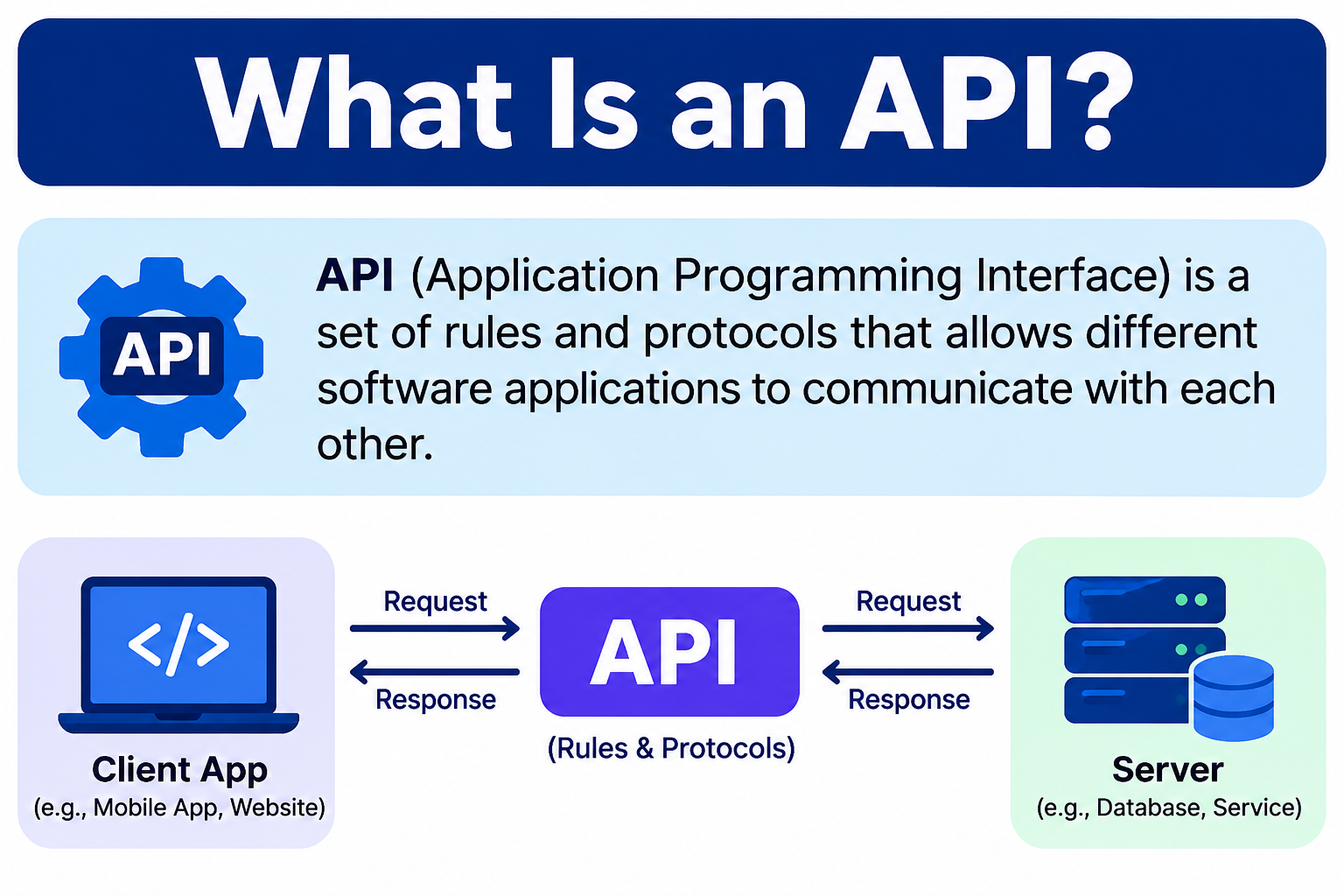
Introduction
Think about the last time you checked a weather app on your phone. It showed you the current temperature, wind speed, and a forecast for the week ahead. That information did not come from the app itself. The app reached out to a weather service, requested the data, and displayed it on your screen. The system that made that communication possible is called an API.
Here is another way to think about it. Imagine you are at a restaurant. You do not walk into the kitchen and tell the chef what you want. You tell the waiter, the waiter carries your request to the kitchen, and the kitchen prepares your meal. The waiter then brings your food back to you. In this analogy, the waiter plays the role of the API, handling communication between two parties that do not interact directly. This is a helpful illustration, though the full picture of what is an API is a little more precise than any single analogy can capture.
APIs are everywhere in modern technology. They are the invisible connectors that allow apps, websites, and services to talk to each other and share information. Understanding what APIs are helps explain how so much of the technology we use every day actually works.
Quick Answer: What Is an API?
An API, or Application Programming Interface, is a set of rules and protocols that allows different software applications to communicate with each other. APIs define how requests should be made, what data can be exchanged, and how responses are returned. They enable developers to connect services, share data, and build applications that use the functionality of other systems without rebuilding that functionality from scratch.
What Is an API?
API stands for Application Programming Interface. Breaking down each word helps clarify what it means. An application is any piece of software, from a mobile app to a web service. Programming refers to how that software is built and how it operates. An interface is a defined point of interaction between two systems, a structured way for them to communicate.
Put it together, and an API is a defined set of rules that describes how software components can interact with each other. It specifies what requests can be made, how they should be formatted, and what kind of response to expect.
APIs exist at multiple levels in computing. Web APIs are used over the internet and are the type most people encounter in modern development. Operating system APIs allow applications to access system-level resources like files, memory, and hardware. Library or framework APIs allow developers to use pre-built functionality within their own code without writing that functionality themselves.
For most of this article, the focus is on web APIs, as they are the most commonly discussed type and the most relevant to everyday software development. If you are learning programming or working with web technologies, web APIs will become a regular part of your work.
The core value of an API is that it allows developers to use existing functionality without building everything from scratch. Instead of creating a payment processing system, a mapping tool, or a weather data engine, a developer can connect to an API that already provides that capability.
How Do APIs Work?
The basic communication model of an API follows a request and response pattern. Here is how it works:
- A client, which might be a mobile app, a website, or another service, sends a request to an API.
- The API processes that request and communicates with the relevant server or backend service.
- The server generates a response and returns it to the API.
- The API delivers that response back to the client.
This cycle happens incredibly quickly, often in a fraction of a second, which is why the apps and services we use feel seamless even though they may be pulling data from multiple sources.
API requests typically include several components. The endpoint is the specific URL the request is sent to. The HTTP method describes what action is being requested. Headers carry metadata such as authentication information and content type. The body of a request, when present, contains data being sent to the server, such as form input or new content to create.
API responses typically include a status code that indicates whether the request succeeded or failed, and a body containing the returned data.
HTTP methods tell the API what kind of action you want to perform:
- GET — retrieve data from the server
- POST — send data to create a new resource
- PUT — update an existing resource
- DELETE — remove a resource
HTTP status codes give a quick indication of what happened with the request:
- 200 — OK, the request was successful
- 201 — Created, a new resource was successfully created
- 400 — Bad Request, the request was malformed or invalid
- 401 — Unauthorized, authentication is required or failed
- 404 — Not Found, the requested resource does not exist
- 500 — Internal Server Error, something went wrong on the server
Understanding status codes is practical and useful. When working with APIs, these codes tell you immediately whether a request worked and, if it did not, give you a starting point for diagnosing the problem.
What Is an API Endpoint?
An API endpoint is a specific URL or address where an API receives requests. Think of it as a particular door into a building. Each door leads to a different room, and each endpoint handles a different type of request.
A single API typically has multiple endpoints, each designed to handle a specific action or data type. For example, an API for a fictional weather service might have separate endpoints for current conditions, weekly forecasts, and historical data.
Here is a simple illustrative example of what an API endpoint URL might look like:
https://api.example.com/weather?city=LondonIn this example, api.example.com is the domain of the API service, /weather is the specific endpoint being accessed, and ?city=London is a query parameter specifying the location. The API uses this information to know what data to retrieve and return.
Note that this URL is illustrative and not a real working endpoint. Real API endpoints follow similar patterns but vary depending on the service and its design.
What Is an API Request and Response?
To make the request and response model more concrete, here is a simple example. Suppose an application wants to retrieve current weather data for London using a fictional weather API. The application sends a GET request to the weather endpoint.
The API processes that request, queries the weather data service, and returns a response. That response might look something like this in JSON format:
{
  "city": "London",
  "temperature": "15°C",
  "condition": "Cloudy",
  "humidity": "78%"
}
This is a JSON (JavaScript Object Notation) response. JSON is a lightweight data format that is easy for both humans to read and machines to parse. It uses key-value pairs to organize data, which is why it has become the most common format for API responses in web development.
It is worth noting that APIs can also return data in other formats, including XML, plain text, or binary data, depending on the API’s design and the client’s request headers. REST APIs commonly use JSON, but it is not the only option.
What Are the Types of APIs?
REST APIs
REST stands for Representational State Transfer. It is an architectural style for designing networked applications, not a protocol. REST APIs use standard HTTP methods and are built around the concept of resources, things like users, products, or orders, each identified by a URL.
REST APIs have several key characteristics. They are stateless, meaning each request contains all the information needed to process it, and the server does not store session state between requests. They use standard HTTP methods. They commonly return JSON, though other formats are possible. They use clear, consistent endpoints to represent resources.
REST APIs are widely used for web and mobile applications because they are relatively simple to understand and integrate with. Many of the APIs that developers encounter in everyday web development are REST APIs.
SOAP APIs
SOAP, which stands for Simple Object Access Protocol, is a messaging protocol that uses XML for message formatting. SOAP is more formal and rigid than REST. It requires strict message structures and uses a contract-based approach defined through a WSDL (Web Services Description Language) file, which describes what operations the API supports and how to call them.
SOAP is still used in enterprise environments, particularly in financial services, healthcare, and other industries where strict standards, formal contracts, and transactional reliability are required. If you work with older enterprise systems or certain regulated industries, you are likely to encounter SOAP.
GraphQL APIs
GraphQL is a query language for APIs that was developed by Meta (formerly Facebook). Unlike REST, where the server determines the structure of the response, GraphQL allows clients to specify exactly what data they need.
This solves two common problems in API design. Over-fetching happens when an API returns more data than the client actually needs. Under-fetching happens when a client needs to make multiple requests to gather all the data it needs. With GraphQL, a client can request precisely the fields it needs in a single query.
GraphQL has its own syntax and concepts that go beyond this introductory article, but knowing it exists and understanding its core benefit is a useful starting point.
WebSocket APIs
WebSocket APIs enable two-way, real-time communication between a client and a server. Unlike the request-response model of REST, a WebSocket connection stays open, allowing both the client and the server to send messages at any time without a new request being required.
Practical use cases include live chat applications where messages appear instantly, financial platforms showing real-time price feeds, online multiplayer games requiring continuous data exchange, and collaborative tools where multiple users see changes simultaneously.
Library and OS APIs
APIs also exist within software libraries and operating systems. When a developer uses a function from a programming library, such as a function to sort a list or handle a file, they are using that library’s API. Similarly, operating system APIs allow applications to interact with the operating system and hardware, such as accessing the file system, network interfaces, or the camera on a mobile device.
These types of APIs are less visible to end users but are fundamental to how all software is built. Understanding software at a basic level helps connect these concepts together.
Public APIs, Private APIs, and Partner APIs
APIs are also categorized by who is allowed to use them:
| Type | Who Can Use It | Common Use |
|---|---|---|
| Public API | Any developer (may require registration or an API key) | Third-party integrations, open data access |
| Private API | Internal teams only | Connecting internal systems and services |
| Partner API | Specific authorized business partners | B2B data sharing and integration |
Public APIs, sometimes called open APIs, are available to external developers. Some are completely open, while others require registration and an API key for access tracking and rate limiting. Public APIs power a huge range of third-party integrations and developer projects.
Private APIs are used internally within an organization. They connect internal systems such as a company’s inventory system, customer database, and reporting tools, without exposing those connections to the outside world.
Partner APIs sit between public and private. They are shared with specific external business partners under formal agreements, enabling data exchange between organizations in a controlled and secure way.
What Is an API Key?
An API key is a unique identifier issued by an API provider that applications include with their requests to authenticate and authorize access to the API. It tells the API who is making the request and allows the provider to track usage, enforce rate limits, and control access.
API keys are not the same as passwords. Passwords authenticate a human user. API keys identify and authenticate an application or developer account making programmatic requests.
Common uses of API keys include identifying which application is sending requests, enforcing usage limits to prevent abuse, providing access to specific features or data tiers, and billing based on usage volume.
Protecting your API keys is important. Some key security practices include:
- Never commit API keys to a public code repository. Anyone who finds your key could use it, potentially running up charges or accessing sensitive data on your behalf.
- Store API keys in environment variables or a secrets management system rather than hardcoding them in your source files.
- This connects directly to the
.gitignoreand commit security practices covered in the Git for beginners guide on TechOriginHub. - Rotate or regenerate keys if you suspect they have been exposed.
What Is API Authentication and Authorization?
Authentication and authorization are two related but distinct concepts in API security.
Authentication answers the question: who are you? It is the process of verifying the identity of the application or user making a request. An API key is a simple form of authentication.
Authorization answers the question: what are you allowed to do? Even after identifying who you are, the API needs to determine what actions or data you have permission to access.
Common authentication and authorization mechanisms in APIs include:
API keys are the simplest approach. The client includes the key with each request, and the API verifies it.
OAuth is an authorization framework that allows users to grant applications limited access to their accounts on other services without sharing their credentials. The “Sign in with Google” or “Sign in with Apple” buttons you see on many websites use OAuth. It is widely used and well-established.
Bearer tokens and JSON Web Tokens (JWTs) are tokens included in request headers that carry identity information. The server validates the token with each request. JWTs are commonly used in modern web applications.
Using an API key alone does not guarantee full security. Proper API security requires a combination of authentication, authorization, encrypted connections, input validation, and other practices.
What Is API Documentation?
API documentation is the reference material that explains how to use an API. Good documentation is one of the most important factors in whether developers can use an API effectively.
Well-written API documentation typically covers:
- All available endpoints and what each one does
- Required and optional parameters for each request
- Authentication requirements and how to authenticate
- Example requests showing exactly how to call the API
- Example responses showing what data is returned
- A complete list of error codes and their meanings
- Rate limits and usage restrictions
When documentation is clear and complete, developers can integrate an API in a fraction of the time it would take with poor or missing documentation. When documentation is vague or incomplete, integration becomes frustrating and error-prone.
Tools like Swagger, which is part of the OpenAPI Specification, and Postman are widely used in the industry to create, publish, and explore API documentation. Postman in particular is a popular tool for testing API requests interactively, which is valuable for anyone learning to work with APIs.
Real-World API Examples
APIs are behind more of everyday technology than most people realize. Here are some practical examples:
Weather APIs allow apps and websites to display current conditions, forecasts, and weather alerts. The app itself does not generate the weather data. It requests it from a weather data provider through an API.
Payment APIs allow online stores to process transactions securely. When you complete a purchase on a website, the checkout process typically calls a payment service API to handle the actual transaction processing.
Maps and location APIs power the mapping and navigation features built into countless apps. Rather than building their own mapping infrastructure, developers use location service APIs to embed maps, calculate routes, and show nearby places.
Social login APIs enable the “Sign in with Google,” “Sign in with Apple,” and similar buttons that appear on websites and apps. These use authentication APIs that allow users to use existing accounts rather than creating new ones.
Travel booking APIs allow platforms to aggregate flight schedules, hotel availability, and pricing from multiple providers in real time. The booking platform does not own all that data. It retrieves it through APIs.
Messaging and notification APIs let applications send SMS messages, emails, and push notifications without building their own messaging infrastructure.
Streaming APIs deliver video and audio content to apps and devices. When you stream music or video, the app is communicating with the streaming service through APIs to request and receive the media data.
Each of these examples represents a situation where a developer chose to use an existing, specialized service through an API rather than trying to build that capability from scratch.
What Is API Integration?
API integration is the process of connecting two or more software systems so they can share data and functionality through APIs. Instead of systems operating in isolation, integration allows them to work together automatically.
A practical business example: a company might use a customer relationship management (CRM) system and a separate email marketing platform. Through API integration, new contacts added to the CRM automatically appear in the email marketing platform, and email engagement data flows back into the CRM. This eliminates manual data entry and keeps both systems synchronized.
API integration reduces manual work, improves data accuracy across systems, and allows businesses to build workflows that span multiple tools without custom development for every connection. Organizations managing many integrations often use integration platforms or middleware services that provide pre-built connectors and management tools.
Understanding how databases and cloud computing work provides useful context for understanding how API integrations are structured in practice.
What Is API Versioning?
API versioning is how API providers manage changes to an API without breaking the applications that already use it. When an API needs to change significantly, releasing a new version rather than modifying the existing one means existing integrations continue to work while new integrations can adopt the updated version.
Here is a simple illustrative example of versioned API endpoints:
https://api.example.com/v1/products
https://api.example.com/v2/products
Both versions exist simultaneously. Applications built on v1 continue to function as before, while new applications can be built on v2 with its updated behavior and features.
Developers building integrations on top of third-party APIs should always check the API’s versioning policy and pay attention to deprecation notices. When a provider announces that an older API version will be retired, integrations that rely on it need to be updated before that deadline.
What Is a Web API?
A web API is an API that is accessed over the internet using standard web protocols, primarily HTTP or HTTPS. Web APIs are the most common type that web developers, mobile developers, and application developers encounter.
Web APIs allow different applications, regardless of what server they run on, what programming language they are written in, or what platform they target, to communicate with each other over the internet. This interoperability is one of the reasons APIs have become so central to modern software architecture.
Modern web applications are often built as a combination of a front-end interface, the part users see and interact with, and a back-end API that handles data and business logic. The front end communicates with the back end through web APIs. This separation makes applications more flexible and easier to maintain. If you are learning JavaScript for web development, you will encounter web APIs frequently, both browser APIs built into the web platform and external web service APIs.
APIs and Everyday Life
Most people interact with APIs many times each day without knowing it. Here are some familiar situations where APIs are working in the background:
When you use a food delivery app, APIs connect the restaurant’s menu system, the payment processor, and the delivery tracking system. All of that coordination happens through API calls.
When you open your banking app, APIs connect the app interface to your account data, transaction history, and the payment network that processes transfers.
When you stream music, APIs handle authentication, retrieve personalized playlist data, and deliver the audio content to your device.
When you use a smart home device, APIs allow different devices and platforms to communicate. Your phone app can control a smart light because both connect to a shared API.
When you book a flight, the booking platform uses APIs to query airline inventory systems, retrieve current pricing, and process your reservation across multiple connected systems.
Every one of these experiences depends on APIs working reliably in the background. That is why developers who understand how to work with APIs are in a strong position to build useful, connected applications.
What Are the Benefits of APIs?
APIs bring a range of practical benefits to developers, businesses, and users:
Reusability means developers can use well-tested, specialized functionality without building it themselves. A payment system built by a dedicated financial technology company is likely more reliable than one built from scratch for a single application.
Scalability allows systems to be extended and updated without rebuilding everything. New features and capabilities can be added through additional API integrations.
Interoperability means different systems, written in different programming languages and running on different infrastructure, can communicate through a common API interface.
Speed of development improves significantly when teams can use APIs for standard functionality rather than building every component from scratch.
Specialization allows development teams to focus on building their core product while using APIs to handle everything else, from payments to messaging to maps.
Innovation is enabled when developers can combine APIs from different services in creative ways to build new products and experiences.
Consistency is provided by a well-designed API. Every application that uses it interacts with the service in the same defined way, which makes integrations more predictable and reliable.
API Security Considerations
API security is a broad and important topic. This article introduces key concepts, though a thorough treatment of API security goes well beyond an introductory guide.
Authentication and authorization are fundamental. APIs should verify who is making requests and ensure they have permission for what they are trying to do.
Rate limiting prevents abuse by restricting how many requests a client can make within a given time period. This protects the API from being overwhelmed by excessive or malicious traffic.
Input validation means checking that data sent to an API is in the expected format before processing it. Failing to validate input is a common source of security vulnerabilities.
HTTPS should be used for all API communication. Unencrypted HTTP connections can expose data to interception.
Protecting API keys is essential. Keys exposed in public code repositories can be discovered and misused. The OWASP (Open Web Application Security Project) publishes guidance on common API security risks, including the OWASP API Security Top 10, which is a useful reference for anyone working with APIs in a professional context.
Understanding cybersecurity principles provides important context for thinking about how APIs should be built and protected.
Common API Mistakes Beginners Make
Not reading the documentation first. Every API works differently. Jumping into code without reading the documentation leads to preventable errors and wasted time.
Exposing API keys in public repositories. This is one of the most consequential mistakes. A publicly exposed API key can be found and abused very quickly. Never commit keys to a GitHub repository or any other public location.
Ignoring error responses and status codes. When a request fails, the status code and error message usually explain why. Not checking these makes debugging much harder.
Not handling rate limits. Most public APIs limit how many requests you can make. Applications that do not handle rate limit responses properly can fail unpredictably.
Assuming all APIs work the same way. REST, SOAP, GraphQL, and WebSocket APIs all have different patterns, conventions, and requirements. Approach each new API by reading its documentation rather than assuming it works like one you have used before.
Ignoring versioning and deprecation notices. When an API version is deprecated, integrations that rely on it will eventually break. Staying aware of versioning changes protects your applications.
Using HTTP instead of HTTPS. All API communication involving sensitive data or authentication should use HTTPS.
Not testing requests before building around them. Tools like Postman make it easy to test API requests interactively. Validating that the API responds as expected before writing integration code saves significant debugging time later.
Overloading APIs with unnecessary requests. Only request the data you actually need. Excessive API calls waste resources, can trigger rate limits, and add unnecessary latency to applications.
Not understanding the difference between authentication and authorization. These solve different problems. Knowing who is making a request and knowing what they are allowed to do are separate concerns that need to be addressed separately.
How to Start Learning About APIs
APIs can seem intimidating at first, but they become approachable with the right starting point. Here is a practical roadmap:
- Understand what an API is and how the request/response model works. This article is your starting point.
- Learn the basics of HTTP, including methods, status codes, and headers. MDN Web Docs is an excellent reference for this.
- Explore publicly available APIs that require minimal setup. Many APIs offer free access with simple registration.
- Use Postman to send API requests and view responses without writing any code. This is one of the best ways to see exactly how APIs behave.
- Learn a programming language that makes working with APIs accessible. Python and JavaScript are both popular choices for working with APIs.
- Read API documentation for a service that interests you. Practice understanding the endpoints, parameters, and authentication requirements.
- Build a small project that uses a public API. Even a simple app that displays weather data or retrieves information from a public dataset is a valuable learning exercise.
- Learn about API authentication, including how API keys work and what OAuth is.
- Explore REST API design principles to understand not just how to use APIs but how well-designed APIs are structured.
- Gradually explore more advanced topics such as GraphQL, WebSocket APIs, and API security practices.
Using Visual Studio Code as your editor while learning API development gives you a capable environment with excellent extensions for working with API-related code. As your understanding grows, exploring programming languages and database concepts will all connect naturally with your growing API knowledge.
Frequently Asked Questions
What is an API in simple words?
An API is a set of rules that allows different software applications to communicate with each other. It defines how requests should be made and how responses are returned, enabling apps to share data and functionality.
What does API stand for?
API stands for Application Programming Interface.
How does an API work?
A client sends a request to an API endpoint. The API processes the request, interacts with the relevant server or service, and returns a response to the client. This request and response cycle happens quickly and enables applications to exchange data and functionality.
What is a REST API?
A REST API is an API built following the REST (Representational State Transfer) architectural style. REST APIs use standard HTTP methods, are stateless, and typically return data in JSON format. They are widely used for web and mobile application development.
What is the difference between a REST API and a SOAP API?
REST is an architectural style that uses standard HTTP and commonly returns JSON. SOAP is a messaging protocol that uses XML and a formal contract-based approach. REST is generally more flexible and easier to work with, while SOAP offers stricter standards suited to certain enterprise and regulated-industry contexts.
What is an API key?
An API key is a unique identifier issued by an API provider that applications include with requests to authenticate access. It identifies the application making the request and allows the provider to track usage and enforce limits.
What is an API endpoint?
An API endpoint is a specific URL or address where an API receives requests. Different endpoints within the same API handle different types of requests and data.
Are APIs only used in web development?
No. APIs exist at multiple levels of computing, including within operating systems, software libraries, and frameworks. However, web APIs, accessed over the internet using HTTP, are the most commonly discussed type in modern development contexts.
Can beginners learn to use APIs?
Yes. Starting with public APIs that have clear documentation and using tools like Postman to test requests before writing code makes APIs very accessible. Basic familiarity with HTTP concepts and a programming language like Python or JavaScript helps significantly.
What is the difference between an API and a database?
A database stores and organizes data. An API provides a defined interface for applications to interact with data or functionality, which might be stored in a database or provided by a service. An API is how applications access things. A database is where data is stored.
What is a public API?
A public API is an API made available to external developers, sometimes freely and sometimes with registration or an API key required. Public APIs power third-party integrations, developer projects, and open data access.
Why do developers use APIs?
Developers use APIs to access existing functionality and data without building it themselves, to integrate different systems and services, to build applications faster, and to connect their products to specialized services like payment processing, mapping, messaging, and more.
References
- MDN Web Docs. HTTP Overview. Mozilla Developer Network. Comprehensive reference for HTTP methods, status codes, and web protocols. https://developer.mozilla.org/en-US/docs/Web/HTTP/Overview
- MDN Web Docs. Introduction to Web APIs. Mozilla Developer Network. https://developer.mozilla.org/en-US/docs/Learn/JavaScript/Client-side_web_APIs/Introduction
- IETF RFC 7231. Hypertext Transfer Protocol (HTTP/1.1): Semantics and Content. Internet Engineering Task Force. Defines HTTP methods and status codes. https://datatracker.ietf.org/doc/html/rfc7231
- OWASP API Security Top 10. Open Web Application Security Project. Authoritative guidance on common API security risks. https://owasp.org/www-project-api-security/
- GraphQL Official Documentation. Introduction to GraphQL. https://graphql.org/learn/
- OpenAPI Initiative. OpenAPI Specification. The standard for describing REST APIs, underpinning tools like Swagger. https://www.openapis.org/
- IETF RFC 6749. The OAuth 2.0 Authorization Framework. Internet Engineering Task Force. https://datatracker.ietf.org/doc/html/rfc6749
- W3C. SOAP Version 1.2 Part 1: Messaging Framework. World Wide Web Consortium. https://www.w3.org/TR/soap12/
- MDN Web Docs. WebSockets API. Mozilla Developer Network. https://developer.mozilla.org/en-US/docs/Web/API/WebSockets_API
- Postman. What is an API? Postman Learning Center. Postman is an authoritative tool in the API development space. https://learning.postman.com/docs/getting-started/introduction/
This article is for educational and informational purposes. API technologies, standards, authentication methods, and best practices evolve over time. Always consult the current official documentation for any API or service you intend to use before building integrations or applications.
Author: TechOriginHub Editorial Team
Author Bio: TechOriginHub Editorial Team covers practical technology, programming, software, cybersecurity, cloud computing, databases, and internet topics with a focus on clear and useful guidance.