
 By saman zahra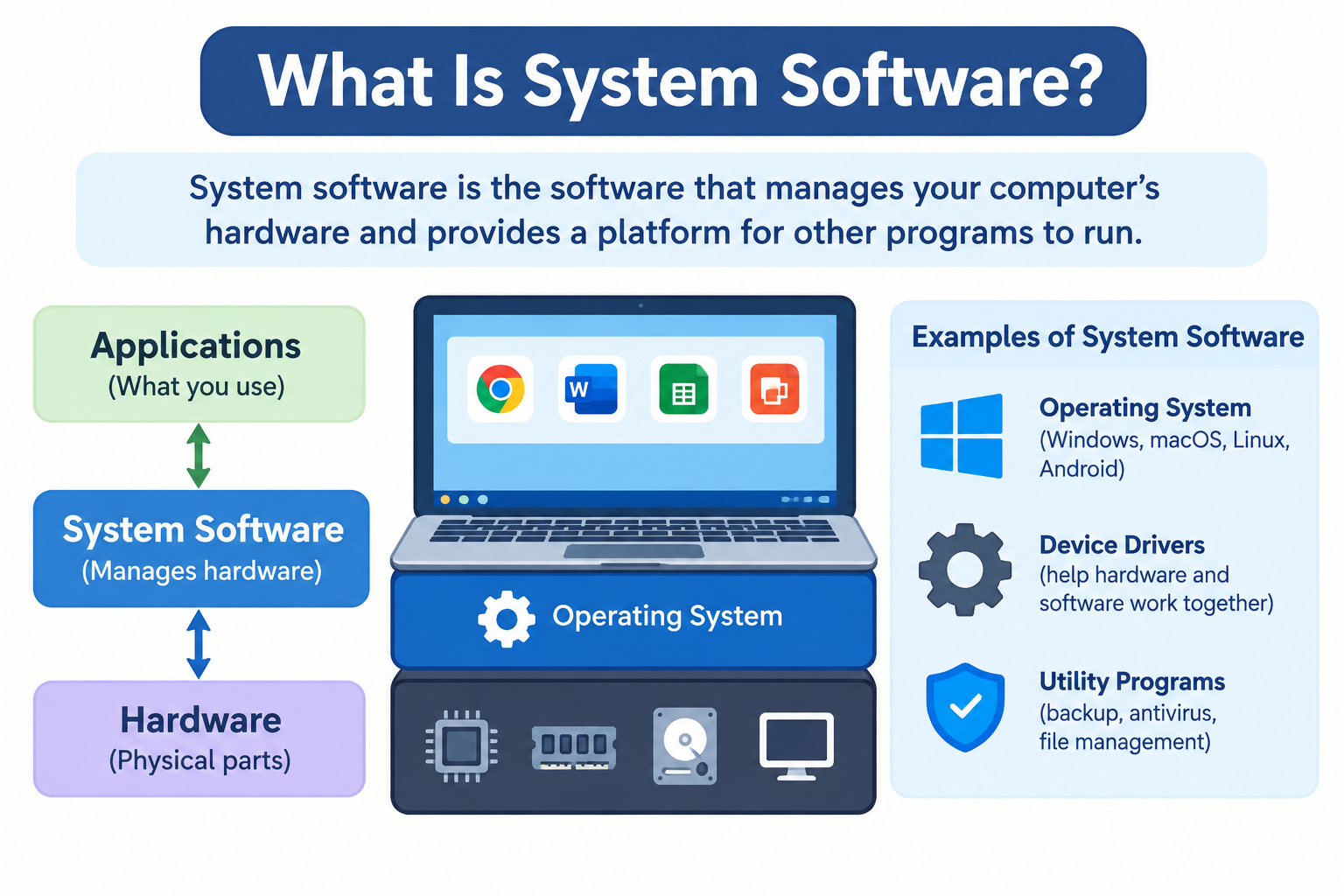
Every time you turn on a computer, open an app, print a document, or unlock your smartphone, software you never directly see or touch is doing the work that makes all of it possible. That software is called system software, and without it, no device you own could do anything useful at all.
What Is System Software?
System software is a category of software designed to manage a computer’s hardware resources and provide a foundation on which other software can run. It acts as the layer between the physical components of a device and the programs users interact with every day.
When you open a web browser, save a file, or connect a printer, system software handles the communication between your action and the hardware that carries it out. You do not see this happening. It operates silently in the background, managing resources, translating instructions, and keeping everything running in an organized way.
The relationship between hardware, system software, and application software works like a structured hierarchy. Hardware is the physical equipment: the processor, memory, storage, screen, and other components. System software sits directly above the hardware and manages it. Application software, the programs users interact with directly such as browsers, games, and word processors, sits above system software and depends on it to function.
Real-world examples of system software include Windows 11, macOS, Linux, iOS, and Android. These are all operating systems, which is the most well-known category of system software. But the category extends further than operating systems alone, as this article explains.
To understand the broader context of how software works across computing devices, the article on what is software and how does it work provides a useful starting point.
Why Is System Software Important?
Without system software, the hardware inside a computer or smartphone would have no way to receive meaningful instructions or coordinate its own components. A processor sitting inside a machine with no software would have nothing to process. A storage drive would have no system organizing how data is written or retrieved.
System software is important for several interconnected reasons.
It makes hardware usable. System software translates the requests made by users and applications into the specific low-level instructions that hardware components understand. Without this translation layer, application software would need to communicate directly with hardware, which would be impractical and would require every application to be rewritten for every different hardware configuration.
It manages shared resources. Multiple programs often run at the same time. The processor, memory, and storage are shared among them. System software coordinates this sharing so that programs do not interfere with each other and each receives the resources it needs to function correctly.
It provides a stable platform. Application developers build software on top of the services that system software provides. This means a developer writing a word processor does not need to write code that manages memory allocation or communicates with a printer at a hardware level. System software handles those tasks, and the application developer works with the interfaces system software exposes.
It handles foundational security. System software manages user accounts, access permissions, encryption capabilities, and network security features. These functions protect the device and its data at a level that application software alone cannot achieve.
It manages file storage. System software determines how files are organized on storage devices, how they are named, how they are retrieved, and how they are deleted. Without this management, storing and finding data on a device would be impossible.
Types of System Software
System software is not a single thing. It is a category that includes several distinct types of software, each with a specific role in keeping a device running.
Operating Systems
An operating system is the most fundamental and visible form of system software. It is the software that starts when you power on a device and provides the environment in which everything else runs.
The operating system manages all of a device’s hardware resources and provides a consistent set of services to application software. These services include memory management, process management, file system management, input and output management, and security enforcement.
Without an operating system, a computer or smartphone cannot perform any useful function for a user. The operating system is what makes the device coherent.
Common examples of operating systems include:
- Windows 11 — Microsoft’s operating system for personal computers and laptops
- macOS — Apple’s operating system for Mac computers
- Linux — An open-source operating system available in many distributions including Ubuntu, Fedora, and Debian, widely used on servers and developer machines
- iOS — Apple’s operating system for iPhone and iPad
- Android — Google’s operating system for smartphones and tablets, built on the Linux kernel
- ChromeOS — Google’s operating system for Chromebook devices
Device Drivers
A device driver is a software program that allows the operating system to communicate with a specific hardware component. Every piece of hardware connected to or built into a device needs a driver that tells the operating system how to talk to it.
When you connect a printer, the operating system uses the printer’s driver to understand how to send documents to it in a format the printer can process. When your graphics card renders an image on screen, the operating system communicates with it through the graphics driver.
Common examples of device drivers include:
- Graphics card drivers from manufacturers such as NVIDIA, AMD, and Intel
- Audio drivers that manage sound hardware
- Printer drivers from manufacturers such as HP, Canon, and Epson
- Touchscreen drivers that interpret touch input on smartphones and tablets
- Network adapter drivers that manage wired and wireless network connections
- Keyboard and mouse drivers
Without the correct driver, the operating system may not recognize a hardware device at all, or it may not be able to use the device’s full capabilities. Drivers are often installed automatically by the operating system when a device is connected, or they can be downloaded manually from the hardware manufacturer’s official website.
Firmware
Firmware is software that is stored directly on a hardware component rather than on the main storage drive of a computer. It is embedded into the hardware itself, typically in a chip on the component, and provides the low-level instructions that allow the hardware to operate.
Firmware sits below the operating system in the hierarchy. When a computer is powered on, the firmware on the motherboard runs before the operating system loads, performing initial hardware checks and preparing the system to boot.
The most commonly encountered firmware on a personal computer is the BIOS (Basic Input/Output System) or its modern replacement, UEFI (Unified Extensible Firmware Interface). This firmware initializes hardware components when the computer powers on and hands control to the bootloader, which then loads the operating system.
Other examples of firmware include:
- Router firmware that controls how a router manages network traffic
- Printer firmware that manages the printer’s internal functions
- Smartphone baseband firmware that manages the cellular radio hardware
- Firmware on hard drives and solid-state drives that manages how the storage hardware operates
The difference between firmware and an operating system is one of scope and location. Firmware is embedded in specific hardware and manages only that hardware. An operating system runs on the main processor and manages the entire device. Firmware updates are delivered by hardware manufacturers and improve functionality, fix bugs, or address security issues in the specific component.
Utility Software
Utility software is system software designed to help maintain, optimize, and manage a computer system. It supports the operating system by performing tasks that keep the system running efficiently and in good condition.
Unlike application software, which performs tasks for the user, utility software largely works on the system itself. Some utility software is built directly into the operating system. Other utility software is available as separate programs.
Common examples of utility software include:
- Disk cleanup tools that remove temporary files and free storage space
- File compression software such as ZIP utilities that reduce file sizes for storage or transfer
- Backup tools that create copies of files and system data for recovery purposes
- Antivirus software that scans for and removes malicious software
- Disk partitioning tools that divide storage drives into separate sections
- System monitoring tools that display information about processor usage, memory usage, and other system metrics
- Defragmentation tools on systems where they remain relevant
Understanding how antivirus software works as a category of utility software is covered in more detail in the article on what is antivirus software.
Bootloader
A bootloader is a small program that runs immediately after a device is powered on, before the operating system loads. Its job is to find the operating system stored on the device and load it into memory so it can start running.
The boot sequence on a typical computer works as follows. When power is applied, the firmware on the motherboard runs and performs initial hardware checks. It then looks for a bootloader on the storage device. The bootloader loads the operating system kernel into memory. The operating system then takes over and completes the startup process.
Common examples of bootloaders include:
- GRUB (Grand Unified Bootloader), widely used on Linux systems and capable of managing multiple operating systems on the same machine
- Windows Boot Manager, the bootloader used on Windows systems
On most consumer devices, users never interact with the bootloader directly. It runs its task silently and quickly during startup. On systems with multiple operating systems installed, the bootloader may present a menu allowing the user to choose which operating system to start.
Language Processors
Language processors are a category of system software that translates code written by software developers into instructions the hardware can execute. They sit at the intersection of system software and the software development process.
The main types of language processors are:
Compilers translate an entire program written in a high-level programming language into machine code before the program runs. The compiled result is a file that can be executed directly by the processor.
Interpreters translate and execute code one instruction at a time as the program runs, without producing a separate compiled file beforehand.
Assemblers translate code written in assembly language, which is closer to the hardware’s native instruction format, into machine code.
Everyday users rarely interact with language processors directly. They are tools used by software developers during the process of creating software. They are classified as system software because they are part of the infrastructure that supports the creation and execution of programs on a computing system.
System Software vs Application Software
System software and application software are the two primary categories of software, and understanding the difference between them clarifies how any computing device is organized.
| Feature | System Software | Application Software |
|---|---|---|
| Definition | Software that manages hardware and provides a platform for other software | Software that performs specific tasks for users |
| Purpose | Hardware management, resource allocation, platform provision | Word processing, browsing, gaming, communication |
| User interaction | Indirect, through interfaces and other software | Direct, through the application’s own interface |
| Examples | Windows, macOS, Android, device drivers, firmware | Microsoft Word, Google Chrome, Spotify, Instagram |
| Dependency | Can run without application software | Cannot run without system software |
| Installed by | Manufacturer, device setup, system administrator | User, app store, or administrator |
| Examples on Windows | Windows OS, device drivers, Windows Defender | Microsoft Edge, Notepad, games |
| Examples on smartphone | iOS or Android operating system, drivers | Camera app, messaging app, social media app |
The key relationship to understand is one of dependency. Application software depends on system software to run. When you open a word processor, it relies on the operating system to allocate memory, manage file saving and opening, display its interface on screen, and accept keyboard input. None of these functions are built into the word processor itself. They are provided by the system software underneath it.
System software can run independently of any specific application. A computer running an operating system with no additional applications installed is still functional as a system. The reverse is not true.
For more on what application software looks like from a user perspective, the article on what is an app explains the concept clearly for everyday users.
Examples of System Software
Here is a comprehensive reference organized by category.
Operating Systems:
- Windows 11 (Microsoft)
- macOS Sonoma (Apple)
- Linux distributions including Ubuntu, Fedora, Debian, and Arch Linux
- iOS (Apple)
- Android (Google)
- ChromeOS (Google)
Device Drivers:
- NVIDIA, AMD, and Intel graphics card drivers
- Realtek and other audio drivers
- Printer drivers from HP, Canon, Brother, and Epson
- Touchscreen drivers in smartphones and tablets
- Network adapter drivers for wired and wireless connections
- USB controller drivers
Firmware:
- BIOS and UEFI on computer motherboards
- Router firmware from manufacturers such as ASUS, Netgear, and TP-Link
- Printer firmware
- Smartphone baseband firmware
- Solid-state drive firmware
Utility Software:
- Windows Disk Cleanup and Storage Sense
- macOS Disk Utility
- Windows Task Manager and macOS Activity Monitor
- Time Machine on macOS for backups
- File compression tools
- Antivirus and security utilities
Bootloaders:
- Windows Boot Manager
- GRUB for Linux systems
How Does System Software Work?
The practical workings of system software become clear through a simple example. Consider what happens when you open a document stored on your computer.
- You double-click the document in your file manager. This is your action at the application level.
- The file manager sends a request to the operating system. It asks the operating system to open the file with the appropriate application.
- The operating system locates the file on the storage device. It reads the file system to find where the file’s data is stored on the drive.
- The operating system communicates with the storage driver. The driver translates the operating system’s request into the specific commands the storage hardware understands.
- The storage hardware retrieves the data. The physical drive reads the data from its storage medium.
- The data is passed back up the chain. The driver passes it to the operating system, which passes it to the application.
- The application displays the document. You see the file open on your screen.
This entire chain of events happens in fractions of a second. Understanding it clarifies why each layer of system software exists and what removing any part of it would mean.
The Kernel
The kernel is the innermost core of the operating system. It is the component that has direct authority over the hardware and manages the most fundamental system operations. All other parts of the operating system and all applications ultimately work through the kernel to access hardware resources.
Users never interact with the kernel directly. It runs continuously in the background, managing memory, processes, and hardware communication silently. According to the Linux Foundation, the Linux kernel is the core of the Linux operating system and manages hardware resources on behalf of the software running above it.
Memory Management
Memory management is the kernel’s responsibility for allocating RAM to running programs. When you open an application, the operating system sets aside a portion of available memory for it to use. When you close the application, that memory is released for other programs.
Memory management also ensures isolation between programs. One running application cannot read or overwrite the memory space belonging to another application. This separation prevents errors in one program from crashing others and provides a basic security boundary between processes.
Process Management
A process is a running instance of a program. When you open a browser, a game, and a music player at the same time, the operating system is managing three processes simultaneously, and likely many more running in the background.
The operating system’s process manager decides which process gets access to the processor at any given moment. Because processors handle tasks very quickly, the operating system can switch between processes rapidly enough that it appears to the user as though everything is running at the same time. On devices with multiple processor cores, multiple processes can genuinely run simultaneously across different cores.
File System Management
System software manages how files are organized and stored on drives. The file system determines how data is laid out on storage hardware, how directory structures are maintained, how file names are stored, and how the operating system keeps track of where each file begins and ends.
Common file systems include NTFS and FAT32 on Windows, APFS and HFS+ on macOS, and ext4 on Linux. Each file system has its own rules and structures, and the operating system must understand the file system format of each storage device it manages.
Input and Output Management
Every time you press a key, move a mouse, touch a screen, or receive audio output from speakers, system software is managing that interaction. The operating system coordinates input from all connected input devices and routes it to the correct application. It manages output to displays, speakers, printers, and other output devices through the appropriate drivers.
This coordination happens continuously and simultaneously, allowing a user to type, listen to music, and move a cursor all at the same time without any of these inputs or outputs interfering with each other.
System Software on Smartphones
Smartphones are computers in a compact form, and they run system software that follows the same principles as desktop and laptop computers, adapted for the constraints and capabilities of mobile hardware.
iOS and Android are the dominant smartphone operating systems. Both manage the processor, memory, camera hardware, cellular radio, Bluetooth, Wi-Fi module, GPS receiver, accelerometer, gyroscope, and every other hardware component inside the phone.
iOS is Apple’s proprietary operating system for iPhone and iPad. It manages all hardware on Apple devices and provides the platform on which App Store applications run. For more on how apps function within iOS, the article on what is an iPhone app covers the specifics.
Android is Google’s open-source operating system built on the Linux kernel. It powers a wide range of devices from different manufacturers and provides the platform on which Android applications run. The article on what is an Android app explains how apps interact with the Android platform.
Device drivers on smartphones manage hardware components including the touchscreen digitizer, camera image sensor, audio hardware, and cellular modem. Firmware is present in components including the baseband processor, which manages cellular communication independently of the main operating system.
Users interact with the smartphone’s system software through the home screen interface, the settings application, and the permissions and notification systems that manage how apps access hardware features.
Understanding how app permissions relate to the smartphone operating system is explained in the article on what is an app permission.
System Software on Windows
On a Windows computer, system software is present throughout the device and accessible through several built-in interfaces.
Windows itself is the operating system. Windows 11 is the current major version, managing all hardware resources and providing the platform for applications. According to Microsoft’s documentation, Windows provides a comprehensive set of services to applications through its application programming interfaces.
Device Manager is a built-in utility that shows all hardware components recognized by Windows and the drivers managing them. It allows users to update drivers, check for driver problems, and see information about installed hardware.
Windows Update delivers operating system updates, security patches, and driver updates automatically. Keeping Windows Update active is one of the most important practices for maintaining system security and stability.
Built-in utility software on Windows includes Disk Cleanup and Storage Sense for managing storage, Task Manager for monitoring running processes and resource usage, Windows Defender for security scanning, and Backup and Restore for data protection.
Windows Boot Manager handles the boot sequence, loading the Windows operating system when the computer powers on.
System Software on Mac
On a Mac, system software reflects Apple’s approach of designing hardware and software together, which allows tighter integration than is possible on platforms where hardware and software come from different companies.
macOS is Apple’s operating system for Mac computers. The current versions are macOS Sonoma and macOS Ventura. According to Apple’s developer documentation, macOS provides a rich set of frameworks and services that applications use to interact with hardware and system resources.
System Settings (previously System Preferences) provides a centralized interface for configuring system software settings, from display and sound to network, security, and privacy.
Built-in utility software on macOS includes Disk Utility for managing storage volumes and drives, Time Machine for automated backups, Activity Monitor for viewing process and resource usage, and Console for viewing system logs.
Driver integration on Mac is managed tightly by Apple, particularly on Apple Silicon Macs where Apple designs both the processor and the operating system. Drivers for Apple’s own hardware are included within macOS rather than distributed separately.
Firmware updates on modern Macs are delivered through the macOS software update mechanism. Apple silicon Macs include Apple’s own firmware across their components, updated as part of macOS system updates.
System Software and Security
System software sits at the foundation of a device’s security architecture. Because it manages hardware, memory, processes, and file access, vulnerabilities at the system software level can have consequences that reach across everything running on the device.
Operating system security features include user account management, which determines who can access the system and what they can do. Permission systems control which applications can access sensitive hardware like the camera and microphone, and which can read or write to sensitive file locations. Encryption features protect stored data. Built-in firewall capabilities control network traffic.
Keeping system software updated is among the most consistently recommended security practices from organizations including CISA. Updates frequently include patches for security vulnerabilities that have been discovered since the previous version was released. Delaying updates leaves devices exposed to vulnerabilities that are already publicly known.
Device drivers present a specific security consideration. Drivers operate with a high level of system access. Outdated drivers can contain vulnerabilities, and drivers from unverified sources carry the risk of malicious code running with elevated privileges. Obtaining drivers only from official hardware manufacturer websites reduces this risk.
Firmware vulnerabilities are particularly serious because firmware operates at a level below the operating system. A vulnerability at the firmware level can persist even if the operating system is reinstalled. Keeping firmware updated through official manufacturer channels is important for addressing this category of risk.
For a broader understanding of how security works across computing systems, the article on what is cybersecurity provides comprehensive context. The article on what is a firewall explains one specific security mechanism that system software manages.
System Software Updates
System software updates are one of the most routine and important maintenance tasks for any computing device. Understanding what these updates deliver and why they matter helps users make better decisions about keeping their devices current.
What updates deliver:
- Security patches address specific vulnerabilities discovered since the previous version was released
- Bug fixes correct errors in existing system behavior
- Performance improvements optimize how the system uses hardware resources
- New features add capabilities to the operating system or its built-in utilities
- Driver updates improve or fix support for specific hardware components
- Firmware updates address issues or improve functionality at the hardware component level
How updates are delivered:
- Windows delivers updates through Windows Update, accessible through Settings. Major version updates and monthly cumulative updates are both delivered this way.
- macOS delivers updates through System Settings under Software Update. Apple typically delivers both security patches and major version updates through this mechanism.
- iOS delivers updates through Settings under General and then Software Update. Security updates are released regularly and can be critical for device protection.
- Android delivers operating system updates through the Settings menu, though the exact path varies by device manufacturer. Security patches are released on a regular schedule by Google and delivered by manufacturers.
Major version updates represent significant changes to the operating system, often introducing new features, interface changes, and architectural improvements. Incremental patch updates are smaller releases that primarily address security issues and bugs without changing the overall structure of the system.
Consistently applying updates is supported by security guidance from organizations including NIST, which emphasizes keeping software current as a foundational security practice.
Open Source vs Proprietary System Software
System software exists across a spectrum from fully proprietary to fully open source, and understanding this distinction helps users make informed decisions about the software their devices run.
Proprietary System Software
Proprietary system software is developed and owned by a company. The source code, meaning the human-readable instructions that make up the software, is not publicly available. Users receive a compiled version of the software and agree to the terms set by the company for its use.
Examples of proprietary system software include:
- Windows (Microsoft)
- macOS (Apple)
- iOS (Apple)
With proprietary system software, users rely on the developing company for security updates, bug fixes, and new features. The closed nature of the source code means that independent researchers cannot review the code for vulnerabilities, though many companies operate bug bounty programs and work with security researchers.
Open Source System Software
Open source system software makes its source code publicly available. Anyone can review, study, modify, and in many cases distribute the software under the terms of its applicable license.
Examples of open source system software include:
- Linux and its many distributions, which power a large proportion of the world’s servers and a significant share of desktop and developer computing
- Android, which is based on the Linux kernel and whose core components are open source, though device manufacturers and Google add proprietary layers
- Many device drivers, particularly those distributed as part of Linux
Open source does not automatically mean free of charge, nor does it mean the software lacks professional support. Many open source operating systems and tools have commercial support options and are maintained by large organizations and communities.
The Linux Foundation supports the development and maintenance of the Linux kernel and related open source projects, representing a significant portion of the world’s open source system software ecosystem.
System Software vs Middleware
Middleware is a term that sometimes creates confusion when discussing system software. Understanding where the boundary lies helps clarify the overall software architecture of computing systems.
Middleware sits between the operating system and the application software that uses it. It provides services and abstractions that applications can use without needing to interact directly with the operating system’s low-level interfaces.
Examples of middleware include:
- Database management systems like MySQL or PostgreSQL that applications use for structured data storage
- Web server software like Apache or Nginx that handles HTTP requests and serves applications over the internet
- Message queue systems that allow applications to communicate asynchronously
- Runtime environments like the Java Runtime Environment or the .NET runtime that provide a consistent execution environment for applications built on those platforms
Middleware is not system software in the traditional sense because it does not directly manage hardware. It is not application software in the traditional sense because it does not perform end-user tasks. It occupies its own distinct layer in the software stack, sitting above system software and below the application layer.
Common System Software Problems and Solutions
System software problems are among the most disruptive issues a device can experience, because they affect the foundation that everything else depends on. Most common problems have established solutions available through official support channels.
Outdated or missing device drivers causing hardware to malfunction:
The most reliable solution is to visit the hardware manufacturer’s official website, locate the support or drivers section for the specific hardware model, and download the current driver version. On Windows, Device Manager can also detect and install drivers for many common components automatically.
Operating system errors or instability:
Check for pending system updates first, as many errors are addressed through updates. Use built-in diagnostic tools such as Windows’ built-in troubleshooters or macOS’s Disk Utility to check for system issues. Consult the official support documentation from Microsoft or Apple for specific error messages. If instability persists, the manufacturer’s official support channels are the appropriate resource.
Firmware issues causing device problems:
Visit the hardware manufacturer’s official website for the specific device and check the support section for firmware updates. Follow the manufacturer’s official instructions for applying firmware updates carefully, as an interrupted firmware update can cause additional problems. Never use unofficial sources for firmware.
Slow system performance related to system software:
Use built-in utility tools to check for storage issues, clear temporary files, and review background processes consuming excessive resources. Task Manager on Windows and Activity Monitor on macOS show which processes are using the most CPU and memory. Keeping the operating system and drivers updated addresses many performance issues. Adding hardware resources such as additional RAM addresses performance limitations that software optimization cannot resolve.
Security vulnerabilities from outdated system software:
Apply all available system updates promptly through the official update mechanism for your operating system. Enable automatic updates where possible to ensure security patches are applied without requiring manual intervention.
Always use official manufacturer and operating system support channels rather than third-party software that claims to diagnose or fix system software problems, as such tools can introduce their own risks.
Frequently Asked Questions
What is system software?
System software is software designed to manage a computer’s hardware resources and provide a platform for application software to run. It operates largely in the background and includes operating systems, device drivers, firmware, and utility software.
What are the types of system software?
The main types are operating systems, device drivers, firmware, utility software, bootloaders, and language processors. Each serves a different role in managing hardware and supporting the running of other software.
What are examples of system software?
Examples include Windows 11, macOS, Linux, iOS, and Android as operating systems. Graphics card drivers, printer drivers, and audio drivers as device drivers. BIOS and UEFI as firmware. Disk Cleanup, antivirus tools, and backup software as utility software.
What is the difference between system software and application software?
System software manages hardware and provides a platform. Application software performs specific tasks for users. Application software depends on system software to run. Examples of application software include word processors, browsers, and games.
Is an operating system system software?
Yes. An operating system is the most fundamental category of system software. It manages all hardware resources and provides services to application software.
What is a device driver?
A device driver is software that allows the operating system to communicate with a specific hardware component such as a graphics card, printer, or touchscreen.
What is firmware?
Firmware is software stored directly on a hardware component that provides low-level control for that specific hardware. Examples include the BIOS or UEFI on a computer motherboard and router firmware.
What is utility software?
Utility software performs maintenance and management tasks on a computer system. Examples include disk cleanup tools, backup software, file compression tools, and antivirus programs.
What is a bootloader?
A bootloader is a small program that runs when a device powers on and loads the operating system into memory before the operating system itself takes control.
Why is system software important?
System software makes hardware usable, manages shared resources, provides a stable platform for applications, and handles foundational security. Without it, a device cannot perform useful functions.
Can a computer work without system software?
Not in any practical sense. Hardware without system software has no organized way to receive instructions, manage resources, or communicate with users or applications. A computer requires at minimum a bootloader and operating system to be useful.
What is system software on a smartphone?
On a smartphone, system software includes the operating system, either iOS or Android, as well as device drivers managing hardware components like the touchscreen, camera, and cellular radio, and firmware embedded in components like the baseband processor.
Is Android system software?
Android is an operating system, which is a category of system software. It manages the hardware of Android smartphones and tablets and provides the platform on which Android apps run. Android is based on the Linux kernel.
Is iOS system software?
Yes. iOS is Apple’s operating system for iPhone and iPad and is a form of system software. It manages all hardware on Apple mobile devices and provides the environment in which iOS apps operate.
What is the most common type of system software?
Operating systems are the most widely recognized and interacted-with type of system software. Every general-purpose computing device runs an operating system.
How is system software different from hardware?
Hardware is the physical components of a device, including the processor, memory, storage, screen, and input devices. System software is code that runs on the hardware and manages it. Hardware is tangible. System software is not.
Should I update my system software?
Yes. Keeping system software updated is one of the most important practices for security and stability. Updates deliver security patches, bug fixes, and performance improvements. Delaying updates leaves devices exposed to known vulnerabilities.
Disclaimer:
This article is intended for educational purposes and provides a general overview of system software for beginners and everyday users. Technical implementations of system software vary significantly between operating systems, hardware manufacturers, and software vendors. Information in this article reflects general computing concepts and may not apply to every specific operating system, device, or software environment. Always refer to official documentation from your operating system or software vendor for specific and authoritative technical guidance.
By Laraib
Laraib is a technology writer and research contributor covering AI, programming, software, cybersecurity, cloud computing, and the latest developments in technology. She focuses on creating clear, practical, and well-researched content that makes complex tech topics easy to understand.