
 By saman zahra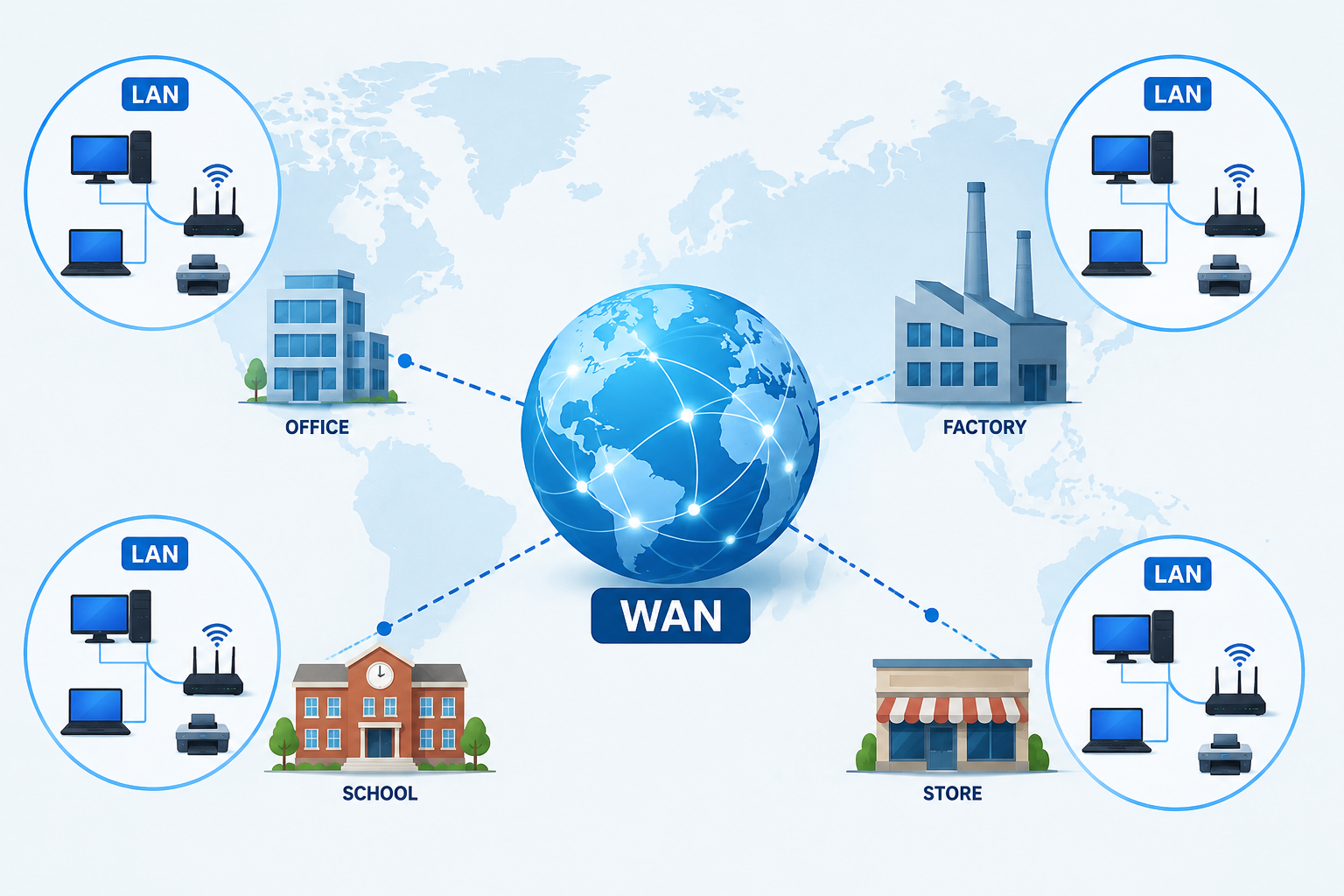
Introduction
Imagine a company with headquarters in New York, a regional office in London, and a development center in Singapore. Every day, employees across all three locations need to share files, access centralized databases, join video calls, and use the same internal applications. Connecting all of these locations into a single coherent network requires something far larger than a local office network.
This is exactly the problem that a Wide Area Network solves. Understanding what is WAN helps explain how organizations connect locations across cities, countries, and continents, and why the telecommunications infrastructure that carries internet traffic around the world works the way it does.
A WAN is not the same as a LAN, and it is not simply another name for the internet, though the internet is the largest and most widely known example of WAN-scale networking. For a broader understanding of how networks are defined and categorized, see our guide on what is a network and how it works. For context on how WANs relate to local networks, our article on what is LAN and how it works covers the local side of this relationship in detail.
Quick Answer: What Is WAN?
A WAN, or Wide Area Network, is a computer network that connects devices, networks, or locations across a large geographic area such as multiple cities, countries, or continents. WANs use telecommunications infrastructure including fiber optic cables, leased lines, cellular networks, and satellite links. The internet is the largest and most widely known example of a WAN, but private enterprise WANs also exist to connect organizational locations across large distances.
What Is WAN?
A Wide Area Network, or WAN, is a computer network that connects devices, networks, or locations across a large geographic area. Unlike a local area network that covers a single building or campus, a WAN spans distances that can range from a few kilometers between city offices to thousands of kilometers between international locations.
WANs rely on telecommunications infrastructure to bridge these distances. This infrastructure includes fiber optic cables running beneath streets and oceans, leased lines provided by telecommunications companies, cellular mobile networks, and satellite links. The organizations that operate this infrastructure, including telecommunications providers and internet service providers, make WAN connectivity possible for businesses and individual users alike.
A helpful but simplified analogy for understanding a WAN is to think of a highway system that connects multiple cities. Each city has its own internal road network for local movement, equivalent to a local area network, and the highways between cities allow travel over much larger distances, equivalent to the WAN links connecting those local networks. This analogy is simplified, but it captures the core idea of long-distance connectivity linking local systems together.
WANs can be private, such as a corporate WAN connecting a company’s offices in different countries, or public, such as the internet, which connects billions of devices globally. The internet is the largest and most widely known example of WAN-scale networking, but it represents one specific type of WAN rather than the definition of WAN itself. For context on the full range of network types, see our guide on what is a network and how it works.
What Does WAN Stand For?
WAN stands for Wide Area Network. Each word in the name describes something specific and meaningful about what this type of network is and does.
Wide describes the geographic scale. Unlike local networks that cover a building or campus, a WAN covers distances that are genuinely wide, potentially spanning entire countries or continents. Wide in this context signals that the network operates at a fundamentally different scale from local networking.
Area reinforces the geographic dimension of the network. It indicates that the network is defined by the physical area it covers, distinguishing it from smaller network types that cover limited local areas.
Network refers to the system of interconnected devices, connections, and infrastructure that allows communication and data exchange. A WAN is a network in the full sense, with devices, links, protocols, and management systems working together to enable communication across long distances.
Together, Wide Area Network describes a network designed specifically to operate at large geographic scale, connecting locations and networks that are too far apart for local networking technologies to bridge directly.
How Does a WAN Work?
A WAN works by linking multiple local networks together across large distances using telecommunications infrastructure and routing equipment. The process involves several components working in coordination.
Step 1: Multiple locations, each with their own local area network, need to communicate with each other across distances that exceed what local networking can directly support.
Step 2: Each location has its own LAN connecting the devices within that site. The LAN handles local communication within the building or campus.
Step 3: WAN connections are established between locations using telecommunications infrastructure. These connections might be dedicated leased lines, fiber circuits, cellular links, or other WAN technologies depending on the service and requirements.
Step 4: A router at each location, often called a WAN router or edge router, manages traffic between the local network and the WAN connection. It determines which traffic should be sent out over the WAN and routes incoming WAN traffic to the correct local destination.
Step 5: Data travels across the WAN infrastructure from the sending location toward its destination. The path it takes depends on the WAN technology in use and the routing decisions made by equipment along the way.
Step 6: The WAN technology in use determines how data is encapsulated, transmitted, and managed across the long-distance connection. Different technologies handle this differently, as explained in the types of WAN section below.
Step 7: Security measures including encryption, firewalls, and VPN tunnels protect data as it travels across WAN connections, which may traverse infrastructure outside the organization’s direct control.
For a detailed explanation of how routers manage traffic at the boundary between local networks and WAN connections, see our guide on what is a router and how it works.
What Are the Main Components of a WAN?
A WAN is built from several key components that each play a specific role in enabling long-distance network connectivity.
| Component | Main Purpose |
|---|---|
| WAN router | Connects LAN to WAN and routes traffic between them |
| WAN link | Physical or logical connection spanning the distance |
| WAN service provider | Delivers the WAN connectivity infrastructure |
| WAN protocol | Governs how data is transmitted across WAN connections |
| Firewall and VPN | Protects WAN traffic and secures connections |
WAN Router
The WAN router, also called an edge router, sits at the boundary between the local network and the WAN connection. It manages the flow of traffic between the LAN at a given location and the wider WAN infrastructure. The router makes forwarding decisions based on destination IP addresses and routing tables that reflect the topology of the wider network. In enterprise environments, WAN routers are dedicated hardware devices managed by network engineers.
WAN Links
WAN links are the physical or logical connections that span the distances between network locations. These can be dedicated fiber circuits leased from a telecommunications provider, cellular connections over mobile networks, satellite links for remote locations, or broadband connections used as WAN access. The type of WAN link used determines the available bandwidth, latency characteristics, and reliability of the WAN connection.
WAN Service Provider
WAN service providers are the telecommunications companies and internet service providers that own and operate the infrastructure through which WAN connections travel. Organizations that need WAN connectivity typically contract with one or more providers for WAN circuits, connectivity services, or managed WAN solutions. The provider’s network becomes the medium through which the organization’s locations communicate.
WAN Protocols
WAN protocols govern how data is formatted, addressed, and transmitted across WAN connections. Different WAN technologies use different protocols suited to their specific transmission methods and requirements. These protocols operate at various layers and handle tasks from physical signal transmission to logical data framing and error handling.
WAN Security Devices
Firewalls at WAN boundaries filter traffic entering and leaving the organization’s network through the WAN connection. VPN gateways create encrypted tunnels for secure communication over WAN links, particularly important when WAN traffic traverses shared or public infrastructure. Encryption protects the confidentiality of data in transit across WAN connections.
Types of WAN
WAN technology is not one-size-fits-all. Different WAN types suit different needs based on performance requirements, budget, geographic coverage, and the nature of the locations being connected.
Leased Lines
A leased line is a dedicated, point-to-point telecommunications connection between two locations, leased from a service provider on a continuous basis. Because the bandwidth is dedicated rather than shared, leased lines offer consistent and predictable performance. This reliability makes them suitable for organizations where WAN performance is critical and consistent throughput is required.
The trade-off is cost. Leased lines are generally more expensive than shared WAN alternatives, particularly over longer distances. For organizations where connectivity reliability justifies the investment, leased lines remain a valuable WAN option.
MPLS (Multiprotocol Label Switching)
MPLS is a widely used enterprise WAN technology that uses short path labels rather than long network addresses to direct data through the network. Rather than each router making independent forwarding decisions based on destination IP addresses, MPLS assigns labels to packets at the network entry point and uses those labels to forward packets along predetermined paths through the provider’s network.
MPLS enables traffic engineering, which allows network managers to control how different types of traffic are routed and prioritized. It also supports Quality of Service features that can prioritize voice and video traffic over less time-sensitive data. From the customer’s perspective, an MPLS network feels like a private network, even though the traffic travels through a shared service provider infrastructure.
SD-WAN (Software-Defined WAN)
SD-WAN is a modern approach to WAN management that uses software to intelligently control and optimize WAN connections. Rather than relying on a single WAN technology or manually configured routing, SD-WAN can aggregate multiple connection types, including broadband internet, MPLS, and cellular, and dynamically route traffic across them based on application requirements and current network conditions.
SD-WAN is covered in more detail in its own dedicated section later in this article.
Broadband WAN
Broadband WAN uses standard internet access technologies such as fiber, cable, or DSL as the basis for WAN connectivity. Smaller organizations and branch offices often use broadband connections as their WAN link, accessing the internet and connecting to centralized resources over a standard ISP broadband connection.
Broadband WAN is cost-effective and widely available, though it shares infrastructure with other users rather than providing dedicated bandwidth. Performance can vary depending on the broadband technology, ISP, and usage patterns on the shared network.
Cellular WAN
Cellular WAN uses mobile network infrastructure, including 4G LTE and 5G networks, to provide WAN connectivity. This approach is particularly useful for mobile deployments, remote locations where fixed-line WAN is not available, and as a backup connection that activates if the primary WAN link fails.
The performance of cellular WAN depends on the signal strength, the mobile carrier’s network, and the number of users sharing the cellular capacity in a given area. 5G networks offer significantly higher bandwidth and lower latency than earlier cellular generations, making cellular WAN more capable for demanding applications.
Satellite WAN
Satellite WAN uses satellite links to provide connectivity in locations where terrestrial WAN infrastructure is unavailable or impractical. This includes remote rural locations, maritime environments, and areas with limited telecommunications development.
Satellite WAN typically involves higher latency than terrestrial WAN technologies because data must travel to a satellite and back. The actual characteristics depend significantly on the satellite type and orbit, with newer low-earth orbit satellite constellations offering meaningfully lower latency than traditional geostationary satellite services. Performance varies by provider, technology, and environmental conditions.
WAN vs LAN
The comparison between WAN and LAN is one of the most fundamental distinctions in networking. Understanding what each does differently clarifies why both exist and how they work together.
| Feature | WAN | LAN |
|---|---|---|
| Stands for | Wide Area Network | Local Area Network |
| Geographic scope | Large area, cities, countries, continents | Limited area, building or campus |
| Typical ownership | Telecommunications providers or ISPs | Single organization or household |
| Infrastructure | Fiber, leased lines, cellular, satellite | Ethernet cables, switches, Wi-Fi |
| Speed | Variable, depends on WAN technology and provider | Generally high within local segment |
| Example | Enterprise multi-site network or internet | Home or office network |
| Management | Often involves service providers | Typically managed internally |
In most real-world deployments, a LAN exists at each WAN location. The LAN connects the devices within that site. The WAN connects those LANs to each other and to other networks across large distances. Neither replaces the other. They serve different purposes at different scales and work together as complementary layers of network infrastructure.
For a comprehensive explanation of how local area networks work, see our guide on what is LAN and how it works.
WAN vs MAN
A Metropolitan Area Network, or MAN, occupies the scale between a LAN and a WAN. It covers a city or metropolitan area, which is larger than a single building or campus but smaller than the multi-city or global distances that WANs span.
| Feature | WAN | MAN |
|---|---|---|
| Stands for | Wide Area Network | Metropolitan Area Network |
| Geographic scope | Large, multi-city or global | City or metropolitan area |
| Typical use | Enterprise multi-site, internet backbone | City networks, ISP metro backbone |
| Infrastructure | Long-distance telecommunications | City-scale fiber or wireless |
A MAN might connect multiple buildings within a city for a single organization, or it might form part of an ISP’s metropolitan distribution infrastructure connecting customers across a city to the broader internet. A WAN extends this concept further, connecting metropolitan areas, cities, and countries into networks of truly wide geographic scope.
WAN vs Internet
One of the most important conceptual distinctions in networking is understanding how WAN and the internet relate to each other. They are not the same thing, and treating them as synonyms creates real confusion.
| Feature | WAN | Internet |
|---|---|---|
| Scope | Can be private or public, varies in size | Global public network |
| Ownership | Can be privately owned and operated | Distributed across many organizations |
| Access | Controlled by organization or provider | Generally publicly accessible |
| Example | Enterprise private WAN | World Wide Web and global services |
| Privacy | Can be fully private | Public |
The internet is the largest and most widely known example of WAN-scale networking. It uses WAN infrastructure to connect billions of devices across every country in the world. In this sense, the internet is built on WAN principles and WAN infrastructure.
However, not every WAN is the internet. A private enterprise WAN that connects a company’s offices in different cities is a WAN, but it is not the internet. It is a private network using WAN-scale infrastructure to connect organizational locations without those connections being part of the public internet.
Understanding this distinction is important. When you connect your home to your ISP, you are using a WAN link to access the internet, but your home is not operating a WAN in the enterprise sense. You are connecting to the public internet through the ISP’s WAN infrastructure.
For a full explanation of how the internet works as a global system, see our guide on what is the internet and how it works.
What Is a WAN Port?
If you look at a home or office router, you will typically see a WAN port alongside several LAN ports. Understanding what the WAN port does helps clarify how home internet connections relate to WAN concepts.
The WAN port on a home router is the port that connects the router to the ISP’s access network, usually through a modem or ONT. The connection that comes in through the WAN port carries the internet service that the ISP provides. The router uses this WAN connection to provide internet access to all the devices on the local network.
Having a WAN port on your router does not mean you are operating an enterprise WAN. The WAN port is simply the interface where the router connects to the ISP’s service. The naming reflects the fact that the ISP connection represents a connection to a wider network beyond the local one, but a home user’s router does not constitute a WAN in the enterprise networking sense.
In enterprise environments, WAN ports and WAN routers are dedicated to managing the organization’s WAN connections to other locations and the internet. These are more complex devices with more sophisticated routing and security capabilities than a typical home router.
For more detail on how routers and their ports work, see our guides on what is a router and how it works and what is a modem and how it works.
What Is a WAN IP Address?
A WAN IP address is the public IP address assigned to a router’s WAN interface by the ISP. This is the address that identifies the connection on the public internet and is visible to servers and services that the connection reaches.
The WAN IP address is distinct from the private IP addresses used within the local network. Devices on the LAN use private addresses that are not directly reachable from the internet. When those devices communicate with internet services, the router translates their private addresses to the WAN IP address through a process called Network Address Translation.
WAN IP addresses can be dynamic, meaning the ISP assigns a different address each time the connection is established or renewed, or static, meaning the same address is assigned consistently. Static WAN IP addresses are important for organizations that host services accessible from the internet, because those services need a consistent address that clients can reliably reach.
For a complete explanation of how IP addressing works across both local and public networks, see our guide on what is an IP address and how it works.
WAN Speed
WAN speed is not a fixed characteristic. It varies considerably depending on the WAN technology in use, the service provider, the service plan, and current network conditions.
Leased lines provide dedicated bandwidth that is not shared with other users. The organization pays for a specific bandwidth level and receives consistent throughput at that level. This predictability is one of the primary reasons organizations choose leased lines for critical WAN connections.
Broadband WAN speeds depend on the ISP plan, the broadband technology used, and the level of network congestion on shared infrastructure. Performance can vary throughout the day as demand on shared networks fluctuates.
Cellular WAN performance depends heavily on signal strength, the mobile generation supported by both the device and the local cell infrastructure, and the number of users sharing cellular capacity in the area. 5G cellular connections can provide substantially higher bandwidth than 4G LTE where 5G coverage is available.
Satellite WAN performance depends on the satellite network used, weather conditions, and the type of satellite orbit. Latency on satellite connections is generally higher than on terrestrial WAN technologies because of the distances signals must travel.
It is important not to treat WAN speed as a simple comparison with LAN speed. Within a local network, data transfer speeds are governed by local hardware. WAN speeds are governed by the telecommunications infrastructure and the service contracted from the provider. These are fundamentally different environments operating at different scales.
WAN in Different Environments
WAN technology serves different purposes depending on the environment and scale.
Enterprise WAN
Large organizations with multiple office locations rely on enterprise WANs to connect their sites into a single coherent network. An enterprise WAN allows employees at different locations to access shared servers, use centralized applications, collaborate in real time, and communicate as though they were on the same network.
Enterprise WANs commonly use MPLS for reliable, manageable connectivity with Quality of Service support, or SD-WAN for more flexible, cost-effective management of multiple connection types. Security is a major consideration, with firewalls, VPN tunnels, and access controls protecting traffic flowing across the WAN.
Home Internet as a WAN Connection
When a home user connects to the internet through an ISP, they are using a WAN link even though they are not operating an enterprise WAN. The ISP’s network is WAN infrastructure that carries traffic between the home and internet destinations. The home router’s WAN port connects to this infrastructure through a modem or ONT.
This is worth clarifying because many people encounter the term WAN first when looking at their home router settings. The WAN connection in this context is the internet connection provided by the ISP, not a private enterprise network connecting multiple organizational locations.
Service Provider WAN
ISPs and telecommunications companies operate their own WAN infrastructure as a core part of their business. This infrastructure includes long-haul fiber optic cables connecting cities and countries, submarine cables crossing oceans, and the routing equipment that directs traffic across these long distances. Service provider WANs form the backbone of internet connectivity, carrying traffic between ISPs and enabling global communication.
Cloud WAN
Major cloud providers operate their own global network infrastructure to connect their data centers and deliver services reliably to users worldwide. This infrastructure represents WAN at a massive scale, designed to minimize latency and maximize reliability for cloud service delivery. Organizations connecting to cloud services over SD-WAN can optimize how their WAN traffic is routed to cloud destinations.
What Is SD-WAN?
SD-WAN, which stands for Software-Defined Wide Area Network, is a modern approach to WAN management that uses software intelligence to control and optimize how network traffic flows across WAN connections.
Traditional WAN management requires hardware-level configuration at each location and is often tied to a single WAN provider or technology. SD-WAN changes this by introducing a software layer that can manage multiple WAN connections of different types simultaneously, such as MPLS, broadband, and cellular, and dynamically route traffic across them based on application requirements and real-time network conditions.
The practical benefits of SD-WAN for organizations include more flexible use of different connection types rather than dependence on a single provider, the ability to route critical or latency-sensitive traffic, such as voice and video, over the best-performing available connection, simpler central management of WAN policy across many locations, and potentially lower WAN costs by reducing dependence on more expensive dedicated WAN services.
SD-WAN has become an increasingly common choice for organizations managing multi-site networks, particularly as cloud services have become central to how businesses operate. The ability to optimize routing to cloud destinations is a natural fit for SD-WAN’s software-defined approach.
WAN and the Internet
The relationship between WANs and the internet is both close and commonly misunderstood. The internet is built on WAN-scale infrastructure, and accessing the internet always involves traversing WAN links.
When a home user sends a request to a website, that request leaves the home network through the ISP’s WAN infrastructure, travels across ISP backbone networks and potentially international links, and reaches the server hosting the site. Every step of that journey beyond the local network involves WAN infrastructure operated by ISPs and telecommunications providers.
For businesses, internet access is itself a WAN service. The connection from the office to the ISP is a WAN link. Traffic destined for internet services travels across that WAN link and through the ISP’s network before reaching its destination.
Understanding this relationship helps clarify why WAN connectivity quality affects internet performance. The speed, reliability, and latency of the WAN link between a location and the internet directly influences the internet experience for users at that location.
For a broader understanding of how the internet is structured and operates globally, see our guide on what is the internet and how it works. For the equipment that connects local networks to ISP WAN links, see our guide on what is a modem and how it works.
WAN and DNS
DNS plays an important role in WAN environments, and understanding how it works in this context helps clarify how devices find and connect to resources across WAN-scale networks.
When a device on a local network wants to connect to a resource by name, whether that resource is on the internet or on another part of the organization’s WAN, it sends a DNS query to resolve the name into an IP address. That DNS query travels across the WAN connection to reach the appropriate DNS resolver.
In enterprise WAN environments, organizations often operate their own internal DNS servers that can resolve both internal resource names and public internet domain names. Internal DNS allows devices across all WAN-connected locations to reach internal servers and services by name without those names being publicly visible.
For home and small business users, the DNS server addresses provided by the ISP handle resolution for internet domain names. These queries travel across the WAN link to the ISP’s DNS infrastructure before the resolved address is returned.
For a complete explanation of how DNS works, see our guide on what is DNS and how the Domain Name System works.
WAN Security
WAN security requires careful attention because data traveling across a WAN often passes through infrastructure that is not under the organization’s direct control. Unlike a local network where the physical infrastructure is on the organization’s premises, WAN traffic may traverse shared telecommunications infrastructure, public internet links, or third-party networks.
Encryption is one of the most important WAN security measures. Encrypting data before it leaves the local network ensures that even if WAN traffic is intercepted, it cannot be read by unauthorized parties. VPN tunnels are a common way to implement encryption for WAN traffic.
Firewalls at WAN boundaries control which traffic is permitted to enter and leave the network through the WAN connection. A properly configured firewall prevents unauthorized access while allowing legitimate WAN traffic to flow.
MPLS security considerations are worth understanding for organizations using MPLS WANs. MPLS networks are logically separated from other customers’ traffic on the provider’s infrastructure, but they are not inherently encrypted. Organizations handling sensitive data over MPLS may add encryption for an additional layer of protection.
SD-WAN security features typically include integrated encryption, firewall capabilities, and the ability to segment traffic across different WAN paths based on security requirements. Many SD-WAN solutions include security functionality as a core component of their design.
Monitoring WAN traffic helps detect unusual patterns that might indicate a security incident, misuse, or a performance problem that warrants investigation.
Physical security of WAN equipment, including WAN routers and any on-premises termination equipment, is also a consideration. Unauthorized physical access to WAN edge equipment can compromise network security.
For comprehensive guidance on protecting networks and connected systems, see our articles on what is cybersecurity, what is a firewall, and network security.
WAN and Cloud Computing
Cloud computing and WAN connectivity are deeply interconnected. When an organization moves applications and data to cloud services, the WAN connection between the organization and the cloud provider becomes a critical part of how those services are accessed.
The path from an organization’s location to a cloud service follows the WAN:
Office LAN → WAN Router → WAN Link → ISP Network → Internet → Cloud Provider
The quality and capacity of the WAN link directly affects the performance of cloud services experienced by users at that location. A constrained or unreliable WAN connection creates a bottleneck that limits what cloud services can deliver regardless of the cloud provider’s infrastructure quality.
SD-WAN has become particularly relevant in cloud-focused environments because it allows organizations to optimize how WAN traffic is routed to cloud destinations. Rather than routing all cloud traffic through a central data center, SD-WAN can direct cloud traffic directly from branch locations to cloud providers over the most appropriate available WAN connection.
Cloud providers also operate their own WAN infrastructure. The global networks of major cloud platforms carry traffic between their data centers and to users around the world, making cloud service delivery possible at a global scale.
For more on how cloud services operate and how they are accessed over network connections, see our guides on what is cloud computing, how does cloud computing work, and what is cloud hosting.
Common WAN Problems
WAN problems can significantly affect an organization’s ability to operate, particularly when centralized resources or cloud services are involved.
WAN link outage is the most severe problem, resulting in complete loss of connectivity between locations or to the internet. This can result from provider infrastructure failure, physical damage to WAN circuits, or equipment failure at the WAN edge.
Slow WAN performance may result from bandwidth congestion, a WAN link operating below its contracted capacity, Quality of Service misconfiguration allowing low-priority traffic to consume excessive bandwidth, or an issue with the service provider’s network.
High latency on WAN connections increases response times for applications and can significantly affect the performance of real-time communications such as voice and video. Latency problems can originate in the WAN link itself, in provider network congestion, or in routing inefficiency.
Packet loss over a WAN connection causes retransmissions that reduce effective throughput and can cause application errors. Packet loss may indicate physical layer problems on the WAN link or congestion in the provider’s network.
WAN security incidents including unauthorized access attempts, unusual traffic patterns, or suspected data exfiltration require immediate attention and investigation.
Configuration problems at the WAN edge, such as incorrect routing configurations or firewall rule changes, can prevent WAN connectivity or cause traffic to be misrouted.
Hardware failure at the WAN edge, including router hardware failures, can bring down WAN connectivity for an entire location.
How to Troubleshoot WAN Problems
A structured approach to WAN troubleshooting helps identify the source of the problem and reach a resolution efficiently.
- Identify whether the problem is WAN-wide or affects only specific locations. If all locations are affected, the problem may be in a central component. If only one location is affected, that location’s WAN connection is the likely source.
- Check WAN router status and connectivity indicators. Router status lights and management interfaces provide immediate information about the state of WAN connections.
- Check physical WAN connections where accessible. Confirm that WAN interface cables are properly connected and that physical connection indicators show an active link.
- Verify WAN IP address assignment. Confirm that the WAN interface has received a valid IP address from the ISP or WAN provider. A missing or incorrect WAN IP address prevents connectivity.
- Test connectivity to known external addresses. Testing reachability to stable external addresses helps confirm whether the WAN link is carrying traffic or is completely down.
- Check DNS resolution over the WAN connection. If IP connectivity is working but name resolution is failing, DNS configuration may be the issue rather than the WAN link itself.
- Contact the WAN service provider or ISP if the link is down. If the WAN link appears to be down and local equipment appears healthy, the problem is likely in the provider’s network and requires provider intervention.
- Review firewall and security device logs. Security devices at the WAN boundary may be blocking traffic or may show evidence of a security incident.
- Check for configuration changes that may have affected WAN routing. Recent changes to router configuration, firewall rules, or routing tables should be reviewed if WAN problems began coinciding with changes.
- Escalate to the network administrator or service provider if needed. Complex WAN problems often require provider involvement or specialist network engineering skills to diagnose and resolve.
WAN Best Practices
Following good practices in WAN design, management, and security improves reliability, performance, and protection for organizations that depend on WAN connectivity.
- Use redundant WAN connections for critical business connectivity. A second WAN link from a different provider or using a different technology, such as cellular backup, ensures connectivity continues if the primary link fails.
- Encrypt sensitive data traveling across WAN connections. Do not assume WAN links are secure by default. Encryption protects data in transit across infrastructure that may not be fully within the organization’s control.
- Implement firewalls at WAN boundaries. A properly configured firewall at the WAN edge controls what traffic enters and exits the network through the WAN connection.
- Monitor WAN performance and traffic regularly. Consistent monitoring provides baseline data that makes it easier to detect anomalies and diagnose problems quickly when they occur.
- Use SD-WAN for flexible and cost-effective WAN management where appropriate. SD-WAN can optimize traffic routing, reduce WAN costs, and improve cloud application performance for organizations managing multi-site networks.
- Keep WAN router firmware updated. Firmware updates address security vulnerabilities and improve stability. Unpatched WAN edge equipment is a security risk.
- Implement Quality of Service to prioritize critical traffic. QoS ensures that time-sensitive applications such as voice and video receive the bandwidth and prioritization they need even when the WAN link is under load.
- Document WAN architecture and connection details. Clear documentation of WAN topology, provider details, and configuration makes troubleshooting faster and reduces the risk of errors during changes.
- Have clear escalation procedures with WAN service providers. Knowing who to contact and how to escalate quickly when WAN problems occur reduces downtime during critical outages.
- Regularly review WAN security policies and access controls. WAN security requirements evolve as threats change and as the organization’s network and cloud usage evolves. Periodic review keeps security policies current and effective.
Frequently Asked Questions
What is WAN?
A WAN, or Wide Area Network, is a computer network that connects devices, networks, or locations across a large geographic area such as multiple cities, countries, or continents using telecommunications infrastructure.
What does WAN stand for?
WAN stands for Wide Area Network. Wide describes the geographic scale, Area describes the physical coverage, and Network refers to the connected system of devices and infrastructure.
How does a WAN work?
WANs link multiple local networks together across large distances using telecommunications links. Routers at each location manage traffic between the local network and the WAN connection, directing data toward its destination across the WAN infrastructure.
What is the difference between WAN and LAN?
A LAN covers a limited local area such as a building or campus. A WAN covers large geographic distances connecting multiple locations or networks. LANs typically exist at each WAN location, and the WAN connects those LANs together.
What is the difference between WAN and MAN?
A MAN covers a metropolitan or city-scale area. A WAN covers much larger distances, potentially spanning multiple cities, countries, or continents.
What is the difference between WAN and internet?
The internet is the largest and most widely known example of WAN-scale networking, but not all WANs are the internet. A private enterprise WAN is a WAN but is not the internet. The internet is a global public network accessible to anyone.
Is the internet a WAN?
Yes, the internet is the largest example of WAN-scale networking. However, not every WAN is the internet. Private enterprise WANs also exist that are not part of the public internet.
What is a WAN port?
The WAN port on a router is the port that connects the router to the ISP’s access network or modem. It receives the internet connection and carries traffic between the local network and the ISP’s infrastructure.
What is a WAN IP address?
A WAN IP address is the public IP address assigned to a router’s WAN interface by the ISP. It is the address visible on the internet, distinct from the private IP addresses used within the local network.
What is SD-WAN?
SD-WAN, or Software-Defined Wide Area Network, uses software to manage and optimize WAN connections. It can aggregate multiple WAN technologies and dynamically route traffic based on application needs and network conditions.
What is MPLS?
MPLS, or Multiprotocol Label Switching, is a WAN technology that uses labels to direct traffic through a provider’s network along predetermined paths. It supports traffic engineering and Quality of Service features commonly used in enterprise WANs.
What is a leased line?
A leased line is a dedicated, point-to-point telecommunications connection between two locations leased from a service provider. It provides consistent, dedicated bandwidth and is not shared with other customers.
What devices are used in a WAN?
Key WAN devices include WAN routers at each location, firewalls, VPN gateways, and the telecommunications infrastructure operated by service providers. SD-WAN appliances are also used in software-defined WAN deployments.
What is a WAN router?
A WAN router, also called an edge router, connects a local network to the WAN infrastructure. It manages traffic between the local network and the WAN connection, making routing decisions based on destination addresses.
How fast is a WAN?
WAN speed varies considerably by technology and provider. Leased lines offer dedicated bandwidth. Broadband WAN speed depends on the ISP plan. Cellular and satellite WAN performance varies with signal and network conditions. WAN speed is not a single fixed value.
Is a WAN secure?
WANs are not automatically secure. Data traveling across WAN infrastructure may pass through shared or public networks. Encryption, VPNs, firewalls, and ongoing security monitoring are necessary to protect WAN traffic.
What is a private WAN?
A private WAN is a WAN that connects organizational locations using dedicated or logically separated network connections that are not accessible to the general public. Enterprise MPLS WANs are a common example.
What is a public WAN?
A public WAN is accessible to the general public. The internet is the primary example. Broadband internet connections used as WAN access connect to public WAN infrastructure.
What is a cellular WAN?
A cellular WAN uses mobile network infrastructure, including 4G LTE or 5G, to provide WAN connectivity. It is commonly used for mobile deployments, remote locations, and WAN backup connections.
What is a satellite WAN?
A satellite WAN uses satellite links to provide connectivity in locations where terrestrial WAN is unavailable or impractical. Latency characteristics vary by satellite type and orbit.
How does a home internet connection relate to a WAN?
A home internet connection uses a WAN link provided by the ISP to connect the home to the internet. The home user is not operating an enterprise WAN but is accessing the internet through the ISP’s WAN infrastructure.
What is the WAN port on my router?
The WAN port is where you connect the router to the modem or ISP equipment. It carries the internet connection into the router, which then distributes it to local devices through the LAN ports.
What is a WAN IP address vs LAN IP address?
A WAN IP address is the public address assigned by the ISP, visible on the internet. LAN IP addresses are private addresses used within the local network, not directly reachable from the internet.
Why is my WAN connection slow?
Slow WAN performance can result from ISP network congestion, a service plan that does not meet bandwidth needs, Quality of Service misconfiguration, or problems with the WAN link or provider network.
Why is my WAN connection dropping?
WAN connection drops can result from ISP or provider network problems, physical connection issues, hardware failure at the WAN edge, or configuration problems on the WAN router.
How do I secure a WAN connection?
Use encryption for sensitive WAN traffic, implement firewalls at WAN boundaries, use VPN tunnels where appropriate, keep WAN equipment firmware updated, and monitor WAN traffic regularly.
What is WAN optimization?
WAN optimization refers to techniques used to improve the efficiency and performance of data transmission over WAN connections. These can include data compression, traffic deduplication, and protocol optimization to make better use of available WAN bandwidth.
Can a small business use a WAN?
Yes. Small businesses with multiple locations can use WAN technologies including broadband with VPN tunnels or SD-WAN to connect their sites. Not all WAN implementations require expensive enterprise-grade dedicated circuits.
What is the difference between WAN and broadband?
Broadband is a type of internet access technology that can be used as a WAN connection. WAN is the broader networking concept of connecting locations across large distances. Broadband is one technology used to implement WAN connectivity.
Does every organization need a WAN?
Not necessarily. Single-location organizations may not need a WAN beyond their internet connection. Organizations with multiple locations that need to share resources and communicate between sites benefit from WAN connectivity.
Final Thoughts
A Wide Area Network is one of the most important concepts in modern networking, spanning the full range from small businesses connecting two offices to the global telecommunications infrastructure that powers the internet.
Understanding what is WAN means understanding that it is a network category defined by geographic scale, not a specific technology or a synonym for the internet. WANs use telecommunications infrastructure including fiber, leased lines, MPLS, SD-WAN, cellular networks, and satellite links to connect locations that local area networks cannot bridge on their own.
The distinction between WAN and LAN is about scale and purpose. LANs connect devices within a limited local area. WANs connect those local networks to each other and to wider resources across distances that require telecommunications infrastructure to span. Both are essential. Neither replaces the other.
The internet is the largest and most widely known WAN, but private enterprise WANs exist independently of the public internet, connecting organizational locations through dedicated or logically separated connections. The WAN port on a home router represents a connection to the ISP’s WAN infrastructure, though a home user does not operate an enterprise WAN in the traditional sense.
WAN security requires deliberate attention because traffic crossing WAN infrastructure may pass through networks outside the organization’s direct control. Encryption, firewalls, monitoring, and clear security policies all contribute to protecting WAN-connected systems and data.
As cloud computing continues to grow in importance, WAN connectivity becomes more critical. The path from any device to a cloud service always includes WAN infrastructure, and the quality of that WAN link directly shapes the cloud experience. SD-WAN has emerged as a powerful approach to managing this connectivity more flexibly and efficiently than traditional WAN architectures.
A WAN connects networks and locations across large geographic distances, forming the backbone of enterprise connectivity, ISP infrastructure, and the global internet that billions of people rely on every day.
References
- Internet Engineering Task Force (IETF). RFC 3031 — Multiprotocol Label Switching Architecture. https://www.rfc-editor.org/rfc/rfc3031
- Internet Engineering Task Force (IETF). RFC 791 — Internet Protocol. https://www.rfc-editor.org/rfc/rfc791
- Internet Engineering Task Force (IETF). RFC 4364 — BGP/MPLS IP Virtual Private Networks (VPNs). https://www.rfc-editor.org/rfc/rfc4364
- National Institute of Standards and Technology (NIST). NIST Special Publication 800-77 Revision 1 — Guide to IPsec VPNs. https://csrc.nist.gov/publications/detail/sp/800-77/rev-1/final
- Cybersecurity and Infrastructure Security Agency (CISA). Network Security Best Practices. https://www.cisa.gov/
- Internet Society (ISOC). How the Internet Works. https://www.internetsociety.org/
- IEEE Standards Association. IEEE 802.3 — Ethernet Standard. https://standards.ieee.org/ieee/802.3/
- MEF Forum. SD-WAN Technical Specifications. https://www.mef.net/
- Cisco Systems. WAN Technology Overview and SD-WAN Documentation. https://www.cisco.com/
- 3GPP. Technical Specifications for 4G LTE and 5G NR Mobile Broadband. https://www.3gpp.org/
Disclaimer
This article is for educational and informational purposes only. WAN configurations, technologies, speeds, security features, and network designs vary by service provider, equipment manufacturer, and network requirements. Always follow service provider documentation and applicable networking best practices.