
 By Saad Qureshi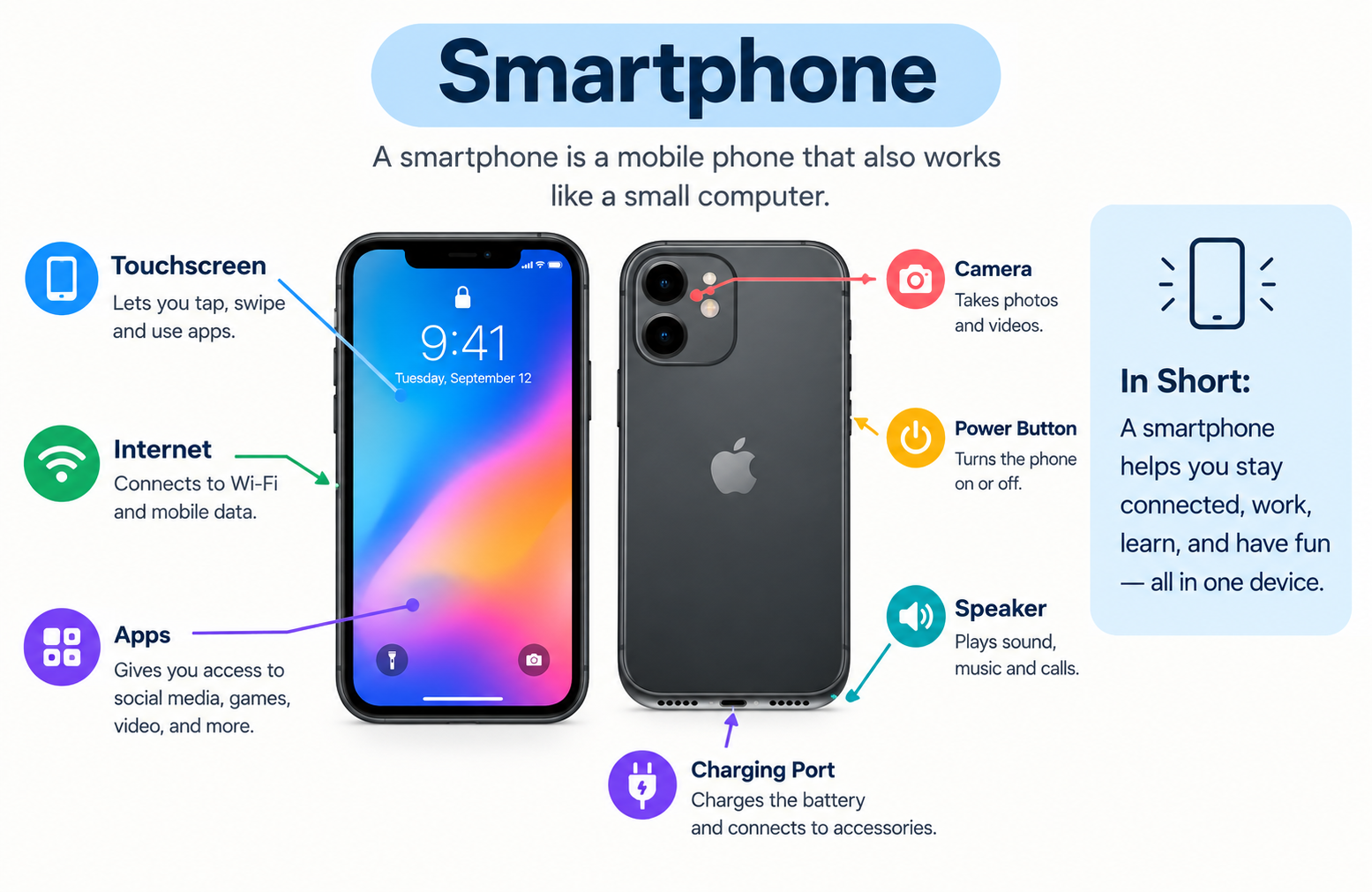
Introduction
A smartphone is a handheld electronic device that combines the calling and messaging functions of a traditional mobile phone with the computing power of a personal computer. It runs a mobile operating system, supports downloadable apps, connects to the internet, and includes a touchscreen display, camera, GPS, and wireless connectivity. Smartphones are distinct from basic mobile phones because they can run complex software, browse the full web, and perform tasks that once required a desktop or laptop computer.
This guide explains what a smartphone is, how it works, what its main components are, and what people use it for every day. Whether you are new to smartphones or simply want to understand your device better, everything you need is covered here.
Smartphone Definition: What Is a Smartphone?
A smartphone is a mobile device that integrates advanced computing capabilities into a form factor small enough to fit in your hand or pocket. Unlike a basic phone that handles only calls and texts, a smartphone runs a full mobile operating system that can support a wide range of software programs known as apps.
The key characteristics that define a smartphone include:
-
A touchscreen display as the primary input method
-
A mobile operating system such as Android or iOS
-
Support for downloadable apps from an app store
-
Internet connectivity through Wi-Fi and cellular networks
-
A built-in camera capable of photos and video
-
GPS for location and navigation
-
Wireless connectivity including Bluetooth and NFC
-
Onboard sensors for orientation, light, and biometric security
The term smartphone exists to separate these capable devices from feature phones, which are simpler mobile phones that can make calls and send texts but cannot run downloadable apps or perform advanced computing tasks. A smartphone is essentially a pocket-sized computer that also happens to make phone calls.
A Brief History of Smartphones
Mobile phones have changed dramatically over the past four decades. Understanding where smartphones came from helps explain why they work the way they do.
The 1980s and early 1990s saw the first generation of mobile phones. These were large, expensive devices used almost exclusively for voice calls. Texting did not yet exist, and internet access on mobile devices was not a consideration.
The late 1990s and early 2000s brought the rise of feature phones. These smaller, more affordable devices added SMS text messaging, basic games, simple ringtones, and limited internet browsing through early mobile web protocols. They were capable for their time but ran proprietary software that users could not expand with third-party apps.
The mid to late 2000s marked the beginning of the modern smartphone era. Touchscreen devices with full operating systems and app ecosystems transformed what a mobile phone could do. Manufacturers, software developers, and mobile network operators all adapted to support this new category of device.
Today, smartphones are among the most widely used personal technology devices in the world. They function as cameras, navigation systems, entertainment centers, productivity tools, payment devices, and communication hubs, all in a single device that fits in a pocket.
How Does a Smartphone Work?
At its core, a smartphone works by combining physical hardware components with software to process information, run programs, and communicate wirelessly. Every action you take on a smartphone, from sending a message to streaming a video, involves hardware and software working together.
Here is a simplified breakdown of the process:
- You interact with the device through the touchscreen or physical buttons.
- Your input is interpreted by the operating system.
- The operating system communicates with the processor, which performs the required computing tasks.
- The processor reads from and writes to RAM and storage as needed.
- The result of that processing is displayed on the screen, transmitted wirelessly, or stored on the device.
- Wireless radios handle sending and receiving data over cellular networks, Wi-Fi, and Bluetooth.
Apps are central to how a smartphone functions in practice. On Android devices, Android apps are designed to run on Google’s Android operating system, taking advantage of the hardware and system services the OS provides. On Apple devices, iPhone apps are built specifically for iOS and follow Apple’s design and functionality guidelines. In both cases, the app relies on the operating system to manage hardware access, security, and performance.
Smartphone Hardware: The Physical Components
The hardware inside a smartphone determines its performance, capabilities, and user experience. Here is a clear explanation of each major component.
Processor (CPU and SoC)
The processor is the brain of a smartphone. It handles every computing task the device performs, from loading an app to rendering graphics in a game.
Modern smartphones do not use a traditional CPU on its own. Instead, they use a System on a Chip, commonly abbreviated as SoC. An SoC integrates the CPU, GPU (graphics processor), modem, neural processing unit, and other components onto a single chip. This integration makes smartphones more power-efficient and compact than if these components were separate.
The speed and capability of the processor directly affect how smoothly a smartphone responds, how quickly apps open, and how well demanding tasks like video editing or gaming perform.
Memory: RAM and Storage
Smartphones use two distinct types of memory, each serving a different purpose.
RAM (Random Access Memory) is short-term memory. It holds the data and processes that are currently active, allowing the operating system and open apps to run quickly without reloading from scratch every time. More RAM generally results in smoother multitasking, allowing more apps to remain active in the background without slowing down.
Storage is long-term memory. This is where the operating system, installed apps, photos, videos, music, and documents are permanently saved. Common storage capacities in modern smartphones range from 64GB to 1TB depending on the device and price tier.
Apps also use temporary storage in the form of cache to speed up their performance. App cache stores frequently accessed data locally so that an app does not need to download or reprocess the same information every time it opens. This improves load times but also occupies storage space over time.
Display
The display is how you see and interact with everything on a smartphone. Modern smartphones use capacitive touchscreens that detect the electrical charge from your fingertip, allowing them to respond to taps, swipes, pinches, and other gestures.
Key display specifications include:
- Screen size measured diagonally in inches, typically ranging from around 5.5 inches to 6.9 inches for standard smartphones.
- Resolution measured in pixels, affecting how sharp and detailed the image appears.
- Refresh rate measured in Hz, affecting how smoothly motion and scrolling appear on screen. Higher refresh rates such as 90Hz or 120Hz produce noticeably smoother visuals.
- Display technology such as OLED or LCD, which affects color accuracy, contrast, and battery consumption.
Camera System
Smartphone cameras have become one of the most significant factors in purchasing decisions. Modern smartphones typically include multiple rear cameras and at least one front-facing camera.
Camera quality is determined by a combination of factors including:
- Sensor size, which affects how much light the camera can capture
- Aperture, which controls depth of field and low-light performance
- Optical image stabilization for reducing blur in handheld shots
- Computational photography, which uses software and artificial intelligence to enhance images after they are captured
Megapixel count alone is not a reliable indicator of camera quality. A camera with a larger sensor and better software can outperform a higher-megapixel camera with a smaller sensor in many real-world conditions.
Battery
The battery provides the electrical power that runs every component of a smartphone. Battery capacity is measured in milliampere-hours, written as mAh. A higher mAh rating generally indicates a larger energy reserve and longer battery life, though actual usage time depends heavily on how the device is used and how efficiently the software manages power consumption.
Most modern smartphones use lithium-ion or lithium-polymer batteries and support fast charging, which can replenish a significant portion of the battery in a short time. Many also support wireless charging.
Sensors
Smartphones contain a range of sensors that enable features users interact with every day:
- Accelerometer: Detects the orientation and movement of the device. Used for rotating the screen between portrait and landscape modes and for fitness tracking.
- Gyroscope: Measures rotational movement. Used in gaming, augmented reality, and camera stabilization.
- Proximity sensor: Detects when the phone is held close to your face during a call and turns off the screen to prevent accidental input.
- Ambient light sensor: Measures the brightness of the surrounding environment and adjusts screen brightness automatically.
- Fingerprint sensor: Reads a fingerprint for biometric device authentication. Can be embedded under the display or placed on the back or side of the device.
- Face recognition system: Uses the front camera and sometimes infrared sensors to authenticate the user by facial recognition.
- GPS: Receives signals from satellite systems to determine the device’s precise geographic location for navigation and location-based services.
Connectivity Hardware
Smartphones include several wireless radios and chips that handle different types of connections:
- Cellular modem: Connects to mobile networks for calls, messaging, and mobile internet. Supports standards including 4G LTE and 5G.
- Wi-Fi antenna: Connects to local wireless networks for internet access.
- Bluetooth radio: Connects wirelessly to accessories such as headphones, speakers, keyboards, and smartwatches.
- NFC chip: Near Field Communication enables contactless payments through services like Apple Pay and Google Pay, as well as short-range data sharing.
Smartphone Software: What Runs on a Smartphone?
Hardware gives a smartphone its capabilities, but software determines what it can actually do and how it behaves.
The Operating System
The operating system is the foundational software layer that manages all of the smartphone’s hardware resources and provides the environment in which everything else runs.
The two dominant smartphone operating systems are:
Android, developed by Google, is an open-source operating system used by a wide range of manufacturers including Samsung, Google, OnePlus, Motorola, and many others. Because it is open-source, manufacturers can customize the Android interface and add their own features on top of the core system. Android apps are distributed primarily through the Google Play Store and are built to run across a broad range of Android devices from different manufacturers.
iOS, developed by Apple, is a proprietary operating system that runs exclusively on Apple’s iPhone lineup. Apple controls both the hardware and software, resulting in a tightly integrated experience. iPhone apps are distributed through the Apple App Store and are designed specifically for Apple hardware and the iOS environment.
Both operating systems handle core functions including running apps, managing files and storage, connecting to networks, processing sensor data, and controlling security and permissions.
Apps: The Software You Use Daily
Apps are the software programs you install and use on a smartphone. Each app is designed to serve a specific purpose, whether that is checking the weather, editing photos, playing a game, or managing your bank account.
Understanding what apps are helps explain why smartphones are so versatile. The operating system provides the platform, and apps build on top of that platform to deliver specific functionality. A smartphone without apps would be limited to whatever the operating system itself provides. With apps, the range of things a smartphone can do is effectively unlimited.
Apps are downloaded from dedicated digital marketplaces called app stores. The App Store serves iPhone users, while the Google Play Store serves Android users. Both stores contain millions of apps across every imaginable category.
App Data and Storage Management
Every app installed on a smartphone generates and stores data. This includes user account information, saved preferences, downloaded content, and activity history.
Understanding app data is important because it accumulates over time and occupies storage space on the device.
In addition to permanent data, apps also generate cache. App cache is temporary data that an app stores locally to avoid reloading the same content every time it is opened. For example, a social media app might cache images from your feed so they load instantly on your next visit rather than downloading again from the server. Cache improves performance but can build up significantly on a device used heavily over time.
App Permissions
When you install an app on a smartphone, it may request permission to access hardware or data on the device. Common permission requests include access to the camera, microphone, location, contacts, calendar, and photo library.
Understanding app permissions is one of the most important aspects of smartphone privacy. Each permission grants an app access to a specific part of your device or data. You can review and manage permissions for each installed app through your phone’s settings, and you can revoke any permission you are not comfortable granting.
Key Features of a Smartphone
The following features define a smartphone and distinguish it from simpler mobile devices:
| Feature | Description |
|---|---|
| Touchscreen interface | Primary input method using finger gestures |
| Mobile operating system | Android or iOS managing all device functions |
| App support | Downloadable apps through an app store |
| Internet connectivity | Wi-Fi and cellular data access |
| Camera system | Multi-lens cameras for photos and video |
| GPS and navigation | Satellite-based location and mapping |
| Bluetooth and NFC | Wireless connections to accessories and payments |
| Voice calling and messaging | Calls, SMS, and messaging apps |
| Biometric security | Fingerprint and face unlock |
| Personal assistant | Siri on iPhone, Google Assistant on Android |
| Sensors | Accelerometer, gyroscope, proximity, and light sensors |
What Are Smartphones Used For?
Smartphones serve an enormous range of purposes in everyday life. The flexibility of the app ecosystem means a single device can replace or supplement many other tools.
Communication is the most fundamental use. Smartphones support voice calls, video calls, SMS texting, and a wide range of messaging apps that work over the internet.
Social media and entertainment are among the most common daily uses. Streaming video, listening to music, browsing social feeds, and playing games all happen through dedicated apps.
Navigation using built-in GPS and map apps allows users to get turn-by-turn directions, check traffic conditions, and discover nearby places.
Photography and video using the built-in camera system have made smartphones the most widely used cameras in the world for personal use.
Productivity including email, calendar management, document editing, and note-taking allows users to handle work and personal tasks from anywhere.
Mobile banking and payments through banking apps and contactless payment systems allow users to manage their finances and pay for purchases without a physical wallet.
Health and fitness tracking through sensors and dedicated apps monitors steps, heart rate, sleep, and other health metrics.
Shopping through e-commerce apps allows users to browse, compare, and purchase products from any location.
Education through learning apps, online courses, and research tools makes information and structured learning accessible from anywhere.
Smart home control through connected apps allows users to manage lights, thermostats, security cameras, and other smart home devices directly from their smartphone.
The breadth of these use cases is possible because of the open, extensible nature of apps and the powerful hardware they run on.
Smartphone Operating Systems: Android vs iOS
The two dominant smartphone platforms take different approaches to delivering the smartphone experience.
Android is developed by Google and is available as an open-source platform that any manufacturer can adopt and customize. This openness means Android runs on an enormous variety of devices at every price point from budget-friendly entry-level phones to premium flagships. The Android app ecosystem is built around the Google Play Store and supports a wide range of hardware configurations.
iOS is developed by Apple and runs exclusively on iPhone hardware. Apple designs both the operating system and the physical device, resulting in tight integration between hardware and software. iPhone apps are distributed exclusively through the Apple App Store and are optimized for a defined set of Apple hardware specifications.
| Feature | Android | iOS |
|---|---|---|
| Developer | Apple | |
| Device manufacturers | Many (Samsung, Google, OnePlus, etc.) | Apple only |
| Customization | High | Moderate |
| App store | Google Play Store | Apple App Store |
| Open source | Yes (core OS) | No |
| Device variety | Wide range of devices and prices | Limited to iPhone lineup |
| Update delivery | Varies by manufacturer | Direct from Apple |
Both platforms offer millions of apps through their respective app stores and both provide robust ecosystems for communication, productivity, entertainment, and more. The choice between them often comes down to personal preference, ecosystem familiarity, and budget.
Smartphone vs Feature Phone: What Is the Difference?
The term smartphone exists specifically to distinguish advanced mobile devices from simpler feature phones. Here is a clear comparison.
| Feature | Feature Phone | Smartphone |
|---|---|---|
| Operating system | Proprietary, limited OS | Full mobile OS (Android or iOS) |
| App support | No downloadable third-party apps | Full app ecosystem via app store |
| Internet browsing | Basic or none | Full web browsing |
| Camera | Basic or none | Advanced multi-lens camera system |
| Processing power | Low | High-performance SoC |
| Touchscreen | Rare, basic if present | Full capacitive touchscreen |
| GPS | Rarely included | Standard feature |
| Price range | Generally lower | Wide range from budget to premium |
| Primary use | Calls and texting | Communication, computing, entertainment, and more |
Feature phones served an important role in making mobile communication widely accessible and continue to be used in markets where cost or simplicity are the primary considerations. Smartphones serve users who need a versatile connected computing device in their pocket.
Smartphone vs Tablet: What Is the Difference?
Smartphones and tablets share much of the same underlying technology but differ in meaningful ways.
| Feature | Smartphone | Tablet |
|---|---|---|
| Screen size | Typically 5.5 to 6.9 inches | Typically 8 to 13 inches or larger |
| Portability | Fits in a pocket | Carried in a bag |
| Cellular calling | Standard feature | Often data only, some support calls |
| Operating system | Android or iOS | Android, iOS (iPadOS), or others |
| App compatibility | Full smartphone app ecosystem | Same apps, optimized for larger screen |
| Primary use | All-purpose mobile computing | Media, productivity, reading |
| SIM card | Standard | Optional on many models |
Both smartphones and tablets run the same types of apps and connect to the internet in similar ways. Tablets trade portability for a larger screen that is better suited to tasks like reading, video consumption, drawing, and document editing. Smartphones prioritize portability and always-available connectivity.
How Do Smartphones Connect to the Internet?
Smartphones use two primary methods to connect to the internet, often switching between them automatically depending on what is available.
Cellular data uses a built-in cellular modem to connect to mobile networks operated by carriers. The most common current standards are:
- 4G LTE: A widely available mobile network standard that delivers fast mobile internet suitable for streaming, browsing, and most everyday tasks.
- 5G: The next-generation mobile network standard that offers significantly faster speeds and lower latency than 4G LTE where 5G coverage is available. The actual experience of 5G varies depending on the type of 5G network and local infrastructure.
Wi-Fi connects the smartphone to a local wireless router, typically providing faster speeds and lower data costs than cellular. Most smartphones automatically prioritize Wi-Fi when a known network is in range and switch to cellular when Wi-Fi is unavailable.
Smartphones manage this switching automatically in the background, so most users experience seamless connectivity without manually choosing between cellular and Wi-Fi.
Smartphone Privacy and Security
Smartphones store a significant amount of personal information, making security an important consideration for every user.
Biometric security through fingerprint sensors and facial recognition provides a convenient and secure way to unlock the device. Biometric data is processed and stored locally on the device rather than being sent to external servers on most modern smartphones.
Screen lock and passcode protection ensures that anyone who picks up your phone cannot access it without the correct PIN, password, or pattern. This is the most basic and essential security measure every smartphone user should have enabled.
Software updates issued by the operating system developer patch security vulnerabilities as they are discovered. Keeping the operating system and apps updated is one of the most effective ways to maintain smartphone security.
App permissions are a critical layer of privacy control. Every app that requests access to your camera, microphone, location, or contacts is asking for a level of access to your personal data. Understanding app permissions and reviewing them regularly allows you to control what each app can and cannot access. Both Android and iOS provide settings screens where you can view and manage permissions for every installed app.
Reviewing app permissions periodically, especially after installing new apps or updating existing ones, is a practical habit that significantly reduces your exposure to unnecessary data collection.
Frequently Asked Questions
What is a smartphone?
A smartphone is a handheld electronic device that combines mobile phone functions with computing capabilities. It runs a mobile operating system, supports downloadable apps, connects to the internet, and includes a touchscreen, camera, GPS, and wireless connectivity.
How does a smartphone work?
A smartphone works by combining hardware components including a processor, RAM, storage, display, battery, and wireless radios with software including an operating system and apps. The processor handles computing tasks, the operating system manages resources, and apps deliver specific functionality to the user.
What is the difference between a smartphone and a regular phone?
A regular or feature phone can make calls and send texts but cannot run downloadable apps, does not have a full operating system, and has limited internet capability. A smartphone runs a full mobile operating system, supports a complete app ecosystem, and can perform advanced computing tasks.
What operating system do smartphones use?
The two dominant smartphone operating systems are Android, developed by Google, and iOS, developed by Apple. Android runs on devices from many manufacturers, while iOS runs exclusively on Apple iPhone devices.
What can you do with a smartphone?
Smartphones are used for calls, messaging, video calls, social media, video streaming, music, gaming, navigation, photography, email, mobile banking, shopping, health tracking, education, and smart home control, among many other tasks.
What are the main hardware components of a smartphone?
The main hardware components are the processor (SoC), RAM, storage, display, camera system, battery, sensors (accelerometer, gyroscope, GPS, fingerprint sensor), and wireless connectivity hardware (cellular modem, Wi-Fi, Bluetooth, NFC).
What is the difference between Android and iPhone?
Android is an open-source operating system used by many manufacturers and offers a wide variety of devices and high customization. iPhone runs Apple’s iOS, which is exclusive to Apple hardware and offers a tightly integrated, consistent experience. Both support millions of apps through their respective app stores.
How do smartphones connect to the internet?
Smartphones connect to the internet through cellular data using 4G LTE or 5G mobile networks, and through Wi-Fi by connecting to local wireless routers. The device switches between these automatically depending on availability.
What are apps and why do smartphones need them?
Apps are software programs designed to run on a smartphone operating system. They extend the functionality of the smartphone, covering every category from communication and entertainment to productivity and finance. Without apps, a smartphone would be limited to only what the operating system itself provides.
What is a smartphone processor?
A smartphone processor, typically implemented as a System on a Chip (SoC), is the component that handles all computing tasks on the device. It includes the CPU, GPU, modem, and other subsystems integrated onto a single chip and directly determines how fast and capable the smartphone is.
How much storage does a smartphone need?
Storage needs vary by use. Users who store many photos, videos, and apps locally benefit from 128GB or more. Users who rely primarily on streaming and cloud storage can manage with less. Many current smartphones start at 128GB of internal storage.
What is the difference between a smartphone and a tablet?
Smartphones are smaller, more portable devices that fit in a pocket and include cellular calling as a standard feature. Tablets have larger screens suited to media and productivity but are less portable and often do not support cellular voice calls. Both run the same operating systems and apps.
Are smartphones safe to use?
Smartphones are safe when used with basic security practices including enabling a screen lock, keeping software updated, reviewing app permissions, and downloading apps only from official app stores. No device is completely immune to security risks, but these measures significantly reduce exposure.
What is 5G on a smartphone?
5G is the fifth generation of mobile network technology. It offers faster data speeds and lower latency than 4G LTE where 5G coverage is available. The practical benefit depends on your carrier’s 5G network type and local coverage.
How long do smartphone batteries last?
Battery life varies widely depending on the device, battery capacity, and usage patterns. Most modern smartphones are designed to last through a full day of typical use on a single charge. Heavy use such as gaming or video streaming drains the battery significantly faster.
Disclaimer:
This article is intended for educational and informational purposes and provides a general overview of what smartphones are, how they work, and what they are used for. Technical specifications, features, and capabilities described in this article reflect general smartphone technology as it exists across the industry. Specific devices may vary in their exact hardware, software, and feature sets. This article does not constitute an endorsement of any specific smartphone brand, manufacturer, operating system, or service mentioned in this guide.