
 By saman zahra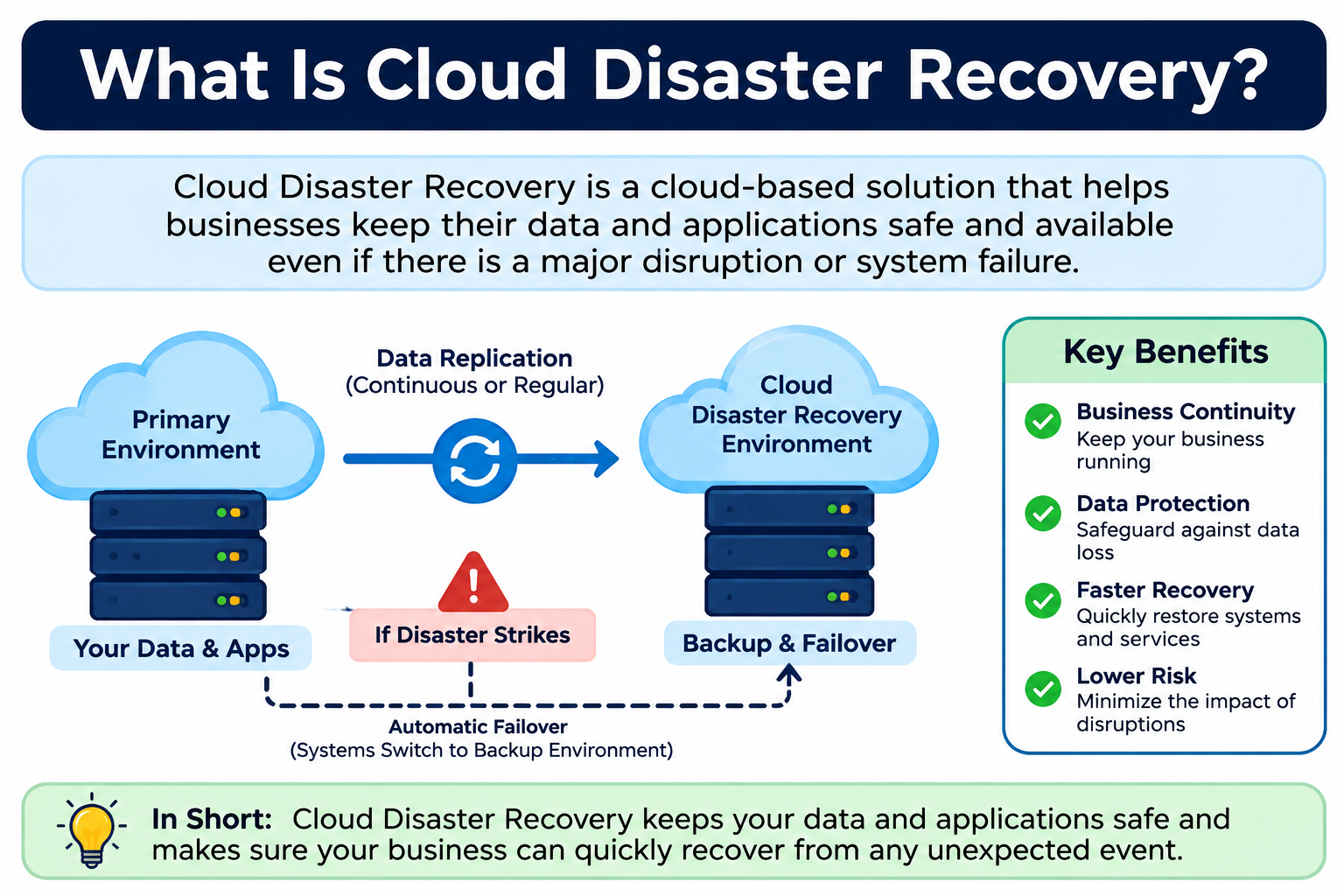
Every business, organization, and institution relies on its IT systems to function. Applications need to run. Data needs to be accessible. Services need to stay online. But what happens when something goes wrong? Hardware fails. Ransomware attacks lock systems. Natural disasters knock out data centers. Power outages interrupt operations. Human errors delete critical files. These events are not hypothetical risks. They happen every day.
Understanding what is cloud disaster recovery helps organizations prepare for exactly these situations. Cloud disaster recovery is a strategy and a set of services that uses cloud infrastructure to replicate, protect, and restore IT systems, applications, and data after a disruptive event. Rather than building and maintaining costly secondary physical facilities, organizations use cloud resources as their recovery environment.
If you are new to cloud computing, What Is Cloud Computing? A Beginner’s Guide provides a strong foundation before diving deeper into disaster recovery concepts.
Quick Answer: What Is Cloud Disaster Recovery?
Cloud disaster recovery is a strategy that uses cloud infrastructure to replicate, back up, and restore IT systems, applications, and data after a disruption such as a cyberattack, hardware failure, or natural disaster. It allows organizations to recover operations more quickly by using cloud resources as a pre-configured recovery environment, reducing or eliminating the need for costly secondary physical data centers.
What Is Cloud Disaster Recovery?
Cloud disaster recovery, often called cloud DR, is a strategy that uses cloud computing resources to restore IT systems, applications, and data after an unexpected disruptive event. The goal is simple: when primary systems fail or become unavailable, the organization can switch to a cloud-based recovery environment and continue operating.
It is important to understand that cloud disaster recovery is a strategy, not a single product. It involves planning, replication, infrastructure configuration, testing, and ongoing maintenance. Buying a cloud subscription does not automatically give you disaster recovery. You need a deliberate plan that defines what systems need to recover, how quickly they must recover, and how that recovery will actually happen.
Organizations use cloud DR because cloud infrastructure offers geographic distribution, scalable resources, and faster provisioning compared to traditional approaches. Instead of building and managing a secondary physical data center that might sit idle for years, they pay for cloud resources that can be activated when needed.
The disruption events that cloud DR addresses include hardware failures, cyberattacks and ransomware, natural disasters, power outages, software failures, human errors, and vendor service outages. Any event that takes critical systems offline is within the scope of disaster recovery planning.
Why Does Disaster Recovery Matter?
When IT systems go down, the consequences extend far beyond a technical inconvenience. Businesses lose revenue during every hour of downtime. Operations grind to a halt when applications are unavailable. Customer orders cannot be processed. Employees cannot access the tools they need to work.
Data loss is another serious risk. If systems fail without adequate protection, organizations may lose records that took years to build. Financial data, customer records, operational databases, and communications can all be permanently lost without proper recovery measures in place.
Customer trust is difficult to rebuild after a significant outage. When a service is unavailable for extended periods, customers notice and remember. Repeated outages can drive customers to competitors and damage a brand’s reputation permanently.
Regulatory requirements add another layer of concern. Many industries, including healthcare, finance, and government, are subject to laws and standards that require organizations to protect data and maintain operational continuity. Failing to meet these requirements can result in legal penalties and compliance violations.
The common causes of IT disruptions include:
- Hardware failure, such as disk crashes or server malfunctions
- Cyberattacks including ransomware and distributed denial of service attacks
- Natural disasters such as floods, fires, and earthquakes
- Power outages and electrical failures
- Human error, including accidental deletion and misconfiguration
- Software failures and application bugs
- Vendor service outages
Understanding these risks makes clear why disaster recovery is not optional for any organization that depends on IT systems. If you want to understand the cyber threats that make DR particularly urgent, What Is Malware? explains common attack types in straightforward terms.
What Is the Difference Between Cloud Disaster Recovery and Cloud Backup?
Many people use these terms interchangeably, but cloud disaster recovery and cloud backup are not the same thing. Confusing them is one of the most common mistakes organizations make when planning for IT resilience.
Cloud backup primarily protects data by creating and storing copies in the cloud. If files are accidentally deleted or corrupted, backup allows you to restore those files. It is focused on data protection and data recovery.
Cloud disaster recovery is broader. It is designed to restore entire IT systems, including applications, servers, configurations, and data, so that operations can resume after a major disruption. It involves not just having copies of data but having a ready recovery environment where systems can actually run.
| Feature | Cloud Disaster Recovery | Cloud Backup |
|---|---|---|
| Main purpose | Restore full IT systems after disruption | Protect data copies for recovery |
| Scope | Systems, applications, and data | Primarily data |
| Recovery target | Full system restoration | Data restoration |
| RTO focus | Yes | Less emphasis |
| RPO focus | Yes | Yes |
| Complexity | Higher | Usually simpler |
| Example | Full system failover | File recovery |
Backup is a component of a disaster recovery strategy, but it is not a complete DR solution by itself. Having backups of your data does not mean your applications will be running and your systems will be operational when disaster strikes. A full DR plan addresses the entire recovery process.
What Is the Difference Between Cloud DR and Cloud Storage?
Cloud storage is a service that stores data in the cloud, making it accessible from any internet-connected device. It is designed for storing and retrieving files, documents, media, and other data.
Cloud disaster recovery goes much further. It is focused on restoring complete IT systems and applications after a disruption, not just retrieving stored files. While cloud storage may play a supporting role in a DR architecture, it does not provide the recovery environment, failover capability, or system restoration that DR requires.
To learn more about how cloud storage works independently, What Is Cloud Storage? provides a clear explanation.
Key Concepts in Cloud Disaster Recovery
Before exploring how cloud DR works, it helps to understand the core concepts that define any disaster recovery strategy.
RTO — Recovery Time Objective
RTO is the maximum amount of time an organization can tolerate before its systems must be restored and operational after a disruption. It answers the question: how long can we be down before the impact becomes unacceptable?
For example, an online retailer might define an RTO of four hours for its e-commerce platform. That means if systems fail, the recovery plan must restore full operations within four hours. Different systems often have different RTOs. Email might tolerate a longer outage than a payment processing system.
RPO — Recovery Point Objective
RPO defines how much data an organization can afford to lose, measured in time. It answers the question: how far back can we roll back our data and still function?
For example, if a company backs up its database every hour and has an RPO of one hour, it means it accepts that up to one hour of data might be lost in a disaster. An RPO of zero would require continuous replication so that no data is ever lost, which demands more sophisticated and typically more expensive infrastructure.
Failover
Failover is the process of switching from a failed or unavailable primary system to a secondary recovery system. When the primary environment goes down, failover moves workloads to the cloud recovery environment so operations can continue.
Failback
Failback is the reverse of failover. Once the primary systems have been repaired, restored, and tested, operations are moved back from the cloud recovery environment to the primary environment. Failback needs to be planned as carefully as failover.
Replication
Replication is the continuous or scheduled process of copying data and system configurations from primary infrastructure to the cloud recovery environment. It is the mechanism that keeps the DR environment current. Without replication, recovery environments quickly become outdated.
Recovery Point
A recovery point is a specific point in time from which systems can be restored. The most recent recovery point determines how much data might be lost during recovery, directly connecting to the RPO definition.
How Does Cloud Disaster Recovery Work?
Cloud disaster recovery follows a logical sequence of activities, from planning through recovery and back to normal operations. Here is how the process works:
- An organization assesses its IT systems and identifies which workloads are critical to operations.
- A cloud disaster recovery plan is designed, including defined RTOs and RPOs for each critical system.
- Systems and data are replicated to cloud infrastructure in one or more geographic regions.
- Replication runs continuously or on a scheduled basis, keeping cloud copies aligned with primary systems according to the defined RPO.
- Recovery infrastructure is pre-configured in the cloud, ready to activate when needed.
- A disruption occurs, taking primary systems offline.
- The disaster recovery plan is activated, either manually or automatically depending on the architecture.
- Systems fail over to the cloud recovery environment.
- Operations resume from the cloud environment, with users accessing systems through the recovery infrastructure.
- The primary systems are repaired, restored, and tested.
- Operations fail back to the primary environment once it is confirmed stable.
- The DR plan is reviewed, lessons are documented, and the plan is updated as needed.
Replication is the engine that makes cloud DR possible. Without current copies of data and system configurations, recovery environments cannot restore operations accurately. The recovery environment must be pre-configured and regularly tested to be reliable. RTO and RPO requirements drive decisions about replication frequency, infrastructure type, and recovery procedures.
Testing is critical throughout this process. A DR plan that has never been tested against real conditions cannot be trusted to perform when it is actually needed.
Understanding the underlying cloud infrastructure that makes this possible is important. How Does Cloud Computing Work? explains the foundational concepts behind cloud resources and service delivery.
Cloud Disaster Recovery vs Traditional Disaster Recovery
Before cloud computing became widely available, organizations that needed disaster recovery had to build and maintain secondary physical data centers. They would replicate systems to a second location, keep hardware running or on standby, and manage facilities, power, cooling, and staff at both sites. This approach remains in use today but carries significant costs and complexity.
| Feature | Cloud Disaster Recovery | Traditional Disaster Recovery |
|---|---|---|
| Infrastructure | Cloud provider resources | Secondary physical data center |
| Upfront cost | Usually lower | Often higher |
| Ongoing cost | Subscription and usage-based | Hardware and facility maintenance |
| Scalability | Usually flexible | Limited by physical capacity |
| Geographic distribution | Often easier | Requires physical locations |
| Recovery testing | Often easier to test | Testing can be disruptive or complex |
| Management | Managed or self-managed | Usually self-managed |
| Speed of provisioning | Often faster | Usually slower |
Cloud DR generally reduces upfront capital expenditure because organizations do not need to purchase and maintain dedicated secondary hardware. However, ongoing subscription and usage costs can accumulate over time, and organizations should evaluate total cost of ownership carefully rather than assuming cloud DR is always cheaper.
Testing is one area where cloud DR often has a practical advantage. Traditional DR testing frequently requires scheduling downtime or running parallel tests that risk disrupting live operations. Cloud DR environments can often be tested in isolation with less risk to production systems, though testing still requires careful planning.
For a broader comparison of cloud and traditional infrastructure approaches, Cloud Computing vs Traditional Computing provides additional context.
What Are the Types of Cloud Disaster Recovery?
Not all disaster recovery approaches are the same. Organizations choose from several DR types based on their RTO and RPO requirements, budget, and the criticality of each workload.
Backup and Restore
Backup and restore is the simplest and lowest-cost approach. Data and system images are backed up to cloud storage regularly. When a disaster occurs, systems are rebuilt from those backups.
This approach typically results in the longest recovery times because systems must be fully rebuilt and restored from backup. It is most suitable for workloads where a longer downtime is acceptable, such as development environments or archival systems.
Pilot Light
The pilot light approach keeps a minimal set of core systems replicated and running in the cloud at all times. This core represents the essential components needed to restart the full environment, much like a pilot light on a gas furnace that keeps the flame ready without burning at full power.
When a disaster occurs, additional resources are provisioned and activated around the running core. Recovery is faster than backup and restore but still requires time to scale up the full environment. Costs are moderate because only minimal resources run continuously.
Warm Standby
Warm standby maintains a reduced-capacity version of the full environment running continuously in the cloud. This scaled-down version can handle operations at reduced load and is ready to scale up to full capacity quickly during recovery.
Recovery time is faster than pilot light because the environment is already partially operational. Costs are higher than pilot light because more resources run continuously. Warm standby is well suited to important systems that need reasonably fast recovery but do not justify the cost of a full duplicate environment.
Hot Standby / Active-Active
Hot standby, also called active-active, maintains a fully operational duplicate environment in the cloud that mirrors the primary environment in real time. When a disruption occurs, failover is nearly instantaneous because the secondary environment is already running at full capacity.
This approach provides the fastest possible recovery and can support very aggressive RTO requirements. It is also the most expensive option because full infrastructure runs continuously. Hot standby is typically reserved for mission-critical systems where even brief downtime causes unacceptable impact.
| DR Type | Description | Recovery Speed | Cost |
|---|---|---|---|
| Backup and Restore | Restore from backup | Slowest | Lowest |
| Pilot Light | Core systems replicated | Moderate | Low to moderate |
| Warm Standby | Reduced capacity running | Faster | Moderate to higher |
| Hot Standby | Full duplicate running | Fastest | Highest |
Benefits of Cloud Disaster Recovery
Cloud disaster recovery offers a range of advantages compared to traditional approaches, though the actual benefits depend on how well the DR strategy is designed, implemented, and maintained.
Faster recovery options. Depending on the DR type chosen, cloud environments can support significantly faster recovery than rebuilding physical systems from scratch.
Geographic distribution. Cloud providers operate data centers across multiple regions, making it practical to replicate systems to geographically distant locations without building physical facilities there.
Scalable recovery infrastructure. Cloud resources can be scaled up during recovery and scaled down afterward, avoiding the need to maintain full secondary capacity permanently.
Lower upfront costs compared to physical DR. Organizations can avoid purchasing dedicated secondary hardware, though ongoing costs must be evaluated carefully.
Easier testing. Cloud DR environments can often be tested without disrupting production systems, making regular testing more practical.
Reduced physical infrastructure dependency. Recovery does not depend on a physical facility remaining operational, which matters when disasters affect specific geographic areas.
Flexible recovery options. Organizations can choose the DR type that matches each workload’s requirements rather than applying a single approach to everything.
Pay-for-use pricing options. Some cloud DR models allow organizations to pay primarily for active recovery usage rather than maintaining full standby capacity, though pricing varies significantly by provider and architecture.
Centralized management. Cloud DR platforms often provide dashboards and management tools that offer visibility into replication status, recovery readiness, and system health from a single location.
Support for regulatory compliance. Cloud providers often offer compliance certifications and features that help organizations meet regulatory requirements, though compliance remains the organization’s responsibility to verify and implement.
Replication options. Cloud DR supports a range of replication frequencies and methods, allowing organizations to align replication with their RPO requirements.
Reduced manual intervention in some architectures. Automated failover capabilities in some DR architectures can reduce the time between a disruption event and recovery initiation, though automation must be carefully designed and tested.
Disadvantages of Cloud Disaster Recovery
A balanced view of cloud disaster recovery requires understanding its limitations and challenges alongside its benefits.
Ongoing subscription costs. Cloud DR involves recurring costs for storage, replication, compute resources, and potentially managed services. These costs accumulate over time and must be planned and budgeted carefully.
Internet dependency. Recovery operations depend on internet or private network connectivity to the cloud. A disruption that also affects network connectivity can complicate or delay cloud-based recovery.
Recovery time dependent on data volume and connection speed. Restoring large datasets over a network connection takes time. Organizations with very large data volumes may find that recovery takes longer than expected if network bandwidth is insufficient.
Vendor dependency. Relying on a cloud provider for DR means that provider outages or service changes can affect recovery capabilities. Multi-cloud or hybrid DR strategies can reduce this risk.
Configuration complexity. Setting up cloud DR correctly requires technical expertise in both cloud infrastructure and disaster recovery architecture. Misconfiguration can result in a DR environment that fails when it is actually needed.
Ongoing testing requirements. Cloud DR is not a set-and-forget solution. Regular testing is essential, and testing requires time, resources, and expertise.
Security configuration responsibilities. Organizations must configure security controls in their cloud DR environment correctly. Improperly secured DR environments can become a vulnerability.
Data sovereignty and compliance considerations. Replicating data to cloud regions in other countries may raise data sovereignty concerns. Organizations must understand where their data is stored and whether that meets regulatory requirements.
Migration complexity. Moving existing workloads into a cloud DR architecture can be technically complex, particularly for legacy systems.
Skills requirements. Effective cloud DR requires staff with cloud computing, networking, and disaster recovery expertise. Organizations without these skills may need to invest in training or managed services.
Managing these challenges requires careful planning, the right provider selection, ongoing monitoring, and regular review of DR capabilities.
Is Cloud Disaster Recovery Secure?
Security is a legitimate concern for any cloud-based service, and cloud disaster recovery is no exception. The honest answer is that cloud DR is not automatically secure. Security depends on both the measures a cloud provider implements and the security practices the organization applies to its own DR configuration and management.
Cloud providers typically implement security measures that include:
- Encryption of data in transit using protocols such as TLS
- Encryption of data at rest within cloud storage
- Access controls and identity management systems
- Multi-factor authentication options for management accounts
- Physical security of data center facilities
- Network security including firewalls and traffic monitoring
- Monitoring and logging capabilities
However, organizations are responsible for configuring and using these features correctly. Encryption must be enabled and managed. Access controls must be properly configured. MFA must be enforced. Replication pipelines must be secured. DR management accounts must be protected with strong credentials.
Replication traffic between primary systems and cloud DR environments is a potential attack surface. If replication is not properly secured, malicious actors could intercept data or corrupt recovery environments. Similarly, if DR management accounts are compromised, an attacker could disable or manipulate the DR environment.
Security in cloud DR also connects to the shared responsibility model, which is covered in the next section.
For a broader understanding of cloud security principles, What Is Cloud Security? provides a detailed explanation of how security works in cloud environments.
Cloud Disaster Recovery and the Shared Responsibility Model
One of the most important concepts for any organization using cloud services is the shared responsibility model. Cloud providers and customers each carry specific security responsibilities, and understanding the boundary between them is essential.
In cloud disaster recovery, the provider typically secures the underlying physical infrastructure, the cloud platform itself, and the hardware that supports it. The organization is responsible for everything it configures and operates on top of that infrastructure.
| Area | Typical Responsibility |
|---|---|
| Physical infrastructure | Provider |
| Cloud platform security | Provider |
| DR configuration | Customer |
| Access management | Customer |
| Data protection | Customer |
| Application security | Customer |
| DR testing | Customer |
This means that organizations cannot assume their DR environment is secure simply because it runs on a reputable cloud provider’s infrastructure. They must actively configure security controls, manage access permissions, protect credentials, encrypt data, and test DR procedures.
It is worth noting that exact responsibilities vary depending on the provider, the service model, and the specific DR architecture. Organizations should review their provider’s shared responsibility documentation carefully.
Cloud Disaster Recovery Use Cases
Cloud disaster recovery applies across a wide range of industries and system types. Here are common scenarios where organizations rely on cloud DR:
Enterprise application recovery. Large organizations protect business-critical applications such as ERP systems, CRM platforms, and supply chain management software using cloud DR.
Database recovery. Organizations replicate databases to cloud environments to enable rapid restoration with minimal data loss after a failure or corruption event.
Virtual machine recovery. Virtualized server environments can be replicated to cloud infrastructure, allowing entire virtual machines to be restored or failed over during an incident.
Website recovery. Organizations protect public-facing websites by maintaining recovery environments that can serve traffic when primary hosting becomes unavailable.
E-commerce recovery. Online retailers with revenue-critical ordering and payment systems use cloud DR to minimize downtime during peak sales periods.
Financial systems recovery. Banks, investment firms, and financial services providers protect transaction systems, trading platforms, and customer portals with DR plans that meet strict RTO and RPO requirements.
Healthcare system recovery. Hospitals and health networks protect electronic health records, patient management systems, and diagnostic systems to maintain patient care continuity.
Government system recovery. Public sector organizations protect citizen-facing services and critical government operations with cloud-based DR capabilities.
Remote work infrastructure recovery. Organizations protect VPN systems, collaboration platforms, and remote access tools that employees depend on to work from outside the office.
SaaS application recovery. Software-as-a-service providers use cloud DR to protect multi-tenant platforms and maintain service availability for customers.
Email system recovery. Email is critical to most organizations, and DR plans often include rapid restoration of email services after a disruption.
Manufacturing system recovery. Manufacturers protect operational technology systems, production scheduling, and supply chain applications using cloud DR strategies.
Cloud Disaster Recovery for Small Businesses
Small businesses often assume that disaster recovery is only a concern for large enterprises with dedicated IT teams. This is a misconception that can lead to devastating consequences when something goes wrong.
Small businesses are frequently more vulnerable to data loss and downtime than large enterprises. They typically have fewer redundant systems, smaller IT budgets, and less internal expertise. When a server fails or a ransomware attack hits, recovery without a DR plan in place can take days or weeks, or may not be possible at all.
Cloud disaster recovery lowers the entry barrier for small businesses. Instead of investing in secondary physical infrastructure, small businesses can use cloud DR services at a fraction of the traditional cost. Managed DR services further reduce the technical burden by handling configuration, monitoring, and failover management.
Small businesses should start with a simple assessment of their critical systems. Which applications must stay operational? What data cannot be replaced? How long can the business tolerate being offline? Answering these questions makes it possible to design a DR plan appropriate for the business’s size, budget, and risk tolerance.
Even a basic cloud DR plan that covers critical data and the most important applications is significantly better than having no plan at all.
Cloud Disaster Recovery for Enterprises
Enterprise organizations face more complex DR challenges than smaller businesses. They operate large, interconnected IT environments with many applications, databases, and services that have different recovery requirements.
Enterprise DR planning must account for:
- Multiple systems with different RTO and RPO requirements
- Regulatory and compliance requirements across multiple jurisdictions
- Global operations spanning multiple geographic regions
- Interconnected applications where recovery order matters
- Complex data flows and dependencies between systems
- Dedicated DR teams and defined recovery roles
- Continuous replication to multiple cloud regions
- Hot standby and warm standby environments for critical systems
- Regular DR exercises and compliance audits
Enterprises often combine multiple DR types, using hot standby for the most critical systems, warm standby for important but less time-sensitive applications, and backup and restore for development or archival systems.
Given the complexity involved, enterprises typically maintain dedicated DR planning functions and conduct formal DR tests on a scheduled basis. DR strategies are reviewed regularly and updated when significant changes occur in the IT environment.
Disaster Recovery as a Service (DRaaS)
Disaster Recovery as a Service, commonly called DRaaS, is a cloud service model where a third-party provider manages the DR infrastructure, replication, failover, and recovery processes on behalf of an organization.
With DRaaS, the provider handles continuous replication of the organization’s systems to cloud infrastructure, monitors replication health, manages the recovery environment, and executes or supports failover when a disaster is declared. The organization pays a subscription fee rather than investing in DR infrastructure and management internally.
DRaaS reduces the internal management burden significantly. Organizations without dedicated DR teams or deep cloud expertise can benefit from a managed service that brings specialized knowledge and pre-built DR capabilities.
The difference between DRaaS and self-managed cloud DR is primarily a question of who manages the process. In self-managed cloud DR, the organization designs, configures, monitors, and manages the entire DR architecture using cloud provider tools and resources. With DRaaS, the service provider takes on much of this operational responsibility.
DRaaS is not automatically better than self-managed cloud DR. The right choice depends on the organization’s internal capabilities, budget, risk tolerance, and the specific terms of the DRaaS agreement. Organizations should review SLA commitments, RTO and RPO guarantees, failover procedures, and contract terms carefully before selecting a DRaaS provider.
Cloud Disaster Recovery Planning
A cloud DR plan is a documented strategy that defines how an organization will recover its IT systems after a disruption. Having a plan is not enough on its own. The plan must be realistic, tested, and maintained to be effective.
Here are the key steps in DR planning:
- Identify critical systems and applications that must be recovered after a disruption.
- Assess the business impact of disruptions to each critical system, including revenue loss, operational impact, and compliance implications.
- Define RTO and RPO requirements for each critical system based on business impact analysis.
- Choose the appropriate DR approach for each workload based on its RTO, RPO, and budget constraints.
- Select a cloud provider and appropriate regions that meet geographic, compliance, and connectivity requirements.
- Design the DR architecture, including replication methods, recovery environment configuration, and failover procedures.
- Implement replication and configure the recovery environment.
- Document the DR plan clearly, including step-by-step recovery procedures, roles, responsibilities, and escalation contacts.
- Train staff on DR procedures so that the right people know what to do when a disaster is declared.
- Test the DR plan using realistic scenarios to verify that it actually works.
- Review and update the plan regularly, particularly after significant changes to IT systems, staffing, or business operations.
A DR plan that has never been tested is an untested assumption, not a reliable capability. Testing is not optional.
How to Test Cloud Disaster Recovery
Testing is the only way to confirm that a disaster recovery plan will actually work when it is needed. There are several testing approaches, each serving a different purpose.
Tabletop exercises involve key stakeholders walking through the DR plan step by step in a discussion format. They identify gaps in procedures, roles, and communication without making any actual changes to systems.
Partial failover tests involve failing over a subset of systems or a non-production environment to verify that specific components of the DR plan work correctly.
Full failover tests involve switching the complete production environment to the cloud recovery environment to verify that all systems, applications, and data are recoverable and functional.
Restore tests verify that backup data can actually be restored and that restored systems are operational. Many organizations discover during restore testing that backups they assumed were usable are corrupted or incomplete.
Scheduled tests are planned in advance and conducted at regular intervals, such as quarterly or annually, to maintain confidence in DR readiness.
Post-incident reviews examine what worked and what did not after a real disaster event, using lessons learned to improve the DR plan.
How often should organizations test? There is no universal answer, but most DR frameworks recommend testing at least annually, with more frequent testing for critical systems. Organizations with high operational risks or strict compliance requirements may test quarterly or even more frequently.
A disaster recovery plan that has never been tested cannot be relied upon in a real disaster. Testing is what transforms a plan from a document into a genuine capability.
Cloud Disaster Recovery Best Practices
Following proven practices significantly improves the reliability and effectiveness of a cloud DR strategy.
- Define RTO and RPO requirements for each critical system before designing any DR architecture.
- Identify all critical systems and dependencies, not just the obvious ones. Missing a dependency can cause recovery to fail even when primary systems are restored.
- Choose the right DR type for each workload based on its actual recovery requirements and budget, rather than applying the same approach to everything.
- Automate replication where possible to reduce the risk of human error and ensure consistency with RPO requirements.
- Encrypt all replicated data both in transit and at rest to protect it from unauthorized access.
- Enable multi-factor authentication on all DR management accounts and restrict access to authorized personnel only.
- Test DR plans regularly using realistic scenarios and document the results.
- Document the DR plan clearly with step-by-step procedures that can be followed under pressure during an actual incident.
- Train all staff with DR roles so that knowledge is not concentrated in a single person who may be unavailable during an actual disaster.
- Monitor replication health continuously and investigate any replication failures or delays promptly.
- Review and update the DR plan after any significant change to IT systems, personnel, applications, or business operations.
- Store DR documentation separately from primary systems so that it remains accessible even when primary systems are unavailable.
- Ensure the DR plan covers all critical dependencies, including third-party services, APIs, authentication systems, and network infrastructure.
- Evaluate DR costs regularly and adjust the DR architecture as business needs and budgets evolve.
How Much Does Cloud Disaster Recovery Cost?
Cloud disaster recovery costs vary considerably depending on the DR type, the number and complexity of systems covered, the provider, and the specific services used. Rather than citing specific prices that can change rapidly, it is more useful to understand the major cost components.
Replication costs cover the charges for continuously or periodically copying data from primary systems to cloud infrastructure.
Cloud storage costs apply to the data and system images stored in the cloud recovery environment.
Compute resources for the recovery environment vary significantly by DR type. Hot standby requires full compute resources running continuously. Pilot light requires only minimal resources during normal operations.
Data transfer costs apply when data moves between primary systems and cloud, and between cloud regions. These costs can be significant for organizations with large data volumes.
DRaaS subscription fees apply when using a managed DR service provider.
DR testing costs may include compute charges for activating recovery environments during tests.
Managed services fees apply when using provider support or third-party managed DR services.
Software licensing for DR tools, replication software, or management platforms adds to the total cost.
Support level and SLA terms often affect pricing, with higher support tiers and stronger SLA guarantees commanding higher costs.
Number of systems covered and their data volumes directly affect storage and replication costs.
RTO and RPO requirements influence cost significantly. Tighter RTO and RPO requirements generally demand more infrastructure and more sophisticated replication, which increases cost.
Organizations can choose between pay-as-you-go DR, where they pay primarily for storage and activate compute resources only during recovery or testing, reserved capacity models where they commit to specific resources in advance, and DRaaS subscription pricing where a fixed or tiered fee covers managed DR services.
Do not assume that cloud DR is always cheaper than traditional DR. Total cost depends heavily on the specific architecture, the systems covered, and ongoing usage patterns.
Cloud Disaster Recovery Pricing: What Should You Check?
When evaluating cloud DR solutions or DRaaS providers, reviewing the following elements helps avoid unexpected costs and capability gaps:
- Which specific systems and workloads are covered by the DR solution
- What RTO and RPO are guaranteed or supported under the service agreement
- How frequently replication occurs and whether it meets your RPO requirements
- Storage costs for replicated data and system images
- Compute costs during active recovery and during testing
- Whether DR testing incurs additional charges
- Data transfer fees for replication and recovery operations
- Support availability, response times, and SLA terms
- Documented failover and failback procedures and who is responsible for executing them
- Contract terms, renewal conditions, and exit provisions
Reading the fine print on SLA terms is particularly important. Understand what happens if the provider fails to meet RTO or RPO commitments and what remedies are available.
Examples of Cloud Disaster Recovery
Cloud DR is delivered in several different forms, and organizations choose based on their requirements, expertise, and budget.
DRaaS providers offer managed disaster recovery services where the provider handles replication, monitoring, and failover management on behalf of the customer.
Cloud provider native DR services are DR tools and features built directly into major cloud platforms, allowing organizations to use existing provider infrastructure for replication, storage, and recovery environments.
Self-managed cloud DR using IaaS involves organizations designing and managing their own DR architecture on top of cloud infrastructure, using IaaS resources as the recovery environment.
Hybrid DR combining on-premises and cloud allows organizations to maintain some DR capabilities on-premises while using cloud infrastructure for geographic distribution or additional capacity.
When evaluating specific providers, always review current provider documentation directly. Capabilities, pricing, and service terms change frequently, and independently verified current information from the provider is essential before making decisions.
Cloud Disaster Recovery for Students and Beginners
Cloud disaster recovery is a valuable topic for students pursuing careers in IT, cloud computing, cybersecurity, or business technology. Understanding DR concepts connects to many important areas of technology practice.
Students learning about cloud DR gain exposure to:
- Cloud computing fundamentals and how cloud infrastructure is structured
- Business continuity concepts and how technology supports operational resilience
- Backup and replication techniques and how data is protected
- RTO and RPO as practical frameworks for balancing cost and risk
- DR planning processes and how IT strategies are designed and documented
- Cloud security principles and the shared responsibility model
Starting with cloud computing basics makes learning DR much easier. If you are building your technology knowledge base, Best Software for Students includes useful tools for organizing your learning and productivity.
Common Cloud Disaster Recovery Mistakes
Understanding common mistakes helps organizations avoid problems that undermine DR effectiveness.
Never testing DR. The most dangerous mistake is having a DR plan that looks complete on paper but has never been validated through actual testing.
Confusing backup with DR. Having data backups is not the same as having a working DR capability. Backups protect data; DR restores operational systems.
Ignoring RTO and RPO. Designing a DR architecture without defined RTO and RPO requirements leads to mismatched capabilities that may not meet actual business needs.
Poor replication monitoring. Failing to monitor replication health means that problems, such as replication falling behind or failing silently, may not be discovered until a disaster reveals that the DR environment is outdated.
Insufficient documentation. A DR plan that exists only in the memory of key individuals is a fragile plan. Losing those individuals during an incident can paralyze recovery.
Giving excessive access permissions. Over-provisioned access to DR management systems creates unnecessary security risk.
Not covering all critical systems. Recovering some systems but missing critical dependencies can leave recovery incomplete and operations non-functional.
Ignoring costs. Failing to monitor and manage DR costs can result in unexpected budget overruns as data volumes and system complexity grow.
Not updating DR plan after IT changes. Every significant change to IT systems, applications, or staffing must be reflected in the DR plan. Outdated plans lead to failed recoveries.
Relying on a single region. A DR environment located in the same geographic region as primary systems may be affected by the same localized disaster, defeating the purpose of geographic distribution.
Frequently Asked Questions
What is cloud disaster recovery?
Cloud disaster recovery is a strategy that uses cloud infrastructure to replicate, protect, and restore IT systems, applications, and data after a disruptive event such as a cyberattack, hardware failure, or natural disaster.
What is cloud disaster recovery in simple words?
It is a way for organizations to recover their technology systems after something goes wrong, using cloud resources instead of a second physical data center.
How does cloud disaster recovery work?
Organizations replicate their systems and data to cloud infrastructure, configure a recovery environment, and activate it when a disruption occurs. Systems fail over to the cloud, operations resume, and then systems fail back to the primary environment once it is restored.
What is the difference between cloud DR and cloud backup?
Cloud backup primarily protects data copies. Cloud DR restores complete IT systems and applications so operations can resume. Backup is a component of DR but not a complete DR solution.
What is RTO?
RTO stands for Recovery Time Objective. It is the maximum amount of time allowed to restore systems and resume operations after a disruption.
What is RPO?
RPO stands for Recovery Point Objective. It defines how much data loss is acceptable, measured in time before the disruption event.
What is failover?
Failover is the process of switching from a failed primary system to a secondary cloud recovery system so that operations can continue.
What is failback?
Failback is the process of returning operations from the cloud recovery environment back to the primary systems once they have been restored and tested.
What is DRaaS?
DRaaS, or Disaster Recovery as a Service, is a managed cloud service where a third-party provider handles DR infrastructure, replication, monitoring, and failover management.
What are the types of cloud disaster recovery?
The four main types are backup and restore, pilot light, warm standby, and hot standby. They vary in recovery speed, complexity, and cost.
Is cloud disaster recovery secure?
Cloud DR is not automatically secure. Security depends on both the provider’s controls and the organization’s configuration, access management, encryption practices, and ongoing monitoring.
Is cloud disaster recovery expensive?
Costs vary widely depending on the DR type, number of systems, data volumes, and provider. Cloud DR can be more affordable than traditional DR in some scenarios but requires careful cost analysis and ongoing budget management.
How often should I test disaster recovery?
Most DR frameworks recommend testing at least annually. Critical systems or high-risk environments may warrant quarterly testing or more frequent exercises.
What is a pilot light disaster recovery?
Pilot light keeps a minimal set of core systems replicated and running in the cloud, with additional resources activated during recovery. It offers faster recovery than backup and restore at moderate cost.
What is a warm standby?
Warm standby maintains a reduced-capacity version of systems running in the cloud, ready to scale up quickly during recovery. It offers faster recovery than pilot light at higher cost.
What is a hot standby?
Hot standby maintains a fully operational duplicate environment running continuously. Failover is nearly instantaneous but costs are the highest of all DR types.
Can small businesses use cloud disaster recovery?
Yes. Cloud DR reduces the infrastructure and cost barriers that previously made DR difficult for small businesses. Managed DR services can further reduce the technical complexity.
Does cloud disaster recovery replace backup?
No. Cloud DR and cloud backup serve different purposes. Backup protects data copies. DR restores complete systems. Both have a role in a comprehensive data protection and recovery strategy.
What are the benefits of cloud disaster recovery?
Benefits include faster recovery options, geographic distribution, scalable infrastructure, lower upfront costs in many cases, easier testing, and flexible DR types suited to different workloads.
What are the risks of cloud disaster recovery?
Risks include ongoing costs, internet dependency, configuration complexity, vendor dependency, security configuration responsibilities, data sovereignty concerns, and the need for ongoing testing and maintenance.
Final Thoughts
Cloud disaster recovery is one of the most important investments an organization can make in the resilience of its technology operations. When disruptions happen, and they inevitably do, the difference between a quick recovery and a prolonged crisis often comes down to how well the DR strategy was planned, implemented, and tested.
This guide has covered what is cloud disaster recovery and why it matters, how it works through replication, failover, and failback, the key concepts of RTO and RPO that define recovery requirements, the four types of cloud DR ranging from backup and restore to hot standby, the benefits and genuine limitations of cloud-based recovery approaches, the security responsibilities that both providers and organizations share, how DRaaS simplifies DR management for organizations without dedicated teams, how DR planning and testing work in practice, the cost factors that organizations should evaluate carefully, and the common mistakes that undermine DR effectiveness.
The most important thing to understand about cloud disaster recovery is that it is not a one-time setup. It requires continuous attention. Systems change. Data grows. Staff changes. New threats emerge. A DR plan that was accurate and tested last year may not reflect the current IT environment this year. Regular testing, ongoing monitoring, and scheduled plan reviews are what keep cloud disaster recovery effective when it is actually needed.
Organizations that treat disaster recovery as a living process rather than a completed project are the ones most capable of recovering quickly when disruption inevitably arrives.
References
- National Institute of Standards and Technology (NIST). NIST Special Publication 800-34 Rev. 1: Contingency Planning Guide for Federal Information Systems. csrc.nist.gov
- Amazon Web Services. Disaster Recovery of Workloads on AWS: Recovery in the Cloud. AWS Well-Architected Framework. docs.aws.amazon.com
- Microsoft Azure. Azure Site Recovery Documentation. Microsoft Azure. learn.microsoft.com
- Google Cloud. Disaster Recovery Planning Guide. Google Cloud Architecture Framework. cloud.google.com
- IBM. Disaster Recovery as a Service (DRaaS). IBM Documentation. ibm.com
Technology Disclaimer:
This article is for educational and informational purposes only. Cloud disaster recovery services, pricing, features, security controls, and provider capabilities can change over time. Always verify current information through official provider documentation and consult qualified technology professionals before implementing a disaster recovery strategy.
Author:
TechOriginHub Editorial Team covers practical technology, software, cybersecurity, and cloud computing topics with a focus on clear and useful guidance.