
 By saman zahra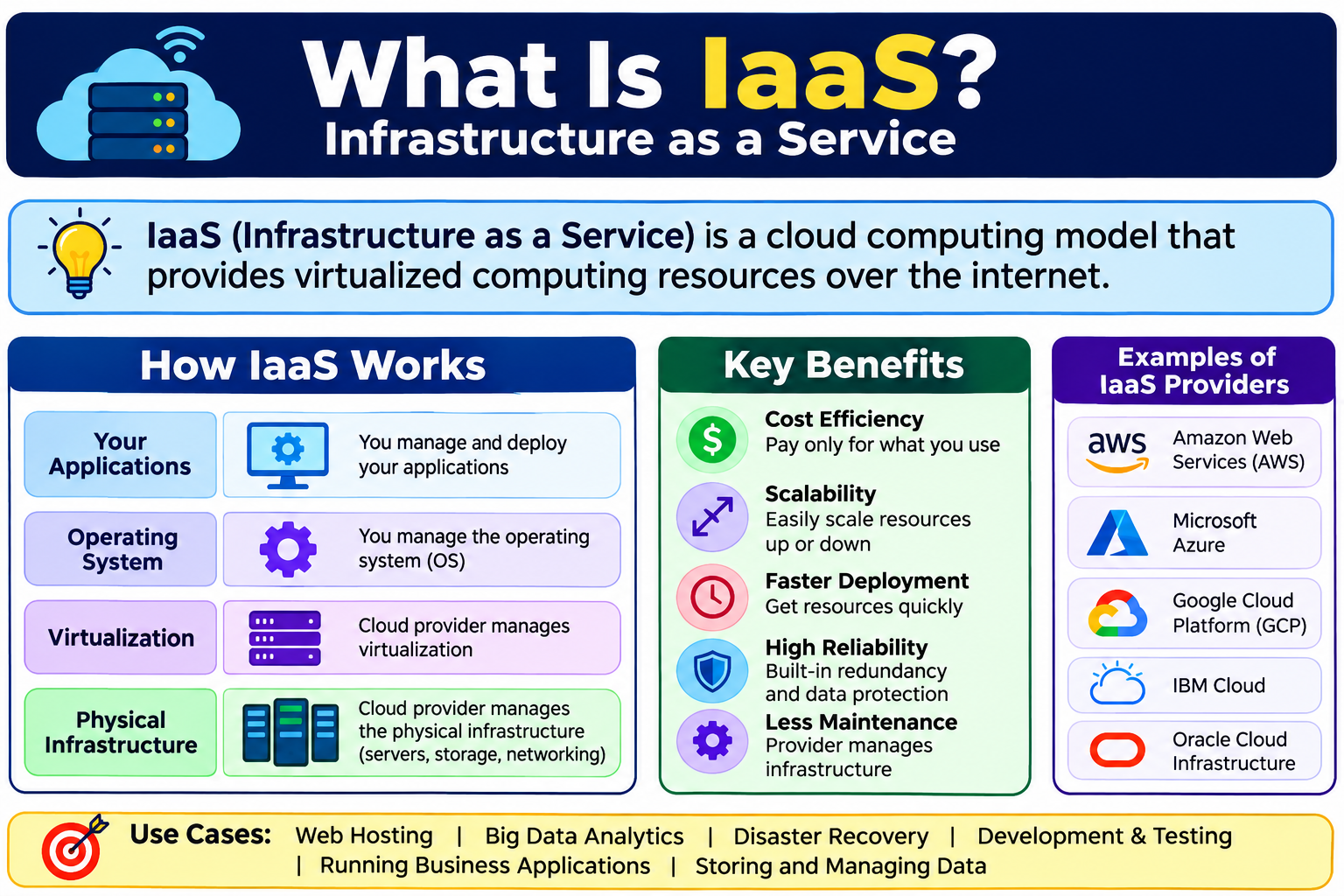
Every application needs somewhere to run. Every business that depends on software needs servers, storage, and networking to keep that software operational. For decades, meeting those needs meant purchasing physical hardware, setting up data centers, hiring staff to manage equipment, and planning years in advance for capacity that might not be needed until much later.
That model worked, but it was expensive, slow, and inflexible. Understanding what is IaaS helps explain how cloud computing changed this equation. Infrastructure as a Service, or IaaS, delivers virtualized computing resources over the internet, allowing organizations to access servers, storage, and networking without owning or managing physical hardware.
If you are new to cloud computing, What Is Cloud Computing? A Beginner’s Guide provides a solid foundation before exploring the specific service models built on top of it.
Quick Answer: What Is IaaS?
IaaS, or Infrastructure as a Service, is a cloud computing model that provides virtualized computing resources over the internet, including virtual servers, storage, networking, and virtualization infrastructure. Organizations use IaaS to run applications and manage workloads without owning or maintaining physical hardware. They typically pay on a pay-as-you-go or subscription basis, accessing resources through a web console, API, or command-line interface.
What Is IaaS?
IaaS stands for Infrastructure as a Service. It is a cloud computing model in which a cloud provider delivers virtualized computing infrastructure over the internet. This infrastructure includes virtual servers, storage systems, networking components, and the virtualization layer that makes all of it possible.
In a traditional setup, an organization that needed a server had to purchase physical hardware, install it in a data center or server room, connect it to a network, and maintain it over time. With IaaS, the cloud provider owns and manages all of that physical hardware. The organization simply accesses virtual versions of those resources through an internet connection.
The division of responsibility is clear. The cloud provider manages the physical data centers, the hardware, and the virtualization infrastructure. The customer manages the operating system, the applications running on those systems, the data stored within them, and the network configuration they control.
IaaS is one of the three main cloud service models. The other two are PaaS, or Platform as a Service, and SaaS, or Software as a Service. Understanding how these models differ from each other is essential to choosing the right approach for any given workload.
Organizations use IaaS for many reasons. It reduces upfront capital expenditure on hardware. It allows faster deployment of computing resources. It provides geographic flexibility through data center regions around the world. And it gives technical teams full control over their computing environment without the burden of physical infrastructure management.
What Does IaaS Include?
IaaS is not a single service. It is a collection of virtualized infrastructure components that together form a complete computing environment. Here are the key components customers typically access through an IaaS platform.
Virtual Machines
A virtual machine, often called a VM, is a software-based version of a physical server. It runs an operating system and applications just like a physical machine does, but it exists as a software layer on top of physical hardware managed by the provider.
Virtual machines are the core building block of most IaaS environments. Customers can provision one VM or hundreds, choose the operating system, configure the amount of CPU and memory, and start using it within minutes. When the workload changes, VMs can be resized, duplicated, or terminated as needed.
Storage
IaaS platforms offer several types of storage to meet different needs.
Block storage works like a traditional hard drive attached to a server. It is used for databases and applications that need fast, low-latency access to data stored in structured blocks.
Object storage is designed for large volumes of unstructured data such as images, videos, backups, and log files. It is accessed through APIs and is highly scalable.
File storage provides shared file systems that multiple virtual machines can access simultaneously, similar to a network-attached storage system.
Each storage type serves different purposes, and IaaS environments typically provide access to all three.
Networking
IaaS platforms provide virtual networking components that allow customers to build secure, isolated network environments in the cloud. These include virtual private networks, subnets, route tables, and network gateways.
Customers can configure load balancers to distribute traffic across multiple virtual machines, assign public and private IP addresses, set up DNS records, and configure firewall rules to control traffic flow. This level of networking control mirrors what organizations can do with physical network equipment, delivered entirely through software.
Virtualization
Virtualization is the technology that makes IaaS possible. A hypervisor is software that runs on physical servers and creates virtual machines by dividing the physical hardware into isolated virtual environments.
The hypervisor manages how CPU, memory, and storage resources are allocated across multiple virtual machines running on the same physical hardware. Customers do not interact with the hypervisor directly. It operates at the infrastructure layer managed by the provider, but understanding its role helps explain how IaaS delivers flexibility and resource efficiency.
Operating System Access
One of the defining characteristics of IaaS is that customers manage their own operating systems. After provisioning a virtual machine, the customer installs, configures, patches, and maintains the OS. This is fundamentally different from PaaS, where the provider manages the platform, and SaaS, where the provider manages everything.
This level of control is valuable for organizations with specific OS requirements or custom configurations. It also means that OS security, updates, and maintenance are the customer’s responsibility.
Scalability
IaaS platforms allow customers to scale resources up or down based on demand. Need more computing power during a busy period? Additional virtual machines can be provisioned. Traffic drops after a peak period? Resources can be reduced to lower costs.
However, scaling in IaaS requires planning and configuration. It is not always automatic. Organizations need to design their architectures to take advantage of scalability features, set up monitoring to detect when scaling is needed, and configure their applications to work across multiple instances.
How Does IaaS Work?
The process behind IaaS is logical and consistent once you understand the layers involved.
- A cloud provider builds and operates large physical data centers filled with servers, storage systems, and networking hardware. These facilities include power systems, cooling, physical security, and redundant connectivity.
- Virtualization software, specifically hypervisors, runs on the physical servers and creates pools of virtual resources that can be divided and allocated to customers.
- Customers access these virtual resources through a web-based management console, a command-line interface, or APIs that allow programmatic control of infrastructure.
- Customers provision virtual machines, attach storage volumes, configure networks, and set up security rules according to their requirements.
- Customers install and configure their chosen operating systems, middleware, and applications on the virtual machines they have provisioned.
- Customers are billed based on usage, which may include the hours a virtual machine runs, the amount of storage consumed, the volume of data transferred, and additional services used.
- Throughout all of this, the provider manages the physical layer. Hardware failures, data center maintenance, and virtualization platform updates are the provider’s responsibility.
The web console or management portal is where most customers spend their time managing IaaS resources. APIs are particularly important for developers and operations teams who automate infrastructure provisioning through code. This practice, known as infrastructure as code, brings consistency, repeatability, and version control to infrastructure management.
Understanding the underlying cloud infrastructure that supports IaaS helps clarify how these services are delivered. How Does Cloud Computing Work? explains the foundational mechanics of cloud resource delivery.
IaaS vs PaaS vs SaaS
IaaS is one of three primary cloud service models. The differences between them come down to how much the provider manages and how much the customer controls.
| Feature | IaaS | PaaS | SaaS |
|---|---|---|---|
| What it provides | Virtual infrastructure | Development platform | Ready-to-use software |
| Customer manages | OS, apps, data, middleware | Applications and data | User settings only |
| Provider manages | Physical hardware, virtualization | Infrastructure and platform | Everything |
| Flexibility | Highest | Moderate | Lowest |
| Technical skill required | High | Moderate | Low |
| Example use case | Hosting custom applications | Building web applications | Using email software |
| Control level | Maximum | Moderate | Minimal |
IaaS gives organizations the most control over their computing environment. They choose the OS, configure the network, install applications, and manage everything above the virtualization layer. That control comes with responsibility. Technical expertise is required to manage IaaS environments effectively.
PaaS sits one level higher. The provider manages the underlying infrastructure and platform so developers can focus on writing and deploying applications without managing servers or operating systems. To learn more about how PaaS works, What Is PaaS? covers the platform model in detail.
SaaS is at the opposite end of the spectrum. The provider manages everything, and users simply access software through a web browser or application. There is no infrastructure or platform to manage. What Is SaaS? explains this model clearly for anyone exploring the full range of cloud service options.
Choosing the right model depends on the workload, the technical capabilities of the team, and the level of control the organization needs.
IaaS vs Traditional On-Premises Infrastructure
Before IaaS existed, organizations that needed computing infrastructure had one option: build it themselves. That meant purchasing servers, installing them in a data center or server room, connecting networking equipment, and hiring staff to manage everything. The process was slow, expensive, and difficult to scale.
| Feature | IaaS | Traditional On-Premises |
|---|---|---|
| Hardware ownership | Provider | Customer |
| Upfront cost | Usually lower | Often high |
| Ongoing cost | Usage-based | Hardware, maintenance, facilities |
| Scalability | Flexible | Limited by physical capacity |
| Deployment speed | Usually faster | Slower |
| Maintenance responsibility | Provider (hardware) | Customer |
| Geographic distribution | Easier | Requires physical locations |
IaaS typically reduces the upfront investment required to access computing infrastructure. Organizations avoid purchasing servers that may sit underutilized for much of their lifespan. They also avoid the costs of data center facilities, power, cooling, and physical maintenance.
However, ongoing IaaS costs can accumulate over time. Organizations with stable, predictable workloads sometimes find that owned infrastructure is more cost-effective over a long period than paying for cloud resources continuously. Total cost of ownership analysis is important before committing to either model.
For a broader look at how cloud and traditional approaches compare across multiple dimensions, Cloud Computing vs Traditional Computing provides a thorough comparison.
Benefits of IaaS
IaaS offers genuine advantages for many organizations and workload types, though the actual benefits depend on how well the environment is designed and managed.
No physical hardware to purchase or maintain. Organizations access computing resources without buying servers, storage arrays, or networking equipment. The provider handles hardware procurement, installation, and replacement.
Faster provisioning of resources. Virtual machines and storage volumes can often be provisioned in minutes rather than the days or weeks required to order, deliver, and set up physical hardware.
Scalable infrastructure. IaaS environments can accommodate changing workload requirements by adding or removing resources, though scaling must be planned and configured to work effectively.
Geographic distribution options. Most IaaS providers operate data centers across multiple regions and countries, making it practical to deploy infrastructure closer to users or in multiple locations for redundancy.
Pay-as-you-go pricing options. On-demand pricing allows organizations to pay for what they use rather than investing in capacity they may not always need.
Reduced data center management burden. Organizations do not need to manage physical data center facilities, power systems, cooling, or hardware maintenance for the resources the provider manages.
Disaster recovery support. IaaS platforms provide the building blocks for disaster recovery strategies, including replication, geographic redundancy, and rapid resource provisioning.
Business continuity options. The ability to quickly provision resources in different regions supports business continuity planning when primary systems are disrupted.
Access to enterprise-grade infrastructure. Small organizations can access the same quality of infrastructure that large enterprises use, without the capital investment that would previously have made it inaccessible.
Flexible operating system and application choices. Customers choose their own OS, configure it as needed, and install the applications that suit their requirements.
Support for development and testing environments. Development and test environments can be provisioned quickly, used for as long as needed, and then terminated, avoiding the cost of maintaining permanent infrastructure for non-production purposes.
Global reach through provider data center regions. Organizations can deploy applications in regions around the world without establishing physical presence in those locations.
Disadvantages of IaaS
A fair assessment of IaaS requires acknowledging its limitations and challenges.
Requires significant technical expertise to manage. IaaS puts the customer in control of the OS, applications, networking, and security. Without the right skills, managing an IaaS environment effectively is difficult and risky.
Ongoing costs can exceed on-premises for some workloads. For stable, predictable workloads that run continuously, the ongoing cost of IaaS can over time exceed the cost of owned infrastructure. This varies by workload and provider.
Internet dependency. Accessing and managing IaaS resources requires a reliable internet or private network connection. Network outages can affect access to cloud-hosted systems.
Vendor lock-in risks. Building infrastructure that relies heavily on provider-specific services and features can make it difficult and costly to migrate to a different provider later.
Security configuration is customer responsibility. The provider secures the physical infrastructure, but OS security, application security, access management, and data protection are the customer’s responsibility. Misconfiguration is a common source of security incidents.
Compliance and data sovereignty considerations. Storing data in cloud regions in other jurisdictions may raise compliance questions depending on the industry and applicable regulations.
Cost unpredictability with pay-as-you-go models. Without careful monitoring, usage can grow unexpectedly and result in bills that exceed budget. Cost management requires active attention.
Performance dependent on provider infrastructure and configuration. Network latency, storage performance, and compute capacity are influenced by how the IaaS environment is configured and where it is deployed.
Migration complexity. Moving existing applications to IaaS can be complex, particularly for legacy systems that were not designed for cloud environments.
Organizations can manage many of these challenges through careful planning, choosing appropriate pricing models, investing in team training, implementing cost monitoring, and designing architectures that reduce vendor dependency where practical.
IaaS Security and the Shared Responsibility Model
Security is one of the most critical considerations in any IaaS environment. It is also one of the most commonly misunderstood.
IaaS is not automatically secure. The cloud provider secures the physical data centers, the hardware, and the virtualization layer. Everything above that layer is the customer’s responsibility. This division is known as the shared responsibility model.
| Area | Typical Responsibility |
|---|---|
| Physical data centers | Provider |
| Virtualization layer | Provider |
| Virtual machine OS | Customer |
| Application security | Customer |
| Data encryption | Customer |
| Network configuration | Customer |
| Access management | Customer |
| Patch management | Customer |
In practical terms, this means that customers must configure firewall rules correctly, apply OS patches regularly, encrypt sensitive data both in transit and at rest, manage user access with appropriate permissions, and monitor their environments for suspicious activity.
Identity and access management is particularly important. Overly permissive access roles are a common source of security risk in IaaS environments. Applying the principle of least privilege, where users and services have only the permissions they actually need, reduces the impact of compromised credentials.
Multi-factor authentication should be enabled on all accounts with access to IaaS management consoles and APIs. Monitoring and logging should be configured to capture activity and alert on anomalies.
Exact responsibilities vary depending on the provider and the specific services used. Organizations should always review their provider’s shared responsibility documentation before deploying sensitive workloads.
For a comprehensive look at how security works in cloud environments, What Is Cloud Security? covers the principles, tools, and practices that protect cloud infrastructure.
IaaS Use Cases
IaaS is a versatile foundation that supports a wide range of workloads across many industries.
Website and web application hosting. Organizations host their websites and web applications on virtual machines in IaaS environments, taking advantage of scalability and geographic distribution.
Development and testing environments. Development teams provision IaaS resources to build and test applications, using them for as long as needed and terminating them when done.
Big data analysis. IaaS provides the compute and storage capacity needed to process large datasets for analytics and reporting workloads.
High-performance computing. Research institutions and engineering firms use IaaS to run computationally intensive simulations and calculations that would require significant dedicated hardware on-premises.
Backup and disaster recovery. Organizations use IaaS as a cost-effective destination for backup data and as a recovery environment for disaster recovery strategies.
E-commerce platforms. Online retailers host their storefronts, databases, and order processing systems on IaaS infrastructure, scaling resources during peak shopping periods.
Storage and archiving. Organizations store large volumes of data in IaaS object storage for long-term retention and compliance archiving.
Enterprise application hosting. Business applications such as ERP systems, CRM platforms, and data warehouses run on virtual machines in IaaS environments.
Machine learning workloads. Data science teams use IaaS compute resources, including GPU-enabled virtual machines, to train and run machine learning models.
Gaming infrastructure. Online gaming companies use IaaS to host game servers, manage player data, and scale infrastructure based on active player counts.
Media streaming. Content providers use IaaS storage and compute resources to store, process, and deliver video and audio content to audiences worldwide.
Remote desktop environments. Organizations host virtual desktop infrastructure on IaaS platforms, allowing employees to access a fully configured desktop from any device.
IaaS for Small Businesses
Small businesses often assume that IaaS is too complex or too expensive for their needs. In many cases, this assumption is worth reconsidering.
IaaS lowers the barrier to accessing enterprise-grade computing infrastructure. A small business that previously could not afford dedicated servers now has access to the same quality of infrastructure that large corporations use, at a scale appropriate to its size and budget.
Starting small is one of the key advantages. A small business can provision a single virtual machine, a small amount of storage, and a basic network configuration to host a website or run a business application. As the business grows, resources can be expanded incrementally without a large upfront investment.
The challenge for small businesses is that IaaS requires technical expertise to manage effectively. If the business does not have in-house IT staff with cloud infrastructure experience, managed IaaS services offered by cloud providers or third-party managed service providers can reduce that burden. Managed services handle monitoring, patching, security configuration, and ongoing maintenance on behalf of the customer.
Cost planning matters for small businesses. Pay-as-you-go pricing offers flexibility but requires monitoring to avoid unexpected bills. Setting up budget alerts and reviewing usage regularly helps keep costs predictable and under control.
IaaS for Enterprises
Enterprise organizations use IaaS at a much larger scale, with more complex requirements and greater stakes attached to performance, security, and compliance.
Large organizations often deploy IaaS across multiple regions to support global operations and provide geographic redundancy. High availability architectures spread workloads across multiple availability zones within a region, reducing the risk of a single point of failure taking critical systems offline.
Regulatory compliance is a significant consideration for enterprises in industries such as finance, healthcare, and government. IaaS providers offer compliance certifications and features that support regulatory requirements, but the organization remains responsible for implementing compliant configurations and maintaining evidence of compliance.
Hybrid cloud integration is common at the enterprise level, combining IaaS resources with on-premises infrastructure connected through private network links. This approach allows organizations to keep sensitive workloads on-premises while using cloud resources for flexible capacity or specific use cases.
Reserved capacity pricing helps enterprises optimize costs for predictable workloads. By committing to specific resource levels for defined periods, organizations receive discounted rates compared to on-demand pricing, which reduces total cloud spending for stable workloads.
Dedicated IaaS management teams, internal standards, governance frameworks, and automated monitoring tools are common in enterprise environments. The scale and complexity of enterprise IaaS use requires structured management practices to maintain security, performance, and cost efficiency.
IaaS Pricing Models
IaaS pricing varies by provider and by the specific resources and services used. Understanding the main pricing models helps organizations choose the approach that best matches their workload patterns and budget requirements.
Pay-As-You-Go
Pay-as-you-go, also called on-demand pricing, charges based on actual resource consumption. You pay for the hours a virtual machine runs, the gigabytes of storage you use, and the data you transfer. There is no upfront commitment.
This model offers maximum flexibility. It is well suited to variable workloads, development environments, and situations where future resource needs are uncertain. The trade-off is that costs can be unpredictable if usage is not monitored carefully.
Reserved Instances
Reserved instances allow organizations to commit to a specific resource level for a defined period, typically one or three years, in exchange for a discounted rate compared to on-demand pricing. The discount can be significant for stable, predictable workloads that run continuously.
Reserved capacity makes sense when an organization knows it will use a certain amount of compute or storage consistently over time. It requires more planning but can meaningfully reduce cloud spending for qualifying workloads.
Spot or Preemptible Instances
Spot instances, sometimes called preemptible instances, offer access to unused cloud capacity at reduced prices. The discount can be substantial compared to on-demand rates.
The key limitation is that the provider can reclaim spot instances with short notice when that capacity is needed elsewhere. This makes them unsuitable for critical production workloads but well suited to fault-tolerant batch processing, data analysis, and tasks that can be interrupted and resumed.
Subscription Pricing
Some IaaS offerings use fixed monthly or annual subscription pricing for defined resource packages. This provides predictable billing and can simplify budgeting, though it may be less flexible than usage-based models.
Beyond the core pricing model, organizations should account for these cost components when planning IaaS budgets:
- Compute costs, based on the type and size of virtual machine and the hours it runs
- Storage costs, typically charged per gigabyte per month for each storage type
- Data transfer costs, particularly egress fees for data leaving the cloud environment
- Networking costs, including load balancers, reserved IP addresses, and VPN connections
- Support tier costs, which vary significantly between basic and premium support levels
IaaS is not always cheaper than alternatives. Total cost of ownership depends on workload characteristics, usage patterns, the pricing model selected, and how efficiently the environment is managed.
How to Choose an IaaS Provider
Selecting an IaaS provider is a significant decision that affects performance, security, cost, and operational flexibility for years. These criteria help organizations evaluate their options systematically.
Geographic regions and availability zones. Consider whether the provider operates data centers in the regions where your users, customers, or regulatory requirements demand. Multiple availability zones within a region support high availability architectures.
Compute and storage options. Evaluate the range of virtual machine types, sizes, and configurations available. Consider whether the provider offers the storage types and performance levels your workloads require.
Network performance. Review the provider’s network infrastructure, bandwidth capabilities, and latency characteristics for the regions you plan to use.
Security certifications and compliance. Check whether the provider holds relevant security certifications such as ISO 27001, SOC 2, or industry-specific compliance attestations relevant to your organization.
SLA and uptime commitments. Review the provider’s service level agreements carefully. Understand what uptime is committed for each service, what remedies apply if commitments are not met, and what exclusions apply.
Pricing transparency. Choose providers whose pricing is clearly documented and whose billing tools make it practical to monitor and manage spending.
Support options. Evaluate the support tiers available, response time commitments, and the quality of technical support for your team’s needs.
Integration with existing tools. Consider whether the provider’s services integrate with the tools, platforms, and workflows your organization already uses.
Migration support. Assess what tools, documentation, and services the provider offers to help migrate existing workloads to their platform.
Vendor lock-in considerations. Evaluate how dependent you would become on provider-specific services and how difficult migration to a different provider would be in the future.
Community and documentation quality. Good documentation, an active user community, and accessible learning resources make it easier for teams to use the platform effectively.
Always evaluate providers based on your specific workload requirements rather than general reputation alone. A provider that works well for one type of workload may not be the best fit for another.
IaaS Best Practices
Applying proven practices from the start significantly improves the security, reliability, and cost efficiency of an IaaS environment.
- Define workload requirements before provisioning resources. Understanding what you need prevents over-provisioning and helps you choose the right VM sizes and storage types.
- Use the principle of least privilege for all access management. Grant users and services only the permissions they actually need to perform their functions.
- Enable multi-factor authentication on all IaaS management accounts and API access credentials. This reduces the risk of account compromise significantly.
- Encrypt data at rest and in transit. Use encryption for all stored data and ensure that data moving between systems is protected with appropriate protocols.
- Monitor resource usage and costs continuously. Set up dashboards that give visibility into what resources are running and what they cost.
- Set up alerts for unusual spending or activity. Budget alerts warn of unexpected cost growth. Security alerts flag suspicious access or configuration changes.
- Patch operating systems and applications regularly. Unpatched software is one of the most common entry points for attackers. Establish a patch management process and follow it consistently.
- Use infrastructure as code for consistent and repeatable deployments. Defining infrastructure in code rather than configuring it manually reduces human error and makes environments reproducible.
- Design for high availability using multiple availability zones. Spreading workloads across availability zones reduces the risk of a single failure taking everything offline.
- Implement network segmentation and firewall rules. Isolate workloads from each other and restrict network traffic to only what is necessary for each system to function.
- Back up data and test restores regularly. Backups are only useful if they actually work when needed. Test restore procedures on a scheduled basis.
- Review and right-size resources to avoid over-provisioning. Regularly check whether virtual machine sizes and storage allocations match actual usage, and adjust to eliminate waste.
- Document the IaaS architecture and configuration. Clear documentation helps teams understand the environment and respond effectively when problems occur.
- Plan for vendor lock-in mitigation from the start. Use open standards and portable architectures where practical to preserve flexibility for the future.
Common IaaS Mistakes
Understanding what commonly goes wrong helps organizations avoid the same pitfalls.
Over-provisioning resources and paying for unused capacity. It is easy to provision more than you need and forget to right-size or terminate unused resources. Regular reviews of running resources and associated costs prevent this from becoming a significant expense.
Underestimating management complexity. IaaS hands over significant control to the customer, which means significant responsibility. Organizations sometimes underestimate the technical expertise required to manage OS, applications, networking, and security effectively.
Neglecting OS and application patching. In a traditional data center, patching is typically a managed function with defined schedules. In IaaS, it is the customer’s job. Falling behind on patches leaves systems exposed to known vulnerabilities.
Weak access controls and overly permissive roles. Assigning broad administrative permissions to accounts that do not need them creates unnecessary risk. If those accounts are compromised, the impact is much larger than it needed to be.
Ignoring data egress costs. Data transfer into cloud environments is often free or inexpensive, but data leaving the cloud can attract significant charges. Applications that move large volumes of data out of the cloud environment regularly can generate substantial bills.
No monitoring or alerting in place. Running IaaS resources without monitoring is flying blind. Performance problems, security incidents, and cost overruns are much harder to detect and address without visibility into what is happening.
Treating IaaS as automatically secure. Assuming the provider handles security is one of the most dangerous misconceptions in cloud computing. The customer is responsible for a significant portion of the security stack in an IaaS environment.
Not designing for availability and redundancy. Deploying all resources in a single availability zone or region creates a single point of failure. High availability requires deliberate architectural decisions.
Poor documentation. Undocumented infrastructure is difficult to manage, troubleshoot, and hand over to other team members. Documentation is not optional in a well-managed IaaS environment.
Failing to plan for disaster recovery. IaaS provides tools and capabilities that support disaster recovery, but DR does not happen automatically. Organizations must plan, implement, and test DR strategies deliberately.
Examples of IaaS
IaaS is available in several different forms, and organizations choose based on their requirements, existing infrastructure, and technical capabilities.
Major public cloud IaaS platforms are operated by large cloud providers and offer the broadest range of compute, storage, and networking options. They serve organizations of all sizes and support workloads ranging from simple websites to complex enterprise applications. Always review current provider documentation for accurate feature and pricing information before making decisions.
Managed IaaS services are offered by cloud providers and third-party managed service providers who take on operational responsibility for the IaaS environment. Managed services reduce the internal expertise required but come at a higher cost than self-managed IaaS.
Private cloud IaaS involves deploying IaaS infrastructure within an organization’s own data center or dedicated facilities, using virtualization software to deliver cloud-like resource management internally. This approach appeals to organizations with strict data sovereignty or security requirements.
Hybrid IaaS environments combine on-premises infrastructure with public cloud IaaS resources, connected through private network links. Workloads can run in the most appropriate environment, and organizations can use cloud resources to extend capacity when needed.
For organizations evaluating cloud storage options that complement their IaaS infrastructure, reviewing Best Cloud Storage Services Comparison can help identify services that integrate well with broader cloud architectures.
IaaS for Students and Beginners
IaaS is an excellent starting point for anyone building a career in cloud computing, IT operations, or software development. The concepts and skills involved in managing IaaS environments are foundational to many technology roles.
Students studying IaaS gain practical knowledge in several important areas.
Cloud computing fundamentals. Understanding how cloud providers deliver virtual resources gives students a practical framework for the broader cloud computing landscape.
Virtualization concepts. Learning how hypervisors create and manage virtual machines connects to core infrastructure knowledge that applies in both cloud and on-premises environments.
Networking basics. Configuring virtual networks, firewalls, and load balancers in an IaaS environment builds networking skills that translate directly to professional practice.
Operating system management. Provisioning and managing virtual machines running Linux or Windows builds OS administration skills that are relevant to many technology roles.
Security principles. Applying access controls, encryption, and monitoring in an IaaS environment introduces fundamental security practices in a hands-on context.
Career relevance. Cloud infrastructure skills are among the most in-demand in the technology industry. Practical experience with IaaS platforms, combined with relevant certifications, builds a strong foundation for roles in cloud engineering, DevOps, and systems administration.
Many major cloud providers offer free tier access that allows students to experiment with virtual machines, storage, and networking at no cost within defined usage limits. This hands-on practice is one of the most effective ways to build IaaS skills.
For students building their technology toolkit more broadly, Best Software for Students covers useful tools for learning, productivity, and professional development.
Frequently Asked Questions
What is IaaS?
IaaS, or Infrastructure as a Service, is a cloud computing model that delivers virtualized computing resources over the internet, including virtual servers, storage, and networking, without the customer needing to own or maintain physical hardware.
What is IaaS in simple words?
IaaS lets you rent computing infrastructure from a cloud provider over the internet instead of buying and managing your own physical servers and equipment.
What does IaaS stand for?
IaaS stands for Infrastructure as a Service.
How does IaaS work?
A cloud provider builds physical data centers and uses virtualization to create virtual versions of servers, storage, and networking. Customers access and manage those virtual resources through a web console or API and pay based on usage.
What is the difference between IaaS, PaaS, and SaaS?
IaaS provides virtual infrastructure and gives customers maximum control. PaaS provides a development platform where customers manage applications but not infrastructure. SaaS provides ready-to-use software where the provider manages everything.
What are examples of IaaS?
Examples include major public cloud IaaS platforms, managed IaaS services, private cloud environments, and hybrid cloud architectures combining on-premises and cloud resources. Always check current provider documentation for specific offerings.
What are the benefits of IaaS?
Benefits include no physical hardware to purchase, faster resource provisioning, scalable infrastructure, geographic distribution options, pay-as-you-go pricing, and access to enterprise-grade computing without large upfront investment.
What are the risks of IaaS?
Risks include high management complexity, potential cost unpredictability, vendor lock-in, customer responsibility for security configuration, compliance considerations, and internet dependency.
Is IaaS secure?
IaaS is not automatically secure. The provider secures physical infrastructure and the virtualization layer. The customer is responsible for OS security, application security, data encryption, access management, and network configuration.
Is IaaS cheaper than on-premises?
Not always. IaaS can reduce upfront capital costs, but ongoing usage-based costs can exceed on-premises costs for stable workloads. A total cost of ownership analysis is necessary to compare the options fairly.
Who manages security in IaaS?
Security is shared. The provider manages physical and virtualization security. The customer manages OS security, applications, data encryption, access controls, network configuration, and patch management.
What is a virtual machine in IaaS?
A virtual machine is a software-based server that runs on physical hardware managed by the cloud provider. Customers use virtual machines to run operating systems and applications just as they would on a physical server.
What is the shared responsibility model in IaaS?
The shared responsibility model defines which security tasks belong to the provider and which belong to the customer. In IaaS, the provider handles physical infrastructure and virtualization. The customer handles everything else, including the OS, applications, data, and network configuration.
Can small businesses use IaaS?
Yes. IaaS lowers the barrier to enterprise-grade infrastructure. Small businesses can start with minimal resources and scale as needed. Managed IaaS options can reduce the technical burden for businesses without dedicated IT staff.
What skills do you need to manage IaaS?
Useful skills include cloud platform knowledge, operating system administration, networking concepts, security practices, scripting and automation, and understanding of virtualization. The specific skills required depend on the workloads and platform used.
What is pay-as-you-go pricing in IaaS?
Pay-as-you-go pricing charges based on actual usage. You pay for the hours resources run and the data you store or transfer, without committing to a fixed capacity in advance.
What is a reserved instance?
A reserved instance is a pricing arrangement where you commit to a specific resource level for a defined period, typically one or three years, in exchange for a discounted rate compared to on-demand pricing.
What is vendor lock-in in IaaS?
Vendor lock-in occurs when an organization becomes heavily dependent on a specific provider’s proprietary services, making it difficult or expensive to migrate to a different provider in the future.
Is IaaS the same as cloud hosting?
Not exactly. Cloud hosting is a broader term that can refer to various managed hosting services. IaaS specifically refers to a cloud service model that provides virtualized infrastructure resources that the customer manages directly.
What is the difference between IaaS and traditional infrastructure?
With IaaS, the provider owns and manages physical hardware. With traditional on-premises infrastructure, the organization owns and manages everything. IaaS typically offers faster provisioning, geographic flexibility, and reduced upfront costs, though ongoing costs and management responsibilities differ.
Final Thoughts
Infrastructure as a Service has changed how organizations access and manage computing resources. Instead of purchasing physical servers, building data centers, and managing hardware through its entire lifecycle, organizations can provision virtual machines, storage, and networking in minutes and pay based on what they actually use.
This guide has covered what is IaaS and how it works through virtualization and cloud provider infrastructure, the key components including virtual machines, storage, networking, and operating system access, how IaaS compares to PaaS and SaaS in terms of control and management responsibility, how it differs from traditional on-premises infrastructure, the genuine benefits IaaS offers alongside its real limitations and challenges, the shared responsibility model that defines security obligations for providers and customers, a wide range of use cases across industries and organization sizes, the pricing models that determine how IaaS costs are structured, and the best practices that help organizations get the most from their IaaS investments.
The most important thing to remember about what is IaaS is that it is not a passive solution. Virtual machines need to be patched. Security configurations need to be maintained. Costs need to be monitored. Architectures need to be tested and reviewed as workloads change. Organizations that treat IaaS as a set-and-forget infrastructure choice often encounter security vulnerabilities, unexpected costs, and reliability problems that careful ongoing management would have prevented.
IaaS delivers real value when it is treated as an active, managed environment with the same attention and discipline that good infrastructure management has always required.
References
- National Institute of Standards and Technology (NIST). NIST Special Publication 800-145: The NIST Definition of Cloud Computing. csrc.nist.gov
- Amazon Web Services. What Is Cloud Computing? AWS Documentation. aws.amazon.com
- Microsoft Azure. What Is IaaS? Infrastructure as a Service. Microsoft Azure Documentation. azure.microsoft.com
- Google Cloud. Infrastructure as a Service (IaaS). Google Cloud Documentation. cloud.google.com
- IBM. IaaS vs PaaS vs SaaS. IBM Cloud Learn Hub. ibm.com/cloud/learn
- Cloud Security Alliance. Security Guidance for Critical Areas of Focus in Cloud Computing. cloudsecurityalliance.org
- Microsoft Azure. Shared Responsibility in the Cloud. Microsoft Azure Documentation. learn.microsoft.com
- National Institute of Standards and Technology (NIST). NIST Special Publication 800-190: Application Container Security Guide. csrc.nist.gov
Technology Disclaimer:
This article is for educational and informational purposes only. IaaS services, pricing, features, security controls, and provider capabilities can change over time. Always verify current information through official provider documentation and consult qualified technology professionals before implementing an IaaS solution.
Author:
TechOriginHub Editorial Team covers practical technology, software, cybersecurity, and cloud computing topics with a focus on clear and useful guidance.