
 By saman zahra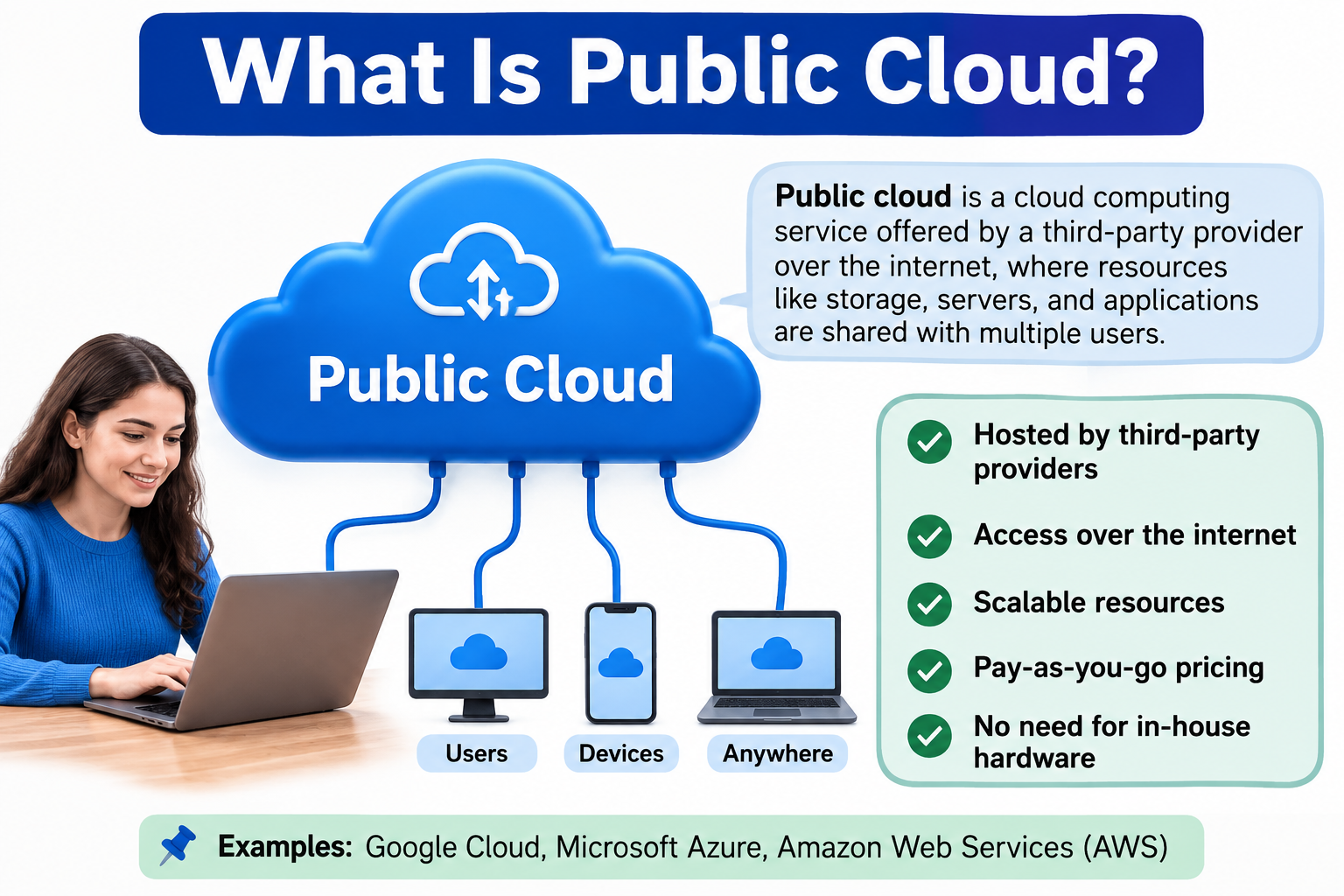
When you use an application through a web browser, store files online, or run software without installing it on your device, there is a strong chance you are using public cloud services. Public cloud computing refers to computing resources such as servers, storage, databases, networking, and applications delivered through infrastructure operated by a cloud provider and made available to customers over a network. Major examples include Amazon Web Services, Microsoft Azure, and Google Cloud. Understanding what is public cloud, how it works, and what it offers helps individuals and organizations make informed technology decisions. For foundational context, start with [What Is Cloud Computing? A Beginner’s Guide].
Quick Answer: What Is a Public Cloud?
A public cloud is a cloud computing environment where infrastructure and services are operated by a third-party cloud provider and made available to multiple customers over a network, typically the internet. Customers share the provider’s underlying infrastructure, but each customer’s resources and data are logically isolated through the provider’s security architecture. Examples include Amazon Web Services, Microsoft Azure, and Google Cloud.
What Is Public Cloud?
Public cloud is a cloud computing deployment model where a cloud provider owns, operates, and maintains the infrastructure and makes services available to multiple customers over a network. The provider manages the physical hardware, data centers, networking, and core platform components. Customers access services through the internet or, in some cases, dedicated private network connections.
An important distinction is worth clarifying immediately. Public cloud does not mean your data or applications are publicly accessible to everyone. The word “public” refers to the fact that the infrastructure is owned by a provider and made available to the public as a service, not that any data stored within it is visible to other users. Each customer’s resources are logically isolated from other customers through virtualization, access controls, and the provider’s security architecture.
Think of public cloud infrastructure like an apartment building. Many residents share the same building, elevators, and parking structure. However, each apartment is a private, locked space. Residents share the building without having access to each other’s homes. Public cloud works in a similar way. Customers share the underlying infrastructure without accessing each other’s data or resources.
Virtualization plays a central role in making this possible. Virtualization technology creates isolated computing environments on shared physical hardware, allowing many customers to run their workloads on the same physical servers without interfering with each other. For more on how virtualization works, [What Is VMware?] provides useful background.
How Does Public Cloud Work?
Public cloud services operate through a sequence of steps that happen quickly and largely invisibly to the end user.
- A customer selects a cloud service from a provider, such as virtual server hosting, a managed database, or object storage.
- The provider allocates or provisions the requested resources from its pool of available infrastructure.
- The customer configures the service, setting options such as region, computing size, storage capacity, and access permissions.
- Users and applications connect to the service through the internet or a dedicated private network connection.
- The provider’s cloud infrastructure processes incoming requests, running application code or retrieving stored data as needed.
- Data is stored, processed, or returned to the user according to the service’s design.
- Depending on the service model, the provider maintains the underlying infrastructure, operating system components, or platform software, while the customer manages their own application and configuration.
Behind every public cloud service is a network of physical data centers equipped with thousands of servers, storage systems, and networking equipment. Virtualization software divides this physical capacity into isolated virtual resources that the provider can allocate to different customers. The provider’s management systems handle resource provisioning, monitoring, and maintenance automatically.
What Services Does a Public Cloud Provide?
Public cloud extends far beyond simple file storage. Major cloud providers offer a broad catalog of services covering most areas of modern computing.
Compute services provide virtual machines and processing capacity for running applications, websites, and workloads. Storage services allow customers to store files, objects, databases, and backups at scale. Database services provide managed relational and non-relational database systems that the provider maintains and updates. Networking services deliver virtual networks, load balancers, content delivery networks, and network security tools.
Security services include identity and access management, key management, threat detection, and security monitoring tools. Analytics services process and analyze large volumes of data to generate business insights. Application hosting services allow web and mobile applications to run on managed infrastructure without provisioning individual servers. Backup services protect data against loss by creating copies that can be restored when needed.
Monitoring and logging services track the health and performance of cloud resources and applications. These services together make the public cloud a comprehensive platform for building, running, and managing technology workloads of almost any kind.
For a focused look at cloud-based data storage specifically, read [What Is Cloud Storage?]. If you are evaluating cloud storage services for personal or business use, [Best Cloud Storage Services Comparison] offers a practical guide.
What Are Public Cloud Service Models?
Public cloud services are typically organized into three primary service models. Each model defines a different division of responsibility between the provider and the customer.
Public Cloud IaaS
Infrastructure as a Service provides virtual computing resources over the internet. Customers rent virtual machines, storage, and networking from the provider. The provider manages the physical hardware and the virtualization layer. The customer installs and manages their own operating systems, middleware, and applications on top of the virtual infrastructure. IaaS gives customers a high degree of control and is often used for custom application deployments, development environments, and workloads that require specific configurations.
Public Cloud PaaS
Platform as a Service provides a managed development and deployment environment. Developers build and run applications on the provider’s platform without managing the underlying servers, operating systems, or runtime software. The provider handles infrastructure maintenance, patching, and scaling for the platform layer. PaaS allows development teams to focus on writing and deploying application code rather than managing infrastructure.
Public Cloud SaaS
Software as a Service delivers complete, ready-to-use applications over the internet. The provider manages everything from infrastructure to the application itself. Customers simply access and use the software through a browser or dedicated app. Examples include productivity suites, customer relationship management tools, and collaboration platforms. For widely used SaaS examples, [What Is Google Workspace?] and [What Is Microsoft Office?] provide detailed overviews.
For a complete explanation of all three models and cloud deployment types, visit [What Are the Types of Cloud Computing?].
What Are Examples of Public Cloud?
Several major providers operate public cloud infrastructure at global scale. Each offers a broad portfolio of services covering compute, storage, databases, networking, and specialized workloads.
Amazon Web Services is one of the most widely recognized public cloud providers. It offers a comprehensive range of services including virtual computing, object storage, managed databases, content delivery, and networking tools. AWS serves a wide range of customers from individual developers to large enterprises.
Microsoft Azure is Microsoft’s public cloud platform. It provides computing infrastructure, managed databases, networking, identity management, and enterprise application services. Azure integrates closely with Microsoft’s existing enterprise products and development tools.
Google Cloud is Google’s public cloud offering. It provides computing infrastructure, data analytics, storage, machine learning services, and application hosting. Google Cloud is known for its data analytics and processing capabilities.
| Provider | General Focus | Example Services |
|---|---|---|
| AWS | Broad cloud infrastructure and services | Compute, storage, databases |
| Microsoft Azure | Cloud infrastructure and enterprise services | Compute, databases, analytics |
| Google Cloud | Cloud infrastructure, data and applications | Compute, storage, analytics |
These descriptions reflect general provider positioning. Always review current official documentation from each provider for up-to-date product and service information.
Public Cloud vs Private Cloud
Public cloud and private cloud are two distinct cloud deployment models. Understanding the difference helps organizations evaluate which approach suits their requirements.
| Feature | Public Cloud | Private Cloud |
|---|---|---|
| Infrastructure | Provider-operated shared infrastructure | Dedicated environment |
| Ownership | Usually the provider | Organization or provider |
| Scalability | Usually high | Depends on infrastructure |
| Control | Varies by service | Often greater customization |
| Hardware management | Mostly provider | More direct responsibility |
| Typical use | Broad range of workloads | Specific control or compliance requirements |
A private cloud is a cloud environment dedicated to a single organization. It can be hosted on the organization’s own premises, in a colocation facility, or operated by a managed service provider. Private cloud provides more direct control over infrastructure and is often chosen for workloads with specific compliance, security, or customization requirements.
One important clarification: public cloud is not automatically less secure than private cloud, and private cloud is not automatically more secure than public cloud. Security in both environments depends on how well the infrastructure is configured, monitored, and managed. A poorly configured private cloud can be less secure than a well-managed public cloud deployment.
For a detailed explanation of cloud deployment models including public, private, and hybrid cloud, read [What Are the Types of Cloud Computing?].
Public Cloud vs Hybrid Cloud
Hybrid cloud combines public cloud infrastructure with private cloud or on-premises environments, connecting them through networking and management tools.
| Public Cloud | Hybrid Cloud |
|---|---|
| Uses public cloud infrastructure | Combines public cloud with private or on-premises environments |
| Simpler architecture in some cases | More complex integration required |
| Suitable for many general workloads | Useful when workloads need different environments |
A practical example of hybrid cloud is an organization that runs its customer-facing web application on the public cloud for scalability, while keeping its sensitive financial processing systems on a private on-premises infrastructure. The two environments connect through secure network links and share identity management systems.
Hybrid cloud gives organizations the flexibility to use public cloud resources for workloads that benefit from scalability and global reach, while keeping sensitive or regulated workloads in environments where they have more direct control. However, hybrid architectures are more complex to design, integrate, and manage than using a single environment.
Public Cloud vs Traditional Computing
Traditional computing refers to environments where organizations purchase, manage, and maintain their own hardware and infrastructure, typically on-premises. The contrast with public cloud is significant across several dimensions.
Hardware ownership in traditional computing requires organizations to purchase and maintain servers, storage arrays, and networking equipment. Public cloud eliminates that direct hardware ownership responsibility for customers.
Scalability in traditional environments requires purchasing additional hardware, which takes time and capital. Public cloud allows organizations to increase or decrease resources relatively quickly without hardware procurement.
Maintenance of physical infrastructure in traditional environments is the organization’s responsibility. Public cloud transfers most physical infrastructure maintenance to the provider.
Cost structure differs considerably. Traditional infrastructure involves upfront capital expenditure for hardware and ongoing operational costs for maintenance, power, and staffing. Public cloud typically uses a usage-based or subscription pricing model that shifts costs from capital to operational spending.
Deployment of new workloads in traditional environments can take days or weeks due to hardware procurement and configuration. Public cloud often enables faster provisioning.
Accessibility to traditional on-premises systems is often tied to the physical network. Public cloud services are accessible from any authorized device with appropriate network connectivity.
Benefits of Public Cloud
Public cloud offers genuine advantages that have driven its widespread adoption across organizations of many sizes and industries.
Scalability allows organizations to increase computing resources during periods of high demand and reduce them when demand falls. This responsiveness is difficult to match with fixed on-premises hardware.
Flexible resource allocation means organizations can choose from a wide range of virtual machine sizes, storage options, and specialized services, configuring resources to match specific workload requirements.
Lower upfront hardware investment is a potential advantage in many cases. Organizations can begin using computing resources without purchasing physical servers or storage equipment. Ongoing usage costs still require careful management.
Faster provisioning allows new servers, databases, or storage capacity to be created in minutes through a provider’s console or API, rather than through a hardware procurement process that can take weeks.
Remote accessibility means authorized users can connect to public cloud services from almost anywhere with appropriate network access, supporting distributed teams and remote work.
Global infrastructure options allow organizations to deploy workloads in data center regions close to their users, improving performance for geographically distributed customers.
Managed services transfer operational responsibilities for tasks such as database maintenance, software patching, and infrastructure monitoring to the provider, allowing internal teams to focus on other priorities.
Access to advanced technologies such as managed analytics, specialized compute options, and application hosting capabilities becomes available without building that infrastructure internally.
Reduced physical infrastructure management removes the burden of maintaining data center equipment, power systems, and cooling infrastructure from the customer organization.
Flexible pricing models including pay-as-you-go options mean organizations can align costs more closely with actual usage rather than paying for fixed capacity regardless of utilization.
Actual costs depend heavily on workload characteristics, usage volume, architecture choices, data transfer patterns, and pricing model selection. Public cloud is not automatically cheaper than on-premises alternatives for every workload.
Disadvantages of Public Cloud
Public cloud adoption also carries real limitations that deserve careful consideration.
Ongoing usage costs can grow significantly as workloads scale. Organizations that do not actively monitor and manage their cloud spending can face unexpected charges.
Vendor lock-in occurs when applications and workflows become deeply dependent on a specific provider’s proprietary services, making migration to another provider complex and expensive.
Internet and network dependency means that accessing public cloud services typically requires reliable network connectivity. Service disruption or poor connectivity can affect application availability.
Configuration complexity is a real challenge. Public cloud environments offer many configuration options, and incorrect settings can create security vulnerabilities or performance problems.
Data transfer costs, sometimes called egress fees, apply when moving large volumes of data out of a cloud environment. These costs can be significant for data-intensive workloads.
Provider outages, while relatively infrequent for major providers, do occur. When a provider experiences a disruption, all customers relying on affected services experience impact simultaneously.
Compliance considerations require careful planning. Organizations in regulated industries must ensure that their cloud configuration meets applicable regulatory requirements, which may not be straightforward in every case.
Less direct physical control over the underlying hardware can be a concern for organizations with specific security or operational requirements.
Migration challenges arise when organizations need to move workloads from one provider to another or from cloud back to on-premises. This process can be technically demanding and time-consuming.
Practical steps to reduce these risks include setting up cost monitoring and alerts, designing applications with portability in mind, reviewing configuration security regularly, and understanding provider SLAs and outage history before committing critical workloads.
Is Public Cloud Secure?
Public cloud can be made very secure, but security is not automatic. It depends on both the provider’s infrastructure controls and the customer’s configuration and operational practices.
Major cloud providers invest significantly in physical data center security, including access controls, surveillance, and environmental protections. They also invest in encryption for data in transit and at rest, identity and access management systems, network security controls, security monitoring, and regular security updates for platform components.
Encryption protects data as it moves between users and cloud services and while it resides on storage systems. Identity and access management controls who can access specific resources and what actions they can perform. Authentication verifies identity before granting access. Authorization determines what an authenticated user is permitted to do.
Network security tools including virtual firewalls, network access controls, and intrusion detection systems help protect cloud workloads. Monitoring and logging tools allow organizations to detect unusual activity and investigate incidents.
However, the customer carries significant security responsibility depending on which services they use. A misconfigured storage bucket, an account with excessive permissions, or a weak password can create serious vulnerabilities regardless of the provider’s security investment.
Understanding [What Is Cloud Security?] provides essential guidance for securing cloud environments. [What Is Cybersecurity?] covers foundational security principles. For network-level protection, [Network Security] and [What Is a Firewall?] explain how network security controls work in cloud and traditional environments.
What Is the Shared Responsibility Model?
The shared responsibility model is a framework that defines which security tasks belong to the cloud provider and which belong to the customer. Understanding this division is essential for anyone using public cloud services.
Cloud providers generally take responsibility for securing the underlying infrastructure. This includes the physical data centers, the hardware servers, the network infrastructure, and the virtualization or platform layer that delivers services to customers.
Customers take responsibility for what they configure and manage on top of that infrastructure. This includes access controls, user permissions, application security, data classification, encryption settings, and how publicly accessible their resources are.
The precise division of responsibility shifts depending on the service model. In IaaS, where the customer manages virtual machines and operating systems, the customer carries more security responsibility than in SaaS, where the provider manages almost everything.
Consider two examples. A customer using a virtual machine through IaaS is responsible for patching the operating system, configuring the firewall rules for that machine, managing user accounts, and securing the application they install. A customer using a SaaS email platform is responsible for managing user accounts, access permissions, and how they share information within the platform. The provider handles the infrastructure and application security.
Misunderstanding the shared responsibility model is a common source of cloud security incidents. Organizations should review their provider’s shared responsibility documentation carefully before deploying workloads.
Public Cloud and Data Privacy
Storing and processing data in a public cloud environment raises important questions about privacy, data residency, and how providers handle customer information.
Data access controls within your cloud account determine who can read, write, or manage specific resources. Configuring these controls carefully is a customer responsibility. Leaving storage resources or databases accessible without appropriate restrictions can expose sensitive data.
Encryption protects data from unauthorized access both during transmission and when stored. Most public cloud providers offer encryption tools and options, but customers must enable and configure them appropriately for their workloads.
Data residency refers to where data is physically stored geographically. Some regulations require that certain types of data remain within specific national or regional boundaries. Most major public cloud providers offer the ability to choose storage regions, but confirming this alignment with applicable regulations is the customer’s responsibility.
Privacy policies from major cloud providers describe how they handle customer data, what access they retain for operational purposes, and under what circumstances they may disclose information. Reading these policies carefully before storing sensitive information is an important step.
Compliance frameworks relevant to specific industries, such as healthcare data regulations or financial services requirements, impose specific obligations on how data is handled in cloud environments. Organizations with compliance obligations should verify that their cloud configuration meets those requirements.
This article does not provide legal advice. Organizations handling regulated or sensitive data should consult qualified professionals and review current provider documentation.
Public Cloud Scalability
Scalability is one of the most frequently cited advantages of public cloud computing. It refers to the ability to increase or decrease computing resources in response to changing demand.
Vertical Scaling
Vertical scaling means adding more resources to an existing system. For example, upgrading a virtual machine from a smaller configuration with less processing power and memory to a larger configuration. Vertical scaling has practical limits because it is bounded by the maximum size of available virtual machine options.
Horizontal Scaling
Horizontal scaling means adding more instances of a resource rather than making an existing one larger. For example, running five web servers instead of one to handle higher traffic volumes. Horizontal scaling can continue across a larger range of capacity and is a common approach for high-traffic applications.
Automatic Scaling
Automatic scaling, sometimes called autoscaling, uses rules or metrics to add or remove instances dynamically based on real-time demand. When traffic to a web application increases, the system can automatically provision additional instances to handle the load. When traffic decreases, it can remove unnecessary instances to reduce costs. Automatic scaling allows applications to respond to demand changes without manual intervention.
Scalability is one of the primary reasons organizations choose public cloud over fixed on-premises hardware, particularly for workloads where demand varies significantly over time.
Public Cloud Reliability and Availability
Public cloud providers design their infrastructure to be highly available, meaning services remain accessible even when individual components fail. However, high availability depends on how the infrastructure is configured, not just on the provider’s capabilities.
Redundancy is built into public cloud infrastructure at multiple levels. Physical servers, storage systems, and networking equipment are replicated so that a single hardware failure does not disrupt service. Data is often stored across multiple physical devices simultaneously.
Availability zones are separate physical data center facilities within a cloud region, each with independent power, cooling, and network connectivity. Deploying applications across multiple availability zones protects against a failure in any single facility.
Regions are separate geographic locations where cloud providers operate infrastructure. Deploying applications across multiple regions provides protection against regional failures and supports global performance for distributed users.
Failover mechanisms automatically redirect traffic or workloads from a failed component to a healthy one, reducing the impact of failures on end users. Backup systems create copies of data at regular intervals to support recovery if primary data is lost or corrupted. Disaster recovery configurations can replicate entire workloads to secondary regions to support business continuity after significant disruptions.
Despite these capabilities, cloud providers experience outages. High availability is not the same as zero downtime. Achieving strong reliability requires designing applications to take advantage of available zones, regions, and redundancy options, not simply deploying to the cloud and assuming availability follows automatically.
Public Cloud Use Cases
Public cloud is used across an enormous range of practical scenarios. Here are common examples that illustrate its versatility.
Website hosting allows businesses and individuals to run websites on virtual servers that scale automatically with visitor traffic rather than relying on fixed-capacity hosting.
Mobile applications use public cloud infrastructure for backend services, databases, and push notification systems that support apps running on millions of devices simultaneously.
Business applications including CRM platforms, productivity tools, and enterprise software run on public cloud infrastructure as SaaS products or as custom deployments.
Data analytics workloads process large datasets using managed analytics and processing services without organizations needing to build and maintain dedicated data processing infrastructure.
Cloud storage provides scalable, accessible storage for files, media, and backups. [Best Cloud Storage Services Comparison] covers consumer and business storage options in detail.
Backup and data protection workloads use public cloud storage to maintain copies of important data that can be restored if local systems fail or data is accidentally deleted.
Disaster recovery configurations replicate on-premises or cloud workloads to a separate environment so operations can continue after a significant disruption.
Software development teams use public cloud environments for building, testing, and deploying applications, taking advantage of managed development platforms and automated deployment tools.
Testing environments can be created quickly in the public cloud, used for a specific testing cycle, and then removed when no longer needed, avoiding the cost of maintaining idle infrastructure.
Database hosting through managed database services removes the operational burden of database administration while providing scalable, reliable data storage for applications. [What Is Database Software? Types, Uses and Examples] provides context on how databases function in these environments.
Remote work support through cloud-hosted virtual desktops, collaboration tools, and file sharing services allows employees to access work resources from any location.
Streaming platforms for video, audio, and other media content use public cloud infrastructure to deliver content to global audiences at scale.
Public Cloud for Small Businesses
Public cloud can offer meaningful practical benefits for small businesses, but it is not the right choice in every situation and requires active management to deliver value.
Reduced hardware management means small businesses can use cloud services without purchasing, housing, and maintaining physical servers. This removes a significant operational burden for organizations without dedicated IT staff.
Scalability allows a small business to start with modest cloud resources and grow its usage as the business expands, rather than investing in hardware sized for future needs from the beginning.
Remote access to cloud-hosted applications and files supports employees working from different locations, which has become increasingly relevant for many small business models.
Managed services deliver capabilities such as managed email, managed databases, and productivity applications through the provider’s infrastructure, reducing the technical complexity that small teams need to handle internally.
Business continuity features including cloud backup and disaster recovery options help small businesses protect against data loss events that could otherwise be severely disruptive.
However, small businesses should also pay attention to ongoing subscription and usage costs, which can increase unexpectedly if not monitored. Security configuration requires attention even for small organizations. Dependence on a single provider creates vulnerability if that provider experiences outages or changes pricing significantly.
Small businesses should evaluate their specific technology requirements, IT capabilities, and budget carefully before choosing public cloud services, rather than adopting them as a default assumption.
Public Cloud for Students
Students encounter public cloud services regularly, often without recognizing the technology behind them.
Cloud storage services used for saving assignments and sharing documents with classmates rely on public cloud infrastructure. When a student accesses a document saved online from multiple devices, they are using public cloud storage.
Online applications including productivity tools, learning management systems, and collaboration platforms are typically delivered as SaaS products running on public cloud infrastructure. For practical tool recommendations, visit [Best Software for Students]. For information on Google’s cloud-based productivity suite specifically, [What Is Google Workspace?] explains the full range of available tools.
Coding platforms used by computer science students often run on public cloud infrastructure, providing development environments and computing resources for programming assignments and projects.
Virtual machines accessed through educational cloud programs allow students to experiment with different operating systems and server configurations without needing dedicated hardware.
Research tools and academic databases are increasingly hosted on cloud infrastructure, making them accessible from any network-connected device rather than requiring access through a campus network.
Public Cloud Pricing
Public cloud pricing varies considerably between providers, services, and usage patterns. Understanding the common pricing approaches helps organizations estimate and manage costs effectively.
Pay-as-you-go pricing charges based on actual resource consumption measured in time, volume, or transactions. You pay for the computing power, storage, and data transfer your workloads actually use. This model is flexible but requires active monitoring to avoid unexpected charges.
Subscription pricing charges a fixed recurring fee for a defined set of resources or services. It offers more predictable costs and works well for workloads with consistent, stable usage patterns.
Usage-based billing applies to many specific services, charging based on the number of requests processed, the volume of data analyzed, or other measurable consumption metrics.
Reserved capacity options, available from major providers, allow customers to commit to using a specific level of resources over a defined period, often one or three years, in exchange for a reduced rate compared to pay-as-you-go pricing.
Free tiers offered by major cloud providers allow developers and small workloads to use limited amounts of specific services at no charge. These are useful for learning, development, and small-scale testing.
Costs vary by compute usage, storage volume, data transfer volume, database usage, geographic region, and specific service type. Always review current pricing documentation directly from the provider before making financial commitments.
How to Choose a Public Cloud Provider
Selecting a public cloud provider is a significant decision that affects technical capabilities, cost, compliance, and operational flexibility for an extended period.
Services offered by the provider should align with your specific workload requirements. Review the provider’s service catalog carefully and confirm that the specific capabilities your applications need are available.
Pricing models and total expected costs should be evaluated realistically over a meaningful time horizon, accounting for growth in usage and data transfer volumes, not just initial costs.
Performance characteristics including compute performance, storage throughput, and network latency may vary between providers and between regions within the same provider.
Geographic regions available from the provider affect how close your infrastructure can be to your users and may influence compliance with data residency requirements.
Security controls and compliance certifications should be reviewed against your specific security requirements and regulatory obligations. Providers publish compliance documentation that details which standards and regulations their infrastructure supports.
Reliability track record and service level agreements describe what uptime commitments the provider makes and what remedies apply if those commitments are not met.
Documentation quality affects how easily your team can learn, configure, and troubleshoot cloud services effectively.
Technical support options, including availability hours, response time commitments, and support plan pricing, matter when problems occur.
Integration with existing tools, systems, and workflows affects how smoothly cloud services can be adopted without disrupting current operations.
Data portability and the ability to export your data and migrate to another provider if needed should be understood before committing long-term.
Vendor lock-in risk should be considered by evaluating how deeply provider-specific services and APIs would be embedded in your applications if you adopted them fully.
Public Cloud Security Best Practices
Protecting workloads running on public cloud infrastructure requires consistent attention to both account security and resource configuration.
- Use strong, unique passwords for all cloud accounts and avoid reusing credentials across services.
- Enable multi-factor authentication on all cloud accounts to protect against unauthorized access even if passwords are compromised.
- Follow least-privilege access principles, granting users and services only the permissions they actually need for their specific functions.
- Review access permissions regularly and remove permissions that are no longer required.
- Encrypt sensitive data both during transmission and when stored, using the encryption tools provided by the platform.
- Monitor account activity and cloud resource logs for unusual behavior and investigate anything unexpected promptly.
- Keep software, operating systems, and applications running on cloud infrastructure updated with current security patches.
- Configure network security controls, including virtual firewalls and network access rules, correctly for each workload. Understanding [What Is a Firewall?] helps clarify how these controls work.
- Avoid making sensitive storage resources or databases publicly accessible without a specific and justified reason.
- Maintain regular backups of important data and test restoration procedures to confirm they work correctly.
- Monitor cloud spending actively and set alerts for unexpected cost increases, which can sometimes signal unauthorized activity.
- Review security logs generated by cloud services and investigate alerts promptly.
- Remove unused accounts, unused virtual machines, and unused resources to reduce the attack surface.
- Apply consistent security policies across all cloud environments and projects rather than managing security on an ad hoc basis.
Understanding threats such as phishing attacks, which target cloud account credentials, is essential. [What Is Phishing Attacks?] explains how these attacks work. [What Is Malware?] covers threats that can target cloud-connected devices. [What Is Antivirus Software?] and [What Is Endpoint Security?] provide guidance on protecting the devices used to manage cloud accounts and resources.
Common Public Cloud Mistakes
Many security and operational problems in public cloud environments stem from avoidable configuration and management errors.
Leaving resources publicly accessible without justification is one of the most common and consequential mistakes. Storage buckets, databases, or management interfaces exposed to the internet without proper authentication have been responsible for many data exposure incidents.
Weak passwords or shared account credentials create serious access control vulnerabilities, particularly when not combined with multi-factor authentication.
Excessive permissions granted to users or services beyond what they actually need increases the potential damage if an account is compromised.
Ignoring monitoring logs means that security incidents and unusual activity go undetected until they cause significant damage.
Not monitoring costs allows unexpected expenses to accumulate unnoticed until the billing cycle reveals the problem.
Skipping backups leaves organizations without recovery options when data is accidentally deleted or corrupted.
Poor architecture decisions, such as deploying all workloads in a single availability zone or failing to design for failure, reduce resilience unnecessarily.
Inadequate vendor lock-in planning during initial adoption can make switching providers extremely difficult later, limiting future flexibility.
Misconfigured security groups or network access rules can inadvertently expose services to more network access than intended.
Failing to update software and applications running on cloud infrastructure leaves known vulnerabilities unaddressed even when the cloud provider has patched its own platform components.
Frequently Asked Questions
What is public cloud?
Public cloud is a cloud computing environment where infrastructure and services are operated by a third-party provider and made available to multiple customers over a network. Examples include AWS, Microsoft Azure, and Google Cloud.
What is public cloud in simple words?
Public cloud means using computing services, such as servers, storage, and applications, provided by a company over the internet. You pay to use the provider’s infrastructure rather than owning and managing your own.
How does public cloud work?
A provider operates large data centers full of servers and storage systems. Customers access computing resources from those data centers over the internet, configured through a management console or API. The provider manages the physical infrastructure depending on the service model used.
What are examples of public cloud?
Major examples include Amazon Web Services, Microsoft Azure, and Google Cloud. Specific public cloud services include virtual machines, managed databases, object storage, and SaaS applications.
Is AWS a public cloud?
Yes. Amazon Web Services is one of the most widely recognized public cloud providers, offering a broad portfolio of infrastructure and platform services to customers globally.
Is Microsoft Azure a public cloud?
Yes. Microsoft Azure is a public cloud platform operated by Microsoft, providing infrastructure, platform, and software services to individuals and organizations over the internet.
Is Google Cloud a public cloud?
Yes. Google Cloud is a public cloud platform operated by Google, offering computing infrastructure, data analytics, storage, and application services.
Is public cloud safe?
Public cloud can be very safe, but security depends on both the provider’s controls and the customer’s configuration. Security is a shared responsibility. Organizations must configure their cloud environments correctly and manage access carefully.
What are the advantages of public cloud?
Key advantages include scalability, faster provisioning, reduced hardware management, remote accessibility, global infrastructure options, managed services, and access to advanced technologies. Actual benefits depend on workload and configuration.
What are the disadvantages of public cloud?
Key disadvantages include ongoing usage costs, vendor lock-in, network dependency, configuration complexity, data transfer costs, potential provider outages, and compliance considerations.
What is the difference between public and private cloud?
Public cloud uses provider-operated shared infrastructure accessible to multiple customers. Private cloud provides a dedicated environment for a single organization. Private cloud offers more direct control. Public cloud offers greater scalability and reduced hardware management.
What is the difference between public and hybrid cloud?
Public cloud uses only the provider’s public infrastructure. Hybrid cloud combines public cloud with private or on-premises environments, connecting them through networking. Hybrid provides more deployment flexibility but greater architectural complexity.
Is public cloud cheaper than private cloud?
Not always. Cost depends on workload characteristics, usage volume, and time horizon. Some workloads cost less in public cloud. Others may be more cost-effective in private or on-premises environments. A total cost of ownership analysis for specific workloads provides the most accurate comparison.
Who should use public cloud?
Public cloud is suitable for a wide range of organizations and workloads, including startups, growing businesses, development teams, remote-work environments, and workloads with variable demand. Organizations with very specific compliance requirements, maximum control needs, or highly predictable workloads should evaluate all options before committing.
What is public cloud IaaS?
Public cloud IaaS provides virtual computing resources such as virtual machines, storage, and networking through the provider’s infrastructure. The customer manages the operating system and applications. AWS EC2, Azure Virtual Machines, and Google Compute Engine are examples.
What is public cloud PaaS?
Public cloud PaaS provides a managed platform for building and deploying applications without managing the underlying infrastructure. Google App Engine and Azure App Service are examples.
What is public cloud SaaS?
Public cloud SaaS delivers complete, ready-to-use software applications over the internet. The provider manages everything. Gmail, Microsoft 365, and Zoom are examples.
Does public cloud mean my data is public?
No. Public cloud refers to the type of infrastructure, not the accessibility of your data. Your data is logically isolated from other customers through access controls and the provider’s security architecture. Properly configured public cloud resources are not accessible to the general public.
Does public cloud require the internet?
Most public cloud services are accessed over the internet. Some providers also offer dedicated private network connection options for organizations that require a direct, non-internet connection to cloud infrastructure.
What is the shared responsibility model?
The shared responsibility model defines which security tasks belong to the cloud provider and which belong to the customer. Providers secure the underlying infrastructure. Customers secure their configurations, access controls, and application data. The division of responsibility varies by service model.
Final Thoughts
Public cloud computing has become a foundational part of modern technology infrastructure for organizations and individuals across every industry. It delivers computing resources including servers, storage, databases, networking, and applications through infrastructure operated by providers such as Amazon Web Services, Microsoft Azure, and Google Cloud.
Understanding what is public cloud requires grasping a few key ideas. Public cloud means provider-operated shared infrastructure, not publicly accessible data. Customers share physical infrastructure but each customer’s resources are logically isolated. Services span IaaS, PaaS, and SaaS models that offer different levels of customer control and provider management. Security is a shared responsibility where the provider secures the infrastructure and the customer secures their configuration and applications.
The benefits of public cloud, including scalability, faster provisioning, global availability, and managed services, are genuine and well-suited to many workloads. The limitations, including ongoing costs, vendor lock-in risks, configuration complexity, and compliance considerations, require active management and informed planning. Public cloud is not automatically cheaper or more secure than private or on-premises alternatives, and the right choice depends on specific workload requirements, organizational capabilities, and business objectives.
Public cloud is one deployment approach within cloud computing, and it is often used alongside private infrastructure or on-premises systems in hybrid arrangements. Whether for hosting applications, storing data, supporting remote teams, or running analytics workloads, what is public cloud at its core is a practical, scalable, and widely accessible way to consume computing resources without owning the underlying hardware.
References
National Institute of Standards and Technology. “The NIST Definition of Cloud Computing.” NIST Special Publication 800-145. https://nvlpubs.nist.gov/nistpubs/Legacy/SP/nistspecialpublication800-145.pdf
Amazon Web Services. “What Is Cloud Computing?” AWS Documentation. https://aws.amazon.com/what-is-cloud-computing/
Microsoft Azure. “What Is Public Cloud?” Microsoft Azure Documentation. https://azure.microsoft.com/en-us/resources/cloud-computing-dictionary/what-is-a-public-cloud/
Google Cloud. “Public Cloud.” Google Cloud Documentation. https://cloud.google.com/learn/what-is-public-cloud
Cloud Security Alliance. “Security Guidance for Critical Areas of Focus in Cloud Computing.” https://cloudsecurityalliance.org/research/guidance/
IBM. “Public Cloud.” IBM Think Topics. https://www.ibm.com/topics/public-cloud
Microsoft Azure. “Shared Responsibility in the Cloud.” Microsoft Azure Security Documentation. https://learn.microsoft.com/en-us/azure/security/fundamentals/shared-responsibility
Amazon Web Services. “AWS Shared Responsibility Model.” AWS Documentation. https://aws.amazon.com/compliance/shared-responsibility-model/
Technology Disclaimer
This article is for educational and informational purposes only. Cloud services, features, pricing, security controls, privacy policies, and availability can change over time. Always check official provider documentation before making technical or business decisions.
Published by the TechOriginHub Editorial Team, covering practical technology, software, cybersecurity, and cloud computing topics with a focus on clear and useful guidance