
 By saman zahra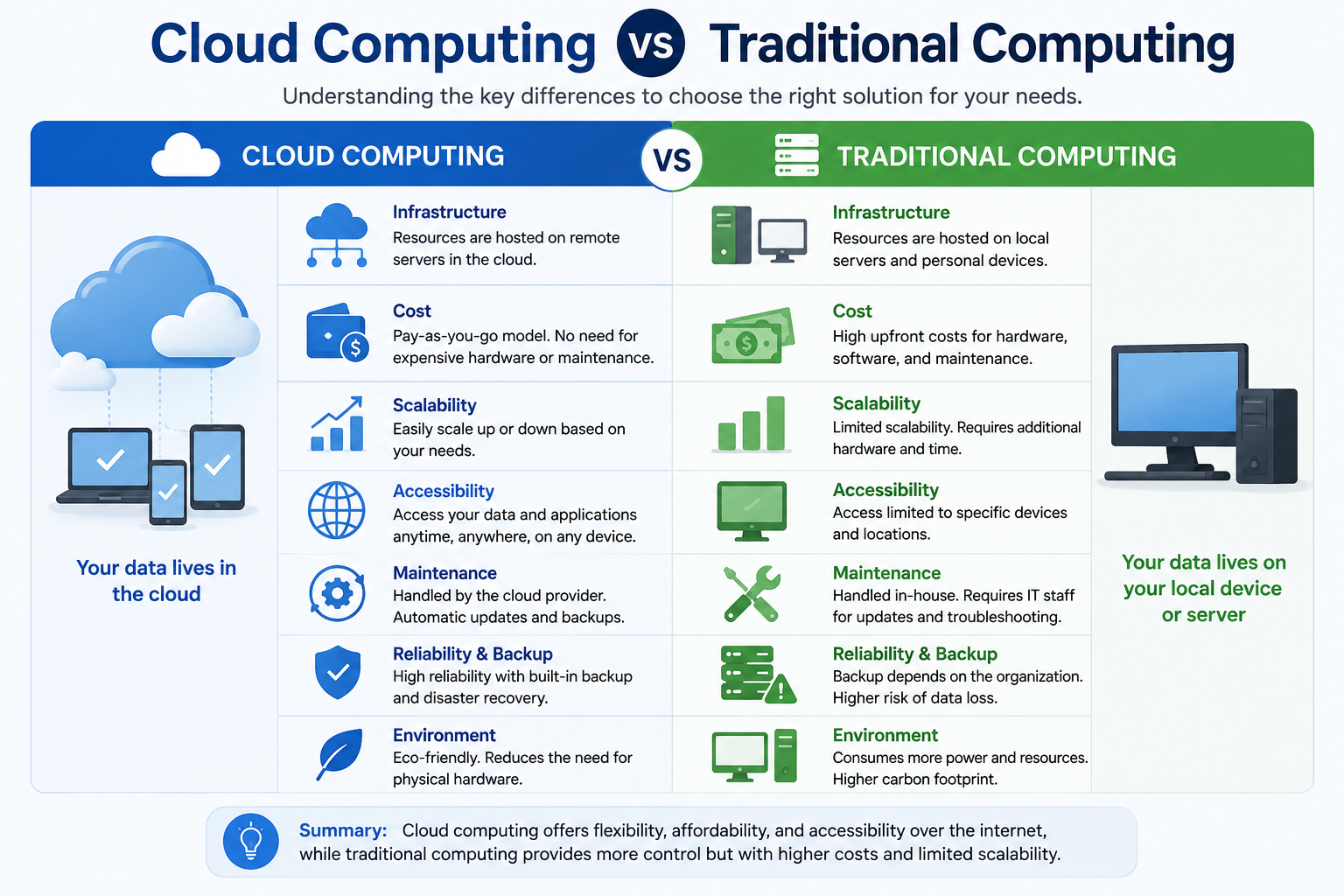
For decades, organizations ran their applications and stored their data on hardware they owned and managed directly. Whether that meant a desktop computer under a desk or a room full of servers, the infrastructure stayed local. Cloud computing changed that picture significantly. Instead of buying and maintaining their own hardware, organizations can now access computing resources through cloud providers over a network.
Understanding cloud computing vs traditional computing matters because both approaches are still actively used today. Neither has replaced the other entirely. Many organizations use a combination of both, depending on what works best for their specific needs. If you are new to the concept, [What Is Cloud Computing? A Beginner’s Guide] provides a helpful starting point.
Quick Answer: What Is the Difference Between Cloud Computing and Traditional Computing?
Cloud computing delivers computing resources such as servers, storage, databases, and software through provider-managed infrastructure accessed over a network. Traditional computing relies on hardware and infrastructure that the organization or user owns and manages directly, often on-premises. Cloud computing offers flexible, on-demand resource access. Traditional computing typically provides greater direct control over hardware and local processing.
What Is Cloud Computing?
Cloud computing is the delivery of computing resources over a network, typically the internet. Instead of running applications on hardware you own, you access servers, storage, databases, networking, and software managed by a cloud provider. You pay for what you use, scale up or down based on demand, and access services from almost anywhere.
Cloud providers such as Amazon Web Services, Microsoft Azure, and Google Cloud operate enormous data centers filled with physical hardware. They make that hardware available to customers through software-defined services. Customers interact with those services through dashboards, APIs, and applications without directly touching any physical equipment.
Cloud computing covers a wide range of service models. Infrastructure as a Service gives you virtual computing resources. Platform as a Service provides development environments. Software as a Service delivers ready-to-use applications. To understand these models in more depth, read [How Does Cloud Computing Work?].
What Is Traditional Computing?
Traditional computing refers to environments where users or organizations own, operate, or directly manage much of the hardware and infrastructure they rely on. This can include desktop computers, local servers, on-premises storage systems, and the networking equipment connecting them.
In a traditional computing environment, an organization typically purchases its own hardware, installs software on that hardware, and takes responsibility for maintaining, updating, and replacing it over time. IT staff or the users themselves handle most of the infrastructure management.
It is worth noting that “traditional computing” and “on-premises computing” are related terms but not always perfectly identical. Traditional computing is a broader phrase that can include personal desktops and laptops. On-premises computing usually refers specifically to organization-managed server infrastructure located within the organization’s facilities. Both share the idea that the organization controls its own physical infrastructure directly.
Traditional computing is not outdated or obsolete. Many organizations continue to run critical systems on-premises for legitimate reasons including control, compliance, and performance predictability.
Cloud Computing vs Traditional Computing at a Glance
| Feature | Cloud Computing | Traditional Computing |
|---|---|---|
| Infrastructure | Provider-managed | Organization or user-managed |
| Hardware ownership | Usually the provider | Usually the user or organization |
| Initial hardware investment | Lower in many cases | Often higher |
| Scalability | Usually flexible | Often requires hardware changes |
| Maintenance | Shared or provider-managed | Mostly user or organization-managed |
| Remote access | Usually strong | Depends on network setup |
| Cost model | Often usage or subscription-based | Often hardware plus maintenance costs |
| Deployment | Often faster | Can take longer |
| Control | Varies by service model | Often greater direct control |
| Internet dependency | Commonly higher | Can be lower for local workloads |
These differences do not apply identically to every environment. Specific configurations, service models, and workloads change how these characteristics play out in practice.
How Does Cloud Computing Work?
When you use a cloud service, a series of steps happen quickly in the background. Understanding this process at a basic level helps explain why cloud computing behaves differently from running software locally.
- You or your application sends a request, such as opening a file or running a calculation.
- Your device connects to the cloud service over a network connection.
- Cloud infrastructure receives the request and directs it to appropriate computing resources.
- Those resources process the request, which may involve retrieving data from cloud databases or storage systems.
- The result is sent back to your device over the network.
All of this typically happens in fractions of a second under good network conditions. The quality of your internet connection plays a meaningful role in how responsive cloud services feel. For a more detailed explanation, visit [How Does Cloud Computing Work?].
How Does Traditional Computing Work?
In a traditional computing environment, the process stays largely local.
- You access a local computer or connect to the organization’s internal network.
- An application runs on local hardware or on organization-managed servers within the same facility.
- Data is processed locally or through internal systems connected via the local network.
- Storage is handled by local drives or internal servers managed by IT staff.
- IT staff or users maintain, update, and repair the infrastructure as needed.
Consider a small company running a file server in their office. Employees connect to that server through the office network, access shared documents, and save their work directly to on-premises storage. No external cloud provider is involved. The company controls everything, but also manages everything.
Cloud Computing vs Traditional Computing: Hardware
Hardware is one of the clearest points of difference between these two approaches.
In a cloud environment, the provider owns and manages the physical servers, storage systems, networking equipment, and data center facilities. Customers do not directly handle or configure the physical hardware. When hardware needs upgrading or replacing, the provider handles it without disrupting the customer’s service.
In a traditional computing environment, the organization is responsible for purchasing servers, storage devices, networking equipment, and workstations. When hardware reaches the end of its useful life, the organization must budget for replacement and manage the transition. Physical maintenance, including cleaning, component replacement, and environmental management, falls to internal staff.
This difference has significant implications for upfront cost, ongoing responsibility, and how quickly an organization can expand its computing capacity.
Cloud Computing vs Traditional Computing: Cost
Cost is a nuanced topic when comparing these two models. Neither is universally cheaper. Total cost depends on workload, usage patterns, staff requirements, and the specific infrastructure involved.
Cloud Computing Costs
Cloud services are commonly priced on a subscription or pay-as-you-go basis. You pay for the computing power, storage, and services you actually use. This can reduce the upfront investment needed to start a project. However, ongoing subscription costs accumulate over time. High data transfer volumes can add unexpected charges. Poorly managed cloud usage, such as leaving resources running unnecessarily, can increase costs significantly.
Traditional Computing Costs
Traditional infrastructure involves substantial upfront hardware purchases, including servers, storage arrays, and networking equipment. Beyond hardware, organizations carry ongoing costs for electricity, cooling, physical space, software licenses, hardware maintenance, and IT staff. Hardware typically needs replacing every several years, adding periodic capital expenses. For predictable, stable workloads, total cost of ownership over several years can compare favorably with cloud subscriptions in some scenarios.
The right comparison depends on your specific situation. An organization with fluctuating demand may find cloud pricing efficient. An organization with steady, predictable workloads may find owned infrastructure cost-effective over a long period. Conducting a thorough total cost of ownership analysis for your specific workload is always worthwhile before making decisions.
Cloud Computing vs Traditional Computing: Scalability
Scalability is about how easily you can increase or decrease your computing capacity as needs change.
Cloud Computing
Cloud environments typically offer strong scalability. If your application experiences a sudden traffic increase, many cloud services allow you to add computing resources quickly, sometimes automatically. When demand drops, you can reduce resources and costs accordingly. This elasticity is one of the features that makes cloud computing attractive for workloads with variable demand.
Traditional Computing
Scaling traditional infrastructure usually requires purchasing additional hardware, waiting for delivery and installation, configuring new systems, and integrating them into the existing environment. This process takes time and money. Vertical scaling, meaning adding more processing power or memory to an existing server, has physical limits. Horizontal scaling, meaning adding more servers, requires additional hardware and management.
For a deeper look at cloud service and deployment models related to scalability, visit [What Are the Types of Cloud Computing?].
Cloud Computing vs Traditional Computing: Performance
Performance is not straightforward to compare because it depends on many variables. Hardware quality, network speed, application design, workload type, storage performance, and how well the environment is configured all influence the result.
Cloud providers often use high-performance hardware in their data centers and continuously invest in infrastructure improvements. However, the network connection between the user and the cloud introduces latency. For applications that require very low latency or process very large data volumes locally, on-premises infrastructure may provide more predictable performance.
Traditional computing environments keep processing close to the user or the data, which can reduce latency for certain workloads. However, the performance of on-premises systems is limited by the hardware the organization has invested in and how well it is maintained.
Neither approach is guaranteed to outperform the other in every situation. Understanding the specific performance requirements of your workload is the right starting point for any comparison.
Cloud Computing vs Traditional Computing: Security
Security is one of the most important and most misunderstood dimensions of this comparison. Cloud computing is not automatically more secure than traditional computing, and traditional computing is not automatically more secure than cloud computing. Security depends heavily on configuration, identity management, monitoring, and user behavior in both environments.
Cloud providers typically invest significantly in physical security for their data centers, encryption technology, access control systems, and security monitoring tools. They also publish shared responsibility models that clarify which security responsibilities belong to the provider and which belong to the customer. In a cloud environment, customers generally remain responsible for securing their accounts, configuring access controls correctly, managing user identities, and protecting the data they put into cloud services.
Traditional computing environments give organizations direct control over physical security, network design, and hardware configuration. Organizations running on-premises infrastructure can implement their own firewalls, intrusion detection systems, and access controls without depending on a third party. However, they are also fully responsible for keeping systems patched, monitoring for threats, and responding to incidents without the provider’s security infrastructure to rely on.
Understanding [What Is Cloud Security?] helps clarify the protections and responsibilities involved in cloud environments. For broader security context, [What Is Cybersecurity?] provides foundational knowledge. Organizations managing their own network infrastructure should also understand [Network Security] and the role of tools like [What Is a Firewall?].
Cloud Computing vs Traditional Computing: Data Storage
Where and how data is stored differs significantly between these two models.
Traditional computing stores data on local hard drives, on-premises storage servers, or storage area networks within the organization’s facilities. The organization has direct physical control over where data resides. Backup procedures are managed internally, which can require additional hardware, software, and staff effort.
Cloud computing stores data on the provider’s infrastructure, typically replicated across multiple locations to protect against hardware failure. Cloud storage can be accessed from anywhere with appropriate credentials. However, the organization has less direct control over where the data physically resides, though many providers allow customers to specify geographic regions.
To understand cloud-based data storage in detail, read [What Is Cloud Storage?]. For a comparison of current cloud storage services, visit [Best Cloud Storage Services Comparison].
It is important to note that cloud storage and cloud backup are not the same thing. Cloud storage gives you access to files. Cloud backup is designed specifically for data recovery. Organizations should understand the difference before deciding how to protect important data.
Cloud Computing vs Traditional Computing: Accessibility
Cloud Computing
Cloud services are designed to be accessible from multiple locations and devices. An employee can work from the office, a home network, or another country, as long as they have appropriate credentials and internet access. This geographic flexibility is one of the most cited advantages of cloud computing, particularly for distributed teams.
Traditional Computing
Traditional systems are often more closely tied to the local environment. Employees working on-premises access applications and data through the organization’s internal network. Remote access is certainly possible with traditional infrastructure through technologies such as VPNs, remote desktop solutions, and virtual private networks, but it typically requires additional configuration and planning.
Traditional systems can be made accessible remotely. The important distinction is that remote access is usually a deliberate add-on in traditional environments, while it is often a default capability in cloud services.
Cloud Computing vs Traditional Computing: Maintenance
Maintenance responsibilities shift considerably between the two models.
Cloud Computing
The level of maintenance a cloud customer handles depends on the service model. With Infrastructure as a Service, the provider manages the physical hardware and data center, while the customer manages the operating system, middleware, and applications. With Platform as a Service, the provider takes on more of the stack, including the operating system. With Software as a Service, the provider manages nearly everything, and the customer uses the application. This graduated responsibility is one reason organizations choose cloud services.
Traditional Computing
Organizations running traditional infrastructure manage most of the stack themselves. IT staff handle hardware maintenance, operating system updates, software patches, network equipment, power and cooling systems, and physical security. This requires dedicated personnel with relevant skills and ongoing budget for maintenance activities.
Cloud Computing vs Traditional Computing: Deployment Speed
One of the practical advantages cloud computing offers is the ability to provision resources quickly. A developer can spin up a virtual server in minutes through a cloud provider’s console. Testing environments, additional storage, or new application instances can be created without a procurement process.
Traditional infrastructure deployment typically involves purchasing hardware, coordinating delivery, installing equipment in a rack, configuring networking, and testing the system before production use. Depending on the organization’s size and procurement process, this can take days, weeks, or longer.
The speed advantage of cloud provisioning is particularly valuable for development teams, startups, and organizations responding to sudden changes in demand. Established organizations with predictable infrastructure needs may find that their traditional procurement cycles cause less disruption than it might initially appear.
Cloud Computing vs Traditional Computing: Flexibility
Cloud computing offers strong flexibility in terms of adjusting resources, experimenting with new services, expanding geographically, and enabling remote work. Organizations can try a new database service, explore analytics tools, or add storage without making a permanent hardware commitment.
Traditional computing environments offer flexibility in a different sense. Organizations have full authority to customize hardware, configure software exactly as needed, and design network architecture to their specific requirements. Customization is thorough but requires greater technical effort and time.
Understanding [What Is Software and How Does It Work?] and [What Is Application Software Used For?] can help clarify how software choices interact with infrastructure decisions in both environments.
Cloud Computing vs Traditional Computing: Reliability
Cloud providers typically design their infrastructure with redundancy built in. Data is often replicated across multiple servers or locations. Failover systems can route traffic away from a failed component automatically. Many providers publish service level agreements that describe their uptime commitments.
However, cloud outages do occur. When a major cloud provider experiences a service disruption, it can affect many customers simultaneously. Organizations that depend entirely on a single cloud provider face concentration risk.
Traditional infrastructure faces different reliability challenges. A hardware failure in an on-premises environment affects that organization directly. However, the failure is also within the organization’s control to detect and address. Organizations with strong IT teams and well-maintained hardware can achieve reliable operations on-premises.
Reliability in both environments depends heavily on how well the infrastructure is designed, maintained, and monitored. Neither approach guarantees zero downtime.
Cloud Computing vs Traditional Computing: Disaster Recovery
Cloud Computing
Cloud providers often offer disaster recovery tools and services. Organizations can replicate workloads across multiple geographic regions, configure automated backups, and use cloud-native disaster recovery services to restore operations relatively quickly after an incident. The geographic distribution of cloud infrastructure can make recovery from physical disasters more straightforward.
Traditional Computing
Organizations running traditional infrastructure are responsible for their own disaster recovery planning. This typically involves maintaining backup servers, storing backup copies off-site, building secondary data center capacity, and developing and testing recovery procedures. Effective disaster recovery is absolutely achievable on-premises, but it requires deliberate investment in hardware, software, and planning.
Both approaches can support strong disaster recovery. The key difference is that cloud providers offer tools and infrastructure to support it, while traditional environments require the organization to build and maintain those capabilities independently.
Cloud Computing vs Traditional Computing: Control
Cloud Computing
Control in cloud environments varies significantly by service model. With Infrastructure as a Service, customers have meaningful control over operating systems, storage, and applications. With Software as a Service, the provider manages most of the environment and customers configure application settings within defined boundaries. Organizations that require control over specific hardware configurations, chip architecture, or physical network design may find cloud service models limiting.
Traditional Computing
Traditional computing environments generally give organizations more direct control over every layer of the stack, from the physical hardware to the application. Organizations can choose specific hardware vendors, configure network architecture in detail, and implement custom security controls. This level of control is valuable for organizations with specialized requirements.
The trade-off is that greater control comes with greater management responsibility. More control means more to maintain, monitor, and secure.
Cloud Computing vs Traditional Computing: Privacy and Compliance
Organizations in regulated industries face specific requirements about how data is stored, protected, and accessed. Healthcare organizations, financial institutions, and government agencies often operate under strict compliance frameworks that affect infrastructure choices.
Cloud providers have made significant investments in compliance certifications and offer tools to help customers meet regulatory requirements. However, the organization remains responsible for configuring services correctly and demonstrating compliance to auditors. Data residency, meaning where data is physically stored, matters for some regulations. Many cloud providers allow customers to specify geographic regions for data storage to address this concern.
Traditional on-premises infrastructure gives organizations direct control over data location and can simplify demonstrating compliance in some regulatory contexts. However, maintaining compliance on-premises still requires investment in controls, documentation, and audit readiness.
This article does not provide legal or compliance advice. Organizations with specific regulatory requirements should evaluate their obligations carefully and consult qualified professionals before making infrastructure decisions.
Advantages of Cloud Computing
Cloud computing offers several genuine advantages worth understanding clearly.
Scalability allows organizations to adjust computing resources as demand changes, which is particularly valuable for workloads that vary significantly over time.
Flexibility enables teams to access services from different locations and experiment with new tools without long hardware procurement cycles.
Remote access supports distributed teams and employees working from multiple locations, which has become increasingly important in modern work environments.
Faster provisioning means development and testing environments can be created in minutes rather than weeks.
Reduced hardware management transfers physical infrastructure responsibilities to the provider, allowing internal teams to focus on other priorities.
Access to advanced services, such as specialized databases, analytics platforms, and global content delivery, becomes available without the organization building that capability from scratch.
Geographic availability enables organizations to serve users in different regions through infrastructure located closer to those users.
Collaboration tools built into many cloud services support real-time teamwork across distributed teams.
Potentially lower upfront infrastructure costs can reduce the capital investment needed to start a project, though ongoing subscription costs require careful management.
Disadvantages of Cloud Computing
Cloud computing also carries real limitations that deserve straightforward acknowledgment.
Internet dependency means that poor or unavailable connectivity can prevent access to cloud-hosted services and data.
Ongoing subscription costs accumulate over time and can grow significantly as usage scales, sometimes exceeding what on-premises hardware would have cost.
Vendor lock-in occurs when an organization’s applications and workflows become deeply tied to one provider’s specific services and formats, making migration difficult.
Configuration mistakes are a significant risk. Misconfigured cloud resources have been responsible for data exposure incidents. Correct configuration requires skill and ongoing attention.
Data transfer costs, sometimes called egress fees, apply when moving large amounts of data out of a cloud environment and can be significant for data-intensive workloads.
Service outages at the provider level affect all customers relying on that service simultaneously.
Privacy considerations arise because data is stored on and processed by infrastructure operated by a third party.
Provider dependency means that pricing changes, policy changes, or a provider’s business decisions can affect customers.
Migration complexity makes moving from one cloud provider to another or returning to on-premises infrastructure a significant undertaking.
Advantages of Traditional Computing
Traditional computing environments offer meaningful advantages in the right circumstances.
Direct hardware control gives organizations authority over specific hardware choices, configurations, and physical environment management.
Local data access ensures that applications and data remain accessible regardless of internet connectivity, which matters for certain workloads.
Greater infrastructure customization allows organizations to design network architecture, storage systems, and security controls precisely to their requirements.
Predictable workloads can often be handled efficiently by on-premises hardware sized appropriately for that workload.
Reduced dependency on external providers means the organization is not subject to a cloud provider’s pricing changes, service policy changes, or outage events.
Greater control over physical infrastructure allows organizations to implement physical security measures and control who can physically access hardware.
Disadvantages of Traditional Computing
Traditional computing environments also carry genuine challenges.
Higher upfront hardware investment is required to build and maintain on-premises infrastructure, which can be a significant capital expense.
Maintenance responsibilities fall entirely on the organization, requiring IT staff with relevant expertise and ongoing budget for hardware and software management.
Hardware replacement is a recurring cost as equipment reaches the end of its useful life.
Limited scalability means that expanding capacity quickly requires purchasing and deploying additional hardware, which takes time and money.
Physical space requirements for servers, storage, and networking equipment add facility costs including space, power, and cooling.
Power and cooling costs for on-premises data centers or server rooms add ongoing operational expenses.
More infrastructure management demands on IT staff can divert attention from strategic projects and application development.
Disaster recovery requires dedicated investment in backup systems, off-site storage, and recovery procedures that the organization builds and tests independently.
Cloud Computing vs Traditional Computing for Small Businesses
Small businesses face a different set of considerations than large enterprises. Budget constraints, limited IT staff, and the need to focus energy on core business activities all influence the decision.
Cloud services can lower the initial investment needed to start using professional-grade software and infrastructure. A small business can use cloud-based email, file storage, and collaboration tools without purchasing or managing servers. This is a genuine advantage when IT expertise is limited and hardware budgets are tight.
At the same time, small businesses should not automatically assume cloud computing is always the right choice. A business that operates entirely locally with stable, predictable computing needs may not gain significant benefit from migrating to cloud services. Ongoing subscription costs can add up, and migrating from one system to another carries its own risks and expenses.
Security deserves careful attention in any environment. Understanding threats is important regardless of infrastructure choice, and resources like [What Is Antivirus Software?] and [What Is Endpoint Security?] help small business owners protect their systems effectively.
The best advice is to evaluate specific business needs, budget realities, IT resources, and growth plans before deciding. Many small businesses benefit from a mix of both approaches, such as cloud-based productivity software alongside locally managed devices.
Cloud Computing vs Traditional Computing for Students
Students today interact with both cloud and traditional computing regularly, often without thinking about the distinction.
Cloud storage services let students save notes, assignments, and research papers and access them from any device. Collaborative writing tools enable group projects without emailing files back and forth. Online learning platforms run on cloud infrastructure. Many free and low-cost cloud tools are accessible without specialized hardware.
Traditional computing still plays a role in student life through local devices such as laptops and desktop computers, locally installed software for specific academic tasks, and campus computer labs.
Students interested in exploring software tools for study and productivity can find practical guidance in [Best Software for Students]. For productivity suites common in academic settings, [What Is Google Workspace?] and [What Is Microsoft Office?] provide detailed information.
Students interested in computing infrastructure can also explore virtualization concepts through resources like [What Is VMware?] and [Free Virtualization Software], which help build hands-on understanding of computing environments.
Cloud Computing vs Traditional Computing for Large Businesses
Large organizations often operate at a scale where both cloud and traditional infrastructure play significant roles. Enterprise applications, relational databases, analytics platforms, and communication systems may run across a combination of environments. [What Is Database Software? Types, Uses and Examples] provides useful context for understanding data management in these environments.
Remote employees may rely on cloud services for access to work systems. Core transaction processing may run on on-premises servers with proven stability. Data archiving might use cloud storage for cost-effective long-term retention.
Compliance requirements in industries such as finance, healthcare, and government can influence where specific data and workloads must reside. Large organizations often employ dedicated cloud architects, security teams, and infrastructure engineers to manage complex environments.
Multi-cloud strategies, where organizations use services from multiple cloud providers to avoid single-provider dependency, are increasingly common at enterprise scale. Hybrid environments that combine private infrastructure with public cloud services are also a standard pattern in large organizations.
Can Cloud and Traditional Computing Work Together?
Yes, and many organizations do exactly that. A hybrid computing approach combines cloud resources with on-premises or traditional infrastructure, allowing organizations to use each where it makes the most sense.
Common hybrid scenarios include running core databases on-premises while hosting web applications in the cloud. Organizations may keep existing legacy systems on traditional infrastructure while building new services in the cloud. A business might use cloud backup to protect data stored on local servers. Development and testing can happen in the cloud while production systems remain on-premises.
Hybrid architectures give organizations flexibility to migrate at their own pace rather than attempting a complete migration at once. They can move workloads to the cloud incrementally, testing what works well in each environment before committing fully.
For a clear explanation of public, private, hybrid, and other cloud deployment models, visit [What Are the Types of Cloud Computing?]. Understanding virtualization technologies is also relevant here, and [What Is Oracle VirtualBox?] offers insight into how virtualized environments work alongside physical infrastructure.
Cloud Computing vs Traditional Computing: Which Is Better?
There is no single correct answer to this question. The better choice depends entirely on the specific situation, requirements, and priorities of the organization or individual involved.
Cloud computing may be the stronger choice when an organization prioritizes rapid scalability, remote access for distributed teams, faster deployment of new services, or a preference for reduced physical infrastructure management. Startups and growing businesses often find cloud services well-suited to their changing needs.
Traditional computing may be the stronger choice when an organization requires direct hardware control, needs to meet specific compliance or data residency requirements, runs stable and predictable workloads, or has specialized infrastructure needs that cloud service models do not accommodate well.
A hybrid approach is often the most practical choice for organizations that need both the flexibility of cloud resources and the control of on-premises infrastructure.
Cloud Computing vs Traditional Computing Decision Guide
| If You Need… | Consider |
|---|---|
| Rapid scalability | Cloud |
| Direct hardware control | Traditional |
| Remote access for distributed teams | Cloud |
| Local processing for low-latency workloads | Traditional |
| Reduced physical infrastructure management | Cloud |
| Highly customized physical infrastructure | Traditional |
| Combination of flexibility and control | Hybrid |
This table provides a starting point, not a final answer. Every organization has unique workloads, budgets, compliance requirements, and technical capabilities. Use this guide to start asking the right questions, then evaluate your specific situation before committing to any infrastructure approach.
Frequently Asked Questions
What is the difference between cloud computing and traditional computing?
Cloud computing uses provider-managed infrastructure accessed over a network. Traditional computing uses hardware the organization or user owns and manages directly. Cloud offers flexible, remote access. Traditional provides greater direct control over physical infrastructure.
Is cloud computing better than traditional computing?
Neither is universally better. Cloud suits organizations needing scalability and remote access. Traditional suits organizations needing direct hardware control or specific compliance requirements. Many organizations use both.
Is cloud computing cheaper than traditional computing?
Not always. Cloud reduces upfront hardware investment but introduces ongoing subscription costs. Traditional computing involves hardware purchases and maintenance costs. Total cost depends on workload, usage patterns, and time horizon.
Is traditional computing still used?
Yes. Many organizations continue to rely on traditional, on-premises computing environments for specific workloads, compliance requirements, and operational reasons.
What is traditional computing?
Traditional computing refers to environments where users or organizations own and directly manage much of the hardware and infrastructure they use, often on-premises or through locally managed servers and devices.
What is cloud computing?
Cloud computing is the delivery of computing resources such as servers, storage, databases, and software over a network through provider-managed infrastructure. Users access services on demand without owning the physical hardware.
Is cloud computing more secure than traditional computing?
Not automatically. Security depends on configuration, access management, monitoring, and user behavior in both environments. Cloud providers offer security tools, but customers must configure and use them correctly.
Does traditional computing require the internet?
Not necessarily. Traditional on-premises systems can operate entirely within a local network without internet connectivity. Internet access may still be used for updates, external communication, or remote access.
Does cloud computing always require the internet?
Most cloud services require internet connectivity to function. Some cloud services offer limited offline functionality, but full access typically depends on a network connection.
Which is easier to maintain?
Cloud services shift some maintenance responsibilities to the provider, particularly for physical hardware and data center infrastructure. Traditional computing places most maintenance responsibilities on the organization. Neither eliminates maintenance entirely.
Which is more scalable?
Cloud environments typically offer more flexible and faster scalability, especially for variable workloads. Scaling traditional infrastructure usually requires hardware purchases and configuration.
Which gives more control?
Traditional computing typically gives organizations more direct control over hardware, operating systems, and physical infrastructure. Cloud control varies by service model.
Which is better for small businesses?
It depends on the business’s budget, IT resources, workload, and growth plans. Cloud services can reduce upfront investment and infrastructure management burden, but ongoing costs and specific business needs matter too.
Can cloud and traditional computing work together?
Yes. Hybrid environments that combine cloud resources with on-premises infrastructure are common and allow organizations to use each approach where it is most effective.
What is hybrid computing?
Hybrid computing uses a combination of cloud resources and on-premises or traditional infrastructure. Organizations can run different workloads in the most appropriate environment and connect them through networking.
What are the disadvantages of cloud computing?
Key disadvantages include internet dependency, ongoing subscription costs, vendor lock-in, configuration risks, data transfer costs, service outages, and privacy considerations.
What are the advantages of traditional computing?
Key advantages include direct hardware control, local data access, greater infrastructure customization, reduced external provider dependency, and control over physical security.
Final Thoughts
The comparison between cloud computing vs traditional computing is not a contest with a single winner. Both approaches have genuine strengths and real limitations.
Cloud computing offers flexibility, scalability, reduced hardware management, and strong remote access capabilities. Traditional computing offers direct hardware control, local processing, and greater authority over physical infrastructure. Cost, security, performance, and reliability depend on the specific implementation in both cases, not on the model alone.
Infrastructure, cost, scalability, security, maintenance, accessibility, control, performance, and disaster recovery all look different depending on whether you are working in a cloud, on-premises, or hybrid environment. Understanding those differences clearly is more valuable than declaring one approach universally superior.
Most organizations today do not see this as a binary choice. Hybrid architectures that combine cloud and traditional infrastructure have become common precisely because different workloads benefit from different environments. Migrating gradually, testing what works, and making evidence-based decisions serves organizations far better than adopting any approach wholesale without analysis.
The right question is not which model is better in the abstract. The right question is which approach, or which combination, fits your specific workload, budget, compliance requirements, and operational capabilities today, with room to adapt as those needs evolve. Understanding cloud computing vs traditional computing thoroughly is the foundation for answering that question well.
References
National Institute of Standards and Technology. “The NIST Definition of Cloud Computing.” NIST Special Publication 800-145. https://nvlpubs.nist.gov/nistpubs/Legacy/SP/nistspecialpublication800-145.pdf
Amazon Web Services. “What Is Cloud Computing?” AWS Documentation. https://aws.amazon.com/what-is-cloud-computing/
Microsoft Azure. “What Is Cloud Computing?” Microsoft Azure Documentation. https://azure.microsoft.com/en-us/resources/cloud-computing-dictionary/what-is-cloud-computing/
Google Cloud. “What Is Cloud Computing?” Google Cloud Documentation. https://cloud.google.com/learn/what-is-cloud-computing
IBM. “Cloud Computing.” IBM Think Topics. https://www.ibm.com/topics/cloud-computing
Cloud Security Alliance. “Security Guidance for Critical Areas of Focus in Cloud Computing.” https://cloudsecurityalliance.org/research/guidance/
NIST. “Cloud Computing Security Reference Architecture.” NIST Special Publication 500-299. https://csrc.nist.gov/publications/detail/sp/500-299/draft
Microsoft Azure. “Shared Responsibility in the Cloud.” Microsoft Documentation. https://learn.microsoft.com/en-us/azure/security/fundamentals/shared-responsibility
Disclaimer
This article is for educational and informational purposes only. Cloud technologies, pricing, security features, hardware costs, and business requirements can change over time. Always verify current information with official documentation and qualified technology professionals before making major infrastructure decisions.
Published by the TechOriginHub Editorial Team, covering practical technology, software, cybersecurity, and cloud computing topics with a focus on clear and useful guidance.