
 By saman zahra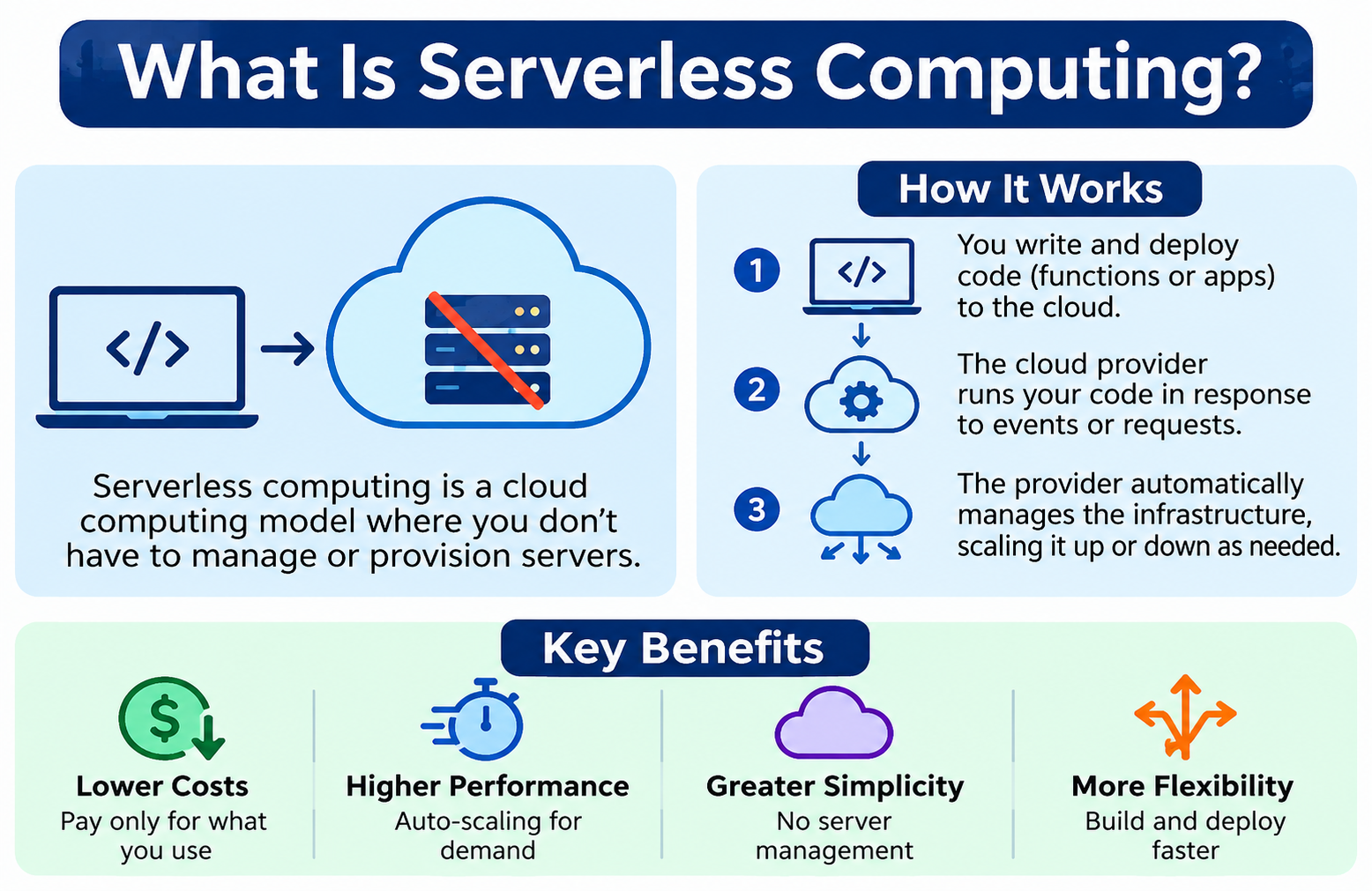
Building and deploying applications traditionally required developers to think carefully about servers. Which type of server? How many? How should they be configured? Who patches them when vulnerabilities appear? Serverless computing changes that picture significantly. With serverless, developers write and deploy application code without directly provisioning, managing, or maintaining the underlying servers. The servers still exist and are operated by the cloud provider, but that infrastructure layer becomes largely invisible to the developer. Understanding what is serverless computing, how it works, and where it fits in the broader cloud computing landscape helps developers, students, and technology decision-makers evaluate it effectively.
Quick Answer: What Is Serverless Computing?
Serverless computing is a cloud computing model where the provider manages the underlying infrastructure automatically while developers focus on writing application code. Resources can be allocated and released based on demand, often without manual configuration. Many serverless services use usage-based pricing, charging for actual execution time or requests rather than reserved server capacity. Servers still exist but their management is abstracted away from the developer.
What Is Serverless Computing?
Serverless computing is a cloud execution model where the cloud provider automatically manages the infrastructure needed to run application code. Developers write functions or services, deploy them to a serverless platform, and the platform handles everything beneath that layer, including provisioning computing resources, managing capacity, and scaling in response to demand.
The term can be misleading. Serverless does not mean there are no servers. Physical servers absolutely exist in the provider’s data centers. The difference is that developers do not interact with those servers directly. They do not choose a server size, configure an operating system, apply security patches to the underlying host, or worry about what happens when a server needs replacing. The provider absorbs those responsibilities as part of the service.
Think of the distinction this way. Traditional hosting might require you to choose specific hardware, install software, and maintain the system yourself. Serverless is more like calling a function and trusting that the platform will figure out what computing resources are needed to run it. The infrastructure is there, but it is not your immediate concern.
Serverless computing is closely related to broader cloud computing but is distinct from it. Cloud computing is an umbrella term covering many service models including storage, virtual machines, databases, and networking. Serverless is a specific execution model within that broader category, focused on running code without direct infrastructure management. [What Is Cloud Computing? A Beginner’s Guide] explains the broader cloud computing landscape and how serverless fits within it.
Why Is It Called Serverless?
The name refers to the developer’s experience rather than the physical reality. From the developer’s perspective, there is no server to configure, no operating system to manage, and no hosting environment to maintain. The infrastructure is present behind the scenes but is abstracted away completely.
A practical analogy helps clarify this. Traditional hosting is like renting an office space. You choose the space, furnish it, pay for utilities, and maintain it. If something breaks, you fix it. Serverless is closer to using a service where the workspace is set up and maintained by someone else. You arrive, do your work, and leave. The maintenance happens without your involvement.
This abstraction is genuinely valuable for many development scenarios. It reduces the operational burden on development teams, accelerates deployment, and allows developers to focus on solving business problems through code rather than managing the environment in which code runs. Understanding why the term exists helps avoid the common misconception that serverless platforms somehow operate without physical computing infrastructure.
How Does Serverless Computing Work?
Serverless platforms operate through a sequence of steps that connect developer-written code to cloud infrastructure in a largely automated way.
- A developer writes application code, typically a function or a service designed to respond to specific events.
- The code is deployed to a serverless platform through a command-line tool, a dashboard, or a continuous deployment pipeline.
- An event triggers the code, such as an HTTP request arriving at an API endpoint, a file being uploaded to storage, a message being placed in a queue, or a scheduled timer firing.
- The serverless platform allocates the execution environment needed to run the function or service.
- The code executes within that environment, processing the event and producing a result.
- The result is returned to the caller, stored in a database, written to storage, or passed to another service depending on the application design.
- After execution, resources may be released if no further events are pending.
- The provider continues to manage all underlying infrastructure, including the hardware, operating system, and runtime environment for the serverless service.
The exact behavior varies between serverless services and providers. Some services run code for milliseconds in response to individual events. Others can handle longer-running workloads depending on the platform’s execution limits. The core idea remains consistent: the developer focuses on the code, and the platform manages the infrastructure.
For a broader explanation of how cloud infrastructure delivers services, visit [How Does Cloud Computing Work?].
What Is Function as a Service (FaaS)?
Function as a Service is one of the most widely recognized forms of serverless computing. In a FaaS model, developers deploy individual functions, which are small units of code designed to perform a specific task in response to an event.
A function might authenticate a user login request, resize an uploaded image, send a notification, process a payment event, or query a database and return results. Each function is focused on a single task and executes in response to a specific trigger.
FaaS functions are typically stateless, meaning they do not retain information between executions. Each invocation runs independently. If state needs to be persisted, the function stores it in a database, cache, or other external service between executions.
Automatic scaling is a key characteristic of FaaS platforms. When many events arrive simultaneously, the platform can run multiple instances of the same function in parallel. When demand drops, execution environments are reduced. This behavior happens without manual intervention.
Billing in FaaS services is often based on the number of function invocations and the duration of each execution, measured in fractions of a second and weighted by the memory allocated to the function. This means that if a function is not being called, costs may be minimal or absent.
FaaS is an important component of serverless computing, but serverless extends beyond FaaS. Backend as a Service, managed databases, serverless storage, and other fully managed cloud services also fall under the serverless umbrella.
What Is Backend as a Service (BaaS)?
Backend as a Service provides ready-made backend capabilities that applications can consume through APIs rather than building and maintaining those capabilities independently. A development team building a mobile application, for example, might use BaaS to handle user authentication, data storage, file uploads, push notifications, and email delivery without writing the backend code for each of these functions from scratch.
Authentication services verify user identities and manage login sessions. Database services store and retrieve structured data without requiring the developer to set up and administer a database server. File storage services hold user-uploaded content such as profile pictures, documents, and media files. Notification services deliver push notifications, emails, or SMS messages to users. User management features handle account creation, password resets, and user profile data.
BaaS reduces the total amount of backend infrastructure developers need to build, deploy, and maintain. Instead of writing authentication code and operating the servers that run it, a developer integrates with a BaaS authentication API and focuses on the application experience. This can significantly accelerate development, particularly for small teams or early-stage products.
BaaS and FaaS can be used together in serverless architectures. A FaaS function might handle custom business logic while a BaaS service handles authentication and data storage for the same application.
Serverless Architecture
A typical serverless application connects several cloud services rather than running as a single server-hosted application. A simplified view of how these components connect looks like this:
A user interacts with a web or mobile application. The application sends a request to an API gateway, which receives and routes that request to the appropriate serverless function. The function executes, potentially reading from or writing to a database or cloud storage service, and returns a response that travels back through the API gateway to the user.
API Gateway
An API gateway sits at the entry point of a serverless application. It receives incoming HTTP requests from web or mobile clients, validates them, applies rate limiting or authentication controls where configured, and routes requests to the appropriate serverless function. The API gateway acts as the managed front door to the application’s backend logic.
Serverless Functions
Serverless functions contain the application’s business logic. Each function is triggered by an event, executes its code, and returns a result or writes output to another service. Functions are deployed individually and can be updated, scaled, and monitored independently of each other.
Database
Serverless applications connect to databases to store and retrieve structured data. Managed database services that scale automatically and require no direct database server administration align well with serverless architectures. Understanding how databases work in application contexts is covered in [What Is Database Software? Types, Uses and Examples].
Cloud Storage
Applications often need to store files, images, videos, documents, and other unstructured data. Cloud object storage services work well with serverless architectures because they can be accessed through API calls from functions without requiring the application to manage a file server. [What Is Cloud Storage?] explains how cloud storage works and the role it plays in cloud application architectures.
What Are the Main Characteristics of Serverless Computing?
Several characteristics distinguish serverless computing from other cloud and hosting models.
No direct server management means developers do not provision, configure, or maintain the servers on which their code runs. The provider handles those responsibilities.
Automatic scaling allows the platform to increase execution capacity when demand rises and reduce it when demand falls, without manual configuration changes by the developer.
Event-driven execution means code runs in response to specific triggers such as HTTP requests, file uploads, queue messages, database changes, or scheduled timers, rather than running continuously on a dedicated server.
Infrastructure abstraction removes the operating system, server configuration, and runtime management from the developer’s list of responsibilities for the serverless service itself.
Usage-based pricing in many serverless services means billing reflects actual usage, such as the number of function executions and their duration, rather than a fixed charge for reserved capacity.
Managed services provided by cloud vendors handle operational tasks such as patching, monitoring underlying infrastructure health, and maintaining runtime environments.
Stateless design in many FaaS workloads means functions do not maintain in-memory state between invocations. Persistent state is handled externally through databases, caches, or storage services.
Rapid deployment allows developers to push code changes to a serverless platform and have them active quickly without provisioning new servers or configuring hosting environments.
These characteristics vary between providers and services. Not every serverless platform implements each characteristic identically, and reviewing specific provider documentation is important before building on any platform.
Benefits of Serverless Computing
Serverless computing offers genuine advantages for the right workloads and development contexts.
Reduced infrastructure management removes the need for developers to configure, patch, and maintain server operating systems and hosting environments for the serverless service itself.
Automatic scaling means applications can respond to sudden increases in demand without pre-provisioning extra server capacity or manually adjusting resource allocation.
Faster application development becomes possible when development teams spend less time on infrastructure setup and more time writing application logic.
Lower operational overhead for teams without dedicated infrastructure engineers can make serverless an accessible way to deploy backend services without deep systems administration expertise.
Pay-for-use pricing in many serverless services means that idle applications incur minimal or no charges, unlike a server that continues billing even when receiving no traffic.
Easy integration with cloud services is supported by the event-driven nature of serverless, which connects naturally to cloud storage events, database triggers, message queues, and other managed services.
Event-driven architecture suits many modern application patterns including API backends, data pipelines, and automation workflows.
Rapid deployment allows code changes to reach production quickly, supporting faster iteration and experimentation cycles.
High availability options exist through many serverless platforms, which distribute execution capacity across multiple data center locations.
Reduced server maintenance means developers are not responsible for applying operating system patches or managing server hardware replacement cycles.
Flexible development allows teams to write functions in multiple supported programming languages and deploy different parts of an application using the approach that suits each component.
Easier experimentation is possible when deploying a new function or service does not require provisioning dedicated infrastructure, lowering the cost and effort of trying new approaches.
These benefits apply where the platform, workload, and architecture support them. Serverless does not automatically reduce total costs for all workloads, and some scenarios are better served by other infrastructure models.
Disadvantages of Serverless Computing
A balanced view of serverless computing requires understanding its real limitations.
Cold starts can add latency to certain function invocations, particularly when a function has not been invoked recently and the platform needs to initialize a new execution environment.
Execution limits restrict how long a single function can run and how much memory it can use. Workloads requiring long-running processes or very large memory allocations may not fit within these limits depending on the platform.
Vendor lock-in is a significant consideration. Serverless architectures often use platform-specific APIs, triggers, and service integrations that make migration to another provider complex and time-consuming.
Debugging complexity increases in distributed serverless applications where a single user action may trigger multiple functions interacting with multiple services. Tracing the path of a request through the system requires good tooling and logging practices.
Monitoring challenges arise from the same distributed nature. Understanding the performance and behavior of a serverless application requires aggregating observability data across many individual function executions.
Distributed architecture introduces new failure modes that are different from traditional monolithic applications. Functions can fail independently, messages can be delivered out of order, and partial failures require careful handling.
Stateless execution considerations affect applications that need to maintain in-memory session state between requests, requiring external state management solutions.
Pricing complexity can make it difficult to predict monthly costs, particularly as usage grows. A workload that appears inexpensive at low volume may become costly at high volume depending on execution duration, memory allocation, and data transfer charges.
Dependency on provider services means the application’s availability and performance are influenced by the health and behavior of the serverless platform and associated managed services.
Performance variability can occur in serverless environments due to cold starts, shared infrastructure behavior, and network conditions between services in a distributed architecture.
Migration complexity affects organizations that want to move a serverless application to a different provider, since platform-specific integrations may need to be rewritten substantially.
Practical approaches to reducing these challenges include warm-up strategies for cold start-sensitive functions, designing applications with portability in mind where feasible, implementing structured logging from the beginning, and monitoring costs actively as usage grows.
What Are Cold Starts in Serverless?
A cold start occurs when a serverless platform needs to initialize a new execution environment before running a function. When a function has not been invoked for a period of time, the platform may have released its execution environment. The next invocation requires setting up a fresh environment before the function can execute.
The initialization process involves loading the runtime, initializing dependencies, and preparing the execution context. During this time, the user or calling service waits. The additional time this adds to the first response is called the cold start latency.
After the environment is initialized, subsequent invocations while the environment remains active are called warm starts. Warm starts execute without the initialization overhead and respond more quickly than cold starts.
The factors affecting cold start duration include the programming language and runtime used, the size of the function package and its dependencies, the amount of initialization code that runs at startup, and the specific serverless platform and its internal implementation.
Cold starts do not affect every serverless application noticeably. Applications designed for background tasks, data processing, or other non-interactive workloads may tolerate cold start latency without user impact. Applications serving interactive users with strict latency requirements need to consider cold start behavior and apply appropriate mitigation strategies where relevant.
Not every serverless platform or service exhibits cold starts in the same way, and provider-specific documentation describes the behavior of specific services more accurately than generalizations.
Serverless Scalability
Serverless platforms can automatically allocate additional execution capacity as incoming demand increases. This happens without requiring developers to manually configure additional servers, adjust auto-scaling policies, or manage resource pools. When demand drops, execution capacity is reduced correspondingly.
For event-driven workloads with variable or unpredictable traffic patterns, this automatic adjustment can be a significant operational advantage compared to maintaining a fixed server capacity sized for peak demand.
Concurrent executions allow many instances of the same function to run simultaneously when many events arrive at once. A sudden spike in API traffic can trigger many parallel function executions, each handling individual requests independently.
Traffic spikes that would overwhelm a fixed server configuration may be handled more gracefully in serverless environments because the platform manages capacity allocation dynamically rather than depending on a single server or fixed cluster.
However, scalability in serverless computing is not unlimited. Cloud providers impose quotas, concurrency limits, and regional capacity constraints on serverless services. These limits vary by provider, region, service tier, and account configuration. An application that requires extremely high concurrency needs to understand these limits and request quota increases if necessary through the provider’s processes.
Treating serverless as infinitely scalable is an oversimplification. The practical limits of any specific platform must be understood before designing an application that depends on handling very high concurrent workloads.
Serverless Security
Serverless computing does not automatically make an application secure. Security in a serverless environment depends on both the provider’s infrastructure security and the developer’s application design, configuration, and operational practices.
Identity and access management controls which identities, whether users, services, or other functions, can invoke specific functions or access specific resources. Applying least-privilege principles means each function has only the permissions it genuinely needs to perform its task, limiting the potential impact of a security compromise.
Authentication verifies the identity of users or systems calling serverless APIs before granting access. Authorization determines what an authenticated identity is permitted to do. Both must be implemented correctly at the application layer.
Encryption protects data in transit between clients and API endpoints and between functions and the databases or storage services they use. Encryption at rest protects stored data in connected services.
Secrets management is particularly important in serverless environments. Database credentials, API keys, and other sensitive configuration values should not be hardcoded in function code. Provider-managed secrets management services allow functions to retrieve credentials securely at runtime.
Dependency security requires attention because serverless functions often use third-party libraries and frameworks. Vulnerabilities in those dependencies affect function security regardless of how well the function’s own code is written.
API security at the gateway level includes rate limiting, request validation, and authentication controls that protect serverless backends from abuse and unauthorized access.
Logging and monitoring provide visibility into function execution, error rates, and unusual invocation patterns that might indicate security incidents or abuse.
Network controls on some serverless platforms allow functions to be placed within virtual network configurations that restrict their connectivity to specific resources and prevent them from communicating with unauthorized external destinations.
Serverless and the Shared Responsibility Model
Serverless computing shifts the infrastructure management boundary significantly compared to virtual machine or container-based hosting, but it does not eliminate the developer’s security responsibilities.
The cloud provider is generally responsible for the physical data centers, the underlying hardware, the hypervisor and host operating system, the serverless runtime environment, and the security of the managed services the platform provides.
The customer remains responsible for the application code itself, including any logic errors or security vulnerabilities within it. Identity and access management configuration, including which identities can invoke which functions with what permissions, is a customer responsibility. Data protection, including encryption of sensitive data within connected databases and storage services, falls on the customer. Secrets management and secure handling of credentials and configuration are developer responsibilities. API configuration, including authentication controls at the gateway level, requires correct configuration by the development team. Application-level security including input validation, output encoding, and protection against common web application vulnerabilities remains the developer’s responsibility.
Exact responsibilities vary by the specific serverless service being used and the provider’s documented shared responsibility model for that service. Reviewing provider documentation for the specific services in use is essential for understanding where the security boundary sits.
Serverless Pricing: How Does It Cost?
Serverless pricing models differ from traditional server pricing in important ways, but serverless is not automatically cheaper for all workloads.
In traditional server-based deployments, you typically pay for server capacity based on the resources you reserve, whether those resources are fully utilized or not. A server runs and bills continuously regardless of whether it is handling requests.
In many serverless services, billing reflects actual usage. Common billing dimensions include the number of requests or function invocations received, the duration of each execution measured in milliseconds and weighted by memory allocation, data transferred in and out of the function, storage consumed by associated services, database read and write operations, and API gateway request volumes.
Free tier allowances exist in many serverless offerings, covering a defined number of requests and execution seconds per month. For low-volume workloads, serverless can be very inexpensive or effectively free within these allowances.
For consistently high-volume workloads, usage-based pricing can accumulate significantly. A function executing millions of times per day at substantial duration may cost considerably more per month than a dedicated server or container cluster sized for the same throughput. Architecture decisions, execution efficiency, memory allocation, and data transfer volumes all affect the total cost of a serverless deployment.
Pricing details change and vary by provider, region, and service. Always review the current official pricing documentation of the specific provider and services you are considering before making cost projections.
Serverless vs Traditional Server-Based Computing
| Feature | Serverless | Traditional Server-Based Computing |
|---|---|---|
| Server management | Provider handles underlying infrastructure | Organization or provider manages servers |
| Scaling | Often automatic | Often requires configuration |
| Billing | Often usage-based | Often resource or server based |
| Maintenance | Lower infrastructure maintenance | More infrastructure maintenance |
| Deployment | Usually fast | Can require more infrastructure setup |
| Control | Less low-level infrastructure control | More direct server control |
| Best for | Event-driven and variable workloads | Long-running and highly customized workloads |
Traditional server-based computing gives development and operations teams direct access to the operating system, runtime configuration, and networking stack. This control is valuable for workloads with very specific infrastructure requirements or long-running processes.
Serverless trades that low-level control for reduced management overhead and automatic scaling behavior. This trade-off is beneficial for many modern application patterns but constraining for workloads that need consistent long-running processes, highly predictable performance characteristics, or deep operating system access.
The comparison with traditional computing approaches is covered in broader context at [Cloud Computing vs Traditional Computing].
Serverless vs Cloud Hosting
| Feature | Serverless | Cloud Hosting |
|---|---|---|
| Server management | Mostly abstracted | Depends on hosting model |
| Scaling | Often automatic | Depends on provider |
| Application model | Often function or event based | Can host full applications |
| Infrastructure control | Lower | Usually higher |
| Billing | Often usage-based | Plan or resource based |
| Best for | Event-driven workloads | Websites and full applications |
Cloud hosting runs websites and applications on cloud-based infrastructure, providing a persistent environment where the application operates continuously. Serverless typically executes code in response to discrete events without maintaining a persistent application runtime that is always active.
Cloud hosting gives developers more control over the application runtime environment and is well suited to full web applications, APIs with consistent traffic, and services that need to run continuously. Serverless suits workloads that are triggered by events, have variable traffic, or benefit from per-execution pricing. [What Is Cloud Hosting?] explains cloud hosting in detail.
Serverless vs Virtual Machines
Virtual machines provide an isolated computing environment with its own operating system running on shared physical hardware. Developers or administrators configure the operating system, install runtimes, manage networking, and control the complete software stack within the virtual machine.
Serverless abstracts the operating system entirely. Developers do not choose, configure, or maintain the operating system or the host environment. The platform manages runtime selection and version, and the developer interacts only with the function or service API.
| Feature | Serverless | Virtual Machine |
|---|---|---|
| OS control | Abstracted away | Full OS control |
| Runtime management | Provider managed | Customer managed |
| Billing | Often execution-based | Usually resource reservation |
| Execution model | Event-driven | Continuously running |
| Scaling | Often automatic | Requires configuration |
| Infrastructure control | Low | High |
Virtual machines suit workloads that require specific operating system configurations, long-running services, or deep control over the computing environment. [What Is VMware?] covers enterprise virtualization technology. [What Is Oracle VirtualBox?] explains a widely accessible virtualization platform for learning and development environments.
Serverless vs Containers
Containers package an application and its dependencies into a portable unit that can run consistently across different environments. Containers give developers control over the application runtime while abstracting the underlying host operating system.
Serverless functions abstract more deeply than containers. Developers do not choose or configure the container runtime, manage container orchestration, or decide how containers are scheduled and distributed across infrastructure. The platform handles all of that.
| Feature | Serverless | Containers |
|---|---|---|
| Runtime control | Abstracted | Developer configures runtime |
| Infrastructure management | Provider managed | Requires orchestration |
| Scaling | Often automatic | Requires configuration |
| Execution model | Often event-driven | Can run continuously |
| Portability | Provider-dependent | Higher portability |
| Startup behavior | Cold starts possible | Container startup time |
Containers provide greater portability between providers and environments. A containerized application can often be deployed with fewer changes across different cloud providers or on-premises environments. Serverless applications using provider-specific triggers and APIs are more tightly coupled to the specific platform.
The trade-off is that containers require more infrastructure management than serverless. Container orchestration platforms add operational complexity that serverless platforms largely remove for the developer.
Serverless vs PaaS
Platform as a Service provides a managed platform for building and deploying applications without managing the underlying servers or operating systems. Developers deploy applications to the platform and the provider manages the runtime environment.
Serverless computing shares some characteristics with PaaS but differs in important ways. PaaS typically provides a persistent application runtime that runs continuously and scales based on configuration. Serverless functions are often executed transiently in response to events and may not maintain a persistent running process between invocations.
Serverless offers deeper infrastructure abstraction in many cases, with billing that reflects individual executions rather than allocated application capacity. PaaS can give developers a more familiar application model with persistent processes, which may suit traditional web application architectures better than function-based serverless.
Product categories can overlap, and some platforms offer capabilities that blend PaaS and serverless characteristics. Reviewing the specific service documentation is the most reliable way to understand where a particular offering sits.
Examples of Serverless Computing
Several major cloud providers offer serverless computing platforms used widely by developers and organizations.
AWS Lambda is Amazon Web Services’ serverless function execution service. It supports multiple programming languages and integrates with a broad range of other AWS services. Functions can be triggered by HTTP requests through API Gateway, file uploads to Amazon S3, messages from Amazon SQS, database events, scheduled tasks, and many other event sources. Always verify current capabilities, limits, and pricing through the official AWS documentation.
Azure Functions is Microsoft’s serverless compute offering. It supports multiple languages and integrates with Azure services including Azure Storage, Azure Service Bus, and Azure Cosmos DB. Azure Functions supports various hosting and scaling plans. Review current official Microsoft documentation for up-to-date feature and pricing information.
Google Cloud Run allows developers to run containerized applications in a serverless environment, where the underlying infrastructure is managed by Google and the service scales automatically with incoming requests. Google Cloud Functions offers event-driven function execution. Both are part of Google Cloud’s serverless portfolio. Verify current product details through official Google Cloud documentation.
Cloudflare Workers runs JavaScript and other supported languages at Cloudflare’s global edge network, executing code close to users. It is designed for use cases where low latency globally distributed execution matters. Review current capabilities through official Cloudflare documentation.
Each platform has distinct characteristics, pricing models, execution limits, and integration options. They should not be assumed to work identically despite falling under the general serverless category.
Serverless Use Cases
Serverless computing suits a wide range of practical application scenarios.
REST APIs built with serverless functions and an API gateway provide a scalable backend for web and mobile applications without maintaining a dedicated API server.
Web backends handle user requests, process form submissions, and return dynamic content in response to HTTP events.
Mobile backends support mobile application features such as user authentication, data retrieval, and push notification delivery without the mobile team managing server infrastructure.
Image processing functions can resize, compress, or convert images automatically when they are uploaded to cloud storage, generating transformed versions for different display contexts.
File processing functions can parse uploaded documents, extract data from CSV files, or validate file formats when files arrive in a storage service.
Scheduled tasks run on timers to perform recurring operations such as sending summary emails, cleaning up expired records, or generating reports at defined intervals.
Data processing functions can transform, enrich, or aggregate data streams from queues, databases, or event buses as part of data pipeline architectures.
Notifications can be sent to users through email, SMS, or push notification services in response to events such as completed orders, system alerts, or user activity triggers.
Chatbot backends can process incoming messages, apply business logic, and return responses in event-driven architectures well suited to serverless execution.
IoT event processing handles streams of data from connected devices, triggering functions when sensors report readings, alerts, or status changes.
Automation workflows execute sequences of tasks in response to business events such as new customer registrations, completed payments, or status changes in business systems.
Authentication workflows validate user credentials, issue tokens, and manage session lifecycle through serverless functions integrated with identity services.
ETL tasks, meaning extract, transform, and load operations, can use serverless functions to move data between systems, transform it into the required format, and load it into target databases or storage.
Event-driven applications of many types benefit from serverless execution when the application responds to discrete events rather than running continuous processing.
When Should You Use Serverless Computing?
Serverless computing may be a practical choice in several situations.
Event-driven applications where code runs in response to specific triggers rather than continuously align naturally with the serverless execution model.
Variable workloads with unpredictable traffic patterns benefit from automatic scaling that matches execution capacity to actual demand without maintaining idle reserved servers.
APIs and web backends that handle discrete HTTP requests can be built efficiently on serverless platforms, particularly when usage patterns are irregular.
Background jobs that run infrequently or unpredictably, such as image processing or report generation, can avoid the cost of maintaining dedicated servers for work that happens intermittently.
Automated tasks triggered by business events or scheduled timers fit naturally into a serverless architecture where code runs when needed and incurs no cost when idle.
Teams that want less infrastructure management and prefer to focus engineering effort on application functionality rather than server operations may find serverless reduces their operational overhead meaningfully.
Applications that benefit from rapid deployment and iteration can move faster when changing or adding functions does not require provisioning and configuring new hosting infrastructure.
When Should You Avoid Serverless Computing?
Serverless computing is not the right fit for every situation.
Workloads requiring long-running processes, such as ongoing data stream processing or batch jobs that run for many hours, may exceed execution time limits on serverless platforms and require alternative infrastructure.
Applications requiring extremely predictable, consistently low latency may find cold start behavior and shared infrastructure variability incompatible with their performance requirements.
Deep operating system control, including custom kernel configurations, specific system-level libraries, or direct hardware access, is not available in serverless environments.
Workloads running continuously at high volume may cost more on usage-based serverless pricing than on dedicated server or container infrastructure sized for that consistent load.
Architectures that would become unnecessarily complex as collections of many small functions interacting through event buses and queues may be simpler and more maintainable as traditional server-based or container-based applications.
Organizations where vendor portability is a major requirement should consider that serverless architectures often become tightly coupled to provider-specific services, making migration to another platform more complex.
Serverless Computing for Beginners
Getting started with serverless computing does not require deep prior experience, but a foundation in a few key areas helps significantly.
- Learn basic programming in a language supported by major serverless platforms, such as Python, JavaScript, or TypeScript.
- Understand APIs and how HTTP requests work, since many serverless applications are built around API-driven architectures.
- Learn cloud computing fundamentals to understand the broader context in which serverless fits. [What Is Cloud Computing? A Beginner’s Guide] provides a strong starting point.
- Learn basic networking concepts including how requests travel between clients and servers and how DNS and HTTPS work.
- Try deploying a simple serverless function using the free tier of a major provider, building something small such as a function that returns a response to an HTTP request.
- Learn event-driven architecture concepts, understanding how functions can be chained together through events and queues.
- Understand cloud security basics before building applications that handle user data or sensitive business information.
- Monitor usage and costs from the beginning to develop habits that prevent unexpected billing surprises as usage grows.
[Best Software for Students] covers tools and resources relevant to technology learners.
Serverless Computing for Students
Students can use serverless platforms to build meaningful projects that demonstrate cloud development skills without the overhead of managing servers.
A simple API built with serverless functions and an API gateway demonstrates understanding of HTTP, event-driven architecture, and cloud deployment in a single project.
A contact form backend that receives form submissions, validates them, and sends email notifications is a practical project that combines API handling with external service integration.
An image processing project that automatically resizes uploaded images using a storage event trigger demonstrates event-driven architecture and file processing in a cloud context.
A scheduled notification service that sends a daily summary or reminder email using a timer-triggered function illustrates scheduled task automation with serverless.
A small database application that reads from and writes to a managed database through serverless functions demonstrates data persistence patterns common in real-world cloud applications.
These projects build portfolio-ready examples of cloud skills while keeping infrastructure costs minimal through provider free tiers. [Best Software for Students] provides additional guidance on tools for students and learners in technology fields.
Common Serverless Computing Mistakes
Many problems in serverless applications stem from avoidable decisions made during design or development.
Assuming serverless means no servers and therefore no infrastructure concerns is a fundamental misunderstanding that leads to overlooking provider limits, security responsibilities, and operational considerations.
Ignoring execution limits allows applications to be designed with functions that need to run longer than the platform permits, leading to unexpected failures in production.
Ignoring costs, particularly as usage scales, can result in monthly bills that exceed what dedicated server infrastructure would have cost for the same workload.
Giving excessive permissions to serverless functions beyond what they need violates least-privilege principles and increases the potential damage from compromised functions.
Creating too many small functions without planning the overall architecture leads to distributed systems that are difficult to understand, debug, and maintain.
Ignoring cold starts for latency-sensitive applications results in unexpected user experience degradation that could have been addressed during the design phase.
Poor logging in serverless functions makes debugging and incident investigation significantly harder, since the distributed nature of serverless makes logs from individual executions harder to correlate without structured logging practices.
Weak API security at the gateway layer leaves serverless backends vulnerable to unauthorized access and abuse.
Vendor lock-in accumulates gradually as applications use more provider-specific services, making the eventual cost of migration higher than anticipated.
Not testing failure scenarios leaves the application unprepared for partial failures that are more common in distributed serverless architectures than in traditional monolithic applications.
Frequently Asked Questions
What is serverless computing?
Serverless computing is a cloud model where the provider manages the underlying infrastructure automatically while developers focus on application code. Resources are allocated based on demand, and many services use usage-based pricing.
What does serverless mean?
Serverless means that developers do not directly manage, provision, or maintain the servers running their code. The term describes the developer experience, not the physical absence of servers.
Are there really no servers in serverless computing?
No. Servers absolutely exist in the provider’s data centers. Serverless means the servers are managed by the provider and abstracted away from the developer rather than physically absent.
How does serverless computing work?
A developer deploys code to a serverless platform. An event triggers the code. The platform allocates an execution environment, runs the code, and returns the result. The provider manages all underlying infrastructure.
What is FaaS?
Function as a Service is a serverless model where developers deploy individual functions that execute in response to events. Functions are stateless, automatically scaled, and often billed by execution count and duration.
What is BaaS?
Backend as a Service provides ready-made backend capabilities such as authentication, database access, file storage, and notifications through APIs, reducing the backend infrastructure developers need to build themselves.
What are examples of serverless computing?
Examples include AWS Lambda, Azure Functions, Google Cloud Run, Google Cloud Functions, and Cloudflare Workers. Always verify current product details through official provider documentation.
Is serverless cheaper?
Not always. Serverless can be cost-efficient for irregular or low-volume workloads. For consistently high-volume workloads, usage-based pricing may cost more than dedicated infrastructure. Total cost depends on architecture, execution duration, memory allocation, and data transfer volumes.
Is serverless secure?
Serverless can be made secure, but security is not automatic. Developers remain responsible for application code security, access management configuration, secrets handling, and data protection.
What are the benefits of serverless computing?
Key benefits include reduced infrastructure management, automatic scaling, faster development, lower operational overhead, event-driven architecture support, and pay-for-use pricing in many services.
What are the disadvantages of serverless computing?
Key disadvantages include cold starts, execution limits, vendor lock-in, debugging complexity, pricing unpredictability at scale, and reduced low-level infrastructure control.
What is a cold start?
A cold start occurs when a serverless platform initializes a new execution environment before running a function, adding latency to the first invocation after a period of inactivity.
Is serverless scalable?
Serverless platforms can scale automatically in response to demand, but scalability is not unlimited. Providers impose concurrency limits, quotas, and regional capacity constraints on serverless services.
What is the difference between serverless and cloud computing?
Cloud computing is a broad category covering many service types including virtual machines, storage, and databases. Serverless is a specific execution model within cloud computing focused on running code without direct infrastructure management.
What is the difference between serverless and cloud hosting?
Cloud hosting provides a persistent environment for running websites and applications. Serverless executes code transiently in response to events without maintaining a continuously running application runtime.
What is the difference between serverless and containers?
Containers package applications with their dependencies and give developers control over the runtime environment. Serverless abstracts the runtime more deeply and executes code in response to events without requiring container management.
What is the difference between serverless and virtual machines?
Virtual machines provide full operating system access and run continuously on allocated resources. Serverless abstracts the operating system entirely and executes code in response to events on a pay-per-execution model.
Is serverless good for beginners?
Serverless can be accessible for beginners because it removes infrastructure management responsibilities. However, beginners benefit from understanding cloud computing fundamentals, APIs, and basic security before building production serverless applications.
What applications are best for serverless?
Event-driven applications, APIs with variable traffic, background jobs, automation workflows, and data processing tasks align well with serverless computing.
When should you avoid serverless?
Avoid serverless for long-running processes, applications requiring extremely consistent low latency, workloads needing deep operating system control, and continuously high-volume workloads where reserved server capacity may be more cost-efficient.
Final Thoughts
Serverless computing represents a meaningful shift in how applications are built and deployed, but understanding it requires starting with an accurate foundation. Serverless does not mean server-free. Servers exist in the provider’s infrastructure and handle every execution. What changes is that developers no longer manage those servers directly. The provider absorbs infrastructure operations, and developers focus on code.
Function as a Service delivers event-driven code execution without persistent server management. Backend as a Service provides ready-made backend capabilities through APIs. Together they form a serverless ecosystem that can support a wide range of modern application architectures.
The benefits of serverless computing, including reduced infrastructure management, automatic scaling, faster development cycles, and pay-for-use pricing in many services, are real and valuable for the right workloads. The limitations, including cold starts, execution limits, vendor lock-in risks, debugging complexity, and pricing that can scale unpredictably, deserve equal consideration.
Security in serverless environments requires active developer involvement. The provider secures the infrastructure. The developer secures the application code, access controls, secrets management, and data handling. Neither party’s responsibilities disappear in a serverless model.
Cost in serverless is not universally lower than traditional server infrastructure. Usage-based pricing can be favorable for irregular or low-volume workloads and potentially costly for consistently high-throughput workloads. Architecture decisions, execution efficiency, and data transfer volumes all influence total cost significantly.
The comparison with traditional servers, cloud hosting, virtual machines, containers, and platform services helps clarify where serverless fits best. It is not a universal replacement for other infrastructure models. It is a strong fit for event-driven, variable-demand, and code-focused workloads where infrastructure management overhead would otherwise slow development or add unnecessary operational burden.
What is serverless computing in its simplest terms? It is a model that lets developers focus more on what their application does and less on the infrastructure that runs it, while the cloud provider manages the servers behind the scenes.
References
Amazon Web Services. “What Is Serverless Computing?” AWS Documentation. https://aws.amazon.com/serverless/
Microsoft Azure. “What Is Serverless Computing?” Microsoft Azure Documentation. https://azure.microsoft.com/en-us/resources/cloud-computing-dictionary/what-is-serverless-computing/
Google Cloud. “Serverless Computing.” Google Cloud Documentation. https://cloud.google.com/serverless
Cloudflare. “What Is Serverless?” Cloudflare Learning Center. https://www.cloudflare.com/learning/serverless/what-is-serverless/
CNCF. “Cloud Native Definition.” Cloud Native Computing Foundation. https://github.com/cncf/toc/blob/main/DEFINITION.md
Amazon Web Services. “AWS Lambda.” AWS Lambda Documentation. https://docs.aws.amazon.com/lambda/latest/dg/welcome.html
Cloud Security Alliance. “Security Guidance for Critical Areas of Focus in Cloud Computing.” https://cloudsecurityalliance.org/research/guidance/
Microsoft Azure. “Shared Responsibility in the Cloud.” Microsoft Azure Security Documentation. https://learn.microsoft.com/en-us/azure/security/fundamentals/shared-responsibility
Technology Disclaimer
This article is for educational and informational purposes only. Cloud platforms, pricing, features, service limits, and security responsibilities can change over time. Always verify current information through official provider documentation before making technical or business decisions.
Published by the TechOriginHub Editorial Team, covering practical technology, software, cybersecurity, and cloud computing topics with a focus on clear and useful guidance.