
 By saman zahra
The banking app on your phone, the online store you shop from and many Android apps all have something in common: there is a good chance Java is running somewhere behind them. Java has been around for 30 years, and it is still one of the most trusted programming languages in the world.
In this guide, we explain what Java programming is in simple words, how it works, its main features, where it is used, and how you can start learning it. We have checked the latest Java version details, so the information is current as of October 2026.
Quick Info
| Detail | Information |
|---|---|
| Name | Java |
| Type | General-purpose, object-oriented programming language |
| Created by | James Gosling and team at Sun Microsystems |
| First released | 1995 |
| Current owner | Oracle (since buying Sun in 2010) |
| Open-source version | OpenJDK |
| File extensions | .java (source code), .class (bytecode), .jar (package) |
| Runs on | Any device with a Java Virtual Machine (JVM): Windows, macOS, Linux and more |
| Motto | “Write once, run anywhere” |
| Price | Free to learn and use with OpenJDK builds |
| Best for | Enterprise software, Android apps, web back ends, big data, banking systems |
Key Takeaways
- Java is a general-purpose, object-oriented language used to build all kinds of software.
- Java code runs on the Java Virtual Machine (JVM), so the same program works on many operating systems.
- It is known for being stable, secure and good at handling large systems.
- Java is widely used in banking, enterprise apps, Android development and cloud services.
- New Java versions come out every six months, and some are LTS (Long-Term Support) releases.
- Java is not the same as JavaScript. They are two completely different languages.
What Is Java Programming?
Java is a high-level, general-purpose programming language used to build desktop software, web apps, mobile apps, games and huge business systems. “High-level” means it uses words and rules that people can read easily, instead of raw machine instructions.
Java is object-oriented. This means you organize your program around “objects,” which bundle data and actions together. For example, a Car object might store its color and speed, and have actions like start() and stop(). This makes large programs easier to build, reuse and fix.
The biggest idea behind Java is “Write Once, Run Anywhere.” You write your code one time, and it can run on Windows, macOS, Linux or a server without being rewritten.
Java Is Not JavaScript
Many beginners mix these up because of the similar names. They are very different:
- Java is a compiled, strongly typed language used for apps, servers and Android.
- JavaScript is a scripting language mainly used to make web pages interactive in the browser.
The name “JavaScript” was chosen in the 1990s partly as a marketing move, when Java was very popular.
A Short History of Java
- 1991: James Gosling and a small team at Sun Microsystems started a project called “Green” to build software for smart devices. The language was first called Oak.
- 1995: It was renamed Java (after Java coffee) and released to the public.
- 2006 to 2007: Sun made Java open source through the OpenJDK project.
- 2010: Oracle bought Sun Microsystems and became Java’s main steward.
- 2014: Java 8 added lambdas and streams, one of the biggest updates ever.
- 2017: Java moved to a fast schedule, with a new version every six months.
- 2025: Java turned 30 years old and released Java 25 as a long-term support version.
How Does Java Work?
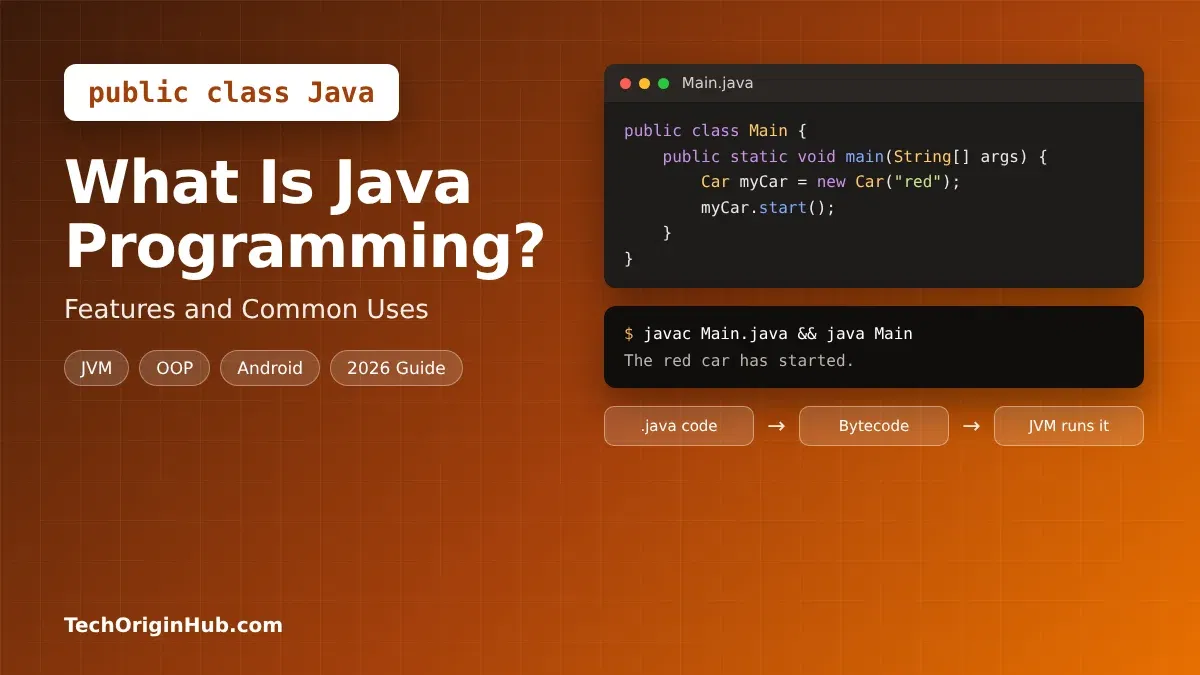
Java uses a two-step process that makes it portable. Here is how a Java program goes from your keyboard to running on a computer:
- You write source code in a file that ends with
.java, such asHello.java. - The compiler (
javac) turns it into bytecode. Bytecode is a special in-between code saved in.classfiles. It is not tied to any one operating system. - The Java Virtual Machine (JVM) runs the bytecode. Every operating system has its own JVM, and each JVM understands the same bytecode.
- The JIT compiler speeds things up. While the program runs, the JVM’s Just-In-Time compiler turns frequently used code into fast machine code.
- Garbage collection cleans memory. The JVM automatically frees memory your program no longer uses, so you do not have to manage it by hand.
JDK vs JRE vs JVM
| Term | Full Name | What It Does |
|---|---|---|
| JDK | Java Development Kit | Everything you need to write and build Java programs, including the compiler javac |
| JRE | Java Runtime Environment | What you need to run Java programs (JVM plus core libraries) |
| JVM | Java Virtual Machine | The engine that actually runs Java bytecode on your device |
In simple words: developers install the JDK, and the JVM inside it runs the code. In modern Java, the JRE is no longer offered as a separate download, because the JDK includes everything.
Java Examples for Beginners
Example 1: Hello World
public class Hello {
    public static void main(String[] args) {
        System.out.println("Hello, World!");
    }
}
Every Java program starts from the main method. System.out.println prints a line of text to the screen.
Good news for beginners: Since Java 25, you can write a simpler version without the class wrapper:
void main() {
    IO.println("Hello, World!");
}
This feature, called compact source files and instance main methods, makes Java much friendlier for first-time learners.
Example 2: Variables and Data Types
public class Student {
    public static void main(String[] args) {
        String name = "Saad";
        int age = 25;
        double marks = 87.5;
        boolean passed = true;

        System.out.println(name + " is " + age + " years old.");
        System.out.println("Marks: " + marks + ", Passed: " + passed);
    }
}
Java is strongly typed, so you must say what kind of data each variable holds, like int for whole numbers or String for text.
Example 3: If and Else
int marks = 72;

if (marks >= 50) {
    System.out.println("You passed!");
} else {
    System.out.println("Try again.");
}
Example 4: A Loop
for (int i = 1; i <= 5; i++) {
    System.out.println("Count: " + i);
}
This prints numbers from 1 to 5.
Example 5: A Simple Class and Object
class Car {
    String color;

    Car(String color) {
        this.color = color;
    }

    void start() {
        System.out.println("The " + color + " car has started.");
    }
}

public class Main {
    public static void main(String[] args) {
        Car myCar = new Car("red");
        myCar.start();
    }
}
Here, Car is a class (a blueprint), and myCar is an object made from that blueprint. This is the core idea of object-oriented programming.
Key Features of Java
- Platform independent: Java bytecode runs on any device with a JVM, which is the heart of “Write Once, Run Anywhere.”
- Object-oriented: Classes, objects, inheritance and interfaces help you build large programs in clean, reusable pieces.
- Strongly typed: The compiler checks data types before your program runs, so many mistakes are caught early.
- Automatic memory management: Garbage collection frees unused memory, which reduces crashes and memory leaks.
- Secure: Java has no direct pointer access, checks bytecode before running it, and gets regular security updates.
- Multithreading: Java can run many tasks at the same time. Modern virtual threads let one app handle a huge number of tasks with little memory.
- Fast performance: The JIT compiler turns hot code into machine code, so Java runs close to the speed of compiled languages.
- Rich standard library: Built-in tools for files, networking, dates, collections, math and more.
- Backward compatible: Code written years ago usually still runs on new Java versions.
- Huge ecosystem: Thousands of libraries and tools, plus build tools like Maven and Gradle.
Common Uses of Java
| Use Case | How Java Is Used | Popular Tools and Examples |
|---|---|---|
| Enterprise software | Large business systems for HR, finance and supply chains | Spring, Jakarta EE |
| Banking and finance | Trading platforms, payment systems and core banking | Used by many major banks |
| Android apps | Building mobile apps for Android phones | Android SDK, Android Studio |
| Web back ends and APIs | Server code that powers websites and APIs | Spring Boot, Quarkus, Micronaut |
| Cloud and microservices | Small services running on cloud platforms | Spring Cloud, Kubernetes |
| Big data | Processing very large amounts of data | Apache Hadoop, Apache Kafka, Apache Spark (JVM) |
| Desktop apps | Programs with windows and buttons | JavaFX, Swing, IntelliJ IDEA |
| Games | Game logic and cross-platform games | Minecraft Java Edition, libGDX |
| Scientific and government systems | Reliable, long-running software | Data analysis and simulation tools |
| Embedded and IoT | Smart cards, set-top boxes and devices | Java Card, embedded JVMs |
A note on Android: Google has made Kotlin its preferred language for Android since 2019. However, Java is still fully supported, many existing apps are written in Java, and Kotlin itself runs on the same JVM ideas, so Java skills still help a lot.
Popular Java Frameworks
- Spring and Spring Boot: The most popular choice for web apps, APIs and microservices.
- Hibernate: Makes it easier to work with databases using Java objects.
- Jakarta EE: A set of standards for large enterprise apps.
- Quarkus and Micronaut: Lightweight frameworks built for fast cloud apps.
- JUnit: The standard tool for testing Java code.
Java Versions in 2026
Java releases a new version every six months, in March and September. Every two years, one version is marked LTS (Long-Term Support), which means it gets updates for many years. Most companies use LTS versions.
| Version | Released | Type | Note |
|---|---|---|---|
| Java 27 | September 15, 2026 | Feature release | Latest version, short-term support |
| Java 26 | March 2026 | Feature release | Replaced by Java 27 |
| Java 25 | September 2025 | LTS | Best choice for most new projects |
| Java 21 | September 2023 | LTS | Still widely used, added virtual threads |
| Java 17 | September 2021 | LTS | Common in older production systems |
| Java 11 and 8 | 2018 and 2014 | LTS | Legacy, mostly in older apps |
What is new in Java 27: G1 is now the default garbage collector everywhere, TLS 1.3 gets post-quantum hybrid key exchange for stronger encryption, and compact object headers become the default to save memory. The next LTS version is expected to be Java 29 in September 2027.
Advantages and Disadvantages of Java
| Advantages | Disadvantages |
|---|---|
| Runs on almost any platform | Code can be longer (more verbose) than Python |
| Very stable and reliable for large systems | Uses more memory than languages like C or Go |
| Strong security and type checking | Slower startup time for small apps |
| Huge job market, especially in enterprise | Learning OOP concepts takes time for beginners |
| Massive community and free learning resources | Oracle JDK licensing can confuse businesses (free OpenJDK builds solve this) |
| Backward compatible, long support periods | Less popular for quick scripts and data science |
Java vs Other Popular Languages
| Feature | Java | Python | JavaScript | C++ |
|---|---|---|---|---|
| Typing | Static, strong | Dynamic | Dynamic | Static |
| Runs on | JVM | Python interpreter | Browser, Node.js | Directly as machine code |
| Speed | Fast | Slower | Fast (V8) | Very fast |
| Beginner friendly | Medium | Very easy | Easy | Hard |
| Best known for | Enterprise, Android, banking | AI, data science, scripts | Websites, web apps | Games, systems, high performance |
If you are deciding what to learn first, also read our guide on Python programming.
How to Start Learning Java
- Install a JDK: Download a free OpenJDK build such as Eclipse Temurin, Amazon Corretto or Microsoft Build of OpenJDK. Pick Java 25 (LTS) for learning and most projects.
- Check the install: Open Terminal or Command Prompt and type
java -versionandjavac -version. - Choose an editor: IntelliJ IDEA Community Edition, Eclipse and VS Code (with the Java extension pack) are all free and popular.
- Write your first program: Create
Hello.javawith the Hello World example above. - Compile and run it: Type
javac Hello.java, thenjava Hello. With modern Java, you can also runjava Hello.javadirectly. - Learn the basics in order: Variables, data types, operators, if/else, loops, arrays, methods, then classes and objects.
- Build small projects: Try a calculator, a to-do list, a number guessing game or a simple bank account program.
- Move to frameworks: Once you are comfortable, learn Spring Boot for web apps or Android Studio for mobile apps.
Tip: Practice a little every day. Java has many rules at first, but they become natural after a few weeks of regular coding.
Frequently Asked Questions
Is Java still used in 2026?
Yes. Java is still one of the most used languages for enterprise software, banking systems, Android apps and cloud services. New versions keep coming every six months, and Java 27 was released in September 2026.
Is Java hard to learn?
Java is moderately easy. It has more rules than Python, but those rules teach good programming habits. Newer features, like the simple void main() style, make it easier for beginners than before.
Is Java free?
Yes. You can learn and use Java for free with OpenJDK builds like Eclipse Temurin or Amazon Corretto. Oracle’s own JDK has its own license terms, so businesses should check those before using it.
What is the difference between Java and JavaScript?
They are separate languages with different uses. Java builds apps, servers and Android software, and runs on the JVM. JavaScript mainly runs in web browsers to make pages interactive, and also on servers through Node.js.
Which Java version should I learn?
Learn Java 25, the latest LTS version. It is supported for many years and includes modern, beginner-friendly features.
Is Java good for Android development?
Yes, Java is still supported for Android. However, Google recommends Kotlin for new Android apps. Learning Java first makes picking up Kotlin much easier.
What is the JVM in simple words?
The JVM (Java Virtual Machine) is a program that runs Java bytecode. It acts like a translator between your Java code and the computer’s operating system, which is why Java works on so many devices.
Can I get a job with Java?
Yes. Java developers are in demand at banks, large companies, government agencies and software firms. Spring Boot and cloud skills make Java developers even more valuable.
Final Thoughts
Java has stayed popular for 30 years because it is stable, secure and runs almost anywhere. From banking systems and enterprise software to Android apps and big data tools, Java quietly powers a huge part of the digital world.
If you want a language that teaches strong programming basics and opens doors to well-paid jobs, Java is a smart choice in 2026. Install Java 25, try the examples in this guide, and build small projects step by step.
References
- ADTmag, “JDK 27 Heads Toward September Release with Default G1, Post-Quantum TLS and Structured Concurrency”: https://adtmag.com/articles/2026/07/31/jdk-27-heads-toward-september-release-with-default-g1-and-postquantum-tls-and-structured-concurrency.aspx
- InfoQ, “Java News Roundup: September 14, 2026”: https://www.infoq.com/news/2026/09/java-news-roundup-sep14-2026/
Disclaimer
This article is for general information and learning purposes only. Java version and release details were checked on October 31, 2026, and may change. Always confirm the latest information on official Java and OpenJDK sources before choosing a version for production use. TechOriginHub is not affiliated with Oracle, the OpenJDK project or any company mentioned. Java is a registered trademark of Oracle and/or its affiliates.