
 By saman zahra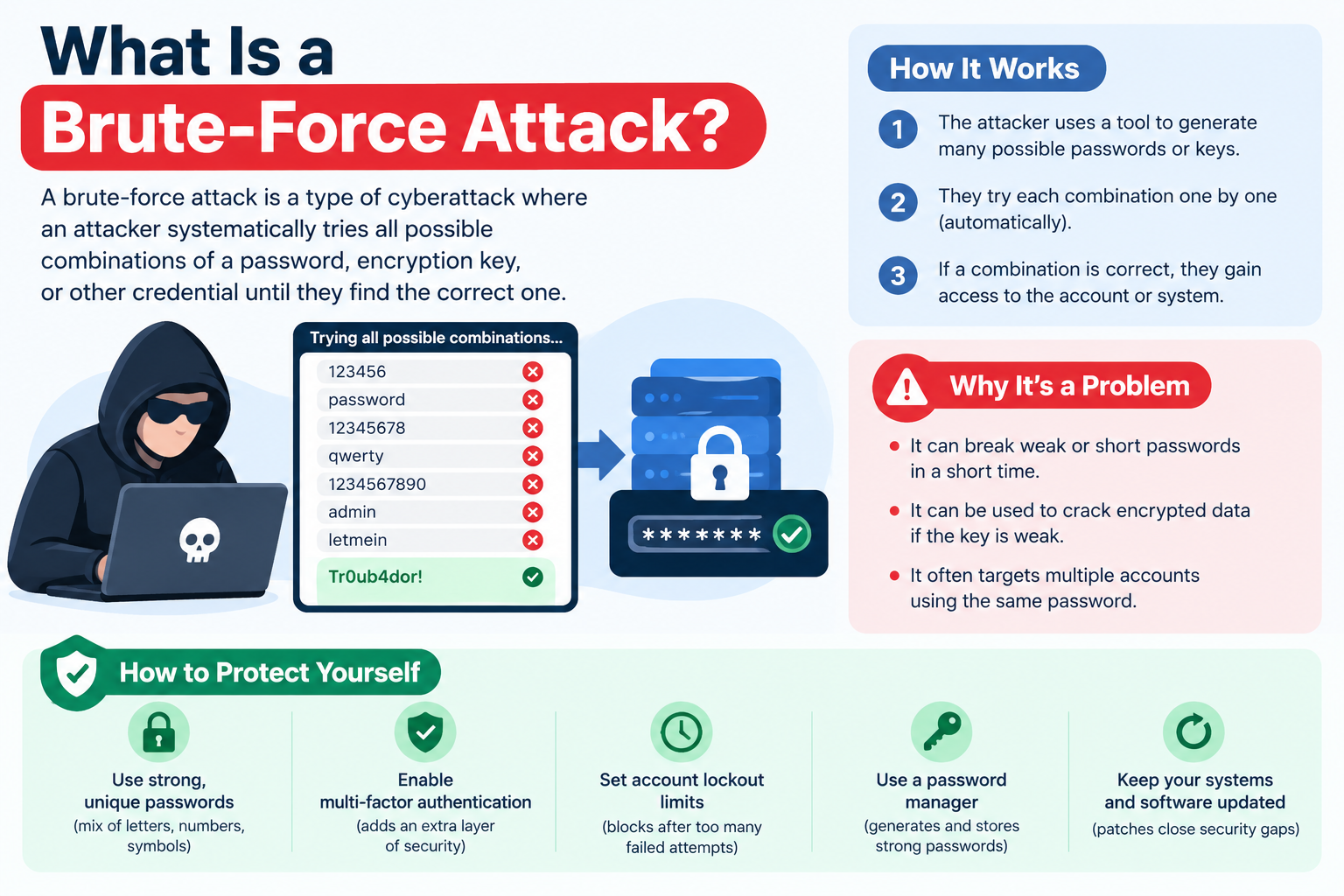
Introduction
Brute-force attacks are among the oldest and most persistent threats in cybersecurity, yet they remain effective because of one consistent human weakness: predictable, weak, or reused passwords. Understanding what a brute-force attack is, how it works, and how to defend against it is foundational knowledge for anyone who manages accounts, systems, or data online.
What Is a Brute-Force Attack?
A brute-force attack is a trial-and-error method used by attackers to gain unauthorized access to accounts, systems, or encrypted data by systematically trying every possible combination of passwords, credentials, or encryption keys until the correct one is found.
The concept is straightforward. Imagine trying to open a combination lock by starting at 0000 and working through every possible combination in sequence until the lock opens. A brute-force attack works exactly the same way, but instead of a person turning a dial, automated software generates and tests millions or billions of combinations per second, making what would take a human thousands of years achievable in hours or days depending on the target’s password strength.
Brute-force attacks target a wide range of systems and services:
- User login pages on websites and applications
- Email, social media, and cloud service accounts
- Encrypted files, archives, and databases
- Network services such as SSH, FTP, and Remote Desktop Protocol
- Wi-Fi network passwords
- API authentication endpoints
The success of any brute-force attack depends on two primary factors: the strength of the target password and the computational power available to the attacker. A weak four-character password can be cracked in seconds with modern hardware. A strong sixteen-character random password that uses a mix of character types may require more computational effort than is practically feasible to brute force, making the attack effectively impractical.
Brute-force attacks are one of the most fundamental and persistent threats in cybersecurity, and understanding them is the first step toward defending against them.
How Does a Brute-Force Attack Work?
Brute-force attacks are carried out using automated software tools that can generate and test thousands to billions of password combinations per second depending on the computing resources available to the attacker and the nature of the target system.
The basic process of a brute-force attack:
- The attacker identifies a target system, login page, encrypted file, or network service they want to access
- The attacker configures an automated brute-force tool with parameters such as which character sets to use, the minimum and maximum password length to attempt, and any known information about the target that might narrow the search
- The tool systematically generates and submits credential combinations to the target
- The tool monitors responses to determine whether each attempt failed or succeeded
- When the correct credential is found, the tool stops and the attacker uses the cracked credentials to access the target
The role of computing power:
Modern hardware significantly affects how fast brute-force attacks can be conducted. Standard processors can test many thousands of combinations per second for some scenarios. Graphics processing units, originally designed for rendering images, can perform parallel computations that make them exceptionally effective for offline password cracking. Cloud computing resources allow attackers to scale up computational power for larger and more complex attacks without requiring dedicated hardware.
Online versus offline brute-force attacks:
This distinction matters significantly for both attackers and defenders.
Online brute-force attacks test credentials directly against a live service such as a website login page. These attacks are constrained by network speed, server response time, and any security controls the service has in place such as rate limiting and account lockout.
Offline brute-force attacks work against a captured password hash file without interacting with the live service at all. When a database containing hashed passwords is stolen in a breach, attackers can run their cracking tools locally at full computing speed with no network constraints or server-side defenses slowing them down. This makes offline attacks dramatically faster than online ones.
Defending against brute-force attacks involves multiple types of cybersecurity controls working together across authentication, network, application, and endpoint layers.
Types of Brute-Force Attacks
Not all brute-force attacks work the same way. Attackers use several distinct variations depending on what they know about the target, how quickly they need results, and what defenses are in place.
| Attack Type | How It Works | Speed | Most Effective Against |
|---|---|---|---|
| Simple Brute-Force | Tries every possible character combination systematically | Slow for long passwords | Short, weak passwords with no complexity |
| Dictionary Attack | Tries words from a curated list of common passwords | Faster than simple brute-force | Common passwords and real words |
| Hybrid Attack | Combines dictionary words with numbers and symbols | Moderate | Slightly modified common passwords |
| Credential Stuffing | Uses leaked username and password pairs from breaches | Very fast against many sites | Users who reuse passwords across sites |
| Reverse Brute-Force | Tries one common password against many usernames | Fast | Large user databases with lockout policies |
| Rainbow Table Attack | Uses precomputed hash tables to look up password hashes | Very fast for unsalted hashes | Databases storing passwords without salting |
| Password Spraying | Tries a small set of common passwords slowly across many accounts | Deliberately slow | Environments with account lockout policies |
Simple Brute-Force Attack
A simple brute-force attack tries every possible combination of characters in sequence, starting from the shortest possibilities and working through every permutation upward in length and complexity. For a password using only lowercase letters and numbers, the attack begins with single characters, then two-character combinations, then three, and continues until every possibility has been tried or the correct password is found.
Simple brute-force attacks are computationally intensive and predictable in their approach, but they will always eventually find the correct password given sufficient time and resources. The critical variable is how long that takes.
Short passwords of four to six characters can be cracked almost instantly with modern hardware regardless of which characters they use. Passwords of twelve or more characters using a genuine mix of uppercase letters, lowercase letters, numbers, and symbols make simple brute-force attacks computationally impractical, potentially requiring thousands of years of computation even with powerful hardware.
The National Institute of Standards and Technology (NIST) Special Publication 800-63B emphasizes password length as the most important factor in resistance to brute-force attacks, which is why modern guidance focuses on length requirements rather than arbitrary complexity rules.
Dictionary Attack
A dictionary attack uses a pre-prepared list of words, phrases, and commonly used passwords rather than trying every possible character combination. The wordlist used typically includes common English words, well-known weak passwords such as password123, qwerty, and letmein, names and dates, sports teams, and critically, real passwords that have been exposed in previous data breaches.
Dictionary attacks are significantly faster than simple brute-force attacks because they prioritize the most commonly chosen passwords first. Instead of working through mathematically every possibility, the attack front-loads the guesses most likely to succeed based on how people actually create passwords.
Many real-world password cracking incidents rely on dictionary attacks because a significant proportion of users choose predictable passwords based on recognizable words and phrases. The OWASP (owasp.org) Authentication Cheat Sheet specifically warns against passwords that appear on commonly available wordlists as a baseline security requirement.
Hybrid Brute-Force Attack
A hybrid attack combines dictionary wordlists with brute-force techniques by adding numbers, symbols, and character substitutions to dictionary words. If the base dictionary word is summer, the hybrid attack also tries Summer1, summer2024, $ummer, summ3r, Summer2024!, and every other variation that follows common password modification patterns.
Hybrid attacks specifically target the widespread practice of taking a recognizable word and adding numbers or symbols to satisfy minimum password complexity requirements. Passwords like Fluffy2023! or Company@2024 feel complex to the user who created them, but they follow highly predictable patterns that hybrid attack tools are specifically designed to exploit. From a brute-force resistance standpoint, these passwords are far weaker than a truly random string of equal or even lesser length.
Credential Stuffing
Credential stuffing uses real username and password combinations stolen from previous data breaches rather than generating guesses at all. When a major website or service is breached and its user database is stolen, those credentials are frequently sold or published on dark web forums. Attackers compile these leaked lists and use automated tools to test whether the same email and password combination provides access to other services.
Credential stuffing directly exploits the widespread practice of password reuse. When a user registers for a dozen different services using the same email address and password, a single breach of any one of those services can expose all the others. Because credential stuffing uses real, confirmed credentials rather than random guesses, its success rate against sites where users have reused passwords is substantially higher than traditional brute-force guessing.
Phishing attacks are another significant source of credentials that end up in stuffing attack lists. Credentials stolen through phishing campaigns are frequently sold or traded and used in subsequent credential stuffing attacks against other platforms. The relationship between phishing and credential stuffing represents a connected chain of attacks that begins with social engineering and ends with automated credential abuse at scale.
Understanding phishing attacks is therefore directly relevant to understanding why credential stuffing is as prevalent and effective as it is.
Reverse Brute-Force Attack
A reverse brute-force attack inverts the typical approach. Instead of trying many passwords against one account, the attacker takes one or a small set of common passwords and systematically tries them against a large list of known usernames or email addresses.
For example, an attacker takes the password password123 and submits it against thousands of known usernames or email addresses sourced from a previous breach, a public directory, or another data source. Because only a single attempt is made against each individual account, the account lockout threshold, which triggers after a set number of failed attempts for the same account, is never reached for any single user.
Reverse brute-force attacks are specifically designed to circumvent account lockout defenses while still testing large numbers of accounts for weak passwords.
Rainbow Table Attack
Passwords in properly secured systems are not stored in plain text. They are stored as hashes, the output of a one-way mathematical function that converts the password into a fixed-length string that cannot be directly reversed. When a user logs in, the system hashes the entered password and compares it to the stored hash.
A rainbow table attack uses a massive precomputed database of passwords and their corresponding hash values to rapidly look up a hash and identify the original password without needing to compute each hash from scratch during the attack. If an attacker obtains a database of password hashes, they can compare those hashes against the rainbow table to find matches almost instantly.
The defense against rainbow table attacks is salting. A salt is a unique random value added to each password before hashing is applied. This means that even if two users have identical passwords, their stored hashes will be completely different because each hash was computed from a different salted input. Precomputed rainbow tables become useless against salted hashes because the salt makes each hash unique.
Properly implemented password storage using salted hashing with algorithms designed for this purpose, such as bcrypt, scrypt, or Argon2, is the primary technical defense against both rainbow table attacks and offline brute-force attacks more broadly.
Password Spraying
Password spraying is a deliberately slow and low-volume variation designed specifically to avoid triggering account lockout policies. Instead of trying many passwords against a single account rapidly, an attacker tries a very small number of commonly used passwords across a very large number of accounts over an extended time period.
By spreading attempts across many accounts and making only a few attempts per account, password spraying stays below the lockout threshold for every individual account. The strategy accepts a low success rate per account but compensates by targeting enormous numbers of accounts simultaneously.
Password spraying has been used in significant corporate and government breaches where attackers gained initial access through employee accounts protected only by weak or commonly used passwords. The Cybersecurity and Infrastructure Security Agency (CISA) has specifically highlighted password spraying as a technique used in high-profile intrusion campaigns targeting organizations of all sizes.
Real-World Examples of Brute-Force Attacks
Online Account Compromises
Automated brute-force and credential stuffing tools are routinely used to target consumer online accounts including email, social media, gaming platforms, and e-commerce services. Attackers use leaked credential lists to attempt access wherever users have reused the same email and password combination. Accounts with weak passwords that were not included in any breach are targeted through dictionary and simple brute-force approaches, particularly when services lack adequate rate limiting.
Corporate Network Intrusions
Remote access services including Remote Desktop Protocol and Secure Shell are frequently targeted with brute-force attacks, particularly when exposed directly to the internet with weak or default administrator credentials. Attackers who successfully brute-force their way into an exposed RDP endpoint gain direct interactive access to the target system, which has been used as an entry point for ransomware deployments and data theft operations. CISA guidance specifically highlights exposed RDP with weak passwords as a critical and commonly exploited vulnerability.
Wi-Fi Password Cracking
Attackers operating within wireless range of a target network can capture the authentication handshake that occurs when a device connects to the network. This handshake can then be taken offline and subjected to dictionary and brute-force attacks without maintaining proximity to the network or generating any traffic that network monitoring would detect. Networks protected only by short or common Wi-Fi passwords are particularly vulnerable to this approach.
API Authentication Attacks
Web application APIs that expose authentication endpoints are targeted with automated brute-force attempts against API keys, tokens, and login credentials. APIs without adequate rate limiting or lockout mechanisms can be subjected to sustained automated credential attacks that operate far faster than any login page a human would interact with.
API security specifically addresses this attack surface, and organizations building or operating APIs should treat authentication endpoint protection as a baseline security requirement rather than an optional enhancement.
What Makes Passwords Vulnerable to Brute-Force Attacks?
Password Length
Password length is the single most important factor in resistance to brute-force attacks. Each additional character exponentially increases the number of possible combinations an attacker must try. A four-character password using only lowercase letters represents a relatively small search space that can be exhausted almost instantly with modern hardware. A sixteen-character password using a genuine mix of character types represents an astronomically larger search space that makes exhaustive brute-force computationally impractical within any realistic timeframe.
NIST Special Publication 800-63B recommends prioritizing password length over arbitrary complexity rules, a position supported by the mathematical reality of how password search space scales with length.
Character Set Complexity
Using only lowercase letters limits the character set to 26 possibilities per position. Adding uppercase letters doubles that. Adding numbers and special symbols expands it further. Each expansion of the character set multiplies the total search space for every character position in the password, making brute-force attacks progressively more demanding.
Predictability
A password can be long and appear complex while still being highly predictable to attack tools. Passwords based on real words, recognizable names, meaningful dates, keyboard patterns, and common modification conventions are vulnerable to dictionary and hybrid attacks even when they technically meet length requirements. Summer2024! is demonstrably more predictable from a brute-force perspective than a genuinely random twelve-character string, despite being the same length.
Password Reuse
Using the same password across multiple accounts transforms every breach that exposes that password into an exposure of every other account where it is used. Credential stuffing attacks are entirely dependent on this behavior. A password that is strong in isolation becomes a systemic risk the moment it is reused anywhere that has weaker security practices.
How to Prevent Brute-Force Attacks
Use Long and Complex Passwords
Use passwords of at least twelve characters, and preferably sixteen or more, for every account. Include a genuine mix of character types rather than following predictable modification patterns. Consider passphrases combining multiple random unrelated words as a practical way to create both long and memorable passwords. A password manager can generate and securely store long random unique passwords for every account without requiring you to remember them individually.
Never Reuse Passwords
Every account should have a unique password so that a breach affecting one service does not expose any others. A password manager makes this practical by storing every unique credential securely and filling it in automatically.
Enable Multi-Factor Authentication
Multi-factor authentication requires an additional verification step beyond the password, such as a one-time code from an authenticator app, a hardware security key, or biometric verification. Even if an attacker successfully cracks a password through brute force, they cannot complete authentication without passing the second factor.
Two-factor authentication is one of the most effective individual defenses against brute-force attacks and should be enabled on every account that supports it. For a detailed explanation of how it works and why it matters, this guide on two-factor authentication covers the topic comprehensively.
Implement Account Lockout Policies
Account lockout policies automatically lock or temporarily disable an account after a defined number of consecutive failed login attempts. This prevents automated tools from making unlimited attempts against a single account. Lockout thresholds need to be calibrated carefully: set too low and legitimate users who mistype their password get locked out frequently; set too high and automated attacks can make substantial progress before triggering it.
Organizations should also consider the potential for lockout-based denial of service, where an attacker intentionally triggers lockouts for legitimate users. Temporary lockouts with exponential backoff, rather than permanent locks, typically strike a better balance.
Implement Rate Limiting
Rate limiting restricts how many login attempts can be made from a specific IP address or user account within a defined time window. By slowing down the rate at which attempts can be submitted, rate limiting makes large-scale automated attacks impractical even if it does not block them entirely. Progressive rate limiting, which increases the delay between allowed attempts as failed attempts accumulate, makes attacks progressively slower and more detectable.
Use CAPTCHAs on Login Pages
CAPTCHAs present challenges that human users can complete easily but automated bots cannot reliably solve. Implementing CAPTCHA on login pages, particularly triggered after a threshold of failed attempts rather than on every login, prevents automated tools from submitting unlimited credential guesses. OWASP authentication guidance highlights CAPTCHA as a standard countermeasure against automated login attacks.
Monitor and Alert on Suspicious Login Activity
Monitoring authentication logs for patterns characteristic of brute-force attacks, including high volumes of failed attempts, attempts from unexpected geographic locations, attempts across many accounts in short timeframes, and attempts at unusual hours, enables detection of attacks in progress. Alerts that reach administrators or account owners quickly allow faster response before an attack succeeds.
Use IP Blocking and Geo-Fencing
Blocking IP addresses that generate excessive failed login attempts removes the source of ongoing attacks. Geographic access restrictions that limit login attempts to regions where legitimate users are expected provide an additional layer of filtering that reduces the attack surface for attacks originating from unexpected locations.
Salt and Hash Passwords Properly
For developers and system administrators, storing passwords using proper cryptographic hashing with a unique random salt for each password is a non-negotiable technical requirement. Recommended password hashing algorithms including bcrypt, scrypt, and Argon2 are specifically designed to be computationally expensive, which means they slow down offline brute-force attacks even on powerful hardware. These algorithms are designed to remain effective as hardware improves by allowing the cost factor to be increased over time.
Proper salted hashing directly defeats rainbow table attacks and significantly raises the computational cost of offline brute-force attacks against captured password databases.
Implement Zero Trust Principles
A zero trust security approach requires verification of every access request regardless of where it originates, and enforces least-privilege access that limits what any single set of credentials can reach. Even in a scenario where an attacker successfully brute-forces a set of credentials, zero trust controls limit what those credentials can access, containing the damage rather than allowing lateral movement through the organization.
Zero trust security principles are directly relevant to credential-based attack resilience because they ensure that stolen or cracked credentials alone are not sufficient to access sensitive resources.
Identity and access management provides the operational framework through which strong authentication policies, least privilege access, and access controls are implemented and enforced across an organization, making it a foundational component of any defense against brute-force credential attacks.
Brute-Force Attacks and Endpoint Security
Endpoint security tools contribute meaningfully to brute-force attack defense, particularly for attacks targeting network services and remote access running on devices. Security software on endpoints can identify unusual authentication activity patterns, block processes associated with known brute-force tools when attackers gain initial access and attempt to move laterally, and enforce access controls on local services.
Remote access services like RDP should be protected not only with strong passwords and MFA but through endpoint-level controls including host-based firewalls and monitoring that can detect and respond to sustained authentication attempts against those services.
Brute-Force Attacks and Network Security
Network-level security controls play an important role in brute-force attack prevention, particularly for network services and remote access. Firewalls that restrict which IP addresses and networks are permitted to initiate connections to sensitive services such as RDP and SSH significantly reduce the attack surface by limiting who can even reach the authentication interface.
Intrusion detection systems can identify patterns characteristic of brute-force attacks, including rapid sequential connection attempts to authentication services, and alert administrators to ongoing attacks. VPN requirements for remote access reduce exposure further by requiring attackers to first compromise VPN authentication before they can even reach the services they intend to brute force.
Network security controls operate as a first line of defense that limits the population of attackers who can reach authentication endpoints at all, complementing the authentication-level controls that manage what happens when they do.
Brute-Force Attacks on Web Applications
Web application login pages are among the most commonly targeted surfaces for brute-force attacks precisely because they are publicly accessible to anyone with an internet connection and directly control access to user accounts and the data those accounts can reach.
Application-level controls for preventing brute-force attacks on web applications include rate limiting on login endpoints, CAPTCHA verification triggered by failed attempts, account lockout after a defined failure threshold, monitoring for unusual login patterns, and web application firewall rules that recognize and block known brute-force attack signatures.
Web application security addresses brute-force prevention alongside the full range of application-level threats, and authentication security is consistently among the most critical areas of focus in web application security assessments.
Application security more broadly encompasses the authentication controls, session management protections, and monitoring capabilities that together protect applications from brute-force and other credential-based attacks across the full application stack.
Ethical Hacking and Brute-Force Testing
Ethical hackers and penetration testers use brute-force techniques in authorized security assessments to identify whether systems are vulnerable to password attacks before real attackers can exploit them. Testing for brute-force vulnerabilities is a standard component of a thorough security assessment, covering login pages, remote access services, network services, API authentication endpoints, and encrypted data storage.
Findings from authorized brute-force testing provide organizations with specific, evidence-based information about which systems are vulnerable, which passwords or password policies are inadequate, and which defenses like rate limiting and lockout policies are absent or misconfigured. This information directly informs security hardening decisions.
Ethical hacking professionals conduct this testing with the same tools and techniques that malicious attackers use, but with explicit written authorization from the system owner and within clearly defined boundaries. Understanding how ethical hacking applies to brute-force vulnerability testing helps organizations see why regular penetration testing is a valuable investment rather than a luxury.
It bears repeating clearly: any brute-force testing must only be conducted with explicit written authorization from the system owner. Unauthorized brute-force attempts against any system are illegal under computer fraud laws in most jurisdictions regardless of the intent behind them.
Ethical hacking as a discipline exists precisely to channel security testing knowledge toward improving defenses rather than enabling attacks.
Brute-Force Attack Prevention Best Practices Summary
For individual users:
- Use passwords of at least twelve characters, and preferably sixteen or more, for every account
- Use a password manager to generate and store strong unique passwords for every account
- Enable two-factor authentication on every account that supports it, starting with email, financial accounts, and any accounts containing sensitive information
- Never reuse passwords across different accounts regardless of how strong the password is
- Check whether your email addresses or passwords have appeared in known data breaches using reputable breach checking services
- Use passphrases combining multiple random unrelated words as a practical alternative to complex short passwords
For organizations and developers:
- Enforce strong password policies with meaningful minimum length requirements based on current NIST guidance
- Implement account lockout or progressive rate limiting on all authentication interfaces
- Use CAPTCHA on login pages triggered by suspicious activity patterns rather than on every login
- Store passwords using properly salted cryptographic hashing with bcrypt, scrypt, or Argon2
- Monitor authentication logs for brute-force attack patterns and generate alerts for investigation
- Require two-factor authentication for all user accounts with mandatory enforcement for administrative and privileged accounts
- Restrict access to remote services such as RDP and SSH through firewall rules and VPN requirements
- Conduct regular penetration testing to identify brute-force vulnerabilities before attackers do
- Apply zero trust principles to limit the impact of any successful credential compromise
- Maintain a complete identity and access management framework that enforces least privilege and provides visibility into authentication events across the organization
- Train employees on the risks of password reuse and the importance of strong unique passwords to reduce vulnerability to phishing and credential stuffing
Frequently Asked Questions
What is a brute-force attack?
A brute-force attack is a trial-and-error method where attackers use automated software to systematically try every possible password, credential, or encryption key combination until the correct one is found. It is one of the most fundamental attack types in cybersecurity and remains effective against weak or predictable passwords.
How does a brute-force attack work?
The attacker configures an automated tool that generates and submits credential combinations to the target system at high speed. The tool monitors responses to identify successful combinations. Online attacks work against live services and are constrained by network speed and server defenses. Offline attacks work against captured password hash files without those constraints.
What are the different types of brute-force attacks?
The major types are simple brute-force, dictionary attacks, hybrid attacks, credential stuffing, reverse brute-force, rainbow table attacks, and password spraying. Each uses a different strategy depending on what the attacker knows about the target and what defenses are in place.
What is the difference between a brute-force attack and a dictionary attack?
A simple brute-force attack tries every possible character combination mathematically. A dictionary attack uses a pre-prepared list of common words and known passwords, which is faster because it prioritizes the most likely passwords first rather than exhausting every theoretical possibility.
What is credential stuffing?
Credential stuffing uses real username and password pairs stolen from previous data breaches to test whether the same credentials provide access on other sites. It exploits password reuse rather than guessing new passwords. It has a higher success rate than traditional brute-force against users who reuse passwords.
What is a reverse brute-force attack?
A reverse brute-force attack takes one common password and tries it against many different accounts rather than trying many passwords against one account. It is designed to avoid account lockout policies that activate after multiple failed attempts against the same account.
What is a rainbow table attack?
A rainbow table attack uses a precomputed database of passwords and their corresponding hash values to rapidly identify passwords from their stored hashes. Salting passwords before hashing defeats rainbow table attacks by making each hash unique even for identical passwords.
What is password spraying?
Password spraying tries a small number of common passwords across a large number of accounts very slowly and deliberately. It is designed to stay below account lockout thresholds by making only a few attempts per account while still testing many accounts for weak credentials.
How long does a brute-force attack take?
This depends entirely on the password’s length and complexity and the attacker’s computational resources. A short simple password can be cracked in seconds. A long random password using a full character set can take computationally impractical lengths of time. There is no universal answer because both variables span enormous ranges.
What makes a password resistant to brute-force attacks?
Length is the most important factor. Longer passwords exponentially increase the search space an attacker must cover. Genuine randomness and character set variety also matter. Predictable patterns, real words, and common modifications reduce effective resistance regardless of technical length.
How do I protect my accounts from brute-force attacks?
Use long unique passwords for every account, enable two-factor authentication wherever it is available, and use a password manager to make both of those things practical without relying on memory.
What is rate limiting and how does it prevent brute-force attacks?
Rate limiting restricts how many login attempts can be made from an IP address or account within a time window. By capping the speed of attempts, it makes automated high-speed brute-force tools impractical and buys time for detection and response.
What is account lockout and how does it help?
Account lockout automatically disables an account after a set number of failed login attempts. It prevents automated tools from making unlimited guesses against a single account but must be balanced carefully to avoid being abused to lock out legitimate users.
How does multi-factor authentication stop brute-force attacks?
MFA requires the attacker to pass a second verification factor, such as a time-based code or hardware key, in addition to the password. Even if brute force reveals the correct password, access is blocked without the second factor, which the attacker is far less likely to have.
Can a long password prevent brute-force attacks?
A long, genuinely random password makes brute-force attacks computationally impractical within any realistic timeframe. However, length alone does not protect against credential stuffing if the password is reused and has appeared in a breach, or against dictionary attacks if the password is based on predictable words despite its length.
What is the difference between online and offline brute-force attacks?
Online attacks test credentials against a live service and are limited by network speed and server defenses. Offline attacks work against captured password hash files at full local computing speed with no server-side defenses, making them significantly faster.
How do websites detect brute-force attacks?
Websites detect brute-force attacks by monitoring authentication logs for patterns including high volumes of failed attempts from single IP addresses, attempts across many accounts in short timeframes, attempts at unusual times or from unexpected geographic locations, and request patterns characteristic of automated tools rather than human users.
Is using a password manager safe against brute-force attacks?
Yes. Password managers generate and store genuinely long random unique passwords for every account, making both simple brute-force and dictionary attacks far less effective, and eliminating password reuse that enables credential stuffing. The password manager’s own master password should be strong and protected with two-factor authentication.