
 By saman zahra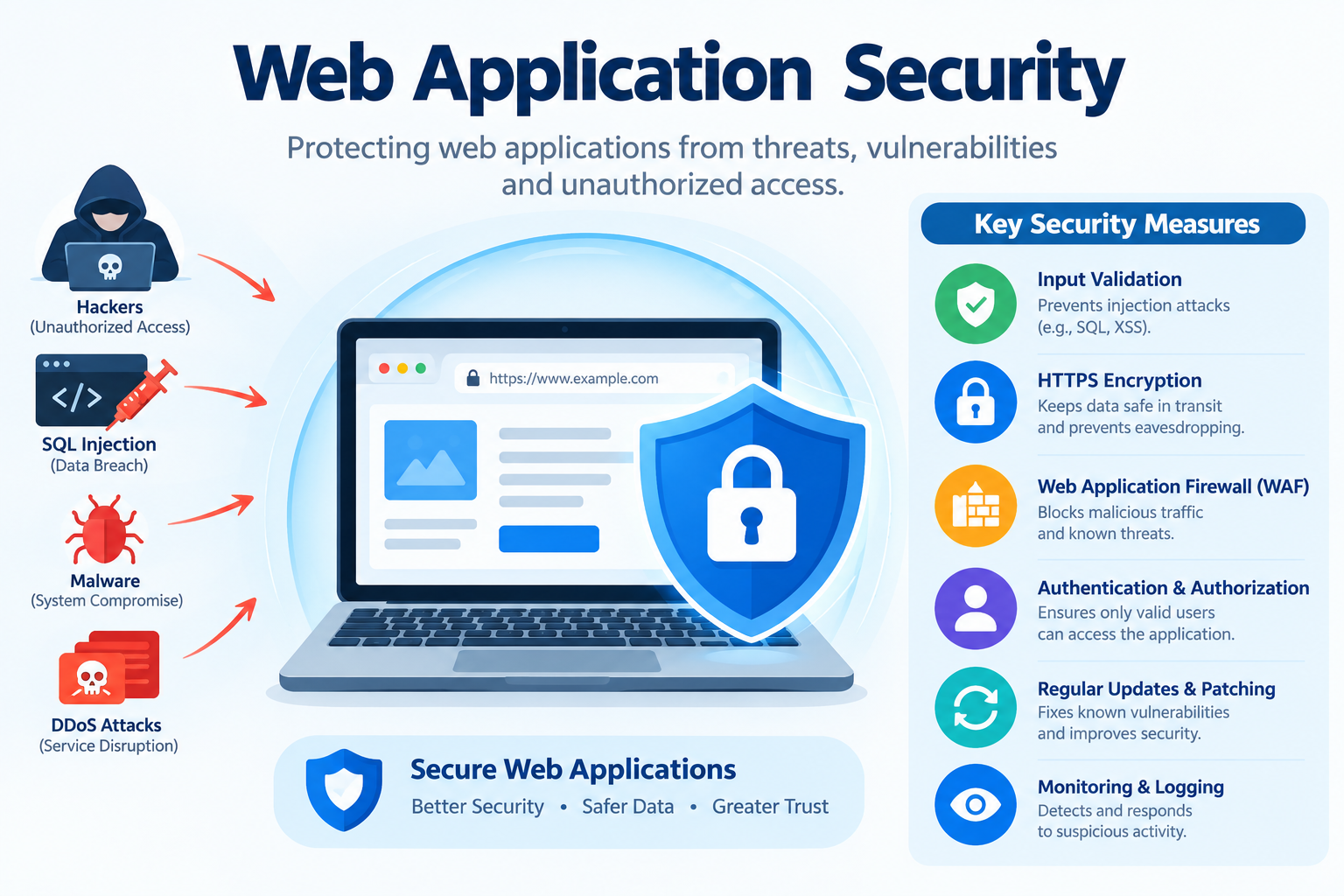
Introduction
Web application security is a topic that affects everyone who uses the internet, from individuals checking their bank balance online to businesses running complex customer-facing platforms. Understanding what it is, why it matters, and how to approach it is no longer just a concern for security specialists. Developers, business owners, students, and IT professionals all benefit from having a clear, grounded understanding of this subject.
This guide covers the definition, key threats, essential protections, testing methods, and best practices for web application security in plain, accurate language.
What Is Web Application Security?
Web application security is the practice of protecting websites, web applications, and web services from security threats, attacks, and vulnerabilities that could allow unauthorized access, data theft, service disruption, or malicious manipulation of the application or its users.
Web applications are software programs that users access through a web browser over the internet. Examples include online banking platforms, e-commerce websites, social media platforms, email services, and business web portals. Nearly everything people interact with online is a web application of some kind.
What makes web applications particularly exposed to attack is a straightforward fact: they are designed to be publicly accessible. That openness, which makes them useful to legitimate users, also makes them reachable by anyone with an internet connection, including those with malicious intentions.
Web application security involves a combination of secure development practices, security testing, runtime protection controls, and ongoing monitoring. No single measure is sufficient on its own. Effective security requires multiple overlapping layers working together.
To understand how web application security fits within the broader field, it helps to start with a foundational understanding of cybersecurity as a whole. Web application security is one specific and critical discipline within that broader field.
Simple real-world examples of web application security in practice:
- A bank’s online portal uses encryption and strong authentication to protect customer account access.
- An e-commerce website validates all form inputs to prevent attackers from injecting malicious code into its database.
- A web application firewall filters malicious requests before they reach the application server.
- A developer runs security tests against their web application before launching it publicly to identify and fix vulnerabilities.
Why Is Web Application Security Important?
Web applications are among the most frequently targeted attack surfaces in modern cybersecurity. The reason is straightforward. They are publicly accessible, they handle sensitive data, and they often connect to backend systems containing valuable information.
A successful attack on a web application can result in:
- Theft of user personal data, financial information, and login credentials
- Unauthorized access to user accounts and sensitive business systems
- Injection of malicious content that harms users who visit the site
- Complete takeover of the web application or its underlying server
- Financial losses, regulatory penalties, and severe reputational damage
- Disruption of services affecting users and business operations
Every web application that collects user data, handles financial transactions, or provides access to sensitive systems carries a responsibility to protect that data and those users through effective security measures.
Regulatory frameworks add legal weight to this responsibility. The General Data Protection Regulation (GDPR) in Europe, the Payment Card Industry Data Security Standard (PCI DSS) for payment card data, and the Health Insurance Portability and Accountability Act (HIPAA) for healthcare data in the United States all impose specific requirements on organizations to protect the data they hold and transmit through web applications.
Web application security is a critical component within the broader spectrum of cybersecurity disciplines. It is also a specific and critical subset of the broader application security field, which covers security across all types of software, not only those accessed through a browser.
How Do Web Application Attacks Work?
Understanding how attacks work helps in understanding why specific security controls matter. Web application attacks typically follow a recognizable pattern.
Reconnaissance
Attackers begin by gathering information about the target web application. They probe its functionality, identify the technologies and frameworks it uses, and look for known vulnerabilities in those technologies. Publicly available information, error messages, and responses from the application itself can all provide useful intelligence to an attacker.
Exploitation
Once a vulnerability is identified, the attacker crafts an attack to exploit it. This might involve crafting malicious input to inject into a form field, intercepting a communication between the user and the application, or exploiting a logic flaw in how the application processes requests.
Impact
After successful exploitation, the attacker achieves their objective. That objective could be stealing data, gaining unauthorized access to accounts or systems, disrupting the service, or planting malicious content that affects other users.
A critical point for anyone who believes their application is too small to be a target: many web application attacks are automated. Attackers use tools to scan large numbers of websites simultaneously, looking for known vulnerabilities. Small websites and applications are routinely swept up in these automated scans simply because they exist and are reachable.
Understanding how attackers think and operate is the foundation of ethical hacking and penetration testing, which organizations use to identify web application vulnerabilities before real attackers can exploit them.
The OWASP Top Ten: The Most Critical Web Application Security Risks
The Open Web Application Security Project, known as OWASP, is a nonprofit organization dedicated to improving software security. It publishes the most widely referenced resource in web application security: the OWASP Top Ten.
The OWASP Top Ten is a regularly updated list of the ten most critical security risks to web applications. It is used by developers, security professionals, and organizations worldwide as a baseline reference for understanding and addressing the most commonly exploited and impactful categories of web application vulnerability.
The current version of the OWASP Top Ten is always available at owasp.org. Always consult the official OWASP website for the most current version, as it is updated periodically to reflect changes in the threat landscape.
OWASP Top Ten Summary
| Risk Category | What It Means Simply |
|---|---|
| Broken Access Control | Users can access data or functions they should not be permitted to |
| Cryptographic Failures | Sensitive data is not properly encrypted, exposing it to theft |
| Injection | Malicious code or commands are inserted through application inputs |
| Insecure Design | Security flaws are built into the application’s design from the start |
| Security Misconfiguration | Security settings are incorrect, incomplete, or left at insecure defaults |
| Vulnerable and Outdated Components | Using libraries or frameworks with known, unpatched vulnerabilities |
| Identification and Authentication Failures | Weaknesses in how the application verifies user identity |
| Software and Data Integrity Failures | Using code or data from unverified sources without integrity checks |
| Security Logging and Monitoring Failures | Insufficient logging makes it impossible to detect or respond to attacks |
| Server-Side Request Forgery | The application can be tricked into making requests to unintended locations |
The OWASP Top Ten is not an exhaustive list of every possible web application security risk. It is a prioritized guide to the most commonly exploited and impactful categories of vulnerability. Organizations and developers who systematically address these ten risk categories significantly reduce their exposure to the most common and damaging web application attacks.
The National Institute of Standards and Technology (NIST) also publishes guidance on secure software development practices that complements the OWASP framework, and both resources are frequently referenced together in professional security guidance.
Common Web Application Security Threats Explained
SQL Injection
SQL injection is one of the oldest and most dangerous web application vulnerabilities. It occurs when an attacker inserts malicious database commands, called SQL statements, into an input field such as a login form or search box.
If the web application does not properly validate and sanitize that input before passing it to the database, the malicious command is executed. This can allow an attacker to:
- View all data in the database, including user credentials
- Modify or delete database records
- Bypass authentication entirely without knowing a valid password
Example: An attacker enters a specially crafted string into a username field. Instead of authenticating as a user, the crafted input instructs the database to return all user records, giving the attacker access without valid credentials.
Prevention: Use parameterized queries or prepared statements for all database interactions. These techniques separate data from SQL commands, making injection attacks impossible regardless of what input is provided. Validate and sanitize all inputs as an additional layer of defense.
The PortSwigger Web Security Academy provides detailed technical explanations of SQL injection and practical exercises for developers who want to understand this vulnerability more deeply.
Cross-Site Scripting (XSS)
Cross-site scripting occurs when an attacker injects malicious scripts, typically JavaScript, into a web page that is then served to other users. When an unsuspecting user’s browser loads the affected page, it executes the attacker’s script.
That script can:
- Steal the user’s session cookies, allowing the attacker to impersonate them
- Redirect users to malicious phishing pages designed to steal credentials
- Capture keystrokes including passwords
- Modify the content displayed on the page to deceive the user
XSS attacks exploit insufficient validation of user-supplied content that is displayed to other users on web pages.
Three main types of XSS:
- Stored XSS: The malicious script is permanently stored in the application’s database and served to all users who view the affected content.
- Reflected XSS: The script is embedded in a crafted link and reflected back in the server’s response when the link is clicked.
- DOM-based XSS: The attack occurs entirely in the browser, manipulating the Document Object Model without the server being directly involved.
Prevention: Encode all user-supplied output before displaying it on web pages. Implement a Content Security Policy header to restrict which scripts browsers are permitted to execute.
Broken Access Control
Access control determines what authenticated users are permitted to see and do within a web application. Broken access control occurs when those restrictions are not properly enforced, allowing users to access data or perform actions beyond what they are authorized for.
Examples of broken access control:
- A regular user modifies a number in the URL and accesses another user’s account data
- A logged-in user navigates to an administrative function that should be restricted to administrators
- Sensitive documents are accessible by directly typing their URL without any authorization check
Prevention: Enforce access control checks on the server side for every request. Never rely solely on hiding links or functionality in the user interface. Apply the principle of least privilege, giving users only the access they genuinely need for their role.
Broken Authentication
Authentication weaknesses allow attackers to compromise passwords, session tokens, or other authentication mechanisms to assume user identities.
Common authentication weaknesses include:
- Allowing weak or commonly used passwords
- No protection against brute force login attempts
- Exposing session tokens in URLs
- Not invalidating sessions properly after logout
- Failing to implement multi-factor authentication
Prevention: Enforce strong password policies, implement rate limiting on login attempts, use secure session management, and support multi-factor authentication. Two-factor authentication is one of the most effective single steps an application can take to protect user accounts from compromise, even when passwords are exposed in a breach.
Cross-Site Request Forgery (CSRF)
CSRF attacks trick authenticated users into unknowingly submitting requests to a web application they are logged into. An attacker crafts a malicious link or page that, when visited by an authenticated user, causes their browser to send a legitimate-looking request to the target application.
Because the request originates from the user’s authenticated session, the application treats it as valid.
Example: A user is logged into their banking application. They click a malicious link in an email. That link causes their browser to silently submit a fund transfer request using their active authenticated session, transferring money to an account controlled by the attacker.
Prevention: Implement CSRF tokens, which are unique and unpredictable values embedded in forms and requests. The server verifies the token is present and valid before processing the request. Requests without a valid token are rejected.
Security Misconfiguration
Security misconfiguration is one of the most common web application security issues and does not require any coding vulnerability to exploit. It arises from incorrectly or insufficiently configured security settings.
Examples include:
- Default credentials not changed on web servers or administrative panels
- Unnecessary features, ports, or services left enabled
- Detailed error messages displayed to users, revealing internal system information to attackers
- Missing security headers in HTTP responses
- Cloud storage buckets or services left publicly accessible without restriction
Prevention: Follow security hardening guidelines for all web server and application configurations. Conduct regular configuration reviews and disable anything that is not actively required.
Sensitive Data Exposure
Web applications that transmit or store sensitive data without adequate protection expose that data to theft. Attackers can intercept unencrypted data traveling between users and the application, or access improperly stored data if they gain access to the backend.
Common failures include:
- Transmitting sensitive data over unencrypted HTTP rather than HTTPS
- Storing passwords without proper cryptographic hashing
- Exposing sensitive data in application logs, error messages, or API responses
Prevention: Always use HTTPS with properly configured, current TLS versions. Store passwords using strong hashing algorithms such as bcrypt. Minimize the sensitive data your application collects and retains to reduce what is at risk.
Insecure Direct Object References
This vulnerability occurs when an application exposes references to internal objects, such as database record IDs or file names, through inputs that users can control, without verifying whether the user is authorized to access the referenced resource.
Example: A user changes a document ID number in a URL from 1045 to 1046 and is able to download another user’s private document because the application does not check whether the requesting user is authorized to access document 1046.
Prevention: Implement authorization checks for every data access request on the server side. Consider using indirect reference maps that translate user-facing identifiers to internal references without exposing actual object identifiers.
Using Vulnerable Components
Modern web applications are built using many third-party libraries, frameworks, plugins, and components. If any of these contain known unpatched vulnerabilities, the entire web application can be compromised through those components, regardless of how carefully the application’s own code was written.
Prevention: Regularly audit and update all third-party components. Use software composition analysis tools to identify components with known vulnerabilities. Monitor security advisories for the technologies your application depends on.
The Cybersecurity and Infrastructure Security Agency (CISA) publishes vulnerability advisories and guidance on vulnerability management that can support this ongoing process.
Web Application Security Controls and Protection Methods
Web Application Firewall
A web application firewall, commonly called a WAF, sits between users and the web application, filtering and monitoring HTTP traffic to detect and block known attack patterns. WAFs can identify and block common attacks such as SQL injection and cross-site scripting attempts before they reach the application.
WAFs work by comparing incoming requests against a ruleset that identifies known malicious patterns. When a request matches a known attack signature, the WAF blocks it.
WAFs can be deployed as hardware appliances, software installed on the server, or cloud-based services. They provide an important additional layer of defense, but they are not a substitute for secure coding practices and proper application-level security controls. A well-configured WAF adds meaningful protection while still requiring the underlying application to be as secure as possible.
HTTPS and TLS Encryption
HTTPS encrypts all communication between the user’s browser and the web application using Transport Layer Security, known as TLS. This prevents attackers from intercepting and reading data in transit, a technique known as a man-in-the-middle attack.
All web applications that handle any user data should use HTTPS. The padlock icon in a browser’s address bar indicates an active HTTPS connection. Keeping TLS certificates current and configured to use current protocol versions is an ongoing maintenance requirement, not a one-time setup task.
Input Validation and Sanitization
All data a web application receives, whether from users, APIs, or external sources, should be validated to confirm it matches the expected format and does not contain malicious content. Input that fails validation should be rejected before the application processes it.
Output encoding is the complementary control: it ensures that data displayed to users is treated as text to be displayed rather than code to be executed, which prevents cross-site scripting.
Strong Authentication Controls
Web applications should enforce strong password requirements and protect against brute force attacks through rate limiting and temporary account lockout mechanisms. Session tokens must be generated securely, rotated after login, and invalidated on logout.
Two-factor authentication adds a verification step that protects accounts even when passwords are compromised. It is one of the most effective authentication improvements any web application can implement.
Content Security Policy
A Content Security Policy, or CSP, is a security header that instructs browsers about which sources of content are trusted and permitted to load on a web page. CSP is one of the most effective defenses against cross-site scripting because it prevents browsers from executing scripts loaded from unauthorized sources.
CSP is implemented through HTTP response headers and requires careful configuration to be effective without interfering with legitimate application functionality.
Security Headers
HTTP security headers are instructions sent by the web server to the browser that enable important built-in browser security protections.
Key security headers include:
- Content-Security-Policy: Controls which content sources browsers may load, defending against XSS
- X-Frame-Options: Prevents the page from being embedded in iframes on other sites, defending against clickjacking
- Strict-Transport-Security: Instructs browsers to always use HTTPS for the domain
- X-Content-Type-Options: Prevents browsers from guessing the content type, reducing certain attack vectors
Implementing security headers is a relatively straightforward step that meaningfully improves protection for web application users.
Principle of Least Privilege
Web application components, services, and user accounts should be granted only the minimum level of access and permissions necessary to perform their functions. Database accounts used by a web application should have only the permissions required for normal operation, not administrator-level access. This limits the potential damage if any component or account is compromised.
Security Logging and Monitoring
Web applications should log security-relevant events including login attempts, access control failures, and input validation failures. These logs make it possible to detect ongoing attacks, understand how a breach occurred, and gather information needed to respond effectively.
Monitoring tools that alert on suspicious patterns enable faster response to attacks in progress. Without adequate logging, an organization may not even know an attack has occurred until significant damage is done.
Regular Security Patching
The web application itself and all underlying components, including web server software, frameworks, libraries, and content management systems, must be kept updated with security patches. Unpatched vulnerabilities are a primary attack vector that attackers actively and systematically scan for.
Web Application Security Testing Methods
Security testing is how organizations verify that their security controls are working and identify vulnerabilities before attackers do.
| Testing Method | What It Does | When Used | Who Performs It |
|---|---|---|---|
| Static Analysis (SAST) | Analyzes source code for vulnerabilities without running the application | During development | Developers and security teams |
| Dynamic Analysis (DAST) | Tests the running application by simulating external attacks | Before and after deployment | Security testers |
| Penetration Testing | Qualified security professionals attempt to exploit vulnerabilities | Before major releases and periodically | Ethical security professionals |
| Vulnerability Scanning | Automated scanning for known vulnerabilities | Regularly and continuously | Security teams |
| Manual Code Review | Human review of code for security flaws | During development and audits | Senior developers and security specialists |
| Bug Bounty Programs | External researchers report vulnerabilities for rewards | Ongoing for live applications | Independent security researchers |
Penetration Testing for Web Applications
Web application penetration testing involves qualified security professionals attempting to exploit vulnerabilities in a web application in a controlled and authorized manner. The goal is to identify weaknesses before real attackers can discover and exploit them.
A thorough web application penetration test covers authentication, authorization, input handling, session management, business logic, and API security. The results are documented in a report that provides the organization with specific findings and recommendations for remediation.
Ethical hacking and penetration testing are the practical application of understanding how attackers operate, turned toward the goal of identifying and addressing vulnerabilities proactively. Organizations that conduct regular penetration testing of their web applications are significantly better positioned to understand and reduce their actual security risk.
Web Application Security vs Network Security vs Endpoint Security
These three security disciplines address different layers of an organization’s technology environment. All three are necessary, and none is a substitute for the others.
| Dimension | Web Application Security | Network Security | Endpoint Security |
|---|---|---|---|
| What it protects | Web applications and their data | Network infrastructure and traffic | User devices and endpoints |
| Primary threats | Injection attacks, XSS, broken authentication | Intrusion, traffic interception | Malware, unauthorized device access |
| Key controls | WAF, input validation, authentication | Firewalls, IDS, encryption in transit | Antivirus, device management, patching |
| Who is responsible | Developers and security teams | Network and infrastructure teams | IT and endpoint management teams |
| Where protection applies | At the application layer | At the network layer | At the device layer |
These disciplines are complementary. An attacker blocked at the network level may still succeed through a web application vulnerability. Conversely, strong web application security does not compensate for an unprotected network or compromised endpoint.
Understanding network security and how it relates to web application security helps organizations build a more complete picture of their overall security posture. Similarly, endpoint security addresses the devices through which users access web applications, making it a relevant consideration for a comprehensive security strategy.
Web application security is one of several distinct types of cybersecurity that together form a layered and comprehensive defense.
Web Application Security and Zero Trust
The zero trust security model operates on a straightforward principle: never trust, always verify. No user, device, or request is automatically trusted based on its location, including whether it originates inside the network perimeter.
Applied to web applications, zero trust means every request for access to application resources must be explicitly authenticated and authorized, regardless of where it originates.
Zero trust principles applied to web applications:
- Verify the identity of every user before granting access to any application resource
- Enforce least privilege access so users can only reach what they genuinely need
- Continuously validate rather than assuming trust based on previous authentication events
- Monitor all application access for anomalous behavior that may indicate compromise
Zero trust is not a single product or tool. It is an approach to security architecture that shapes how web applications are designed, how access is controlled, and how activity is monitored. Understanding zero trust security in depth provides useful context for developers and security teams thinking about how to structure access controls in web applications.
Web Application Security and Cloud Security
Many web applications today are deployed in cloud environments rather than on-premises servers. Cloud deployment brings significant operational benefits but also introduces specific security considerations that differ from traditional hosting.
Key cloud web application security considerations:
- Shared responsibility: Cloud providers secure the underlying infrastructure, but the customer is responsible for securing the application itself, its configuration, and its data. Understanding where the provider’s responsibility ends and yours begins is essential.
- Configuration security: Cloud services and storage must be configured to prevent unauthorized public access. Misconfigured cloud storage buckets have been the cause of numerous publicly reported data exposures.
- Cloud-native component security: Applications that use cloud-native services such as serverless functions, managed databases, and API gateways need to secure each of those components appropriately.
- Identity and access management: Controlling who and what can access cloud-hosted application resources requires deliberate identity and access management configuration.
Security misconfigurations in cloud environments are a common cause of web application data breaches. Organizations deploying web applications in the cloud benefit from understanding cloud security principles and how they apply to their specific cloud environment and architecture.
Web Application Security Best Practices for Developers
Developers play the most direct role in determining how secure a web application is. Security built into the development process is significantly more effective and efficient than security added after the fact.
Core developer best practices:
- Follow the OWASP Top Ten guidance as a baseline security checklist for every web application you build. Refer to owasp.org for the current version.
- Validate and sanitize all inputs received from users, APIs, and external sources. Never trust data that comes from outside your application.
- Use parameterized queries or prepared statements for all database interactions to eliminate the possibility of SQL injection.
- Encode all output before displaying user-supplied content on web pages to prevent cross-site scripting.
- Always use HTTPS and ensure TLS is properly configured with a current, valid certificate.
- Implement strong authentication controls including support for two-factor authentication, rate limiting on login attempts, and secure session management.
- Apply the principle of least privilege to user accounts, database connections, and application services.
- Keep all frameworks, libraries, and components updated and monitor for newly disclosed vulnerabilities affecting dependencies your application uses.
- Implement comprehensive security logging for authentication events, access control failures, and input validation rejections.
- Conduct security testing including static analysis during development and dynamic testing before deployment.
- Implement security headers including Content Security Policy.
- Store passwords using strong hashing algorithms and never in plain text or reversible encryption.
For a broader understanding of application security practices that extend beyond web-specific considerations, application security covers the foundational principles that apply across all types of software development.
Web Application Security Best Practices for Business Owners
Business owners do not need to understand every technical detail of web application security, but they do need to make informed decisions that protect their customers, their data, and their organization.
Practical guidance for business owners:
- Ensure any web application your business operates or relies on undergoes regular security testing by qualified professionals. Do not assume that launching an application means it is secure.
- Work with developers or development firms who follow secure development practices and can demonstrate that security testing has been conducted.
- Keep all web application software updated, including content management systems, plugins, themes, and extensions. Outdated software is a common entry point for attackers.
- Require multi-factor authentication for all administrative access to web applications and management systems.
- Use a reputable web application firewall service to add a protection layer to customer-facing applications.
- Understand your obligations under data protection regulations applicable to your business and geographic region, including GDPR, HIPAA, or PCI DSS as relevant.
- Have an incident response plan so your organization knows what steps to take if your web application is compromised.
- Back up web application data regularly and verify that backups can actually be restored. Untested backups may fail when needed most.
For business owners who want to understand the broader context for these decisions, a solid grounding in cybersecurity fundamentals is the most useful starting point.
Common Web Application Security Mistakes to Avoid
Not Testing Security Before Launch
Many web application security breaches occur through vulnerabilities that existed from the day the application launched but were never tested for. Security testing should be conducted before any web application goes live and repeated regularly after launch as the application changes and new threats emerge.
Treating Security as a One-Time Activity
Web application security is not a checkbox completed once during development. New vulnerabilities are regularly discovered in frameworks, libraries, and components. New attack techniques emerge continuously. Security is an ongoing practice, not a one-time project with a completion date.
Ignoring Third-Party Component Security
Using outdated or vulnerable third-party libraries, plugins, and frameworks is one of the most common causes of web application compromise. Every component in a web application’s dependency chain needs to be tracked, monitored, and updated. A vulnerability in a library you did not write is still your responsibility to address.
Not Implementing HTTPS
Running a web application over unencrypted HTTP is an unacceptable security risk for any application that handles user data, credentials, or any form of personal information. HTTPS is a baseline security requirement for all web applications, not an optional enhancement.
Insufficient Logging and Monitoring
Without adequate logging, an organization cannot detect attacks in progress, understand how a breach occurred, or gather the information needed to respond effectively and meet regulatory reporting requirements. Logging and monitoring are as important as the preventive controls designed to block attacks in the first place.
Over-Reliance on a Single Control
Relying on a single security control, such as a WAF or HTTPS alone, creates a single point of failure. If that control is bypassed or misconfigured, there is nothing else to catch the attack. Effective web application security requires defense in depth: multiple overlapping layers of security controls so that if one layer fails, others remain in place.
Frequently Asked Questions
What is web application security?
Web application security is the practice of protecting websites, web applications, and web services from attacks, unauthorized access, data theft, and service disruption. It involves secure development, testing, runtime protection, and ongoing monitoring.
Why is web application security important?
Web applications are publicly accessible and often handle sensitive personal, financial, and business data. Successful attacks can result in data theft, financial loss, service disruption, regulatory penalties, and serious reputational damage.
What are the most common web application security threats?
The most commonly exploited threats include SQL injection, cross-site scripting, broken access control, broken authentication, cross-site request forgery, security misconfiguration, and the use of vulnerable third-party components.
What is SQL injection?
SQL injection is an attack where malicious database commands are inserted into application input fields. If the application does not properly validate inputs, those commands are executed by the database, potentially allowing an attacker to access, modify, or delete data.
What is cross-site scripting?
Cross-site scripting, or XSS, is an attack where malicious JavaScript is injected into web pages served to other users. The script executes in the victim’s browser and can steal session cookies, redirect users, or capture keystrokes.
What is the OWASP Top Ten?
The OWASP Top Ten is a regularly updated list published by the Open Web Application Security Project at owasp.org that identifies the ten most critical security risk categories for web applications. It is the most widely used baseline reference in web application security.
What is a web application firewall?
A web application firewall, or WAF, filters and monitors HTTP traffic between users and a web application, blocking requests that match known attack patterns such as SQL injection or XSS attempts.
What is HTTPS and why is it important for web application security?
HTTPS uses TLS to encrypt communication between the user’s browser and the web application. It prevents attackers from intercepting and reading data in transit. All web applications handling user data should use HTTPS.
What is broken access control?
Broken access control occurs when a web application fails to enforce restrictions on what authenticated users are permitted to access or do. This can allow users to access other users’ data or administrator functions they should not be able to reach.
What is cross-site request forgery?
CSRF is an attack where a malicious link or page causes an authenticated user’s browser to unknowingly submit a request to a web application they are logged into. The application processes the request as legitimate because it comes from the user’s authenticated session.
How do I test a web application for security vulnerabilities?
Security testing methods include static analysis of source code during development, dynamic analysis of the running application, penetration testing by qualified security professionals, automated vulnerability scanning, and manual code review.
What is the difference between SAST and DAST?
Static Application Security Testing (SAST) analyzes source code for vulnerabilities without running the application, typically during development. Dynamic Application Security Testing (DAST) tests the running application from the outside, simulating how an attacker would probe it.
How does web application security differ from network security?
Web application security protects software applications and their data at the application layer. Network security protects network infrastructure and traffic flows at the network layer. Both are necessary and complementary. Refer to the comparison table earlier in this article for a structured overview of the differences.
What is Content Security Policy?
A Content Security Policy is a security header that instructs browsers about which content sources are permitted to load on a web page. It is one of the most effective defenses against cross-site scripting attacks.
How does zero trust apply to web application security?
Zero trust applied to web applications means every request for access must be explicitly authenticated and authorized, regardless of origin. No user or session is automatically trusted based on previous activity or network location.
What should developers do to secure a web application?
Developers should validate all inputs, use parameterized queries, encode output, implement HTTPS, enforce strong authentication, apply least privilege, keep components updated, implement security headers, and conduct security testing throughout the development process.
What should business owners do to improve web application security?
Business owners should ensure regular security testing by qualified professionals, require updated software, mandate multi-factor authentication for administrative access, use a web application firewall, understand applicable regulatory obligations, and maintain an incident response plan.
How does cloud deployment affect web application security?
Cloud deployment introduces shared responsibility for security between the cloud provider and the customer, along with specific risks from misconfigured cloud services and storage. Understanding your responsibilities under the cloud provider’s shared responsibility model is essential for cloud-hosted web applications.
DISCLAIMER
This article is intended for educational purposes and provides a general overview of web application security for beginners, developers, and business owners. Web application security is a broad and rapidly evolving field. Specific threats, tools, and best practices described in this article reflect current general understanding and may change as the threat landscape evolves. This article does not provide specific security advice for any particular web application or organization. Always consult a qualified cybersecurity professional for security assessments and recommendations specific to your environment. Implementing web application security measures may require technical expertise. Organizations and developers should work with qualified security professionals when implementing security controls. This article does not constitute an endorsement of any specific security product, tool, or vendor.
About the Author
Zahra is a technology writer and research contributor covering AI, programming, software, cybersecurity, cloud computing, and the latest developments in technology. She focuses on creating clear, practical, and well-researched content that makes complex tech topics easy to understand.