
 By saman zahra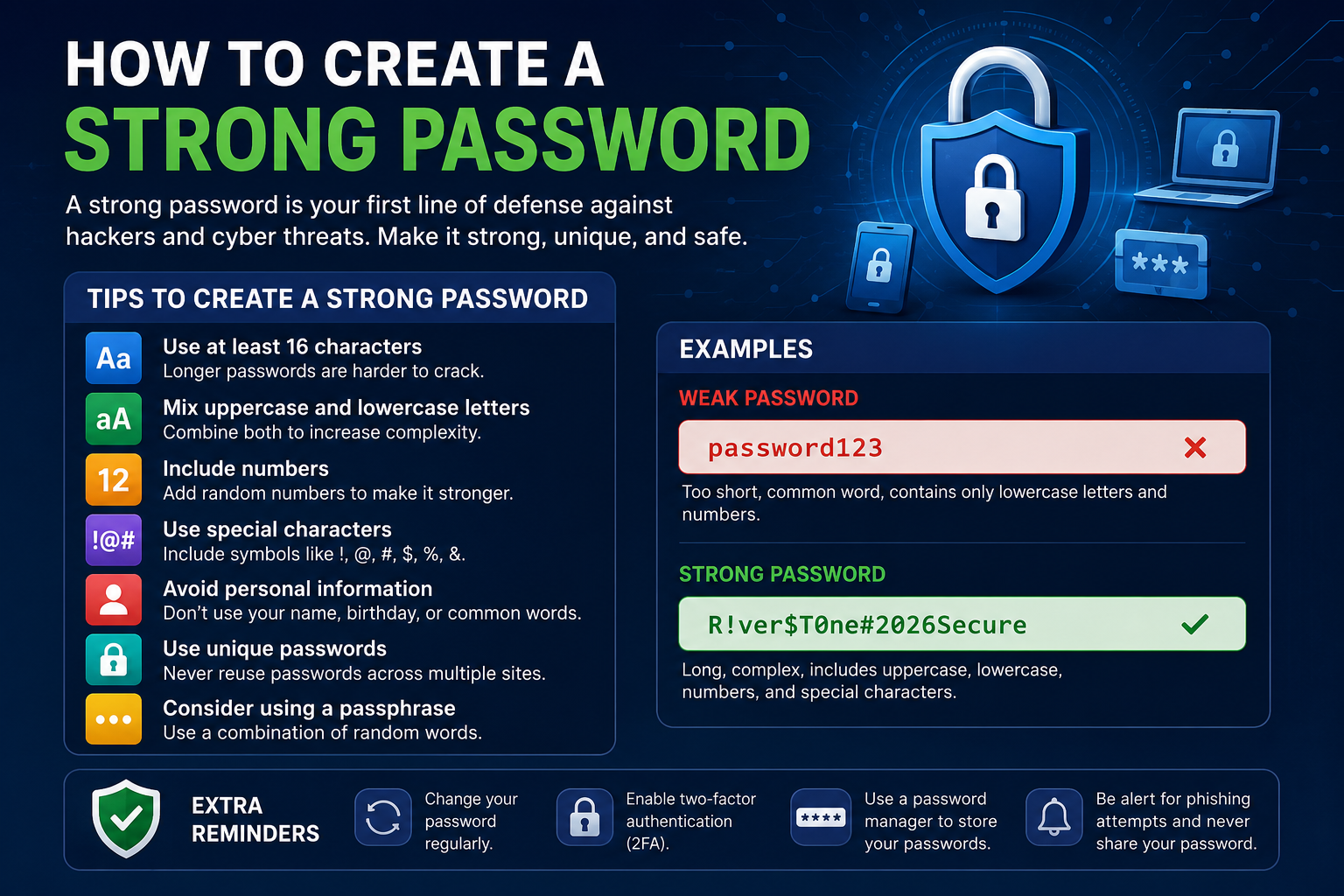
Introduction
Every day, millions of people lose access to their accounts because of weak passwords. Hackers steal personal data, drain bank accounts, and take over social media profiles. All of this often starts with one poorly chosen password.
Learning how to create a strong password is one of the simplest and most powerful things you can do to protect yourself online. Whether you use online banking, send emails, or scroll through social media, your password stands between your data and a cybercriminal.
Identity theft alone costs victims billions of dollars every year. A single compromised email account can give hackers access to your bank, your work files, and your personal conversations. The good news is that strong password security is something anyone can learn, starting today.
This complete beginner’s guide walks you through everything you need to know about password protection, password best practices, and how to stay safe in 2026.
Quick Answer
To create a strong password, use at least 16 characters and combine uppercase letters, lowercase letters, numbers, and special characters. Avoid using your name, birthday, or common words. Never reuse the same password across multiple accounts. Consider using a passphrase, such as “Purple$Train!Jumps89” — it is long, complex, and easy to remember. Use a trusted password manager to store and generate secure passwords.
What Is a Strong Password?
A strong password is a combination of characters that is extremely difficult for hackers or automated software to guess. It does not contain obvious words, personal information, or predictable patterns. Instead, it uses a random mix of characters that only you know.
According to NIST (National Institute of Standards and Technology), password length is one of the most critical factors in password security. A longer password takes significantly more time and computing power to crack. That makes length your first line of defense.
A strong password typically has these characteristics:
- At least 16 characters in length
- A mix of uppercase and lowercase letters
- Numbers placed in non-obvious positions
- Special characters like !, @, #, $, or %
- No connection to personal information
- No dictionary words used on their own
For example, the password “Mountain#Clouds77!” is far stronger than “john1234.” One is complex and unpredictable. The other is an open door for any hacker.
Strong passwords matter because they protect your digital identity. Your online accounts hold your financial records, private communications, and personal data. A weak password puts all of that at serious risk.
Why Strong Passwords Are Important
Most people underestimate how quickly hackers can crack a simple password. Modern password-cracking tools can test billions of combinations per second. A six-character password like “abc123” can be cracked in less than a second.
Strong password security protects you in several critical ways.
Preventing Unauthorized Access
A strong password makes it nearly impossible for hackers to break into your accounts through guessing or automated attacks. The more complex your password, the longer it takes — often decades — to crack.
Protecting Personal Data
Your accounts contain sensitive information including your address, phone number, and date of birth. Hackers use this data to impersonate you, apply for credit cards, and commit fraud. Password protection is your first defense.
Securing Financial Accounts
Online banking relies entirely on your login credentials. A weak banking password can lead to emptied accounts and serious financial damage. Secure password habits are essential for anyone who manages money online.
Reducing Identity Theft
Identity theft begins when someone gains unauthorized access to your personal information. Strong passwords, especially when combined with multi-factor authentication, drastically reduce this risk.
Improving Overall Online Security
Good password habits protect not just you, but also the people you communicate with. A compromised email account can spread phishing links to your friends, family, and colleagues.
How to Create a Strong Password
Creating a strong password is a skill anyone can develop. Follow these detailed steps to build passwords that keep hackers out.
Use at Least 16 Characters
Why it matters: Password length directly determines how long it takes to crack a password. According to cybersecurity research, a 16-character password with mixed characters can take centuries to crack using current technology.
Good example: “BlueSky#Mountain!42”
Bad example: “blue42”
Best practice: Always aim for 16 characters or more. Longer passwords are always stronger, even if they seem harder to remember at first. Use a password manager to store them safely.
Mix Uppercase and Lowercase Letters
Why it matters: Mixing cases increases the number of possible combinations hackers must try. A password using only lowercase letters has far fewer possibilities than one using both cases.
Good example: “sParkLinG!Water77#”
Bad example: “sparkling water”
Best practice: Avoid simply capitalizing the first letter. Instead, scatter capital letters throughout the password to make it harder to predict.
Include Numbers
Why it matters: Adding numbers increases password complexity significantly. However, placing numbers at the end of a simple word, such as “password123,” is one of the most predictable patterns hackers target.
Good example: “L3mon!Fr3sh#Sky9”
Bad example: “sunshine123”
Best practice: Place numbers in the middle of your password or spread them throughout. Avoid using obvious sequences like 123 or your birth year.
Add Special Characters
Why it matters: Special characters like !, @, #, $, %, and ^ add another layer of complexity. They increase the character pool that automated tools must search through.
Good example: “R@inD@nce!2026#”
Bad example: “raindance2026”
Best practice: Use at least two special characters and place them at unexpected positions within the password rather than just at the start or end.
Avoid Personal Information
Why it matters: Hackers often research their targets before attempting to crack passwords. They try names, birthdays, anniversaries, pet names, and hometowns first because these are the most commonly used password elements.
Good example: “Q7#willow$Frost!K”
Bad example: “mike1990” or “jessica_birthday”
Best practice: Never use your name, family members’ names, birthdays, addresses, or any information that someone could find on your social media profiles.
Never Use Common Passwords
Why it matters: Lists of the most common passwords are freely available online. Hackers use these lists to run dictionary attacks, trying the most popular passwords first. If yours appears on such a list, it will be cracked almost instantly.
Common passwords to avoid:
- password
- 123456
- qwerty
- letmein
- admin
- iloveyou
Good example: “Gr!zz1y#Coast&Jump5”
Bad example: “password1” or “123456789”
Best practice: Check whether your password appears on known breach lists by using tools like Have I Been Pwned. If it does, change it immediately.
Create a Unique Password for Every Account
Why it matters: Password reuse is one of the most dangerous habits in cybersecurity. When hackers steal credentials from one website, they immediately try those same credentials on hundreds of other sites. This attack is called credential stuffing.
Good example: Using a different strong password for Gmail, your bank, and your Netflix account.
Bad example: Using “myPassword123” for every account you own.
Best practice: Treat every account as a separate security layer. Use a password manager to generate and store unique passwords for every single account.
Use Passphrases Instead of Simple Words
Why it matters: Passphrases are longer sequences of random words combined with numbers and special characters. They are easier to remember than random strings of characters but still highly secure.
Good example: “Tiger!Blanket$Ocean9Tree”
Bad example: “ilovemycat”
Best practice: Choose four or more unrelated words and connect them with numbers and special characters. Avoid using famous quotes or song lyrics, as these appear in dictionary attack lists.
Strong Password Examples
Understanding the difference between a weak and a strong password helps you make better choices immediately.
| Password Type | Example | Strength Level | Why |
|---|---|---|---|
| Weak | 123456 | Very Weak | Sequential numbers, extremely common |
| Weak | password | Very Weak | Most common password in the world |
| Weak | john1985 | Weak | Name plus birth year, easily guessed |
| Moderate | John#1985! | Moderate | Some complexity but personal info used |
| Strong | K9#mango$River!Z | Strong | Long, mixed, no personal info |
| Very Strong | Bl!ue$Fox9#Lamp&Tree | Very Strong | 20+ characters, fully random, all character types |
| Passphrase | Correct!Horse$Battery9Staple | Very Strong | Long, memorable, complex passphrase |
The passphrase “Correct!Horse$Battery9Staple” is 28 characters long. It uses a mix of character types and is easy enough to remember. It would take modern computers thousands of years to crack through brute force.
In contrast, “john1985” could be cracked in under a second using a basic dictionary attack combined with common number patterns.
Common Password Mistakes
Even security-conscious people sometimes fall into password traps. Here are the most common mistakes to avoid.
Reusing Passwords Across Multiple Accounts
This is the single biggest password mistake. When one site gets breached, every other account using that password becomes vulnerable. Always use unique passwords.
Using Birthdays and Anniversaries
Personal dates are among the first things hackers try. Social media makes it easy for attackers to find this information. Never include dates in your passwords.
Using Names
Your name, your partner’s name, or your pet’s name should never appear in a password. Hackers specifically target these patterns.
Using Sequential Numbers or Keyboard Patterns
Patterns like 123456, 987654, qwerty, or asdfgh are completely predictable. Cracking tools try these patterns within the first few attempts.
Using Dictionary Words Alone
Single dictionary words are highly vulnerable to dictionary attacks. Even less common words can be cracked if they appear in word lists that hackers use.
Saving Passwords in Unsecured Places
Writing passwords on sticky notes, storing them in unencrypted text files, or emailing them to yourself creates serious security risks. Use an encrypted password manager instead.
Sharing Passwords
Sharing passwords — even with people you trust — increases the risk of exposure. If you must share access, use features within password managers designed for secure sharing.
Using Short Passwords
Anything under 12 characters is considered inadequate by current security standards. Aim for 16 or more characters in every password you create.
Changing Only One Character When Updating Passwords
Many people update passwords by changing just one letter or number. Hackers know this pattern and account for it during attacks. Make substantial changes when updating passwords.
How Password Managers Help
A password manager is a secure application that stores, generates, and autofills your passwords. It encrypts your password vault with a single master password that only you know.
Key Benefits of Password Managers
Password managers solve the biggest password problem: human memory. Nobody can realistically remember 50 unique, 16-character passwords. A password manager handles that for you.
They generate truly random, complex passwords at the click of a button. They autofill login forms securely, reducing your exposure to phishing sites. Many also alert you when a password has been compromised in a data breach.
Best Practices for Using a Password Manager
- Choose a reputable, well-reviewed password manager.
- Create a very strong and unique master password.
- Enable multi-factor authentication on the password manager itself.
- Keep the application updated to the latest version.
- Use the built-in password generator for every new account.
Password Manager Comparison Table
| Password Manager | Free Plan | Cross-Platform | MFA Support | Open Source | Notable Feature |
|---|---|---|---|---|---|
| Bitwarden | Yes | Yes | Yes | Yes | Fully open source |
| 1Password | No | Yes | Yes | No | Travel mode feature |
| Dashlane | Limited | Yes | Yes | No | Dark web monitoring |
| LastPass | Limited | Yes | Yes | No | Emergency access |
| Keeper | Limited | Yes | Yes | No | Zero-knowledge security |
| NordPass | Limited | Yes | Yes | No | XChaCha20 encryption |
All of these options provide strong encryption and reliable security. Bitwarden is particularly recommended for beginners because it is open source, free, and highly trusted by the cybersecurity community.
Multi-Factor Authentication (MFA)
Multi-factor authentication adds a second layer of verification beyond your password. Even if a hacker obtains your password, MFA prevents them from accessing your account without the second factor.
How MFA Works
When you log in with MFA enabled, you enter your password as usual. The system then asks for a second form of verification. This second factor might be a one-time code sent to your phone, a biometric scan, or a hardware security key.
Types of MFA
- SMS codes sent to your mobile number
- Authenticator app codes (Google Authenticator, Microsoft Authenticator)
- Email verification codes
- Biometric verification (fingerprint or face recognition)
- Hardware security keys (YubiKey)
Why MFA Matters
According to Microsoft, MFA blocks over 99.9% of account compromise attacks. Even a simple SMS-based MFA provides substantial protection compared to a password alone.
Always enable MFA on your most important accounts first. These include your email, online banking, social media, and any account linked to payment information. A strong password combined with MFA creates a security layer that is genuinely difficult to bypass.
How Hackers Crack Passwords
Understanding how hackers attack passwords motivates better security habits. Here are the most common methods they use.
Password Attack Methods Table
| Attack Method | How It Works | How to Defend Against It |
|---|---|---|
| Brute-Force Attack | Tries every possible character combination | Use long, complex passwords (16+ characters) |
| Dictionary Attack | Tries words from password lists | Avoid real words; use random combinations |
| Credential Stuffing | Uses leaked credentials on other sites | Use unique passwords for every account |
| Phishing | Tricks you into entering your password on a fake site | Verify URLs; use MFA; use a password manager |
| Keylogging | Malware records your keystrokes | Keep devices updated; use antivirus software |
| Data Breaches | Stolen credentials from hacked databases | Monitor breach notifications; update passwords |
| Social Engineering | Manipulates people into revealing passwords | Never share passwords; verify all requests |
Brute-Force Attacks
Automated tools systematically try every possible combination of characters. A short password can be cracked in seconds. A 16-character complex password takes centuries to crack this way.
Dictionary Attacks
Hackers use massive word lists containing millions of common passwords, words, and variations. This is why using real words or common phrases is dangerous.
Credential Stuffing
After a data breach, hackers sell lists of stolen usernames and passwords. They then use bots to try these credentials on hundreds of popular websites simultaneously.
Phishing
Hackers create convincing fake websites or send fraudulent emails to trick you into entering your password. A password manager helps here because it only autofills passwords on the correct, verified website.
Keyloggers
Malicious software installed on your device records every keystroke. This is why keeping your devices clean of malware is a critical part of password safety.
Best Password Security Tips
Apply these 20 actionable tips to dramatically improve your password security starting today.
- Always use at least 16 characters in every password you create.
- Never reuse the same password across different accounts.
- Enable multi-factor authentication on every account that supports it.
- Use a reputable password manager to store and generate passwords.
- Change any password immediately if you suspect it has been compromised.
- Avoid using personal information in passwords, including names and birthdays.
- Check your email address on Have I Been Pwned to see if it appears in known breaches.
- Never share your passwords with anyone, including coworkers or family members.
- Use a unique email address for highly sensitive accounts when possible.
- Set up breach notifications so you know when your data has been exposed.
- Update your most important passwords at least once per year.
- Avoid logging into sensitive accounts on public Wi-Fi without a VPN.
- Never type your password into a website you reached through a suspicious link.
- Use a passphrase approach for passwords you need to memorize.
- Regularly review and delete accounts you no longer use.
- Keep your devices, browsers, and security software fully updated.
- Use a password generator rather than creating passwords manually.
- Enable account lockout policies on platforms that support it.
- Never save passwords in your browser if you share your device with others.
- Log out of accounts when using shared or public computers.
Password Security Checklist
| Security Action | Completed? |
|---|---|
| All passwords are 16+ characters | |
| Every account has a unique password | |
| Password manager is installed and in use | |
| MFA is enabled on email accounts | |
| MFA is enabled on banking accounts | |
| MFA is enabled on social media accounts | |
| Have I Been Pwned check completed | |
| No passwords saved in plain text files | |
| No passwords written on paper or sticky notes | |
| Passwords updated for any breached accounts |
Best Password Practices for Businesses
Businesses face unique cybersecurity challenges because multiple employees share access to sensitive systems. A single weak employee password can compromise an entire organization.
Employee Password Training
Regular cybersecurity training ensures that every employee understands password best practices. Training should cover how to create strong passwords, recognize phishing attempts, and respond to suspected breaches. Make training mandatory and repeat it at least annually.
Company-Wide Password Policies
Enforce written password policies that define minimum password length, complexity requirements, and update schedules. These policies should align with NIST guidelines and industry security standards. Document the policy clearly and make it accessible to all employees.
Mandatory Multi-Factor Authentication
All business accounts — especially those with access to financial systems, customer data, or internal networks — should require MFA. This applies to remote access tools, email systems, and cloud platforms.
Enterprise Password Managers
Business-grade password managers like 1Password Teams, Bitwarden for Business, or Dashlane for Business allow teams to share credentials securely. They provide centralized control, audit logs, and access management features.
Access Control and the Principle of Least Privilege
Only give employees access to the systems they actually need to do their jobs. Limit the number of people with administrative access. Review and revoke access immediately when an employee leaves the organization.
Incident Response for Password Breaches
Have a clear plan for responding to password compromises. This should include immediate account lockdown, password resets, breach notifications to affected parties, and a post-incident review to prevent recurrence.
Frequently Asked Questions
How do I create a strong password?
Use at least 16 characters and combine uppercase letters, lowercase letters, numbers, and special characters. Avoid personal information and common words. Consider using a passphrase made up of four or more unrelated words. Use a password manager to generate and store complex passwords securely.
How long should a password be?
Current NIST guidelines recommend a minimum of 16 characters for standard accounts. For highly sensitive accounts like banking or email, aim for 20 characters or more. Longer passwords are always stronger, regardless of complexity.
What makes a password secure?
A secure password is long (16+ characters), uses all four character types (uppercase, lowercase, numbers, special characters), avoids personal information, and is unique to one account. It should not contain dictionary words used alone or predictable patterns.
Should I use a password manager?
Absolutely. Password managers are one of the most effective cybersecurity tools available. They generate random, complex passwords, store them in encrypted vaults, and autofill them securely. Every cybersecurity expert recommends using one.
Is 12 characters enough for a password?
Twelve characters provide moderate protection but fall short of current best practices. With modern computing power, 12-character passwords are becoming increasingly vulnerable. Aim for 16 or more characters to ensure adequate security in 2026.
What is a passphrase?
A passphrase is a sequence of four or more random words combined with numbers and special characters. For example, “Purple!Eagle$7Mountain#Lamp” is a strong passphrase. Passphrases are easier to remember than random character strings and can be just as secure or stronger.
How often should I change my password?
You do not need to change passwords on a fixed schedule if they are strong and unique. However, change any password immediately if you suspect a breach, if the account appears in a data breach notification, or if you shared the password with someone. Annual reviews of important passwords are a good habit.
Can hackers crack strong passwords?
A properly created strong password of 16 or more characters using mixed character types would take modern computers thousands to millions of years to crack through brute force. However, phishing, keyloggers, and data breaches can still expose even the strongest passwords. MFA significantly reduces this risk.
What is the safest password?
The safest password is one that is at least 20 characters long, uses a random mix of all character types, was generated by a password manager, is unique to one account, and is protected by MFA. No human-created password is as strong as a randomly generated one from a trusted password generator.
Is MFA necessary if I have a strong password?
Yes. MFA adds a critical second layer of security that a password alone cannot provide. If your password is ever exposed through a data breach or phishing attack, MFA prevents hackers from accessing your account. Think of MFA as a backup lock on your door.
Should I reuse passwords?
Never. Reusing passwords is one of the most dangerous habits in cybersecurity. Credential stuffing attacks specifically exploit this behavior. When one account is breached, hackers automatically try the same credentials on hundreds of other websites.
What are the most common password mistakes?
The most common mistakes include reusing passwords, using short passwords, including personal information, using dictionary words, saving passwords in unencrypted files, skipping MFA, and using common passwords like “123456” or “password.”
Are password generators safe?
Yes, when they come from reputable sources. Password generators built into trusted password managers use cryptographically secure random number generators. Avoid using obscure online password generators from unknown websites, as they may log your generated passwords.
Can browsers save passwords securely?
Modern browsers like Chrome, Firefox, and Safari offer built-in password managers with encryption. They are better than nothing, but dedicated password managers offer stronger encryption, better cross-platform support, breach monitoring, and more advanced security features.
What is the best password strategy?
The best strategy combines several elements: use a reputable password manager, generate unique 16+ character passwords for every account, enable MFA on all important accounts, monitor for data breaches, and stay informed about current cybersecurity threats. Consistency is more important than any single technique.
People Also Ask
How do you create a strong password?
Create a strong password by using at least 16 characters with a mix of uppercase letters, lowercase letters, numbers, and special characters. Avoid personal information and common words. Use a password manager to generate and store secure passwords automatically.
What makes a password secure?
Length, complexity, uniqueness, and unpredictability make a password secure. A secure password has 16 or more characters, uses all four character types, avoids personal information, and is not shared with any other account.
How many characters should a password have?
NIST recommends at least 16 characters for standard accounts. For critical accounts, 20 or more characters is preferable. Password length is one of the most important factors in determining how long it takes to crack.
What are examples of strong passwords?
Examples include: “K9#mango$River!Z,” “Bl!ue$Fox9#Lamp&Tree,” and the passphrase “Correct!Horse$Battery9Staple.” Each example uses 16 or more characters, mixes all character types, and avoids predictable patterns.
Is a password manager safe?
Reputable password managers are extremely safe. They use strong encryption (typically AES-256 or XChaCha20), zero-knowledge architecture (meaning the provider cannot see your passwords), and regular third-party security audits. Bitwarden, 1Password, and Dashlane are widely trusted by security professionals.
Should every account have a different password?
Yes, without exception. Using the same password across multiple accounts creates a single point of failure. One breach can compromise every account sharing that password. Unique passwords for every account are a fundamental cybersecurity requirement.
What is a passphrase?
A passphrase consists of four or more unrelated words combined with numbers and special characters. For example, “Tiger!Blanket$Ocean9Tree” is a strong passphrase. Passphrases are long, secure, and significantly easier to remember than random character strings.
How do hackers steal passwords?
Hackers steal passwords through phishing attacks, data breaches, keylogging malware, brute-force attacks, dictionary attacks, credential stuffing, and social engineering. Enabling MFA and using unique strong passwords defends against most of these methods.
Is MFA better than passwords alone?
Yes. According to Microsoft, MFA blocks over 99.9% of account compromise attempts. While strong passwords are essential, MFA provides a critical additional layer of security that a password alone cannot offer.
What is the best password security practice?
The best practice combines a reputable password manager for generating and storing unique, complex passwords, MFA enabled on all important accounts, regular breach monitoring, and ongoing awareness of current cybersecurity threats.
Password Best Practices Summary Table
| Best Practice | Why It Matters | Implementation |
|---|---|---|
| Use 16+ characters | Longer passwords take exponentially longer to crack | Set minimum length in password manager settings |
| Mix all character types | Increases possible combinations hackers must try | Use uppercase, lowercase, numbers, and special characters |
| Use unique passwords | Prevents credential stuffing attacks | Generate a new password for every account |
| Enable MFA | Blocks 99.9% of account compromise attempts | Activate in account security settings |
| Use a password manager | Stores and generates strong passwords securely | Install a reputable manager like Bitwarden or 1Password |
| Avoid personal info | Prevents targeted guessing and social engineering | Never use names, birthdays, or addresses |
| Monitor for breaches | Early detection limits damage | Use Have I Been Pwned or password manager alerts |
| Never share passwords | Reduces exposure and unauthorized access | Use secure sharing features in password managers |
| Update compromised passwords | Minimizes damage from known breaches | Act immediately upon breach notification |
| Use passphrases | Easier to remember while remaining secure | Combine four unrelated words with numbers and symbols |
Final Thoughts
Knowing how to create a strong password is one of the most valuable digital skills you can develop. Passwords remain the primary barrier between your personal data and cybercriminals who use increasingly sophisticated tools to break through weak defenses.
Throughout this guide, you learned that strong passwords require length, complexity, and uniqueness. You discovered that password managers solve the problem of remembering dozens of complex passwords. You also learned that multi-factor authentication provides a critical second layer of protection that makes your accounts genuinely difficult to compromise.
The threats are real and they are growing. Data breaches expose billions of credentials every year. Phishing attacks grow more convincing every month. Hackers use automated tools that can try millions of password combinations per second.
The solution, however, is straightforward. Start today by auditing your current passwords. Replace any weak, short, or reused passwords with strong, unique alternatives. Install a reputable password manager and let it generate passwords for you. Enable MFA on every account that allows it, starting with your email and banking accounts.
Your online security does not require technical expertise. It requires consistent habits and the right tools. Apply what you have learned in this guide and significantly reduce your risk of becoming a victim of hacking, identity theft, or financial fraud.
Take action right now. Your digital safety is worth the effort.
References
- Cybersecurity and Infrastructure Security Agency (CISA). “Use Strong Passwords.” https://www.cisa.gov
- National Institute of Standards and Technology (NIST). “Digital Identity Guidelines — NIST SP 800-63B.” https://www.nist.gov
- Open Web Application Security Project (OWASP). “Authentication Cheat Sheet.” https://owasp.org
- Microsoft Security. “Your Pa$$word Doesn’t Matter — MFA Statistics.” https://www.microsoft.com/security
- Google Safety Center. “Protect Your Account with Strong Passwords.” https://safety.google
Technology Disclaimer
The information provided in this article is intended for educational and informational purposes only. TechOriginHub does not endorse any specific commercial product or service mentioned in this guide. Cybersecurity threats and best practices evolve rapidly. Always consult official sources such as CISA, NIST, and OWASP for the most current security recommendations. While the tips in this article significantly improve password security, no security measure can guarantee complete protection against all cyber threats.