
 By saman zahra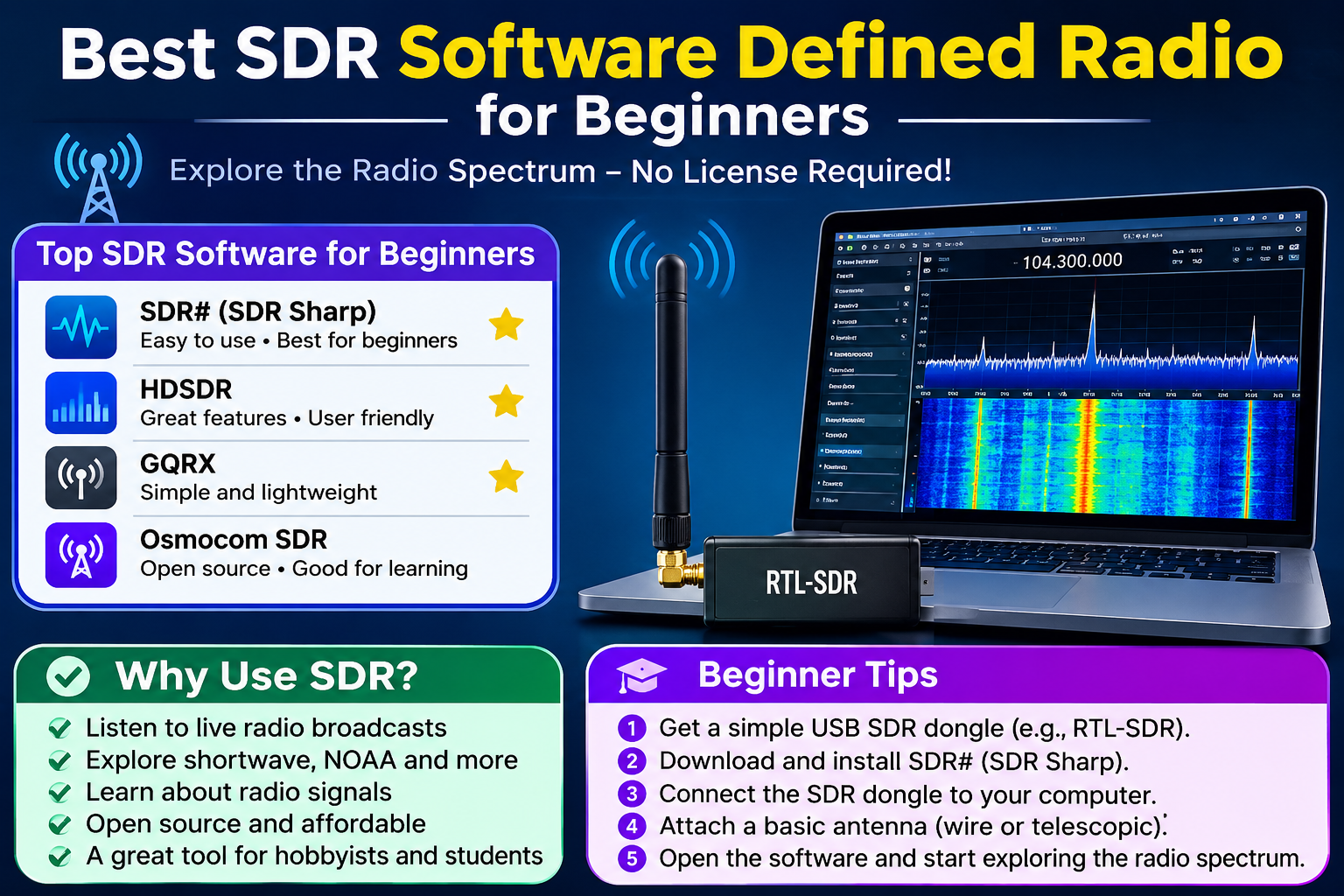
Introduction
Imagine receiving live images directly from weather satellites passing overhead, tracking aircraft across your local skies, or listening to signals from ships at sea, all using a small USB dongle plugged into a laptop and free software downloaded from the internet. This is not science fiction. This is software defined radio, and it has made radio exploration more accessible than ever before.
Traditional radio equipment was expensive, limited to specific frequency ranges, and required hardware changes to switch between different types of signals. Software defined radio changes that equation entirely. With a modest hardware investment and freely available software, beginners can explore a remarkable range of radio signals and applications.
If you have been searching for the best SDR software defined radio for beginners, this guide covers everything you need to know: what SDR is, which hardware to start with, which software options are widely recommended, practical applications, and the legal considerations every beginner should understand before getting started.
Quick Answer: What Is the Best SDR Software Defined Radio for Beginners?
For most beginners, a low-cost RTL-SDR USB dongle paired with free software such as SDR# (SDRSharp) on Windows or GQRX on Linux and macOS is a widely recommended starting point. These combinations are accessible, well-documented, and supported by large communities. They allow beginners to explore software defined radio without significant financial investment or advanced technical knowledge.
What Is Software Defined Radio (SDR)?
Software defined radio is a radio communication system in which components that were traditionally implemented in dedicated hardware are instead implemented using software running on a general-purpose computer. In a conventional radio receiver, physical circuits handle tasks like filtering, amplification, and signal decoding. In an SDR system, much of that processing happens in software after the signal has been converted to digital data.
A helpful analogy is the shift from physical media players to streaming software. Just as a music streaming application replaced the need for a separate CD player, cassette deck, and radio in one device, SDR software replaces or supplements many dedicated radio hardware functions with flexible, updatable programs.
This approach makes SDR considerably more flexible than traditional radio equipment. The same hardware can receive many different types of signals simply by changing the software or its settings. New signal decoding capabilities can be added through software updates or plugins without buying new hardware.
SDR can receive signals across a wide range of frequencies depending on the hardware used, and some SDR devices are also capable of transmitting. Entry-level hardware, however, is typically receive-only, which is an important distinction covered in more detail later in this guide.
How Does SDR Work?
The basic SDR signal chain has three main stages, and understanding each one helps demystify how the whole system operates.
The antenna picks up radio waves traveling through the air. These are electromagnetic signals at specific frequencies, ranging from the FM radio stations in your city to signals from aircraft and satellites far above. The antenna converts these waves into a small electrical signal.
The SDR hardware (often a USB dongle for beginners) receives that electrical signal and converts it into digital data that a computer can process. This conversion is performed by components called an analog-to-digital converter (ADC). The hardware also determines which frequencies you can receive and how much of the spectrum you can see at once.
The software on your computer receives the digital data stream from the hardware and processes it. It filters out the frequencies you do not want, amplifies the signal of interest, and applies demodulation to extract the audio or data content. The software also provides the visual displays that show you what signals are present across a range of frequencies.
A few key terms are worth understanding before going further:
Frequency is the specific radio channel you are monitoring, measured in hertz (Hz), kilohertz (kHz), megahertz (MHz), or gigahertz (GHz). An FM radio station broadcasting at 98.5 MHz, for example, is transmitting at that frequency.
Bandwidth refers to the range of frequencies visible at once on your screen. A wider bandwidth lets you see more of the spectrum simultaneously.
Sample rate is how frequently the hardware measures the incoming signal per second. A higher sample rate generally means a wider visible bandwidth.
Gain is the amplification applied to the incoming signal. Too little gain and weak signals disappear. Too much gain and strong signals overload the receiver and cause distortion.
Demodulation is the process of extracting the useful audio or data content from a radio signal. Different types of signals use different modulation methods, and SDR software supports multiple demodulation modes to handle them.
Why Is SDR Popular With Beginners?
Several factors have made SDR one of the most accessible entry points into radio technology for hobbyists and students.
Low cost is perhaps the most significant factor. Entry-level RTL-SDR dongles are available at very low prices compared to traditional radio equipment covering equivalent frequency ranges. This makes experimenting financially practical for most people.
Flexibility sets SDR apart from dedicated hardware. A single SDR receiver can be used to receive FM radio, track aircraft, monitor weather satellites, listen to amateur radio conversations, and decode digital signals, all by changing settings or software rather than buying separate devices.
Free software means the ongoing cost of exploring SDR is minimal. Applications like SDR#, GQRX, SDR++, and GNU Radio are all available at no cost, supported by active developer communities.
Large and active communities online mean that beginners rarely struggle alone. Forums, wikis, YouTube tutorials, and dedicated websites have created a rich ecosystem of guidance for people at every level of experience.
Educational value is considerable. SDR teaches practical concepts in radio technology, signal processing, electronics, and even programming, making it valuable for students and self-learners across multiple disciplines.
Practical applications give SDR immediate real-world relevance. When you can actually see aircraft overhead represented as dots on a map generated by your own SDR setup, or receive and decode a weather satellite image, the technology feels genuinely useful rather than purely theoretical.
What Hardware Do You Need to Get Started With SDR?
RTL-SDR USB Dongles
RTL-SDR refers to a family of low-cost USB receiver dongles based on chipsets originally designed for DVB-T digital television reception. Researchers and hobbyists discovered that these chipsets could be repurposed as wideband radio receivers, and the SDR community has grown substantially around them ever since.
An RTL-SDR dongle typically connects to a computer via USB and requires no external power supply. The frequency range varies by specific device and chipset, so checking the official specifications for any dongle you are considering is important. Most RTL-SDR devices are receive-only. They cannot transmit radio signals, which is a key safety and legal distinction.
When evaluating a beginner RTL-SDR dongle, it is worth looking for devices with a good-quality oscillator for frequency stability, a metal enclosure that provides some shielding from interference, and clear documentation. The RTL-SDR Blog V4 and similar purpose-built SDR dongles are commonly discussed in beginner communities, though you should verify current availability and specifications directly from the manufacturer or reputable retailers.
Other SDR Hardware Options
RTL-SDR dongles are far from the only option, and more capable hardware is available for users who outgrow entry-level equipment.
HackRF One is an open-source hardware platform capable of both receiving and transmitting radio signals across a wide frequency range. Its transmit capability makes it significantly more powerful than RTL-SDR devices but also means users must be especially careful about legal compliance when using it.
Airspy devices are designed with higher performance specifications than typical RTL-SDR dongles, offering improved dynamic range and sensitivity for more demanding reception tasks.
SDRplay produces a range of SDR receivers targeting hobbyists and professionals, with different models covering different frequency ranges and performance levels.
LimeSDR is a more advanced platform designed for software-defined radio development and research, supporting both transmit and receive operation.
Each of these options represents a different balance of cost, capability, and complexity. Beginners are generally well served starting with an RTL-SDR dongle before considering more advanced hardware. For current specifications and pricing, consult the official pages for each manufacturer.
Antennas for SDR
The antenna is one of the most important parts of any SDR setup. A good antenna makes an enormous difference to what signals you can receive and how clearly you can receive them.
Most beginner SDR kits include a simple telescopic whip antenna. This is adequate for getting started and learning the software, but performance improves considerably with purpose-built antennas matched to the frequencies you want to receive.
Common antenna types for SDR use include:
Dipole antennas consist of two elements extending in opposite directions. They can be tuned to specific frequency bands and are effective for many applications.
Whip antennas are single vertical elements that are simple to set up and reasonably effective across a range of frequencies.
Discone antennas are popular among SDR users because they provide reasonable reception across a very wide range of frequencies, making them practical for general scanning.
Directional antennas such as Yagi antennas focus reception in a specific direction, which is useful for receiving weak signals from satellites or distant stations.
Antenna choice depends heavily on what you want to receive. An antenna optimized for aircraft ADS-B reception around 1090 MHz will perform differently from one designed for FM broadcast reception around 88 to 108 MHz. Amateur radio organizations such as the ARRL publish accessible guides to antenna fundamentals that are worth exploring.
Computers and Operating Systems
SDR software runs on Windows, macOS, and Linux, giving you considerable flexibility in which computer you use. The processing demands of SDR software vary, but most modern computers are capable of running entry-level SDR applications without difficulty. Laptops are popular for SDR because they make portable setups easy.
A Raspberry Pi single-board computer can also serve as an SDR platform, particularly for dedicated applications such as aircraft tracking or remote SDR access. This opens interesting possibilities for low-power, always-on SDR projects.
Best SDR Software for Beginners
Several free SDR software options are well-regarded in the beginner community. The right choice for you depends on your operating system, your hardware, and what you want to accomplish. Here is an overview of the most widely discussed options.
SDR# (SDRSharp)
SDR# is one of the most commonly recommended SDR software programs for Windows users. It provides an approachable starting point with a graphical interface that includes a waterfall display, a spectrum analyzer, and support for multiple demodulation modes.
The waterfall display shows signal activity over time, with colors representing signal strength. This makes it easy to spot active transmissions even when you do not know exactly which frequency to monitor. SDR# supports a plugin architecture, which means the community has developed additional modules that extend its capabilities for specific tasks such as ADS-B reception and digital mode decoding.
SDR# is focused primarily on Windows. For current downloads, installation guides, and plugin information, visit the official Airspy website at airspy.com/download/.
GQRX
GQRX is a widely used open-source SDR receiver application available for Linux and macOS. It provides signal visualization through a spectrum display and waterfall, supports multiple demodulation modes, and includes the ability to record received audio. GQRX is built on top of GNU Radio, which means it benefits from GNU Radio’s signal processing capabilities while presenting a more accessible graphical interface.
For Linux users in particular, GQRX is frequently the first SDR software recommended. It is available through the package managers of many Linux distributions, which simplifies installation. For current information, visit the official GQRX website at gqrx.dk.
GNU Radio
GNU Radio is a free and open-source software development toolkit for building signal processing systems. It is considerably more powerful and flexible than SDR# or GQRX, but it also has a steeper learning curve.
GNU Radio uses a visual flowgraph approach in which users connect processing blocks together to create signal processing chains. Each block performs a specific function such as filtering, demodulating, or displaying data. This visual approach introduces signal processing concepts in an intuitive way, though mastering it takes time.
GNU Radio is well suited for users who want to build custom SDR applications, experiment with signal processing, or go beyond what general-purpose SDR receivers offer. If you are interested in algorithms and signal processing, GNU Radio is a fascinating platform to explore. Visit gnuradio.org for official documentation and community resources.
SDR++
SDR++ is a modern, cross-platform SDR receiver application available for Windows, Linux, and macOS. It is designed with a clean, contemporary interface and has been developed with an emphasis on low CPU usage relative to the functionality it provides.
SDR++ uses a plugin architecture that supports multiple hardware devices out of the box, making it a flexible choice for users who work with different SDR hardware. Its cross-platform availability makes it particularly useful for people who work across multiple operating systems. The source code and releases are available on the official SDR++ GitHub page.
CubicSDR
CubicSDR is a cross-platform SDR receiver application available for Windows, Linux, and macOS. It aims to provide a beginner-friendly interface with essential features including a waterfall display and multiple demodulation modes, without overwhelming new users with complexity.
CubicSDR is a practical choice for beginners who want a straightforward application that works across different operating systems. Visit cubicsdr.com for current information and downloads.
OpenWebRX
OpenWebRX takes a different approach from the other software discussed here. Rather than running as a local desktop application, OpenWebRX allows SDR hardware to be accessed through a web browser. This makes it possible to share SDR access over a local network or the internet, or to access SDR hardware connected to a Raspberry Pi or server from another device.
OpenWebRX is commonly used to create shared SDR receivers that multiple users can access simultaneously. It is an interesting option for more advanced setups and for educational environments where sharing a single receiver among several users is desirable. Visit openwebrx.de for current documentation.
Unitrunker and DSD+ for Digital Modes
For users interested in monitoring trunked radio systems or decoding digital voice modes, specialized tools like Unitrunker and DSD+ are frequently discussed in the SDR community. These are more specialized than general-purpose SDR receivers and focus on decoding the specific protocols used by certain radio systems.
These tools go beyond the scope of general beginner use and require a good understanding of the systems being monitored. It is important to understand the legal considerations that apply to monitoring specific types of radio systems in your jurisdiction before using specialized decoding software.
SDR Software Comparison Table
| Software | Platform | Free | Best For | Difficulty Level |
|---|---|---|---|---|
| SDR# (SDRSharp) | Windows | Yes | General beginners on Windows | Beginner |
| GQRX | Linux, macOS | Yes | Linux and macOS users | Beginner-Intermediate |
| SDR++ | Windows, Linux, macOS | Yes | Cross-platform flexibility | Beginner-Intermediate |
| CubicSDR | Windows, Linux, macOS | Yes | Beginners wanting simplicity | Beginner |
| GNU Radio | Windows, Linux, macOS | Yes | Custom SDR applications and learning | Intermediate-Advanced |
| OpenWebRX | Browser-based | Yes (self-hosted) | Remote and shared SDR access | Intermediate |
Software capabilities, platform support, and availability change over time. Always check the official project pages for current information before downloading or making decisions based on this table.
What Can You Do With SDR?
One of the most compelling aspects of SDR is the remarkable variety of practical applications available to beginners with basic hardware and free software.
Receiving Aviation Communications (ADS-B)
ADS-B, which stands for Automatic Dependent Surveillance-Broadcast, is a system that aircraft use to broadcast their position, altitude, speed, and identification. These transmissions are unencrypted and intended to be received by air traffic control systems and other aircraft equipped with ADS-B receivers.
SDR can receive ADS-B signals, and software tools such as dump1090 and Virtual Radar Server can decode them and display aircraft positions on a map in real time. This is one of the most popular beginner SDR projects because results are immediate and visually engaging. ADS-B does not provide access to private or encrypted aviation communications.
Weather Satellite Images
Several weather satellites transmit images of Earth using radio signals that SDR equipment can receive with appropriate antenna setups. NOAA weather satellites use a format called APT (Automatic Picture Transmission) that SDR receivers can capture, and dedicated decoding software can process the received signal into visible satellite images.
Receiving weather satellite images requires an antenna suited to the relevant frequencies and some patience with setup and decoding, but it is one of the most rewarding SDR projects a beginner can attempt.
Amateur Radio Reception
SDR is widely used by amateur radio enthusiasts to monitor amateur radio bands and listen to conversations, contests, and digital mode transmissions. This is an excellent way to learn about different modes of radio communication and the amateur radio community.
Transmitting on amateur radio frequencies requires an appropriate license in most countries. SDR receivers are great for listening, but anyone wishing to transmit should pursue the relevant amateur radio qualification for their country.
FM Radio and DAB
Standard FM broadcast radio reception is one of the simplest things to confirm with an SDR setup, making it a useful first test when configuring hardware and software. SDR can also receive DAB (Digital Audio Broadcasting) digital radio where it is broadcast, though decoding DAB requires appropriate software and hardware capable of handling the relevant frequencies and bandwidth.
Marine AIS Tracking
AIS, or Automatic Identification System, is used by ships to broadcast their position, identity, heading, and speed. These transmissions are intended to help vessels and port authorities track maritime traffic. SDR can receive AIS signals, and dedicated software can display vessel positions on a nautical chart, similar to how ADS-B data can be visualized for aircraft.
Pager Decoding
Many paging systems still use unencrypted radio transmissions, particularly older POCSAG-protocol systems. SDR can receive these signals, and software such as PDW can decode the page messages. It is important to understand that while receiving and decoding certain types of pager transmissions may be technically possible, regulations regarding interception of personal communications vary by country, and responsible SDR use means understanding what is legally permissible in your jurisdiction.
NOAA Weather Radio
NOAA Weather Radio broadcasts continuous weather information across a range of VHF frequencies in the United States. SDR can receive these broadcasts clearly with a suitable antenna, providing practical utility beyond experimental use.
Trunked Radio Monitoring
Trunked radio systems are used by organizations to share a pool of radio channels efficiently. SDR can receive trunked radio transmissions, and specialized software can follow conversations as they hop between channels. The legal and ethical dimensions of monitoring specific trunked systems vary significantly, and beginners should research carefully what is permissible in their location before pursuing this application.
Radio Astronomy and Scientific Uses
SDR has found applications in educational radio astronomy, where it is used to detect and analyze natural radio emissions from celestial sources. Universities and educational organizations have used RTL-SDR and similar hardware in classroom demonstrations and research projects, illustrating the breadth of legitimate scientific applications for accessible SDR hardware.
Legal and Ethical Considerations for SDR
This topic deserves careful attention. Understanding the legal framework around radio reception and transmission is essential for responsible SDR use, and the rules vary significantly depending on where you live and what you want to do.
Radio spectrum regulation is managed by government agencies in every country. In the United States, this is the Federal Communications Commission (FCC). In the United Kingdom, it is Ofcom. In Australia, it is the Australian Communications and Media Authority (ACMA). Each country has its own rules governing who can transmit on which frequencies, what types of signals can be received, and what can be done with received information.
Listening to radio signals is legal in many jurisdictions for a wide range of transmission types, including broadcast radio, aircraft ADS-B, marine AIS, and amateur radio. However, this is not universal. Some countries restrict even passive monitoring of certain frequency bands, and some types of transmissions are legally protected regardless of whether they are encrypted.
Transmitting on radio frequencies generally requires a license in most countries. Using SDR hardware capable of transmission, such as HackRF One, without appropriate authorization is illegal in most jurisdictions. This applies even to low-power, short-range transmissions.
Intercepting private communications is a serious legal concern. Many countries have laws that specifically prohibit intercepting communications not intended for the general public, regardless of whether those communications are encrypted. This includes mobile phone calls, private business radio systems, and other non-broadcast communications.
This article does not provide legal advice. Regulations are complex, vary by country and situation, and change over time. Before engaging in any SDR activity beyond receiving clearly public broadcasts, consult your local communications regulatory authority to understand what is permitted in your jurisdiction. Responsible SDR use means enjoying the technology within the boundaries of applicable law.
How to Set Up SDR for the First Time
Getting an SDR setup working for the first time involves several straightforward steps. The exact process varies depending on your operating system and the specific hardware and software you have chosen.
- Obtain an SDR receiver. An RTL-SDR dongle is a widely recommended starting point for beginners.
- Install drivers. Most RTL-SDR hardware requires specific drivers to work correctly with SDR software. For Windows, this often involves a tool called Zadig to install the correct USB drivers. Your hardware’s official documentation will provide the appropriate instructions.
- Download and install SDR software. Choose software appropriate for your operating system, such as SDR# for Windows or GQRX for Linux or macOS.
- Connect the antenna to the SDR device before plugging it into the computer.
- Connect the SDR device to a USB port on your computer.
- Open the SDR software and select your device from the available hardware options.
- Tune to a known frequency such as a local FM broadcast station to confirm that the hardware and software are working correctly.
- Explore the waterfall display. Look for signals appearing as vertical lines or patterns in the display and experiment with tuning to different frequencies.
- Consult official documentation for both your hardware and software whenever you encounter issues or want to explore more advanced features.
Setup guides specific to your hardware and software are available from official project websites and from community resources. Following official documentation for your specific combination of hardware and software produces the most reliable results.
Common SDR Mistakes Beginners Make
Learning from common mistakes saves time and frustration when getting started with SDR.
Using the wrong antenna for the frequency of interest is one of the most frequent issues. An antenna designed for VHF frequencies will perform poorly at UHF frequencies and vice versa.
Not installing the correct drivers causes hardware recognition failures. Always follow the official driver installation instructions for your specific hardware and operating system.
Setting gain too high causes strong local signals to overload the receiver, producing distortion and making weaker signals impossible to receive. Start with moderate gain settings and adjust carefully.
Setting gain too low means weak signals disappear entirely. Finding the right gain level for your environment requires experimentation.
Choosing a frequency with no local activity leads to the disappointing experience of seeing nothing on the display. Start with known active frequencies such as FM broadcast stations or aviation ADS-B to confirm your setup is working.
Ignoring the software documentation means missing important setup steps and features. Most SDR software projects maintain detailed documentation and quick-start guides.
Not understanding demodulation modes leads to selecting the wrong mode for the signal type being received, producing only noise or silence.
Attempting to transmit without appropriate hardware and licensing is both dangerous and illegal. Entry-level RTL-SDR dongles are receive-only, and transmitting on any frequency without appropriate authorization is illegal in most countries.
Confusing different software tools is common for beginners encountering the SDR software ecosystem for the first time. Each program serves different purposes, and understanding what each one does helps you choose the right tool for your goal.
Not checking local legal regulations before monitoring certain frequency ranges is a mistake that responsible beginners should avoid from the outset.
SDR Antenna Basics for Beginners
The antenna is arguably the single most important component in an SDR system. A high-quality SDR receiver connected to a poor antenna will perform worse than a modest receiver connected to a well-matched, well-positioned antenna.
Antenna resonance is the concept that an antenna works most efficiently at specific frequencies related to its physical size. An antenna built for one frequency range will not perform as well outside that range. This is why specialized antennas for specific applications, such as aircraft ADS-B or weather satellite reception, outperform general-purpose antennas for those tasks.
Omnidirectional antennas receive signals from all directions equally. These are practical for general scanning and monitoring because you do not need to point them at a specific source. Most beginner antennas are omnidirectional.
Directional antennas focus reception in a specific direction. They provide stronger reception from the direction they are pointed at the cost of rejecting signals from other directions. These are useful for satellite reception and communicating with distant stations.
Beginner antenna options include the telescopic whip antennas often included in starter SDR kits, simple wire dipole antennas that can be constructed inexpensively, and magnetic mount antennas that attach to a metal surface and work well for vehicles or metal surfaces near windows.
Antenna placement matters significantly. Height above the ground, distance from metal objects and buildings, and minimizing obstructions between the antenna and the signals of interest all affect reception quality.
Coaxial cable connects the antenna to the SDR receiver. Cable quality and length affect signal loss, particularly at higher frequencies. Short runs of good-quality coaxial cable minimize signal loss between the antenna and the receiver.
Amateur radio organizations such as the ARRL publish accessible antenna guides that provide solid foundational knowledge applicable to SDR antenna setups.
SDR Resources and Communities for Beginners
The SDR community is active, welcoming, and well-resourced. Several excellent starting points exist for beginners looking for guidance and connection.
RTL-SDR.com is a widely recognized blog and resource specifically focused on RTL-SDR hardware and beginner projects. It covers tutorials, project ideas, hardware reviews, and software guides in accessible language. It is one of the first resources many beginners encounter and return to regularly.
The GNU Radio community at gnuradio.org provides official documentation, tutorials, and a forum where users at all levels discuss signal processing projects and seek help with technical questions.
Reddit communities dedicated to SDR, amateur radio, and related topics offer active discussion, beginner questions, and project sharing. Searching for SDR-focused communities on Reddit will surface several active groups.
Official documentation for each software package is the most reliable source of accurate, current information. When something is not working as expected, the official documentation should be the first place you look.
Amateur radio organizations such as the ARRL in the United States, the RSGB in the United Kingdom, and equivalent organizations in other countries publish educational material about radio technology that complements SDR learning effectively.
No single resource is the definitive authority on all things SDR. Combining official documentation with community discussion and hands-on experimentation produces the best learning outcomes.
Is SDR Good for Learning Programming and Electronics?
SDR sits at a genuinely interesting intersection of radio technology, electronics, signal processing, and software development. This makes it a rich learning platform that extends well beyond simply receiving radio signals.
GNU Radio uses a visual flowgraph programming approach that introduces fundamental signal processing concepts such as filtering, amplification, and demodulation in a hands-on, interactive way. Working through GNU Radio tutorials builds intuition about how signals are processed computationally.
Python scripting is commonly used in SDR projects. GNU Radio supports Python scripting for automating workflows, processing received data, and building custom applications. Many SDR community projects are built in Python, making it a natural choice for extending SDR capabilities programmatically. The TechOriginHub guide to Python programming is a useful resource for anyone wanting to develop these skills.
Data visualization becomes relevant when you want to analyze and display received data. Understanding how to work with data and present it meaningfully connects directly to broader skills in programming and data analysis.
Algorithms are central to signal processing. Filters, demodulators, and decoders are all algorithms, and studying how they work in an SDR context provides concrete, practical exposure to algorithmic thinking.
Version control with tools like Git becomes useful when you start customizing SDR software, writing scripts, or contributing to open-source SDR projects. Tracking your changes and collaborating with others benefits from the same version control practices used in conventional software development.
For students and self-learners interested in technology broadly, SDR provides a compelling practical context for developing skills that transfer directly to professional work in software development, cybersecurity, and electronics engineering.
Frequently Asked Questions
What is the best SDR software defined radio for beginners?
For most beginners, an RTL-SDR USB dongle combined with SDR# on Windows or GQRX on Linux and macOS is a widely recommended starting combination. These provide an accessible, low-cost entry point with good community support and documentation.
What is software defined radio?
Software defined radio is a radio communication system in which functions traditionally performed by dedicated hardware components are instead implemented using software running on a general-purpose computer. This makes SDR more flexible and upgradeable than conventional radio hardware.
Do I need a license to use SDR?
For receive-only operation, a license is generally not required in many countries for receiving publicly broadcast transmissions. However, regulations vary significantly by country and by the type of transmission. Transmitting on radio frequencies requires a license in most countries. Always check with your local communications regulatory authority.
What is RTL-SDR?
RTL-SDR refers to a family of low-cost USB receiver dongles originally based on chipsets designed for DVB-T digital television reception. The SDR community adapted these chipsets for use as wideband radio receivers. RTL-SDR devices are receive-only and are popular for beginner SDR projects due to their low cost and wide community support.
Is SDR software free?
Yes, the most widely used SDR software for beginners, including SDR#, GQRX, SDR++, CubicSDR, GNU Radio, and OpenWebRX, are all available at no cost. Some commercial SDR software also exists for specialized applications.
What frequencies can I receive with SDR?
The receivable frequency range depends on the specific hardware used. RTL-SDR dongles typically cover a broad range spanning from below 30 MHz to over 1 GHz, though the exact range varies by device. Check the official specifications for your specific hardware for accurate frequency coverage information.
What is the difference between SDR# and GQRX?
SDR# is a Windows-focused SDR receiver application known for its accessible interface and plugin support. GQRX is an open-source application primarily targeting Linux and macOS users and is built on GNU Radio. Both provide spectrum visualization, waterfall display, and multiple demodulation modes. The practical choice between them often comes down to operating system.
Can I use SDR on a Mac or Linux?
Yes. GQRX, SDR++, CubicSDR, and GNU Radio all support macOS and Linux. SDR# is Windows-focused, though alternative configurations exist. For Linux users, GQRX is frequently the most straightforward starting point.
What antenna should I use for SDR?
The best antenna depends on the frequencies you want to receive. A discone antenna provides reasonable coverage across a wide range of frequencies for general use. Purpose-built antennas optimized for specific applications such as aircraft ADS-B or weather satellite reception provide better performance for those specific tasks. The telescopic whip antenna included in many starter kits is a reasonable starting point.
Can SDR transmit radio signals?
Most entry-level SDR hardware, including typical RTL-SDR dongles, is receive-only and cannot transmit. More advanced SDR hardware such as HackRF One supports both transmission and reception, but transmitting on radio frequencies without appropriate licenses is illegal in most countries.
What is a waterfall display in SDR software?
A waterfall display is a visualization that shows signal activity across a range of frequencies over time. The horizontal axis represents frequency, the vertical axis represents time (with newer data at the top), and colors represent signal strength. Active transmissions appear as colored vertical lines or patterns, making it easy to identify signal activity across the spectrum at a glance.
Is SDR legal?
SDR hardware and software are legal to own and use for general radio reception in most countries. What you do with your SDR setup, however, is subject to applicable regulations. Receiving publicly broadcast transmissions is generally permitted. Transmitting without a license is illegal. Intercepting private communications may be illegal regardless of whether they are encrypted. Always comply with the regulations of your jurisdiction.
References
- RTL-SDR Blog. RTL-SDR.com. Widely recognized beginner resource for RTL-SDR hardware and projects. https://www.rtl-sdr.com
- GNU Radio Project. GNU Radio Official Documentation. https://www.gnuradio.org
- Airspy. SDR# (SDRSharp) Downloads and Documentation. https://airspy.com/download/
- GQRX SDR. GQRX Official Website. https://gqrx.dk
- OpenWebRX. OpenWebRX Official Website. https://www.openwebrx.de
- SDR++ GitHub Repository. SDR++ Source and Releases. https://github.com/AlexandreRouma/SDRPlusPlus
- ARRL — American Radio Relay League. Antenna Fundamentals and Amateur Radio Resources. https://www.arrl.org
- Federal Communications Commission (FCC). Spectrum Management and Radio Regulations. https://www.fcc.gov
- Ofcom. Radio Spectrum Management. https://www.ofcom.org.uk/spectrum
- Australian Communications and Media Authority (ACMA). Radiocommunications Regulation. https://www.acma.gov.au
This article is for educational and informational purposes only. SDR hardware specifications, software features, platform support, and applicable regulations change over time. Always consult the current official documentation for any hardware or software you use. Radio frequency use is regulated by law in most countries. Always ensure your SDR activities comply with applicable regulations in your jurisdiction. This article does not constitute legal advice.
Author: TechOriginHub Editorial Team
Author Bio: TechOriginHub Editorial Team covers practical technology, programming, software, cybersecurity, cloud computing, databases, and internet topics with a focus on clear and useful guidance.