
 By saman zahra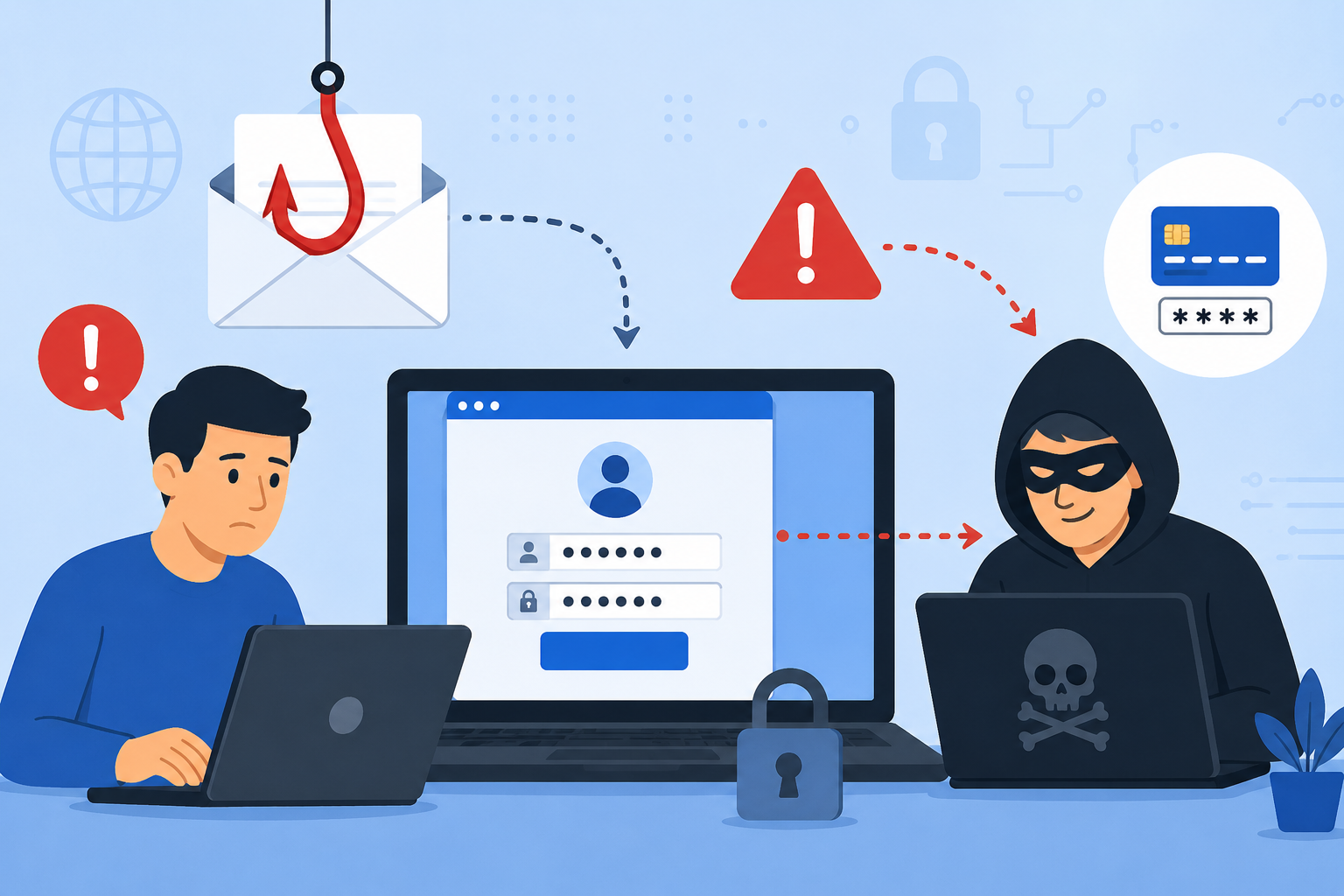
Phishing remains one of the most widespread and consistently effective cyber threats facing individuals and organizations in 2026. Every day, billions of fake emails land in inboxes around the world, fake websites impersonate trusted banks and government agencies, fraudulent text messages trick people into handing over their banking details, and sophisticated voice call scams convince victims to reveal passwords over the phone. Understanding what is phishing, how these attacks are designed to deceive even careful people, and how to protect yourself effectively is genuinely essential knowledge for anyone who uses email, social media, online banking, or a smartphone in daily life.
Quick Answer
What is phishing? Phishing is a type of cyberattack where criminals impersonate trusted organizations or individuals to trick victims into revealing sensitive information such as passwords, banking details, or personal data. Attackers use fake emails, websites, text messages, and phone calls to deceive targets. Phishing is the leading cause of data breaches, identity theft, and financial fraud worldwide.
What Is Phishing?
Phishing is a social engineering attack in which cybercriminals impersonate legitimate organizations, colleagues, government agencies, or trusted individuals to manipulate victims into taking harmful actions. Those actions typically involve clicking malicious links, opening dangerous attachments, visiting fake websites designed to look exactly like real ones, or directly handing over sensitive information like passwords, credit card numbers, and social security numbers.
The word “phishing” is a deliberate play on the word “fishing.” Just as a fisherman casts bait into the water hoping a fish will bite, cybercriminals cast deceptive messages across the internet hoping that recipients will take the bait. The core technique has not changed since phishing first emerged in the mid-1990s, but the sophistication, personalization, and scale of modern phishing attacks have grown dramatically.
Phishing is particularly dangerous because it targets human psychology rather than technical systems. Even organizations with sophisticated technical security controls regularly suffer data breaches that begin with a single employee clicking a convincing phishing email. Attackers exploit natural human tendencies including trust in familiar brands, urgency when warned about account problems, curiosity about unexpected messages, and fear of negative consequences if immediate action is not taken.
Real-world examples demonstrate just how costly phishing attacks can be. In 2016, a phishing email targeting a single Google Docs link resulted in the theft of login credentials from millions of users within hours. In a more targeted example, a spear phishing email sent to a finance employee at a major corporation tricked them into wiring millions of dollars to an attacker-controlled account. Every year, the FBI’s Internet Crime Complaint Center reports phishing as one of the top cybercrime categories by both volume of complaints and total financial losses.
How Does a Phishing Attack Work?
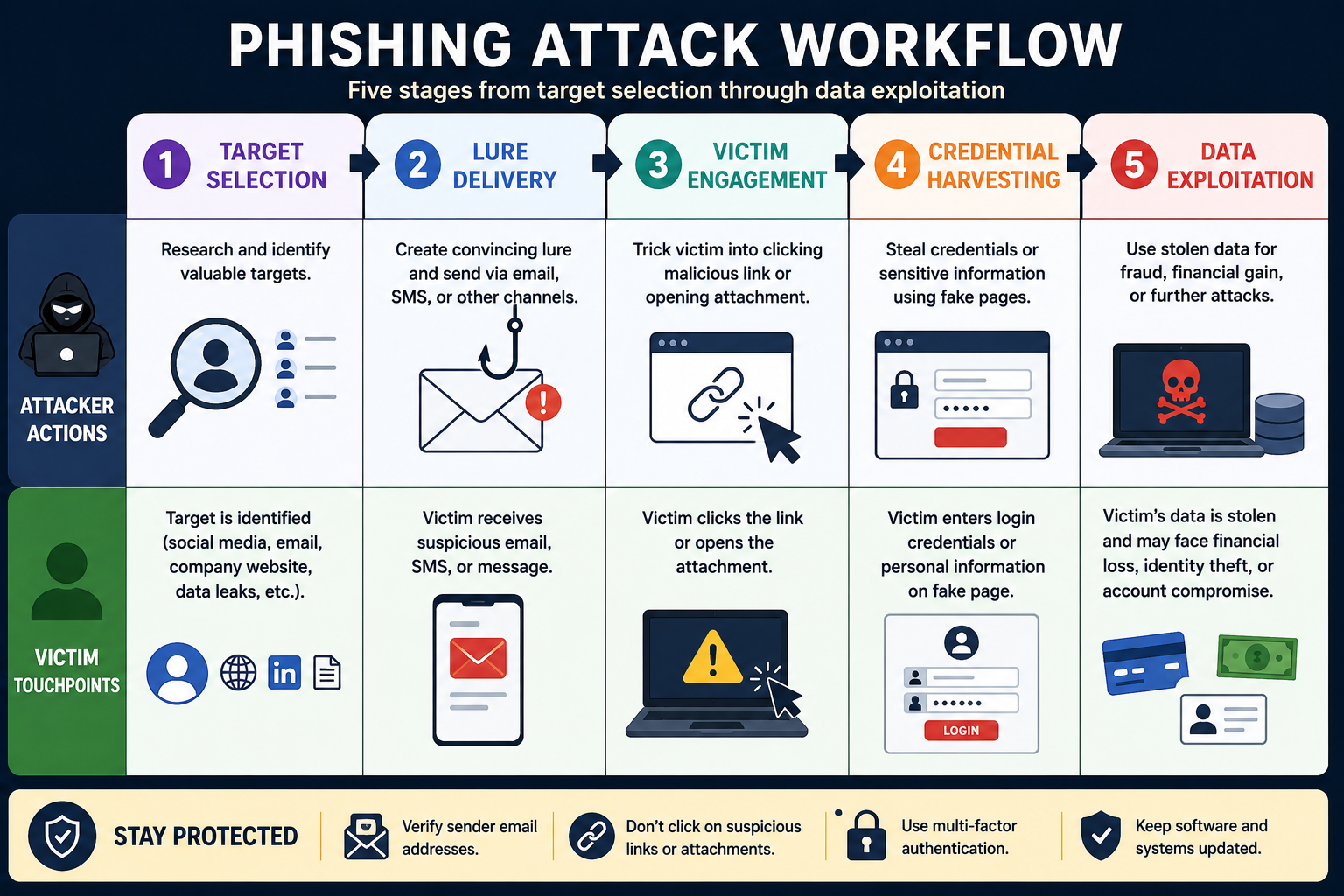
Phishing attacks follow a deliberate, structured process that attackers refine to maximize their success rate. Understanding each stage helps you recognize attacks before they succeed.
Choosing the Target
Every phishing campaign begins with the attacker selecting their targets. Broad campaigns send millions of identical messages to anyone the attacker can reach, hoping a small percentage of recipients will respond. More targeted campaigns identify specific individuals, organizations, or job roles that are likely to have access to valuable information or financial systems.
Attackers gather targeting information from a wide variety of public sources. Social media profiles reveal job titles, employer names, and colleague relationships. Company websites list executive names and departmental structures. Data from previous breaches provides email addresses, passwords, and personal details that make subsequent phishing attempts more convincing. The more information an attacker collects about a target before crafting their message, the more convincing and successful their phishing attempt tends to be.
Creating a Fake Message
With targets identified, the attacker creates a deceptive message designed to appear completely legitimate. This involves replicating the visual design of trusted organizations including logos, color schemes, fonts, and email layouts with remarkable accuracy. Modern phishing emails are often nearly indistinguishable from genuine messages from the organizations they impersonate.
The message content is carefully crafted to trigger specific psychological responses. Urgent warnings about account suspension create panic that pushes recipients to act before thinking carefully. Unexpected delivery notifications spark curiosity. Requests from apparent authority figures like managers or executives leverage deference to hierarchy. Promises of prizes or refunds appeal to financial self-interest. Each psychological trigger is designed to bypass the recipient’s natural skepticism and push them toward the desired action.
Delivering the Attack
Attackers deliver phishing messages through multiple channels depending on their target and objectives. Email is by far the most common delivery method, but phishing also arrives through SMS text messages, voice phone calls, social media messages, messaging platform communications, and even physical mail in highly targeted campaigns.
The message typically directs victims toward one of two harmful actions. It either prompts them to click a link leading to a fake website designed to steal credentials or install malware, or it instructs them to open an attachment that directly delivers malware to their device when opened. In some cases, particularly in business email compromise attacks, the message simply asks the victim to perform a specific action like transferring funds or updating payment details, relying entirely on deception rather than any technical malware component.
Stealing Sensitive Information
When a victim clicks a link in a phishing message, they typically arrive at a fake website that looks identical to the legitimate site being impersonated. These sites capture any information the victim enters, including usernames, passwords, credit card numbers, bank account details, personal identification numbers, and security question answers. The fake site often then redirects the victim to the real website with an error message, so the victim assumes they simply mistyped their password and has no idea their credentials have been stolen.
Alternatively, if the phishing message delivers malware through an attachment or a drive-by download, the malware might install a keylogger that records all future keystrokes, deploy ransomware that encrypts the victim’s files, or establish a backdoor that gives the attacker ongoing access to the compromised device.
Using the Stolen Data
Once attackers obtain stolen credentials and personal data, they exploit it quickly before victims notice the theft and change their passwords. Stolen banking credentials enable direct financial fraud. Stolen email credentials provide access to additional sensitive communications and enable further phishing attacks against the victim’s contacts. Stolen personal information enables identity theft, fraudulent account creation, and sale on dark web criminal marketplaces.
Sophisticated criminal organizations also use compromised credentials to attempt credential stuffing attacks, automatically trying the stolen username and password combination against dozens of other popular websites and services. Since many people reuse passwords across multiple accounts, a single successful phishing attack can unlock numerous accounts across different platforms simultaneously.
Types of Phishing Attacks
Phishing takes many distinct forms, each adapted for different delivery channels, targets, and objectives. Recognizing each type helps you stay alert across all the channels attackers use.
Types of Phishing Attacks Comparison Table
| Type | Delivery Channel | Target | Sophistication | Primary Goal |
|---|---|---|---|---|
| Email Phishing | Mass audience | Low-Medium | Credential theft, malware | |
| Spear Phishing | Specific individuals | High | Targeted data or access theft | |
| Whaling | Senior executives | Very High | Financial fraud, data access | |
| Smishing | SMS Text Message | Mobile users | Medium | Credential theft, fraud |
| Vishing | Phone Call | Individuals and businesses | Medium-High | Financial fraud, data theft |
| Clone Phishing | Previous email recipients | High | Credential theft, malware | |
| Social Media Phishing | Social platforms | Social media users | Medium | Account takeover, fraud |
Email Phishing
Email phishing is the original and still most prevalent form of phishing attack. Attackers send mass email campaigns impersonating well-known organizations including banks, payment services, streaming platforms, package delivery companies, government agencies, and technology companies. These emails typically claim there is an urgent problem with the recipient’s account and instruct them to click a link immediately to resolve it.
How it works: Attackers send identical or slightly varied emails to thousands or millions of addresses simultaneously. The emails impersonate trusted brands using spoofed sender addresses and replicated visual designs. Links in the emails direct recipients to fake websites that capture entered credentials.
Common targets: Anyone with an email address. Mass campaigns aim for quantity rather than quality, accepting that only a small percentage of recipients need to respond for the attack to be profitable.
Risks: Credential theft, financial fraud, malware infection, identity theft, and unauthorized account access across multiple platforms if passwords are reused.
Prevention: Enable spam filtering, verify sender email addresses carefully before clicking any link, navigate directly to official websites rather than clicking email links, and enable multi-factor authentication on all important accounts.
Spear Phishing
Spear phishing is a highly targeted variant that focuses on specific individuals rather than mass audiences. Attackers research their targets thoroughly beforehand, incorporating personal details like the target’s name, job title, employer, recent activities, colleague names, and current projects into convincing, personalized messages that are significantly harder to identify as fraudulent than generic phishing emails.
How it works: After researching the target through social media, company websites, and data from previous breaches, the attacker crafts a highly personalized email that references specific details the target would recognize as legitimate. The message might appear to come from a known colleague, a trusted vendor, or a familiar organization.
Common targets: Corporate employees with access to financial systems or sensitive data, IT administrators with network access, executives, and anyone whose compromise would provide significant value to the attacker.
Risks: Spear phishing causes some of the largest financial losses and most damaging data breaches of any phishing variant because it specifically targets high-value individuals with significant access.
Prevention: Always verify unexpected requests through a second communication channel, be cautious about how much personal information you share publicly on social media and professional platforms, and implement email authentication standards like DMARC, DKIM, and SPF in business environments.
Whaling
Whaling is spear phishing specifically directed at high-level executives, board members, and other senior organizational figures. The term reflects the size of the target, going after the “big fish” within an organization. Whaling attacks are extensively researched, highly sophisticated, and often involve impersonating regulatory bodies, legal firms, business partners, or other executives within the same organization.
How it works: Attackers create meticulously crafted messages that reflect knowledge of the target’s business environment, current projects, regulatory landscape, and professional relationships. These attacks often request urgent wire transfers, authorize fraudulent vendor payments, or seek access to highly sensitive organizational data.
Common targets: CEOs, CFOs, board members, senior legal counsel, and other executives with authority to approve significant financial transactions or access critical organizational data.
Risks: Individual whaling attacks have resulted in organizations losing tens of millions of dollars in a single fraudulent transaction. The reputational damage, regulatory consequences, and recovery costs further amplify the financial impact.
Prevention: Implement strict financial authorization procedures requiring multiple approvals for significant transactions, establish clear verification protocols for any payment request received by email regardless of apparent sender authority, and provide specialized security awareness training for executives.
Smishing (SMS Phishing)
Smishing combines “SMS” and “phishing” to describe phishing attacks delivered through text messages to mobile phones. Smishing messages typically impersonate banks, package delivery services, government agencies, mobile carriers, or retail companies. They create urgency by claiming an account has been compromised, a package requires action, a payment is overdue, or a prize is waiting to be claimed.
How it works: Attackers send text messages containing shortened URLs that obscure the true destination. Victims who click the link arrive at a fake mobile-optimized website designed to steal credentials or deliver mobile malware. Some smishing attacks skip links entirely and simply instruct victims to call a fraudulent phone number.
Common targets: Smartphone users of all ages, though less technically experienced users are disproportionately affected by smishing campaigns.
Risks: Financial fraud through stolen banking credentials, mobile malware installation, identity theft, and unauthorized access to accounts linked to the victim’s phone number including two-factor authentication codes.
Prevention: Never click links in unexpected text messages regardless of how urgent they appear. Navigate directly to official websites or apps to verify any claimed account issue. Register your number with official do-not-call registries where available. Report suspicious texts to your mobile carrier.
Vishing (Voice Phishing)
Vishing uses phone calls rather than digital messages to deceive victims. Attackers pose as bank fraud departments, government tax agencies, technical support representatives, law enforcement officers, or social security officials. They use social engineering techniques to create panic, build false urgency, and convince victims to reveal sensitive information or make fraudulent payments over the phone.
How it works: Vishing callers often use caller ID spoofing technology to make their calls appear to originate from legitimate organization phone numbers. They script convincing scenarios and use pressure tactics to prevent victims from pausing to verify the caller’s identity through independent means. Some sophisticated operations use recordings of real executives’ voices created using artificial intelligence.
Common targets: Older adults who are less familiar with digital security practices, employees whose contact information is publicly listed, and individuals who have recently reported financial issues or account problems online.
Risks: Direct financial losses through fraudulent bank transfers or gift card purchases, disclosure of account credentials and personal identification information, and identity theft enabling long-term fraudulent activity.
Prevention: Never provide sensitive information to callers who contact you unexpectedly, regardless of how official they sound. Hang up and call the organization back using a verified number from their official website. Remember that legitimate government agencies and banks will never demand immediate payment by gift card or cryptocurrency.
Clone Phishing
Clone phishing creates a near-perfect duplicate of a legitimate email that the target previously received. Attackers intercept or find access to a genuine previous communication, clone it with only one change by replacing legitimate links or attachments with malicious versions, and resend it to the victim appearing to come from the original legitimate sender.
How it works: The cloned email appears familiar because it genuinely replicates a message the target has seen before. The attacker might claim the original email contained errors and that the new version replaces it, or simply resend it without explanation. Because the target recognizes the email’s content, they are less suspicious and more likely to interact with the malicious elements without scrutiny.
Common targets: Individuals and business users who regularly receive and act on routine email communications from known senders, including invoices, meeting invitations, document sharing notifications, and subscription confirmations.
Risks: Credential theft, malware delivery, and financial fraud with an elevated success rate due to the target’s familiarity with the apparent original message.
Prevention: Pay close attention to sender email addresses even in familiar-looking messages, be skeptical of duplicate emails claiming to correct previous communications, and verify unexpected re-sent messages directly with the claimed sender through a separate channel.
Social Media Phishing
Social media phishing uses platforms like Facebook, Instagram, LinkedIn, Twitter, and WhatsApp to deliver phishing attacks. Attackers create fake profiles impersonating known contacts, brands, or celebrities, send fraudulent messages through platform messaging systems, post malicious links in comments and groups, and create fake customer service accounts that respond to users seeking help from legitimate brands.
How it works: On professional networks like LinkedIn, attackers impersonate recruiters or business contacts with attractive job offers that lead to credential-harvesting sites. On consumer platforms, fake brand accounts offer prizes and discounts requiring users to log in through a fake page. Compromised friend accounts send messages with urgent requests or interesting links that carry malware.
Common targets: Active social media users across all demographics, with professional platform attacks specifically targeting business professionals seeking career opportunities.
Risks: Account takeover, credential theft for associated email and financial accounts, exposure to malware, financial fraud through fake investment or prize schemes, and reputation damage if a compromised account is used to phish the victim’s own contacts.
Prevention: Verify friend and connection requests carefully, be skeptical of unsolicited messages offering prizes or opportunities, navigate directly to official brand pages rather than clicking profile links, and enable strong privacy settings that limit who can message you directly.
Common Signs of a Phishing Email or Website
Recognizing phishing attempts before engaging with them is your most valuable defense. Look carefully for these fifteen warning signs.
- The sender’s email address does not exactly match the official domain of the organization it claims to represent, even if the display name looks correct.
- The email creates extreme urgency, threatening account closure, legal action, or missed opportunities if you do not act immediately.
- The message contains spelling mistakes, grammatical errors, or awkward phrasing that would not appear in genuine professional communications.
- Links in the email display a different URL when you hover your mouse over them compared to the text shown in the message.
- The website URL uses slight misspellings or character substitutions of trusted domains, such as using “rn” to mimic “m” or adding extra words to the domain.
- The website lacks a valid HTTPS connection, though note that a padlock icon alone does not guarantee a site is legitimate since phishing sites can also use HTTPS.
- The message requests sensitive information like passwords, credit card numbers, or social security numbers directly through email or text.
- Unexpected attachments arrive in emails you were not anticipating, particularly files with executable formats or Office documents prompting you to enable macros.
- The email uses generic greetings like “Dear Customer” or “Dear User” rather than your actual name.
- Prize notifications, inheritance announcements, or offers of unusually large financial rewards arrive completely out of the blue.
- The website design looks slightly off, with misaligned elements, blurry logos, unusual fonts, or visual inconsistencies compared to the genuine site.
- A message that appears to come from someone you know asks for something highly unusual or out of character for that person.
- The email threatens severe consequences for non-compliance but provides no specific account details that a legitimate organization would include.
- Clicking a link in an email redirects you through multiple intermediate URLs before reaching a destination page.
- The website you landed on requests login credentials but the URL in your browser bar does not match the official address of the organization.
Phishing vs Spam
Phishing and spam are related concepts that people frequently confuse with each other. While both involve unwanted email communications, they differ significantly in intent and potential harm.
Phishing vs Spam Table
| Factor | Spam | Phishing |
|---|---|---|
| Primary Purpose | Commercial advertising, bulk promotion | Deception to steal data or money |
| Criminal Intent | Not always criminal | Always criminal in nature |
| Target Selection | Mass audiences without selection | Mass or specifically targeted individuals |
| Harm Potential | Mostly annoying, occasionally harmful | Directly causes financial loss and data theft |
| Content Type | Promotional offers, advertisements | Fake alerts, account warnings, urgent requests |
| Links Included | May link to real commercial sites | Always links to fake or malicious sites |
| Legal Status | Regulated but not always illegal | Illegal in virtually all jurisdictions |
| Detection | Caught by basic spam filters | Requires more sophisticated phishing detection |
| Typical Response Needed | Delete and ignore | Report and take protective action |
The key distinction is intent and impact. Spam is primarily a nuisance that clogs inboxes with unwanted commercial messages. Phishing is a deliberate criminal attack designed to deceive victims into actions that cause real financial and personal harm. Some spam evolves into phishing when promotional messages include deceptive elements intended to steal information, blurring the line between the two categories.
Phishing vs Malware
Phishing and malware are distinct cybersecurity threats, though they frequently work together in the same attack campaigns.
Phishing vs Malware Table
| Factor | Phishing | Malware |
|---|---|---|
| Definition | Deceptive communication to steal information | Malicious software designed to harm systems |
| Primary Method | Social engineering and deception | Technical code execution |
| Requires User Action | Yes, victim must click or respond | Sometimes requires action, sometimes automatic |
| Primary Goal | Steal credentials and personal data | Damage, control, or extort victims |
| Delivery Method | Email, SMS, phone, social media | Downloads, email attachments, infected sites |
| Immediate Visible Impact | Often none until damage is done | May cause visible system changes |
| Can They Work Together? | Yes, phishing commonly delivers malware | Yes, malware is often deployed via phishing |
| Defense Focus | Awareness, email security, verification | Antivirus, EDR, patching |
Phishing and malware are deeply interconnected in practice. Many phishing attacks use malware as their payload, delivering it through malicious email attachments or links that trigger drive-by downloads. Understanding both threats and defending against each is essential for comprehensive online security.
For more detail on malware threats, see our complete guide on What Is Malware?.
How to Prevent Phishing Attacks
Defending against phishing requires combining technical security tools with consistently cautious personal behavior. Here are twenty practical steps everyone should implement.
Phishing Prevention Checklist
| Prevention Action | Priority | Applies To |
|---|---|---|
| Verify all sender email addresses | Critical | Everyone |
| Never click suspicious links | Critical | Everyone |
| Enable multi-factor authentication | Critical | All accounts |
| Use strong unique passwords | Critical | All accounts |
| Install reputable security software | High | All devices |
| Enable spam and phishing filters | High | Everyone |
| Keep all software updated | Critical | All devices |
| Verify website URLs before logging in | Critical | Everyone |
| Use a password manager | High | Everyone |
| Learn to recognize phishing tactics | High | Everyone |
| Enable DMARC and email authentication | High | Businesses |
| Train all employees on phishing | Critical | Businesses |
| Use DNS filtering | High | Businesses |
| Implement email security gateway | High | Businesses |
| Hover over links before clicking | High | Everyone |
| Report phishing emails | Medium | Everyone |
| Be cautious on public Wi-Fi | High | Mobile users |
| Secure social media privacy settings | Medium | Everyone |
| Never provide credentials over phone | Critical | Everyone |
| Conduct regular phishing simulations | High | Businesses |
- Always verify the full sender email address, not just the display name shown in your email client. Attackers craft display names that look legitimate while the actual sending address reveals the fraud.
- Never click links embedded in unexpected emails, texts, or social media messages. Instead, navigate directly to the organization’s official website by typing the address manually in your browser.
- Enable multi-factor authentication (MFA) on every account that supports it. MFA ensures that stolen passwords alone cannot grant attackers access to your accounts.
- Use strong, unique passwords for every account so that a phishing compromise of one account’s credentials does not expose other accounts. Never reuse passwords across multiple sites or services.
- Install reputable antivirus and anti-phishing software that actively scans emails, warns about suspicious websites, and blocks known phishing domains before you reach them.
- Enable your email client’s built-in spam and phishing filters and review their settings to ensure maximum protection is active. Report phishing emails to help improve filter accuracy for all users.
- Keep your operating system, browser, email client, and all applications updated with the latest security patches. Many phishing attacks exploit vulnerabilities in outdated software to install malware automatically.
- Carefully check website URLs in your browser’s address bar before entering any login credentials or sensitive information. Look for subtle spelling variations, extra words, or unusual domain extensions.
- Use a password manager that automatically fills credentials only on the correct legitimate domain. If you land on a phishing site, your password manager will not offer to fill your credentials because the domain does not match, providing an important additional safety check.
- Educate yourself about current phishing tactics by regularly reading security awareness resources. Phishing techniques evolve constantly, and knowledge of new tactics helps you stay alert to emerging threats.
- Businesses should implement email authentication standards including SPF, DKIM, and DMARC to make it significantly harder for attackers to send emails that appear to come from your organization’s domain.
- Organizations should conduct regular, realistic phishing simulation training for all employees. Simulated phishing campaigns identify vulnerable employees and provide teachable moments that dramatically improve overall security awareness.
- Use DNS filtering solutions that block access to known phishing domains at the network level, preventing users from reaching phishing sites even if they click a malicious link.
- Implement an enterprise email security gateway that scans all incoming messages for phishing indicators, malicious attachments, and dangerous links before they reach employee inboxes.
- Make a habit of hovering your mouse cursor over any link before clicking it to preview the actual destination URL in your browser’s status bar. If the destination does not match what you expect, do not click.
- Report phishing emails to your email provider using their built-in reporting tools, and forward them to the organization being impersonated so they can take protective action for their broader customer base.
- Be especially cautious when using public Wi-Fi networks, where attackers may intercept traffic or redirect you to fake sites. Always use a VPN on public networks.
- Review and tighten your social media privacy settings to limit the personal information attackers can gather about you for use in targeted spear phishing attacks.
- Establish a firm personal policy to never provide passwords, PINs, or full financial account details to anyone who calls you unexpectedly, regardless of how official they appear. Hang up and call back using a verified number.
- Organizations should run regular phishing simulation exercises that test employees with realistic fake phishing emails and provide immediate training to those who engage with the simulated attacks.
What Should You Do If You Fall for a Phishing Scam?
Acting quickly and systematically after a phishing incident significantly limits the damage. Follow these steps immediately if you believe you have been phished.
Step 1: Disconnect if Necessary
If you clicked a link that may have installed malware or opened a malicious attachment, disconnect your device from the internet and any local network immediately. This prevents malware from communicating with attacker servers and stops it from spreading to other devices on your network. Do not reconnect until the device has been scanned and cleared.
Step 2: Change Compromised Passwords Immediately
Change the password for any account whose credentials you may have entered on a phishing site. Start with your most sensitive accounts including email, banking, and any account linked to payment methods. Change passwords from a different, unaffected device to ensure you are not submitting new credentials to a still-active threat on the compromised device.
Step 3: Enable Multi-Factor Authentication
If you have not already enabled MFA on the affected accounts, do so immediately after changing your passwords. MFA means that even if attackers have obtained your new password through some other means, they cannot access your account without the second authentication factor.
Step 4: Contact Your Bank and Financial Institutions
If you entered any banking information, credit card details, or financial account credentials on a phishing site, contact your bank and card issuers immediately. Explain that you believe your details have been compromised in a phishing attack. Banks can freeze accounts, cancel compromised cards, reverse fraudulent transactions that have not yet cleared, and monitor your accounts for suspicious activity.
Step 5: Monitor All Accounts Carefully
Monitor all financial accounts, email, and any other potentially affected accounts closely for signs of unauthorized access or fraudulent activity. Set up transaction alerts on all bank and credit card accounts so you receive immediate notification of any activity. Continue monitoring for several weeks after the incident, as some attackers wait before using stolen credentials.
Step 6: Scan Your Device for Malware
Run a comprehensive scan of your device using reputable antivirus and anti-malware software. If you opened an attachment or clicked a link that may have delivered malware, this scan may detect and remove threats. For serious suspected infections, consider engaging a professional cybersecurity service or performing a complete operating system reinstall to ensure the device is clean.
Step 7: Report the Incident
Report the phishing attack to the relevant organizations and authorities. Forward phishing emails to the Anti-Phishing Working Group at reportphishing@apwg.org and report them to your email provider. In the United States, report phishing to the FBI’s Internet Crime Complaint Center at ic3.gov and to CISA. Reporting helps authorities track phishing campaigns and potentially protect other victims from the same attack.
Best Tools to Protect Against Phishing
Building strong phishing defenses requires deploying multiple complementary tools that address different aspects of the threat.
Best Anti-Phishing Tools Comparison
| Tool Category | Primary Function | Examples | Best For |
|---|---|---|---|
| Email Security Software | Filter phishing emails before delivery | Proofpoint, Mimecast, Microsoft Defender for Office 365 | Businesses |
| Antivirus Software | Block malware delivered through phishing | Bitdefender, Malwarebytes, Windows Defender | All users |
| Password Managers | Store unique passwords and detect fake sites | Bitwarden, 1Password, Dashlane | All users |
| Browser Protection | Block known phishing websites | Built-in safe browsing, browser extensions | All users |
| DNS Filtering | Block phishing domains at network level | Cisco Umbrella, Cloudflare Gateway | Businesses and home networks |
| Multi-Factor Authentication | Prevent account access with stolen passwords | Google Authenticator, Microsoft Authenticator, hardware keys | All users |
Email Security Software
Enterprise email security platforms scan every incoming message for phishing indicators including suspicious sender domains, malicious links, dangerous attachments, and impersonation patterns. They quarantine suspicious messages before employees see them and provide detailed reporting that helps security teams understand current threat patterns targeting the organization.
Antivirus Software
Modern antivirus solutions include dedicated anti-phishing capabilities alongside their core malware protection functions. They warn users before visiting known phishing sites, scan downloaded files for malware delivered through phishing attacks, and monitor browser activity for signs of credential-harvesting attempts. Keeping antivirus software updated ensures it has the latest phishing site database entries.
Password Managers
Password managers provide powerful but often overlooked phishing protection through their auto-fill functionality. Because password managers store credentials associated with specific domain names, they automatically refuse to fill credentials on phishing sites that impersonate the real domain. This technical verification catches even convincing fake sites that fool visual inspection.
Browser Protection
Modern web browsers include built-in safe browsing features that display prominent warnings before loading known phishing websites. These databases are continuously updated as new phishing sites are discovered. Additionally, browser security extensions from reputable vendors provide additional layers of phishing site detection and blocking.
DNS Filtering
DNS filtering blocks access to known phishing domains at the network level before the user’s browser even attempts to connect. When a user or device attempts to visit a known phishing URL, the DNS filter returns a block page instead of the phishing site, preventing the attack regardless of how the link was delivered.
Multi-Factor Authentication
MFA is the most powerful single technical control against credential phishing because it makes stolen passwords nearly useless on their own. Even when a phishing attack successfully captures a victim’s username and password, the attacker cannot access the account without also possessing the second authentication factor. Implementing MFA across all important accounts dramatically limits the damage even successful credential phishing can cause.
Common Phishing Myths
Dangerous misconceptions about phishing cause many people to underestimate the threat and lower their guard at critical moments.
Myth 1: Phishing Emails Are Always Obviously Fake
Modern phishing emails are frequently indistinguishable from genuine messages. Professional criminal groups invest significant resources in creating near-perfect replicas of legitimate communications from trusted organizations. Security professionals and executives with years of cybersecurity experience regularly fall for well-crafted spear phishing emails.
Myth 2: Only Careless or Uneducated People Get Phished
Phishing attacks succeed against highly educated and security-conscious individuals regularly. Attackers craft messages that create genuine-looking urgency and leverage psychological pressure tactics that can bypass rational skepticism even in careful, experienced individuals. Falling for phishing is a reflection of a well-designed attack, not a measure of the victim’s intelligence.
Myth 3: HTTPS and the Padlock Icon Mean a Website Is Safe
HTTPS means the connection between your browser and the server is encrypted. It does not mean the website itself is legitimate. Phishing sites routinely use HTTPS and display the padlock icon. Always verify the complete URL, not just the presence of a padlock.
Myth 4: My Email Provider Catches All Phishing Emails
Email security filters are effective but not perfect. Sophisticated phishing campaigns specifically test their messages against major email security systems before launching wide campaigns. Some phishing emails inevitably reach inboxes despite filters. User awareness remains essential even when strong technical filters are in place.
Myth 5: Phishing Only Happens by Email
While email remains the most common channel, phishing attacks also use SMS messages, phone calls, social media platforms, messaging applications, and even physical mail in highly targeted campaigns. Staying alert to phishing tactics across all communication channels is important.
Myth 6: I Do Not Have Anything Worth Stealing
Every person has something valuable to a phishing attacker. Email account access enables further phishing attacks against your contacts. Financial account credentials enable direct theft. Personal information enables identity fraud. Compromised devices can be used in criminal botnets. No one is too insignificant to be a worthwhile phishing target.
Myth 7: Phishing Is Easy to Report and Stop
While reporting phishing is important and helpful, it does not quickly neutralize an active phishing site. Attackers host phishing sites on fast-flux infrastructure, constantly changing hosting locations to stay ahead of takedown efforts. New phishing sites appear faster than existing ones are removed. Prevention and user awareness remain more reliable defenses than takedown efforts alone.
Myth 8: MFA Makes You Completely Immune to Phishing
While MFA dramatically reduces the risk from credential phishing, advanced attackers use real-time phishing proxy tools that capture MFA codes as victims enter them and immediately relay them to gain access before the codes expire. MFA is a critical control but not an absolute guarantee against sophisticated phishing attacks.
Myth 9: Businesses Are the Only Real Phishing Targets
Phishing campaigns target individuals just as aggressively as businesses. Mass campaigns sending fake package delivery notifications, streaming service billing alerts, and fake bank security warnings target millions of personal email addresses simultaneously. Individuals face significant personal financial and identity risk from phishing.
Myth 10: If I Do Not Enter Any Information, I Am Safe
Simply visiting a phishing site without entering any information can sometimes be enough to trigger a drive-by download that installs malware through browser vulnerabilities. Additionally, merely loading a tracking-pixel-enabled phishing page confirms to the attacker that your email address is active, making it more valuable and potentially subjecting you to additional targeted campaigns.
Future of Phishing Attacks
The phishing threat landscape is evolving rapidly, driven by new technologies, expanding attack surfaces, and increasing criminal sophistication.
AI-Generated Phishing Emails
Artificial intelligence is transforming phishing at scale. AI tools generate personalized, grammatically perfect phishing emails tailored to specific individuals using information gathered from public sources. Previously, poor grammar and spelling were reliable indicators of phishing attempts. AI-generated phishing eliminates these obvious tells, making attacks significantly more convincing and dramatically harder to identify through content inspection alone.
Deepfake Scams
Attackers are increasingly using deepfake audio and video technology to impersonate executives, family members, and authority figures in vishing and video call attacks. In documented cases, finance employees have transferred substantial sums after receiving video calls from convincing deepfake impersonations of their CEOs. As deepfake technology becomes more accessible, voice and video impersonation attacks will become a major phishing vector.
QR Code Phishing (Quishing)
QR code phishing, known as quishing, uses QR codes in physical materials or digital communications to direct victims to phishing sites. Because most people cannot visually inspect a QR code’s destination before scanning it, and because many security tools do not scan QR codes in emails and documents, quishing bypasses many traditional phishing defenses. This technique is growing rapidly in both email and physical environments.
Business Email Compromise (BEC)
Business email compromise attacks use compromised or convincingly spoofed business email accounts to authorize fraudulent financial transactions. BEC attacks are increasingly sophisticated, using compromised legitimate email accounts rather than spoofed domains, making them extremely difficult to detect with standard email security tools. The FBI consistently identifies BEC as one of the highest-cost cybercrime categories globally.
Advanced Social Engineering
Future phishing attacks will combine multiple social engineering channels simultaneously, coordinating fake phone calls, emails, text messages, and social media messages to create a coherent, convincing false narrative that overwhelms victims’ ability to verify each element independently. These multi-channel attacks will become increasingly personalized using AI analysis of publicly available personal information to craft scenarios that feel completely authentic.
Frequently Asked Questions
What is phishing?
Phishing is a cyberattack where criminals impersonate trusted organizations or individuals using fake emails, websites, text messages, or phone calls to trick victims into revealing sensitive information like passwords, financial credentials, and personal data. It is the most common cause of data breaches and financial fraud worldwide.
How do phishing attacks work?
Phishing attacks work by creating convincing fake communications that impersonate trusted sources. Attackers deliver these through email, SMS, or phone calls and direct victims to fake websites that steal entered credentials, or trick them into opening attachments that install malware on their devices.
What are the common signs of phishing?
Key signs include mismatched sender email addresses, urgent language demanding immediate action, suspicious links that do not match the claimed organization’s domain, requests for sensitive information like passwords or banking details, poor grammar in the message, unexpected attachments, and generic greetings rather than your actual name.
What should I do if I clicked a phishing link?
Immediately disconnect from the internet if malware may have been installed. Change compromised passwords using a clean device. Enable MFA on affected accounts. Contact your bank if financial details were entered. Run a comprehensive malware scan. Monitor all accounts for unauthorized activity. Report the incident to relevant authorities.
Can phishing steal bank details?
Yes. Phishing attacks frequently target banking credentials specifically. Attackers create convincing fake bank websites that capture account numbers, passwords, PINs, and security question answers. They also use phishing to deliver banking trojans and keyloggers that capture financial information entered on legitimate banking sites.
What is spear phishing?
Spear phishing is a targeted form of phishing that focuses on specific individuals rather than mass audiences. Attackers research their targets thoroughly and create highly personalized, convincing messages that reference specific personal details. Spear phishing is far more sophisticated and harder to recognize than generic mass phishing campaigns.
What is smishing?
Smishing is phishing conducted through SMS text messages. Attackers send fake text messages impersonating banks, delivery services, or government agencies that contain malicious links or instruct victims to call fraudulent phone numbers. Smishing attacks are growing rapidly as smartphone use increases globally.
What is vishing?
Vishing is phishing conducted through voice phone calls. Attackers call victims impersonating bank fraud departments, government tax agencies, technical support, or law enforcement, using social engineering and pressure tactics to extract sensitive information or fraudulent payments over the phone.
Is phishing illegal?
Yes. Phishing is illegal in virtually every country worldwide. It constitutes fraud, identity theft, and computer crime under various laws. Penalties for phishing include substantial prison sentences, significant financial fines, and asset forfeiture. Despite legal prohibitions, phishing remains prevalent because many attackers operate across international jurisdictions.
How can businesses prevent phishing?
Businesses should implement email authentication standards (SPF, DKIM, DMARC), deploy enterprise email security gateways, conduct regular employee phishing simulation training, enforce MFA on all systems, use DNS filtering, establish strict financial transaction verification procedures, and develop clear incident response plans for phishing events.
Can antivirus stop phishing?
Antivirus software with anti-phishing capabilities can block many known phishing sites and malicious attachments. However, antivirus alone cannot stop all phishing attacks, particularly novel sites not yet in threat databases or social engineering attacks that do not involve malware. It should be used as part of a multi-layered defense strategy.
What is the difference between phishing and spam?
Spam consists of unwanted bulk commercial emails that are primarily a nuisance. Phishing is a deliberate criminal attack designed to deceive victims into revealing sensitive information or installing malware. All phishing communications are unsolicited, but not all spam is phishing. Phishing is far more harmful and is always criminal in intent.
Can phones receive phishing attacks?
Yes. Smartphones receive phishing attacks through SMS smishing messages, voice vishing calls, social media and messaging app messages, malicious mobile ads, and phishing links delivered through email accessed on mobile browsers. Mobile phishing is growing as attackers increasingly target mobile users.
How can I report phishing?
Report phishing emails to your email provider using built-in reporting tools. Forward phishing emails to reportphishing@apwg.org. Report to the FBI’s Internet Crime Complaint Center at ic3.gov and to CISA at cisa.gov. Also notify the organization being impersonated so they can warn their customers and work on takedowns.
What is the future of phishing?
The future of phishing includes AI-generated personalized attacks that eliminate traditional warning signs, deepfake audio and video impersonation, QR code phishing bypassing email security tools, increasingly sophisticated Business Email Compromise attacks, and coordinated multi-channel social engineering campaigns that combine email, phone, text, and social media simultaneously.
People Also Ask
What is phishing?
Phishing is a cyberattack using fake communications to impersonate trusted organizations and trick victims into revealing passwords, financial details, and personal data. It is the leading cause of data breaches and online fraud worldwide.
How do phishing attacks work?
Attackers create convincing fake emails, websites, texts, or calls that impersonate trusted sources, direct victims to credential-harvesting sites or malware-delivering attachments, and then exploit stolen information for financial fraud or further attacks.
What are the different types of phishing?
Main types include email phishing, spear phishing targeting specific individuals, whaling targeting executives, smishing via SMS, vishing via phone calls, clone phishing replicating legitimate emails, and social media phishing.
How can I identify a phishing email?
Look for mismatched sender addresses, urgent pressure tactics, suspicious links that do not match the claimed organization, requests for sensitive information, generic greetings, poor grammar, and unexpected attachments.
What should I do after clicking a phishing link?
Disconnect from the internet if malware may be involved, change compromised passwords from a clean device, enable MFA, contact your bank, run a malware scan, monitor all accounts, and report the incident to authorities.
Can phishing steal passwords?
Yes. Phishing steals passwords through fake login pages that capture entered credentials, keylogger malware delivered through phishing attacks, and real-time proxy attacks that intercept credentials as victims enter them on fake sites.
Is phishing illegal?
Yes. Phishing constitutes fraud, identity theft, and computer crime and is illegal in virtually every jurisdiction. Perpetrators face significant prison sentences and financial penalties when prosecuted.
What is spear phishing?
Spear phishing is a highly targeted phishing attack that uses personal research about specific individuals to create convincing, personalized messages that are significantly harder to recognize as fraudulent than generic mass phishing attempts.
What is smishing?
Smishing is phishing delivered through SMS text messages, typically impersonating banks, delivery services, or government agencies to trick mobile users into clicking malicious links or calling fraudulent phone numbers.
How do businesses prevent phishing attacks?
Businesses prevent phishing through email authentication standards, enterprise email security gateways, regular employee phishing simulation training, enforced MFA, DNS filtering, strict financial verification procedures, and comprehensive incident response planning.
Final Thoughts
Understanding what is phishing and how these attacks exploit human psychology is one of the most important cybersecurity steps anyone can take in 2026. Phishing remains the starting point for the majority of data breaches, ransomware infections, financial fraud cases, and identity theft incidents that occur worldwide every day. The techniques attackers use continue to grow more sophisticated, more personalized, and harder to distinguish from legitimate communications as AI and deepfake technologies lower the barriers to creating convincing deceptions.
The good news is that the most effective phishing defenses remain accessible to everyone. Verification before acting, multi-factor authentication on every important account, strong unique passwords managed through a password manager, and consistent skepticism toward unsolicited messages dramatically reduce your risk regardless of how sophisticated an attack might be. Technical tools including email security software, browser protection, and DNS filtering add important layers that complement individual caution.
For organizations, the investment in regular phishing simulation training, enterprise email security, and clear verification procedures for financial transactions produces measurable returns by reducing the frequency and severity of successful phishing attacks. Stay informed about evolving phishing techniques, apply the prevention practices outlined in this guide consistently, and build your broader cybersecurity foundation by exploring our guides on What Is Ransomware?
References
- Cybersecurity and Infrastructure Security Agency (CISA). Phishing Guidance and Cybersecurity Resources. Available at: https://www.cisa.gov
- National Institute of Standards and Technology (NIST). Phishing Awareness and Cybersecurity Framework Guidelines. Available at: https://www.nist.gov
- Microsoft Security. Phishing Attack Detection and Protection Resources. Available at: https://www.microsoft.com/security
- Google Safety Center. Phishing Protection and Online Safety Resources. Available at: https://safety.google
- FBI Internet Crime Complaint Center (IC3). Phishing and Business Email Compromise Reporting and Statistics. Available at: https://www.ic3.gov
- OWASP Foundation. Web Application Security and Social Engineering Defense Resources. Available at: https://owasp.org