
 By saman zahra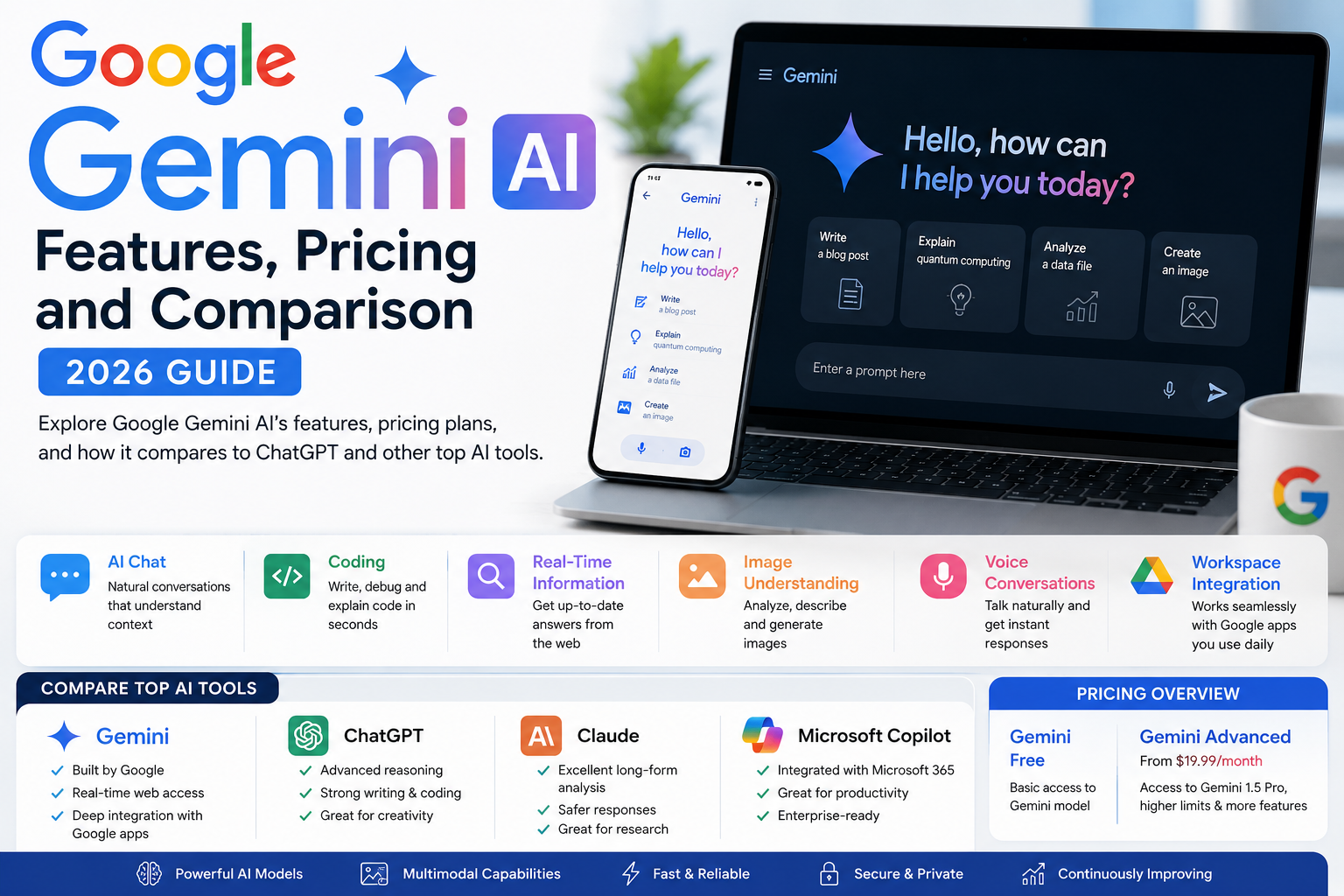
Introduction
Google has been building AI technology longer than almost any organization on earth. Its research labs produced some of the foundational breakthroughs in deep learning, natural language processing, and the Transformer architecture that powers virtually every major AI system today. So when Google entered the AI assistant race directly with its own consumer-facing chatbot, the expectations were high — and in 2026, Google Gemini AI has largely delivered on them.
Gemini is now embedded across Google’s entire product ecosystem — from Search and Gmail to Google Docs, YouTube, and Android. It is simultaneously a conversational AI assistant, a multimodal reasoning system, and a productivity layer built into the tools that hundreds of millions of people use every day. Whether you are a student, a developer, a marketer, or a business professional, Gemini’s integration with Google’s services makes it a uniquely convenient AI tool for anyone already living in that ecosystem.
This guide covers everything you need to know about Google Gemini AI in 2026 — its models, features, pricing, honest limitations, and how it compares to ChatGPT, Claude, and Microsoft Copilot.
Quick Answer — Featured Snippet
Google Gemini AI is Google’s flagship AI assistant, developed by Google DeepMind. Available free at gemini.google.com, it provides AI chat, writing assistance, coding help, image understanding, and real-time web search. Gemini integrates natively with Gmail, Docs, Drive, and other Google Workspace tools. Gemini Advanced, available through Google One AI Premium at $19.99 per month, provides access to the most powerful Gemini models.
What Is Google Gemini AI?
Google Gemini AI is Google’s flagship artificial intelligence assistant — a multimodal AI system capable of understanding and generating text, analyzing images, writing and debugging code, conducting research with real-time web access, and integrating deeply with Google’s suite of productivity applications.
Gemini was developed by Google DeepMind, the AI research organization formed by Google’s merger of Google Brain and the original DeepMind unit. This consolidation brought together two of the world’s most productive AI research teams under one roof — and Gemini is the most visible product of that combined effort.
The name Gemini replaced the previous Google Bard branding in February 2024. That rebranding was significant: it signaled Google’s commitment to positioning Gemini not as a prototype or research experiment, but as a flagship product family competing directly with ChatGPT, Claude, and other leading AI assistants.
The history leading to Gemini is built on decades of Google AI research. Google invented the Transformer architecture — the foundational technology behind virtually all modern large language models — in 2017. It built BERT and T5, which revolutionized natural language understanding. It developed AlphaGo and AlphaFold through DeepMind, demonstrating AI’s capacity to solve problems at superhuman levels in specific domains. Gemini represents the integration of this research depth into a practical, widely accessible AI assistant.
Why does it matter? Because Gemini’s advantage over many competitors is not just model capability — it is integration. When an AI assistant is built by the company that also makes your email, your browser, your search engine, your productivity suite, your maps, and your phone operating system, the depth of contextual integration it can achieve is fundamentally different from standalone alternatives.
For background on the AI technology that powers Gemini and other AI assistants, visit our guide: [What Is Artificial Intelligence? A Beginner’s Guide].
Google Gemini Models
Google has structured Gemini as a family of models rather than a single system, with different models optimized for different performance-efficiency tradeoffs. Understanding this model family helps you understand what you are actually getting at each tier of access.
Gemini Nano is the smallest and most efficient model in the family, designed specifically to run directly on mobile devices — particularly Pixel phones — without requiring a connection to cloud servers. Because it runs locally, it is faster for on-device tasks and does not require constant internet connectivity. Gemini Nano powers on-device AI features like smart reply suggestions, voice recording summarization on Pixel, and AI features within Android applications. Its capability is necessarily limited by what can run efficiently on phone hardware, but its responsiveness and privacy advantages in on-device contexts are significant.
Gemini Flash represents a middle tier optimized for speed and efficiency in cloud-based deployments. It is designed for tasks that require fast response times and high throughput — making it appropriate for applications that need to serve many users simultaneously or generate responses with minimal latency. Gemini Flash is used internally in several Google products where speed is the primary priority.
Gemini Pro is the model available on the Gemini free tier for consumer use. It balances capability and efficiency in a way that makes it appropriate for the broad range of tasks everyday users bring to an AI assistant — research, writing, coding, question answering, and general conversation. For most day-to-day tasks, Gemini Pro delivers results that are competitive with comparable free-tier offerings from other providers.
Gemini Ultra (also referred to in various contexts as Gemini 1.5 Pro or the most advanced Gemini model variants) is Google’s highest-capability model, available through Gemini Advanced on paid plans. It is the model that Google positions as competitive with the most capable models from OpenAI and Anthropic. Gemini Ultra was specifically highlighted for its performance on MMLU (Massive Multitask Language Understanding) benchmarks, where Google reported it outperformed previous state-of-the-art models at the time of its release. It handles complex reasoning, long-context document analysis, advanced coding tasks, and sophisticated multimodal understanding more effectively than the smaller models in the family.
Key Features of Google Gemini AI
AI Chat: Gemini’s core conversational interface handles a wide range of natural language interactions — answering questions, following complex instructions, holding multi-turn conversations, and providing explanations at varying levels of complexity. The conversational experience is fluid and contextually aware within a session.
Writing Assistance: Gemini assists with drafting, editing, reformatting, and improving written content across a range of contexts. The Help Me Write feature, available within Google Docs and Gmail, provides AI writing assistance directly in the applications where writing happens — without requiring a separate platform visit.
Coding: Gemini generates code in multiple programming languages, explains existing code, debugs errors, and helps developers think through technical architecture. It handles Python, JavaScript, Java, Go, SQL, and many other languages with reasonable competence across standard development tasks.
Research: Real-time web access through Google Search is integrated into Gemini’s responses, allowing it to provide information about current events, recent developments, and time-sensitive topics that AI systems with knowledge cutoffs cannot address on their free tiers. This is a distinctive and practically important advantage over several competitors.
File Analysis: Gemini can analyze uploaded documents, PDFs, images, and other file types to extract information, answer questions about content, summarize lengthy materials, and identify key themes or data points.
Image Understanding: Gemini’s multimodal capability allows it to analyze photographs, diagrams, charts, screenshots, and other visual content. Users can upload an image and ask questions about it — identifying objects, reading text within images, interpreting charts, or describing visual content for accessibility purposes.
Voice Conversations: Gemini supports voice input for hands-free interaction, with improving natural language recognition and conversational response capability across the mobile application and select web contexts.
Multimodal Capabilities: The integration of text, image, audio, and video understanding within a single model is Gemini’s architectural distinguishing feature relative to language-only models. This unified multimodal design allows Gemini to reason across different types of information simultaneously — understanding an image and a text description together, for example, rather than processing each separately.
Google Workspace Integration: Gemini is embedded within Gmail, Google Docs, Google Slides, Google Sheets, Google Drive, Google Meet, and other Workspace applications. In Gmail, it drafts email responses and summarizes long email threads. In Docs, it drafts content and refines writing. In Meet, it generates meeting summaries. In Sheets, it helps with formula generation and data analysis. This integration is the feature that most clearly differentiates Gemini for users who spend significant time in Google’s productivity applications.
Real-Time Information: Unlike AI models with fixed training data cutoffs, Gemini’s integration with Google Search enables responses that include current information — up-to-date news, current pricing, recent events, and other time-sensitive data. This is available on the free tier, which is a significant differentiator from ChatGPT’s base free plan.
Google Gemini Pricing
Google structures Gemini access across several tiers, from completely free access through the consumer interface to enterprise-scale deployment through Google Cloud.
| Plan | Model Access | Price | Best For |
|---|---|---|---|
| Gemini Free | Gemini Pro | Free | Casual users, students, evaluation |
| Google One AI Premium | Gemini Advanced (Ultra model) | $19.99/month | Power users, professionals, Workspace integration |
| Google Workspace (Business) | Gemini for Workspace | $30/user/month (add-on) | Business teams using Google Workspace |
| Google Cloud API | Multiple Gemini models via API | Pay per use (token pricing) | Developers, enterprise applications |
| Google One AI Premium Annual | Gemini Advanced | Discounted annual rate | Users committing to long-term access |
Free Plan: The Gemini free plan, accessible at gemini.google.com and through the Gemini app on Android and iOS, provides access to Gemini Pro with real-time Google Search integration. This is genuinely useful for everyday research, writing assistance, coding, and image analysis tasks. The free tier’s real-time search integration alone places it ahead of many competitors’ free plans in practical research utility.
Google One AI Premium at $19.99 per month provides Gemini Advanced — access to Google’s most capable Ultra-class model — along with deeper integration across the entire Google Workspace suite. This includes Gemini assistance within Gmail, Docs, Slides, Sheets, and Meet at a level of depth not available on the free plan. Subscribers also receive two terabytes of Google One storage as part of the package, which partly offsets the subscription cost for users who need cloud storage.
Gemini for Google Workspace is an enterprise add-on that brings Gemini capabilities to Google Workspace for Business customers. At approximately thirty dollars per user per month as an add-on to an existing Workspace subscription, it enables AI assistance across all Workspace applications with enterprise-grade security, privacy guarantees, and administrative controls appropriate for organizational deployment.
Google Cloud API access gives developers and organizations access to multiple Gemini model variants through a token-based pricing structure, enabling integration of Gemini capabilities into custom applications, services, and products.
Google Gemini vs ChatGPT
| Feature | Google Gemini | ChatGPT (GPT-4o) |
|---|---|---|
| Accuracy | Very High | Very High |
| Speed | Fast | Fast |
| Writing Quality | Very Good | Excellent |
| Coding | Very Good | Excellent |
| Research | Excellent (real-time search free) | Good (browsing on Plus) |
| Internet Access | Yes — free tier | Limited on free; Plus only |
| Image Understanding | Excellent | Very Good |
| Voice Features | Good | Excellent (Advanced Voice Mode on Plus) |
| File Uploads | Yes | Plus only |
| Image Generation | Yes (via Imagen) | Yes (DALL-E on Plus) |
| Google Workspace | Excellent — native integration | No |
| Microsoft 365 | No | Via Copilot |
| Free Plan Quality | Very Strong | Good |
| Paid Plan | $19.99/month | $20/month |
| Best For | Google ecosystem users, research | Versatile general use, coding |
The most practically meaningful difference between Gemini and ChatGPT for most users comes down to two factors: ecosystem and real-time information. If you live in Google Workspace, Gemini’s native integration is a daily practical advantage that ChatGPT cannot match without additional tools. If you need current information on the free tier, Gemini’s real-time search integration makes it the stronger choice without payment.
For coding and versatile creative work, ChatGPT’s GPT-4o typically produces stronger results. For voice capability, ChatGPT Plus’s Advanced Voice Mode leads. For overall writing quality and nuance, opinions are divided but ChatGPT has a slight edge in consistency across complex writing tasks.
Google Gemini vs Claude vs Microsoft Copilot
| Feature | Google Gemini | Claude (3.5 Sonnet) | Microsoft Copilot |
|---|---|---|---|
| Writing Quality | Very Good | Excellent | Very Good |
| Coding | Very Good | Very Good | Very Good |
| Research | Excellent (real-time) | Limited | Good (Bing) |
| Image Generation | Yes | No | Yes (DALL-E free) |
| Google Workspace | Excellent | No | No |
| Microsoft 365 | No | No | Excellent |
| Free Plan | Strong — real-time search | Good — daily limits | Strong — no subscription |
| Paid Plan | $19.99/month | $20/month | $30/user/month (365) |
| Long Documents | Very Good | Excellent | Good |
| Privacy Focus | Google data policies | Anthropic privacy standards | Microsoft enterprise |
| Multimodal | Excellent | Good | Good |
| Best For | Google ecosystem users | Long-form writing quality | Microsoft 365 users |
Each of the three tools has a clear primary strength. Gemini leads for Google ecosystem integration and multimodal research capability. Claude leads for writing quality and long document analysis. Copilot leads for Microsoft 365 integration and free image generation without any subscription.
The choice between them is most easily made by asking which productivity ecosystem you spend most of your working day in — Google Workspace, Microsoft 365, or neither — and selecting accordingly.
Advantages of Google Gemini
1. Genuinely strong free tier: Gemini’s free plan is one of the most capable free AI assistant experiences available in 2026. Real-time search, image understanding, file uploads, and writing assistance at no cost places it ahead of most competitors’ free offerings in practical everyday utility.
2. Real-time internet access on the free tier: The integration with Google Search means Gemini can answer questions about current events, recent developments, and time-sensitive topics without requiring a paid subscription — a meaningful advantage over ChatGPT’s free plan.
3. Native Google Workspace integration: For users who live in Gmail, Google Docs, Drive, Slides, Sheets, and Meet, Gemini’s native integration creates an AI assistance layer embedded directly in their existing workflow. No context-switching, no copy-pasting between applications.
4. Multimodal capability built from the ground up: Gemini was designed as a multimodal model from its architecture foundations, rather than having image understanding added as a subsequent capability. This architectural integration produces more coherent reasoning across different types of input.
5. Competitive pricing: At nineteen dollars and ninety-nine cents per month for Gemini Advanced — which also includes two terabytes of Google One storage — the value proposition is strong compared to standalone AI subscriptions from competitors.
6. Backed by Google’s research depth: Google DeepMind’s combined research capability is among the most formidable in the AI industry. The research investment flowing into Gemini model improvements is sustained and significant.
7. Android integration: Gemini is deeply integrated into the Android operating system, making it the AI assistant of choice for Android users — accessible via the assistant button, within apps, and through on-device Nano for offline capability.
8. Strong multilingual support: Gemini supports a wide range of languages with high quality, benefiting from Google’s extensive multilingual training data and translation technology.
9. Google One storage included in Advanced: The two terabytes of Google One storage included with the Advanced subscription has genuine monetary value that partially offsets the subscription cost for users who need cloud storage.
10. Continuous integration expansion: Google is actively expanding Gemini’s integration across its product portfolio — Search, YouTube, Maps, Android, Chrome, and more. The breadth of integration is growing rather than static.
11. Strong image understanding: Gemini’s multimodal architecture produces reliable and contextually appropriate image analysis across photographs, charts, diagrams, and screenshots.
12. Developer accessibility through Google Cloud: The Gemini API through Google Cloud provides developers with well-documented, supported access to multiple model variants, enabling integration into custom applications with familiar Google Cloud tooling.
Limitations of Google Gemini
Creative writing consistency: While Gemini handles most writing tasks capably, its creative writing — fiction, poetry, nuanced narrative — is somewhat less consistently impressive than Claude or ChatGPT when working with complex stylistic requirements or extended creative projects.
Coding compared to top alternatives: Gemini’s coding capability is very good for common development tasks but does not consistently match GPT-4o’s performance on more complex or obscure coding challenges. For developers who use AI coding assistance intensively, this gap is measurable.
Google account required: Accessing Gemini requires a Google account. Users who prefer to minimize their Google account usage or do not have one face a barrier that does not exist with all competitors.
Privacy considerations with Google’s data ecosystem: For users with concerns about how their interaction data fits into Google’s broader data ecosystem, Gemini’s integration with the same company that operates Search, Gmail, and Android creates a level of data proximity that some users prefer to avoid.
Workspace integration depth requires paid subscription: The most practically valuable Workspace integration features — Gemini in Gmail, Docs, and Meet at full capability — require either Google One AI Premium or the Workspace Gemini add-on. The free tier provides a preview of this integration rather than its full depth.
Less specialized for creative content production: Tools like Claude or ChatGPT are sometimes more versatile for creative writers who need AI assistance across a wider range of stylistic and narrative contexts.
Voice mode less mature than ChatGPT Plus Advanced Voice: ChatGPT Plus’s Advanced Voice Mode provides a more natural, lower-latency voice conversation experience than Gemini’s current voice implementation, particularly for extended voice-based interaction.
Accuracy on specialized or niche topics: Like all AI assistants, Gemini can produce inaccurate information on highly specialized topics or recent research. The real-time search integration mitigates this for current information but does not eliminate it for domain-specific technical accuracy.
Hallucination risk: Despite Google’s research investment, Gemini still generates confident-sounding but factually incorrect information in some contexts — particularly for specific statistics, named entities, and niche technical topics. Independent verification remains essential.
Enterprise Workspace integration is expensive: The full enterprise Workspace Gemini add-on at approximately thirty dollars per user per month, on top of an existing Workspace subscription, represents significant per-user cost for organizations deploying at scale.
Real-World Use Cases
| User Type | How Gemini Helps | Key Advantage |
|---|---|---|
| Students | Research with cited current information, writing drafts, concept explanation, exam preparation | Real-time search on free tier |
| Teachers | Lesson plan generation, differentiated material creation, assessment drafting | Docs integration |
| Bloggers | Research assistance, draft generation, SEO keyword exploration | Real-time information |
| Developers | Code generation, debugging, API documentation, technical explanation | Multimodal code review |
| Businesses | Email drafting, document summarization, meeting summaries, report generation | Workspace integration |
| Marketers | Campaign copy, ad headlines, audience research, competitive analysis | Current market information |
| Researchers | Literature summary, current research updates, data interpretation | Real-time Google Scholar access |
| Content Creators | Script drafting, content ideation, image analysis for visual projects | Multimodal understanding |
Students benefit most from Gemini’s real-time search capability at no cost. Research questions that require current information — recent studies, current statistics, recent policy changes — are answered with up-to-date, search-integrated information rather than potentially outdated training data. Students should still verify important factual claims against primary sources independently.
Developers can use Gemini for code generation across common languages, explanation of unfamiliar codebases, and debugging assistance. Gemini’s multimodal capability adds the ability to analyze screenshots of error outputs or UI mockups alongside code — a genuinely useful workflow for front-end development.
Businesses using Google Workspace are the clearest primary beneficiaries of Gemini Advanced. Drafting client proposals in Docs with AI assistance, summarizing long email threads in Gmail, and generating meeting summaries in Meet — these workflows represent measurable time savings for professionals whose work already lives in the Google ecosystem.
Marketers benefit from Gemini’s research and copywriting combination. Writing a campaign brief while simultaneously pulling current market data and audience research, all within a single conversation, creates a more efficient research-to-content workflow.
Is Google Gemini Safe?
Safety is a legitimate and important consideration for any AI tool, and Google has invested significantly in responsible AI development across its Gemini deployment.
Privacy and data handling. Google is transparent that Gemini conversations may be reviewed by human reviewers and used to improve its products by default. Users who prefer to limit this can adjust their Gemini privacy settings within their Google account. For users who want stronger privacy guarantees, the enterprise Workspace Gemini subscription includes data agreements that prohibit use of conversation content for model training.
Data storage and retention. Gemini conversations are stored in your Google account by default and can be reviewed, deleted, or paused in your activity settings. Google’s data retention policies apply to Gemini conversation data — users can review and manage this through their Google Account settings at myactivity.google.com.
Content policies. Gemini applies content safety policies that restrict the generation of harmful, misleading, or inappropriate content. These policies are enforced through technical filters and ongoing policy refinement, though no content safety system is perfectly comprehensive.
Responsible AI commitment. Google has published its AI Principles — a framework for responsible AI development — and has ongoing responsible AI research teams dedicated to safety, fairness, and transparency in AI systems. DeepMind has an extensive history of safety research that feeds into Gemini’s development.
Enterprise security. For organizations deploying Gemini through Google Workspace with the Gemini add-on, enterprise-grade security controls, data processing agreements, and compliance certifications appropriate for regulated industries are available.
Practical guidance. As with any AI assistant, avoid sharing passwords, financial account details, personally identifiable information about third parties, legally privileged communications, and proprietary business information that you would not want processed by a third-party platform without explicit data handling agreements in place.
Tips for Getting Better Results with Gemini
Include context about your purpose. Gemini responds better when it understands why you need something, not just what you need. “I am preparing a presentation for non-technical senior managers about our company’s AI adoption strategy” produces a more appropriately calibrated response than simply asking for AI adoption strategy content.
Leverage the Google integration explicitly. When working in Google Docs, ask Gemini to help you write something “in the same style as the rest of this document.” When in Gmail, provide context about your email thread and ask for a response that addresses specific points. Taking advantage of the contextual awareness within Workspace applications produces more relevant outputs.
Use follow-up questions for research. Gemini’s real-time search integration is most valuable when you use it for multi-step research conversations. Start with a broad query, then ask follow-up questions that narrow toward the specific information you need, using Gemini to synthesize the research as you go.
Ask for specific formats. Request tables, numbered lists, bullet points, or structured formats explicitly. “Present this as a comparison table with three columns” produces a directly usable output rather than undifferentiated prose.
Specify the audience level. Tell Gemini who will read or use its output. “Explain this to a year-ten biology student” and “Explain this to a PhD researcher in molecular biology” will — correctly — produce very different responses to the same underlying question.
Use image uploads strategically. Gemini’s image understanding is strong enough to be genuinely useful for specific tasks — upload a graph and ask for interpretation, share a design mockup and ask for content suggestions, photograph a handwritten note and ask for transcription and summary. These multimodal workflows are underused by most Gemini users.
Set your expertise level upfront. Begin complex technical conversations with a brief statement of your background: “I am an experienced SQL developer but new to NoSQL databases.” This frames everything that follows appropriately without requiring you to re-establish context in every follow-up.
Ask Gemini to verify and cite. When research accuracy matters, explicitly ask Gemini to draw from its real-time search capability and indicate the sources it is drawing on. This is more reliable than assuming it is doing so automatically.
Frequently Asked Questions
Is Google Gemini free?
Yes. Google Gemini is available free at gemini.google.com and through the Gemini app on Android and iOS. The free plan provides access to Gemini Pro with real-time Google Search integration, image understanding, file analysis, and writing assistance. Gemini Advanced with the most powerful model is available through Google One AI Premium at nineteen dollars and ninety-nine cents per month.
What is Gemini Advanced?
Gemini Advanced is the premium tier of Google Gemini, available through a Google One AI Premium subscription at nineteen dollars and ninety-nine cents per month. It provides access to Google’s most capable Gemini Ultra-class model, deeper Google Workspace integration across Gmail, Docs, Sheets, Slides, and Meet, and two terabytes of Google One storage. It handles more complex reasoning, longer documents, and more sophisticated tasks than the free tier.
Is Gemini better than ChatGPT?
Gemini and ChatGPT have different strengths. Gemini leads for Google Workspace integration, real-time information access on the free tier, and multimodal reasoning. ChatGPT leads for coding versatility, creative writing consistency, Advanced Voice Mode, and the breadth of its GPT Store ecosystem. For Google ecosystem users, Gemini’s integration advantages typically make it the more practical choice. For versatile standalone AI assistance, ChatGPT Plus is generally the stronger option.
What are the features of Google Gemini?
Key features of Google Gemini include AI conversation and chat, writing assistance with Help Me Write in Docs and Gmail, coding assistance, real-time internet search integration, file and image analysis, multimodal understanding across text and visual content, voice input, integration across Google Workspace applications, and AI image generation through Google’s Imagen models.
What is the difference between Gemini Free and Gemini Advanced?
Gemini Free provides Gemini Pro model access with real-time search, image understanding, and writing assistance at no cost. Gemini Advanced, available at nineteen dollars and ninety-nine cents per month, provides the most powerful Gemini Ultra-class model, significantly higher capability on complex tasks, deeper integration across all Google Workspace apps, two terabytes of Google One storage, and priority access to new features.
Can Gemini generate images?
Yes. Google Gemini can generate images using Google’s Imagen model technology, integrated into the Gemini interface. Image generation is available on both free and paid tiers, with quality and generation limits varying by access level. Generated images can be downloaded and used in content creation projects.
Is Google Gemini safe?
Google Gemini applies content safety policies, has responsible AI guidelines published through Google’s AI Principles framework, and offers privacy controls through Google Account settings. Conversation data may be reviewed for product improvement by default — users can adjust this in privacy settings. For enterprise use with sensitive data, Google Workspace Gemini add-on provides stronger data agreements. Avoid sharing sensitive personal or confidential business information in any AI assistant conversation.
Can Gemini write code?
Yes. Gemini writes code in Python, JavaScript, Java, Go, SQL, and many other programming languages. It explains existing code, identifies and fixes bugs, suggests optimizations, and assists with technical architecture discussions. Its coding capability is competitive for most standard development tasks, though some developers find ChatGPT slightly more capable on complex or unusual coding challenges.
Does Gemini work on mobile?
Yes. The Gemini app is available for Android and iOS. On Android devices — particularly Google Pixel phones — Gemini is deeply integrated as the primary AI assistant, accessible through the assistant button, within apps, and on-device through Gemini Nano for offline tasks without cloud connectivity. The iOS app provides the same conversational AI functionality through a browser-like application.
Is Google Gemini worth paying for?
Gemini Advanced is worth paying for primarily for two types of users: those who need more powerful model capability for complex reasoning, coding, or analysis tasks, and those who use Google Workspace intensively and benefit from deep AI integration across Gmail, Docs, Sheets, and Meet. The nineteen dollar and ninety-nine cent monthly price, combined with two terabytes of Google One storage, represents competitive value for committed Google ecosystem users.
Which Gemini model is best?
For most consumer use cases, the Gemini Pro model on the free tier is sufficient. For demanding professional tasks — complex document analysis, advanced coding, sophisticated reasoning — Gemini Ultra through Gemini Advanced is the strongest option. For on-device efficiency on Pixel phones, Gemini Nano provides capable offline AI features. For speed-sensitive applications and developer integrations, Gemini Flash is optimized for high-throughput use.
Can businesses use Gemini?
Yes. Businesses can access Gemini through the Gemini for Google Workspace add-on at approximately thirty dollars per user per month, which brings Gemini capabilities across all Workspace applications with enterprise security controls, data processing agreements, and administrative management. Developers and data teams can access Gemini models through the Google Cloud API with token-based pricing appropriate for custom business application development.
Final Verdict
Google Gemini AI is a genuinely strong AI assistant in 2026, with a clear and compelling value proposition for a specific type of user — and a more complicated recommendation for others.
Who should use Google Gemini:
Users who spend significant time in Google Workspace — Gmail, Google Docs, Drive, Sheets, and Meet — will find Gemini’s native integration provides daily practical value that no competing AI assistant can replicate without additional tools. The experience of having AI assistance available directly within the applications where your work already happens is qualitatively different from copying content between a standalone AI tool and your workspace applications.
Students who need real-time information for research will find Gemini’s free tier more immediately useful than ChatGPT’s free plan, simply because the search integration means current information is available without payment.
Android users, particularly Pixel phone users, benefit from Gemini’s deep mobile integration, including on-device Nano capability for offline use cases.
Users who want a capable AI assistant at no cost and already have a Google account will find the free Gemini experience among the strongest free AI assistants available in 2026.
Who might prefer an alternative:
Developers and technical professionals who need the strongest possible coding assistance may find ChatGPT GPT-4o or DeepSeek AI produce slightly more capable results for complex programming tasks.
Users who prioritize long-form writing quality and nuanced instruction-following may find Claude more consistently impressive for complex editorial and creative writing work.
Microsoft 365 users who spend their working day in Word, Outlook, Excel, and Teams will find Microsoft Copilot’s integration depth more immediately relevant than Gemini’s Google-centric approach.
Users with significant privacy concerns about the Google data ecosystem may prefer an AI assistant from a provider with a different data relationship — Anthropic’s Claude or Mistral AI, for example.
The clearest, most honest summary: if you use Google’s products extensively in your daily work or study, Gemini is the AI assistant you should be using. If you do not, the choice depends on your specific primary use case — and several alternatives may serve you better in specific categories.
For more on the broader AI assistant landscape, read our related guides:[Best ChatGPT Alternatives You Can Use in 2026].
References
- Google Gemini — Official Google Gemini platform covering features, plans, and access.
https://gemini.google.com - Google AI — Official Google AI hub covering Gemini models, research, and capabilities.
https://ai.google - Google DeepMind — Official DeepMind research hub covering Gemini model development and AI research.
https://deepmind.google - Google Workspace — Official Google Workspace platform covering Gemini integration and enterprise features.
https://workspace.google.com - Google Developers — Official Google developer documentation for Gemini API access and integration.
https://developers.google.com
Author Bio
TechOriginHub Editorial Team
The TechOriginHub Editorial Team consists of experienced technology journalists, AI software reviewers, and SEO content strategists dedicated to delivering accurate, balanced, and genuinely useful content about AI tools and emerging technologies. With direct hands-on experience using Google Gemini across research, writing, coding, and Google Workspace productivity workflows, the team provides honest assessments grounded in real-world daily use. Every review is verified against official Google documentation and tested across both free and paid plan capabilities.
Disclaimer
Disclaimer: This article is for informational and educational purposes only. Google Gemini features, AI models, pricing, subscription plans, and availability may change over time. Always verify the latest information on the official Google websites before making decisions based on AI products or services.