
 By saman zahra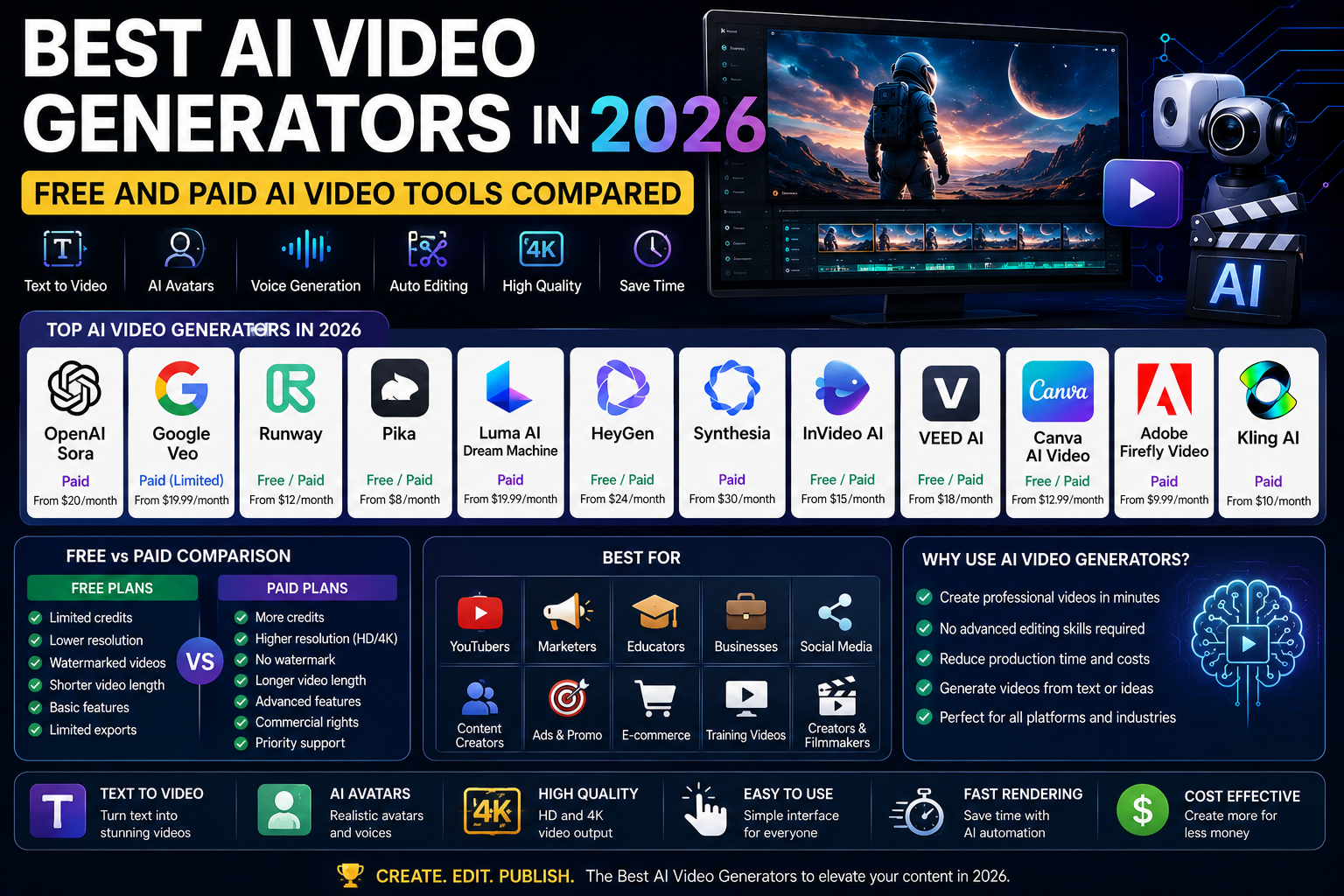
Introduction
Video content has become the dominant format across every major platform — YouTube, TikTok, Instagram, LinkedIn, and beyond. But video production has always been expensive, time-consuming, and technically demanding. Cameras, lighting, editing software, sound, talent — the barrier to entry for high-quality video was high enough to keep many talented storytellers and businesses locked out of the format entirely.
The best AI video generators have changed that equation fundamentally. In 2026, a written description, a photograph, or a short text prompt can produce video content ranging from a talking-head presenter to a cinematic short film — without a camera, a crew, or a professional editing suite. The technology has developed at remarkable speed, moving from blurry, unreliable novelties to genuinely usable creative tools in just a few years.
This means YouTubers can produce more content with fewer resources. Marketing teams can create product videos, explainers, and ad content at a fraction of traditional production cost. Educators can build engaging course materials without a production team. Small businesses can produce the visual content that was previously only available to organizations with significant media budgets.
But the market has grown crowded fast, and the differences between tools are significant. This guide tests twelve of the most prominent AI video generators available in 2026, evaluates them honestly, and helps you identify the right tool for your specific content goals and budget.
Quick Answer — Featured Snippet
The best AI video generators in 2026 include OpenAI Sora for cinematic text-to-video quality, Runway for professional creative video editing, HeyGen and Synthesia for AI presenter avatars, Pika Labs and Luma AI Dream Machine for creative and artistic video, InVideo AI for fast social media content, and VEED AI for integrated video editing. Free tiers are available across several platforms with varying generation limits.
What Are AI Video Generators?
AI video generators are software tools that create video content using artificial intelligence. Rather than filming footage with a camera, shooting scenes with actors, or editing sequences manually, you provide the AI with inputs — a text description, a script, a collection of assets, or a static image — and it produces video content based on those instructions.
The category encompasses several distinct types of tools that work in different ways and suit different purposes.
Text-to-video AI generators create entirely original video content from written descriptions. You describe a scene — a sunset over a city skyline, a person walking through a forest, a golden retriever running across a beach — and the AI generates that scene as a short video clip. This is the most dramatic and technically impressive category, and it includes OpenAI Sora, Runway, Pika, Google Veo, and Luma AI Dream Machine.
Image-to-video AI technology takes a still photograph or an AI-generated image as its starting point and animates it into a moving video sequence. This is particularly useful for bringing existing images to life or generating video from visuals that were themselves created with AI image generators.
AI avatar and presenter video tools create videos featuring realistic, AI-generated human presenters who deliver scripted content. You provide a script, select an avatar, and the platform generates a video of that avatar speaking your content with accurate lip-sync and natural delivery. These tools — HeyGen, Synthesia — are particularly valuable for training videos, corporate communications, and educational content.
AI voice generation complements visual output by synthesizing natural-sounding speech from written scripts. Many AI video platforms now include integrated voice tools that generate narration, sync it with visuals, and adjust pacing and emphasis.
Who should use AI video generators? Content creators on YouTube, TikTok, and Instagram who want to produce more without spending more. Marketing teams creating explainer videos, ads, and social content. Educators building course videos and presentations. Small businesses producing product and brand videos. Developers building video features into applications. And increasingly, filmmakers and production studios exploring previsualization and b-roll alternatives.
How We Tested These AI Video Generators
Every tool in this comparison was evaluated across ten criteria using a consistent set of test prompts and workflows covering cinematic video generation, social media content, presenter-based videos, and product demonstrations.
Video Quality assessed resolution, lighting naturalness, motion smoothness, subject coherence, and how well the generated video held up when viewed at standard playback quality.
Prompt Accuracy measured how faithfully each tool interpreted increasingly specific instructions, including camera angle requests, mood and style descriptions, and multi-element scene definitions.
Rendering Speed evaluated the time between submitting a prompt and receiving a completed video, accounting for both generation time and queue delays for free-tier users.
Ease of Use assessed the interface, onboarding experience, and time required for a new user to produce their first usable video result.
Editing Features examined built-in tools for extending clips, adjusting timing, adding overlays, and making modifications to generated outputs.
AI Voice Quality evaluated the naturalness, pronunciation accuracy, and expressiveness of generated narration across the platforms that include voice tools.
Avatar Quality assessed the visual realism, lip-sync accuracy, and naturalness of movement for platforms featuring AI presenter avatars.
Commercial License examined what rights users have to use generated videos for business, marketing, and client purposes.
Pricing compared monthly costs, credit allowances, and what each tier unlocks relative to cost.
Value for Money considered the usable output volume and quality achievable relative to subscription cost, for both occasional and regular creators.
Best AI Video Generators in 2026
OpenAI Sora
Overview: OpenAI’s Sora represents the frontier of text-to-video generation and has set a new benchmark for what is possible from a written prompt. First demonstrated publicly in early 2024 and made available to creators in subsequent releases, Sora can produce high-quality, complex video scenes including multiple characters, dynamic camera movements, and convincing physical motion — all from text descriptions. Its understanding of physics, lighting, and visual narrative is on a different level from most competitors when it performs at its best.
Key Features: Text-to-video generation with cinematic quality at up to 1080p resolution. Image-to-video animation for bringing still images to life. Storyboard mode for sequencing multiple prompts into a narrative. Remix feature for modifying generated videos. Blend tool for combining inputs from multiple sources. A director-level understanding of camera language, lighting, and scene composition.
Video Quality: Outstanding when Sora generates well. Cinematic camera movements, convincing physical motion, natural lighting, and impressive scene complexity. However, quality is not universally consistent — hands, text, and certain physical interactions can produce artifacts or unexpected physics. The best Sora outputs are genuinely striking. The weakest require regeneration.
Ease of Use: Good. The ChatGPT-adjacent interface is familiar and reasonably intuitive. Producing quality results consistently requires some experimentation with prompt complexity and style terminology.
Free Plan: Currently available through ChatGPT Plus with limited monthly generation capacity — useful for testing but not sufficient for regular production volumes.
Paid Pricing: Sora is accessible through ChatGPT Plus at twenty dollars per month with limited monthly credits, and ChatGPT Pro at two hundred dollars per month with significantly more capacity.
Best For: Filmmakers and video creators who want cutting-edge text-to-video quality, professionals exploring AI for previsualization and concept work, and creators who need cinematic quality for short-form storytelling.
Pros: Best-in-class cinematic quality at its peak, strong physical and motion understanding, integrated with familiar OpenAI platform, Storyboard mode enables narrative sequencing, rapidly improving.
Cons: Not yet consistently reliable — quality varies significantly between generations, ChatGPT Pro at two hundred dollars per month is required for meaningful production volume, limited options for fine camera and motion control, not widely available as a standalone application.
Overall Rating: 9.2 out of 10
Google Veo
Overview: Google Veo is Google’s answer to the text-to-video challenge, built on the research power of Google DeepMind. Demonstrated alongside Gemini and made available to waitlist users, Veo produces video with strong physical accuracy, natural lighting, and high-quality motion. Its key differentiators include particularly strong long-form coherence — the ability to maintain visual consistency across longer sequences than many competitors — and integration with Google’s broader ecosystem of creative tools.
Key Features: Text-to-video at high resolution. Particularly strong at realistic physics and motion in dynamic scenes. Long-form sequence generation with better visual consistency than many alternatives. Image-to-video animation. Integration with Google Gemini for prompt assistance. Style and technique controls for filmmakers.
Video Quality: Very strong. Veo’s outputs show natural motion, realistic lighting, and impressive coherence across longer sequences. Fine details — facial features, hand movement, fabric motion — are handled well. Some of the most impressive kitchen sink, physical motion, and crowd-scene outputs in the category.
Ease of Use: Good once access is granted. The interface is clean and prompt-driven. Access has been limited to a waitlist at various stages of rollout, which affects availability for some users.
Free Plan: Available through Gemini Advanced subscription with set generation limits.
Paid Pricing: Access through Google One AI Premium at nineteen dollars and ninety-nine cents per month, with generation credits allocated according to subscription tier.
Best For: Creative professionals working in the Google ecosystem, filmmakers evaluating AI for production workflows, and users who want long-form sequence generation with strong visual consistency.
Pros: Excellent physical and motion coherence across longer sequences, strong photorealistic quality, integrated with Google Gemini, improving rapidly, reasonably accessible through Google subscription.
Cons: Access historically limited through waitlist phases, not yet available as a standalone dedicated platform, less community-developed prompt resources than more open tools.
Overall Rating: 8.9 out of 10
Runway
Overview: Runway has been at the forefront of accessible AI video tools for several years and remains the platform of choice for many professional creators, VFX artists, and filmmakers. What distinguishes Runway from pure text-to-video tools like Sora is its comprehensive creative suite — text-to-video generation, image-to-video, video editing tools, green screen without a physical green screen, professional motion tracking, and a growing set of cinematic effects. It is less a single tool and more a production environment built around AI video.
Key Features: Gen-3 Alpha text-to-video generation. Image-to-video animation from still sources. Video editing tools including inpainting, motion tracking, and rotoscoping with AI assistance. Act-One for face animation driven by reference video. Multi-Motion Brush for controlling specific areas of generated motion. Cinematic camera controls. A growing library of AI-powered VFX creative effects.
Video Quality: Very strong, particularly with Gen-3 Alpha. The generation output produces convincing cinematic video across a wide range of styles. Quality is professional enough for commercial creative applications. Some of the best results of any tool come from combining generation with Runway’s editing suite to refine raw outputs.
Ease of Use: Good to very good. The interface is better-designed than many competitors, and the various tools are logically organized. The learning curve is moderate — you can produce results quickly, but mastering the full feature set takes investment.
Free Plan: One hundred twenty credits available on registration. Credits deplete relatively quickly during exploration — enough to test the tools but not for regular free creation.
Paid Pricing: Standard plan at twelve dollars per month with six hundred and twenty-five credits. Pro plan at thirty-five dollars per month with two thousand credits. Unlimited plan at ninety-five dollars per month with unlimited relaxed generation. Enterprise pricing available.
Best For: Professional video creators, VFX artists, filmmakers using AI for production and editing, creative agencies producing AI-enhanced content at scale, and content creators who need editing tools alongside generation.
Pros: Most comprehensive creative suite in the category, strong generation quality, excellent integration between generation and editing tools, Act-One for facial animation is genuinely distinguished, strong value at Pro tier.
Cons: Free credits deplete quickly, relaxed-generation queue on Unlimited plan can be slow during peak demand, learning curve for the full feature set, credits-based model requires planning for regular usage.
Overall Rating: 9.0 out of 10
Pika
Overview: Pika has established itself as one of the most accessible and genuinely fun creative AI video tools available, with a distinctive personality that sets it apart from more directly productivity-focused competitors. Pika’s toolset spans text-to-video generation, image-to-video animation, and creative effects — but it also offers a suite of entertaining transformation effects that make it popular for social media content and community-driven creative work.
Key Features: Text-to-video generation with strong creative and artistic styles. Pikaffects — a library of creative transformation effects applied to images (melting, exploding, inflating, crushing) that have become popular on social media. Image-to-video animation. Lip Sync AI for adding natural voice to generated or uploaded video. Scene extension and modification tools.
Video Quality: Good. Pika’s output quality fits its positioning as a creative and social-media-friendly tool. Generated videos are clean and stylistically consistent but do not consistently match the cinematic ceiling of Sora or Runway Gen-3 for complex professional use cases. The Pikaffects library produces reliably entertaining and shareable results.
Ease of Use: Excellent. Pika is among the most immediately accessible tools in the category. The interface is designed for exploration and fun, and most features require no technical knowledge whatsoever.
Free Plan: Eighty monthly video credits on the free plan — useful for regular casual creation.
Paid Pricing: Standard plan at eight dollars per month with more credits and faster generation. Pro plan at twenty-eight dollars per month with significantly higher credit allowances. Unlimited plan at ninety-five dollars per month with unlimited relaxed generation and priority queue access.
Best For: Social media creators, casual creative users, and anyone who wants an accessible, entertaining AI video tool for short-form creative content and visual effects.
Pros: Very easy to use, Pikaffects library is genuinely unique and social-media-friendly, generous free tier, strong lip sync capability, fun and creative community.
Cons: Not the strongest option for professional cinematic video, maximum generation length is short, quality ceiling is lower than top-tier cinematic tools.
Overall Rating: 8.3 out of 10
Luma AI Dream Machine
Overview: Luma AI’s Dream Machine has quickly become one of the most talked-about AI video tools since its launch, earning praise for the quality of its motion coherence and the natural, organic feel of its generated video. Where some AI video generators produce technically impressive but slightly artificial-feeling motion, Luma’s Dream Machine has consistently produced video that moves and flows in ways that feel more physically natural and emotionally grounded.
Key Features: Text-to-video and image-to-video generation with strong motion coherence. Natural camera movement and physically believable motion. Keyframe control for defined start and end frames. Video extension for lengthening generated clips. Relatively fast generation compared to some competitors with similar quality output.
Video Quality: Very good. Luma AI’s Dream Machine produces natural-feeling motion that distinguishes it favorably from tools that generate visually impressive but stiff or artificial movement. Physical behavior — fabric, hair, water, particle effects — is handled with convincing naturalness. Fine detail at high complexity can occasionally break down, as with most tools.
Ease of Use: Excellent. The prompt interface is straightforward, and generation is reasonably fast. Keyframe control is accessible without being intimidating.
Free Plan: Thirty free generations per month on the free plan — genuinely useful for regular casual creation.
Paid Pricing: Lite plan at nine dollars and ninety-nine cents per month with seventy generations. Standard plan at twenty-nine dollars and ninety-nine cents per month with two hundred generations. Pro plan at ninety-nine dollars and ninety-nine cents per month with five hundred generations.
Best For: Creators who prioritize natural, organic-feeling motion in their AI-generated video, users who want a good balance of quality and accessibility, and social media content creators who need consistent, well-used free generation per month.
Pros: Natural, physically believable motion, good free generation allowance, fast generation, strong keyframe control, accessible interface.
Cons: Short maximum video length, quality ceiling behind top-tier tools for complex cinematic sequences, less comprehensive editing tools than Runway.
Overall Rating: 8.6 out of 10
Kling AI
Overview: Kling AI, developed by Chinese technology company Kuaishou, has emerged as a serious competitor in the text-to-video category, earning particular attention for the quality of its longer-form generations, strong physics understanding, and competitive output quality relative to more established Western platforms. Kling has expanded its accessibility internationally and has built a growing user base among content creators drawn to its distinctive feature set.
Key Features: Text-to-video generation at quality competitive with leading tools. Strong long-form video capability relative to many competitors. Cinematic mode for higher quality output. Image-to-video animation. Lip sync feature for generated video. Effects library for visual style transformation.
Video Quality: Very good to excellent. Kling has produced some of the most impressive results in the category for specific visual types — outdoor scenes, nature photography, city environments, and physical motion involving people and objects. Consistency across a range of prompts is competitive with Runway and Pika.
Ease of Use: Good. Access has expanded from China-focused to increasingly available globally. The interface is navigable, though some users report specific regional challenges with account registration and payment processing.
Free Plan: Limited free video credits per day, replenished daily — a useful allowance for regular casual creation.
Paid Pricing: Standard plan at around ten dollars per month with more credits and faster generation. Pro plan at around thirty-seven dollars per month with significantly higher credit allowances.
Best For: Content creators who want strong generation quality at competitive pricing, users exploring alternatives to Runway and Pika, and those interested in longer AI-generated video sequences.
Pros: Competitive generation quality, longer video capability than many alternatives, good physics and motion handling, daily free credit replenishment, competitive pricing.
Cons: Not as widely polished globally as Runway or Sora, international payment and account setup can be complex, smaller English-language community for prompt resources.
Overall Rating: 8.4 out of 10
HeyGen
Overview: HeyGen leads the AI avatar and presenter video category, enabling users to create professional-looking videos featuring realistic AI-generated human presenters without cameras, studios, or on-screen talent. Its avatar library is extensive, its lip-sync technology is among the best in the category, and its ability to clone a user’s own face and voice creates a compelling case for personalized, reproducible content. For businesses producing training videos, product explainers, or marketing content at scale, HeyGen’s avatar capability offers genuine operational value.
Key Features: Large library of professional AI avatars across diverse demographics and styles. Custom avatar creation from a user’s own image or video. Voice Cloning for personalized narration. Video translation with lip-sync adjustment into over one hundred languages. Video aspect ratio adaptation for different platforms. Interaction video templates for social media and marketing use cases.
Video Quality: Excellent for its intended use case. HeyGen avatars deliver convincingly natural presentation with accurate lip-sync, natural blinking and head movement, and professional delivery. The result is not indistinguishable from a human presenting on camera in every scenario — but for business video content, it is close enough to eliminate the production barrier entirely for many use cases.
Ease of Use: Very good. The workflow — write or paste a script, select an avatar, choose a voice, generate — is logical and accessible. Regular users can turn around polished presenter videos in minutes.
Free Plan: Limited free plan available with access to basic avatars and generation limits — useful for evaluating the platform.
Paid Pricing: Creator plan at twenty-nine dollars per month with more avatars, custom voice, and extended generation. Team plan at eighty-nine dollars per month with collaboration features. Enterprise plans available with custom pricing.
Best For: Businesses producing training and onboarding content, marketing teams creating product explainers at scale, educators building course video without recording setup, and multilingual content creators producing localized versions of the same video.
Pros: Best-in-class AI avatar quality, exceptional voice cloning, strong video translation capability, accurate lip-sync, large professional avatar library, genuinely production-ready for business use.
Cons: Avatar videos are not fully indistinguishable from live-action in all scenarios, custom avatar and voice cloning require paid plans, less versatile than cinematic video generators for creative and artistic content.
Overall Rating: 9.1 out of 10
Synthesia
Overview: Synthesia has been at the forefront of AI avatar video for several years, and in 2026 it remains one of the most polished and business-ready platforms in the category. Its focus on training, corporate communications, and educational video gives it a professional, enterprise-oriented character distinct from more creatively expressive tools. With over two hundred avatars, support for over one hundred and forty languages, and a well-developed editor, Synthesia is trusted by thousands of businesses globally.
Key Features: Over two hundred professional AI avatars. Support for over one hundred forty languages. Custom avatar creation from user’s image. Enterprise-grade security and data handling. Document-to-video feature for converting text documents into presenter videos. Video templates for training, compliance, onboarding, and communications use cases. SCORM export for learning management system integration.
Video Quality: Excellent within its category. Synthesia’s avatar output is among the most natural and professional-looking available. The platform’s focus on business and educational use cases means its avatars are tuned for formal and instructional delivery — precisely appropriate for the content they are most often used to create.
Ease of Use: Very good. The editor is clean and template-driven. Creating a complete training video with professional presentation, relevant backgrounds, and branded elements is accessible without video production expertise.
Free Plan: Not available as a standard offering. A free mini-plan with limited access allows evaluation of the platform.
Paid Pricing: Starter plan at twenty-nine dollars per month for individual creators with ten minutes of video per month. Creator plan at eighty-nine dollars per month with more minutes and custom avatar access. Enterprise plans available.
Best For: Businesses and training organizations that produce large volumes of training, compliance, onboarding, and internal communications video, multinational companies needing content in multiple languages consistently, and L&D teams seeking professional video production without on-camera talent.
Pros: Industry-leading avatar quality and language coverage, enterprise-ready security, strong document-to-video and LMS integration, trusted by major enterprise clients, professional and polished output.
Cons: Limited creative expressiveness compared to cinematic video generators, paid-only after limited trial, video minutes are restrictive on entry-level plans, less suited to social media creative content.
Overall Rating: 9.0 out of 10
InVideo AI
Overview: InVideo AI takes a different and distinctly practical approach to video creation: rather than generating cinematic footage from prompts, it focuses on producing complete, publishable social media and marketing videos quickly from written instructions or scripts. The platform combines AI scene selection from a large stock library, AI-generated scriptwriting, automated voiceover, text overlays, and transitions into a single workflow optimized for speed. For marketers and social media managers who need high-volume output more than cinematic artistry, it represents a genuinely efficient solution.
Key Features: Text prompt to complete social media video — including script, scene selection, voiceover, and text overlays. Access to a large library of stock video and image assets. AI script generation for video content. Automated voiceover with multiple voice options. Video editing tools for refining generated sequences. Platform-optimized export for YouTube, TikTok, Instagram, and other formats.
Video Quality: Good and fit for purpose. InVideo’s outputs are professional social media and marketing videos suitable for platform publishing. They are not cinematic or AI-generated visual content in the Runway or Sora sense — they are curated, edited, well-structured social videos assembled from stock assets and automated voice. That distinction matters and does not diminish the tool’s genuine usefulness for its target audience.
Ease of Use: Excellent. Text prompt to publishable video in minutes is a genuinely achievable workflow. The interface is built for non-video-producers, and the results require minimal editing.
Free Plan: Limited but usable free plan with watermark on exports, four exports per month, and standard quality.
Paid Pricing: Plus plan at twenty dollars per month with fifty exports, watermark removal, and premium stock access. Max plan at forty-eight dollars per month with more exports and AI capabilities. Pro plan at one hundred dollars per month with unlimited video exports.
Best For: Social media managers who need high-volume platform content with minimal production time, marketers producing product and promotional videos without a video team, and creators who want fast, structured video output from scripts rather than cinematic generation.
Pros: Extremely fast from prompt to publishable video, strong stock asset library, functional so even non-video users produce professional-looking content, competitive pricing, reliable volume production.
Cons: Not cinematic or AI-synthesized visual generation — it assembles from stock, quality limited by stock library access, watermark on free plan, less creative flexibility than generation-focused tools.
Overall Rating: 8.2 out of 10
VEED AI
Overview: VEED is primarily a browser-based video editing platform that has built AI capabilities into its core editing tools — positioning itself as an editing platform with AI assistance rather than a pure AI video generator. The result is an interesting hybrid: genuinely useful video editing tools enhanced by AI features like AI avatar generation, text-to-speech, and automated subtitling. For creators who want editing and AI tools in one place without juggling platforms, it occupies a genuinely useful niche.
Key Features: Full-featured browser-based video editor. AI avatar video generation with a growing avatar library. Text-to-speech narration with multiple voice options. Automated subtitling with high accuracy across languages. AI B-roll generation and caption generation. Screen recording and webcam capture integrated with editing. Team collaboration features on paid plans.
Video Quality: Good. AI-generated avatar videos through VEED are professional output suitable for business and social content. The editing environment is capable and the subtitling feature is one of the best in the category for accuracy and ease of use.
Ease of Use: Excellent. The browser-based editor is among the most intuitive in the category. Anyone who can use a basic document editor can navigate VEED’s interface with minimal learning time.
Free Plan: Functional free plan with watermark on exports, ten minutes of video per month, and limited AI features.
Paid Pricing: Lite plan at around twelve dollars per month with watermark removal and increased AI access. Pro plan at around thirty dollars per month with full AI features and priority support. Business plans available with team features.
Best For: Content creators who want an editor-first platform with AI assistance, teams producing subtitled content at scale, and users who value the simplicity of all-in-one browser editing over specialized generation tools.
Pros: Very easy to use, excellent subtitle automation, functional free tier, strong avatar tool for the price point, accessible from any browser without installation.
Cons: AI video generation is not the primary strength compared to dedicated generators, watermark on free exports, avatar library smaller than HeyGen or Synthesia.
Overall Rating: 7.9 out of 10
Canva AI Video
Overview: Canva’s AI video capabilities extend its design platform’s accessibility into video creation. Magic Media generates video and images from text prompts, and the surrounding design toolkit enables quick production of finished social and marketing videos without leaving the platform. For the millions of users already in Canva for design work, adding video to their content workflow with familiar tools is the primary value proposition.
Key Features: Text-to-video generation with Magic Media. Integration with Canva’s complete design toolkit — templates, brand assets, text overlays, and audio. Animation tools for making static designs into moving content. Background remover for video and image elements. Magic Edit and Magic Expand for video refinement.
Video Quality: Good for social content. Canva’s AI-generated video is competent for informal social media and marketing use cases. It does not produce cinematic or high-end cinematic-style video — that is not its design intent. For what it is meant to do, it performs reliably.
Ease of Use: Excellent. If you already use Canva, the AI video features require no learning curve at all.
Free Plan: The free Canva plan includes limited AI credits per month, covering Magic Media access.
Paid Pricing: Canva Pro at around fifteen dollars per month or one hundred twenty dollars annually with significantly more AI credits and full feature access.
Best For: Small business owners, social media managers, and content marketers already using Canva for design who want to add video to their content output without a new platform.
Pros: Fully integrated with a familiar design platform, very easy to use, competitive pricing, good for finished content that combines AI-generated video with design elements.
Cons: Not a serious competitor to dedicated video generators for quality output, AI video is a feature within a design tool rather than a purpose-built generator, monthly credit limits on Pro plan can be restrictive for video-heavy workflows.
Overall Rating: 7.6 out of 10
Adobe Firefly Video
Overview: Adobe Firefly has expanded into video generation, bringing Adobe’s commercial-licensing rigor to AI video. Firefly Video generates video from text prompts and reference images with the same commercial-use licensing commitment that distinguishes Firefly’s image generation. Its integration potential with Adobe’s video tools — Premiere Pro, After Effects — positions it as the natural video generation choice for Creative Cloud users already invested in the Adobe ecosystem.
Key Features: Text-to-video generation with commercial licensing. Image-to-video animation. B-roll generation mode optimized for supplementary production footage. Generative Extend for extending video clips. Integration with Premiere Pro and After Effects for professional editing workflows. Commercial-safe licensing on all generated outputs.
Video Quality: Good to very good. Firefly Video’s output is clean and commercially appropriate. It does not yet match the most cutting-edge cinematic quality of Sora or top-tier Runway usage, but it delivers professional, licensable video that integrates naturally into professional editing workflows where refinement is always part of the process.
Ease of Use: Good for Adobe users, moderate for others. If you already work in Premiere Pro or After Effects, Firefly Video’s integration makes practical sense. The standalone web interface is accessible but less immediately intuitive than simpler consumer tools.
Free Plan: Limited monthly generative credits on the free plan, as with Firefly Image.
Paid Pricing: Firefly Standard at nine dollars and ninety-nine cents per month with two thousand credits per month. Firefly Pro at twenty-nine dollars and ninety-nine cents per month with significantly more credits and premium video features.
Best For: Professional video editors and Creative Cloud users who want commercially licensed AI video that integrates with existing Adobe workflows, production teams that need the legal confidence of Adobe’s licensed training data, and marketing teams already in the Adobe ecosystem.
Pros: Commercial licensing on all generated video, Premiere Pro and After Effects integration potential, professional and commercially appropriate output, backed by Adobe’s creative software ecosystem.
Cons: Video generation capability still developing relative to more specialized competitors, monthly credits are restrictive for video-heavy workflows, strongest values realized only within Creative Cloud subscription.
Overall Rating: 8.1 out of 10
AI Video Generators Comparison Table
| Tool | Video Quality | Free Plan | Starting Price | Max Video Length | AI Avatars | AI Voice | Text-to-Video | Image-to-Video | Best For | Rating |
|---|---|---|---|---|---|---|---|---|---|---|
| Sora | Outstanding | Limited via ChatGPT | $20/mo (ChatGPT Plus) | Up to 20 sec | No | Limited | Yes | Yes | Cinematic storytelling | 9.2/10 |
| Google Veo | Very Strong | Via Gemini | $19.99/mo | Up to 8 sec | No | No | Yes | Yes | Long-form coherence | 8.9/10 |
| Runway | Very Strong | 120 credits | $12/mo | Variable | No | No | Yes | Yes | Professional editing | 9.0/10 |
| Pika | Good | 80 credits/mo | $8/mo | Up to 10 sec | No | Limited | Yes | Yes | Creative and social | 8.3/10 |
| Luma AI | Very Good | 30 videos/mo | $9.99/mo | Up to 10 sec | No | No | Yes | Yes | Natural motion | 8.6/10 |
| Kling AI | Very Good | Daily credits | ~$10/mo | Up to 10 sec | No | Limited | Yes | Yes | Competitive quality and price | 8.4/10 |
| HeyGen | Excellent | Limited | $29/mo | Variable | Excellent | Excellent | No | Limited | Business presenters | 9.1/10 |
| Synthesia | Excellent | Trial only | $29/mo | Variable | Excellent | Excellent | No | No | Corporate training | 9.0/10 |
| InVideo AI | Good | Free watermark | $20/mo | Variable | No | Yes | Limited | No | Social media volume | 8.2/10 |
| VEED AI | Good | Free watermark | $12/mo | Variable | Good | Yes | Limited | No | Editing with AI features | 7.9/10 |
| Canva AI Video | Good | Limited credits | $15/mo | Short | No | Limited | Yes | Yes | Integrated design workflow | 7.6/10 |
| Adobe Firefly Video | Good | Limited credits | $9.99/mo | Up to 5 sec | No | No | Yes | Yes | Commercial creatives | 8.1/10 |
Free vs Paid AI Video Generators
| Feature | Free Tools | Paid Tools |
|---|---|---|
| Daily or Monthly Generation Limits | Limited — varies significantly by platform | High or unlimited |
| Video Quality | Good for casual use | Highest quality available |
| Watermarks | Present on most free tiers | Removed on all paid plans |
| Maximum Video Length | Shorter clips typical | Extended length on most paid plans |
| Export Quality | Standard or reduced resolution | Full resolution export |
| Commercial Rights | Varies — verify per platform | Explicitly licensed on most paid plans |
| AI Voice Generation | Limited or not included | Available on avatar-focused platforms |
| Avatar Support | Basic avatars or none | Full avatar library, custom avatars |
| Priority Generation | Standard queue | Priority or faster processing |
| Video Editing Features | Basic tools | Comprehensive suite |
| Best For | Testing, casual creation, evaluation | Professional and business production |
Best AI Video Generators by Category
| Category | Best Tool | Runner Up | Key Reason |
|---|---|---|---|
| YouTube | Runway | HeyGen | Editing suite plus presenter capability |
| TikTok | InVideo AI | Pika | Fast, formatted for short-form social |
| Instagram Reels | InVideo AI | Canva AI Video | Social-format optimization |
| Marketing | Runway | Adobe Firefly Video | Quality and commercial licensing |
| Education | Synthesia | HeyGen | Training and course presenter videos |
| Business | Synthesia | HeyGen | Professional avatar video production |
| Animation | Pika | Kling AI | Creative style and effect range |
| Product Videos | Adobe Firefly Video | Runway | Commercial licensing and quality |
| Social Media | InVideo AI | VEED AI | Volume production and platform optimization |
| Beginners | Luma AI Dream Machine | Canva AI Video | Easy interface, free access |
| Filmmakers | Sora via ChatGPT Pro | Runway | Cinematic quality and editing |
| News and Explanation | HeyGen | Synthesia | Avatar presenter with script |
Which AI Video Generator Is Best for Beginners?
For someone brand new to AI video, the priority is a tool that produces usable results quickly without requiring any prior video production knowledge or willingness to research prompt engineering techniques.
Luma AI Dream Machine is the strongest recommendation for beginners primarily interested in exploring text-to-video generation. Its thirty monthly free generations provide a meaningful allowance to experiment with, its interface is clean and unintimidating, and it produces reliably natural output without complex prompt writing skills.
Canva AI Video is the stronger choice for beginners whose goal is finished social or marketing content in familiar surroundings. Anyone who already uses Canva will find the AI video features immediately accessible.
For beginners interested in avatar-based video — presenting information without appearing on camera themselves — HeyGen’s free plan provides a meaningful introduction to the category’s core workflow without any cost.
Which AI Video Generator Is Best for YouTubers?
YouTube creators have a specific and often demanding set of production needs: consistent output volume, engaging content quality, and workflow efficiency that does not require dramatically increasing production time with every video.
Runway is the top recommendation for YouTubers who want cinematic AI effects integrated with editing tools in a single platform. The combination of generation and editing in one environment eliminates platform-switching friction, and the Pro plan at thirty-five dollars per month provides enough credits for the generation and editing requirements of a weekly-or-more video production schedule.
HeyGen serves YouTubers who produce content in a presenter format — tutorials, reviews, commentary — and either want to avoid being on camera or need to produce content consistently without scheduling studio time. The voice cloning capability allows building a recognizable, consistent presenter identity across many videos.
InVideo AI is the right fit for YouTubers who produce topical content regularly and want fast production of supporting social clips and promotional video optimized for different platforms.
Which AI Video Generator Is Best for Businesses?
Business use of AI video spans distinctly different needs: training and onboarding content, marketing and promotional video, product explainers, internal communications, and brand content.
Synthesia is the definitive recommendation for training, compliance, and internal communications video at volume. Its enterprise-oriented features, language coverage, LMS integration, and consistent professional quality make it the platform most commonly chosen by learning and development teams at established organizations.
HeyGen serves the business need for marketing and external-facing video production — product explainers, promotional content, personalized video outreach. Its voice cloning and avatar customization give business content a more personalized and differentiated feel than templated alternatives.
Adobe Firefly Video suits video production teams already in the Adobe ecosystem who need the commercial licensing confidence that accompanies Adobe’s training data commitments — and who want AI-generated video integrated into existing Premiere Pro editing workflows.
Tips for Creating Better AI Videos
The quality of AI-generated video is strongly influenced by the quality of the prompt that generates it. These practices consistently produce better results across the platforms reviewed in this guide.
Describe the scene cinematically. Frame your prompt like a director’s shot description. Rather than “a city street,” try “a wide establishing shot of a rain-slicked city street at night, neon reflections in puddles, slow camera push forward.”
Specify lighting with precision. Lighting has an enormous impact on how generated video reads emotionally. “Golden hour,” “dramatic side lighting,” “overcast midday,” “backlit with lens flare” — each produces distinctly different moods from the same subject.
Control camera movement explicitly. Camera language is encoded in training data in ways that allow you to direct motion deliberately. Terms like “slow dolly in,” “pan left,” “static shot,” “aerial drone movement,” and “rack focus” produce correspondingly specific outputs.
Describe subject motion clearly. What is moving, how fast, and in what direction? “A woman walks slowly toward camera” is a clearer direction than “a woman is walking.” More specific physical motion descriptions produce more predictable outputs.
Break complex scenes into shorter generations. Rather than attempting to generate a complex multi-subject scene in one prompt, consider generating individual elements or shorter sequences and assembling them in an editing platform.
Iterate deliberately. Evaluate each generation against the specific elements of your prompt. Identify which element failed to land, and refine that part of the description specifically. Broad regeneration from scratch without analysis often produces no better results.
Common Mistakes to Avoid
Expecting perfect output from first-generation results. AI video generation — like image generation — is iterative for a reason. Expect to generate, evaluate, and refine multiple times before arriving at results suitable for publication.
Ignoring commercial licensing on free tiers. Before using any generated video in client work, marketing materials, or commercial content of any kind, confirm that your current plan includes commercial usage rights for the platform’s outputs.
Underestimating the value of editing. Raw AI video generation, even at its best, often benefits from color correction, sound design, transition editing, and context integration. Expect AI generation to be one stage of a production process, not the complete process itself.
Using a tool outside its intended use case. Synthesia for creative cinematic video and Runway for training video production are equally mismatched — neither will perform as intended. Choose the tool that matches your specific use case category.
Generating and downloading every video. Most platforms allow evaluating generations in context before downloading. Evaluate carefully against your grading criteria before committing credits to extended processing.
Future of AI Video Generation
The trajectory for AI video through 2026 and beyond is among the most exciting and fastest-moving areas of AI development. Several clear directions are already visible and will continue to shape the category significantly.
Longer and more coherent video generation is the most obvious frontier. Current tools generate clips measured in seconds. The direction of research and development clearly points toward minutes, and eventually full scenes or longer, with visual and narrative consistency maintained across dramatically extended lengths.
Better control and direction will make AI video feel less like a slot machine and more like a directing tool. Camera choreography, character consistency across scenes, specific motion direction — the ability to specify exactly what you want and receive it reliably is the primary quality-of-use improvement these tools are making every version release.
Integration across platforms will create more complete production workflows. The future is not selecting a tool for generation and another for editing — it is platforms where generation, editing, voice, and publishing are integrated into single, coherent production environments.
Real-time generation — video appearing interactively as prompts are adjusted — is technically emerging and will change the creative workflow significantly when it matures. Luma’s Keyframe feature and similar interactive tools represent early evidence of this directional shift.
Cost compression will make current paid-tier capabilities available on free tiers over time, as model efficiency improves and competition intensifies. The same quality that Runway Premium delivers at thirty-five dollars per month today will likely be achievable in free tools within two years.
Frequently Asked Questions
What is the best AI video generator?
The best AI video generator depends on your use case. OpenAI Sora leads for cinematic text-to-video quality. Runway leads for professional video editing with generation. HeyGen leads for AI presenter avatars. Synthesia leads for corporate training and communications. The strongest single recommendation for most creators is Runway, which balances generation quality with a comprehensive editing suite.
Is there a free AI video generator?
Yes. Several platforms offer functional free tiers. Luma AI Dream Machine provides thirty free generations monthly. Runway provides one hundred twenty credits on registration. HeyGen, InVideo, and VEED all operate limited free plans. Pika offers eighty monthly credits on its free plan. Microsoft Designer provides free DALL E-powered video generation within Microsoft account limits.
Is OpenAI Sora free?
Sora is not available as a standalone free product. Limited video generation access is available through ChatGPT Plus at twenty dollars per month, with more generous access through ChatGPT Pro at two hundred dollars per month. Free video generation through technical workarounds or third-party integrations of Sora does not represent legal or supported usage.
Which AI video generator creates the most realistic videos?
At its best, OpenAI Sora produces some of the most photorealistically convincing AI video of any tool currently available. Google Veo and Runway Gen-3 Alpha closely follow, each with specific strengths in physical motion coherence and cinematic style. For realistic presenter avatar video, HeyGen and Synthesia lead the category by a significant margin.
Which AI video tool is best for YouTube?
Runway is the top recommendation for YouTube creators who want the strongest combination of generation quality and editing tools. HeyGen is the stronger choice for presenter-style YouTube content, tutorial videos, and educational channels. InVideo AI fits creators who produce high volumes of topical, social-focused content optimized for YouTube Shorts and cross-platform distribution.
Can AI create videos from text?
Yes. Text-to-video generation — creating entirely original video content from written descriptions — is one of the most significant developments in AI over the past two years. OpenAI Sora, Google Veo, Runway, Pika, Luma AI, and Kling AI all generate video from text prompts. Quality and reliability vary by tool and prompt complexity, but the technology has matured considerably since early demonstrations.
Which AI video generator has the best avatars?
HeyGen and Synthesia lead the AI avatar category by a clear margin. HeyGen’s recent avatar updates have produced some remarkably natural presenter videos, and its voice cloning technology is competitive. Synthesia is more established for enterprise training contexts. Both produce professional presenter content that is suitable for production use in most business and educational contexts.
Can AI replace video editors?
AI video tools cannot currently replace professional video editors. They are valuable for generating b-roll, creating draft sequences, animating static images, and producing certain specific content types — but they lack the editorial judgment, narrative intuition, and creative decision-making that define quality video editing. Their most realistic and current role is accelerating specific production tasks and enabling creators without professional editing skills to produce serviceable content.
Which AI video generator is best for beginners?
Luma AI Dream Machine offers the best balance of quality, accessibility, and free generation for beginners. Its thirty monthly free videos allow meaningful experimentation without financial commitment. Canva AI Video suits beginners who already use Canva for design work. For beginner avatar-based video, HeyGen’s free plan provides an effective introduction to the category.
Which AI video generator is best in 2026?
In 2026, OpenAI Sora leads for cutting-edge text-to-video quality. Runway leads for professional video creation and editing. HeyGen and Synthesia share leadership for AI avatar and presenter video. Luma AI Dream Machine leads for accessible quality with a genuinely useful free tier. InVideo AI leads for social media volume production. The right tool for you depends on your use case, budget, and the specific type of video content you are creating.
How long can AI-generated videos be?
Maximum generation length varies significantly by platform and plan. Sora generates clips up to twenty seconds. Runway’s generations are typically four to ten seconds per generation. Kling AI produces longer sequences than many competitors at similar quality. Clip lengths extend with successive generation and platform-specific extension tools. Full narratives and longer sequences typically require generating multiple clips and assembling them through editing.
Are AI-generated videos watermarked on free plans?
Yes, most platforms add watermarks to free plan outputs. Watermark removal is a standard paid-plan feature across nearly all platforms reviewed in this guide. Runway, HeyGen, InVideo, VEED, and most other platforms include watermarks on free-generated outputs and remove them upon upgrading to a paid plan.
Final Verdict
The right AI video generator is the one that most directly addresses what you are actually trying to produce. Here are our recommendations for each major user type in this guide.
Best overall for creative and cinematic video: OpenAI Sora via ChatGPT Plus — when it performs at its best, nothing else currently generates video with the same level of cinematic understanding and visual coherence. The twenty-dollar ChatGPT Plus price makes it accessible for creators who do not yet need high generation volume.
Best for professional video production: Runway — the combination of competitive generation quality, comprehensive editing tools, Act One for facial animation, and a well-maintained, continuously improving platform makes it the most complete professional AI video environment available.
Best for business presenters and training video: Synthesia — enterprise-grade avatars, exceptional language coverage, and a focus on corporate communication use cases make it the trusted choice for organizations producing training, onboarding, and internal video at scale.
Best for marketing and personalized business video: HeyGen — its avatar quality, voice cloning capability, and template library make it the strongest platform for businesses producing personalized or branded presenter video across marketing channels.
Best free option: Luma AI Dream Machine — thirty free generations per month represents genuinely useful regular access, and its natural-looking motion makes it competitive with much more expensive tools for common creative use cases.
Best for beginners: Luma AI Dream Machine for text-to-video generation, HeyGen for presenter video, and Canva for integrated design and video workflows.
Best for YouTubers: Runway for creators who want the complete generation-plus-editing environment. HeyGen for presenter-style channels. InVideo AI for high-volume, social-format production.
Best for students: Luma AI’s free tier for video generation experimentation and VEED’s free plan for editing and subtitling cover most student video creation needs without cost.
Best for marketers: Adobe Firefly Video for commercially licensed quality coming from Adobe’s Creative Cloud ecosystem. Runway for agencies producing creative video content and seeking the strongest generation and editing combination.
Best for professional content creators: Runway at its Pro or Unlimited tiers — the comprehensive creative suite, consistent quality, and integrated editing environment serve creators producing volume content with professional standards.
The best AI video generators available in 2026 represent a genuine democratization of video production — putting capabilities that once required significant budgets and technical expertise within reach of anyone with a clear creative vision and the willingness to experiment. The tools will continue to improve rapidly. The gap between amateur AI-generated video and professionally produced content will continue to narrow.
Used thoughtfully and ethically, these tools are extraordinary creative amplifiers — and the creators who learn to use them well now will be significantly ahead of the curve as the technology continues its rapid advancement.
References
- OpenAI Sora — Official Sora documentation covering access, pricing, and video generation capabilities.
https://openai.com/sora - Google DeepMind — Official Veo documentation and Google AI creative tools.
https://deepmind.google - Runway — Official Runway platform covering Gen-3 capabilities, pricing, and feature details.
https://runwayml.com - Pika — Official Pika platform covering current features, credit pricing, and Pikaffects library.
https://pika.art - Luma AI — Official Luma Labs platform covering Dream Machine features and pricing.
https://lumalabs.ai - Kling AI — Official Kling platform covering generation capabilities and international access.
https://www.klingai.com - HeyGen — Official HeyGen platform covering avatar capabilities, voice cloning, and pricing.
https://www.heygen.com - Synthesia — Official Synthesia platform covering pricing, language coverage, and enterprise features.
https://www.synthesia.io - InVideo AI — Official InVideo platform covering plans, features, and stock asset library.
https://invideo.io - VEED AI — Official VEED platform covering editor features, AI tools, and pricing.
https://www.veed.io - Canva — Official Canva platform covering Magic Media video and Pro plan features.
https://www.canva.com
Author Bio
TechOriginHub Editorial Team
The TechOriginHub Editorial Team consists of experienced technology journalists, AI software reviewers, and creative professionals with direct, hands-on experience across the leading AI video generation and editing platforms. With backgrounds spanning video production, content marketing, social media management, and emerging technology, the team tests every platform reviewed in real-world production workflows before offering recommendations. Our reviews are grounded in direct testing across both creative and commercial use cases, verified against official platform documentation, and written to serve creators at every level — from first-time video creators exploring what AI tools can do to production teams evaluating AI for professional workflows.
Disclaimer
This article is for informational and educational purposes only. AI video generators, pricing, subscription plans, features, and availability may change over time. Always verify the latest information on the official website before purchasing or using any AI video generation platform.