
 By saman zahra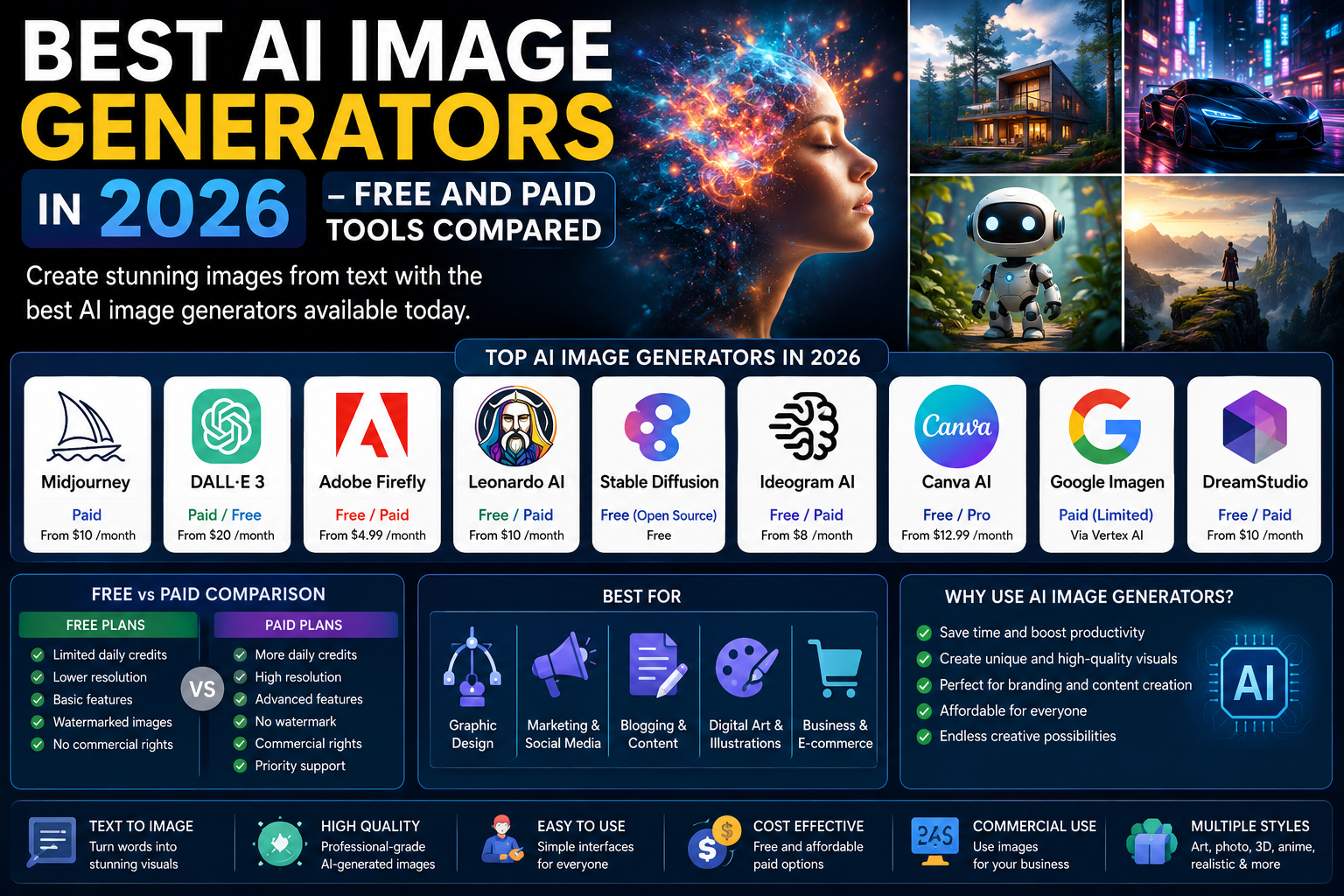
Introduction
Not long ago, creating a professional-quality image required either design talent, expensive software, or a budget to hire a graphic designer. In 2026, a clear text description written in plain English is all it takes to produce a photograph, an illustration, a logo concept, a product mockup, or a piece of digital art that would have taken hours or days to produce through traditional means.
The best AI image generators have fundamentally changed what is possible for bloggers, marketers, social media managers, small business owners, designers, and hobbyists. What was once a costly bottleneck in content production is now accessible to anyone with an internet connection and a clear idea of what they want to create.
But the market has grown crowded. There are now dozens of AI image generation tools making ambitious claims about quality, speed, and capability — and the differences between them are real and significant. This guide tests twelve of the most prominent AI image generators available in 2026, evaluates them honestly across nine key criteria, and helps you find the right tool for your specific needs and budget.
Quick Answer — Featured Snippet
The best AI image generators in 2026 include Midjourney for artistic and photorealistic quality, DALL·E for ease of use and prompt understanding, Adobe Firefly for commercial design work, Leonardo AI for accessible free daily generation, Stable Diffusion for complete customization, and Canva AI for integrated design workflows. Free options are available across several platforms without requiring a paid subscription.
What Are AI Image Generators?
AI image generators are software tools that create visual content — photographs, illustrations, digital paintings, logos, product images, and more — based on text descriptions provided by the user. Instead of drawing, photographing, or designing an image manually, you describe what you want in words, and the AI generates a visual representation of your description.
The technology behind most modern AI image generators is built on a class of models called diffusion models. In simple terms, diffusion models are trained by adding random noise to real images until they become unrecognizable, and then learning to reverse that process — recovering a coherent image from noise step by step. At generation time, the model starts with pure noise and progressively refines it, guided by your text description, until a coherent image that matches your prompt emerges.
Different tools use different underlying models and training approaches, which is why results vary so significantly between platforms. Some are trained primarily on photorealistic images and excel at natural-looking photography. Others are trained on artistic styles and perform better for illustration, fantasy art, or abstract imagery. Understanding which type of model a tool uses helps explain why the same prompt can produce dramatically different results across different platforms.
Who should use AI image generators? The answer is broad and getting broader. Bloggers need featured images for every post they publish. Social media managers need a constant stream of visual content. Marketing teams need ad creatives and campaign visuals. Small business owners need product images, promotional graphics, and brand visuals without a dedicated design budget. Designers use them to accelerate concept development and explore variations quickly. Teachers and students use them for illustration in presentations and educational materials.
How We Tested These AI Image Generators
Every tool in this comparison was evaluated hands-on across nine criteria, using a consistent set of test prompts covering photorealistic images, illustrations, product concepts, logo designs, and abstract artistic styles.
Image Quality assessed the visual output for detail, accuracy, aesthetics, and how well the generated image matched the quality that a professional designer or photographer might produce.
Prompt Accuracy measured how well each tool interpreted and delivered on increasingly specific instructions — from simple descriptions to complex multi-element prompts with specific style, color, and composition requirements.
Speed measured the time from prompt submission to image delivery, including any queuing delays that affect free tier users during peak periods.
Ease of Use evaluated the platform’s interface, the learning curve for new users, and how quickly someone without experience could produce a useful result.
Editing Features assessed the built-in tools for refining, modifying, or extending generated images — including inpainting, outpainting, upscaling, background removal, and variation generation.
Commercial License examined what rights users have to use generated images for business and commercial purposes at each pricing tier.
Pricing compared the cost of paid plans and what each tier provides relative to its monthly cost.
Free Plan evaluated the generosity and practical usefulness of each tool’s no-cost access tier.
Value for Money considered the quality of output achievable relative to the subscription cost for both casual and regular users.
Best AI Image Generators in 2026
Midjourney
Overview: Midjourney has established itself as the gold standard for AI image quality among serious creators, designers, and artists. Its outputs are visually striking, artistically sophisticated, and often indistinguishable from professional-quality photography or illustration. Originally accessible only through Discord, Midjourney now offers a dedicated web interface that has made the experience considerably more intuitive. It remains the tool that other AI image generators are most frequently compared against.
Key Features: Exceptional photorealistic and artistic image quality. Advanced style controls including aspect ratio, stylization strength, and chaos parameters for variety. Image prompting that allows reference images to influence generated outputs. Character and style reference systems that maintain visual consistency across multiple generations. Upscaling and variation tools for refining initial outputs. A community gallery accessible to all users for prompt and style inspiration.
Image Quality: Outstanding. Midjourney consistently produces the highest-quality, most visually compelling outputs of any tool tested. Photorealistic images are often indistinguishable from professional photography. Artistic styles are rich with detail and genuine creative character. Lighting, texture, and composition consistently outperform competitors at equivalent complexity levels.
Ease of Use: Good but with a learning curve. The web interface is significantly more accessible than the original Discord-only approach. The parameter system — aspect ratios, stylization values, character references — adds power but requires some familiarization to use effectively. New users will produce good results quickly; mastering the full range of capabilities takes more time.
Free Plan: No permanent free plan. Midjourney offers a limited trial for new users with a small number of generations before requiring a subscription.
Paid Pricing: Basic plan at ten dollars per month with around two hundred generations. Standard plan at thirty dollars per month with unlimited relaxed generation. Pro plan at sixty dollars per month with faster generation and stealth mode for private work. Mega plan at one hundred twenty dollars per month for high-volume users.
Best For: Professional designers, digital artists, marketing agencies, serious content creators, and anyone for whom image quality is the primary priority and a subscription cost is acceptable.
Pros: Best-in-class image quality across virtually all styles, powerful style and character consistency tools, strong community for prompt inspiration, reliable performance, iterative variation tools for refinement.
Cons: No permanent free tier, subscription cost is a real barrier for casual users, steeper learning curve than simpler alternatives, professional features like stealth mode require the higher-priced plans.
Overall Rating: 9.4 out of 10
DALL·E
Overview: DALL·E, developed by OpenAI and integrated directly into ChatGPT, offers the most accessible entry point into AI image generation of any tool on this list. For users already familiar with ChatGPT’s conversational interface, generating an image is as simple as describing what you want in plain English. The results are consistently clean, professional, and well-aligned with prompt instructions. DALL·E 3 brought significant improvements in prompt understanding, making it one of the most reliably intuitive tools available.
Key Features: Seamless integration with ChatGPT — no separate platform needed. Outstanding prompt understanding that accurately interprets complex, detailed descriptions. Inpainting for editing specific areas of generated images. Outpainting for extending images beyond their original borders. Image variations for exploring alternatives from an initial generation. Safety content filters that prevent generation of harmful or misleading imagery.
Image Quality: Very good. DALL·E produces clean, crisp, professional-quality images with strong adherence to prompt instructions. Photorealistic outputs are slightly behind Midjourney in fine detail and texture at high resolution. For illustration, concept imagery, and graphic design elements, DALL·E performs very well and handles text in images more reliably than most competitors.
Ease of Use: Excellent. The ChatGPT integration means anyone who can write a sentence can generate an image. No learning curve. Asking ChatGPT to improve or iterate on a generated image is as simple as describing the desired change in a follow-up message.
Free Plan: DALL·E through ChatGPT Plus is the primary access route. Microsoft Designer and Microsoft Copilot offer free DALL·E-powered image generation with daily limits, providing genuinely useful free access without a ChatGPT subscription.
Paid Pricing: DALL·E is accessible through ChatGPT Plus at twenty dollars per month. API access is available for developers with per-image pricing. Microsoft Copilot provides free daily generation through its DALL·E integration.
Best For: Users who want immediate, intuitive image generation without a learning curve, ChatGPT Plus subscribers who want image generation integrated with their existing AI workflow, and users who need reliable text rendering in generated images.
Pros: Best prompt understanding in the category, integrated into ChatGPT for effortless workflow, handles text in images more reliably than competitors, strong safety standards, available free through Microsoft Copilot.
Cons: Photorealistic quality slightly behind Midjourney at complex compositions, free access through ChatGPT is limited, less control over stylistic parameters than dedicated Midjourney users might want.
Overall Rating: 9.0 out of 10
Adobe Firefly
Overview: Adobe Firefly is Adobe’s AI image generation platform, and it brings two distinctive advantages that matter enormously for professional creators: it is trained exclusively on licensed Adobe Stock and public domain content, making its outputs legally safe for commercial use, and it integrates deeply with the Creative Cloud applications — particularly Photoshop and Illustrator — that professional designers already use daily. For anyone whose work involves commercial products, client deliverables, or professional content creation, these advantages are difficult to overstate.
Key Features: Commercial-safe training data and output licensing. Deep integration with Photoshop (Generative Fill and Expand), Illustrator (Generative Recolor), and other Creative Cloud applications. Generative Fill for adding or removing elements from existing images. Generative Expand for extending images beyond their original borders beyond their compositional limits. Firefly Boards (formerly Project Concept) for collaborative visual exploration. Text-to-image with fine style controls.
Image Quality: Very good to excellent. Firefly has improved significantly over successive versions, and its photorealistic outputs are competitive with the best tools in the category. Its integration with Photoshop means the quality ceiling is effectively unlimited — you can always refine output with full manual editing capability.
Ease of Use: Very good for Adobe users, moderate for others. If you already work in Photoshop or Illustrator, Firefly’s integration is seamless. For users without Creative Cloud experience, the standalone Firefly web interface is functional but less immediately intuitive than simpler tools.
Free Plan: Twenty-five generative credits per month on the free plan, with images generated at standard resolution. Firefly Standard plan provides additional credits at a monthly cost.
Paid Pricing: Firefly Standard at around nine dollars and ninety-nine cents per month with two thousand credits. Firefly Pro at around twenty-nine dollars per month with significantly more credits and premium features. Full Creative Cloud subscription includes Firefly credits within the broader subscription.
Best For: Professional designers and photographers who need commercially licensed AI-generated images, Creative Cloud subscribers who want AI capabilities integrated into existing workflows, and businesses that need legal confidence in the rights to use generated images commercially.
Pros: Commercially safe outputs with clear licensing, best integration with professional design software, strong photorealistic quality, Generative Fill in Photoshop is genuinely transformative for photo editing workflows.
Cons: Monthly credit limits can be restrictive for heavy users, full potential requires a Creative Cloud subscription, standalone free tier is limited, pricing becomes complex when combining Firefly with Creative Cloud.
Overall Rating: 8.8 out of 10
Leonardo AI
Overview: Leonardo AI has built its reputation on being both genuinely powerful and genuinely accessible. Its free tier is among the most generous in the category, providing enough daily tokens for meaningful creative exploration without spending anything. With multiple specialized AI models optimized for different visual styles — photorealism, illustration, anime, concept art, and more — it provides versatility that rivals far more expensive tools.
Key Features: Multiple specialized AI models for different visual styles. Daily token allocation on the free tier. Image-to-image generation for style transfer and transformation. Canvas editor for refining generated images. Real-time canvas generation that updates as you type. Motion feature for simple animation of generated images. Fine-tuning on custom datasets for paid users.
Image Quality: Very good. Leonardo AI produces high-quality outputs across multiple styles, with particularly strong performance in illustration, concept art, and photorealistic imagery. While it does not consistently reach Midjourney’s ceiling on complex artistic compositions, it comes close on most everyday use cases at a fraction of the cost.
Ease of Use: Good. The interface presents more options than simpler tools, which creates a slight learning curve. However, the model selection dropdown makes choosing an appropriate generation model straightforward, and generation results are quick enough to enable rapid experimentation.
Free Plan: One hundred fifty tokens per day, refreshed every twenty-four hours. This is a genuinely useful daily allowance — enough for most casual users and small content creators to explore meaningful creative work without subscribing.
Paid Pricing: Apprentice plan at twelve dollars per month with eight thousand five hundred tokens per month. Artisan plan at thirty dollars per month with thirty-five thousand tokens. Maestro plan at sixty dollars per month with one hundred fifty thousand tokens.
Best For: Content creators who want strong image quality on a limited budget, hobbyists and social media managers who need regular generation without a subscription commitment, and users who want model variety without platform switching.
Pros: Generous free daily tokens, multiple models for different styles, strong quality relative to price, functional canvas editor, good community for shared prompts and inspiration.
Cons: Daily token limit is restrictive for very heavy users, interface can feel complex for absolute beginners, the most powerful models are paid-tier only, less polished editing tools than Adobe Firefly.
Overall Rating: 8.7 out of 10
Stable Diffusion
Overview: Stable Diffusion, developed by Stability AI, occupies a unique position in this comparison: it is open-source, which means you can run it on your own hardware for free, customize it extensively, and integrate it into your own applications via API. This makes it unmatched in terms of flexibility and control — and also means it has a steeper technical setup than any other tool on this list. For power users, developers, and technically confident creators, it is arguably the most valuable tool in the category.
Key Features: Fully open-source model — free to download and run locally. Fine-tuning on custom datasets to train the model on specific styles, characters, or brand aesthetics. Extensive community ecosystem of pre-trained models called LoRAs and checkpoints for specialized styles. ControlNet for precise structural control over generated compositions. API access for integration into custom applications. Runs entirely offline on consumer hardware with a suitable GPU.
Image Quality: Excellent with the right setup. Out of the box, Stable Diffusion is competitive with other tools. With community fine-tuned checkpoints and LoRAs available for thousands of specific styles and subjects, skilled users regularly generate output that matches or exceeds paid tools.
Ease of Use: Challenging for beginners. Setting up Stable Diffusion locally requires some technical comfort with software installation, hardware requirements, and configuration. Platforms built on Stable Diffusion — like DreamStudio, offered by Stability AI directly — simplify this considerably but slight the customization advantage.
Free Plan: Fully free when run locally on your own hardware — no subscription, no credits, no limits. Requires a GPU with at least eight gigabytes of VRAM for reasonable performance. DreamStudio offers free generation credits on sign-up.
Paid Pricing: DreamStudio operates on a credit system — around ten dollars for one thousand credits. API pricing based on usage volume.
Best For: Developers building AI-powered applications, power users who want complete creative control, technically confident creators running generation on their own hardware, and anyone who needs custom fine-tuning for specific visual styles or subjects.
Pros: Completely free with local setup, unmatched customization and fine-tuning capability, large community contributing pre-trained models, API access for developers, runs offline for privacy-sensitive use cases.
Cons: Technical setup barrier for beginners, requires suitable GPU hardware, the complexity that makes it powerful also makes it intimidating, community content quality varies widely.
Overall Rating: 8.9 out of 10 (for power users) — 7.0 (for beginners without technical background)
Ideogram AI
Overview: Ideogram AI has carved out a distinctive and genuinely useful niche: it handles text rendered within images better than any other AI image generator currently available. If you need an AI-generated image that includes specific words or phrases — a poster with a title, a mockup with packaging text, a social media graphic with a quote — Ideogram is the tool that delivers on that requirement most reliably. Beyond text handling, its general image quality has improved considerably and is competitive with the best tools in the category.
Key Features: Superior text rendering within generated images — the tool’s standout capability. Strong photorealistic and illustrated output quality. Magic Prompt feature that automatically enhances short prompts to produce better results. Upscale and variation tools. Free daily generations with weekly limits. Ability to reference specific aspect ratios and style tags.
Image Quality: Very good. Ideogram produces clean, well-composed images with strong detail. Its text rendering capability is genuinely distinctive — with Midjourney and DALL·E, asking for images with accurate embedded text is a roll of the dice. Ideogram delivers accurate text with far greater reliability.
Ease of Use: Good. Clean, modern interface with a straightforward prompt input and gallery of community generations for inspiration. The Magic Prompt feature is genuinely helpful for users new to prompt writing.
Free Plan: One generation request per turn with a limited number per day on the free plan. Generation results are publicly visible by default on the free tier.
Paid Pricing: Basic plan at around eight dollars per month with more daily generations, priority processing, and private generation. Plus plan at around twenty dollars per month with significantly higher limits.
Best For: Users who need AI-generated images that include text — posters, graphics, social media visuals, product concepts, and branding mockups. Also strong for general image generation at an accessible price point.
Pros: Best text-in-image generation in the category, strong overall image quality, good free tier for light users, clean and beginner-friendly interface, private generation on paid plans.
Cons: Text rendering accuracy is good but not perfect, free tier limits are restrictive for regular creators, fewer advanced editing tools than Midjourney or Adobe Firefly.
Overall Rating: 8.5 out of 10
Canva AI
Overview: Canva AI’s image generation is less about producing the highest-quality standalone images and more about integrating AI-generated visuals into a complete design workflow. For the millions of users already in Canva for social media graphics, presentations, marketing materials, and other visual content, the ability to generate an image and immediately incorporate it into a design — all within the same platform — eliminates a significant workflow friction point.
Key Features: Text-to-image generation integrated directly into Canva design documents. Magic Media for generating images and short videos from text descriptions. Background remover for product and subject isolation. Magic Edit for AI-powered image modification. Magic Expand for extending image backgrounds. Integration with Canva’s complete design toolkit — templates, typography, brand assets, and collaboration features.
Image Quality: Good. Canva AI’s image generation produces vectors and illustrations well suited to the types of visual content typically created in Canva — social media graphics, presentations, marketing visuals. It is not the tool of choice when artistic or photorealistic quality is the primary goal, but for practical design use cases, it delivers consistently.
Ease of Use: Excellent. If you already use Canva, there is effectively zero learning curve. If you do not, Canva itself remains one of the most intuitive design platforms available.
Free Plan: Canva’s free tier includes limited AI generation credits per month. The free tier is genuinely usable for periodic AI image needs within a broader design workflow.
Paid Pricing: Canva Pro at around fifteen dollars per month (or one hundred twenty dollars annually) includes five hundred AI generation credits per month and access to the full Magic Studio suite of AI tools.
Best For: Small business owners, social media managers, and content marketers who need AI-generated visuals incorporated into broader design projects rather than standalone images.
Pros: Integrated seamlessly with an excellent design toolkit, no additional platform required, free tier is functional, strong for producing finished visual content with AI-generated elements.
Cons: Not the strongest tool for standalone image generation, monthly credit limits on Pro plan, less control over generation parameters than dedicated tools.
Overall Rating: 8.0 out of 10
Google Imagen
Overview: Google Imagen brings Google’s significant AI research capability to image generation, most directly accessible through Google Gemini. For users already working in the Google ecosystem, image generation via Gemini provides convenience that reduces friction in workflows already centered on Google tools. Imagen’s underlying technology has produced some impressively photorealistic results, and its integration with Gemini’s conversational AI makes iteration straightforward.
Key Features: Photorealistic and illustrated image generation through Google Gemini. Integration with Google Gemini’s conversational AI for iterative image refinement. Accurate interpretation of natural language prompts. Available in Google Workspace applications through Gemini integration. Safety content policies aligned with Google’s responsible AI standards.
Image Quality: Good to very good. Imagen generates clean, appealing images with strong prompt interpretation. Photorealistic quality has improved with successive model versions and is competitive with DALL·E in many common use cases. Artistic and illustrated styles are somewhat behind specialized tools like Midjourney and Leonardo AI.
Ease of Use: Very good. As with DALL·E in ChatGPT, generating images via Gemini is as simple as typing a natural language description into a familiar conversational interface. No learning curve.
Free Plan: Image generation available through Google Gemini’s free tier with daily limits.
Paid Pricing: Advanced image generation and higher limits through Google One AI Premium at nineteen dollars and ninety-nine cents per month.
Best For: Google ecosystem users who want image generation integrated with their existing workflows, users who need quick, simple image generation without leaving their Google-centric workspace.
Pros: Easy and intuitive, integrated with Google Workspace, no additional platform needed for Gemini users, reasonable free daily limits.
Cons: Image quality not yet at the level of Midjourney or DALL·E 3 for complex prompts, fewer advanced parameters and style controls, credits and limits can feel restrictive for heavy users.
Overall Rating: 7.8 out of 10
Microsoft Designer
Overview: Microsoft Designer combines DALL·E-powered image generation with a full-featured design platform — making it perhaps the most accessible tool on this list for complete beginners who want to produce finished visual content, not just standalone images. Free access through a Microsoft account makes it one of the most genuinely useful zero-cost options in the category.
Key Features: Free DALL·E 3-powered image generation with a Microsoft account. Integrated design templates that apply generated images to social media posts, invitations, presentations, posters, and more. Background removal and image editing tools within the platform. Brand kit for consistent visual identity across generated content. Generative erase and fill for photo editing.
Image Quality: Very good. Powered by DALL·E 3, image quality matches what ChatGPT Plus users get from the same model — clean, well-composed, and well-aligned with prompts. The integrated design application means the quality ceiling for finished visual content is higher than with image generation alone.
Ease of Use: Excellent. One of the most beginner-friendly platforms in the category. Template-driven editing means users with no design background can produce professional-looking results quickly.
Free Plan: Free to use with a Microsoft account. Fifteen boosts per day for faster generation, with standard-speed generation available without limit after boosts are exhausted.
Paid Pricing: Included free with a Microsoft 365 subscription (around six dollars and ninety-nine cents per month for Personal). Additional boosts available through Microsoft’s Copilot Pro at twenty dollars per month.
Best For: Complete beginners and non-designers who want high-quality finished visual content for free, small business owners and social media managers who need both image generation and design tools in one platform.
Pros: Genuinely free with a Microsoft account, DALL·E 3 quality at zero cost, integrated design platform makes the most of generated images, excellent for social media content.
Cons: Boost limits on free tier can result in slower generation at peak times, less advanced control than dedicated image generation tools, Microsoft account required.
Overall Rating: 8.3 out of 10
DreamStudio
Overview: DreamStudio is Stability AI’s official web interface for Stable Diffusion — providing the benefits of Stable Diffusion’s powerful generation capability in an accessible, browser-based form without requiring local installation or technical setup. It brings Stable Diffusion’s quality within reach of users who cannot or do not want to manage the technical requirements of running the model locally.
Key Features: Accessible web interface for Stable Diffusion generation — no local installation required. Model selection across Stable Diffusion variants including SDXL. Fine control over generation parameters including steps, guidance scale, and seed. Image-to-image and inpainting tools. Credit-based pricing without a monthly subscription requirement.
Image Quality: Very good. DreamStudio delivers Stable Diffusion quality through a simplified interface. Performance across styles is competitive, and the ability to experiment with different generation parameters gives users more control than most simpler web-based tools.
Ease of Use: Good. Significantly more accessible than running Stable Diffusion locally, while retaining enough control over generation parameters to satisfy users who want to fine-tune their outputs.
Free Plan: Free generation credits on account creation to test the platform.
Paid Pricing: Credit-based system — approximately ten dollars purchases one thousand credits, with one credit typically covering one image generation at standard settings. No monthly subscription requirement.
Best For: Users who want Stable Diffusion’s generation quality without local installation, budget-conscious creators who prefer pay-as-you-go over subscription, and those exploring Stable Diffusion before committing to local setup.
Pros: No subscription required — pay only for what you use, Stable Diffusion quality without technical setup, good parameter control, latest Stable Diffusion models available.
Cons: Credit costs accumulate for heavy users, fewer features than some dedicated generation platforms, interface less polished than competitors.
Overall Rating: 8.0 out of 10
Playground AI
Overview: Playground AI focuses on making image exploration and generation accessible through a clean, simple interface with a generous free tier. It is particularly well-suited for users who want to experiment with AI-generated imagery without a steep learning curve or immediate financial commitment. Its community features and remixing capability — viewing and building on other users’ prompts and outputs — make it a genuinely educational environment for learning prompt writing.
Key Features: Free daily image generations with limits. Community gallery with visible prompts that you can remix and adapt for your own use. DALL·E 2 and Stable Diffusion model options within the same interface. Inpainting and outpainting editing tools. Canvas mode for side-by-side generation and composition.
Image Quality: Good. Playground AI delivers reliable, appealing image quality across the models it supports. Results are typically a step below the top tier of Midjourney and Adobe Firefly, but the free tier’s usefulness and quality are compelling relative to cost.
Ease of Use: Excellent. One of the simplest, most approachable interfaces in the category. The community gallery with remix capability makes learning prompt writing genuinely accessible and enjoyable.
Free Plan: Five hundred images per day on the free plan — one of the most generous allowances available. Model options and editing features are somewhat limited on the free tier compared to paid plans.
Paid Pricing: Pro plan at fifteen dollars per month with more daily generation capacity, faster generation, and additional model options. Turbo plan at forty-five dollars per month for high-volume users.
Best For: Beginners learning prompt writing, users who need high daily generation volume at minimal cost, and creators who want to explore AI image generation across multiple model types in one interface.
Pros: Exceptionally generous free tier, community remake functionality is excellent for learning, multiple models in one platform, very easy to use.
Cons: Image quality a step below the top tier, some features restricted to paid plans, less cutting-edge than tools built around the latest proprietary models.
Overall Rating: 8.1 out of 10
NightCafe
Overview: NightCafe is one of the longest-running AI art generation platforms, with a loyal community built over several years. Its multi-algorithm approach — allowing users to choose between different AI generation models within the same platform — gives it a versatility that belies its relatively modest profile. The credit-based system and social features distinguish it from more conventional generation tools.
Key Features: Multiple AI generation algorithms within one platform including Stable Diffusion and DALL·E. Daily free-generation credits. Community challenges and social features for sharing and getting feedback. Style presets that simplify the process of achieving specific looks. Bulk generation for creating multiple variations efficiently.
Image Quality: Good. NightCafe’s quality has improved with the integration of newer Stable Diffusion models. Artistic and stylized outputs are its strength. Photorealistic results are competitive at standard settings but do not consistently match the top tier of the category.
Ease of Use: Good. The style presets and multi-algorithm approach reduce the friction of getting started, though the number of options can feel slightly overwhelming initially.
Free Plan: Five free credits daily, with additional credits earnable through community participation and daily logins — a genuinely useful allowance for casual users.
Paid Pricing: Credit packs from around nine dollars and ninety-nine cents for one hundred credits. No subscription required — credits do not expire.
Best For: Artists and hobbyists interested in AI-generated art across multiple styles, community-oriented creators who value social features and peer feedback, and casual users who want flexible, low-commitment access.
Pros: Credit-based model with no subscription and no expiry, multiple algorithms in one platform, strong community features, daily free credits for casual use.
Cons: Less advanced than top-tier tools for complex professional use cases, free tier is limited for regular creation, interface feels less modern than newer competitors.
Overall Rating: 7.9 out of 10
AI Image Generators Comparison Table
| Tool | Image Quality | Free Plan | Starting Price | Commercial Use | Editing Tools | Ease of Use | Best For | Rating |
|---|---|---|---|---|---|---|---|---|
| Midjourney | Outstanding | Trial only | $10/mo | Yes | Strong | Moderate | Quality-focused creators | 9.4/10 |
| DALL·E | Very Good | Via Copilot | $20/mo | Yes | Good | Excellent | Ease and prompt accuracy | 9.0/10 |
| Adobe Firefly | Excellent | 25 credits/mo | $9.99/mo | Yes | Excellent | Good | Commercial and pro design | 8.8/10 |
| Leonardo AI | Very Good | 150 tokens/day | $12/mo | Yes | Good | Good | Free daily use, versatility | 8.7/10 |
| Stable Diffusion | Excellent | Free locally | Free/$10 credits | Yes | Extensive | Challenging | Power users, developers | 8.9/10 |
| Ideogram AI | Very Good | Daily limits | $8/mo | Yes | Moderate | Good | Text-in-image generation | 8.5/10 |
| Canva AI | Good | Limited credits | $15/mo | Yes | Good | Excellent | Design workflow integration | 8.0/10 |
| Google Imagen | Good | Via Gemini | $19.99/mo | Yes | Limited | Excellent | Google ecosystem users | 7.8/10 |
| MS Designer | Very Good | Yes | Free/$6.99/mo | Yes | Good | Excellent | Beginners, social media | 8.3/10 |
| DreamStudio | Very Good | Free credits | $10 credits | Yes | Good | Good | Pay-as-you-go users | 8.0/10 |
| Playground AI | Good | 500 images/day | $15/mo | Yes | Good | Excellent | Learning, high volume free | 8.1/10 |
| NightCafe | Good | 5 credits/day | $9.99 credits | Yes | Moderate | Good | Community, casual artists | 7.9/10 |
Free vs Paid AI Image Generators
| Feature | Free Tools | Paid Tools |
|---|---|---|
| Daily or Monthly Credits | Limited — varies significantly | Generous or unlimited |
| Image Quality | Good for casual use | Highest quality available |
| Watermarks | Sometimes present | Removed on all paid plans |
| Commercial Rights | Varies by tool — check each platform | Explicitly licensed on most paid plans |
| Editing Features | Basic or restricted | Full suite of inpainting, outpainting, upscaling |
| Batch Generation | Not available | Available on most paid plans |
| API Access | Not included | Available on most paid platforms |
| Priority Processing | Standard queue | Faster or priority queue |
| Advanced Parameters | Limited controls | Full parameter control |
| Private Generation | Usually public by default | Private generation on paid plans |
| Best For | Exploration, casual use, learning | Professional and business production |
Best AI Image Generators by Category
| Category | Best Tool | Runner Up | Key Reason |
|---|---|---|---|
| Graphic Design | Adobe Firefly | Midjourney | Commercial licensing, Creative Cloud integration |
| Logo Design | Ideogram AI | Adobe Firefly | Text rendering for brand names |
| Social Media | Microsoft Designer | Canva AI | Free generation plus design templates |
| Marketing | Midjourney | Adobe Firefly | Quality and commercial safety |
| Blog Images | DALL·E via ChatGPT | Canva AI | Fast, integrated with writing workflow |
| YouTube Thumbnails | Leonardo AI | Ideogram AI | Free daily generation, text support |
| Digital Art | Midjourney | Leonardo AI | Artistic quality and style range |
| Product Photography | Adobe Firefly | Midjourney | Photorealism and editing integration |
| Business Use | Adobe Firefly | Microsoft Designer | Commercial licensing clarity |
| Beginners | Microsoft Designer | DALL·E | Free and zero learning curve |
| Students | Playground AI | Microsoft Designer | Free daily generation allowance |
| Developers | Stable Diffusion | DreamStudio | API access and local runability |
Which AI Image Generator Is Best for Beginners?
For someone brand new to AI image generation, the priority is a tool that produces quality results without requiring any technical knowledge or willingness to learn complex parameter systems.
Microsoft Designer is the top recommendation. It is free, requires only a Microsoft account, and generates DALL·E 3 quality images through a clean, simple interface. A complete beginner can type a description and receive a professional-looking result within seconds — no setup, no payment, no learning curve.
DALL·E through ChatGPT or Microsoft Copilot is a close second, particularly for users already comfortable with conversational AI interfaces. The ability to describe a desired change in plain English and have the image regenerated accordingly removes any technical barrier entirely.
Playground AI rounds out the beginner-friendly recommendations with its exceptionally generous free tier and community remix feature, which is genuinely valuable for learning how better prompts produce better results.
Which AI Image Generator Is Best for Businesses?
Business use of AI-generated images has specific requirements that differ from personal creative use: clear commercial licensing, consistent quality, workflow efficiency, and ideally integration with tools the business already uses.
Adobe Firefly is the strongest recommendation for most businesses. Its training on licensed and public domain content means generated images carry clear commercial usage rights. Integration with the Creative Cloud applications that most professional design teams already use eliminates workflow friction. For businesses where images end up in client deliverables, marketing materials, or products, this combination is difficult to match.
Microsoft Designer is the stronger choice for small businesses without a Creative Cloud subscription. Free access with a Microsoft account means no additional cost, and the integrated design platform allows non-designers to produce finished marketing materials and social media visuals without professional design skills.
For businesses with developers or technical teams who want deep customization, Stable Diffusion’s fine-tuning capability allows training the model on proprietary brand imagery — something no other tool offers to the same degree.
Which AI Image Generator Is Best for Designers?
Professional designers have the highest quality standards in this user category and the most specific workflow requirements.
Adobe Firefly with its Photoshop and Illustrator integration is the most immediately practical recommendation. Generative Fill inside Photoshop — the ability to add, remove, or modify specific areas of an image using AI — has become a genuinely transformative tool in professional photo editing and compositing workflows, and no other platform offers an equivalent integration.
Midjourney serves a different and equally important designer need: concept generation and creative exploration. Producing a dozen visual variations of a concept in minutes and selecting the strongest direction before executing in full — this is a workflow change that saves significant project time and often leads to more interesting, less predictable creative directions.
Stable Diffusion appeals to designers with technical confidence who want to train the model on their own style or build custom generation pipelines — capabilities that neither Firefly nor Midjourney currently offer.
Tips for Writing Better AI Prompts
The quality of AI-generated images is directly proportional to the quality of the prompt that generates them. These practical tips consistently produce better results across all major tools.
Be specific about the subject. Rather than “a dog,” try “a golden retriever puppy sitting in a sun-drenched field of long grass.” Specificity gives the model a clearer target to aim at.
Specify the style explicitly. Tell the model what visual character you want: “photorealistic portrait photography,” “flat illustration style,” “watercolor painting,” “dark fantasy art style,” or “clean product photography on white background.”
Describe the lighting and mood. Lighting has an enormous impact on how an image reads. “Golden hour light,” “dramatic studio lighting,” “soft natural window light,” or “neon cyberpunk glow” produce dramatically different moods from the same subject.
Specify camera and composition terms. Photography and design terminology is richly encoded in image generation training data. Terms like “close-up portrait,” “wide angle establishing shot,” “overhead view,” “bokeh background,” “shallow depth of field,” and “cinematic aspect ratio” reliably improve results.
Keep prompts under the length where they become confusing. Extremely long, convoluted prompts can work against you. Focus on the most important descriptive elements and iterate. Generate, evaluate, adjust, and regenerate.
Use reference features where available. Many tools — Midjourney, Leonardo AI, Ideogram — support image and character references. Providing a reference image alongside your prompt significantly improves consistency in style and subject.
Common Mistakes to Avoid
Expecting perfect results from a single generation. AI image generation is iterative for a reason. Expect to generate, evaluate, and refine multiple times before arriving at a result worth using. Budget time and credits accordingly.
Ignoring licensing terms on the free tier. Commercial usage rights vary considerably across platforms and pricing tiers. Before using an AI-generated image in any commercial context — marketing, client work, products — confirm that your current plan includes commercial usage rights for the platform you used.
Relying on a single tool for every task. Different tools have genuine specialized strengths. Using a general-purpose tool for text-heavy image generation when Ideogram exists is choosing worse results over better ones.
Descending into platform hopping. Switching between tools constantly without investing time in any one produces decent results everywhere but mastery nowhere. Choose one primary tool, learn it well, and add specialists for specific needs that emerge.
Skipping the license verification step. Some free-tier tools restrict commercial usage of generated outputs. This is an easy mistake to make and potentially costly for businesses using AI-generated content in commercial materials.
Future of AI Image Generation
The trajectory for AI image generation through 2026 and beyond is defined by several developments that are already visible in the market and will continue to accelerate.
Higher resolution and video integration represent the most straightforward direction. Image generation models are already producing higher-resolution outputs natively, and the integration of image and video generation within the same platforms — already emerging in Runway and Stability AI’s ecosystem — will continue to mature into coherent multimedia creation workflows.
Greater prompt accuracy and context understanding is improving with each model generation. The gap between what you describe and what you receive narrows with every major version update. Conversational interfaces integrated directly with image generation, like DALL·E in ChatGPT and Imagen in Gemini, represent the direction of travel for user experience.
Specialized style consistency — the ability to generate images that consistently match a specific brand aesthetic, character, or subject across many sessions — is improving rapidly. Midjourney’s character and style reference systems are early examples of a capability that will become more sophisticated and more accessible.
Commercial safety and licensing clarity will become an increasingly important competitive differentiator. As businesses scale AI image use, the legal confidence provided by platforms like Adobe Firefly, trained exclusively on licensed content, becomes a genuinely valuable operational requirement.
Real-time generation — images appearing as you type, as Leonardo AI’s real-time canvas already demonstrates — feels like a genuinely different creative experience and will likely become more common across platforms.
Frequently Asked Questions
What is the best AI image generator?
Midjourney leads the category for overall image quality and artistic capability. DALL·E offers the best balance of quality and ease of use. Adobe Firefly is the strongest choice for commercial and professional design work. Leonardo AI provides the finest free tier for regular creators. The best tool for you depends on your use case, budget, and workflow.
Is DALL·E free?
DALL·E is accessible free through Microsoft Copilot and Microsoft Designer with daily limits, offering genuinely useful free access without a ChatGPT subscription. Full DALL·E 3 access without limits requires ChatGPT Plus at twenty dollars per month. API access for developers is available on a pay-per-use basis.
Is Midjourney worth paying for?
For users who need consistently high-quality, artistically sophisticated AI-generated images — designers, marketers, serious content creators — yes. The Basic plan at ten dollars per month provides around two hundred generations, which for most regular users delivers enough output to justify the cost. For casual or occasional use, the free tiers of Microsoft Designer, Leonardo AI, or Playground AI are more appropriate starting points.
Which AI image generator creates the most realistic images?
Midjourney consistently produces the most photorealistic and organically compelling images across complex subjects and compositions. Adobe Firefly is a strong second, particularly for photography-adjacent content. DALL·E handles photorealistic instruction-following very well but falls slightly behind Midjourney on fine texture detail at high complexity levels.
Can AI-generated images be used commercially?
Commercial usage rights vary by platform and pricing tier. Adobe Firefly explicitly provides commercial usage rights on generated images. Midjourney’s paid plans include commercial usage rights (with some restrictions on free or trial outputs). Microsoft Designer’s outputs include commercial usage rights. Stable Diffusion’s open-source license permits commercial use of generated images. Always verify the specific licensing terms on the platform you are using before deploying generated images commercially.
Which AI tool is best for logos?
For AI-generated logo concepts, Ideogram AI is the strongest choice because it renders text within images far more reliably than any competing tool — an essential quality when a logo includes a brand name. Adobe Firefly with its vector background in Illustrator integration is a strong complement for refining AI-generated concepts into production-ready files. No tool currently produces fully production-ready logos without further design work; all require refinement in a vector design application.
Which AI image generator is best for beginners?
Microsoft Designer is the best starting point for complete beginners. It is free with a Microsoft account, uses DALL·E 3 for high-quality generation, and integrates with design templates so beginners can produce finished visual content immediately without needing design skills. DALL·E through ChatGPT or Microsoft Copilot is equally intuitive for users already comfortable with conversational AI.
Is Stable Diffusion free?
Yes. Stable Diffusion is open-source and completely free to download and run on your own hardware, with no subscription, credits, or limits — provided you have a compatible GPU with at least eight gigabytes of VRAM. DreamStudio, Stability AI’s official web interface, offers a browser-based alternative with free trial credits and credit-based pricing for continued use without local setup.
Can AI replace graphic designers?
AI image generation tools cannot currently replace graphic designers. They are powerful assistants that dramatically accelerate specific tasks — concept generation, mockup creation, element generation, and editing — but they lack the strategic thinking, brand judgment, client communication, and finished production expertise that professional designers bring. The most realistic and current relationship is augmentation: designers who use AI tools effectively produce more work in less time than those who do not.
Which AI image generator is best in 2026?
In 2026, Midjourney leads for pure image quality, DALL·E leads for ease of use and prompt accuracy, Adobe Firefly leads for commercial and professional design applications, and Leonardo AI leads for accessible free daily use. Microsoft Designer is the strongest free option for beginners and general users. The right choice depends entirely on your primary use case, quality requirements, and budget.
What is the difference between diffusion models and other AI image generation approaches?
Diffusion models are the dominant architecture behind most modern AI image generators. They work by gradually adding noise to training images and learning to reverse that process — ultimately learning to generate coherent images from random noise guided by a text prompt. Earlier approaches like GANs (Generative Adversarial Networks) used a different mechanism and generally produced lower quality for complex prompts. Today, diffusion has largely become the industry standard for high-quality text-to-image generation.
How do I make AI-generated images look less obviously AI-generated?
The most immediate improvements come from prompt specificity — adding detailed descriptions of lighting, texture, lens type, and photographic context. Avoid overly generic subjects; unusual or specific compositions read as more natural. Use inpainting or editing tools to fix the common giveaways — inconsistent hands, strange reflections, asymmetrical objects, or an overly smooth, plasticky texture. Upscaling with a high-quality upscaler often adds texture detail that resolves the artificial look.
Final Verdict
The right AI image generator is the one that most precisely matches your workflow, quality requirements, and budget. Here are our recommendations for each major user type in this guide.
Best overall for image quality: Midjourney — nothing else consistently reaches its visual quality across artistic, photorealistic, and illustrative styles. If quality is your primary criterion and a subscription cost is acceptable, Midjourney is the tool to choose.
Best for beginners: Microsoft Designer — free, intuitive, DALL·E 3 quality, and integrated with design templates that turn generations into finished content without any design skills.
Best for bloggers: DALL·E through ChatGPT — the fastest path from an idea to a suitable featured image, integrated directly into a tool that many bloggers already use for writing assistance. Leonardo AI’s daily free tokens are a strong alternative for bloggers on an absolute zero budget.
Best for professional designers: Adobe Firefly integrated with Photoshop and Illustrator — the combination of commercially safe outputs, Generative Fill editing capability, and Creative Cloud workflow integration makes it unmatched for professional design use cases.
Best for businesses: Adobe Firefly for commercially licensed clarity and professional integration. Microsoft Designer for small businesses that need quality visual content without a paid AI subscription.
Best for students: Microsoft Designer or Playground AI — both offer genuinely useful free access without requiring a credit card or subscription commitment.
Best for marketing teams: Midjourney for concept quality and Adobe Firefly for commercially licensed production output. The combination covers the majority of marketing visual needs at the highest quality available in each tier.
Best free option: Microsoft Designer for most users, Leonardo AI for creators who want daily generation with model variety, and Stable Diffusion for technically confident users running locally.
The best AI image generators available in 2026 have genuinely transformed what is possible for individuals and organizations without dedicated design resources. A clear prompt, a tool that fits your needs, and five minutes of iteration are frequently all that is required to produce visual content that would previously have taken hours or cost money to produce. Used well, these tools are not a replacement for creative skill — they are an extraordinary amplifier of it.
References
- OpenAI DALL·E — Official documentation for DALL·E 3 capabilities, ChatGPT integration, and API access.
https://openai.com/dall-e - Midjourney — Official Midjourney platform covering features, pricing, and generation parameters.
https://www.midjourney.com - Adobe Firefly — Official Adobe generative AI platform covering features, credits, and commercial licensing.
https://firefly.adobe.com - Leonardo AI — Official Leonardo AI platform covering models, token pricing, and features.
https://leonardo.ai - Stability AI — Official Stability AI platform covering Stable Diffusion models and DreamStudio.
https://stability.ai - Google Imagen — Official Google DeepMind Imagen documentation and capabilities.
https://deepmind.google/technologies/imagen - Microsoft Designer — Official Microsoft Designer platform covering features, templates, and free access.
https://designer.microsoft.com - Canva — Official Canva platform covering Magic Studio AI tools and Pro plan features.
https://www.canva.com - Ideogram AI — Official Ideogram platform covering text rendering capabilities and pricing.
https://ideogram.ai - OpenAI Platform Documentation — GPT and DALL·E API documentation for developers.
https://platform.openai.com/docs
Author Bio
TechOriginHub Editorial Team
The TechOriginHub Editorial Team consists of experienced technology journalists, AI software reviewers, and creative professionals with hands-on experience across the leading AI image generation platforms. With backgrounds in digital design, content marketing, photography, and emerging technology, the team tests every tool reviewed against real-world creative workflows before offering recommendations. Our reviews are grounded in direct testing, verified against official platform documentation, and written to serve creators at every level of experience — from complete beginners taking their first step into AI-generated imagery to professional designers evaluating tools for commercial client work.
Disclaimer
Disclaimer: This article is for informational and educational purposes only. AI image generators, features, pricing, commercial licensing, and free plans may change over time. Always verify the latest information on the official website before purchasing or using any AI image generation tool for personal or commercial projects.