
 By saman zahra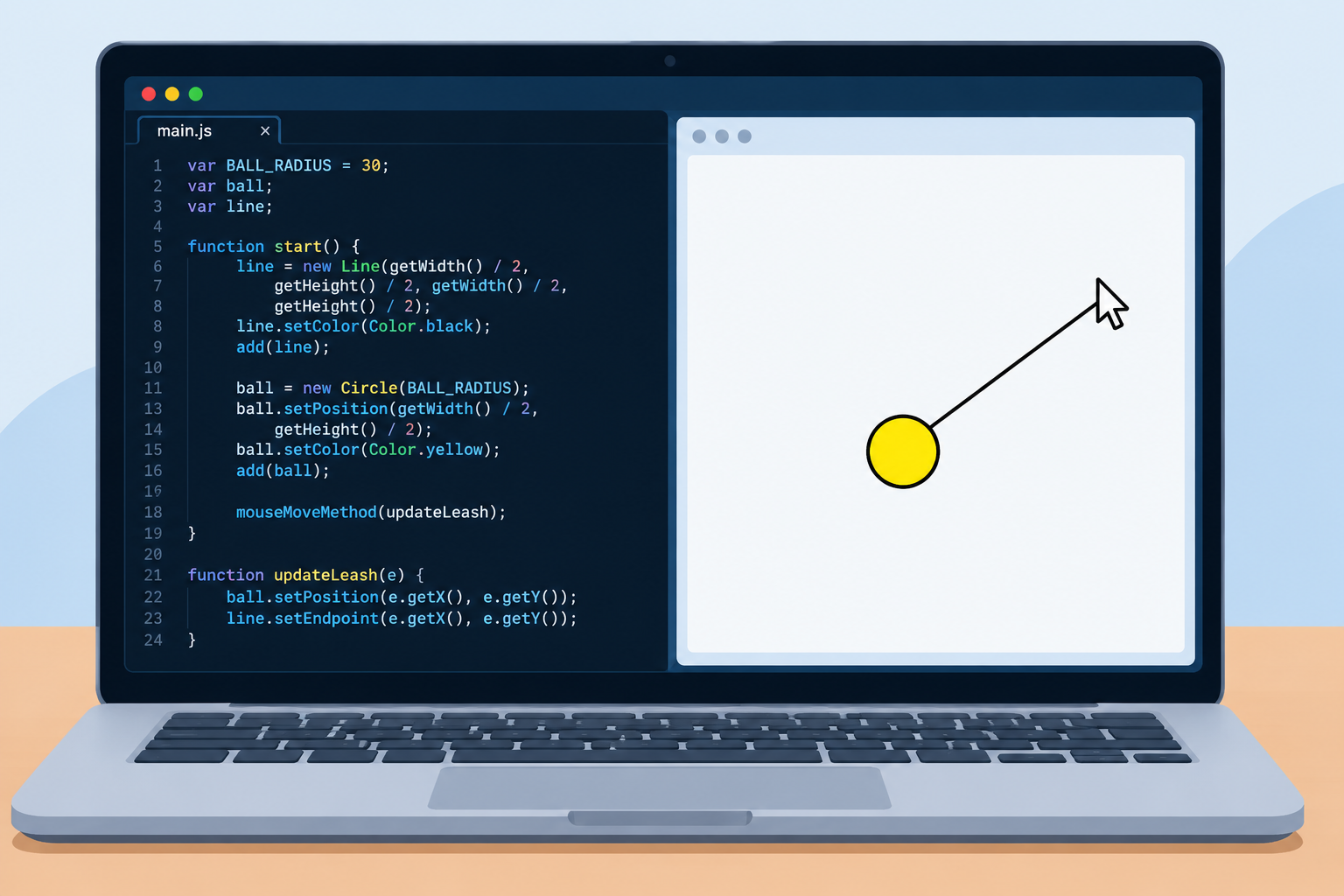
You are working through the CodeHS JavaScript graphics unit, and you hit 9.7.4: Leash. The idea sounds simple: a ball on a leash that follows your mouse. But when you run your code, maybe the ball does not move, the line stays stuck, or the leash starts jumping around the screen.
Do not worry. This is one of those exercises where one tiny mistake, usually with variables or the wrong method, breaks everything.
In this guide, you will get a working JavaScript solution for CodeHS 9.7.4 Leash, a line-by-line explanation of how it works, the most common mistakes students make, and how to fix them. The goal is not just to pass the exercise, but to actually understand mouse events, so the next exercises feel easier.
Quick Info: CodeHS 9.7.4 Leash
| Detail | Quick Answer |
|---|---|
| Course area | CodeHS JavaScript, graphics and mouse events |
| What the program does | A ball follows the mouse, connected to the center of the screen by a line (the leash) |
| Objects used | One Circle (the ball) and one Line (the leash) |
| Key event function | mouseMoveMethod() |
| Key methods | ball.setPosition(x, y) and line.setEndpoint(x, y) |
| Most common mistake | Redeclaring the variables inside start() with var |
| Second most common mistake | Using line.setPosition() instead of line.setEndpoint() |
| Difficulty | Beginner |
Key Takeaways
- Create the line first, then the ball, so the ball is drawn on top of the line.
- The line starts at the center of the canvas and never moves its starting point.
- Use mouseMoveMethod() to run a function every time the mouse moves.
- Inside that function, move the ball with setPosition() and stretch the leash with setEndpoint().
- Declare ball and line as global variables, and do not put var in front of them again inside start().
What the 9.7.4 Leash Exercise Asks You to Do
The program should show:
- A line that starts at the center of the screen. This is the leash.
- A ball at the end of the line.
- When you move your mouse, the ball follows the mouse, and the line stretches from the center to the ball.
Think of it like walking a dog. The center of the screen is your hand, the line is the leash, and the ball is the dog running wherever your mouse goes.
Always read the exact instructions in your CodeHS assignment as well. Teachers and course versions can change small details like colors, radius, or variable names.
The Working JavaScript Solution
var BALL_RADIUS = 30;
var ball;
var line;

function start() {
    // Create the line starting and ending at the center of the screen
    line = new Line(getWidth() / 2, getHeight() / 2, getWidth() / 2, getHeight() / 2);
    line.setColor(Color.black);
    add(line);

    // Create the ball centered at the middle of the screen
    ball = new Circle(BALL_RADIUS);
    ball.setPosition(getWidth() / 2, getHeight() / 2);
    ball.setColor(Color.yellow);
    add(ball);

    // Track mouse movement to update ball and leash endpoint
    mouseMoveMethod(updateLeash);
}

function updateLeash(e) {
    ball.setPosition(e.getX(), e.getY());
    line.setEndpoint(e.getX(), e.getY());
}
Run it, move your mouse over the canvas, and the yellow ball should follow your cursor while the black leash stretches from the center.
How the Code Works, Line by Line
1. The global variables
var BALL_RADIUS = 30;
var ball;
var line;- BALL_RADIUS is a constant. Writing it in capital letters is a common way to show that the value should not change.
- ball and line are declared at the top, outside any function. This makes them global variables, which means every function in the program can use them.
This matters because the ball and line are created in start(), but they are moved in updateLeash(). If they only existed inside start(), updateLeash() would not be able to find them.
2. The start() function
CodeHS runs start() automatically when the program begins. This is where you set everything up.
3. Creating the leash
line = new Line(getWidth() / 2, getHeight() / 2, getWidth() / 2, getHeight() / 2);In CodeHS, a line is created with new Line(x1, y1, x2, y2), where (x1, y1) is the start point and (x2, y2) is the end point.
- getWidth() / 2 gives the horizontal center of the canvas.
- getHeight() / 2 gives the vertical center.
Here, both the start and end are at the center, so the line begins with zero length. It will stretch once the mouse moves.
Notice there is no var in front of line here. That is on purpose. We are filling in the global variable, not creating a new one.
4. Coloring and adding the line
line.setColor(Color.black);
add(line);
An object does not appear on the screen until you call add().
5. Creating the ball
ball = new Circle(BALL_RADIUS);
ball.setPosition(getWidth() / 2, getHeight() / 2);
ball.setColor(Color.yellow);
add(ball);- new Circle(BALL_RADIUS) makes a circle with a radius of 30 pixels.
- For circles in CodeHS, setPosition(x, y) places the center of the circle at that point, so the ball sits right on the end of the leash.
- The ball is added after the line. Objects added later are drawn on top, so the ball covers the end of the leash neatly.
6. Listening for mouse movement
mouseMoveMethod(updateLeash);This is the most important line. It tells CodeHS: “Every time the mouse moves, run the updateLeash function.”
Notice there are no parentheses after updateLeash. You are passing the function itself so CodeHS can call it later, not running it right now. Writing mouseMoveMethod(updateLeash()) would be a mistake.
7. The updateLeash(e) function
function updateLeash(e) {
    ball.setPosition(e.getX(), e.getY());
    line.setEndpoint(e.getX(), e.getY());
}- e is the mouse event. It holds information about where the mouse is.
- e.getX() and e.getY() give the mouse’s current x and y position.
- ball.setPosition() moves the ball’s center to the mouse.
- line.setEndpoint() moves only the end of the line to the mouse, while the start stays at the center.
That combination is exactly what creates the leash effect.
If you want a refresher on how JavaScript functions, variables, and events fit together, our beginner guide on what JavaScript is and how it works covers the basics.
Why setEndpoint() and Not setPosition() for the Line?
This is where many students get stuck.
| Method | What it does to a Line | Result in this exercise |
|---|---|---|
| line.setPosition(x, y) | Changes the starting point of the line | The leash’s anchor leaves the center and follows the mouse, which is wrong |
| line.setEndpoint(x, y) | Changes the ending point of the line | The leash stays anchored at the center and stretches to the ball, which is correct |
CodeHS’s own graphics tutorial describes it the same way: setPosition changes where a line starts, and setEndpoint changes where it ends.
Common Mistakes and How to Fix Them
Mistake 1: Using var again inside start()
// Wrong
function start() {
    var line = new Line(getWidth() / 2, getHeight() / 2, getWidth() / 2, getHeight() / 2);
    add(line);
}
Putting var in front of line inside start() creates a brand new local variable that only exists inside start(). The global line stays empty. When updateLeash() tries to call line.setEndpoint(), it fails, because the global line was never set.
Fix: Remove var inside start(). Just write line = new Line(…) and ball = new Circle(…).
This is exactly the kind of bug that “looks right” but does not work. Learning to spot it is a big part of programming.
Our guide on what debugging is in programming explains how to track down errors like this step by step.
Mistake 2: Using setPosition() on the line
If your whole leash slides around the screen instead of stretching from the center, you used line.setPosition() in updateLeash().
Fix: Change it to line.setEndpoint(e.getX(), e.getY()).
Mistake 3: Adding parentheses in mouseMoveMethod
// Wrong
mouseMoveMethod(updateLeash());
This runs the function once immediately (without a mouse event) instead of giving it to CodeHS to call later.
Fix: Use mouseMoveMethod(updateLeash); with no parentheses after the function name.
Mistake 4: Forgetting add()
If you cannot see the ball or the line at all, you may have created them but never added them to the canvas.
Fix: Make sure both add(line); and add(ball); are in start().
Mistake 5: The line is drawn on top of the ball
If the leash cuts across the middle of the ball, you added the ball first and the line second.
Fix: Add the line first, then the ball.
Mistake 6: Typos and capital letters
JavaScript is case-sensitive. mousemovemethod, SetPosition, or setEndPoint will not work if the correct name is mouseMoveMethod, setPosition, or setEndpoint.
Fix: Check spelling and capital letters carefully. Also make sure the function name you pass to mouseMoveMethod matches the function you wrote exactly.
Mistake 7: Forgetting the e parameter
// Wrong
function updateLeash() {
    ball.setPosition(e.getX(), e.getY());
}
Without e in the parentheses, the function has no event to read from.
Fix: Write function updateLeash(e).
Quick Troubleshooting Table
| What you see | Likely cause | Fix |
|---|---|---|
| Nothing appears | Missing add() | Add both objects in start() |
| Ball appears but does not move | Missing or wrong mouseMoveMethod | Use mouseMoveMethod(updateLeash); |
| Ball moves, line does not | Local var line in start(), or wrong method | Remove var, use setEndpoint() |
| Whole line moves with the mouse | Used line.setPosition() | Use line.setEndpoint() |
| Line covers the ball | Wrong add() order | Add line first, then ball |
| Error mentions undefined | Typo, missing e, or local variable | Check spelling, add e, remove extra var |
Understanding Mouse Events (The Big Idea)
The real lesson of 9.7.4 is not leashes. It is event-driven programming.
Normally, code runs from top to bottom and then stops. With events, you tell the program: “When something happens, run this function.” The program then waits and reacts to the user.
In CodeHS JavaScript, you will see several event functions like this, such as:
- mouseMoveMethod() for when the mouse moves
- mouseClickMethod() for when the mouse is clicked
- mouseDragMethod() for when the mouse is dragged
Each one takes a function name, and CodeHS calls that function with an event object e that has getX() and getY().
These built-in functions are a simple example of a programming interface: ready-made tools you call without needing to know how they work inside. If you are curious about that idea at a bigger scale, our article on what an API is explains it with real-world examples.
Try These Challenges to Learn More
Once your leash works, try changing it to make sure you really understand it:
- Change the ball color to red or blue.
- Make the leash thicker using line.setLineWidth(5).
- Change the anchor point so the leash starts from the top-left corner instead of the center.
- Use mouseDragMethod instead, so the ball only moves while you hold the mouse button.
- Add a second ball on its own leash anchored somewhere else.
Small experiments like these are the fastest way to get comfortable with graphics and events.
A Quick Note on Using Solutions Responsibly
It is completely normal to look up help when you are stuck. The best way to use a solution like this is to read the explanation, close it, and then try to write the code yourself from memory. If you just copy and paste, you may pass this exercise but struggle on the next one, and on quizzes where you cannot look anything up.
Also check your school or teacher’s rules about using outside help on assignments.
Frequently Asked Questions
What is CodeHS 9.7.4 Leash?
It is a JavaScript graphics exercise where a ball follows the mouse and is connected to the center of the screen by a line, like a ball on a leash.
Why is my leash not moving in CodeHS 9.7.4?
The most common reason is using var inside start(), which creates a local variable. Remove var so the global line and ball are used. Also check that mouseMoveMethod(updateLeash) is in start().
What does mouseMoveMethod do?
It tells CodeHS to run a specific function every time the mouse moves over the canvas.
What is the difference between setPosition and setEndpoint for a line?
setPosition changes where the line starts. setEndpoint changes where the line ends. For the leash, you use setEndpoint so the line stays anchored at the center.
Why does the ball need to be added after the line?
Objects added later are drawn on top. Adding the ball last keeps it on top of the leash.
What are e.getX() and e.getY()?
They return the current x and y position of the mouse from the event object e.
Can I name the function something other than updateLeash?
Yes. You can use any valid name, such as leash or moveBall, as long as you use the same name in mouseMoveMethod().
Why are ball and line declared outside start()?
So they are global variables that both start() and updateLeash() can use.
Final Thoughts
CodeHS 9.7.4 Leash looks like a small exercise, but it teaches three big programming ideas at once: global variables, event-driven code, and updating objects on the screen. Once you understand why the line uses setEndpoint() and why you should not write var twice, the rest falls into place.
Run the solution, then try the challenges above and rebuild it yourself. That is how a quick fix turns into real coding skill.
References
- CodeHS Tutorial: Basic Graphics in JavaScript
- CodeHS Graphics Library Source: Line class (setPosition and setEndpoint)
Disclaimer
This article is for educational purposes only. It explains a sample solution to help students understand JavaScript graphics and mouse events in CodeHS. Exercise instructions, autograder checks, and course versions can vary, so always follow your own assignment’s requirements. Use this guide in line with your school’s and teacher’s academic honesty rules. TechOriginHub is not affiliated with CodeHS, and this article is not sponsored.