
 By saman zahra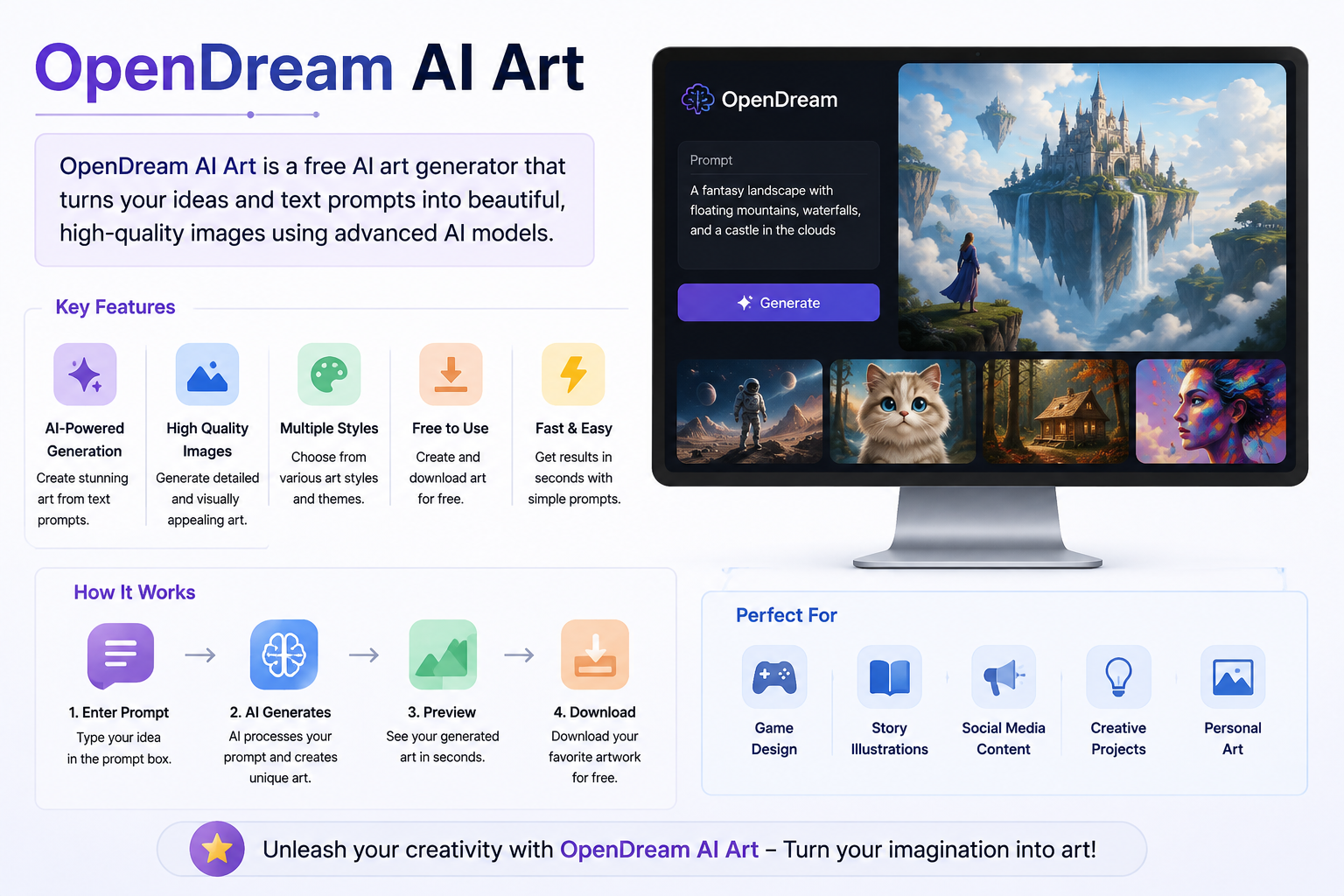
Introduction
Creating visual art once required years of practice, expensive software, and specialized skills. Today, anyone with an internet connection can type a description and receive a generated image within seconds. AI art generation tools have fundamentally changed what it means to create visuals, making the process accessible to students, hobbyists, content creators, and professionals alike.
OpenDream AI art is one of the web-based platforms at the center of this shift. It allows users to generate images directly in a browser using text prompts, without installing software or owning specialized hardware. If you have been curious about what OpenDream is, how it works, and whether it is the right tool for your needs, this guide covers everything you need to know.
It is worth noting upfront that OpenDream is a web-based interface built on top of Stable Diffusion technology. It is not a standalone AI model developed from scratch. Understanding that distinction helps set accurate expectations for what the platform can and cannot do.
Quick Answer: What Is OpenDream AI Art?
OpenDream is a web-based AI art generation platform that uses Stable Diffusion-based models to create images from text prompts. Users type a description of the image they want, select a style or model, and the platform generates an image based on that input. OpenDream offers a community gallery for browsing and sharing creations, multiple artistic style options, and both free and paid access tiers for different levels of use.
What Is OpenDream?
OpenDream is a web-based AI art generation platform that allows users to create images from text descriptions using Stable Diffusion-based models. The platform is designed to be accessible to anyone, regardless of their technical background or artistic experience.
Unlike professional design applications that require installation, subscription management, and a learning curve, OpenDream works entirely in a web browser. You visit the site, type what you want to see, and the platform handles the generation process. No software downloads, no GPU setup, and no deep technical knowledge are required.
A simplified way to think about it: imagine describing a scene to a skilled artist who then creates a visual interpretation of your description. OpenDream works in a broadly similar way, except the “artist” is a machine learning model processing your text input and generating a corresponding image. This analogy is simplified because the underlying technology is far more complex, but it captures the basic interaction between user and platform.
OpenDream also includes a community gallery where users can browse images created by others, find prompt inspiration, and explore the range of styles the platform supports. This social dimension makes it useful not just as a creation tool but as a space for discovering what AI art generation can produce.
How Does OpenDream Work?
Understanding how OpenDream generates images helps users get better results and set realistic expectations. The process follows a consistent sequence each time an image is generated.
Step 1: The user visits the OpenDream platform in a web browser. No installation is needed because all processing happens on the platform’s servers.
Step 2: The user types a text prompt describing the desired image. The quality and specificity of this prompt significantly affects the output.
Step 3: If the platform offers multiple models or styles, the user selects one. Different models are trained or fine-tuned to produce different visual styles, from photorealistic to anime to painterly.
Step 4: The user adjusts any available settings, such as image dimensions or aspect ratio, depending on what options the current version of the platform provides.
Step 5: The platform sends the prompt and settings to a Stable Diffusion-based model running on its servers. The model begins processing the input.
Step 6: The model generates an image by working through a process of gradual refinement, starting from noise and progressively shaping it into a coherent visual based on the prompt.
Step 7: The completed image is returned to the user’s browser for review. If the result is not what was intended, the user can adjust the prompt, change the model, or modify settings and generate again.
Seed values play a role in this process at a basic level. A seed is a number that influences the starting point of the generation. Using the same seed with the same prompt can produce similar results, while changing the seed introduces variation. Some platforms expose this setting to users for more controlled experimentation.
What Is Stable Diffusion and How Does OpenDream Use It?
Stable Diffusion is an open-source AI image generation model developed by Stability AI in collaboration with academic and research partners. It was released publicly in 2022 and quickly became one of the most widely used foundations for AI art generation tools due to its open-source nature and strong performance.
At a high level, Stable Diffusion is a type of generative model called a latent diffusion model. It learns to generate images by being trained on large datasets of images and their associated text descriptions. During generation, it works in a compressed representation of image data and gradually refines noise into a coherent image guided by the text prompt.
OpenDream provides a web-based interface that connects users to Stable Diffusion-based models hosted on its servers. This means users benefit from the capabilities of Stable Diffusion technology without needing to set it up locally or understand the underlying technical details.
It is important to understand that OpenDream is not the same thing as Stable Diffusion itself. Stable Diffusion is the underlying model technology. OpenDream is the platform and interface built on top of it. The distinction matters because OpenDream controls which models are available, what settings are exposed, and how the user experience is structured. Different platforms can offer different experiences even when built on the same underlying model family.
OpenDream may offer multiple models or checkpoints, which are specific trained versions of Stable Diffusion fine-tuned for different visual styles or subjects. Selecting a different model can dramatically change the look and feel of the generated images.
OpenDream Key Features
OpenDream includes several features that make it useful for a range of creative applications. The specific features available may vary depending on the current version of the platform and the user’s plan.
Text-to-Image Generation
Text-to-image generation is the core function of OpenDream. Users write a text prompt describing the image they want, and the platform generates a visual interpretation of that description. The accuracy and quality of the result depend on how clearly and specifically the prompt is written, as well as the model selected for the generation.
A vague prompt like “a forest” will produce a generic result. A more detailed prompt that specifies lighting, mood, style, time of day, and compositional elements will generally produce a more targeted and refined image.
Image-to-Image Generation
Image-to-image generation allows users to upload a reference image and use it as a starting point for a new generation. The platform combines the visual information from the uploaded image with the text prompt to produce a variation or transformation of the original.
A strength setting typically controls how much the output changes from the input image. A low strength value keeps the output closer to the original image. A high strength value allows the model to move further from the reference, potentially creating something quite different. This feature is useful for style transfers, variations on existing artwork concepts, and iterative creative exploration.
Style Models and Checkpoints
One of OpenDream’s more useful features for creative work is the availability of multiple style models or checkpoints. Different models are trained or fine-tuned to produce images in distinct visual styles. Common categories include anime and illustrated styles, photorealistic styles, painterly or artistic styles, and fantasy or concept art styles.
Selecting the right model for a project makes a significant difference to the output. A model tuned for anime-style art will produce very different results from a model focused on photorealism, even with an identical prompt. Experimenting with different models is one of the most effective ways to explore what the platform can produce.
Community Gallery
OpenDream includes a community gallery where users can browse images created and shared by other users. This gallery serves multiple purposes. It provides visual inspiration for users who are unsure what prompts to write. It demonstrates the range of styles and subjects the platform can generate. It also creates a social dimension to the platform where users can engage with each other’s creative outputs.
The community gallery is particularly useful for beginners who want to understand what good prompts look like before writing their own.
Prompt Inspiration and Examples
Related to the community gallery, OpenDream allows users to view the prompts associated with images in the gallery. This means that if you see an image you like, you can examine the prompt that produced it and adapt it for your own creative goals. Learning from existing prompts is one of the fastest ways to improve your own prompting approach.
Image Resolution and Dimensions
OpenDream typically offers options for selecting the dimensions and aspect ratio of the generated image. Common choices include square formats, portrait orientations, and landscape orientations. Higher resolution outputs generally require more processing time and may be limited on free plans. Choosing the right dimensions for the intended use of the image, whether for social media, print, or digital display, is worth considering before generating.
How to Use OpenDream for the First Time
If you are new to OpenDream, the following walkthrough provides a general overview of the process. Keep in mind that the specific interface and available options may differ depending on the current version of the platform.
- Visit the OpenDream website and create an account. Some functionality may be accessible without an account, but creating one typically provides access to more features and generation history.
- Navigate to the image generation interface. This is usually the main workspace where you enter prompts and configure settings.
- Type a clear and descriptive text prompt. Start with something straightforward so you can understand the platform’s output before adding complexity.
- Select a style or model if options are presented. For a first attempt, try a few different models with the same prompt to see how the outputs differ.
- Adjust image dimensions or other settings if desired. For a first attempt, the default settings are a reasonable starting point.
- Click generate and wait for the result. Generation time varies depending on server load and the complexity of the request.
- Review the image and decide whether it meets your expectations. If not, refine the prompt, try a different model, or adjust settings.
- Save or download the image if you want to keep it. Do not rely on the platform storing your images indefinitely.
The experience will feel more intuitive after a few generations. Most users find that their prompt writing improves quickly with practice.
How to Write Better Prompts for OpenDream
The quality of the text prompt is the single most important factor in the quality of the generated image. A well-written prompt gives the model clear, specific guidance. A vague or poorly structured prompt produces inconsistent or generic results.
Be specific and descriptive. Instead of writing “a mountain,” consider what you actually want to see. The time of day, the weather, the season, the perspective, and the artistic style all shape the output significantly.
Include multiple dimensions of the image. Effective prompts often address the subject, the environment or background, the lighting conditions, the mood or atmosphere, and the artistic style. Covering all of these areas gives the model more information to work with.
Use style references where appropriate. Describing a desired aesthetic, such as a specific art movement, a visual medium like oil painting or watercolor, or a general mood, helps guide the model toward a particular look.
Avoid overly short or vague prompts. Single-word or two-word prompts rarely produce the most interesting or intentional results. Adding detail almost always improves the output.
Use negative prompts to exclude unwanted elements. Most Stable Diffusion-based platforms support negative prompts, which are descriptions of things you do not want in the image. Common uses include excluding blurry elements, unwanted objects, or specific visual artifacts that sometimes appear in AI-generated images.
Iterate rather than accept the first result. Prompt writing is a process of refinement. If the first result is not right, identify what is missing or incorrect and adjust the prompt accordingly. Small changes can produce meaningfully different outputs.
OpenDream Use Cases
OpenDream supports a wide range of creative applications, from personal projects to professional inspiration work. The platform is genuinely versatile, though the specific appropriateness of any application depends on the context and the applicable terms of service.
Personal Creative Projects
Many users turn to OpenDream simply for creative enjoyment. Generating art for personal wallpapers, profile images, fantasy character concepts, or visual exploration of imagined scenes are all common personal uses. The platform removes the technical barrier to visual creativity, making it accessible to people who have ideas but not traditional art skills.
Content Creation
Content creators working on blogs, social media accounts, presentations, and digital publications often need visual assets. OpenDream can generate concept images, illustrative visuals, and mood boards that support written content or stand alone as creative posts. Users should always review the platform’s terms of service before using generated images in published content, particularly for commercial purposes.
Design Inspiration
Designers and creative professionals sometimes use AI art tools as an ideation resource. Generating a range of visual concepts quickly can help explore directions, color palettes, and compositional approaches before committing to a direction in a professional design application. The generated images serve as reference and inspiration rather than final deliverables.
Education and Learning
OpenDream provides an accessible entry point for understanding how AI image generation works. Students exploring the field of machine learning, digital art, or creative technology can use the platform to experiment with prompting, observe how different inputs affect outputs, and develop an intuition for how these systems behave.
Game and Story Concept Art
Writers, game designers, and storytellers sometimes use AI art tools to generate visual representations of characters, environments, and scenes from their creative projects. These images can serve as visual references during development, help communicate ideas to collaborators, or simply enrich the creative process. Generated images used in commercial game or story projects require careful review of the applicable terms of service.
OpenDream Free vs Paid Plans
OpenDream offers both free access and paid subscription options, following a model common among AI art platforms. The general structure gives users a way to try the platform without upfront cost while offering additional capabilities for those who need more.
The free tier typically allows a limited number of image generations per day or provides a credit allocation that refreshes periodically. Free users may also experience longer wait times during periods of high demand because paid users often receive priority access to generation resources.
Paid plans generally offer a higher number of generations, faster processing through priority queuing, access to private generation options so images are not visible in the public community gallery, and potentially access to higher resolution outputs or additional models.
The specific pricing, credit allocations, and feature differences between tiers change over time. It is important to check the official OpenDream website for current plan details before making any decisions. Do not rely on third-party summaries, including this article, for specific pricing information.
OpenDream vs Midjourney
Midjourney is one of the most well-known AI art platforms and a common point of comparison for tools like OpenDream. The two platforms serve overlapping but distinct user bases.
| Feature | OpenDream | Midjourney |
|---|---|---|
| Access method | Web browser | Discord (primarily) |
| Underlying model | Stable Diffusion-based | Proprietary model |
| Free tier | Available (with limits) | Limited free access |
| Style variety | Multiple models and styles | Distinctive Midjourney aesthetic |
| Community gallery | Yes | Yes |
| Prompt complexity | Moderate | High |
Midjourney has developed a recognizable visual style that many users find highly polished and consistent. It uses a proprietary model that produces results different in character from Stable Diffusion-based outputs. Midjourney operates primarily through Discord, which may be familiar to some users and unfamiliar to others.
OpenDream operates entirely in a web browser, which is more accessible for users who are not comfortable with Discord. It offers a wider range of visual styles through different model selections, which gives users more flexibility but also requires more knowledge about which model suits a given goal.
Neither platform is objectively better. The right choice depends on the user’s preferred interface, the visual style they want to achieve, and the features that matter most for their specific use case.
OpenDream vs Stable Diffusion (Local)
Running Stable Diffusion locally on your own computer is a fundamentally different experience from using OpenDream, even though both ultimately use Stable Diffusion-based models.
| Feature | OpenDream | Local Stable Diffusion |
|---|---|---|
| Setup required | None | Significant technical setup |
| Hardware required | None (cloud-based) | High-end GPU recommended |
| Customization | Limited to platform options | Extensive, including custom models |
| Cost | Free tier plus paid plans | Free software, hardware costs apply |
| Privacy | Platform-dependent | Local processing, more private |
| Model variety | Platform selection | Any publicly available model |
Local Stable Diffusion installations, using tools such as Automatic1111 or ComfyUI, offer significantly more control. Users can install any publicly available model or checkpoint, adjust a wide range of generation parameters, run extensions, and keep all generated images on their own hardware without platform dependency.
The trade-off is meaningful. Setting up local Stable Diffusion requires technical knowledge, a compatible GPU with sufficient memory, and time to configure the environment. It is not a beginner-friendly starting point for most users.
OpenDream removes all of that friction. It is the more accessible option for users who want to start generating images immediately without technical setup, even if it means accepting fewer customization options and some privacy considerations associated with cloud-based platforms.
OpenDream vs DALL-E
DALL-E is the image generation model developed by OpenAI. It represents a different approach to AI art generation compared to Stable Diffusion-based tools.
| Feature | OpenDream | DALL-E |
|---|---|---|
| Underlying model | Stable Diffusion-based | OpenAI proprietary model |
| Access | Web platform | OpenAI API and integrated products |
| Style range | Multiple styles via model selection | Consistent DALL-E visual style |
| Free tier | Available with limits | Limited free credits |
| Content policy | OpenDream platform policy | OpenAI content policy |
DALL-E produces images with a consistent visual character shaped by OpenAI’s training and content policy decisions. It is generally considered strong at following complex compositional instructions and producing coherent scenes. Its content policy is also notably more restrictive in certain areas compared to some Stable Diffusion-based platforms.
OpenDream offers more visual variety through different model selections and operates under its own content policy, which may differ from OpenAI’s approach. Users who find DALL-E’s style limiting or who want access to anime and painterly aesthetic options may find OpenDream offers more flexibility for certain creative goals.
As with all comparisons in this space, the best tool is the one that produces results aligned with the user’s specific creative goals and workflow.
OpenDream Content Policy
OpenDream maintains content guidelines that govern what users can and cannot generate on the platform. These policies exist to prevent harm and ensure responsible use of the technology.
Generating content that is harmful, abusive, illegal, sexually explicit in violation of the platform’s rules, or non-consensual is prohibited. This includes attempts to generate realistic depictions of real individuals in misleading or harmful contexts.
Users should read and understand the current content policy before using the platform. Policies evolve over time as platforms respond to new concerns and regulatory environments, so checking the official policy periodically is a good practice.
Violating the content policy can result in consequences including content removal and account suspension. The platform’s moderation systems are designed to detect and act on policy violations.
Responsible use of OpenDream means staying within these guidelines and considering the broader implications of the content being created, not just whether a specific generation is technically possible. Ethical use of AI art tools is an important consideration for anyone working in this space.
Copyright and Ownership of OpenDream Images
The question of who owns AI-generated images is one of the most actively debated areas in both technology and law. The situation is genuinely complex and evolving, and this section provides general context rather than legal advice.
Copyright law varies significantly by jurisdiction. In many jurisdictions, copyright protection traditionally requires a human author. The extent to which AI-generated images qualify for copyright protection, and who holds that protection, is not universally settled and has been the subject of ongoing legal and regulatory discussion.
Users of OpenDream should review the platform’s current terms of service to understand what rights the platform grants regarding generated images and what rights, if any, the platform retains. Terms of service can change, and what applies at the time of reading this article may differ from the current terms.
Images generated by using another artist’s work as a reference or style influence may raise additional legal and ethical considerations. The training data used by Stable Diffusion-based models has itself been a subject of ongoing discussion and legal scrutiny.
For anyone considering commercial use of OpenDream-generated images, consulting a qualified legal professional with expertise in intellectual property law is strongly recommended. Do not assume that AI-generated images are automatically free of copyright obligations or usable for any commercial purpose without review.
OpenDream Privacy and Data
Cloud-based AI art platforms like OpenDream involve sending your prompts and any uploaded images to remote servers for processing. Understanding the privacy implications of this is important before using the platform for sensitive or confidential projects.
Images generated on OpenDream may be stored by the platform and, depending on settings, may be visible in the community gallery. Public generation means other users can see your created images and the prompts used to create them. This is a feature for community sharing but may not be appropriate for all users or all projects.
Paid plans often include the option for private generation, where images are not shared publicly. Users who need privacy for their generated content should check whether this option is available and active on their account.
As a general principle, sensitive, confidential, or personally identifying information should not be incorporated into prompts or uploaded reference images on any cloud-based platform unless you have reviewed and are comfortable with the platform’s data handling practices. Always read the current privacy policy before using the platform for anything sensitive.
Is OpenDream Safe to Use?
For typical creative use by adults following the content policy, OpenDream operates as a functional and accessible AI art platform. Content policy protections are in place to prevent the generation of harmful material, and account security features follow standard web application practices.
Users should apply common account security practices, including using a strong and unique password and being cautious about phishing attempts related to any online account.
Parents and guardians should be aware that community gallery content, while moderated, may include images that are not appropriate for younger users. Parental involvement and supervision is advisable for minors using AI art platforms.
It would not be accurate to describe any online platform as completely safe for all users in all contexts. Content moderation systems are imperfect, platform policies evolve, and individual user experiences vary. Approaching the platform with awareness of its content environment and privacy characteristics is the most sensible approach.
OpenDream Limitations
Honest assessment of any tool includes acknowledging where it falls short. OpenDream has several real limitations that users should understand before investing significant time or money in the platform.
Image quality varies considerably based on the prompt quality, the model selected, and the complexity of the requested scene. Results are not consistently professional-grade, and some generations will require significant prompt refinement before producing acceptable outputs.
Complex or highly specific compositions are difficult to achieve reliably. AI image generation models struggle with precise spatial relationships, accurate text rendering within images, and very specific arrangements of multiple elements.
Free tier limitations restrict the number of images that can be generated, which limits how much experimentation is possible without a paid plan. Users who want to iterate quickly will encounter these limits relatively fast.
Platform dependence means that if OpenDream changes its pricing, features, or availability, users have no control over the impact on their workflow. This is a general risk of relying on any cloud-based platform.
Privacy considerations for cloud-based generation mean that generated content and prompts are processed on external servers, which may not be appropriate for all use cases.
Copyright uncertainty for commercial use remains an unresolved area that requires careful navigation for anyone planning to publish or sell generated images.
OpenDream Best Practices
Getting the most from OpenDream involves both technical habits and responsible usage principles.
- Write detailed and descriptive prompts. The more specific your description, the more targeted the output will be.
- Experiment with different models and styles. Different models produce dramatically different results. Exploring the available options helps you understand the platform’s full range.
- Use negative prompts to exclude unwanted elements. Negative prompts are a powerful tool for improving consistency and removing common generation artifacts.
- Start with simpler prompts and add detail progressively. Beginning simply helps you understand the baseline output before adding complexity.
- Browse the community gallery for prompt inspiration. Studying what prompts produce appealing results accelerates your own learning.
- Save or download images you want to keep. Do not assume the platform will retain your generations indefinitely.
- Review and follow the content policy. Understanding what is and is not permitted prevents account issues and supports responsible use.
- Understand the privacy settings before generating sensitive content. Know whether your generations are public or private before you start.
- Check the terms of service before using images commercially. This step is essential for anyone planning to publish or monetize generated images.
- Iterate and refine prompts rather than accepting the first result. Prompt refinement is the primary skill that separates good results from great ones.
Common OpenDream Problems and Troubleshooting
Even with a well-designed platform, users encounter problems. Most common issues have straightforward solutions.
Image does not match the prompt. This is the most frequent frustration for new users. The solution is almost always to refine the prompt with more specific detail. Adding descriptions of style, lighting, composition, and mood can significantly change the output in the intended direction.
Generation takes a long time. Extended wait times often reflect high server load on the platform. Trying again at a less busy time or considering a paid plan for priority queue access are the practical options.
Image quality is low or output looks distorted. Try selecting a different model or adjusting the generation settings. Some models perform better for specific types of prompts. Adding quality-related terms to the prompt can also help guide the model toward cleaner outputs.
Account or login issues. Check the official OpenDream support resources or help documentation. Password reset options should be available through the platform’s standard account management features.
Generated content is filtered before delivery. This indicates the prompt triggered the platform’s content moderation system. Review the content policy and adjust the prompt to remove any elements that may be causing the filter to activate.
Platform unavailable or experiencing errors. Check the platform’s official communication channels, such as a status page or social media accounts, for announcements about maintenance or outages.
Is OpenDream Worth It?
Whether OpenDream is worth using depends entirely on what you need from an AI art platform. A balanced view helps set appropriate expectations.
For beginners who want to explore AI art generation without any technical setup, OpenDream is a genuinely accessible starting point. The browser-based interface, community gallery, and free tier make it easy to experiment without financial commitment or technical investment.
For users who want maximum customization, model variety, and privacy, running Stable Diffusion locally offers more control, though at the cost of significant setup effort and hardware requirements.
For users who prioritize highly polished and consistently styled outputs, Midjourney may produce results that feel more refined, though its Discord-based interface is a barrier for some users.
OpenDream occupies a practical middle ground. It is more accessible than local Stable Diffusion and more flexible in style options than tools with a single fixed aesthetic. The community gallery adds genuine value for inspiration and learning.
The free tier is a reasonable way to evaluate whether the platform suits your workflow before committing to a paid plan. If you use it regularly and find yourself hitting generation limits or waiting in long queues, a paid plan may provide enough additional value to justify the cost.
No single AI art tool is right for every user or every project. OpenDream is worth exploring, particularly for those who value ease of access and style variety.
Frequently Asked Questions
What is OpenDream?
OpenDream is a web-based AI art generation platform that uses Stable Diffusion-based models to create images from text prompts. It requires no software installation and is accessible through any web browser.
How does OpenDream work?
Users type a text prompt, select a model or style, and the platform sends the request to a Stable Diffusion-based model on its servers. The model generates an image based on the prompt and returns it to the user’s browser.
Is OpenDream free?
OpenDream offers a free tier with generation limits. Paid plans are available for users who need more generations, faster processing, or additional features. Check the official website for current plan details.
What is Stable Diffusion?
Stable Diffusion is an open-source AI image generation model developed by Stability AI and research collaborators. It uses a latent diffusion process to generate images from text prompts and forms the technical foundation for many AI art platforms including OpenDream.
Is OpenDream the same as Stable Diffusion?
No. Stable Diffusion is the underlying model technology. OpenDream is a web-based platform that provides an interface for accessing Stable Diffusion-based models. They are related but distinct.
What can I create with OpenDream?
Users can generate digital artwork, illustrations, concept art, wallpapers, avatar images, mood boards, and visual inspiration across a wide range of artistic styles.
How do I write a good prompt for OpenDream?
Write detailed descriptions that include the subject, style, lighting, mood, and composition. Avoid vague or very short prompts. Add negative prompts to exclude unwanted elements. Refine your prompts iteratively based on the results.
What is a negative prompt?
A negative prompt is a description of elements you do not want to appear in the generated image. It helps the model avoid specific visual artifacts, styles, or objects that are unwanted.
What styles does OpenDream offer?
OpenDream typically offers multiple style models including anime, photorealistic, painterly, fantasy, and concept art styles. The available models may vary and change over time.
Can I use OpenDream images commercially?
Commercial use of AI-generated images is a complex legal area that varies by jurisdiction. Review OpenDream’s current terms of service carefully and consult a legal professional before using generated images commercially.
Who owns the images I create on OpenDream?
This depends on OpenDream’s current terms of service and the applicable laws in your jurisdiction. AI image copyright is an evolving legal area. Always review the current terms of service for the most accurate information.
Is OpenDream safe?
For typical creative use by adults following the content policy, OpenDream functions as a standard web platform. Apply good account security practices and be aware of the platform’s privacy settings. Parental supervision is advisable for younger users.
Does OpenDream store my images?
Generated images may be stored by the platform and may appear in the community gallery depending on your account settings. Paid plans may offer private generation options. Review the privacy policy for current details.
What is the difference between OpenDream and Midjourney?
OpenDream is a browser-based platform using Stable Diffusion models with multiple style options. Midjourney operates primarily through Discord and uses a proprietary model with a distinctive visual style. Neither is objectively better for all use cases.
What is the difference between OpenDream and DALL-E?
OpenDream uses Stable Diffusion-based models while DALL-E uses OpenAI’s proprietary model. They have different visual styles, content policies, and access methods.
Can I use OpenDream without signing up?
Some limited functionality may be available without an account, but creating an account typically provides access to more features and generation history. Check the current platform for specifics.
How do I improve image quality on OpenDream?
Try a different model, write a more detailed prompt, use negative prompts to exclude unwanted elements, and experiment with different generation settings. Iterating on the prompt is usually the most effective approach.
What happens if my generation violates the content policy?
The platform may filter or block the generation. Repeated violations can result in account suspension. Review and follow the content policy to avoid issues.
Is OpenDream good for beginners?
Yes. The browser-based interface requires no technical setup, and the community gallery provides prompt inspiration that helps beginners get started quickly.
Can I do image-to-image generation on OpenDream?
Image-to-image generation is a feature available on many Stable Diffusion platforms. Check the current OpenDream interface for whether this feature is currently supported and how to access it.
What is the OpenDream community gallery?
The community gallery is a section of the platform where users can browse images created and shared by other OpenDream users, along with the prompts used to generate them. It serves as inspiration and a showcase of the platform’s capabilities.
Does OpenDream have a mobile app?
OpenDream is primarily accessed through a web browser. Whether a dedicated mobile app exists at any given time should be verified through the official OpenDream website or app stores.
How many images can I generate for free?
The number of free generations available varies depending on the current plan structure, which changes over time. Check the official OpenDream website for current free tier limits.
Final Thoughts
OpenDream is a web-based AI art generation platform built on top of Stable Diffusion technology. It makes image generation from text prompts accessible to anyone with a browser, removing the technical and hardware barriers that come with running AI models locally.
The platform’s core strengths are its accessibility and its variety. Multiple style models allow users to explore very different visual aesthetics from a single platform. The community gallery provides prompt inspiration and a sense of the creative range that Stable Diffusion-based generation can achieve. The free tier gives new users a low-risk way to experiment before committing to a paid plan.
At the same time, OpenDream has real limitations. Image quality is not consistent across all prompts and models. Complex or highly specific compositions are difficult to achieve reliably. Free tier generation limits restrict extensive experimentation. Privacy considerations are inherent to any cloud-based platform, and the copyright landscape for AI-generated images remains genuinely unsettled.
Compared to running Stable Diffusion locally, OpenDream trades customization and privacy for convenience. Compared to Midjourney, it trades a distinctive polished aesthetic for broader style flexibility and a more conventional web interface. Compared to DALL-E, it offers different content policy characteristics and model variety.
For beginners, students, content creators, and curious individuals who want to explore AI image generation without technical setup, OpenDream AI art represents an accessible and practical entry point. Understanding its capabilities, limitations, and responsible use practices makes the experience more productive and more informed.
OpenDream AI art makes image generation accessible to anyone with a browser, offering an approachable entry point into AI-powered creativity without requiring technical expertise or expensive hardware.
References
- Rombach, R., Blattmann, A., Lorenz, D., Esser, P., and Ommer, B. (2022). High-Resolution Image Synthesis with Latent Diffusion Models. Proceedings of the IEEE/CVF Conference on Computer Vision and Pattern Recognition (CVPR), 10684–10695. https://arxiv.org/abs/2112.10752
- Stability AI. Stable Diffusion — Official Documentation and Model Information. https://stability.ai/
- U.S. Copyright Office. Copyright and Artificial Intelligence — Part 1: Digital Replicas (2023). https://www.copyright.gov/ai/
- Ho, J., Jain, A., and Abbeel, P. (2020). Denoising Diffusion Probabilistic Models. Advances in Neural Information Processing Systems (NeurIPS), 33, 6840–6851. https://arxiv.org/abs/2006.11239
- OpenDream. Official Platform and Terms of Service. https://opendream.ai/
- Baidoo-Anu, D., and Ansah, L. O. (2023). Education in the Era of Generative Artificial Intelligence (AI): Understanding the Potential Benefits of ChatGPT in Promoting Teaching and Learning. Journal of AI, 7(1), 52–62.
- OECD. OECD Principles on Artificial Intelligence. Organisation for Economic Co-operation and Development. https://oecd.ai/en/ai-principles
- Partnership on AI. Responsible Practices for Synthetic Media. https://partnershiponai.org/
Technology Disclaimer
This article is for educational and informational purposes only. OpenDream features, pricing, content policies, and platform availability are subject to change. Always review the official OpenDream website and terms of service for current and accurate information. This article does not constitute legal advice regarding copyright or intellectual property.